Overview

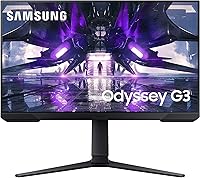
The Samsung Odyssey G3 24-Inch Gaming Monitor is Samsung's answer to gamers who want a capable, fast panel without spending a fortune. The G30A series sits comfortably in the mid-range, and that positioning is honest — this isn't a flagship display chasing HDR or ultra-high resolution bragging rights. What it does offer is a solid VA panel with a 144Hz refresh rate, which for most everyday competitive gaming is genuinely all you need. It also pivots to vertical orientation, making it a surprisingly practical pick for anyone juggling gaming and productivity on the same desk. Expect competent performance, not perfection.
Features & Benefits

At 144Hz with a 1ms response time, the G3 monitor handles fast-paced games the way they're meant to be played — without the motion smear or ghosting that plagues slower panels. AMD FreeSync Premium adds smoothness by syncing the display's refresh rate to your GPU's output, which is most impactful on AMD cards, though compatible Nvidia setups benefit too. The stand covers height, tilt, swivel, and full vertical pivot, and it's sturdier than you'd expect at this price. VESA compatibility makes a monitor arm an easy upgrade. At 24 inches with 1080p, pixel density is sharp and comfortable — not a 4K panel, but plenty crisp for gaming.

Best For

This Samsung gaming display is a strong fit for competitive PC gamers who care more about smooth frame rates than pixel-perfect resolution. If you're on an AMD GPU, FreeSync Premium works without any extra cost or configuration headache. It's also worth considering as a vertical secondary monitor — developers and writers who want a tall panel beside their main display will find the pivot stand genuinely useful. Desk space matters too: at 24 inches, the footprint stays manageable where a 27-inch or ultrawide would feel cramped. Console gamers get solid HDMI support, and budget-focused buyers will appreciate that the feature set doesn't feel compromised.

User Feedback

Buyers are broadly satisfied with the 24-inch Odyssey, with most praising how well it performs straight out of the box. The stand gets genuine compliments — the pivot mechanism feels solid and well-engineered. That said, a few recurring criticisms are worth knowing: the brightness ceiling becomes a real limitation in well-lit rooms, and there's no HDR support to compensate. Port selection is thin — one HDMI and one USB 2.0 port is all you get, with no built-in speakers or USB hub. Colors out of the box lean slightly cool and benefit from a quick calibration. Long-term reliability reports are generally positive, with few complaints about dead pixels or backlight failure.

Pros

  • 144Hz refresh rate delivers visibly smoother gameplay compared to standard 60Hz panels, even at 1080p.
  • AMD FreeSync Premium eliminates screen tearing without requiring a premium GPU or extra configuration.
  • The stand is sturdy and well-built, with height, tilt, swivel, and full vertical pivot all included.
  • VESA compatibility means upgrading to a monitor arm is straightforward and requires no adapters.
  • At 24 inches, the 1080p pixel density is sharp and comfortable for everyday gaming and desktop use.
  • The pivot-to-vertical feature makes this 24-inch Odyssey a genuinely useful dual-purpose display for productivity setups.
  • Long-term reliability reports from owners are largely positive, with few recurring hardware complaints.
  • Compact form factor fits naturally on smaller desks without dominating the workspace.
  • Response time holds up well in fast-paced games, with minimal ghosting reported by real users.

Cons

  • Brightness tops out at 250 cd/m², which struggles in well-lit or sunlit rooms.
  • No HDR support limits the visual depth available for cinematic or visually rich game titles.
  • Port selection is bare minimum — one HDMI and one USB 2.0, with no USB hub or daisy-chaining options.
  • No built-in speakers means you must budget separately for audio output.
  • Out-of-box color calibration leans cool and benefits from manual adjustment before serious use.
  • Limited to 1080p resolution, which may feel insufficient if you later upgrade to a more powerful GPU.
  • Not suitable for content creation workflows that demand color-accurate or wide-gamut output.
  • A single HDMI port makes switching between two input sources inconvenient without an external switch.

Ratings

The scores below reflect our AI-driven analysis of verified global buyer reviews for the Samsung Odyssey G3 24-Inch Gaming Monitor, with spam, bot-generated, and incentivized feedback actively filtered out before scoring. Each category is rated based on real ownership experiences — not manufacturer claims — so both the strengths and the genuine frustrations are represented honestly. Where this Samsung gaming display earns high marks, it earns them; where it falls short, the scores reflect that too.

Refresh Rate Performance
93%
Owners consistently report that 144Hz makes a tangible difference in fast-paced shooters and MOBAs — not just a spec on paper. The transition from 60Hz panels feels immediately noticeable, with on-screen motion appearing dramatically cleaner and more responsive during intense gameplay sessions.
A small number of users report that hitting 144Hz consistently requires a capable GPU, and mid-range cards can struggle to saturate the refresh rate in demanding titles. There are occasional reports of needing to manually confirm 144Hz is enabled in display settings after initial setup.
Response Time & Motion Clarity
86%
The 1ms response time keeps ghosting and trailing artifacts under control in most gaming scenarios, which real users notice most during high-speed camera pans and character movement. Competitive players in particular call out motion clarity as one of the strongest aspects of this panel relative to its price bracket.
Some users with particularly sensitive eyes report mild residual ghosting in very dark scenes — a known characteristic of VA panels rather than a defect unique to this model. It is not a dealbreaker for most, but buyers upgrading from IPS panels may notice it.
AMD FreeSync Premium
89%
AMD GPU owners consistently praise how well FreeSync Premium integrates without any configuration headaches — enable it once in the OSD and it simply works. Several Nvidia users also report success running it under G-Sync Compatible mode on RTX cards, expanding its real-world utility beyond just the AMD ecosystem.
FreeSync compatibility with Nvidia GPUs is functional but not officially guaranteed, and a handful of users report occasional flickering when frame rates dip at the lower boundary of the FreeSync range. It remains a secondary concern, but worth knowing if your system frequently drops frames in demanding scenes.
Stand & Ergonomics
88%
The stand consistently draws compliments for feeling more solid and premium than buyers expect at this price — height, tilt, swivel, and vertical pivot all work smoothly and hold position without drift. Users repurposing the G3 monitor as a vertical productivity display particularly appreciate how stable the pivot mechanism feels when rotated 90 degrees.
The base plate is wider than some users prefer on compact desks, and cable management options built into the stand are minimal. A few buyers note that fine height adjustments require slightly more effort than on higher-end stands with damped mechanisms.
Value for Money
91%
Across hundreds of reviews, value for money is the most frequently praised attribute — buyers feel they are getting 144Hz, FreeSync Premium, and a pivot stand at a price point where competitors often cut corners on at least one of those features. The combination of performance specs and stand quality at this tier is genuinely hard to match dollar for dollar.
A small segment of buyers feel the lack of HDR and the limited port selection reduce the long-term value proposition, particularly as more affordable HDR-capable monitors enter the market. Those who later wish they had spent more on a 1440p panel sometimes feel the upgrade path comes too soon.
Image Quality & Color Accuracy
71%
29%
Out-of-the-box colors are generally acceptable for gaming, with decent contrast that VA panels handle better than IPS alternatives at similar brightness levels. After a brief manual calibration through the OSD, most users report a noticeably more natural and balanced image that holds up well in gaming and casual media consumption.
Colors lean cool from the factory and the panel is not suited for professional color work — photo editors and content creators regularly flag it as insufficient for accuracy-sensitive tasks. Compared to IPS panels at a similar price, color vibrancy and tone rendering are a step behind, which casual users may accept but enthusiasts will notice.
Brightness & Glare Handling
62%
38%
In controlled indoor environments with managed ambient lighting, the 250 cd/m² brightness level is sufficient for comfortable extended gaming sessions. Users in darker rooms or setups with blackout curtains rarely raise brightness as a concern, and the flat panel surface avoids the distortion seen on curved displays under direct light.
In brighter rooms or near windows, the brightness ceiling becomes a real problem — washout and glare are commonly mentioned pain points among users who game during daylight hours. The absence of HDR compounds this, as the display cannot compensate for brightness limitations through dynamic tone mapping the way HDR-certified panels can.
Port Selection & Connectivity
54%
46%
HDMI connectivity is present and functional, supporting 144Hz without requiring a DisplayPort cable, which simplifies setup for console and PC users alike. The USB 2.0 port covers basic peripheral passthrough needs for users who only need to connect one device directly to the monitor.
One HDMI port and a single USB 2.0 connection is a notably thin offering — there is no DisplayPort, no USB hub, and no audio output jack, which forces users to route all peripherals and audio through their PC or a separate hub. Buyers with multiple input sources find the single HDMI particularly limiting when switching between a PC and a console.
Build Quality & Materials
82%
18%
The overall build feels solid for the price segment — the stand base uses a slim metal construction that resists wobble, and the display housing does not flex or creak under normal adjustment. Several long-term owners report no structural degradation after a year or more of regular use.
The rear panel and bezel are plastic, and while the finish is clean, it picks up fingerprints and dust noticeably on the glossy sections. A handful of users feel the construction quality, while good for the price, does not match the premium aesthetic Samsung projects in its marketing materials.
Setup & Out-of-Box Experience
84%
Assembly is consistently described as quick and intuitive — stand attachment clicks into place without tools in most cases, and initial display recognition by a PC or console happens automatically. First-time monitor buyers frequently highlight how painless the setup process is compared to their expectations.
Some users find the OSD menu navigation slightly unintuitive, particularly when adjusting color settings or enabling FreeSync for the first time. A small number of buyers report needing to manually set the resolution and refresh rate in Windows display settings after connecting, as the monitor does not always negotiate 144Hz automatically on first boot.
Resolution & Pixel Density
76%
24%
At 24 inches, 1080p resolution lands at a pixel density that looks sharp and clean at standard desktop viewing distances — text is crisp, game textures look well-defined, and the overall image does not feel soft the way 1080p can on larger panels. Gamers who prioritize frame rate over resolution find 1080p at this screen size a practical sweet spot.
Users who upgrade their GPU mid-ownership or who come from 1440p displays sometimes feel constrained by the resolution ceiling, particularly in graphically rich single-player titles where fine detail matters. The 1080p limit also means the display will not grow with higher-end hardware investments the way a 1440p panel would.
Reliability & Longevity
83%
The long-term ownership picture for this Samsung gaming display is broadly positive — dead pixel complaints are isolated rather than systematic, and backlight uniformity issues are uncommon based on multi-month ownership reports. Samsung's brand presence in the display market provides a reasonable degree of confidence in after-sale support.
A small but notable group of buyers report backlight bleed visible in dark scenes at the corners of the panel, which is a known characteristic of VA panel manufacturing tolerances rather than a unique defect. Units affected by this vary — some owners see none, others find it distracting — making it a minor lottery at purchase.
Vertical Monitor Usability
79%
21%
The pivot-to-vertical capability works as advertised — rotating the display and switching the OS output to portrait mode is a five-minute process that most non-technical users can handle without guidance. Developers and coders who use this 24-inch Odyssey as a secondary vertical display consistently rate the experience as genuinely useful rather than gimmicky.
The stand's footprint in vertical mode occupies a wider physical base area than some compact desks can comfortably accommodate. Software support for portrait mode varies slightly across operating systems, and some users on older Windows versions report needing a manual display driver update to enable rotation without artifacts.
Viewing Angles
74%
26%
The 178-degree horizontal and vertical viewing angle rating holds up reasonably well in practice for single-user desktop setups — sitting directly in front of the display yields consistent colors and contrast without obvious degradation. For typical gaming positions, the angles are more than adequate.
VA panels inherently show more color shift at wide angles than IPS alternatives, and this display is no exception — brightness and color accuracy drop noticeably when viewed from the side, which matters in shared-screen or couch-gaming scenarios. Users who frequently lean away from center while gaming may find the color consistency less reliable than the 178-degree spec implies.

Suitable for:

The Samsung Odyssey G3 24-Inch Gaming Monitor makes the most sense for budget-conscious PC gamers who want a fast, responsive panel without climbing into premium price territory. If you're primarily playing competitive titles — think shooters, MOBAs, or fast-paced action games — the 144Hz refresh rate and 1ms response time deliver a noticeably smoother experience compared to standard 60Hz displays. AMD GPU owners in particular get real value here, since FreeSync Premium works natively and eliminates screen tearing without any additional cost or compatibility workarounds. The pivot stand also makes this a smart pick for anyone who wants a vertical secondary monitor alongside their main display — developers, writers, and coders will appreciate having a tall panel for reading documents or terminals. At 24 inches with a compact footprint, it fits naturally on tighter desks where a larger panel simply wouldn't work.
Not suitable for:

Buyers chasing image quality above all else should look elsewhere before committing to this display. The VA panel delivers decent contrast but its 250 cd/m² brightness ceiling becomes a genuine problem in sunlit rooms or bright office environments, and the absence of HDR means you won't get the dynamic range that more expensive monitors offer. Content creators who rely on color-accurate output for photo or video work will find that the G3 monitor, while pleasant for gaming, isn't calibrated or specced for professional color grading. Those who need a well-equipped connectivity hub will also be disappointed — there's no USB hub, no built-in speakers, and only a single HDMI port and one USB 2.0 connection, which forces you to manage peripherals elsewhere. If your priority is 1440p or 4K resolution for cinematic single-player experiences, this 1080p panel won't satisfy that expectation regardless of how well it performs at its intended task.

Specifications

  • Screen Size: The display measures 24 inches diagonally, offering a compact footprint well-suited to single or multi-monitor desk setups.
  • Panel Type: Uses a VA (Vertical Alignment) panel, which provides stronger contrast ratios than IPS but can exhibit some color shift at extreme off-angles.
  • Resolution: Native resolution is 1920x1080 (Full HD), delivering a pixel density that is sharp and comfortable at typical 24-inch viewing distances.
  • Refresh Rate: Supports a maximum refresh rate of 144Hz, enabling significantly smoother motion in fast-paced games compared to standard 60Hz panels.
  • Response Time: Rated at 1ms response time, which helps reduce motion blur and ghosting during rapid on-screen movement in competitive gaming scenarios.
  • Sync Technology: AMD FreeSync Premium is supported, synchronizing the GPU output and display refresh rate to prevent screen tearing without requiring a premium Nvidia G-Sync module.
  • Brightness: Peak brightness is rated at 250 cd/m², which performs adequately in dim to moderately lit rooms but may feel insufficient in bright or sunlit environments.
  • Viewing Angles: Horizontal and vertical viewing angles each reach 178 degrees, allowing reasonably consistent image quality when viewed from slightly off-center positions.
  • Aspect Ratio: The panel uses a standard 16:9 aspect ratio, compatible with virtually all gaming, streaming, and productivity content without letterboxing or cropping.
  • Surface Type: The screen surface is flat (non-curved), which suits users who prefer uniform image geometry across the full display area.
  • Connectivity: Input options include one HDMI port and one USB 2.0 port, offering basic connectivity without a built-in USB hub or DisplayPort.
  • Adjustability: The stand supports height adjustment, tilt, swivel, and a full 90-degree pivot to vertical orientation for portrait-mode use.
  • VESA Support: The monitor is VESA mount compatible, making it straightforward to attach to a third-party monitor arm or wall mount bracket.
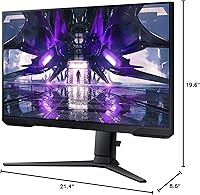
  • Dimensions: Product dimensions are approximately 3.39 x 8.43 x 7.72 inches (depth x width x height), reflecting its slim and space-efficient design.
  • Weight: The monitor weighs approximately 9 pounds, making it manageable to reposition or mount without requiring assistance.
  • Voltage: Designed for 110V electrical systems, standard for North American outlets, with no multi-voltage support noted in official specifications.
  • Model Number: The official Samsung model number for this display is LS24AG302NNXZA, which can be used to verify compatibility and locate official documentation.
  • HDR Support: This display does not support HDR (High Dynamic Range), meaning peak brightness and color volume are limited compared to HDR-certified monitors.
  • Built-in Audio: The G3 monitor includes no built-in speakers, so a separate audio output device such as headphones or external speakers is required.
  • Availability: The monitor was first made available in June 2021 and has not been discontinued by Samsung as of the most recent product listing data.

Related Reviews
Samsung Odyssey G3 G30D 27″ Gaming Monitor
80%
91%
Gaming Performance
88%
Refresh Rate Value
93%
Ergonomics & Stand
67%
Image Clarity
84%
AMD FreeSync
More
Samsung CRG5 24-Inch Curved Gaming Monitor
78%
88%
Value for Money
83%
Image Quality
81%
Gaming Performance
86%
Curvature & Immersion
84%
FreeSync Performance
More
Samsung Odyssey G50A 27-inch Gaming Monitor

80%
91%
Image Clarity
93%
Refresh Rate Performance
88%
Color Accuracy
58%
HDR Quality
89%
Response Time & Input Lag
More
Samsung CF390 24-inch Curved Gaming Monitor
78%
88%
Value for Money
79%
Image Quality
71%
Gaming Performance
86%
Design & Aesthetics
43%
Ergonomics & Stand
More
Samsung Odyssey G9 49-inch Curved Gaming Monitor
82%
93%
Visual Clarity
90%
Immersion & Curvature
94%
Gaming Performance (FPS)
60%
Ease of Setup
88%
Build Quality
More
Samsung Odyssey G50D 32-inch QHD Gaming Monitor

78%
91%
Gaming Performance
88%
Image Sharpness & Clarity
83%
Color Accuracy & Vibrancy
79%
Panel Uniformity & Viewing Angles
58%
HDR Performance
More
Samsung Odyssey G50D 27-Inch Gaming Monitor
81%
88%
Image Clarity
91%
Refresh Rate Performance
86%
Response Time & Motion Handling
84%
Color Accuracy
58%
HDR Performance
More
Samsung Odyssey G55C 27-inch Curved Gaming Monitor
76%
91%
Image Sharpness
89%
Refresh Rate & Motion
84%
Curvature & Immersion
86%
Value for Money
58%
HDR Performance
More
Samsung 27-Inch Odyssey G51C Series QHD Gaming Monitor
87%
92%
Display Quality
94%
Gaming Performance
87%
Value for Money
89%
Ergonomics & Comfort
74%
Brightness
More
Samsung Odyssey G81SF 27-inch Gaming Monitor
80%
96%
Image Quality
97%
Contrast & Black Levels
89%
Refresh Rate & Motion Clarity
88%
Glare Resistance & Matte Coating
91%
HDR Performance
More

FAQ

FreeSync Premium is AMD's technology, but many modern Nvidia GPUs support it under the G-Sync Compatible label. You will want to check whether your specific Nvidia card supports G-Sync Compatible mode — most RTX-series cards do — and enable it in the Nvidia Control Panel. It may not be as fully validated as a native G-Sync display, but in practice most users report it works well.

It is genuinely usable in vertical orientation. The stand pivots a full 90 degrees and feels solid when rotated — it does not wobble or feel unstable in portrait mode. Developers, coders, and anyone reading long documents will find it comfortable. You will need to rotate the display output in your operating system settings, which takes about 30 seconds to set up.

At 24 inches, 1080p looks noticeably sharper than it does on larger panels, so pixel density is not really a concern at normal viewing distances. The bigger argument for 1440p is if you plan to upgrade your GPU and want headroom for higher-fidelity visuals. If your system targets 144fps in the games you play, sticking with 1080p keeps that achievable on mid-range hardware without sacrificing frame rate.

It is a real limitation worth thinking about. At 250 cd/m², the display handles dimly lit gaming setups without issue, but in a room with a window behind or beside you, glare and washout become noticeable. If your gaming space gets significant daylight, consider whether you can control ambient light with blinds, or whether a brighter panel would be a better fit.

Colors out of the box are decent but lean slightly cool, with whites that can appear a touch blue. For gaming, most people will not find it bothersome. If you care about accuracy — even casually — spending a few minutes adjusting color temperature and RGB levels in the OSD gets you to a much more natural result without needing any calibration hardware.

Samsung typically includes a power cable and one HDMI cable in the box. A DisplayPort cable is not included, and the monitor does not have a DisplayPort input regardless, so HDMI is your primary video connection. If you want to connect via a monitor arm, you will need to source your own VESA screws as they are not always included.

Input lag on this panel is low enough that it should not be a concern for competitive play. Combined with the 144Hz refresh rate, the display responds quickly enough for fast-paced titles. The 1ms response time rating helps reduce ghosting, and real-world user feedback backs up the spec — most competitive gamers report it feels responsive.

Yes, the display is VESA compatible, and most standard monitor arms use a 75x75mm or 100x100mm pattern, which this monitor supports. You will need to remove the stand first, which is straightforward. Just confirm the arm you are purchasing lists the correct VESA pattern in its specifications before ordering.

Long-term reliability is generally good based on buyer feedback, with few widespread complaints about dead pixels or backlight failures. As with any monitor, isolated units may have issues, but there are no consistent patterns of early hardware failure reported across the user base. Samsung's warranty coverage is worth registering for at purchase in case anything does come up.

The display does support 144Hz over HDMI, which is convenient since it is the only video input available. You will want to make sure you are using an HDMI 2.0 cable rather than an older HDMI 1.4 cable to ensure the full bandwidth needed for 1080p at 144Hz is available. If you find the refresh rate is capping lower than expected, swapping the cable is the first thing to check.

Where to Buy