

Overview

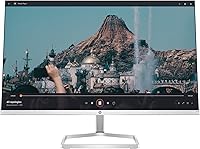
The HP Series 5 524sf 24-inch Monitor is HP's updated take on a no-frills office display, stepping in as the successor to the older M24f for buyers already familiar with that line. It doesn't try to do everything — no flashy spec sheet, no premium feature set — just a clean, functional screen for everyday work. The slim borderless design on three sides looks noticeably tidy on a desk, and the thin profile keeps it from feeling overpowering in smaller spaces. If you're coming in expecting a powerhouse, recalibrate your expectations. This is a display built for reliability and simplicity, and within that scope, it does its job well.

Features & Benefits

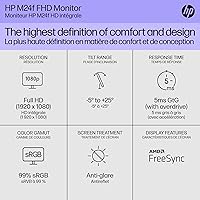
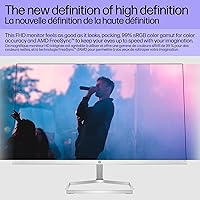
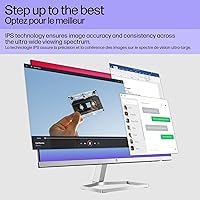
The IPS panel does what you need for office work — colors stay consistent when you shift your viewing angle, and text stays sharp across a full day of reading and document editing. At 300 nits, brightness is fine in a typical home or office with controlled lighting, though a very bright room will push its limits. The flicker-free backlight paired with a low-blue-light filter genuinely helps during longer sessions. Connectivity is minimal: one HDMI 1.4 and one VGA. That covers most standard setups, but DisplayPort and USB-C are nowhere to be found. Tilt adjusts between -5 and +25 degrees, which is workable, but no height adjustment or swivel means your ergonomic flexibility stops there.

Best For

This 24-inch IPS display is a natural fit for home office users who want a dependable screen for email, spreadsheets, and video calls without paying for features they'll never use. Students running a dual-monitor setup on a tight budget will find it holds its own visually, especially with the clean borderless profile making side-by-side screens look tidy. Small businesses equipping multiple workstations will appreciate the consistency — there's no need for color-accurate panels in a standard office environment. It's also worth considering if your PC still uses a VGA output, since having both ports means you won't need to scramble for adapters.

User Feedback

With a 4.4-star average across 231 ratings, the 524sf earns solid marks, and buyer praise centers on easy setup and a display that simply does what's expected without drama. Clean design and reasonable color accuracy for everyday tasks come up often in positive reviews. On the downside, two criticisms appear consistently: the lack of VESA support rules out monitor arms and wall mounting entirely, and the limited port selection feels restrictive if you plan to expand your setup. The review base also skews newer, so there's little data on how this HP monitor holds up after two or three years of heavy use.

Pros

  • IPS panel delivers consistent colors and wide viewing angles for everyday office tasks.
  • Flicker-free backlight and low-blue-light filter make long work sessions noticeably easier on the eyes.
  • Three-sided borderless design keeps a dual-monitor arrangement looking clean and professional on any desk.
  • Both HDMI and VGA ports accommodate older and newer PCs without hunting for adapters.
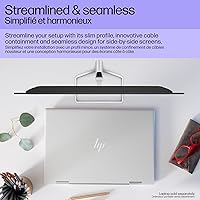
  • Integrated cable management channel reduces desk clutter without any extra effort.
  • Compact, lightweight build fits comfortably on smaller desks and in shared or temporary workspaces.
  • Anti-glare coating handles moderate ambient light without washing out the image.
  • Setup is straightforward — most buyers report being up and running within minutes of unboxing.
  • The 524sf offers dependable daily performance at a price point that leaves room in the budget.
  • A 4.4-star average from over 200 buyers signals consistent satisfaction across home and office use.

Cons

  • No VESA mount support means monitor arms and wall mounts are completely off the table.
  • Port selection is restricted to one HDMI and one VGA — no DisplayPort or USB-C anywhere.
  • At 300 nits, brightness can feel underwhelming in sun-lit rooms or near large windows.
  • Tilt is the only ergonomic adjustment available; height and swivel are simply not options.
  • The 60Hz refresh rate rules out smooth gameplay and limits appeal for even casual gamers.
  • Long-term durability is difficult to gauge — most reviews come from short-term, recent owners.
  • Color accuracy is not sufficient for photo editing, video grading, or any color-critical professional work.
  • A single HDMI port can become a connectivity bottleneck as your desk setup grows.

Ratings

Our AI-generated ratings for the HP Series 5 524sf 24-inch Monitor are built from a systematic analysis of verified buyer reviews worldwide, with spam, bot activity, and incentivized feedback actively filtered out before any score is assigned. Each category reflects the genuine balance of praise and frustration found across real purchase experiences — strengths are credited where earned, and recurring pain points are not softened. Whether this display fits your workflow or falls short of your needs depends on which categories matter most to you, and the scores below are designed to help you make that call with clarity.

Display Quality
78%
22%
The IPS panel earns consistent praise from users doing text-heavy work, with colors that stay accurate when viewed from off-center — useful when sharing a screen during a video call or working side-by-side with a colleague. For spreadsheets, documents, and everyday browsing, the image quality holds up without notable complaints.
Color-critical work is where this display falls short — buyers doing photo editing or graphic design found the panel insufficient for accurate color reproduction. The 300-nit brightness ceiling also limits perceived sharpness in sun-lit rooms, and dark scenes in movies show limited depth due to the absence of local dimming.
Color Accuracy
71%
29%
For the average home office user, color reproduction is consistent enough that documents, presentations, and web pages look natural day-to-day. Users repeatedly noted that skin tones on video calls appeared accurate and that white backgrounds felt clean and neutral without obvious color casts.
Professionals relying on precise color output — photographers, video editors, illustrators — flagged visible inaccuracies when comparing this display against calibrated reference monitors. The panel is not factory-calibrated and covers a modest sRGB gamut range, which is a real limitation if color fidelity is central to your work.
Brightness
67%
33%
In a standard home office or classroom with ceiling lighting and no direct sunlight, 300 nits delivers a comfortable, stable image that does not strain the eyes. Users working in dimmer environments specifically praised the brightness level as more than adequate for daily document and reading tasks.
Several buyers with desks near windows or working in bright open-plan offices found the display washed out under strong ambient light, making text harder to read comfortably. There is no HDR support or dynamic luminance adjustment to compensate when the environment overwhelms the panel's maximum output.
Eye Comfort
86%
The flicker-free backlight is the standout comfort feature for users who spend six to eight hours a day in front of a screen. Combined with the low-blue-light filter, multiple buyers reported measurably less end-of-day eye fatigue compared to their previous monitors, especially those upgrading from older TN panels.
While the low-blue-light filter genuinely helps, some users noted it introduces a slight warm tint to the image, making whites look subtly yellow at higher filter strengths. The absence of height adjustment also means users who cannot position the screen at the correct eye level may still experience neck strain over long sessions.
Build Quality
74%
26%
The physical construction feels solid for its price tier, with a stable base that does not wobble even during firm keyboard use. Most buyers noted the plastics feel appropriately sturdy for an office environment, and the slim bezel construction does not feel flimsy despite the lightweight overall profile.
Long-term durability data is sparse because the review pool skews heavily toward buyers who have owned the monitor for under a year. A handful of users flagged that the stand pivot and hinge feel less premium than the display itself, and the all-plastic body could show wear more visibly over extended use.
Design & Aesthetics
83%
The three-sided borderless design genuinely impressed buyers running dual-screen configurations — thin bezels make two side-by-side displays feel far more cohesive than conventional monitors at this price. The silver and black color scheme fits naturally into both modern home offices and traditional corporate workstation environments.
The bottom bezel is noticeably thicker than the other three sides, which some buyers felt broke the visual symmetry of an otherwise minimal design. The stand is purely utilitarian — functional, but unlikely to add character to a design-conscious desk setup.
Ergonomics
52%
48%
The tilt range of -5 to +25 degrees provides enough flexibility to find a workable screen angle, and buyers at standard fixed-height desks found the default stand height reasonable for seated use. The anti-glare surface also reduces the need to constantly reposition the display away from nearby light sources.
The absence of height adjustment, swivel, and VESA compatibility frustrates a meaningful portion of buyers — particularly those with standing desks, monitor arm setups, or specific ergonomic needs. Users who are taller or shorter than the seated average will likely need an external riser to achieve a comfortable viewing position.
Connectivity
58%
42%
Having both HDMI and VGA on the same display is genuinely practical for buyers transitioning from older hardware — you can run a modern laptop via HDMI while keeping an older desktop connected through VGA without adapters. The dual-input setup also allows toggling between two connected devices through the on-screen menu.
The port selection is where this monitor feels most dated — no DisplayPort, USB-C, audio output, or USB hub means users with modern multi-device desks will constantly feel the limits. Buyers who paired this with a newer laptop reported needing additional docks or adapters almost immediately after setup.
Value for Money
81%
19%
For buyers who need a reliable 24-inch IPS display for everyday tasks without a large upfront cost, the 524sf offers a strong return. The display quality, eye-comfort features, and clean design are difficult to match at this price point from a brand with HP's established service track record. Students and small businesses in particular noted it covered all the essentials without unnecessary extras.
Buyers who stretched the budget expecting premium ergonomics or versatile connectivity were left disappointed — the lack of VESA support and minimal port selection feel like deliberate cost-cutting trade-offs. A number of users also noted that similarly-priced competitors have begun including DisplayPort and height-adjustable stands, making the omissions here feel more pronounced.
Setup & Ease of Use
89%
Buyers across all experience levels — from first-time monitor owners to seasoned IT staff — consistently praised how quick and painless the initial setup is. The stand attaches without tools, the on-screen menu is intuitive, and most users reported the display was up and running within ten minutes of opening the box.
The on-screen menu, while functional, offers limited customization depth — users wanting to fine-tune color profiles or configure advanced picture modes found the options sparse. A small number of buyers also noted that an HDMI cable is not included in the box, adding an unexpected friction point at first use.
Dual-Monitor Use
84%
The slim three-sided borderless design was specifically called out by buyers running two-screen setups as one of the strongest features at this price — narrow bezels minimize the visual gap between displays, making side-by-side configurations feel close to a unified workspace. The compact footprint means two units fit comfortably on most standard desks.
Buyers wanting to drive dual monitors from a single laptop found the connectivity limiting — with only one HDMI port per display and no USB-C or daisy-chain support, multi-device setups typically require a separate dock. The fixed stand height also makes achieving perfectly matched eye levels across two units trickier than expected.
Long-Term Durability
69%
31%
Within the timeframe covered by available reviews, physical components held up without notable issues — no widespread reports of backlight failure, panel degradation, or power problems. HP's brand reputation and accessible warranty support give buyers a reasonable baseline of confidence in the display's expected lifespan.
The review base skews toward newer owners, leaving genuinely insufficient data to assess how panel brightness or the stand mechanism holds up beyond two to three years of daily use. Buyers prioritizing proven long-term reliability may want to wait for a larger pool of extended-use feedback before committing.
Cable Management
77%
23%
The integrated cable channel in the stand was a pleasant discovery for buyers coming from basic monitors with no cord routing at all. Home office users with multiple peripherals connected found it meaningfully reduced desk clutter without needing to purchase separate cable management accessories.
The cable channel works well in a minimal single-device setup but feels tight once a power cable, HDMI, and additional peripheral connections are routed through together. A few buyers noted the channel entrance is awkward to thread cables through initially, requiring more patience than expected for what is marketed as a convenience feature.

Suitable for:

The HP Series 5 524sf 24-inch Monitor is a practical choice for anyone whose daily screen time centers on productivity — email, documents, spreadsheets, and video calls — rather than demanding visual work. Home office workers who want a tidy, space-efficient display will appreciate the slim profile and clean borderless look, especially when pairing two screens side by side. Students building a dual-monitor desk setup on a limited budget will find this 24-inch IPS display offers solid color consistency and comfortable readability without the cost of a premium panel. Small businesses equipping multiple workstations at once get a reliable, fuss-free option that doesn't require complicated setup or ongoing IT attention. It's also a sensible bridge for anyone still running a PC with a VGA output, since the dual-port design means no forced hardware upgrades right away.

Not suitable for:

Buyers who rely on a monitor arm or wall mount should stop here — the HP Series 5 524sf 24-inch Monitor has no VESA support whatsoever, which is a firm dealbreaker for that group. Creative professionals working in photo editing, video color grading, or graphic design will find the color accuracy insufficient for precision output; IPS at this price tier is solid for general use, not professional-grade work. Gamers looking for faster refresh rates or adaptive sync will also want to look elsewhere, since this display runs at a standard 60Hz with no variable refresh support. If your workspace demands more than one output type — say, DisplayPort for a laptop dock or USB-C pass-through — the limited connectivity simply won't keep up. Anyone planning to grow a multi-device setup over time should think carefully about whether a single HDMI port will become a frustration sooner than expected.

Specifications

  • Screen Size: The display measures 24 inches diagonally, offering a comfortable working area without dominating a standard desk.
  • Panel Type: Uses an IPS (In-Plane Switching) panel, which provides wider viewing angles and more consistent color reproduction than TN-based alternatives.
  • Resolution: Native resolution is 1920x1080 (Full HD), delivering sharp, readable text and clear imagery well-suited to everyday productivity tasks.
  • Aspect Ratio: Standard 16:9 widescreen format, compatible with virtually all modern operating systems, applications, and video content.
  • Brightness: Rated at 300 nits, which performs adequately in typical indoor environments with controlled ambient lighting.
  • Refresh Rate: Operates at a standard 60Hz refresh rate, appropriate for office use and general media but not optimized for gaming.
  • Connectivity: Equipped with one HDMI 1.4 port and one VGA port; no DisplayPort, USB-C, audio output, or USB hub is included.
  • Tilt Adjustment: The stand supports tilt between -5 and +25 degrees; no height, swivel, or pivot adjustment is available.
  • VESA Support: VESA mounting is not supported, meaning this display is incompatible with third-party monitor arms and wall mounts.
  • Anti-Glare: The panel surface includes an anti-glare coating that reduces reflections from ambient light sources in moderately lit rooms.
  • Flicker-Free: The backlight uses flicker-free technology, which reduces eye fatigue during extended sessions compared to PWM-dimmed displays.
  • Low-Blue Light: A built-in low-blue-light filter reduces harsh blue wavelengths to help minimize eye strain during prolonged screen use.
  • Design: Features a three-sided borderless design with a slim, thin-and-light profile suited to side-by-side dual-monitor configurations.
  • Cable Management: An integrated cable containment channel is built into the stand to route cords neatly and reduce desk clutter.
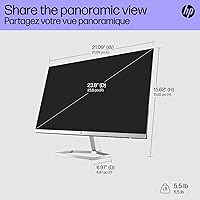
  • Dimensions: Assembled unit measures 21.09 x 15.62 x 6.97 inches (width x height x depth) with stand attached.
  • Weight: Complete unit weighs 7.05 pounds, making it straightforward to reposition or move between workspaces.
  • Model Number: Official part number is 94C17AA#ABA, replacing the earlier HP M24f in the company's monitor lineup.

Related Reviews
HP Series 5 524sw 23.8-inch FHD Monitor
76%
88%
Image Clarity
91%
Eye Comfort
79%
Color Accuracy
67%
Brightness & Visibility
83%
Refresh Rate & Motion
More
HP Series 5 27-inch FHD Monitor

77%
78%
Image Quality
61%
Pixel Density
88%
Eye Comfort
86%
Design & Aesthetics
53%
Ergonomics & Stand
More
Samsung S33GC 24-Inch IPS Monitor
78%
83%
Image Quality
88%
Eye Comfort
41%
Ergonomics & Stand
86%
Value for Money
79%
Connectivity
More
CRUA CR245ZB 24.5″ Gaming Monitor
78%
83%
Gaming Performance
86%
Refresh Rate & Smoothness
74%
Color Accuracy & Vibrancy
91%
Ergonomics & Adjustability
68%
Build Quality & Materials
More
Samsung S43GC 24-Inch IPS Business Monitor
81%
83%
Image Quality
79%
Color Accuracy
88%
Ergonomics & Stand
86%
Eye Comfort
84%
Connectivity
More
Dell E24 24-inch FHD IPS Monitor
78%
83%
Image Quality
67%
Brightness & Glare Handling
78%
Refresh Rate & Smoothness
89%
Connectivity & Compatibility
52%
Ergonomics & Stand
More
Samsung FT45 24-Inch FHD IPS Monitor

80%
91%
Ergonomics & Stand
84%
Image Clarity
72%
Color Accuracy
86%
Eye Comfort
83%
Connectivity
More
Dell G2524H Gaming Monitor 24.5-inch
87%
92%
Performance
96%
Refresh Rate
88%
Build Quality
91%
Ergonomics
93%
Display Quality
More
KOORUI G2511E 24.5-Inch 320Hz Gaming Monitor
78%
93%
Refresh Rate Performance
88%
Response Time
84%
Color Accuracy
51%
HDR Quality
67%
Panel Uniformity
More
MSI PRO MP251W E2 24.5-inch Monitor
75%
88%
Value for Money
83%
Image Quality
86%
Refresh Rate & Motion
84%
Eye Comfort
81%
Design & Aesthetics
More

FAQ

No, and this is worth knowing before you buy. The 524sf does not support VESA mounting, so standard monitor arms and wall mounts are not compatible. If freeing up desk space with an arm is important to you, you will need to look at a different monitor.

It does not. This HP monitor has no integrated audio, so you will need external speakers or headphones connected to your PC or laptop if you want sound while watching video or taking calls.

For the vast majority of everyday tasks — documents, web browsing, email, video calls — 1080p at 24 inches looks clean and comfortable. The pixel density at this size sits around 92 pixels per inch, which is a well-established sweet spot for office work. Only buyers doing detailed photo retouching or working with high-resolution video content are likely to feel the limits of Full HD here.

Yes, with the right cable or adapter. The 524sf includes an HDMI 1.4 port, so a MacBook with USB-C or Thunderbolt 3 and 4 connects easily with a USB-C-to-HDMI cable. Older MacBooks with Mini DisplayPort will need a Mini DisplayPort-to-HDMI adapter, which is widely available.

Not for serious gaming. The 60Hz refresh rate and absence of adaptive sync technology (no FreeSync or G-Sync) mean fast-moving games can exhibit screen tearing and feel less fluid compared to a dedicated gaming display. For casual gaming it is serviceable, but anyone who cares about competitive performance or smooth frame rates should look elsewhere.

You can connect two devices simultaneously — one via HDMI and one via VGA — but the display only shows one source at a time. Switching between inputs is done through the on-screen menu. It works well as a manual KVM-style setup, though the process is not instant.

It holds up fine for casual viewing on Netflix, YouTube, or similar platforms. The IPS panel manages colors well enough for everyday content, and the anti-glare surface helps in a lit room. That said, dark scenes can look a bit flat since there is no local dimming and the panel is not a high-contrast display — it is solid for casual use, not a home cinema experience.

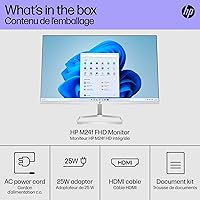
Typically it does not — HP usually includes a power cable and may include a VGA cable, but an HDMI cable is generally not bundled in the package. It is worth picking one up separately, since HDMI is the better of the two available connections.

Setup is tool-free and takes most people well under ten minutes. The stand clicks into place without screws, and from there it is simply a matter of connecting the power and video cables. The on-screen menu is easy to navigate, so you rarely need to spend time adjusting settings out of the box.

The height is fixed — the stand only supports tilt adjustment between -5 and +25 degrees. If the default height does not align well with your eye level, placing the monitor on a small riser or a thick book is a common workaround. Buyers who need precise ergonomic height control should factor this in before purchasing.

Where to Buy