
Overview

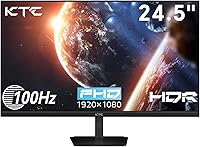
The KTC H25B7 24.5-inch IPS Monitor arrived quietly in late 2024, yet it has already carved out a respectable spot among budget-conscious buyers — ranking in the top 120 computer monitors on Amazon, which is notable for a newer brand. The IPS panel is the real draw here: wide 178-degree viewing angles keep colors consistent whether you are sitting dead-center or glancing from the side. It is light enough to reposition without effort, and VESA 100×100mm compatibility means a wall mount or monitor arm is a genuine option. Think of it as a practical, no-fuss display built for people who want a reliable screen for work and occasional gaming without a hefty price tag.

Features & Benefits

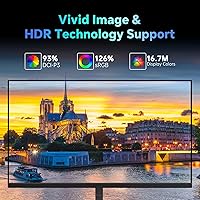
The 100Hz refresh rate with Adaptive-Sync is where this KTC monitor earns real respect in its category. Paired with FreeSync and G-Sync compatibility, it handles light-to-moderate gaming without dramatic screen tearing or stuttering. The 126% sRGB color coverage is a pleasant surprise — colors look punchy and accurate straight out of the box, making it usable for casual photo work. One honest caveat: the color depth is 6-bit plus FRC, not native 8-bit, so serious color grading is not this display's strong suit. The matte anti-glare coating and flicker-free backlight genuinely help during long work sessions, and the 300 cd/m² brightness holds up well in a normally lit room.

Best For

This 24.5-inch IPS display is a strong fit for students and remote workers who want a dependable everyday screen without stretching their budget. The dual-input setup — HDMI for a modern PC, VGA for an older machine — makes it especially useful for people upgrading incrementally rather than all at once. Entry-level gamers will appreciate the smoother 1080p experience; it is not built for competitive esports at high frame rates, but for casual titles it handles things without complaint. The compact footprint suits smaller desks well, and for anyone logging long hours at a screen, the low blue light mode and flicker-free panel are practical, genuinely useful inclusions.

User Feedback

Buyers tend to respond well to the H25B7's out-of-the-box color accuracy and the clean matte finish that keeps glare manageable. The value-to-performance ratio draws consistent praise, particularly from users who compared it against pricier options in the same size range. That said, the stand is a recurring point of friction — tilt is available, but there is no height adjustment or pivot, which limits how precisely you can set up an ergonomic workstation. A few buyers have flagged the 6-bit+FRC panel, worth knowing if color fidelity is a priority. Packaging feedback is largely positive, with most units arriving in good condition. Overall, the consensus leans favorable, with stand limitations being the most accepted trade-off.

Pros

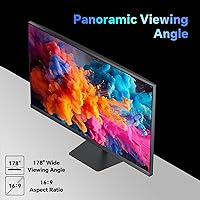
  • IPS panel delivers consistent, accurate colors across a wide 178-degree viewing angle.
  • The 100Hz refresh rate noticeably reduces motion blur during casual gaming compared to standard 60Hz panels.
  • 126% sRGB color coverage makes colors look vibrant and well-saturated straight out of the box.
  • Flicker-free backlight and low blue light mode genuinely reduce eye fatigue during long work sessions.
  • The matte anti-glare coating handles bright room lighting well without washing out the image.
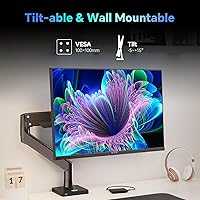
  • VESA 100×100mm compatibility opens the door to monitor arms and wall mounts for a tidier desk setup.
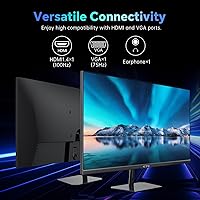
  • Dual HDMI and VGA inputs make the H25B7 a flexible choice for users bridging old and new hardware.
  • Adaptive-Sync support keeps gameplay smooth without screen tearing on compatible graphics cards.
  • Compact footprint and lightweight build make repositioning or moving the monitor straightforward.
  • Buyers consistently rate the out-of-the-box image quality as punching above its price bracket.

Cons

  • The stand supports tilt only — no height adjustment or pivot means ergonomic flexibility is genuinely limited.
  • Color depth is 6-bit plus FRC, not native 8-bit, which matters for anyone doing precise color work.
  • Only one HDMI port available, which can be restrictive if you run multiple modern devices.
  • VGA input caps out at 75Hz, so users on older hardware miss out on the full 100Hz experience.
  • The brand is relatively new and lacks the long-term reliability track record of established display makers.
  • No built-in speakers, so external audio hardware is a must for any media or calls setup.
  • HDR support is basic at best and unlikely to satisfy anyone expecting meaningful HDR performance.
  • The stand feels less sturdy than some competing options at this size, according to several buyers.
  • Limited OSD control options may frustrate users who like fine-tuning brightness, contrast, or color profiles.
  • Single-port HDMI setup with no DisplayPort option limits compatibility with some professional workstations.

Ratings

The scores below were generated by our AI rating engine after analyzing verified buyer reviews from multiple global markets, with spam, incentivized feedback, and bot activity actively filtered out before scoring. The KTC H25B7 24.5-inch IPS Monitor lands in a competitive spot for budget-conscious buyers, and these ratings are designed to reflect both what genuinely impresses users and where real frustrations surface — no glossing over the trade-offs.

Value for Money
91%
Buyers consistently point to this monitor as one of the stronger deals in the 24-inch FHD segment, particularly given the IPS panel and 100Hz refresh rate combination at this price point. Getting Adaptive-Sync and a wide color gamut without spending significantly more is something reviewers mention repeatedly.
A handful of buyers feel that the limited stand adjustability and 6-bit+FRC panel hold back the value argument slightly, especially when a small budget stretch could get a more ergonomically complete monitor from a more established brand.
Image Quality
83%
Colors look punchy and well-balanced straight out of the box, with the wide sRGB coverage making a visible difference for watching video content and casual photo browsing. The IPS panel keeps skin tones and gradients looking natural compared to TN alternatives at the same price.
The 6-bit+FRC color depth is a legitimate limitation for anyone doing serious creative work — gradient banding can appear in sensitive edits. Buyers who pushed the contrast settings too high also noted some blooming around bright objects on dark backgrounds.
Refresh Rate & Smoothness
79%
21%
Moving from a 60Hz or 75Hz panel to this monitor's 100Hz makes a noticeable difference in everyday desktop use and casual gaming alike — scrolling feels tighter and motion in games appears cleaner. Adaptive-Sync compatibility keeps tearing largely absent across a wide range of frame rates.
100Hz at 1080p is solid entry-level territory, not a competitive gaming specification, and buyers who expected a premium gaming feel were sometimes disappointed by the response time performance in fast-paced titles. VGA users miss out on the full refresh rate, capping at 75Hz.
Eye Comfort
86%
The flicker-free backlight is one of the features buyers mention most positively, particularly those logging six or more hours daily at a desk. Combined with the low blue light mode, many users report noticeably less eye fatigue compared to older monitors they replaced.
The low blue light mode shifts the white balance toward warm tones visibly, which some users find distracting during daytime work. Brightness at the lower end of the adjustment range also has a slight uneven glow on certain units, according to scattered feedback.
Stand & Ergonomics
47%
53%
The stand is stable enough for everyday use on a flat desk, and the tilt range covers the basic angles most seated users need when the monitor is placed at standard desk height. For buyers who plan to use a VESA arm, the stand limitation is entirely irrelevant.
No height adjustment, no swivel, and no pivot — for buyers who cannot use a monitor arm, this is a genuine daily frustration, particularly for taller users or those with specific neck or posture considerations. The stand also feels noticeably lightweight and flexes slightly when the desk vibrates.
Build Quality
68%
32%
The overall construction feels adequate for the price range, with a slim bezel design that looks clean on a desk. Most buyers report that the monitor arrived without damage and assembly was straightforward, taking under ten minutes in most cases.
The plastic housing feels thin at the corners, and a few buyers noted minor creaking when adjusting the tilt. At this price tier it is not a dealbreaker, but the build does not inspire the same confidence as monitors from brands with a longer track record.
Connectivity
62%
38%
Having both HDMI and VGA on one monitor is genuinely useful for buyers in transitional setups — for example, connecting a modern laptop via HDMI while keeping an older desktop on VGA without swapping cables. The dual-input approach gets quiet praise from users who need that flexibility.
The absence of a DisplayPort input limits compatibility with some workstations and docking stations that lack HDMI outputs. A single HDMI port also means users with multiple modern devices need an external switch, which is a real inconvenience in more complex desk setups.
Anti-Glare Performance
77%
23%
The matte coating handles reflections from overhead office lighting and nearby windows noticeably better than glossy alternatives, and buyers in mixed-light environments appreciate not having to constantly reposition to avoid glare. Images remain readable in normally lit rooms throughout the day.
The coating introduces a slight texture to the screen surface that some buyers describe as a faint graininess on solid-color backgrounds, which is a known trade-off with heavier matte treatments. Those coming from a glossy display may find the finish less crisp-looking initially.
Color Gamut & Accuracy
74%
26%
The 126% sRGB coverage genuinely makes a visible difference for content consumption and casual creative work — colors in games, photos, and streaming video look richer than what you get from a typical narrow-gamut budget panel. Buyers doing basic photo curation have been pleasantly surprised.
Factory calibration is decent but not precise, and buyers doing any kind of color-managed work will want to profile the monitor themselves. The 6-bit+FRC implementation also means that technically demanding tasks like professional retouching may reveal subtle accuracy gaps.
Setup & Assembly
88%
Most users describe the unboxing and assembly experience as quick and intuitive — stand base to panel in under ten minutes with no tools required for the main connection. Packaging held up well during shipping for the majority of buyers, with screens arriving in good condition.
Cables beyond the power adapter are not included in the box, so buyers need to source their own HDMI cable before setup, which catches some first-time buyers off guard. The instruction sheet is minimal and the OSD menu takes a few minutes of exploration to navigate comfortably.
Brightness & Visibility
71%
29%
At 300 cd/m², the panel handles well-lit home office environments comfortably during normal working hours, and the anti-glare coating compensates for some brightness shortfall in mixed lighting. For indoor use away from direct sunlight, most buyers find the brightness range workable.
In rooms with strong direct sunlight or near bright windows, the 300 cd/m² ceiling starts to show its limits — content can look washed out and you may find yourself maxing brightness regularly. Buyers used to higher-brightness panels may find this adjustment noticeable.
Gaming Performance
67%
33%
For casual titles and games where competitive reaction time is not critical, this 24.5-inch IPS display delivers a genuinely enjoyable experience — smooth motion at 100Hz, good color for immersive environments, and no screen tearing thanks to Adaptive-Sync working reliably across tested hardware.
Input lag and response time performance in fast-paced competitive titles falls short of purpose-built gaming monitors, and buyers who play shooters or fighting games at a high level noticed the limitation. The panel is better suited to RPGs, strategy games, and adventure titles than to esports.
Viewing Angles
84%
The IPS panel keeps colors and contrast consistent even at significant off-axis positions, which matters when sharing a screen with a colleague or positioning the monitor slightly off-center on a wider desk. Buyers coming from TN monitors frequently call this out as a meaningful upgrade.
At extreme horizontal angles beyond roughly 160 degrees, a slight luminance shift becomes visible — not a practical problem for most users, but worth noting for setups where the screen may be viewed frequently from very wide positions.

Suitable for:

The KTC H25B7 24.5-inch IPS Monitor is a practical choice for students, remote workers, and anyone who needs a dependable everyday display without a significant financial commitment. If your primary tasks are document editing, web browsing, video calls, and the occasional casual gaming session, this screen covers all of those bases comfortably. The IPS panel means colors stay consistent even when you are not sitting perfectly centered, which matters if you frequently share your screen with someone beside you or simply like to lean back. People transitioning from an older machine with only a VGA output will appreciate the dual-input flexibility, since they can connect without immediately buying new hardware. The VESA mount support also makes this a solid pick for anyone setting up a cleaner workspace with a monitor arm, or working with limited desk depth.

Not suitable for:

Buyers with serious color-critical workflows — photo retouching, video color grading, or print design — should be aware that the KTC H25B7 24.5-inch IPS Monitor uses a 6-bit plus FRC panel rather than a true native 8-bit display, which can affect color rendering precision under professional scrutiny. Competitive gamers who rely on high frame rates well above 100Hz, or who need the absolute lowest response times for fast-paced titles, will likely find this panel underwhelming compared to purpose-built gaming monitors. The stand is another practical limitation: it offers tilt adjustment only, with no height raise or pivot, so users with specific ergonomic requirements or neck sensitivities may find the fixed positioning frustrating over long sessions. There is also just a single HDMI port, so anyone juggling multiple modern devices simultaneously will need a switch or splitter. If ultra-wide content, 4K resolution, or HDR performance beyond basic compliance matters to you, this display will fall short of expectations.

Specifications

  • Screen Size: The display measures 24.5 inches diagonally, offering a practical footprint well-suited to desks with limited depth or width.
  • Panel Type: An IPS (In-Plane Switching) panel is used, providing consistent color and contrast across a wide range of viewing positions.
  • Resolution: Native resolution is 1920×1080 pixels (Full HD), delivering sharp text and clear visuals for everyday computing and 1080p content.
  • Refresh Rate: Supports up to 100Hz over HDMI and up to 75Hz over VGA, with the higher rate requiring an HDMI 1.4 connection.
  • Color Gamut: Covers 126% of the sRGB color space, producing visibly saturated and vibrant colors compared to standard sRGB-only panels.
  • Color Depth: Displays 16.7 million colors using a 6-bit panel with Frame Rate Control (FRC) to simulate 8-bit output — not a native 8-bit panel.
  • Brightness: Peak brightness is rated at 300 cd/m², which is adequate for well-lit indoor environments but not for use in very bright rooms or near windows.
  • Contrast Ratio: Static contrast ratio is 1300:1, offering reasonable depth between dark and light areas for an IPS panel in this price range.
  • Adaptive Sync: Compatible with both AMD FreeSync and NVIDIA G-Sync when connected via HDMI, reducing screen tearing during gaming.
  • Inputs: Connectivity includes one HDMI 1.4 port (supporting up to 100Hz) and one VGA port (supporting up to 75Hz), with no DisplayPort available.
  • VESA Mount: The monitor supports the standard 100×100mm VESA pattern, making it compatible with most third-party monitor arms and wall mounts.
  • Tilt Range: The included stand allows tilt adjustment between -5° and 15°, but offers no height adjustment, swivel, or pivot capability.
  • Viewing Angle: Rated at 178° horizontally and vertically, meaning colors and brightness hold up well even when viewed from wide off-center angles.
  • Screen Surface: The display uses a matte anti-glare coating that diffuses ambient light reflections, reducing eye strain in mixed or bright lighting conditions.
  • Eye Care: Incorporates a flicker-free backlight and a software-selectable low blue light filter to reduce eye fatigue during prolonged screen use.
  • Power Draw: Maximum power consumption is rated at 36W under load, and the monitor operates on a 12V input.
  • Dimensions: With the stand attached, the monitor measures approximately 4 × 24 × 18 inches (depth × width × height).
  • Weight: Total weight including the stand is 10.68 pounds, making it manageable to move or reposition without assistance.

Related Reviews
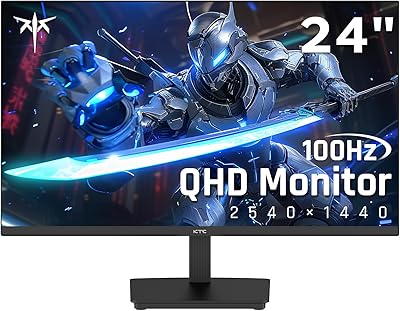
KTC H24T27 24-inch QHD Gaming Monitor
68%
88%
Image Clarity
84%
Color Accuracy
74%
Gaming Performance
41%
HDR Quality
46%
Ergonomics & Adjustability
More
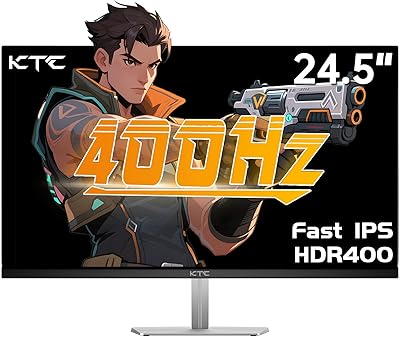
KTC H25X7 24.5-inch 400Hz Gaming Monitor
75%
92%
Refresh Rate Performance
84%
Panel Color Quality
91%
Value for Money
88%
Input Lag & Responsiveness
86%
Connectivity Options
More
ViewSonic VG2448A 24-inch IPS Monitor
83%
93%
Ergonomic Adjustability
88%
Eye Comfort
86%
Connectivity & Port Selection
74%
Image Quality
81%
Build Quality
More
CRUA CR245ZB 24.5″ Gaming Monitor
78%
83%
Gaming Performance
86%
Refresh Rate & Smoothness
74%
Color Accuracy & Vibrancy
91%
Ergonomics & Adjustability
68%
Build Quality & Materials
More
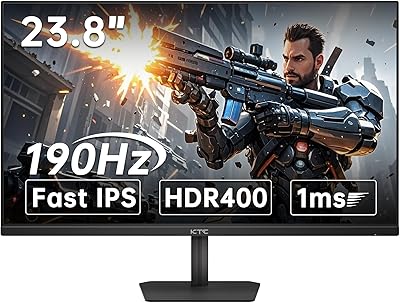
KTC 24-inch 190Hz Gaming Monitor

76%
88%
Refresh Rate Performance
76%
Color Accuracy
83%
Motion Clarity
54%
HDR Quality
91%
Value for Money
More
KTC H32T13 32-Inch QHD IPS Monitor

78%
86%
Image Quality
79%
Color Accuracy
82%
Refresh Rate & Smoothness
51%
HDR Performance
44%
Ergonomics & Adjustability
More
HP Series 5 524sf 24-inch Monitor
75%
78%
Display Quality
71%
Color Accuracy
67%
Brightness
86%
Eye Comfort
74%
Build Quality
More
ReHisk 241KV2 24-inch Gaming Monitor

73%
91%
Refresh Rate Performance
88%
Adaptive Sync
79%
Panel & Color Quality
54%
Brightness & HDR
67%
Build Quality
More
Z-Edge U24I 24-inch IPS Monitor
85%
88%
Display Quality
92%
Value for Money
85%
Build Quality
84%
Gaming Performance
80%
Ergonomics & Design
More
Dell G2524H Gaming Monitor 24.5-inch
87%
92%
Performance
96%
Refresh Rate
88%
Build Quality
91%
Ergonomics
93%
Display Quality
More

FAQ

The H25B7 supports FreeSync natively and is also G-Sync compatible when connected via HDMI, which means most NVIDIA cards from the GTX 10 series onward can use Adaptive-Sync with it. It is not a certified G-Sync module — it uses NVIDIA's open compatibility standard — but in practice, the result is the same for everyday gaming.

No — VGA tops out at 75Hz on this monitor. To get the full 100Hz refresh rate, you need to connect using the HDMI port and make sure your graphics card outputs at that rate. If your PC only has a VGA output, you will be capped at 75Hz regardless.

For casual photo work and general creative tasks, the wide sRGB coverage makes colors look punchy and reasonably accurate. That said, it is worth knowing this is a 6-bit plus FRC panel, not a true native 8-bit display, so professional retouchers or anyone doing color-critical print work may notice limitations in gradient smoothness and absolute color precision.

The stand only tilts — forward and back between -5° and 15°. There is no height adjustment, swivel, or ability to rotate into portrait mode. If ergonomic positioning is a priority for you, pairing this monitor with an aftermarket VESA arm is a straightforward fix, since the 100×100mm mounting pattern is standard.

It will work for console gaming, yes. The HDMI input supports 1080p at up to 100Hz, though most consoles cap at 60Hz at 1080p in standard game modes. You will get a clean, smooth picture and benefit from the IPS color quality, but you will not be taking advantage of the full refresh rate headroom.

No, there are no built-in speakers. You will need external speakers or headphones for any audio output. This is worth factoring in if you are setting up a workspace from scratch.

The matte anti-glare coating does a solid job of diffusing reflections, so direct glare is not a major problem. At 300 cd/m² of peak brightness, it handles normally lit rooms well. However, if your desk sits in direct sunlight for most of the day, you may find yourself pushing brightness to the limit to maintain comfortable contrast.

Assembly is minimal and most buyers report getting it up and running in under ten minutes. The stand base attaches to the neck with a few screws, and the neck clips into the back of the panel. Cables are not included beyond what is needed for power, so make sure you have your own HDMI cable ready.

Most people who game regularly do notice the difference, particularly in faster-paced games where motion smoothness is visible. For spreadsheets and video calls, the extra headroom makes no practical difference. Whether the jump from 75Hz to 100Hz feels meaningful will depend on how sensitive you are to motion and what you were using before.

The flicker-free backlight eliminates the subtle flicker found in older PWM-dimmed displays, which is a genuine comfort improvement for anyone logging many hours at a screen. The low blue light mode is also a useful option for evening work. Between the matte coating, flicker-free operation, and blue light filter, the eye care credentials here are solid for an entry-level display.