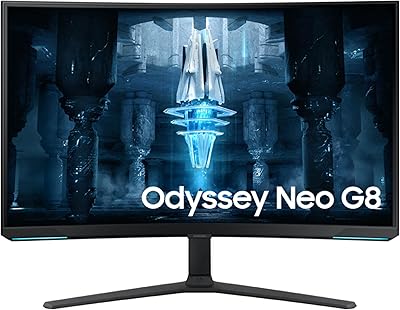
Overview

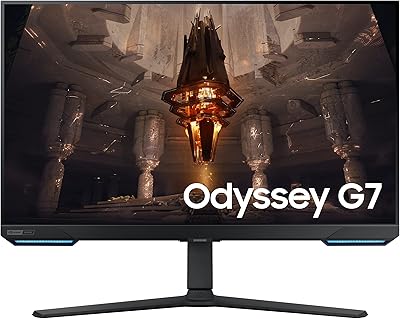
The Samsung Odyssey G7 28-inch 4K Gaming Monitor occupies a genuinely odd niche — and that is not a criticism. It is part gaming monitor, part smart TV, and it handles both roles better than you would expect from a single flat panel on your desk. At this price point, you are not buying a budget compromise or a flagship showpiece; you are buying flexibility. The 28-inch size lands in a specific sweet spot: too large to feel cramped as a monitor, too small to replace a living room TV outright. Samsung's Gaming Hub integration pushes it into hybrid territory, blurring the line between desk setup and couch entertainment in ways few monitors attempt.
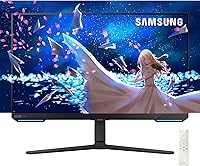
Features & Benefits

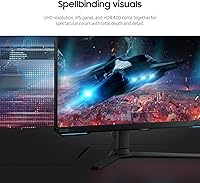
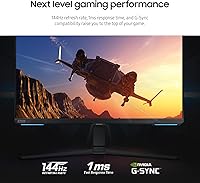
The 4K IPS panel is where this Samsung gaming monitor earns its keep. At 28 inches, 3840x2160 packs enough pixel density that individual pixels essentially vanish — text is crisp, textures are sharp, and colors feel genuinely accurate thanks to 90% DCI-P3 coverage. Pair that with 144Hz and a 1ms response time, and fast-paced games feel immediately snappy, not just visually impressive. AMD FreeSync Premium Pro and NVIDIA G-Sync compatibility means it works well with virtually any modern GPU. The ergonomic stand — with height adjustment, tilt, and swivel — is the kind of quality-of-life feature you only truly appreciate after a long session hunched over a fixed-mount display.

Best For

The Odyssey G7 28-inch is a natural fit for PC gamers who want one display that handles both gaming and streaming without buying a second screen. It suits small-space setups especially well — compact apartments or dual-purpose home offices where adding a smart TV would feel excessive. Cloud gaming users will appreciate the Gaming Hub's access to Xbox Cloud Gaming and GeForce NOW without a console plugged in. That said, this hybrid monitor is not for everyone. If you want ultra-wide immersion, OLED-level contrast, or a panel that holds its own in a sun-drenched room, you should look at alternatives before committing.

User Feedback

Buyers consistently praise color accuracy out of the box — most report vivid, well-calibrated colors without touching the settings. Input switching between PC and Smart TV mode also gets positive marks for being quick and painless. On the downside, the 250–300 nit brightness ceiling is a recurring complaint; in bright rooms, the image can wash out noticeably, and the entry-level HDR certification should not be oversold. Some users flag Wi-Fi connectivity hiccups within the Gaming Hub, and the app library, while functional, is not as deep as a dedicated streaming stick. The stand earns appreciation for its flexibility, though cable management around it tends to frustrate. The review pool remains relatively modest, so weigh individual accounts carefully.

Pros

  • Sharp, high pixel density 4K IPS panel delivers genuinely accurate colors right out of the box.
  • 144Hz refresh rate paired with 1ms response time keeps fast-paced games feeling responsive and blur-free.
  • Works with both AMD and NVIDIA graphics cards, so GPU brand is never a compatibility concern.
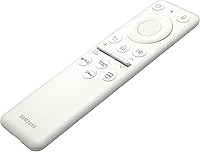
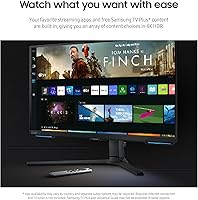
  • Built-in Smart TV functionality with a remote control is a rare and genuinely useful feature for a gaming monitor.
  • Samsung Gaming Hub enables cloud gaming without any console or PC required — just Wi-Fi.
  • Wide 178-degree viewing angles make the Odyssey G7 28-inch comfortable from almost any seating position.
  • Ergonomic stand with height, tilt, and swivel adjustment reduces fatigue during long desk sessions.
  • Ethernet port alongside Wi-Fi provides a more stable connection option for cloud gaming and streaming.
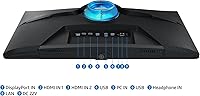
  • Built-in 2-port USB hub keeps peripherals tidy and reduces cable clutter on your desk.
  • Dual-use design consolidates two purchases into one, offering real space and budget efficiency for the right buyer.

Cons

  • Peak brightness of 250 to 300 nits washes out noticeably in well-lit or sunny rooms.
  • DisplayHDR 400 certification is entry-level HDR and will underwhelm users familiar with true HDR performance.
  • The Samsung Gaming Hub app library is functional but noticeably thinner than a dedicated streaming stick or smart TV.
  • Wi-Fi connectivity within the Gaming Hub has drawn occasional complaints about stability and dropped connections.
  • IPS panel contrast cannot match VA or OLED alternatives — dark scenes in games and movies look flat by comparison.
  • Cable management around the ergonomic stand is fiddly and takes effort to keep looking tidy.
  • 28 inches at 4K may require display scaling on Windows to keep text and UI elements comfortably readable.
  • Built-in speakers are adequate for casual use but will disappoint anyone expecting decent audio quality.
  • Relatively modest sales rank suggests a smaller buyer community, meaning less peer review data to cross-reference.
  • Pushing 4K at 144Hz demands a high-end GPU, which adds to the real total cost of ownership for PC gamers.

Ratings

Our AI rating engine analyzed verified global user reviews for the Samsung Odyssey G7 28-inch 4K Gaming Monitor, actively filtering out incentivized, duplicate, and bot-generated submissions to surface what real buyers actually experienced. Scores reflect a balanced picture — genuine strengths are recognized, but recurring frustrations are weighted honestly and not glossed over. Whether this hybrid monitor fits your setup or falls short depends heavily on how you use it, and the breakdown below makes that clear.

Image Clarity
91%
Users upgrading from 1080p or 1440p panels consistently describe the jump in sharpness as immediately noticeable — fine text in productivity apps looks crisp, and in-game textures show detail they had never seen before. The high pixel density at 28 inches means the 4K resolution is never wasted.
A handful of users noted that without proper Windows scaling configured, UI elements and system text can appear uncomfortably small at native resolution. It is a fixable issue, but the out-of-box experience on a fresh Windows install requires some setup time.
Color Accuracy
88%
The IPS panel with 90% DCI-P3 coverage earns consistent praise for vibrant, true-to-life colors that do not require manual calibration for most users. Gamers and casual content consumers alike noted that games and streaming content pop with a richness that feels accurate rather than oversaturated.
Users with professional color-grading needs or those comparing it directly to factory-calibrated monitors flagged minor inconsistencies at the edges of the panel. It is not a replacement for a purpose-built creative display, but for gaming and entertainment it performs well above expectations.
Gaming Performance
87%
The 144Hz refresh rate combined with 1ms response time makes a tangible difference in fast shooters and action games — inputs feel tight, motion blur is largely absent, and tracking moving targets feels precise. FreeSync Premium Pro and G-Sync compatibility mean the experience holds up across both major GPU brands without tearing.
Driving 4K at 144Hz demands a high-end graphics card, and users with mid-range GPUs frequently reported having to reduce resolution or settings to maintain smooth frame rates. The monitor delivers on its specs, but the real cost of unlocking its full gaming potential goes beyond the purchase price.
Smart TV Usability
74%
26%
The ability to switch from a PC gaming session to streaming Netflix or Disney+ with a remote control genuinely impressed users who set up the monitor in a bedroom or small living space. The transition between inputs is fast, and the major streaming apps run without meaningful lag or crashes.
The Samsung Gaming Hub app library is thinner than what you would find on a dedicated smart TV, and some less mainstream streaming services are absent. Users also noted that the smart TV interface, while functional, occasionally feels like a secondary priority in the software's design rather than a fully polished experience.
Brightness & HDR
58%
42%
In dim or controlled lighting — evening gaming sessions or a room with blinds closed — the panel looks clean and well-balanced, with the DisplayHDR 400 certification adding visible improvement in highlight rendering over standard SDR content.
At 250 to 300 nits, the panel struggles badly in bright rooms or near windows, and users in sun-exposed home offices reported frustrating washout during daytime hours. DisplayHDR 400 is the minimum HDR tier, and anyone expecting genuine high-dynamic-range impact will likely feel let down — this is entry-level HDR in practice, not just on paper.
Build Quality
83%
The monitor feels solid and well-assembled, with no reported flex in the panel and a base that stays planted on the desk even during more animated gaming sessions. The overall aesthetic is clean and understated, fitting comfortably in both gaming and professional desk setups.
The plastic finish on the rear housing picks up fingerprints and dust visibly, which bothers tidier users more than others. A small number of buyers reported minor light bleed at panel corners, which is not unusual for IPS but worth knowing if you frequently watch dark content.
Ergonomics & Stand
79%
21%
Height adjustment, tilt, and swivel give users enough flexibility to dial in a comfortable viewing position for long desk sessions, and reviewers who previously dealt with fixed-angle monitors appreciated the difference during extended work or gaming stretches.
Cable management through the stand is consistently described as fiddly — there is limited routing space, and keeping cables tidy requires patience and some trial and error. It is not a dealbreaker, but it is the kind of small frustration that comes up repeatedly in user comments.
Samsung Gaming Hub
71%
29%
For users curious about cloud gaming who do not want to buy a dedicated console, the built-in Gaming Hub is a genuinely low-friction way to try Xbox Cloud Gaming or GeForce NOW — just connect to Wi-Fi, sign in, and play. No downloads or installs required.
The platform's game and app selection has visible gaps compared to native console or PC libraries, and cloud gaming performance is heavily dependent on internet connection quality. Several users reported the interface feeling sluggish, and the available titles skew toward specific services rather than offering a comprehensive catalog.
Connectivity Options
84%
Having both Wi-Fi 5 and a wired Ethernet port on a monitor is genuinely useful — users can opt for the more stable wired connection for cloud gaming while still having wireless flexibility for smart TV use. The dual-port USB hub on the unit also reduces desktop cable clutter for keyboard and mouse users.
Wi-Fi stability under the Gaming Hub has been flagged by a consistent subset of users, particularly during longer cloud gaming sessions where mid-session disconnects were reported. Switching to Ethernet resolves this in most cases, but it undermines the wireless convenience that makes the smart TV setup appealing.
Built-in Audio
52%
48%
The built-in speakers are adequate for background listening, late-night streaming without waking others, or quick casual use when headphones are not available. Having any audio output at all is a step above most monitors in this category.
Users with any standards for audio quality found the speakers thin, lacking bass, and prone to distortion at higher volumes. Almost every reviewer who commented on audio noted they switched to headphones or external speakers immediately — the built-in option is a convenience feature, not a selling point.
Value for Money
76%
24%
For buyers who genuinely use both the gaming monitor and smart TV functionality, the consolidated value is real — replacing two separate purchases with one well-built display makes the mid-to-upper price point easier to justify. Users in small-space setups in particular felt they got strong bang for their investment.
Users who primarily want a high-performance gaming monitor and have no interest in smart TV features may find that comparable gaming panels without the hybrid extras offer better raw display performance at a similar or lower cost. The value equation depends almost entirely on whether the dual-use case matches your lifestyle.
Setup Experience
81%
19%
Physical assembly is straightforward, and the monitor is generally ready to use within a few minutes of unboxing. Samsung's on-screen setup guide for the smart TV features is reasonably intuitive, and most users connected to Wi-Fi and accessed streaming apps without needing to consult a manual.
Windows scaling configuration trips up some users on first boot, and a few reviewers noted that the initial smart TV account setup requires navigating through multiple menus that feel less polished than the hardware itself. Nothing insurmountable, but the first-hour experience is not quite as plug-and-play as the packaging implies.
Viewing Angles
86%
The IPS panel delivers on its promise of consistent color and brightness across wide viewing angles — users who share the screen with others for co-op gaming or movie watching noted that colors stayed accurate without the shift you see on VA or TN panels. This also makes the remote-control, lean-back smart TV use case more practical.
While the 178-degree spec holds up under normal conditions, very extreme off-axis positions do introduce a slight color temperature shift. This is a minor IPS characteristic rather than a product defect, but users who mount the display very high or at steep angles may notice it.
Remote Control
77%
23%
The included remote adds real usability to the smart TV side of this display — being able to adjust volume, switch inputs, and navigate apps from across a room makes the couch viewing scenario feel intentional rather than bolted on. Users appreciated not having to get up and interact with the monitor directly for entertainment use.
The remote's button layout and responsiveness were described as functional but unimpressive — a few users noted occasional lag between button presses and on-screen response, and the build quality of the remote itself feels notably cheaper than the monitor it accompanies.

Suitable for:

The Samsung Odyssey G7 28-inch 4K Gaming Monitor was built for a specific kind of buyer: someone who wants one display to handle gaming, work, and casual streaming without cluttering their space with multiple screens. It is an especially strong fit for people in compact apartments or small home offices where a smart TV would be overkill but a basic monitor would feel limiting. PC gamers who switch between a keyboard-and-mouse session and relaxing with a streaming service will genuinely appreciate being able to grab the remote and lean back without touching their computer. Those upgrading from a 1080p or 1440p setup will notice a real, tangible improvement in sharpness and color depth at this resolution. Cloud gaming curious users — people interested in Xbox Cloud Gaming or GeForce NOW who do not want to commit to a full console — will find the built-in Samsung Gaming Hub a low-friction way to experiment with the format.
Not suitable for:

The Samsung Odyssey G7 28-inch 4K Gaming Monitor has a few hard limitations that matter depending on your priorities. If you game or work in a room with significant natural light, the 250 to 300 nit brightness ceiling will be a persistent frustration — this is not a panel that fights back against sunlight, and the entry-level HDR certification will not impress anyone coming from a higher-end display. Competitive players who prioritize the absolute lowest input lag and fastest refresh rates above all else may find better value in a dedicated 1440p high-refresh monitor rather than pushing a GPU to render 4K at full speed. Ultra-wide enthusiasts will find the standard 16:9 aspect ratio underwhelming for immersive simulation or racing titles. Anyone expecting deep, inky blacks from the IPS panel will also be disappointed — if contrast is your priority, an OLED or VA alternative would serve you better. Finally, buyers who want a well-reviewed, crowd-validated product may want to note that this model sits outside the top tier of electronics bestsellers, meaning there is less collective user data to draw confidence from.
Specifications

  • Screen Size: The panel measures 28 inches diagonally, offering a flat 16:9 aspect ratio suited to both desk use and relaxed viewing.
  • Resolution: Native resolution is 3840x2160 pixels (4K UHD), delivering high pixel density that keeps text crisp and textures detailed at this screen size.
  • Panel Type: Uses an IPS (In-Plane Switching) panel, which provides consistent color accuracy and wide 178-degree viewing angles both horizontally and vertically.
  • Refresh Rate: Supports a maximum refresh rate of 144Hz, enabling smooth motion in fast-paced games without requiring a high-end display upgrade in the future.
  • Response Time: Rated at 1ms response time (MPRT), minimizing motion blur and ghosting during rapid on-screen movement.
  • Brightness: Peak brightness ranges from 250 to 300 nits, which is adequate in controlled lighting but may appear dim in brightly lit environments.
  • HDR Support: Certified to VESA DisplayHDR 400, representing an entry-level HDR standard with improved highlights over SDR but limited peak luminance.
  • Color Gamut: Covers 90% of the DCI-P3 color space, producing rich, accurate colors suitable for both gaming and casual content creation.
  • Sync Technology: Compatible with both AMD FreeSync Premium Pro and NVIDIA G-Sync, eliminating screen tearing and stutter across a wide range of GPU configurations.
  • Connectivity: Includes built-in Wi-Fi 5 (802.11ac) and a wired Ethernet port for flexible network connection when using smart features or cloud gaming.
  • USB Hub: Features a built-in 2-port USB hub, allowing users to connect peripherals such as a keyboard, mouse, or gamepad directly to the monitor.
  • Smart Platform: Runs Samsung Gaming Hub, a built-in cloud gaming and streaming platform that provides access to services like Xbox Cloud Gaming and GeForce NOW without a connected PC or console.
  • Audio: Equipped with integrated speakers, providing basic sound output for streaming and gaming without requiring a separate audio device for casual use.
  • Remote Control: Ships with a physical remote control, enabling navigation of smart TV functions, volume adjustment, and input switching from a distance.
  • Ergonomics: The included stand supports height adjustment, tilt, and swivel, allowing users to fine-tune the display position for extended comfort.
  • Dimensions: Physical dimensions with stand measure 9.6 x 25.1 x 22.7 inches, making it compatible with most standard desks and monitor arms.
  • Weight: The unit weighs 15.4 pounds with stand attached, which is manageable for a single-person setup or repositioning.

Related Reviews

Samsung 43″ Odyssey Neo G7 Gaming Monitor
75%
83%
Picture Quality
74%
HDR Performance
86%
Gaming Performance
78%
Smart TV & Streaming Features
61%
Build Quality & Stand
More
Samsung Odyssey Neo G7 32″ 4K Gaming Monitor
86%
94%
Gaming Performance
91%
Display Quality
88%
Value for Money
90%
Ease of Setup
93%
Color Accuracy
More
Samsung Odyssey G70B 32-inch 4K Gaming Monitor
70%
84%
Image Quality
47%
HDR Performance
76%
Gaming Performance
53%
Panel Consistency
71%
Samsung Gaming Hub
More
Samsung 55-inch Odyssey Ark Curved Gaming Monitor
72%
91%
Image Quality
88%
Immersion & Curvature
86%
Refresh Rate & Responsiveness
78%
Built-in Audio
67%
Cockpit Mode Versatility
More
Samsung Odyssey G50A 27-inch Gaming Monitor
80%
91%
Image Clarity
93%
Refresh Rate Performance
88%
Color Accuracy
58%
HDR Quality
89%
Response Time & Input Lag
More
Samsung 32″ Odyssey Neo G8 Gaming Monitor
77%
93%
Image Quality
91%
HDR Performance
89%
Refresh Rate & Smoothness
88%
Contrast & Black Levels
86%
Response Time & Motion Clarity
More
Samsung Odyssey G3 G30D 27″ Gaming Monitor
80%
91%
Gaming Performance
88%
Refresh Rate Value
93%
Ergonomics & Stand
67%
Image Clarity
84%
AMD FreeSync
More
ASUS TUF Gaming VG28UQL1A 28-inch Gaming Monitor
78%
91%
Image Clarity
88%
Motion Performance
93%
Console Compatibility
83%
Color Accuracy
58%
HDR Performance
More
Samsung Odyssey G50D 27-Inch Gaming Monitor
81%
88%
Image Clarity
91%
Refresh Rate Performance
86%
Response Time & Motion Handling
84%
Color Accuracy
58%
HDR Performance
More
Samsung Odyssey G9 49-inch Curved Gaming Monitor
82%
93%
Visual Clarity
90%
Immersion & Curvature
94%
Gaming Performance (FPS)
60%
Ease of Setup
88%
Build Quality
More

FAQ

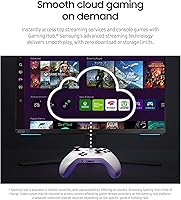
It can absolutely work as a standalone device. The Samsung Odyssey G7 28-inch 4K Gaming Monitor has Wi-Fi and Samsung Gaming Hub built in, so you can stream from Netflix, Disney+, or access cloud gaming services like Xbox Cloud Gaming without any external device connected. You just need a Wi-Fi network and the relevant app accounts.
At 28 inches, 4K resolution translates to a very high pixel density, which means sharper text and finer detail than you would see on a 1080p or 1440p panel of the same size. The trade-off is that the 4K difference is more apparent up close at a desk than it would be from a couch. Most users sitting a normal desk distance away will notice a real improvement over lower-resolution displays.

Most likely yes. At native 4K on 28 inches, UI elements and text can appear very small without scaling enabled. Windows typically recommends 150% scaling at this size and resolution, which still looks sharp while keeping things readable. It is worth spending a few minutes adjusting this after setup.

It works better than you might expect for a monitor add-on. Switching from PC input to the smart TV interface is quick, and the major streaming apps run without issues. The built-in speakers are not impressive by any measure, but they are functional for casual watching. If you are looking for a full smart TV replacement, you will notice the app library and remote experience are a step below a dedicated TV, but for occasional use it is genuinely convenient.

Yes, you can connect a PS5 or Xbox Series X via HDMI and it will display 4K. However, 4K at 144Hz from a console depends on the console's own output capabilities and the HDMI version supported. Both the PS5 and Xbox Series X can output 4K at up to 120Hz over HDMI 2.1, so you should be able to get close to the monitor's maximum performance with current-generation hardware.

Honestly, this is one area where the Odyssey G7 28-inch shows its limits. At 250 to 300 nits, it is fine in a dim room or in the evening, but direct sunlight or a bright office environment will wash the image out. If you game or work near a window during the day, you will want to either manage your lighting or consider a brighter panel.

The DisplayHDR 400 certification is the entry rung of the HDR ladder, so expectations should be moderate. It does improve bright highlights compared to standard SDR mode, and colors can pop a bit more in supported content. However, if you have used a proper HDR display with 1000 nits or more, you will notice the difference. For most buyers stepping up from a basic monitor, it is a step forward, just not a dramatic one.

Yes, the Odyssey G7 28-inch supports VESA mounting, which makes it compatible with most standard monitor arms and wall mounts. This is a practical option if you want to free up desk space or need more precise positioning than the built-in stand allows.

A number of users have reported occasional Wi-Fi hiccups, particularly with the Gaming Hub interface dropping or stuttering during cloud gaming sessions. For the most reliable experience, connecting via the built-in Ethernet port is the better option if your setup allows it. Over a strong wired connection, the cloud gaming performance is noticeably more consistent.

The stand is one of the nicer included stands in this category, with genuine height adjustment, tilt, and swivel. For most users it will be perfectly adequate. The main complaint people have is not the range of motion but rather that routing cables neatly through it takes some patience. If tidiness matters to you, a monitor arm is a cleaner solution, but the stock stand is solid enough that it is not an urgent upgrade.