Overview

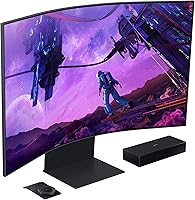
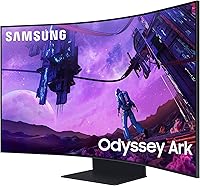
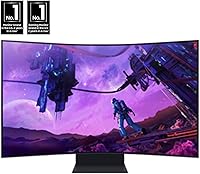
The Samsung 55-inch Odyssey Ark Curved Gaming Monitor sits in an interesting category — too large and too feature-rich to be called just a monitor, yet clearly built for a desk rather than a living room wall. Its 1000R curved panel wraps aggressively around your field of vision in a way that flat screens simply cannot replicate. This is a premium-tier display aimed at users who want one screen to handle serious gaming, streaming, and multitasking without compromise. It is not a casual purchase, and Samsung does not pretend otherwise.
Features & Benefits

The Odyssey Ark runs a Quantum Mini LED panel that produces genuinely impressive contrast and local dimming — bright highlights stay vivid without bleeding into dark areas, which matters a lot in moody, atmospheric games. At 4K with a 165Hz refresh rate and a 1ms response time, it handles both fast-paced competitive play and slower cinematic titles equally well. Cockpit Mode lets you physically rotate the entire screen vertically for a stacked, command-center layout — useful for sim fans, though most casual users will never touch it. The built-in 60W audio with Dolby Atmos support is surprisingly capable, though it still falls short of a dedicated speaker setup.

Best For

This curved gaming display makes the most sense for dedicated PC gamers who want a large-format experience without mounting a TV on the wall. Sim racing and flight sim enthusiasts will particularly appreciate the deep curve and the option to flip the screen into Cockpit Mode. Content creators juggling multiple feeds or windows will find the Multi View feature — supporting up to four simultaneous inputs — a practical daily tool. It also suits home office users who refuse to sacrifice entertainment value when the workday ends. If built-in sound and fewer cables matter to you, that is another legitimate reason to consider it.

User Feedback

Samsung's giant gaming screen holds a 3.8-star average across a few hundred reviews, which deserves an honest read — buyers at this price point have high expectations and are not shy about voicing disappointment. Panel brightness and immersion draw consistent praise, with many owners saying it genuinely transforms their setup. The criticisms, though, are hard to ignore: the glossy surface causes noticeable glare in rooms with windows or overhead lighting, and at nearly 93 pounds the stand demands a large, sturdy desk. Smart TV firmware quirks appear frequently enough in reviews to flag. Cockpit Mode earns enthusiasm from sim users but is largely ignored by everyone else.

Pros

  • The 1000R curved panel creates a genuinely immersive field of view that flat monitors at any size struggle to match.
  • Quantum Mini LED delivers rich contrast and accurate color that holds up in both dark atmospheric games and bright, vivid titles.
  • A 165Hz refresh rate and 1ms response time keep fast-paced gaming smooth and responsive without tearing or ghosting.
  • Multi View lets you run up to four inputs simultaneously, making multitasking on one screen surprisingly practical.
  • Built-in 60W Dolby Atmos audio is the best onboard sound you will find on any gaming monitor, reducing cable clutter significantly.
  • The smart TV platform adds Netflix, YouTube, and streaming apps without needing an external device plugged in.
  • Cockpit Mode offers a genuinely unique vertical pivot option that sim and productivity enthusiasts will appreciate.
  • 4K resolution on a 55-inch panel looks sharp and detailed for both gaming and media consumption.

Cons

  • The glossy screen surface causes noticeable glare in any room with windows or bright overhead lighting.
  • At nearly 93 pounds, moving or repositioning this curved gaming display is a two-person job.
  • The stand has a large footprint that will overwhelm most standard desks and require a purpose-built setup.
  • Samsung's smart TV firmware has drawn complaints about sluggishness and occasional bugs that interrupt the experience.
  • Cockpit Mode, despite being a headline feature, goes largely unused by the majority of buyers outside sim gaming niches.
  • The onboard audio, while impressive for a monitor, falls noticeably short of a dedicated soundbar or speaker system.
  • Premium pricing makes it a tough sell for anyone who will not actively use the advanced features it is built around.
  • The 3.8-star average rating suggests a meaningful portion of buyers feel the real-world experience does not fully meet expectations at this price tier.

Ratings

The scores below reflect our AI-driven analysis of verified global buyer reviews for the Samsung 55-inch Odyssey Ark Curved Gaming Monitor, with spam, bot-submitted, and incentivized feedback actively filtered out before scoring. Each category is weighted against real-world usage patterns reported by owners across gaming, productivity, and entertainment contexts. Both the standout strengths and the recurring frustrations are transparently reflected in every score.

Image Quality
91%
The Quantum Mini LED panel draws consistent praise from owners who use it for extended gaming and streaming sessions — deep blacks, punchy highlights, and accurate colors that hold up across a wide range of content types. Users moving from standard LED monitors frequently describe the contrast difference as immediately noticeable, especially in darker game environments.
A small but vocal group of buyers note that aggressive local dimming can occasionally cause visible blooming around bright UI elements against dark backgrounds. This is a known characteristic of Mini LED technology rather than a defect, but it disappoints users expecting OLED-level uniformity.
Immersion & Curvature
88%
The 1000R curve is the feature most buyers cite as the primary reason they chose this curved gaming display over a flat alternative. During long open-world or sim sessions, the wrap-around field of view creates a sense of depth that genuinely changes how games feel at a desk distance.
A portion of users find the curvature too aggressive for productivity work, particularly when reading long documents or working with spreadsheets where straight horizontal lines can appear slightly bowed. It is a trade-off that casual or hybrid users should consider seriously before buying.
Refresh Rate & Responsiveness
86%
PC gamers running high-frame-rate titles consistently praise how smooth and tear-free gameplay feels, with fast-moving games in particular benefiting from the combination of high refresh and the low response time. FreeSync Premium Pro support adds to the experience for AMD GPU users especially.
Console users frequently note that the high-refresh advantage is largely irrelevant on their platform given current hardware frame-rate limits, and a few PC owners report needing to fine-tune GPU settings to consistently hit the upper refresh range in demanding 4K titles.
Built-in Audio
78%
22%
Among monitor buyers who did not want a separate soundbar, the onboard audio system draws genuinely positive reactions — the bass reach and overall volume output feel more like a budget soundbar than typical monitor speakers. Dolby Atmos content in particular benefits from the multi-driver layout during streaming sessions.
Buyers who own or have previously owned dedicated speaker setups tend to be more critical, noting that stereo separation and mid-range clarity fall short of even an entry-level soundbar. The audio is best understood as a strong convenience feature rather than a replacement for a purpose-built audio system.
Cockpit Mode Versatility
67%
33%
Sim racing and flight sim enthusiasts who specifically sought out Cockpit Mode report high satisfaction, describing it as a feature that meaningfully transforms their setup into something closer to a proper cockpit rig. The pivot mechanism feels sturdy and the height-adjustable stand makes positioning straightforward.
The majority of buyers who do not fall into the sim gaming niche report never using Cockpit Mode at all, which makes it a premium feature many are effectively paying for without benefit. A few users also note that transitioning between orientations is not a quick one-handed operation and requires deliberate repositioning.
Multi View
73%
27%
Users who run a PC and a console simultaneously find Multi View genuinely practical, allowing them to monitor one source while actively using another without switching inputs manually. Streamers who keep a feed monitor alongside their main game window also report finding it useful for their workflow.
The window sizing options are limited compared to software-based multi-monitor solutions, and some users report occasional input sync issues when mixing high-refresh PC sources with lower-refresh console inputs. The feature works, but it is less flexible than power users might expect at this price tier.
Smart TV Platform
61%
39%
For buyers who use the screen primarily in a media room context, the built-in streaming apps reduce the need for an external stick or box. Samsung TV Plus offers a reasonable range of free channels, and the remote-based navigation is familiar to anyone who has used a Samsung television.
Firmware stability issues have been reported consistently enough across reviews to flag as a real concern — sluggish menus, occasional app crashes, and interface quirks appear more frequently than they should on a premium product. Several users recommend relying on an external streaming device for a smoother software experience.
Build Quality
82%
18%
The stand and chassis feel appropriately substantial for a display of this size and price, and the pivot mechanism for Cockpit Mode operates smoothly without play or wobble. Owners who have handled multiple premium monitors generally describe the physical construction as befitting the product tier.
A few users have flagged minor cosmetic inconsistencies around the rear panel and cable management channels, and the glossy bezel picks up fingerprints noticeably. Nothing rises to the level of a structural concern, but the finishing details do not quite match the precision some buyers expect at this price point.
Setup & Installation
63%
37%
The assembly process is reasonably well documented, and most buyers report getting the display upright and connected without significant difficulty once a second person is available to help manage the weight during stand attachment.
The near 93-pound total weight makes solo installation genuinely risky, and several reviewers describe it as a two-person job at minimum. Initial cable management is also awkward given the stand depth and the number of ports, and first-time calibration of the smart platform adds time to the setup process.
Desk Compatibility
54%
46%
Buyers who invested in large, load-rated gaming desks specifically for this display report a satisfying fit, with the wide footprint feeling purposeful rather than intrusive when the desk is properly sized for it.
This is one of the most frequently cited pain points in user reviews — the stand occupies a substantial portion of any standard desk surface, and the weight rules out most consumer-grade desks entirely. A meaningful number of buyers report purchasing a new desk either before or shortly after receiving the monitor, adding unexpected cost to the overall investment.
Glare & Reflections
52%
48%
In controlled lighting environments — dedicated gaming rooms with blackout curtains or dimmed ambient lighting — the glossy panel delivers richer colors and deeper contrast than a matte alternative would at the same panel spec.
In real-world home environments with windows, overhead lights, or mixed lighting, the glossy surface reflects aggressively and consistently frustrates owners who did not account for room conditions before purchasing. This is the single most common complaint in critical reviews and it affects daytime usability significantly in typical home setups.
Value for Money
66%
34%
Buyers who fully utilize the large screen, high refresh rate, built-in audio, and smart TV functionality in a single setup describe the pricing as justified by the consolidation of multiple devices into one. The feature density is objectively high for what the product delivers.
The 3.8-star average rating at this price tier tells a meaningful story — a notable portion of buyers feel the combination of firmware issues, glare problems, and niche features they do not use makes the real-world value proposition harder to defend. Buyers who use only half the feature set will likely feel they overpaid.
Connectivity
77%
23%
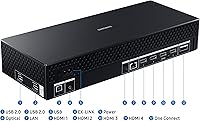
The combination of USB 2.0 and USB 3.0 ports provides enough peripheral connections for a typical gaming desk without requiring a separate hub, and the port layout on the rear panel is reasonably accessible given the stand design.
A few buyers coming from ultrawide or multi-monitor setups note that the HDMI and DisplayPort options, while adequate, leave less flexibility for daisy-chaining or complex multi-device configurations than they hoped for at this price point.

Suitable for:

The Samsung 55-inch Odyssey Ark Curved Gaming Monitor is purpose-built for a specific kind of buyer — one who wants a single, large-format display that can anchor an entire setup without requiring a TV on the wall or a separate soundbar on the desk. Hardcore PC gamers who spend long sessions in immersive open-world or sim-style titles will feel the 1000R curve working in their favor, pulling peripheral vision into the experience in a way that standard flat monitors simply cannot. Sim racing and flight sim enthusiasts get the added bonus of Cockpit Mode, which lets the screen pivot into a vertical orientation for a stacked, multi-panel feel on one display. Content creators and streamers managing multiple windows, feeds, or inputs simultaneously will find the Multi View feature genuinely useful on a screen this size. Home office users who refuse to own separate devices for work and entertainment will also find this curved gaming display a compelling all-in-one solution.
Not suitable for:

The Samsung 55-inch Odyssey Ark Curved Gaming Monitor is a difficult recommendation for anyone without ample, dedicated desk space — at nearly 93 pounds and over 46 inches wide, this curved gaming display is a serious physical commitment that many standard desks simply cannot accommodate safely or comfortably. Buyers who game or work in rooms with significant natural light or overhead lighting should think carefully, as the glossy panel surface can produce distracting reflections that undercut the otherwise excellent image quality. Competitive esports players chasing the absolute lowest input lag on a smaller, faster panel will find better-tuned options at a lower price point. Anyone expecting a true home theater audio experience from the built-in speakers will be disappointed — the onboard sound punches well above typical monitor audio, but it does not replace a proper speaker system. Budget-conscious shoppers and those who need only a straightforward productivity display will find the premium pricing hard to justify given the niche features they are unlikely to use.

Specifications

  • Screen Size: The display measures 55 inches diagonally, placing it firmly in large-format territory that bridges the gap between a traditional monitor and a living room TV.
  • Panel Type: A Quantum Mini LED panel provides precise local dimming zones for deeper blacks and brighter highlights compared to conventional LED-backlit displays.
  • Resolution: Native 4K UHD resolution (3840x2160 pixels) delivers sharp, detailed imagery across the entire 55-inch surface.
  • Refresh Rate: The panel runs at up to 165Hz, producing smooth motion that benefits both fast-paced competitive gaming and high-frame-rate cinematic content.
  • Response Time: A 1ms response time minimizes ghosting and motion blur, keeping moving objects crisp during high-speed gameplay.
  • Curvature: The 1000R curve radius is one of the most aggressive available on a consumer display, designed to match the natural curvature of human vision.
  • Aspect Ratio: The standard 16:9 aspect ratio ensures broad compatibility with PC games, streaming platforms, and productivity software without letterboxing.
  • Audio System: Six integrated drivers — four corner speakers and two central woofers — produce 60 watts of total output in a 2.2.2 channel configuration with Dolby Atmos support.
  • Low-Frequency: The onboard audio system reaches down to 45Hz, which is notably deep for built-in monitor speakers and delivers perceptible bass without a subwoofer.
  • Multi View: Up to four independent input sources can be displayed simultaneously across the screen, making it functional as a multi-device workstation on a single panel.
  • Connectivity: The monitor includes two USB 2.0 ports and two USB 3.0 ports for peripheral connections alongside standard video inputs.
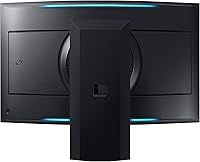
  • Cockpit Mode: The stand supports height adjustment, tilt, and a full 90-degree pivot, allowing the screen to rotate vertically into a stacked cockpit-style orientation.
  • Smart Platform: Samsung's built-in smart TV operating system provides native access to streaming apps including YouTube and Samsung TV Plus without an external media device.
  • Surface Finish: The screen uses a glossy panel surface, which enhances color vibrancy and contrast but is more susceptible to reflections in bright environments.
  • Dimensions: The overall unit measures approximately 46.3 inches wide, 43.4 inches tall, and 15 inches deep with the stand attached.
  • Weight: The fully assembled unit weighs approximately 92.6 pounds, requiring a sturdy, purpose-built desk surface and ideally two people for installation.
  • Power: The display runs on AC power at 240 volts, so users should verify their outlet and cable configuration before setup.
  • Eclipse Lighting: Ambient lighting built into the rear of the display projects a soft glow behind the screen, reducing eye strain during long sessions in dark rooms.

Related Reviews
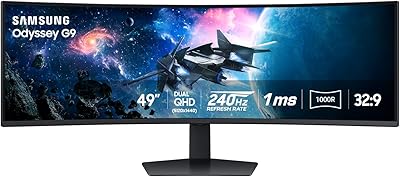
Samsung Odyssey G9 49-inch Curved Gaming Monitor
82%
93%
Visual Clarity
90%
Immersion & Curvature
94%
Gaming Performance (FPS)
60%
Ease of Setup
88%
Build Quality
More
Samsung Odyssey G55C 27-inch Curved Gaming Monitor

76%
91%
Image Sharpness
89%
Refresh Rate & Motion
84%
Curvature & Immersion
86%
Value for Money
58%
HDR Performance
More
Samsung S39C 27-Inch Curved Gaming Monitor
75%
83%
Picture Quality & Color Accuracy
88%
Curvature & Immersion
61%
Refresh Rate & Gaming Performance
86%
Eye Comfort & Long-Session Usability
79%
Build Quality & Aesthetics
More
Samsung Odyssey G55C 32″ Curved Gaming Monitor

78%
88%
Image Sharpness & Resolution
84%
Refresh Rate & Motion Clarity
91%
Curvature & Immersion
93%
Value for Money
57%
HDR Performance
More
Samsung 32-Inch S39C Curved Gaming Monitor
83%
88%
Display Quality
91%
Value for Money
86%
Eye Comfort
89%
Ease of Setup
85%
Build Quality
More
Samsung CRG5 24-Inch Curved Gaming Monitor
78%
88%
Value for Money
83%
Image Quality
81%
Gaming Performance
86%
Curvature & Immersion
84%
FreeSync Performance
More
SAMSUNG Odyssey G50A 27-Inch Gaming Monitor
84%
94%
Gaming Performance
89%
Display Quality
86%
Ergonomics and Adjustability
92%
Color Accuracy
91%
G-Sync Compatibility
More
Samsung 32″ Odyssey G65B Curved Gaming Monitor

84%
91%
Display Quality
93%
Gaming Performance
87%
Curvature Immersion
88%
HDR Performance
90%
Response Time
More
Samsung Odyssey G50D 27-Inch QHD Gaming Monitor
87%
91%
Display Quality
94%
Performance (Refresh Rate/Response Time)
88%
Ergonomics and Comfort
87%
HDR Support
70%
Color Accuracy
More
Samsung Odyssey G3 24-Inch FHD Gaming Monitor
83%
91%
Display Quality
94%
Gaming Performance (Refresh Rate/Response Time)
88%
Ease of Setup
85%
Ergonomics & Adjustability
89%
AMD FreeSync Performance
More

FAQ

It works fine for everyday PC use — browsing, productivity apps, video calls — but the sheer size makes it overkill for standard office tasks at typical desk distances. Most people who buy it use gaming or media consumption as the primary driver, with productivity as a secondary benefit. If gaming is not part of your use case, a smaller display will likely serve you better.

Glare is a real concern with this curved gaming display. The glossy finish enhances color and contrast, but it picks up reflections from windows and overhead lights noticeably. If your desk sits directly in front of or beside a window, you will likely deal with frustrating reflections during daytime use. Blackout curtains or repositioning the desk helps, but it is worth factoring into your room setup before purchasing.

Honestly, most standard desks will struggle. The assembled unit is over 46 inches wide and nearly 15 inches deep at the base, and it weighs close to 93 pounds. A dedicated gaming desk rated for heavy loads is strongly recommended. Many owners end up purchasing a new desk alongside it.

Yes, it connects to current-generation consoles via HDMI. However, the 165Hz refresh rate advantage is largely wasted on consoles since PS5 and Xbox Series X cap out at 120fps in supported titles. You will still get excellent 4K picture quality, but the high-refresh gaming benefit is really a PC feature.

Cockpit Mode pivots the entire screen 90 degrees into a vertical orientation, which creates a tall, stacked display that sim racing and flight sim players use to simulate instrument panels. In practice, it is a genuinely cool feature for that specific audience. If you are not into sim-style gaming, you will probably never rotate it, and that is fine — it does not affect the regular horizontal experience at all.

The onboard audio is impressive by monitor standards — it produces real bass and fills a room better than you might expect. That said, a quality soundbar in a similar price range will outperform it in clarity, soundstage width, and overall depth. Think of the built-in audio as a genuinely usable convenience feature rather than a replacement for a proper audio setup.

Yes, this curved gaming display supports AMD FreeSync Premium Pro, which dynamically syncs the refresh rate to your GPU output to eliminate screen tearing. NVIDIA G-Sync Compatible certification means it also works with NVIDIA cards, though without the full G-Sync hardware module.

Samsung has released firmware updates since launch that resolved some of the early issues, but the smart TV platform on large gaming monitors is generally less polished than it is on Samsung's dedicated TV lineup. Minor quirks in the interface and occasional app stability issues have been reported by a portion of users. Keeping the firmware updated through the settings menu is the best way to stay ahead of known problems.

For 4K content, a seating distance of roughly 3.5 to 5 feet is comfortable and allows you to appreciate the resolution without individual pixels becoming visible. The 1000R curve is specifically designed to feel natural at shorter desk distances, so sitting closer than you would with a TV is intentional and part of the immersion design. Personal preference varies, so if possible, try to test the distance before committing to a desk configuration.

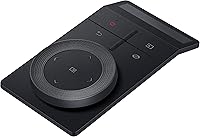
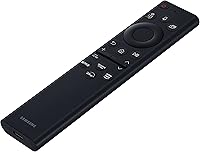
Samsung's Multi View is reasonably accessible through the on-screen menu and the included remote. You can split the screen between two, three, or four inputs and resize the windows to a degree. It is not as flexible as a dedicated multi-monitor software solution, but for switching between a PC, a console, and a streaming source on one screen, it works without major hassle once you have it configured the first time.

Where to Buy