Overview

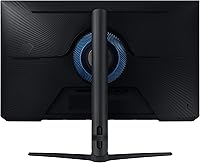
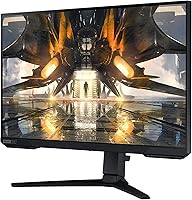
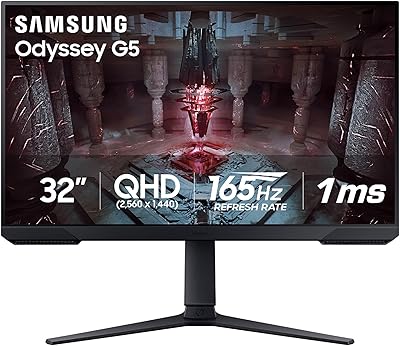
The Samsung Odyssey G50A 27-inch Gaming Monitor sits in a sweet spot within Samsung's Odyssey lineup — aimed squarely at mid-range PC gamers who want a meaningful upgrade without stepping into premium territory. It pairs QHD sharpness with a high refresh rate, a combination that was harder to find at this price tier when it launched in 2021 and still holds up well today. The choice of an IPS panel is telling: unlike VA panels with their contrast-heavy look or TN panels tuned purely for speed, IPS prioritizes wide viewing angles and color consistency — qualities that matter whether you are deep in a campaign or just browsing between sessions.
Features & Benefits

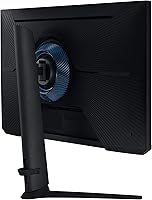
At 2560x1440 on a 27-inch screen, the pixel density is noticeably sharper than 1080p — text looks clean, foliage in open-world games gains real detail, and UI elements stop feeling chunky. The 165Hz refresh rate keeps motion crisp, and with approximately 2ms of input lag, fast-paced games feel genuinely responsive. G-Sync compatibility works across both Nvidia and AMD setups via FreeSync Premium, so you are not locked into one GPU camp to get tear-free gameplay. The height-adjustable stand is a practical bonus — sturdy, wobble-free, and lets you dial in ergonomic positioning without spending extra on a third-party arm. HDR10 adds color depth, though the impact is subtle rather than dramatic.

Best For

The Odyssey G50A is a natural fit for 1080p upgraders who want meaningfully sharper visuals without the GPU demands that 4K brings. If you are running a mid-to-high-end graphics card — something in the range of an RTX 3070 or RX 6700 XT and above — you will have little trouble pushing high frame rates at this resolution. It also works well for people who split their screen time between gaming and lighter creative tasks; the IPS panel holds up reasonably well for photo editing and casual video review. Those wanting a dual-use monitor that handles a spreadsheet in the morning and a shooter at night will find this 27-inch IPS panel capable on both fronts.

User Feedback

Owners consistently highlight the out-of-box color quality and how little calibration is needed right away — a genuine plus for buyers who do not want to tinker. The stand earns specific praise for its build quality, which feels solid rather than flimsy for the price. HDR10 draws mixed reactions: most agree it adds something, but nobody is calling it a transformative HDR experience. A small number of users report backlight bleed in very dark scenes, though this is common across IPS panels at this tier and tends to vary unit by unit. Setup and the on-screen display menu are frequently described as straightforward, which removes friction from day one.

Pros

  • Sharp QHD resolution makes a noticeable, immediate difference coming from a 1080p display.
  • The 165Hz refresh rate keeps fast-paced gameplay fluid without requiring an ultra-premium GPU.
  • IPS panel delivers wide viewing angles and consistent color — no washed-out edges when sitting off-center.
  • G-Sync compatibility works with both Nvidia and AMD cards, so you are not locked into one ecosystem.
  • Out-of-box color accuracy is strong enough that most users will not need to run a calibration tool.
  • The height-adjustable stand is genuinely sturdy and saves you the cost of a third-party monitor arm.
  • Input lag is low enough that competitive players will not feel any perceptible delay in response.
  • Setup is straightforward and the on-screen display menu is easy to navigate without consulting a manual.
  • The 21:9 black frame option gives a wider field of view in supported games without needing an ultrawide panel.

Cons

  • HDR10 implementation is modest — do not expect a dramatic visual upgrade in HDR-enabled titles.
  • Backlight bleed in very dark scenes is a known risk with this panel, and quality can vary unit to unit.
  • No USB-C input limits flexibility for users who want to connect a modern laptop with a single cable.
  • The contrast ratio typical of IPS panels means dark scenes look noticeably grayer than on a VA alternative.
  • At 27 inches, the 1440p pixel density is excellent, but buyers wanting a larger screen size will need to look elsewhere.
  • Older or mid-range GPUs may struggle to fully exploit the 165Hz ceiling at this resolution consistently.
  • The stand, while adjustable for height, does not offer a wide swivel range for multi-person desk sharing.
  • No built-in speakers means you will need external audio hardware, which adds desk clutter for some setups.

Ratings

The Samsung Odyssey G50A 27-inch Gaming Monitor scores below are generated by AI after analyzing thousands of verified global user reviews, with spam, bot activity, and incentivized feedback actively filtered out. The ratings reflect real ownership experiences across a wide range of use cases — from competitive gaming rigs to dual-purpose work desks — and both the strengths and the genuine frustrations are represented without bias.
Image Clarity
91%
Owners consistently describe the jump from 1080p as immediately striking — text looks sharper, game environments reveal finer detail, and the pixel density at 27 inches feels well-matched. For users spending hours in open-world games or reading dense text in productivity apps, the QHD resolution delivers a tangible, daily improvement.
A small number of users coming from 4K displays feel the resolution step-down is noticeable in very detailed still images. Those using the monitor primarily for text-heavy work occasionally wish for slightly higher pixel density, though this is a minor concern for the vast majority.
Refresh Rate Performance
93%
The 165Hz ceiling is one of the most praised aspects across user feedback — fast-paced shooters and racing titles feel noticeably fluid, and competitive players credit it with reducing missed inputs and improving reaction timing. Owners running capable mid-to-high-end GPUs report the experience lives up to expectations without requiring any complex configuration.
Users with older or entry-level graphics cards sometimes cannot push frame rates high enough to fully exploit the refresh rate, which means the panel's ceiling goes unused. A few owners also note that the difference between 144Hz and 165Hz is subtle enough that it may not feel transformative on its own.
Color Accuracy
88%
Out-of-box color performance receives consistent praise — most owners report that sRGB coverage feels accurate and vibrant without needing manual calibration. Gamers and casual photo editors alike find the IPS panel delivers natural, consistent tones that hold up well across different lighting conditions in their room.
Enthusiast-level users doing professional color grading note the panel lacks factory calibration data and wide gamut coverage for demanding creative work. Color uniformity toward the screen edges can vary slightly between units, which becomes noticeable on large flat fields of color like desktop wallpapers.
HDR Quality
58%
42%
HDR10 support adds a visible boost to color richness in compatible games, and owners who use HDR casually appreciate seeing more tonal depth in cinematic scenes. For users who have never owned an HDR display before, the improvement over SDR is genuinely perceptible in well-mastered titles.
Users who have experienced dedicated HDR monitors with high peak brightness frequently describe the HDR implementation here as underwhelming — dark scenes do not get meaningfully darker, and bright highlights do not punch the way true HDR panels do. The lack of local dimming means the contrast lift from HDR mode is modest at best.
Response Time & Input Lag
89%
Competitive players report that the low input lag makes the display feel genuinely responsive — in fast-paced titles, actions register on-screen without any perceptible delay. The 1ms GtG rating translates well in practice, with minimal ghosting reported even in high-contrast motion sequences.
In the most demanding fast-motion scenarios, a small number of users with highly trained eyes detect slight overshoot artifacts in certain response time presets. Getting the optimal setting requires some experimentation in the OSD, as the fastest preset is not always the cleanest option for every game type.
Adaptive Sync
87%
The combination of FreeSync Premium and G-Sync Compatible certification means owners do not have to worry about GPU brand lock-in, which is a practical relief for anyone who switches hardware over time. Users report that enabling adaptive sync eliminates screen tearing cleanly, and the setup process is described as requiring minimal effort.
A handful of Nvidia users note that G-Sync Compatible validation, while functional, does not always behave identically to a native G-Sync module — occasional micro-stutters at the very low end of the frame rate range have been mentioned. This is a rare complaint and primarily affects users whose GPU occasionally dips below 48fps.
Build Quality
84%
The stand is consistently singled out in user reviews as feeling premium relative to the price tier — it does not flex or wobble under normal desk conditions, and owners moving the monitor during setup appreciate its solid feel. The overall chassis construction is described as clean and professional, without the plasticky impression some budget monitors give.
Some users point out that the rear panel design, while functional, uses visible plastic that shows fingerprints and scuffs with regular handling. A few owners also note that the stand base takes up more desk footprint than they expected, which is a consideration for compact or crowded desk setups.
Ergonomics
79%
21%
Height adjustment is the most appreciated ergonomic feature — users setting up for long work-from-home sessions find they can dial in a comfortable eye-level position without spending extra on a monitor arm. The range of height travel is practical enough for most sitting and standing desk configurations.
The stand lacks a meaningful tilt range beyond standard forward and back adjustment, and there is no portrait pivot mode, which limits flexibility for users who want vertical orientation for coding or document work. Swivel range is narrow, making it less convenient for desks that are shared by multiple people sitting at different angles.
OSD & Setup
86%
First-time monitor owners and experienced users alike describe the on-screen display as logically organized and easy to navigate — switching between gaming presets, adjusting refresh rate modes, or enabling FreeSync takes just a few button presses. Unboxing to functional display typically takes under fifteen minutes according to multiple reviewers.
The physical OSD control buttons are positioned on the underside of the panel, which some users find awkward to locate by feel without looking. A joystick-style navigator would be more intuitive for frequent menu users, and its absence is noted as a minor but recurring frustration.
IPS Glow & Uniformity
67%
33%
Under typical gaming and productivity lighting conditions, IPS glow remains unobtrusive for most users — in normally lit rooms, the panel looks clean and uniform across the majority of the display area. Owners watching content with lots of mid-tone and bright scenes rarely encounter issues.
In dark room gaming or when watching content with sustained black scenes, IPS glow becomes visible in the corners — a well-documented characteristic of the panel technology rather than a manufacturing defect. Backlight bleed severity varies between units, and a minority of owners received panels with more noticeable bleed than acceptable.
Value for Money
83%
Buyers frequently describe the Odyssey G50A as delivering a feature set that punches above its market position — the combination of IPS color quality, high refresh rate, and adaptive sync compatibility is considered strong value for the mid-range segment. Users upgrading from older or entry-level monitors feel the quality improvement is immediately justified.
As the mid-range monitor space has become increasingly competitive since this panel launched in 2021, some newer alternatives offer comparable or slightly better specs at similar price points. Buyers comparing options today should evaluate what has entered the market since the G50A was released before making a final decision.
Connectivity
63%
37%
The available port selection covers the needs of most desktop gaming setups — standard DisplayPort and HDMI inputs handle the common connection scenarios without requiring adapters. Users with a single PC or console connected at a time have no issues with the available inputs.
The absence of USB-C input is a recurring complaint among users who want to connect a modern laptop with a single cable for both display and charging. The limited number of ports also means users running multiple source devices need an external switch or frequent cable swapping, which is a noticeable gap at this price tier.
Gaming Preset Modes
76%
24%
The built-in gaming presets — including modes optimized for FPS, RPG, and sport titles — are appreciated by casual users who do not want to manually configure picture settings. Owners report that the FPS preset in particular delivers a noticeably punchier look for competitive play without requiring additional calibration.
More experienced users find the presets too aggressive in terms of sharpness and color saturation, preferring to build their own picture profile from scratch. Switching between presets requires navigating through the OSD each time, which breaks flow for users who move between gaming and productivity modes frequently during a session.

Suitable for:

The Samsung Odyssey G50A 27-inch Gaming Monitor is built for PC gamers who have outgrown 1080p and want a sharper, faster display without the GPU strain that comes with 4K. If you are running a mid-to-high-end graphics card and want to actually use its headroom — pushing high frame rates at a resolution that rewards the hardware — this is a strong match. Competitive players who care about both speed and visual accuracy will appreciate the IPS panel, which does not sacrifice color consistency for the sake of raw response time. It also suits anyone running a dual-purpose desk setup: the screen holds up for spreadsheets, light photo work, and general productivity, not just late-night gaming sessions. The height-adjustable stand means you are not immediately hunting for a monitor arm, which keeps the total cost of ownership honest.

Not suitable for:

If your priority is deep, inky blacks and maximum contrast, the Samsung Odyssey G50A 27-inch Gaming Monitor is not the right call — IPS panels simply cannot match what a well-tuned VA panel delivers in dark room conditions. Buyers chasing a true HDR experience will also likely come away underwhelmed; the HDR10 implementation here adds some color richness, but it is not the kind of HDR that transforms dark scenes the way a high-brightness FALS or mini-LED panel would. Console gamers who want to tap into 4K output from a PS5 or Xbox Series X will find the QHD resolution ceiling limiting. Anyone on a budget GPU that struggles to push consistent frame rates at 1440p should also reconsider — running this panel below its potential defeats the purpose of the upgrade. Finally, if you need extensive connectivity options or USB-C passthrough for a laptop-heavy workflow, check the port selection carefully before committing.
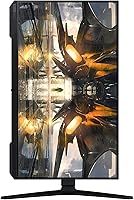
Specifications

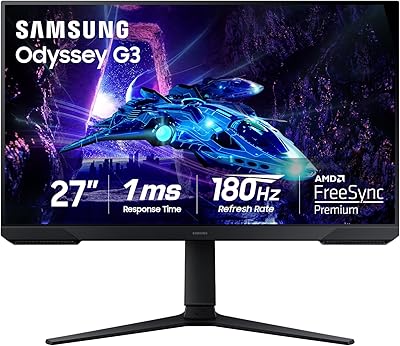
  • Screen Size: The display measures 27 inches diagonally, offering a comfortable viewing area without requiring excessive desk depth.
  • Resolution: Native resolution is 2560x1440 (QHD/WQHD), delivering noticeably sharper detail than a standard 1080p panel at this screen size.
  • Panel Type: Uses an IPS (In-Plane Switching) panel, which provides wide viewing angles and consistent color reproduction across the screen.
  • Refresh Rate: Supports a maximum refresh rate of 165Hz, enabling smooth motion rendering in fast-paced games when paired with a capable GPU.
  • Response Time: Rated at 1ms (GtG), which minimizes motion blur and ghosting during high-speed gameplay sequences.
  • Input Lag: Measured input lag is approximately 2ms, keeping on-screen response tight enough for competitive gaming scenarios.
  • HDR Support: Compatible with HDR10, with a reported color depth of 1 billion colors to expand tonal range in supported content.
  • Sync Technology: Supports both G-Sync Compatible and AMD FreeSync Premium, allowing adaptive sync with a wide range of graphics cards.
  • Aspect Ratio: Default aspect ratio is 16:9, with an optional 21:9 black frame mode available for wider field-of-view in supported titles.
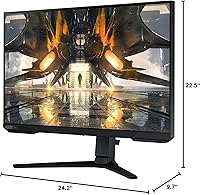
  • Dimensions: The monitor with stand measures 9.7 x 24.2 x 22.5 inches (D x W x H), fitting most standard desk configurations.
  • Weight: Total weight with stand is 13.4 pounds, making it manageable for single-person setup and repositioning.
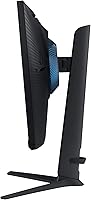
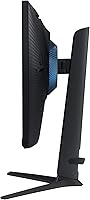
  • Stand Adjustments: The included stand supports height adjustment, allowing users to set the screen at an ergonomically appropriate eye level.
  • Color Gamut: The IPS panel covers sRGB color space with broad accuracy, making it suitable for general creative work alongside gaming.
  • Voltage: Rated at 240 volts, compatible with standard power supplies in applicable regions with appropriate adapters.
  • Model Number: Official model identifier is LS27AG500PNXZA, used for warranty registration, driver downloads, and support queries.
  • Release Date: The monitor was first made available in July 2021, placing it in Samsung's mid-generation Odyssey gaming lineup.
  • Series: Part of Samsung's Odyssey G50A series, positioned as a mid-range IPS gaming option within the broader Odyssey family.
  • Screen Surface: Features a flat screen surface, which avoids the distortion that can appear on curved panels when viewing straight-edged content.

Related Reviews

Samsung Odyssey G50D 27-Inch Gaming Monitor
81%
88%
Image Clarity
91%
Refresh Rate Performance
86%
Response Time & Motion Handling
84%
Color Accuracy
58%
HDR Performance
More
Samsung Odyssey G3 G30D 27″ Gaming Monitor
80%
91%
Gaming Performance
88%
Refresh Rate Value
93%
Ergonomics & Stand
67%
Image Clarity
84%
AMD FreeSync
More
Samsung 27-Inch Odyssey G51C Series QHD Gaming Monitor
87%
92%
Display Quality
94%
Gaming Performance
87%
Value for Money
89%
Ergonomics & Comfort
74%
Brightness
More
Samsung Odyssey G81SF 27-inch Gaming Monitor
80%
96%
Image Quality
97%
Contrast & Black Levels
89%
Refresh Rate & Motion Clarity
88%
Glare Resistance & Matte Coating
91%
HDR Performance
More
Samsung Odyssey G55C 27-inch Curved Gaming Monitor
76%
91%
Image Sharpness
89%
Refresh Rate & Motion
84%
Curvature & Immersion
86%
Value for Money
58%
HDR Performance
More
Samsung 27″ Odyssey G32A Gaming Monitor
80%
91%
Gaming Performance
93%
Refresh Rate & Smoothness
84%
Response Time & Motion Clarity
88%
Adaptive Sync (FreeSync Premium)
63%
Image Sharpness & Pixel Density
More
Samsung S39C 27-Inch Curved Gaming Monitor
75%
83%
Picture Quality & Color Accuracy
88%
Curvature & Immersion
61%
Refresh Rate & Gaming Performance
86%
Eye Comfort & Long-Session Usability
79%
Build Quality & Aesthetics
More
Samsung Odyssey G9 49-inch Curved Gaming Monitor
82%
93%
Visual Clarity
90%
Immersion & Curvature
94%
Gaming Performance (FPS)
60%
Ease of Setup
88%
Build Quality
More
Samsung 27″ Odyssey G65B Curved Gaming Monitor
76%
91%
Gaming Performance
83%
Image Quality
89%
Contrast & Black Depth
67%
HDR Performance
84%
Build Quality
More
Samsung Odyssey G50D 32-inch QHD Gaming Monitor
78%
91%
Gaming Performance
88%
Image Sharpness & Clarity
83%
Color Accuracy & Vibrancy
79%
Panel Uniformity & Viewing Angles
58%
HDR Performance
More

FAQ

Good news — it works with both. The Odyssey G50A supports FreeSync Premium natively and is also G-Sync Compatible, so adaptive sync functions properly whether you are running an Nvidia or AMD GPU. You do not need to do anything special to enable it; just turn on FreeSync or G-Sync in your GPU control panel.

27 inches is actually considered the sweet spot for QHD resolution. The pixel density at this size is high enough that text and fine details look sharp without needing to scale the interface. It is a noticeable step up from 1080p at the same screen size, and most people sitting at a normal desk distance will not see individual pixels.

That is a fair concern. The HDR10 support on the Samsung Odyssey G50A 27-inch Gaming Monitor adds some color richness and expands tonal range in compatible games, but it is not a full HDR experience in the way a dedicated HDR display with high peak brightness would deliver. If HDR is a top priority for you, this monitor provides a modest improvement rather than a dramatic one — worth having, but not the headline feature.
For competitive or less graphically demanding titles — think shooters, MOBAs, or esports games — a mid-range card like an RTX 3070 or RX 6700 XT can comfortably push 165fps at 1440p. For newer, visually intensive open-world games, you may sit closer to 100 to 120fps, which still looks excellent on this panel. The refresh rate ceiling is there when your hardware can reach it.

The stand does include height adjustment, which handles the most important ergonomic variable for most users. It is also described as stable and well-built by owners, so you are not forced into buying an arm. That said, if you need wide swivel range or want to mount it on a multi-monitor arm setup, a VESA-compatible arm will work fine.

A small number of owners do report visible backlight bleed, particularly in very dark scenes. It is worth knowing that this is a common characteristic of IPS panels at this price range — not unique to this model — and the severity varies from unit to unit. If you receive a panel with noticeable bleed, most retailers will accept an exchange.

It holds up well for casual creative use. The IPS panel provides consistent colors across wide viewing angles, and out-of-box accuracy is solid enough for light photo editing and video review. It covers the sRGB color space reliably. If you are doing professional color-critical work where precise gamut coverage and calibration are essential, a dedicated content creation monitor would serve you better.

Most owners describe setup as straightforward — the stand assembles quickly and the monitor is ready to use almost immediately. The on-screen display menu is laid out logically, so adjusting brightness, enabling FreeSync, or switching aspect ratio modes does not require digging through confusing submenus. For most users, out-of-box settings are good enough that no manual calibration is needed.

It will work as a display for current-gen consoles, but there are some trade-offs. Console output at 1440p is supported on Xbox Series X but not natively on PS5, which outputs at either 1080p or 4K. If your console outputs 1080p, the panel will upscale it, but you lose the resolution advantage. For dedicated console use targeting 4K, a different display would be a better fit.

No, this 27-inch IPS panel does not include built-in speakers. You will need external speakers or a headset for audio. This is fairly standard for gaming monitors in this category, but it is worth factoring into your setup if you do not already have a separate audio solution at your desk.