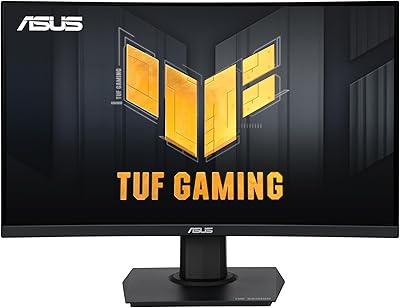
Overview

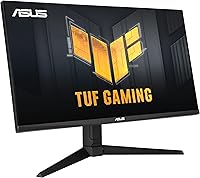
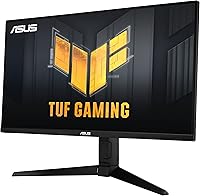
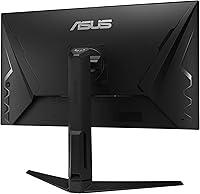
The ASUS TUF Gaming VG28UQL1A 28-inch Gaming Monitor lands in a comfortable spot between budget 4K screens and premium enthusiast panels — capable enough for serious play, grounded enough to stay practical. At 28 inches, the screen offers genuine immersion without overwhelming a typical desk setup, and the Fast IPS panel brings noticeably better color consistency than VA alternatives, which can shift dramatically when viewed off-axis. Launched in 2021, it still holds its own today, largely because of hardware choices that anticipated where console gaming was heading. Think of it as a strong all-rounder — not a hyper-specialized esports tool, not a color-critical production display, but exactly the broad competence most buyers actually need.
Features & Benefits

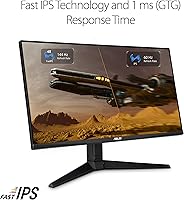
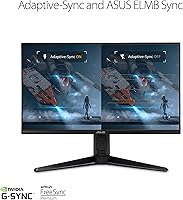
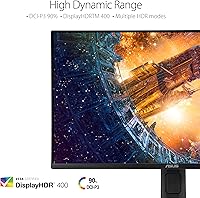
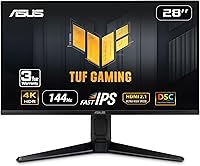
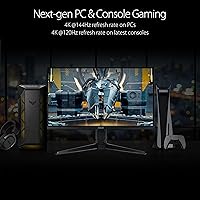
The combination of 4K resolution and 144Hz on a Fast IPS panel is more meaningful than raw numbers suggest — this panel type cuts pixel transitions faster than traditional IPS without the color washout common in TN displays. The HDMI 2.1 port is where this 28-inch 4K panel genuinely stands out: it delivers native 4K 120Hz to a PS5 or Xbox Series X with full 4:4:4 chroma, something many competing monitors still cannot claim. ELMB Sync runs motion blur reduction and variable refresh simultaneously, keeping fast scenes sharp across both AMD and NVIDIA setups. HDR performance is honest — DisplayHDR 400 is adequate for most games, but buyers coming from OLED or mini-LED panels should set realistic expectations before purchasing.

Best For

This ASUS TUF monitor makes the most sense for two distinct groups: console players who want to run a PS5 or Xbox Series X at full 4K 120Hz without signal compromises, and PC gamers who split time between competitive shooters and story-driven titles on a single display. The 28-inch size at 4K produces a high pixel density that rewards sitting roughly 2.5 to 3 feet from the screen — close enough to appreciate the resolution, far enough to avoid fatigue. Casual creators handling lighter color work alongside heavy gaming will also find the 90% DCI-P3 coverage useful. Those chasing peak brightness or deep local-dimming HDR should look at higher-tier options.

User Feedback

Across more than 2,000 ratings, the VG28UQL1A holds a 4.3-star average, and the reasons behind that score are fairly consistent. Buyers regularly highlight out-of-box color accuracy and the real-world value of HDMI 2.1 for console connections — two benefits that pay off immediately without calibration. Owners upgrading from 60Hz panels tend to notice the motion clarity straight away. On the downside, the OSD navigation draws repeated criticism for being harder to use than it should be at this price tier. A portion of users also report mild backlight bleed along panel edges, which is typical IPS behavior rather than a defect. HDR, a few buyers note, underwhelms if your reference point is anything above entry-level performance.

Pros

  • HDMI 2.1 delivers true 4K 120Hz to PS5 and Xbox Series X with no chroma subsampling — a genuine advantage over most rivals.
  • Fast IPS panel provides accurate, consistent colors without the off-axis shift that plagues VA alternatives.
  • ELMB Sync runs motion blur reduction and variable refresh simultaneously, which remains uncommon at this price tier.
  • Works natively with both AMD and NVIDIA GPUs through dual FreeSync Premium and G-SYNC Compatible certification.
  • Strong out-of-box color accuracy means most buyers can use it immediately without running a calibration routine.
  • 90% DCI-P3 coverage makes this 28-inch 4K panel a reasonable dual-purpose screen for casual creative work alongside gaming.
  • Matte anti-glare coating handles ambient light well, reducing the need to manage room lighting carefully.
  • Variable Overdrive adjusts pixel response to match the current frame rate, keeping artifacts under control at lower speeds.
  • At 28 inches, the screen is immersive enough for gaming without demanding a large desk footprint.

Cons

  • DisplayHDR 400 compliance is entry-level — do not expect deep blacks or punchy highlights from HDR content.
  • The OSD control system is more confusing than it should be, especially for buyers new to ASUS monitors.
  • Backlight bleed along panel edges is reported by a portion of users and is a known IPS trade-off at this size.
  • 144Hz is capable but falls short for players specifically chasing 240Hz or higher for fast-paced competitive titles.
  • A single USB 2.0 and single USB 3.0 port is a lean hub offering compared to monitors with more generous connectivity.
  • At 15.19 pounds, the VG28UQL1A is on the heavier side, which can complicate single-person mounting on a monitor arm.
  • HDR content from streaming services will appear modest at best — this is primarily a gaming display, not a home cinema screen.
  • Buyers sensitive to panel uniformity may encounter minor brightness inconsistencies across the screen, a typical IPS limitation.

Ratings

The scores below reflect an AI-driven analysis of verified global user reviews for the ASUS TUF Gaming VG28UQL1A 28-inch Gaming Monitor, with spam, bot-generated, and incentivized submissions actively filtered out to protect accuracy. The results capture what real buyers consistently praise and where genuine frustrations surface — nothing is smoothed over to protect the product's image. Both the standout strengths and the honest trade-offs are reflected transparently in every category score.

Image Clarity
91%
At 4K on a 28-inch panel, the pixel density is high enough that individual pixels are invisible at any realistic desk distance, and users consistently describe text, fine textures, and environmental detail in open-world games as noticeably sharper than their previous 1440p or 1080p displays. The Fast IPS panel maintains color accuracy across wide viewing angles, so clarity holds even when the monitor is positioned slightly off-center.
The very high pixel density means that at distances beyond 3.5 feet, some of the resolution advantage is less perceptible, and buyers who sit farther back may not extract the full benefit over a 1440p alternative. A handful of users also noted that Windows scaling at 4K required some initial setup time to get applications rendering at the right sharpness.
Motion Performance
88%
The combination of 144Hz, 1ms GTG response, and ELMB Sync produces smooth, well-defined motion that users upgrading from 60Hz panels describe as a dramatic improvement — particularly in fast shooters and racing titles where blur previously made tracking difficult. Variable Overdrive further reduces pixel overshoot artifacts when frame rates dip, keeping visuals clean across a wide performance range.
At 144Hz, this monitor is competitive but not class-leading for pure esports use, and players accustomed to 240Hz panels will notice a difference in the very fastest moments of competitive gameplay. ELMB Sync, while effective, slightly reduces peak brightness when active, which a small number of users found distracting in darker game environments.
Console Compatibility
93%
The HDMI 2.1 port is the single most praised feature among console users — PS5 and Xbox Series X both output native 4K 120Hz with full 4:4:4 chroma, meaning no color compression or resolution compromise, which is genuinely rare at this price tier. Buyers who specifically purchased the VG28UQL1A for console gaming report immediate satisfaction with the signal quality and setup simplicity.
Only one of the HDMI ports is version 2.1, so users running multiple HDMI 2.1 devices simultaneously will need a switching solution. A small number of users also noted that getting 4K 120Hz on PS5 required verifying HDMI cable quality, as older high-speed cables can silently limit bandwidth.
Color Accuracy
83%
Out-of-box color performance earns consistent praise, with reviewers noting that skin tones, foliage, and game environments look natural without requiring an immediate calibration session. The 90% DCI-P3 coverage gives this 28-inch 4K panel enough color depth to handle casual photo editing and content creation alongside gaming without feeling like a compromise.
The panel is not factory calibrated to a specific color standard, and users doing serious professional work report that delta-E values straight from the box are acceptable rather than exceptional. Buyers migrating from a wide-gamut professional display may find the color volume underwhelming compared to higher-tier production monitors.
HDR Performance
58%
42%
HDR mode does add visible improvement to compatible games, particularly in scenes with a mix of bright highlights and shadow detail, and users without a premium HDR reference point generally describe the effect as a positive addition. The 90% DCI-P3 coverage means HDR content at least benefits from a reasonably wide color gamut, even if peak brightness is limited.
DisplayHDR 400 is an entry-level certification and this shows plainly in dark scenes, where the absence of local dimming means black levels are constrained by standard IPS backlighting — a limitation that buyers coming from OLED or mini-LED displays find immediately obvious. Several reviewers explicitly recommend leaving HDR mode off for most content and enabling it only selectively for compatible titles.
Sync & Tear-Free Gaming
89%
Dual G-SYNC Compatible and FreeSync Premium certification means virtually any modern GPU — AMD or NVIDIA — gets a smooth, tear-free experience without needing to purchase a more expensive proprietary sync variant. Users with mid-range graphics cards appreciate that variable refresh rate stays active even when frame rates drop below the 48Hz floor, preventing sudden stuttering during demanding scenes.
G-SYNC Compatible certification, while broadly functional, does not match the precision of a full G-SYNC hardware module at the very edges of the refresh range, and a small number of NVIDIA users report occasional flicker when frame rates briefly dip very low. This is a minor concern for most buyers but worth noting for users with weaker GPUs who spend extended time below 60fps.
Build Quality
79%
21%
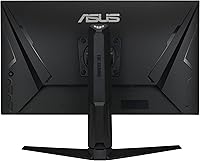
The monitor feels solid rather than flimsy — the stand has minimal wobble under normal desk conditions, and the cabinet construction uses materials that do not creak or flex during adjustment. The matte finish on the back panel and the overall aesthetic are restrained enough to fit into most desk setups without looking out of place.
A few users describe the plastic used on the stand and rear housing as feeling slightly below expectations given the price tier, particularly around the cable management routing points. The monitor also weighs just over 15 pounds, which, while not a daily concern, makes repositioning on a desk more effort than lighter competitors.
OSD & Controls
54%
46%
Once initial settings are saved and a preferred picture mode is selected, the OSD is rarely needed again, and users who push through the learning curve report the available adjustment options are thorough and genuinely useful for dialing in the image to personal preference.
The OSD joystick navigation is the most consistently criticized aspect of this ASUS TUF monitor — first-time ASUS users in particular describe the menu logic as non-obvious, with commonly needed settings buried deeper than expected. Several reviewers specifically called out that brightness adjustment, one of the most routine tasks, required more steps than competing monitors from other brands.
Panel Uniformity
67%
33%
In normal gaming and productivity use, the majority of buyers report no distracting uniformity issues, and the matte coating helps disguise minor brightness variation that would be more visible on a glossy surface. Most users running mixed dark and bright content simultaneously find the panel performs adequately without drawing attention to itself.
A minority of buyers report visible backlight bleed in the corners and edges when displaying dark or fully black screens, which is a known characteristic of IPS panels at this size rather than a manufacturing defect. Users who game extensively in pitch-dark rooms or watch a lot of dark cinematic content are more likely to notice this limitation compared to those with ambient lighting.
Connectivity & Ports
71%
29%
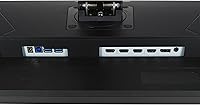
The port selection covers the essentials well — HDMI 2.1, DisplayPort 1.4 with DSC, and a small USB hub handle the majority of gaming and productivity setups without requiring an external hub for basic peripherals. Having both PC and console connections available simultaneously is a practical advantage for multi-device users.
The onboard USB hub is limited to one USB 2.0 and one USB 3.0 port, which is lean compared to monitors in a similar tier that offer three or four ports. Users with multiple peripherals — keyboard, mouse, headset, and a storage drive — will likely still need an external hub to avoid cable swapping.
Ergonomics & Adjustability
77%
23%
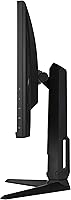
Height adjustment, tilt, and swivel are all available on the stock stand, which puts this monitor ahead of competitors that ship with tilt-only bases — a genuine quality-of-life advantage for users setting up a new workstation from scratch. The stand height range is generous enough to accommodate both seated and standing desk configurations for average users.
The stand does not support portrait pivot rotation, which is a limitation for developers or productivity users who sometimes prefer a vertical monitor orientation. At 15-plus pounds, repositioning the assembled unit is more physical effort than most competitors, and the monitor arm compatibility requires checking weight ratings carefully before purchasing an aftermarket arm.
Value for Money
81%
19%
Buyers consistently describe the feature-to-price ratio as strong, particularly when HDMI 2.1 console compatibility is the primary reason for purchase — finding that combination elsewhere at a similar price point requires meaningful compromise elsewhere in the spec sheet. Users who researched the category before buying frequently note that the VG28UQL1A compares favorably against rivals that charge more for a similar feature set.
The HDR performance gap relative to the price creates some buyer disappointment for those who prioritized HDR as a feature without researching the DisplayHDR 400 standard beforehand. A small number of reviews suggest that newer monitors entering the market offer incremental improvements in panel uniformity and HDR brightness for a comparable outlay, making timing an important consideration.
Setup & Out-of-Box Experience
82%
18%
Physical assembly of the stand is quick and requires no tools, and most users report the monitor is ready to use within minutes of unboxing. Default picture mode color accuracy is strong enough that many buyers skip calibration entirely and remain satisfied with the image quality from day one.
Getting the most from all features — particularly ELMB Sync combined with variable refresh rate, or configuring HDR correctly for specific use cases — requires navigating the OSD, which adds friction given the control scheme criticism noted elsewhere. First-time monitor buyers may find the initial feature configuration less guided than expected.

Suitable for:

The ASUS TUF Gaming VG28UQL1A 28-inch Gaming Monitor is built for the kind of buyer who wants one display to handle everything — console gaming on a PS5 or Xbox Series X at genuine 4K 120Hz, competitive PC gaming with smooth variable refresh, and the occasional creative project. The HDMI 2.1 connection is a practical asset here: console players do not have to accept compressed signal quality or dropped resolution the way they do with older HDMI standards. PC users running either an AMD or NVIDIA GPU will find full sync support without needing to pay a premium for a proprietary G-SYNC module. The 28-inch format at 4K is particularly well-suited for desk setups where sitting around 2.5 to 3 feet from the screen is realistic — that distance is where the pixel density rewards you without straining your eyes. Buyers stepping up from a 1080p or 1440p monitor will notice an immediate and meaningful jump in image clarity, especially in open-world games and cinematic titles where environmental detail matters.
Not suitable for:

If your priority is cutting-edge HDR performance, this 28-inch 4K panel will likely leave you underwhelmed. DisplayHDR 400 is an entry-level certification — it sets a floor, not a ceiling — and anyone accustomed to OLED contrast or a high-end mini-LED display will find the highlight rendering noticeably flat by comparison. Competitive esports players who run at the highest possible refresh rates and want a 240Hz or higher panel should also look elsewhere, since 144Hz, while capable, is not where this monitor competes at its best. Color professionals doing demanding print work or video grading that requires wider color volume or factory-calibrated accuracy will need a dedicated production display rather than relying on the VG28UQL1A. The 28-inch size, while practical for many desks, will feel modest to users who have grown accustomed to 32-inch or ultrawide formats and want a more immersive field of view for single-player gaming.

Specifications

  • Screen Size: The panel measures 28 inches diagonally, offering a balance between desk practicality and visual immersion suited to typical gaming distances of 2.5 to 3 feet.
  • Resolution: Native resolution is 3840 x 2160 pixels (4K UHD), delivering sharp detail at standard viewing distances without requiring upscaling.
  • Panel Type: Fast IPS technology provides faster pixel response than traditional IPS while retaining wide viewing angles and accurate color reproduction.
  • Refresh Rate: The display supports a maximum refresh rate of 144Hz, enabling smoother motion in fast-paced games compared to standard 60Hz or 75Hz panels.
  • Response Time: Rated at 1ms GTG (gray-to-gray), this response time helps minimize ghosting during rapid on-screen movement when paired with appropriate overdrive settings.
  • HDR Standard: Compliant with VESA DisplayHDR 400, which sets a baseline for brightness and tone mapping but does not include local dimming or advanced contrast control.
  • Color Gamut: Covers 90% of the DCI-P3 color space, making it adequate for casual creative work and vibrant gaming visuals, though not suited for professional color-critical production.
  • Sync Technology: Certified as both NVIDIA G-SYNC Compatible and AMD FreeSync Premium, ensuring tear-free gameplay across a wide range of graphics cards without needing a proprietary module.
  • HDMI Version: Includes one HDMI 2.1 port capable of carrying a native 4K 120Hz signal with full 4:4:4 chroma to PlayStation 5 and Xbox Series X without compression.
  • Motion Technology: ELMB Sync combines backlight strobing with variable refresh rate simultaneously, and Variable Overdrive adjusts pixel response dynamically to reduce overshoot at varying frame rates.
  • Aspect Ratio: Standard 16:9 widescreen aspect ratio, compatible with all conventional gaming resolutions and streaming formats without letterboxing under normal use.
  • Screen Surface: Matte anti-glare coating reduces reflections from ambient light sources, making the display more practical in brightly lit rooms than glossy alternatives.
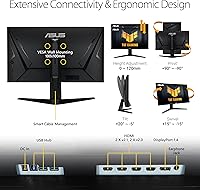
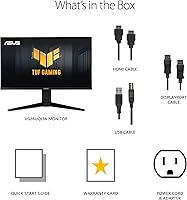
  • USB Ports: The monitor includes one USB 3.0 port and one USB 2.0 port, providing basic hub functionality for peripherals without requiring additional adapters.
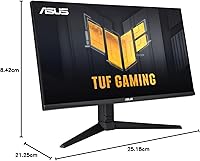
  • Dimensions: With the stand attached, the unit measures 21.25 x 25.18 x 8.42 inches (L x W x H), requiring moderate desk depth for stable placement.
  • Weight: The monitor weighs 15.19 pounds with the stand, which is worth noting for anyone planning to mount it on a third-party monitor arm rated for lighter loads.
  • Ergonomics: The included stand supports height adjustment, tilt, and swivel, allowing comfortable positioning without immediately requiring an aftermarket arm.
  • Display Inputs: Connectivity includes HDMI 2.1, DisplayPort 1.4 with DSC support, and additional HDMI ports, covering standard PC and console connection needs.
  • Power Supply: Rated for 240 volts input, compatible with standard international power infrastructure when used with an appropriate regional power adapter.

Related Reviews
ASUS TUF Gaming VG277Q1A 27″ Gaming Monitor
78%
93%
Refresh Rate Performance
88%
Motion Clarity & Response Time
91%
Adaptive Sync & Tear-Free Gaming
74%
Out-of-Box Color Quality
82%
Shadow Boost & Dark Scene Visibility
More
ASUS VG249QE5A 24-inch Gaming Monitor
76%
88%
Image Quality
91%
Refresh Rate Performance
86%
Motion Clarity
93%
Value for Money
47%
Ergonomics & Stand
More
ASUS VG27VH1B 27-inch Curved Gaming Monitor
78%
93%
Refresh Rate Performance
88%
Motion Clarity & Response Time
91%
Adaptive Sync & Tear-Free Output
67%
Image Sharpness & Resolution
62%
Color Accuracy & Calibration
More
ASUS TUF Gaming VG279Q3R 27-inch 1080p Monitor

84%
91%
Gaming Performance
88%
Visual Quality
83%
Ergonomics & Comfort
87%
Color Accuracy
82%
Build Quality
More
ASUS TUF VG34VQL1B 34-inch Curved Gaming Monitor
78%
83%
Image Quality
89%
Refresh Rate & Smoothness
78%
Response Time & Motion Clarity
81%
Adaptive Sync Performance
54%
HDR Performance
More
ASUS VG27AQ3A 27-inch QHD Gaming Monitor
76%
91%
Image Sharpness & Clarity
88%
Refresh Rate Performance
86%
Motion Clarity & ELMB Sync
83%
Color Accuracy & Coverage
54%
HDR Performance
More
ASUS TUF Gaming VG32UQA1A 32-inch Gaming Monitor
74%
88%
Image Clarity
83%
Refresh Rate Performance
91%
Console Compatibility
54%
HDR Quality
84%
Motion Handling
More
ASUS TUF Gaming VG27WQ3B 27-inch Gaming Monitor
80%
88%
Image Quality
93%
Refresh Rate & Smoothness
91%
Response Time & Motion Clarity
84%
Curved Panel Experience
82%
Color Accuracy & Vibrancy
More
ASUS TUF Gaming VG27AQM1A 27-inch Gaming Monitor
78%
93%
Motion Clarity
89%
Refresh Rate Performance
91%
Image Sharpness
78%
Color Accuracy & Vibrancy
52%
HDR Quality
More
ASUS TUF Gaming VG279QM1A 27-inch 1080P HDR Monitor
86%
91%
Display Quality
94%
Refresh Rate Performance
89%
Color Accuracy
90%
G-SYNC/FreeSync Compatibility
84%
Build Quality
More

FAQ

Yes, and this is one of the stronger reasons to consider the VG28UQL1A specifically. The HDMI 2.1 port handles 4K 120Hz with full 4:4:4 chroma, so you are not sacrificing color detail the way you would on a monitor limited to HDMI 2.0. Just make sure you are using a cable rated for HDMI 2.1 bandwidth to get the full benefit.

It works with NVIDIA cards through G-SYNC Compatible certification, which means variable refresh rate is supported without a built-in G-SYNC hardware module. In practice, the experience is smooth and tear-free for most gaming scenarios, though a native G-SYNC module does offer slightly tighter control at the extremes of the refresh range.

Fast IPS improves the pixel switching speed compared to standard IPS panels, which traditionally lagged behind TN displays in response time. In practice, this means less ghosting on fast-moving objects in games — it is a noticeable improvement in motion clarity while keeping the wide viewing angles and color consistency that make IPS worth choosing over VA or TN in the first place.

Honest answer: it is closer to a checkbox at this level. DisplayHDR 400 sets a minimum standard for peak brightness and tone mapping, but there is no local dimming, so black levels in dark scenes remain limited by standard IPS backlighting. If you have experience with a high-quality OLED or mini-LED display, the HDR here will feel modest. For buyers without that reference point, it adds a mild improvement to compatible games and media.

Around 2.5 to 3 feet tends to be the sweet spot. At that distance, the 4K pixel density on a 28-inch screen is genuinely visible and sharp without requiring you to move your eyes much to take in the full image. Sitting much farther away starts to waste the resolution advantage over a 1440p panel.

A portion of owners do report minor bleed around the edges, particularly in very dark scenes or when displaying a fully black screen. This is typical behavior for IPS panels at this size and price point, not a defect specific to this model. If you are extremely sensitive to uniformity and plan to game in pitch-dark rooms regularly, it is worth being aware of before purchasing.

It is not broken, but it is not the most intuitive either. The joystick-based navigation takes a few minutes to get used to, and some settings are buried a level or two deeper than expected. Once you have done an initial setup pass and saved your preferred picture mode, you rarely need to go back in, so it is more of a first-day inconvenience than an ongoing frustration.

For casual creative work — adjusting photos, light video color grading, or working in applications that benefit from a wide color gamut — the 90% DCI-P3 coverage is genuinely useful. It is not a substitute for a factory-calibrated professional display, but for a gamer who also edits content as a hobby or secondary workflow, the color performance is more than adequate.

At 144Hz with 1ms GTG response and ELMB Sync available, it performs well for competitive play. The motion clarity is solid, and Variable Overdrive helps keep artifacts in check across different frame rates. That said, if you are a dedicated competitive player who prioritizes raw refresh rate above everything, a 240Hz panel at a lower resolution will give you a slight edge in the fastest genres.

The stand covers the most common adjustment needs — height, tilt, and swivel — which is better than the fixed-angle bases found on cheaper monitors. For users with very specific ergonomic requirements or who prefer a monitor arm, the standard VESA mounting compatibility allows you to swap out the stand, though the monitor's 15-pound weight means you should verify your arm's load rating before mounting.

Where to Buy