Overview

The Samsung CF390 24-inch Curved Gaming Monitor sits in an interesting spot — it's a well-known brand at a price where most options feel disposable. The 1800R curvature pulls the screen edges closer to your peripheral vision than a flat panel does, which makes a noticeable difference during long sessions. The chassis is genuinely slim — barely over three inches deep without the stand — and the glossy black finish looks sharp on a desk. It works with Macs and handles voltages from 100 to 240V. Just know upfront: this is a 60Hz FHD panel, and it makes no claims to be anything more.
Features & Benefits

The 1800R curve is the most immediately felt feature here — after an hour of gaming or streaming, there's noticeably less of the eye-darting fatigue you get from flat screens. AMD FreeSync handles screen tearing without extra cost, which AMD GPU owners will appreciate the moment they load a fast-paced title. The built-in Game Mode automatically adjusts brightness and contrast for dark environments, so shadow detail holds up without manual fiddling. At 1080p, the resolution is modest but keeps demands on your graphics card low. The slim build genuinely frees up desk real estate in a way you notice daily.

Best For

This curved Samsung monitor makes the most sense for someone stepping up from gaming on a TV or a basic flat screen for the first time. Students and home-office workers who game after hours will find it handles spreadsheets and streaming just as comfortably as RPGs. The compact footprint makes it a practical pick for small desk setups where every inch counts. AMD GPU owners get FreeSync working right out of the box with no configuration headaches. And if Samsung's reliability matters more to you than chasing high refresh rates, this is a reasonable, well-supported place to land.

User Feedback

With nearly 4,000 ratings averaging 4.6 out of 5 stars, the CF390 has a long track record, and real buyers largely back that up. Color vibrancy and the immersive curve effect earn consistent praise, and most users report out-of-box setup takes only minutes. That said, the stand is a recurring complaint — there is no height adjustment or swivel, just basic tilt, and VESA mounting requires a third-party adapter. Competitive gamers flag the 60Hz ceiling as a hard limit; if fast shooters are your priority, that matters. Long-term owners, though, tend to highlight durability as a quiet strength, which says something real about build quality.

Pros

  • The 1800R curve noticeably reduces eye fatigue during long gaming or work sessions compared to flat panels.
  • AMD FreeSync eliminates screen tearing for AMD GPU owners without requiring any additional purchases or configuration.
  • Setup is genuinely fast — most buyers report being up and running within minutes of unboxing.
  • Color vibrancy punches above what buyers typically expect at this price point.
  • The ultra-slim chassis looks clean on a desk and saves meaningful space in compact setups.
  • Game Mode automatically adjusts contrast and brightness, so dark scenes stay legible without manual tweaking.
  • Wide voltage support (AC 100–240V) makes the CF390 practical for international use or frequent movers.
  • Mac compatibility is built in, so Apple users do not need workarounds or adapters.
  • Nearly 4,000 ratings averaging 4.6 stars reflects a long, consistent track record of buyer satisfaction.
  • Long-term owners frequently cite durability as a quiet strength, suggesting solid build quality for the price.

Cons

  • The stand offers only basic tilt adjustment — no height, swivel, or pivot options at all.
  • VESA mounting requires a third-party adapter, adding cost and hassle for buyers who use monitor arms.
  • The 60Hz refresh rate is a real limitation for anyone playing fast-paced competitive titles seriously.
  • Glossy panel surface picks up reflections in bright rooms, which can become distracting over time.
  • No USB hub or built-in ports beyond basic video inputs limits desk connectivity options.
  • The 1080p resolution, while adequate for casual use, will feel dated on a 24-inch screen for detail-focused work.
  • Buyers expecting premium stand ergonomics at any price point will be disappointed by the rigid base design.
  • The panel is not ideal for color-critical tasks like photo editing where accuracy matters more than vibrancy.

Ratings

Our AI rating system analyzed thousands of verified global reviews for the Samsung CF390 24-inch Curved Gaming Monitor, actively filtering out incentivized, bot-generated, and low-quality submissions to surface what real buyers genuinely experienced. The scores below reflect a balanced synthesis of both consistent praise and recurring frustrations — nothing is glossed over. Whether this curved Samsung monitor earns a place on your desk depends heavily on what you need, and these scorecards are designed to make that decision clearer.

Value for Money
88%
Buyers repeatedly describe the CF390 as one of the better purchases they have made at this price tier, citing the combination of Samsung's brand reliability and a curved panel that typically costs more elsewhere. For students and first-time builders, the return on investment feels tangible from day one.
A handful of users feel the lack of height adjustment and the missing VESA bracket erode the overall value proposition, since correcting those gaps costs extra money. For buyers on a strict budget, those add-ons can sting.
Image Quality
79%
21%
Color vibrancy is the most consistently praised visual trait — games and movies look warmer and more saturated than users expect at this price point. The 1800R curvature also adds a sense of depth that flat panels at the same resolution simply cannot replicate.
The 1080p resolution starts to show its limits on a 24-inch screen when viewing fine text or detailed still images up close. Users coming from higher-resolution panels will notice the step down almost immediately in everyday productivity tasks.
Gaming Performance
71%
29%
For casual and story-driven gaming, the experience is genuinely solid — AMD FreeSync keeps gameplay smooth for AMD GPU owners, and Game Mode handles dark scenes well without manual tweaking. Most players logging sessions in RPGs or adventure titles report zero complaints.
The 60Hz ceiling is a hard wall for competitive gamers, and users who play fast-paced shooters regularly are vocal about feeling the limitation. This is not a monitor you can grow into if your gaming ambitions expand toward high-frame-rate titles.
Design & Aesthetics
86%
The glossy black chassis and ultra-slim profile make the CF390 look noticeably more premium than its price suggests. On a clean desk setup, the slim bezels and curved panel create a cohesive, polished look that buyers frequently comment on in reviews.
The glossy finish, while visually appealing, attracts fingerprints and dust more readily than matte alternatives. Users in bright rooms also report that the reflective surface becomes a minor daily annoyance under overhead lighting.
Ergonomics & Stand
43%
57%
The stand is stable and keeps the monitor firmly in place without wobble, which is about the most generous thing buyers tend to say about it. For users who happen to find the fixed height comfortable for their chair and desk combination, it works without issue.
The stand's limitations generate the most frustration of any aspect of this monitor — no height adjustment, no swivel, and no pivot means many users end up propping the base on books or risers just to get a comfortable viewing angle. VESA mounting requires a third-party adapter, which feels like an oversight at any price.
AMD FreeSync
91%
Owners with AMD GPUs consistently describe FreeSync as working exactly as advertised — screen tearing disappears in supported titles without any complicated setup process. For budget-conscious AMD users, having this feature included rather than locked behind a more expensive panel is a meaningful win.
FreeSync is only relevant if you own a compatible AMD GPU, so buyers with NVIDIA cards get no benefit from this feature at all. The effective FreeSync range is also relatively narrow, which can limit its impact at the lower end of the frame rate spectrum.
Ease of Setup
93%
Assembly is genuinely fast — the stand clicks into the panel, cables connect intuitively, and the on-screen display menu is simple enough to navigate without consulting a manual. Most buyers report being fully operational within ten to fifteen minutes of opening the box.
The power brick and cable management options are minimal, which can leave a desk looking cluttered if you care about a clean build. A small number of users reported difficulty locating the input buttons due to their placement on the underside of the panel.
Build Quality
82%
18%
Long-term owners are notably positive about durability — the monitor holds up well after two or three years of daily use without common issues like backlight bleed worsening or color shifts developing. Samsung's manufacturing consistency gives it an edge over generic alternatives at this price.
The plastic housing, while solid, does not feel as premium as the visual design implies. A few users noted minor flex in the rear panel when adjusting the tilt, which is not a functional problem but does undercut the first-touch impression.
Eye Comfort
77%
23%
The 1800R curvature genuinely reduces the lateral eye movement required during long sessions, and several users who previously experienced headaches on flat screens report fewer issues with the CF390 after extended use. The curve's benefit is more noticeable the longer you sit with it.
The glossy surface creates glare in naturally lit environments, which can cause its own form of eye strain if the monitor is positioned near a window. The panel also lacks a dedicated flicker-free or low blue light mode, which more eye-comfort-focused buyers will notice.
Connectivity
58%
42%
The inclusion of both HDMI and VGA inputs covers most standard desktop and laptop configurations, and switching between sources is handled through a straightforward on-screen menu. For basic single-device setups, the available ports are entirely adequate.
The absence of DisplayPort is a meaningful gap for users with higher-end GPUs, and there are no USB passthrough ports or audio outputs on the panel itself. Buyers expecting a hub-style monitor for a cleaner desk will be disappointed by the limited rear panel.
Curvature Experience
84%
Buyers who were skeptical about curvature before purchasing consistently describe it as a welcome surprise — the immersive effect during gaming and film watching feels genuine rather than gimmicky at the 24-inch size. The 1800R radius hits a sweet spot that works well at typical desk viewing distances.
A small subset of users find the curve slightly distracting when working with straight horizontal lines, such as spreadsheets or architectural software. At 24 inches, the curvature effect is noticeable but more subtle than what larger curved displays deliver.
Brightness & Contrast
69%
31%
In a normally lit room, the brightness level is comfortable for both productivity and gaming without needing to crank settings to maximum. Game Mode's automatic contrast adjustments are well-tuned and save users from digging into menus during late-night sessions.
In bright environments or against a sunlit window, the maximum brightness falls short of what is needed to maintain a comfortable image. Contrast ratios are acceptable but not competitive with VA panels in the same price range, which produce deeper blacks.
Mac Compatibility
87%
Mac users report a clean, plug-and-play experience once the right cable or adapter is in place — no drivers, no display calibration headaches, and no unusual color profile issues. For MacBook users adding a secondary display, the CF390 integrates without friction.
The connection requires an adapter for most modern MacBooks, which is an additional purchase that Samsung does not include in the box. A minority of users on older macOS versions reported initial recognition issues that required a restart to resolve.
Ambient & Power Efficiency
81%
19%
The eco power-saving mode activates reliably during idle periods and contributes to noticeably lower energy consumption over weeks of use, which home-office users on always-on setups tend to appreciate. The wide voltage support makes it genuinely portable across international environments.
The power-saving mode can occasionally switch the display off faster than some users expect, requiring a nudge to wake it during low-activity tasks like reading. The power brick is external and moderately bulky, adding a small amount of cable clutter behind the desk.

Suitable for:

The Samsung CF390 24-inch Curved Gaming Monitor is a strong fit for anyone entering the world of PC gaming without wanting to spend heavily upfront. First-time builders pairing it with a mid-range AMD GPU will get FreeSync working out of the box, which removes screen tearing without any extra investment. Students who need a daily-use display for coursework and want something that also handles casual gaming in the evenings will find the CF390 handles both comfortably. Its slim footprint and lightweight build make it a practical choice for dorm rooms, small apartments, or any desk where space is at a premium. Mac users and anyone who travels between regions will appreciate that it connects and runs without compatibility headaches. If Samsung's long-term support and brand reliability matter more to you than chasing the latest panel technology, this budget curved display delivers exactly what it promises.
Not suitable for:

Buyers who take competitive gaming seriously should look elsewhere before considering the CF390. The 60Hz refresh rate is a hard ceiling — in fast-paced shooters or battle royale titles where fluid motion at 144Hz or higher genuinely affects reaction times, this monitor will feel limiting quickly. Content creators who need accurate color reproduction for photo or video editing will also find the panel's specs fall short of professional-grade displays. Anyone who prefers extensive ergonomic adjustability will run into frustration with the stand, which offers only basic tilt and no height or swivel movement — and VESA mounting requires sourcing a third-party adapter separately. Users upgrading from a high-refresh-rate monitor will likely notice the step down in smoothness immediately. If your setup demands dual-monitor VESA arms or a precisely positioned screen, the stand situation alone could be a dealbreaker.

Specifications

  • Screen Size: The display measures 24 inches diagonally, offering enough screen real estate for immersive single-monitor setups without overwhelming a compact desk.
  • Resolution: Native resolution is 1920x1080 (Full HD), delivering a sharp image for everyday use, gaming, and video streaming at this screen size.
  • Panel Type: The monitor uses an LED-backlit panel with a curved glossy surface that enhances perceived contrast and color depth compared to matte alternatives.
  • Curvature: The 1800R curvature radius bends the screen to match the natural arc of human vision, reducing the need to refocus across the panel during long sessions.
  • Refresh Rate: The maximum refresh rate is 60Hz, which is standard for general use and casual gaming but is not suited for high-frame-rate competitive play.
  • AMD FreeSync: AMD FreeSync is supported, dynamically syncing the monitor's refresh rate with a compatible AMD GPU to eliminate screen tearing and stuttering during gameplay.
  • Game Mode: A dedicated Game Mode setting automatically optimizes on-screen contrast and brightness levels to improve visibility in dark or shadow-heavy scenes.
  • Aspect Ratio: The panel uses a 16:9 widescreen aspect ratio, which is the standard format for modern games, streaming services, and productivity software.
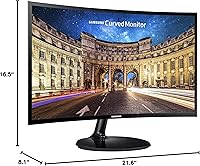
  • Dimensions (with stand): With the stand attached, the monitor measures 21.6 x 16.5 x 8.1 inches (W x H x D), fitting comfortably on most standard desks.
  • Depth (no stand): Without the stand, the monitor is just 3.4 inches deep, making it an exceptionally slim display for wall-mounting or tight shelf installations.
  • Weight: The unit weighs 7.3 pounds with the stand, making it easy to reposition or transport without requiring additional help.
  • Color Finish: The exterior is finished in glossy black, giving the monitor a clean, premium appearance that stands out at its price tier.
  • Voltage Support: The power supply accepts AC 100–240V, making the monitor compatible with standard electrical outlets across North America, Europe, and most international markets.
  • Mac Compatible: The monitor is officially Mac compatible, allowing it to be used with Apple computers without requiring additional drivers or third-party software.
  • Stand Adjustment: The included stand supports tilt adjustment only; there is no height, swivel, or pivot functionality built into the base.
  • VESA Mounting: VESA wall or arm mounting is possible but requires a separately purchased third-party adapter, as the native stand does not include a standard VESA bracket.
  • Power Saving: An eco-friendly power-saving mode reduces energy consumption during idle periods, helping lower electricity usage over time.
  • Series: This monitor belongs to Samsung's CF390 series, a line of entry-level curved displays designed to balance affordability with brand-backed build quality.

Related Reviews

Samsung CRG5 24-Inch Curved Gaming Monitor

78%
88%
Value for Money
83%
Image Quality
81%
Gaming Performance
86%
Curvature & Immersion
84%
FreeSync Performance
More
Sealan 24-Inch Curved Gaming Monitor
86%
92%
Gaming Performance
88%
Visual Quality
91%
Refresh Rate Smoothness
85%
Design & Build
87%
Eye Care Features
More
Samsung S39C 27-Inch Curved Gaming Monitor
75%
83%
Picture Quality & Color Accuracy
88%
Curvature & Immersion
61%
Refresh Rate & Gaming Performance
86%
Eye Comfort & Long-Session Usability
79%
Build Quality & Aesthetics
More
KTC 24-inch 1500R Curved Gaming Monitor

86%
94%
Gaming Performance
89%
Display Quality
92%
Value for Money
87%
Build Quality
83%
Ergonomics
More
Samsung 32-Inch S39C Curved Gaming Monitor
83%
88%
Display Quality
91%
Value for Money
86%
Eye Comfort
89%
Ease of Setup
85%
Build Quality
More
ViewSonic VX2418C 24-inch 1080p Curved Gaming Monitor
84%
90%
Value for Money
91%
Gaming Performance
87%
Display Quality
85%
Ease of Setup
82%
Build Quality
More
SANSUI ES-G24C1 24-inch Curved Gaming Monitor
74%
91%
Value for Money
86%
Gaming Performance
83%
Color & Image Quality
88%
Contrast & Black Levels
47%
Stand & Ergonomics
More
Samsung 24-Inch Super Slim Curved Monitor C24F392
83%
88%
Display Quality
84%
Gaming Performance
80%
Build Quality
91%
Value for Money
85%
Curved Screen Immersion
More
Z-Edge UG24 24-inch Curved Gaming Monitor
85%
88%
Gaming Performance
85%
Display Quality
81%
Build Quality
92%
Value for Money
89%
Ease of Setup
More
Sceptre C248W-1920RN 24-inch Curved Gaming Monitor
76%
91%
Value for Money
78%
Display Quality
83%
Curvature & Immersion
74%
Refresh Rate & Motion Clarity
67%
Build Quality & Design
More

FAQ

Yes, AMD FreeSync is supported natively, so if you have a compatible AMD GPU, you can enable FreeSync directly from your graphics driver settings without any extra hardware or software. It works reliably and makes a noticeable difference in reducing screen tearing during fast-moving games.

Yes, the CF390 is officially Mac compatible. You will need the appropriate cable or adapter depending on your Mac's available ports — most modern MacBooks will connect via a USB-C to HDMI or DisplayPort adapter — but once connected, it works without any driver installation.

It depends entirely on what you play. For RPGs, strategy games, casual shooters, and anything story-driven, 60Hz is perfectly fine and most players will not feel limited. If you are serious about competitive first-person shooters where every millisecond counts, a 144Hz or higher panel would serve you better. Be honest with yourself about your gaming habits before deciding.

The CF390 includes HDMI and VGA inputs, which covers most desktop PCs, laptops, and consoles. It does not include DisplayPort, so buyers using high-end GPU setups may need to plan accordingly.

Not directly with the included stand. The CF390 does not have a built-in VESA mount pattern, so you would need to purchase a compatible third-party VESA adapter bracket separately. This is one of the more commonly cited frustrations from buyers who prefer arm-mounted setups.

The stand supports basic tilt adjustment only — there is no height adjustment, swivel, or portrait pivot available. If ergonomic positioning is important to you, plan on either using a VESA adapter with a monitor arm or adding a monitor riser to compensate for the fixed height.

The glossy panel surface can pick up reflections in well-lit environments, and it is more susceptible to glare than a matte-finish display. If your desk gets a lot of natural light, positioning the monitor away from direct window exposure or using curtains will make a meaningful difference in comfort.

Setup is straightforward. The stand attaches to the panel with a few screws, cables connect in the obvious places, and the on-screen menu is easy to navigate. Most buyers report being fully set up and running in under 15 minutes.

Based on long-term owner feedback, the build quality holds up well with normal use. Samsung's manufacturing standards at this tier tend to produce reliable hardware, and the CF390 has been on the market long enough that multi-year durability is well-documented in user reviews.

The 1800R curvature is noticeable in everyday use, particularly during extended sessions. The screen wraps slightly toward your peripheral vision, which reduces how much your eyes need to travel across the display and can ease fatigue over long periods. It is a genuine ergonomic benefit at this size, not just an aesthetic choice.

Where to Buy