Overview

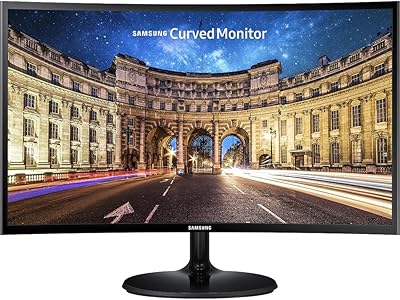
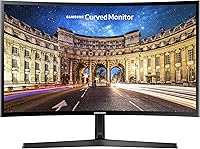
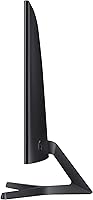
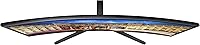
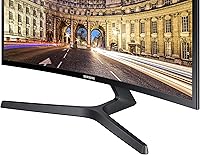
The Samsung CF396 23.5-inch Curved Monitor sits in a sweet spot for anyone who wants a capable, stylish display without spending a fortune. The 1800R curved panel draws you into whatever is on screen — whether that is a spreadsheet or a late-night gaming session — in a way a flat screen simply does not. Design-wise, the CF396 is genuinely attractive: the chassis is barely half an inch thick, and the circular stand looks more like a piece of considered furniture than typical monitor hardware. With over 11,000 ratings averaging 4.6 out of 5 stars, it is clearly clicking with a wide range of buyers.

Features & Benefits

AMD FreeSync is the headline feature for anyone who games, even occasionally — it keeps screen tearing at bay so fast-moving scenes stay clean rather than fractured. Combined with a 4ms response time, this curved Samsung monitor handles action well for casual play, though it is not built for competitive, frame-critical gaming. The Eye Saver Mode is genuinely useful for long work sessions, cutting blue light and flicker so the display stays comfortable over hours. Color-wise, the 3000:1 contrast ratio punches above what you would typically expect here — blacks look deep and colors stay lively. The auto-brightness Eco-Saving feature quietly adjusts as room lighting changes, which is a small but welcome touch.

Best For

This budget curved display finds its best audience among casual and home-office users rather than hardcore gamers. If you are a student or remote worker who stares at a screen for hours and wants something easy on the eyes that also looks good on a desk, this fits the brief well. It is also a solid pick for anyone curious about curved monitors who does not want to commit serious money to the experience. The slim profile and compact circular stand make it ideal for tighter desk setups where every inch counts. And if you are still on a flat screen and considering switching, the CF396 offers a low-risk entry point to find out whether the curvature genuinely suits your workflow or downtime.

User Feedback

With more than 11,000 reviews and a 4.6-star average, the overall reception for this curved Samsung monitor is clearly positive — but the complaints are worth knowing before you buy. Most buyers highlight picture quality and immersion as standout wins, and setup tends to be straightforward out of the box. The recurring criticisms, though, are real: the stand offers no height adjustment, and there is no VESA mount compatibility on certain versions, which limits placement flexibility. Several users also flag that 1080p at this screen size can start to feel limiting if you sit close. Longevity reports are generally encouraging, with many owners citing years of reliable use — a reassuring sign for a display at this accessible price tier.

Pros

  • AMD FreeSync keeps screen tearing under control during fast-moving games without any manual fiddling.
  • The 3000:1 contrast ratio delivers rich, deep blacks that punch well above the price point.
  • Eye Saver Mode makes a noticeable difference during long study or work sessions by cutting blue light and flicker.
  • The ultra-slim chassis looks genuinely premium on a desk and takes up minimal physical depth.
  • Setup is straightforward — most buyers report being up and running within minutes of unboxing.
  • The 1800R curvature provides real immersion for both movies and gaming, not just a cosmetic gimmick.
  • The circular stand design is more attractive than the generic plastic bases common at this price.
  • Eco-Saving Plus auto-brightness quietly reduces energy use without requiring any manual adjustment.
  • With over 11,000 ratings averaging 4.6 stars, the satisfaction track record is unusually strong for this category.
  • Long-term durability reports from owners are largely reassuring, with many citing years of trouble-free use.

Cons

  • The stand offers no height adjustment, which makes ergonomic positioning genuinely awkward for many users.
  • No VESA mount support on certain versions locks you into the stock stand with no alternative.
  • At nearly 24 inches, the 1080p resolution starts to look soft when sitting close to the screen.
  • There are no USB ports on the monitor itself, which limits desk connectivity options.
  • The panel tops out at 60Hz, which is a hard ceiling for anyone who wants smoother high-frame-rate gaming.
  • Color accuracy is adequate for general use but falls short for photo editing or professional design work.
  • Tilt range is limited, and some users find the default angle uncomfortable without a third-party arm.
  • The CF396 has no HDR support, so content that benefits from high dynamic range will look flat compared to HDR-capable displays.
  • Brightness levels may feel underwhelming in very well-lit rooms or near windows.
  • Connectivity options are basic, with no USB-C input for modern laptop users.

Ratings

The scores below for the Samsung CF396 23.5-inch Curved Monitor were generated by our AI system after analyzing thousands of verified global buyer reviews, with spam, bot activity, and incentivized feedback actively filtered out. The ratings reflect the full picture — genuine strengths and real frustrations alike — so you can make an informed decision rather than rely on inflated averages.

Picture Quality
83%
Most buyers are genuinely impressed by how vivid and punchy the display looks straight out of the box. The 3000:1 contrast ratio makes dark scenes in games and films look noticeably richer than you would expect at this price point, and colors stay lively without feeling oversaturated in everyday use.
The 1080p resolution starts to show its limits on a panel of this size, particularly for users who sit close to the screen or work with dense text. A handful of reviewers also note that wide-angle color consistency is not as strong as IPS panels at a similar price.
Curvature & Immersion
81%
19%
The 1800R curve is consistently praised for making the viewing experience feel more natural and enveloping compared to flat screens of the same size. Users working in spreadsheets, browsing wide websites, or playing open-world games frequently mention that they notice and appreciate the curve after just a few hours.
A small number of users — particularly those who share a desk or frequently view the screen from an angle — find the curve slightly disorienting at first. It is also worth noting that the immersive effect is less pronounced than what you get from ultrawide curved monitors, so expectations should be set accordingly.
Design & Aesthetics
88%
The ultra-slim chassis and distinctive circular stand receive consistent praise from buyers who care about how their workspace looks. Many users specifically mention that the monitor looks more expensive than it costs, and the slim profile is a practical bonus for compact desks where depth matters.
The stand design, while visually appealing, is entirely form over function — it offers minimal adjustability and some users find the fixed height does not suit their seating setup. The matte black finish also shows dust fairly readily, which some buyers mention as a minor but persistent nuisance.
Gaming Performance
69%
31%
For casual gaming — think story-driven games, RPGs, or weekend multiplayer sessions — the CF396 handles itself well. AMD FreeSync keeps things smooth when paired with a compatible GPU, and the response time is fast enough that motion blur is rarely a distraction during typical gameplay.
This is not a monitor for serious or competitive gamers. The 60Hz refresh rate ceiling is a hard limitation that no amount of FreeSync can overcome, and more demanding players consistently flag this as a dealbreaker. Users coming from 144Hz panels will notice the difference immediately and may struggle to go back.
Eye Comfort
84%
Eye Saver Mode is one of the most praised features among home office workers and students who use this monitor for extended sessions. Reducing blue light and eliminating flicker makes a meaningful difference over a full workday, and many users specifically credit this feature with helping them work longer without headaches or eye fatigue.
Eye Saver Mode applies a warm color shift that some users find too yellow-tinted for design work or photo editing. A few buyers also note that the feature has to be manually toggled rather than automatically activating on a schedule, which is a small but real inconvenience in daily use.
Ergonomics & Adjustability
41%
59%
The monitor is lightweight and easy to reposition on a desk, which is useful if your setup changes frequently. Initial placement is quick, and for users whose seated eye level happens to align with the fixed stand height, the out-of-box position works without any adjustments needed.
The stand is the single most criticized aspect of this monitor among long-term users. There is no height adjustment, no swivel, and limited tilt range, which means anyone outside the average seated height will either need a monitor arm or will compromise their posture. The lack of VESA support on some versions makes even that workaround unavailable.
Setup & Ease of Use
91%
Buyers across all experience levels consistently describe unboxing and setup as refreshingly quick and hassle-free. The stand assembles without tools, the on-screen menu is easy to navigate, and most users are up and running within minutes of opening the box — a genuine plus for less tech-savvy buyers.
The on-screen display menu, while functional, feels dated and the joystick or button navigation can take a moment to get used to. A small number of users also note that finding the correct input source the first time trips them up, though this is typically a one-time issue.
Connectivity
53%
47%
Having both HDMI and VGA inputs gives the CF396 reasonable flexibility for connecting older and newer devices, and HDMI handshakes reliably with laptops, desktops, and consoles without any fuss. For most straightforward single-source setups, the port selection covers what is needed.
The absence of a USB hub is a frequent complaint among users who expected some convenience ports on the monitor itself. There is also no USB-C, no DisplayPort, and no audio pass-through, which feels increasingly limiting as modern laptops and peripherals have moved away from legacy connections.
Value for Money
86%
Relative to what the CF396 delivers — curved panel, FreeSync, slim design, Samsung build quality — the price point is consistently cited as fair to strong. Many buyers describe it as one of the better-value curved monitors they have owned, especially as a first experience with the format.
As the budget monitor market has grown more competitive, a few users note that newer alternatives at a similar price now offer 75Hz refresh rates or better stand ergonomics. The value case is solid but not unassailable, and buyers willing to research alternatives may find slightly stronger specs for the same spend.
Build Quality & Durability
78%
22%
Long-term owners frequently report that the monitor holds up well over years of daily use, with no significant degradation in panel brightness or color accuracy. The overall feel of the unit is reassuringly solid for its weight class, and Samsung's build consistency gets regular mentions in positive long-term reviews.
The stand base can feel slightly lightweight relative to the panel, and some users have reported minor wobble when accidentally nudging the desk. The plastic finish, while fine at this price, does show minor scratches over time, particularly around the button area on the rear.
Brightness & Glare Handling
72%
28%
The matte anti-glare coating does a reasonable job in moderately lit rooms and open-plan offices, keeping reflections manageable without sacrificing too much color richness. Most users working in controlled lighting conditions find the brightness levels comfortable without needing to max out the slider.
In brighter environments — rooms with large windows or strong overhead lighting — the peak brightness is not quite enough to fully overcome glare, and the image can appear washed out. Buyers who work in sun-facing rooms mention this limitation more than almost any other aspect of the display.
Color Accuracy
63%
37%
For general content consumption — streaming, browsing, casual photo viewing — the colors look appealing and well-saturated straight from the factory. Most everyday users are satisfied without ever touching the color settings, which speaks to the reasonable out-of-box calibration.
Anyone doing even semi-professional photo or video editing will quickly find the color accuracy insufficient. The panel is not factory calibrated to any recognized color standard, and the warm color temperature out of the box skews slightly from neutral, which matters for color-critical tasks even if it is invisible to most casual users.
Noise & Heat
89%
The monitor runs completely silent — no fan, no coil whine, and no audible hum reported by the vast majority of users. Heat output during normal use is minimal, and the chassis remains comfortably cool to the touch even after a full day of use.
A very small number of users have reported faint coil whine on specific units, though this appears to be an isolated quality-control issue rather than a systematic one. It is rare enough that it should not be a primary concern, but worth knowing in case you receive an affected unit.

Suitable for:

The Samsung CF396 23.5-inch Curved Monitor is a strong match for home office workers, students, and remote professionals who spend long hours in front of a screen and want something that looks good without demanding a premium budget. The 1800R curve and Eye Saver Mode make extended work sessions noticeably more comfortable, which matters more than most people expect until they have lived with it. Casual gamers who play in the evenings after work will appreciate the FreeSync support and 4ms response time — it handles fast scenes cleanly enough for mainstream titles even if it is not built for competitive play. Anyone setting up a workspace in a small apartment or shared room will also find the ultra-slim profile and compact circular stand a genuinely useful combination. If you are buying your first curved display and want a low-stakes way to find out whether the format suits you, this is one of the more sensible ways to do it.

Not suitable for:

Buyers with more demanding requirements will likely find the CF396 frustrating in ways that matter. Serious or competitive gamers — anyone who cares about refresh rate beyond 60Hz, needs precise 1ms response, or plays at high frame rates — should look elsewhere, as this panel was not designed for that level of performance. Designers, photo editors, or anyone doing color-critical work will also run into limitations: the 1080p resolution on a nearly 24-inch screen can look noticeably soft up close, and the panel does not offer the color accuracy professionals need. The stand is one of the weaker points — there is no height adjustment and no tilt range worth speaking of, and some versions lack VESA compatibility, which means ergonomic flexibility is essentially off the table. If you are considering a dual-monitor setup and need consistent arm mounting, that limitation alone may be a dealbreaker.

Specifications

  • Screen Size: The panel measures 23.5 inches diagonally, offering a comfortable viewing area for both desk work and casual gaming without dominating a small workspace.
  • Resolution: Native resolution is 1920x1080 (FHD 1080p), which is standard for this screen size though may appear slightly soft at very close viewing distances.
  • Panel Curvature: The screen uses a 1800R curvature radius, meaning the curve is subtle enough for general use while still providing a more immersive feel than a flat panel.
  • Aspect Ratio: The display uses a standard 16:9 widescreen aspect ratio, compatible with virtually all modern content, games, and operating systems.
  • Response Time: The panel is rated at 4ms response time, which is adequate for casual gaming and general productivity with minimal motion blur.
  • Refresh Rate: The monitor runs at a maximum of 60Hz, which is suitable for everyday use and casual gaming but is a limiting factor for high-frame-rate competitive gaming.
  • AMD FreeSync: FreeSync adaptive sync technology is supported, synchronizing the GPU output with the display refresh rate to reduce screen tearing during gaming.
  • Contrast Ratio: The static contrast ratio is rated at 3000:1, delivering noticeably deep blacks and bright whites compared to typical budget monitors in this category.
  • Eye Saver Mode: A dedicated Eye Saver Mode reduces blue light emissions and eliminates flicker, making extended screen sessions more comfortable for the eyes.
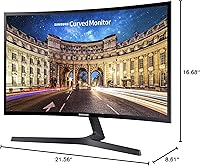
  • Dimensions: The assembled monitor measures 8.61 x 21.56 x 16.68 inches (depth x width x height), with a chassis thickness of under 0.5 inches at its slimmest point.
  • Weight: The complete unit including stand weighs 6.83 pounds, making it light enough to reposition or move without assistance.
  • Stand Type: The monitor ships with a circular base stand that provides basic tilt adjustment but does not support height adjustment or swivel.
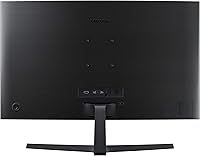
  • VESA Support: VESA wall-mount compatibility is not available on all versions of this model, so buyers planning to use a monitor arm should verify compatibility before purchasing.
  • Color: The monitor is finished in black with a slim bezel and matching circular stand base for a clean, consistent desk aesthetic.
  • Eco-Saving Plus: The Eco-Saving Plus feature automatically adjusts screen brightness based on ambient content brightness, reducing power consumption during typical use.
  • Voltage: The monitor operates on 110V power, making it compatible with standard North American electrical outlets without an adapter.
  • Model Number: The official model identifier is LC24F396FHNXZA, part of Samsung's CF396 series of curved consumer displays.
  • Connectivity: The monitor includes HDMI and VGA input ports for source connections; there are no built-in USB hub ports or USB-C inputs.
  • Active Crystal Color: Samsung's Active Crystal Color technology enhances color vibrancy across the panel for richer, more saturated visuals during everyday use and media playback.
  • First Available: This model was first listed for sale in February 2018 and remains in active production as of the time of this review.

Related Reviews
Samsung 32-inch S39GD Curved Monitor

73%
83%
Value for Money
58%
Image Sharpness & Resolution
88%
Curve & Immersion
79%
Refresh Rate & Motion Smoothness
84%
Eye Comfort & Fatigue
More
Samsung S39C 27-Inch Curved Gaming Monitor

75%
83%
Picture Quality & Color Accuracy
88%
Curvature & Immersion
61%
Refresh Rate & Gaming Performance
86%
Eye Comfort & Long-Session Usability
79%
Build Quality & Aesthetics
More
Samsung 32-Inch S39C Curved Gaming Monitor
83%
88%
Display Quality
91%
Value for Money
86%
Eye Comfort
89%
Ease of Setup
85%
Build Quality
More
Samsung CRG5 24-Inch Curved Gaming Monitor
78%
88%
Value for Money
83%
Image Quality
81%
Gaming Performance
86%
Curvature & Immersion
84%
FreeSync Performance
More
Samsung Odyssey G9 49-inch Curved Gaming Monitor
82%
93%
Visual Clarity
90%
Immersion & Curvature
94%
Gaming Performance (FPS)
60%
Ease of Setup
88%
Build Quality
More
HP Series 5 524sw 23.8-inch FHD Monitor
76%
88%
Image Clarity
91%
Eye Comfort
79%
Color Accuracy
67%
Brightness & Visibility
83%
Refresh Rate & Motion
More
Samsung 24-Inch Super Slim Curved Monitor C24F392
83%
88%
Display Quality
84%
Gaming Performance
80%
Build Quality
91%
Value for Money
85%
Curved Screen Immersion
More
Samsung CF390 24-inch Curved Gaming Monitor
78%
88%
Value for Money
79%
Image Quality
71%
Gaming Performance
86%
Design & Aesthetics
43%
Ergonomics & Stand
More
Gawfolk GF245A 24.5-Inch Curved Gaming Monitor
72%
88%
Value for Money
79%
Image Quality
83%
Refresh Rate Performance
81%
Response Time
63%
Build Quality
More
GAMEPOWER F10 23.6-inch Curved Gaming Monitor
82%
91%
Value for Money
85%
Display Quality
88%
Gaming Performance
80%
Build Quality
82%
Ease of Setup
More

FAQ

Yes, the CF396 connects to consoles via HDMI without any issues. The picture looks great for console gaming at 1080p, and FreeSync will also activate if you are using an Xbox that supports it. Just note that the 60Hz cap means you will not get anything above 60 frames per second regardless of what the console outputs.

That depends on which version you have. Some variants of this model do not include VESA mounting holes, which means standard arms and wall mounts will not attach. Before buying an arm, check the specific unit you are purchasing — some sellers list the VESA status in the product details, and it is worth confirming before you invest in mounting hardware.

No, unfortunately not. The circular stand only allows for a limited tilt adjustment. There is no height or swivel movement built in. If ergonomics are important to you and you sit higher or lower than average, this can be a real frustration — factor that in before buying.

Typically, Samsung includes one cable in the box, but the included accessories can vary by retailer or region. It is worth checking the specific listing or contacting the seller to confirm what is included. Most buyers already have spare HDMI cables, so this is rarely a major issue.

More than you might expect. At a normal sitting distance of roughly two feet, the 1800R curve wraps the edges of the screen slightly toward you, which makes wide browser windows and documents feel a little more natural. It is not dramatic like an ultrawide, but once you have used it for a while, going back to a flat monitor feels oddly jarring.

It works great as a secondary display. The HDMI connection means most modern laptops plug straight in, and the slim profile takes up minimal desk real estate. The only thing to be aware of is that if your laptop outputs via USB-C only, you will need an adapter since this monitor has no USB-C port.

It does warm the color temperature noticeably, which some people find off-putting at first. That said, most users adjust to it quickly, especially if they use it consistently in the evenings. You can toggle it on and off easily from the monitor's on-screen menu, so it is easy to switch back for color-sensitive tasks.

At a normal desk distance of around two feet, most users find it perfectly acceptable for general productivity, streaming, and casual gaming. If you sit very close — closer than 18 inches — the pixel density starts to feel a little soft compared to a smaller 1080p screen. For everyday work and media consumption it is fine; for photo editing or reading dense text at close range, a higher-resolution panel would serve you better.

Most buyers describe it as genuinely simple. The stand clicks together without tools, the cable routing is straightforward, and the monitor is generally ready to use within a few minutes of unboxing. The on-screen menu is basic but easy to navigate once you find the right input.

The panel has a matte anti-glare coating, which helps considerably compared to glossy screens. Bright overhead lights and windows directly behind you will still cause some washout, as they would on any matte display. Positioning the monitor away from direct light sources makes a bigger difference than any screen coating can.