Overview

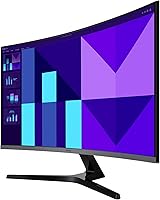
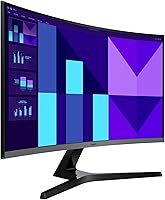
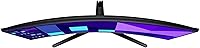
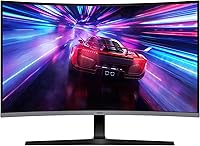
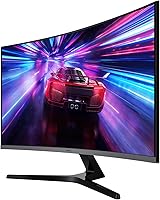
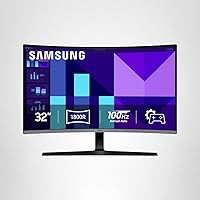
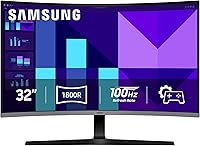
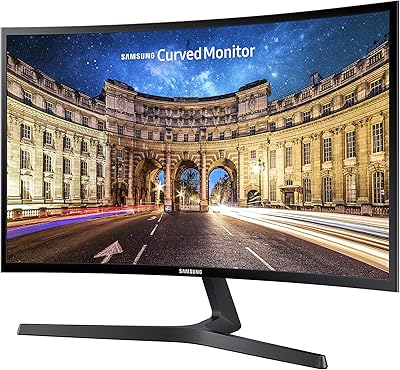
The Samsung 32-inch S39GD Curved Monitor is Samsung's 2025 entry into the budget curved display category, built for casual gamers and everyday desk users who want a big-screen experience without a premium price tag. At 32 inches, the curve genuinely changes how the screen feels — it wraps around your field of view in a way that makes single-monitor setups more engaging than a flat panel at the same size. That said, pixel density is worth addressing upfront: stretching 1080p across 32 inches means the image won't look as sharp as a QHD alternative, especially up close. If crisp text is a priority, that trade-off matters before you buy.
Features & Benefits

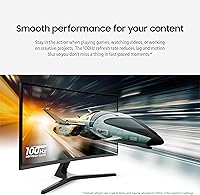
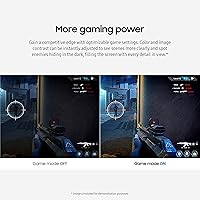
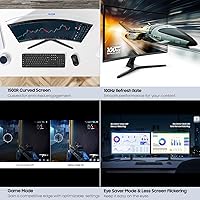
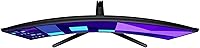
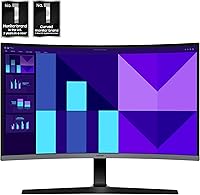
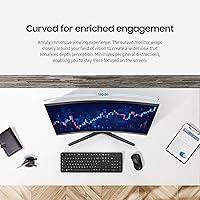
The 1800R curve is the first thing you'll notice — it pulls the screen edges closer to your peripheral vision, which genuinely reduces how much your eyes have to travel during long sessions. The 100Hz refresh rate won't impress hardcore competitive players, but it's a real step up from the 60Hz panels common in this price range, making casual gameplay and video noticeably smoother. Game Mode lets you boost contrast on the fly to pick out details in darker scenes, no extra software required. Built-in speakers are handy for keeping your desk tidy, though they suit background listening rather than serious audio. HDMI connectivity keeps setup simple across PCs, laptops, and consoles.

Best For

This 32-inch curved display is a strong match for casual gamers who want an immersive, large-screen setup without stretching their budget — the size and curve together deliver a sense of presence that flat budget monitors can't replicate. Students and home-office workers logging long hours will appreciate the built-in eye comfort features, even if raw image sharpness isn't the selling point here. Console players wanting a dedicated monitor alternative to a TV will find the setup refreshingly simple. And if you're upgrading from a smaller flat screen for the first time, the jump to this curved Samsung monitor will feel like a genuine step forward.

User Feedback

With roughly 150 ratings and a 4.4-star average, the S39GD earns broadly positive marks, though the feedback comes with some consistent caveats. Buyers frequently praise the screen size and curve for the immersion they offer at this price point, describing it as a meaningful upgrade from smaller or flat displays. The most repeated concern is the 1080p resolution — at 32 inches, it shows its limits for close-range text work or photo editing. The stand's limited range — tilt only, with no height adjustment — also draws frustration from ergonomically-minded users. Speaker impressions are modest at best: useful for casual background audio, but not something most buyers rely on long-term.

Pros

  • The 1800R curve creates genuine immersion that flat budget monitors simply cannot replicate at this size.
  • 100Hz refresh rate delivers noticeably smoother motion in games and video compared to standard 60Hz panels.
  • At 32 inches, the screen size alone is a major upgrade for anyone coming from a smaller display.
  • TÜV-certified Eye Saver Mode reduces real fatigue during long work or study sessions.
  • Built-in speakers keep the desk tidy and eliminate the need for extra cables on basic setups.
  • Matte anti-glare coating handles reflections well in typical indoor lighting conditions.
  • Game Mode makes dark scenes significantly more readable without requiring complex menu adjustments.
  • Samsung brand reliability gives buyers confidence in long-term durability and warranty support.
  • Simple HDMI setup means it works immediately with PCs, laptops, and consoles right out of the box.
  • The clean, all-black design fits naturally into home offices and bedroom setups without looking out of place.

Cons

  • 1080p resolution at 32 inches looks noticeably soft during close-range text-heavy work.
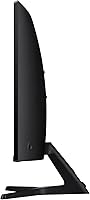
  • The stand offers tilt adjustment only — no height, swivel, or pivot range included.
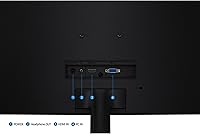
  • A single HDMI port makes switching between two input sources genuinely inconvenient.
  • Speaker audio quality is thin and lacks bass, making them unsuitable for anything beyond casual background use.
  • No true HDR support means high-dynamic-range content looks flat compared to even entry-level HDR-capable panels.
  • Color accuracy out of the box is inconsistent enough to frustrate anyone doing detail-oriented visual work.
  • The 100Hz ceiling will feel restrictive to players upgrading from a higher-refresh gaming monitor.
  • Gradient rendering can appear slightly banded on smooth color transitions, which is a known VA panel trait.
  • No DisplayPort or USB-C input limits flexibility for modern laptops and multi-device desk setups.

Ratings

The Samsung 32-inch S39GD Curved Monitor has been evaluated by our AI rating system after deep analysis of verified global buyer reviews, with spam, bot-generated, and incentivized feedback actively filtered out. The scores below reflect what real users consistently praised and criticized across hundreds of hands-on experiences. Both the genuine strengths and the honest shortcomings of this 32-inch curved display are transparently represented in every category.
Value for Money
83%
Most buyers feel they are getting a generous amount of screen real estate and a genuine curved-panel experience at a price that doesn't require much deliberation. The combination of 32 inches, 100Hz, and Samsung build quality for the asking price is frequently cited as the main reason people pulled the trigger.
A small but vocal group of buyers feel the 1080p resolution at this size undercuts the value argument, noting that spending slightly more would land a QHD panel with meaningfully better pixel density for close-up desktop work.
Image Sharpness & Resolution
58%
42%
For casual video streaming and gaming at a normal viewing distance — roughly two to three feet back — the FHD image looks acceptably clean. Colors appear reasonably vivid out of the box, and the matte coating keeps glare from washing things out in brighter rooms.
This is the S39GD's most consistent weak point in user feedback. Sitting close to a 32-inch 1080p panel makes individual pixels visible, and text rendering in spreadsheets or code editors draws repeated complaints about softness. Users coming from smaller or higher-density screens will feel the downgrade immediately.
Curve & Immersion
88%
The 1800R curve is one of the most praised aspects of this monitor, especially among first-time curved display owners. Users describe a noticeable sense of being pulled into games and films, with the screen edges feeling closer and more natural during long single-monitor sessions.
A handful of users noted that the curve can introduce slight image distortion when viewing wide spreadsheets or working in precise graphic layouts. It is also worth noting that the immersion benefit drops off somewhat during shorter, task-focused work sessions.
Refresh Rate & Motion Smoothness
79%
21%
The step from 60Hz to 100Hz is genuinely perceptible, and casual gamers playing racing games, action RPGs, or watching sports streams consistently note that motion looks smoother and less choppy than on their previous monitors. It is not a dramatic transformation, but it is a real one.
Competitive players accustomed to 144Hz or 165Hz panels will find 100Hz underwhelming. Response time is not class-leading either, so fast-paced multiplayer games can still show some trailing on moving objects that more expensive panels handle more cleanly.
Eye Comfort & Fatigue
84%
The TÜV-certified flicker-free and blue light reduction features earn consistent praise from students and remote workers clocking four to eight hours daily in front of the screen. Several reviewers specifically mentioned fewer headaches and less eye strain compared to their previous monitors after switching to Eye Saver Mode.
Eye Saver Mode shifts the color temperature noticeably warm, which bothers some users enough that they turn it off for anything color-sensitive. The blue light filter is not unique to this monitor and a few buyers felt it underperformed compared to software solutions like f.lux used in tandem.
Build Quality & Aesthetics
76%
24%
The all-black finish is clean and professional-looking without any gamer-aesthetic excess, making it fit naturally into both home offices and bedroom setups. The plastic construction feels solid enough for a budget monitor, and the panel itself does not exhibit obvious flex when adjusted.
The stand is utilitarian at best — tilt adjustment only, with no height or swivel range. Users who care about ergonomic positioning will likely need a separate VESA arm, which adds cost and complexity that some buyers did not anticipate at purchase.
Stand & Ergonomics
51%
49%
The stand is stable and keeps the monitor firmly in place on a desk without wobble. For users who set it once and leave it, the fixed height is not a daily frustration, and the footprint is compact enough not to dominate a smaller desk.
The absence of height adjustment is a recurring complaint, particularly from users who alternate between sitting and standing or share the monitor with someone of a different height. Several buyers called this out as the single most frustrating limitation given that adjustable stands are common even on comparably priced competitors.
Built-in Speakers
55%
45%
Having speakers built in is genuinely convenient for users who just want ambient audio without extra cables or a separate powered speaker on their desk. For video calls, casual YouTube browsing, or background music, they are functional and easy to use.
No one is impressed by the audio quality. Volume headroom is limited, bass is essentially absent, and at higher volumes the sound becomes noticeably thin. Most users treat them as a fallback option rather than a primary audio solution, and anyone who cares about sound will be reaching for headphones or external speakers quickly.
Game Mode Performance
74%
26%
Game Mode is straightforward to activate and provides a meaningful boost to dark-scene visibility, which several users appreciated in horror games and night-cycle segments of open-world titles. The contrast enhancement is real and easy to toggle without diving into complex menu settings.
The color accuracy trade-off in Game Mode is noticeable — skin tones and natural lighting can look oversaturated or slightly unnatural. It works well for gameplay but is not something you would want left on for general desktop use or media consumption.
Setup & Connectivity
86%
HDMI connectivity means this monitor works immediately with virtually any device — gaming consoles, laptops, desktop PCs, and even streaming sticks. Users consistently describe a plug-and-play experience with no driver headaches or input configuration issues.
The single HDMI port limits multi-source flexibility. Users hoping to switch between a PC and a console without unplugging cables will be inconvenienced. The lack of DisplayPort or USB-C inputs also feels restrictive compared to monitors at a similar price point from competing brands.
Color Accuracy & Vibrancy
67%
33%
Out of the box, colors look punchy and engaging for everyday content — streaming services, casual gaming, and general web browsing all look pleasant. The VA panel delivers decent contrast that makes dark scenes feel deeper than typical IPS panels at this tier.
Color accuracy is not a strength and professional creative users will notice it. The sRGB coverage is acceptable but not calibrated from the factory, and achieving accurate colors requires manual adjustments that many users will not bother to make. Gradient rendering can also appear slightly banded in smooth color transitions.
Glare & Matte Coating
81%
19%
The matte anti-glare surface does its job well in typical indoor lighting conditions. Users working near windows or under overhead lighting report far fewer distracting reflections compared to glossy screens they previously owned, which makes long daytime sessions more comfortable.
The matte coating softens the perceived image sharpness slightly, which compounds the existing 1080p pixel density issue at 32 inches. In very dark room conditions, some users notice a slight hazy quality to the image that a glossy panel would not exhibit.
Packaging & Unboxing
77%
23%
The monitor arrives well-protected and assembly is quick — most buyers report having it fully set up within ten to fifteen minutes including cable connections. Samsung includes the necessary hardware and the process requires no tools beyond what is provided in the box.
A few users reported minor cosmetic scuffs on the stand or bezel upon arrival, suggesting the packaging protection could be more robust for a panel this size. The included cable selection is basic, with no DisplayPort cable included.
Brightness & HDR Capability
62%
38%
Brightness is adequate for most indoor environments, and for a budget VA panel the peak luminance holds up reasonably well for daytime use in a moderately lit room. The matte coating assists in keeping the image readable under ambient light.
There is no true HDR support worth speaking of, and this monitor should not be purchased with HDR content in mind. In bright rooms or near sunlit windows, the peak brightness can feel limiting, and contrast in very bright scenes lacks the punch that even entry-level HDR panels deliver.

Suitable for:

The Samsung 32-inch S39GD Curved Monitor is a well-matched pick for casual gamers who want the immersive feel of a curved display without committing to a premium price — the 1800R curve and 100Hz refresh rate deliver a tangibly more engaging experience than a flat 60Hz screen at the same size. Students and remote workers who spend long hours in front of a screen will appreciate the TÜV-certified eye comfort features, which genuinely reduce fatigue during extended sessions compared to standard panels. Console players looking to move away from the living room TV and into a dedicated desk setup will find the plug-and-play HDMI connection and large panel size an easy transition. It also makes strong sense for first-time monitor buyers upgrading from a 24-inch or flat display, where the size and curve alone will feel like a meaningful leap forward. Anyone who values a cleaner desk and can accept modest built-in audio for background listening will also find this 32-inch curved display a practical all-in-one solution.
Not suitable for:

The Samsung 32-inch S39GD Curved Monitor is not the right tool for buyers who sit close to their screen and depend on sharp, pixel-dense text — 1080p spread across 32 inches simply does not hold up at arm's length for tasks like coding, spreadsheet work, or photo editing, and no display setting will fix that underlying resolution gap. Designers, photographers, or anyone doing color-critical work should look elsewhere; the factory calibration and color gamut coverage are adequate for entertainment but fall short of professional standards. Competitive multiplayer gamers who are accustomed to 144Hz or higher refresh rates will also find the 100Hz ceiling limiting. Users who rely on multiple input sources — say, a PC and a console connected simultaneously — will be frustrated by the single HDMI port and the absence of DisplayPort or USB-C. Finally, anyone with strict ergonomic requirements should factor in the stand's tilt-only adjustment, as there is no height or swivel range built in, which may require an additional VESA arm purchase to make the setup comfortable.
Specifications

  • Screen Size: The panel measures 32 inches diagonally, providing a wide viewing area suited for single-monitor desktop setups.
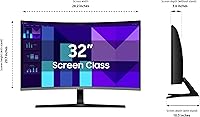
  • Panel Type: Uses a VA (Vertical Alignment) curved panel with an 1800R curvature radius for enhanced depth perception.
  • Resolution: Native resolution is 1920x1080 (Full HD), delivering standard high-definition clarity across the 16:9 aspect ratio.
  • Refresh Rate: Supports a maximum refresh rate of 100Hz, offering smoother motion than conventional 60Hz displays.
  • Response Time: Typical response time is 4ms (GTG), adequate for casual gaming and everyday multimedia use.
  • Surface Finish: Matte anti-glare coating reduces reflections from ambient light sources in typical indoor environments.
  • Eye Care: TÜV Rheinland-certified with flicker-free backlighting and a built-in blue light reduction mode called Eye Saver.
  • Connectivity: Equipped with one HDMI port for connecting PCs, laptops, gaming consoles, and other HDMI-compatible devices.
  • Built-in Audio: Integrated stereo speakers are included, providing basic audio output without the need for external speakers.
  • Game Mode: Dedicated Game Mode allows on-the-fly contrast and color adjustments to improve visibility in dark gaming scenes.
  • Dimensions: The monitor measures 28.2 x 20.7 x 10.3 inches (W x H x D) with the stand attached.
  • Weight: Total weight with stand is 11.2 pounds, making it manageable for solo desk setup and repositioning.
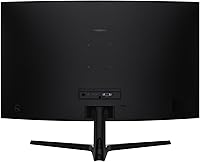
  • Stand Adjustment: The included stand supports tilt adjustment only; height, swivel, and pivot adjustments are not available.
  • VESA Compatibility: The display is VESA mount-compatible, allowing the stand to be replaced with a third-party monitor arm.
  • Color: Available in Black with a slim bezel design that suits both home and office desk environments.
  • Power: The monitor uses an external power adapter; an integrated power supply is not included in the base unit.
  • Model Number: Official model number is LS32D396GANXZA, released in the Samsung S3 (S39GD) series in 2025.
  • Certifications: Holds TÜV Rheinland certification for eye comfort, covering both flicker reduction and blue light emission standards.

Related Reviews

Samsung 32-Inch S39C Curved Gaming Monitor
83%
88%
Display Quality
91%
Value for Money
86%
Eye Comfort
89%
Ease of Setup
85%
Build Quality
More
KOORUI 32-inch Curved Gaming Monitor
84%
89%
Display Quality
92%
Gaming Performance
78%
Build Quality
85%
Color Accuracy
82%
Ergonomics & Comfort
More
CRUA CR320C 32″ Curved 4K Monitor

73%
91%
Image Sharpness
78%
Color Accuracy
88%
Contrast & Black Levels
84%
Curvature & Immersion
67%
Refresh Rate & Smoothness
More
Samsung S39C 27-Inch Curved Gaming Monitor
75%
83%
Picture Quality & Color Accuracy
88%
Curvature & Immersion
61%
Refresh Rate & Gaming Performance
86%
Eye Comfort & Long-Session Usability
79%
Build Quality & Aesthetics
More
Samsung CRG5 24-Inch Curved Gaming Monitor
78%
88%
Value for Money
83%
Image Quality
81%
Gaming Performance
86%
Curvature & Immersion
84%
FreeSync Performance
More
Samsung Odyssey G55C 32″ Curved Gaming Monitor
78%
88%
Image Sharpness & Resolution
84%
Refresh Rate & Motion Clarity
91%
Curvature & Immersion
93%
Value for Money
57%
HDR Performance
More
Samsung 32″ Odyssey G65B Curved Gaming Monitor
84%
91%
Display Quality
93%
Gaming Performance
87%
Curvature Immersion
88%
HDR Performance
90%
Response Time
More
Samsung S32B304 32-Inch FHD Monitor
76%
88%
Value for Money
61%
Image Sharpness & Resolution
93%
Screen Size & Workspace Impact
79%
Build Quality & Design
54%
Stand & Ergonomics
More
Gawfolk GF320E 32-inch 2K Curved Monitor
81%
91%
Display Quality
88%
Ease of Setup
90%
Value for Money
80%
Build Quality
85%
Curvature Experience
More
Gawfolk GF320C 32-Inch Curved Gaming Monitor
75%
88%
Refresh Rate Performance
83%
Image Quality
76%
Motion Clarity
86%
Curvature & Immersion
91%
Value for Money
More

FAQ

This is the most common concern buyers raise, and it deserves a straight answer. At typical TV-viewing distance — say, four or five feet back — 1080p on a 32-inch panel looks fine. But if you are sitting two to three feet away at a desk, which is normal for a monitor, you will notice that text and fine details are not as crisp as they would be on a smaller 1080p screen or a QHD panel at this size. It is not unusable, but it is a real trade-off worth knowing before you buy.

Yes, the HDMI port connects directly to both current-gen consoles without any adapters. The monitor will run your console at 1080p and up to 60Hz for most games, as console HDMI output at 1080p120 is less common. It works as a clean, glare-free desk alternative to a TV for console gaming.

It does, as long as your laptop has an HDMI output or you have a USB-C to HDMI adapter. The monitor is plug-and-play on both Mac and Windows — no drivers required. Just note that there is only one HDMI port, so switching between a laptop and another device means swapping cables manually.

They are genuinely adequate for casual use — background music, video calls, YouTube — but nothing more than that. Bass is nearly absent, and at higher volumes the sound gets thin. Most users end up using headphones or a separate speaker for anything they actually care about listening to.

Unfortunately, no. The included stand only tilts forward and back. There is no height adjustment, swivel, or pivot. If you need your monitor at a specific height for ergonomic reasons, you will want to pick up a separate VESA-compatible monitor arm, which this display does support.

Not in any meaningful way. The S39GD does not carry a recognized HDR certification, and while some HDR signals may be accepted technically, the panel lacks the brightness and contrast range needed to render HDR content with any real impact. Do not factor HDR into your buying decision for this one.

Setup is straightforward and takes most people under fifteen minutes. The stand clicks into the panel base without tools, and cables are limited to power and HDMI. The on-screen menu is simple to navigate for basic adjustments like brightness and contrast.

It works fine for general home office tasks like email, video calls, and document editing. For coding specifically, the pixel density at 32 inches means text rendering is softer than on a smaller or higher-resolution display. If you spend most of your day reading and writing code, a 27-inch QHD monitor would likely be more comfortable for extended focus work.

Eye Saver Mode reduces blue light output and shifts the color temperature warmer, which can reduce eye strain during long sessions — especially in the evening. The trade-off is that colors look noticeably yellowish compared to the standard preset. Most users keep it on for late-night use but switch it off when color accuracy matters, like watching films or doing any kind of visual work.

The 1800R curve is definitely noticeable and is one of the things buyers tend to appreciate most about this display. Sitting directly in front, it creates a subtle wrap-around effect that makes games and video feel more enveloping than a flat screen. For straight-line content like spreadsheets or architectural drawings, some users perceive a slight bowing effect at the edges, but the vast majority find it easy to ignore in practice.

Where to Buy