Overview

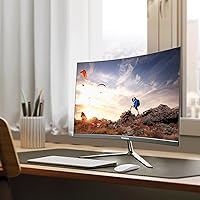
The Gawfolk GF245A 24.5-Inch Curved Gaming Monitor enters a crowded budget segment with a straightforward pitch: a curved VA panel at a price that won't make you wince. The 3000R curvature gives the screen a mild wrap-around effect that genuinely adds a sense of depth during gameplay, even if it's subtle at this screen size. Gawfolk is a relatively new name in the monitor space, so buyers understandably approach it with some skepticism. This is not a premium display chasing color scientists or competitive esports players — it's an accessible, no-frills option built for people who want more than a basic flat panel without a significant investment.
Features & Benefits

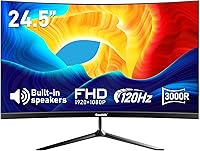
The real draw here is the 120Hz refresh rate over HDMI 2.0, which makes a noticeable difference in how smooth gameplay feels compared to a typical 60Hz screen — especially in fast-paced action games. Pair that with a 1ms GTG response time and motion blur becomes a non-issue in most gaming scenarios. The VA panel earns its keep with a 3500:1 contrast ratio, meaning dark scenes look genuinely dark rather than washed out. Color coverage sits at 98% sRGB, which is solid for this price tier. The built-in stereo speakers won't replace a proper audio setup, but they're a handy convenience. VESA mount support is a nice touch too, though the hardware itself isn't included.

Best For

This curved gaming monitor makes the most sense for someone stepping up from a laptop display or a dusty old 60Hz screen. Students who game in the evenings and work during the day will appreciate that it handles both tasks reasonably well without demanding a dedicated audio setup. Its compact footprint and single-cable connectivity keep desk clutter minimal — useful if space is tight. It also works well as a second screen in a dual-monitor arrangement where peak image fidelity isn't the priority. If you're chasing 4K or height-adjustable ergonomics, look elsewhere. But for a first proper gaming monitor, this budget gaming screen is a reasonable starting point.

User Feedback

With nearly 2,000 ratings and a 4.2-star average, this curved gaming monitor has clearly resonated with buyers in its target audience. Easy setup and picture quality relative to the asking price come up repeatedly as highlights, and several owners note the curved panel adds more immersion than they expected at this size. That said, the feedback isn't universally glowing. The stand only tilts — no height adjustment — which is a real limitation for anyone with specific ergonomic needs. The built-in speakers get used, but few people rave about them. VGA users should know they're capped at 60Hz, worth flagging upfront. On the service side, customer support responsiveness gets decent marks, reassuring for a newer brand.

Pros

  • The 120Hz refresh rate over HDMI makes gameplay noticeably smoother compared to a standard 60Hz screen.
  • A 1ms GTG response time keeps fast-moving visuals sharp, with minimal trailing or ghosting.
  • The VA panel produces deep blacks and strong contrast that flat IPS panels at this price rarely match.
  • Built-in speakers mean one less thing to buy and one less cable to run on a small desk.
  • VESA mount compatibility gives you the option to wall-mount or use a third-party arm for better flexibility.
  • Setup is straightforward — buyers consistently report being up and running within minutes of unboxing.
  • At under $100, this budget gaming screen delivers specs that would have cost significantly more just a few years ago.
  • The matte panel surface reduces glare, making it easier to use near windows or in brighter rooms.
  • Customer support has received positive mentions, which is reassuring for a newer brand without a long service history.

Cons

  • The stand only tilts — no height adjustment or swivel means ergonomic positioning is limited from the start.
  • VGA connectivity is capped at 60Hz, so older GPU users lose the smooth refresh rate advantage entirely.
  • Built-in speaker quality is mediocre at best; anyone who cares about audio will still need external speakers.
  • Gawfolk is a new and largely unknown brand, with no long-term reliability data to draw confidence from.
  • The 3000R curvature has limited impact at 24.5 inches and may feel underwhelming if you expected strong immersion.
  • No adaptive sync support is listed, which can result in screen tearing during graphically demanding games.
  • Wall mount hardware is not included despite the feature being advertised, adding a small extra cost.
  • 1080p resolution on a 24.5-inch panel is acceptable but starts to show its limits for non-gaming desktop use.

Ratings

Our AI rating system analyzed thousands of verified global reviews for the Gawfolk GF245A 24.5-Inch Curved Gaming Monitor, actively filtering out incentivized, bot-generated, and spam submissions to surface what real buyers genuinely experienced. The scores below reflect both the strengths that earned this budget screen a loyal following and the friction points that came up repeatedly across independent buyer accounts. Nothing is glossed over — the ratings show this curved gaming monitor exactly as it performs in real homes and at real desks.

Value for Money
88%
For a sub-$100 curved gaming monitor, buyers consistently feel they are getting more than they paid for. The combination of a 120Hz refresh rate, a VA panel with strong contrast, and built-in speakers in a single affordable package is genuinely hard to argue with at this price point.
A few buyers noted that cutting costs shows in the finer details — the stand feels plasticky, and the speaker quality reminds you that compromises were made. The value proposition holds up well only if your expectations are calibrated to the price tier.
Image Quality
79%
21%
The VA panel earns real praise for its contrast performance. Dark scenes in games look noticeably richer than what most IPS panels in this range can deliver, and colors at 98% sRGB coverage come across as vibrant without looking oversaturated during everyday use.
Color accuracy is not something this budget gaming screen can claim with confidence — there is no factory calibration, and buyers doing anything color-sensitive will notice the limitations quickly. Viewing angles are also narrower than IPS, with some color shift when viewing off-axis.
Refresh Rate Performance
83%
Moving from a 60Hz display to 120Hz on this monitor is immediately noticeable, especially in fast-action games where motion blur used to be a constant nuisance. For casual gaming at 1080p, most mid-range GPUs can push enough frames to actually use the higher refresh rate.
The 120Hz is only accessible via HDMI 2.0 — VGA users are hard-capped at 60Hz, which effectively makes that port legacy-only for any gaming use case. There is also no adaptive sync support, so tearing can appear when frame rates fluctuate.
Response Time
81%
19%
The 1ms GTG response time keeps motion trailing well under control during fast-paced gaming sessions. Players who run shooters or racing titles at higher frame rates will notice that the panel keeps up without producing distracting ghost edges behind moving objects.
GTG response times are measured under ideal conditions and can vary in practice depending on the overdrive settings available in the OSD. Some buyers reported mild ghosting during very dark scene transitions, which is a known characteristic of VA panels at this price tier.
Build Quality
63%
37%
For its weight class, the monitor feels adequately sturdy when placed on a desk and left alone. Assembly takes only a few minutes and the panel itself does not show any obvious flex or wobble during normal use, which is all most budget buyers need.
The stand is the clear weak point — it feels hollow and lightweight, and the tilt-only adjustment limits how useful it actually is. Several buyers noted that the plastic finish picks up fingerprints easily and looks noticeably inexpensive up close.
Stand & Ergonomics
47%
53%
Tilt adjustment, while minimal, at least allows you to find a comfortable angle for seated use at a standard desk height. For buyers who plan to pair this with a VESA arm anyway, the included stand becomes a non-issue.
The absence of height adjustment, swivel, or pivot is a real problem for anyone spending extended hours at their desk. Multiple buyers flagged neck strain after longer sessions, and the tilt range alone cannot compensate for setups that require any meaningful positional flexibility.
Built-in Speakers
52%
48%
Having any speakers built in at this price is a convenience win for small setups or secondary screen use. Students who want to take a quick video call or stream some background audio without digging out headphones will find them adequate for that purpose.
Do not expect meaningful audio quality. Volume levels are modest, bass is essentially absent, and the sound stage is flat. Buyers who tried them for gaming quickly moved back to headphones — these speakers are best understood as a last resort, not a feature.
Connectivity
71%
29%
Having both HDMI 2.0 and VGA on a budget monitor covers a wide range of devices, from modern gaming PCs to older office machines. The HDMI 2.0 port handles 120Hz without issue, and buyers appreciated the straightforward plug-and-play experience with most devices.
Two ports is a thin selection for anyone with multiple source devices — there is no DisplayPort, USB hub, or audio output jack. The VGA limitation to 60Hz also means that legacy users get a functionally different — and worse — experience than buyers connecting via HDMI.
Setup & Installation
86%
Assembly is consistently described as one of this monitor's strongest suits. Most buyers had it out of the box, assembled, and displaying an image within 10 to 15 minutes. The process requires no tools and the on-screen menu is simple enough to navigate without consulting any documentation.
The included documentation is fairly minimal, which can leave newer buyers unsure about OSD settings or how to properly configure the refresh rate on their PC. A few buyers also noted that the cables included are basic and short, which can limit placement flexibility.
Curvature & Immersion
67%
33%
The 3000R curve adds a genuine sense of depth when gaming, especially in open-world or racing titles where peripheral visual wrap makes the scene feel more enveloping. Buyers who had previously used only flat panels noted a clear and immediate difference.
At 24.5 inches, the 3000R radius is gentle enough that some buyers felt the curvature was barely perceptible during regular desktop use. The immersion effect is real but modest — buyers expecting a dramatic wrap-around experience may find it underwhelming compared to wider curved screens.
Eye Comfort
73%
27%
The matte panel surface does a solid job of cutting down on glare in moderately lit rooms, and buyers working near windows found it much easier to use than glossy alternatives. Extended gaming sessions were described as reasonably comfortable by a majority of casual users.
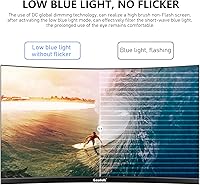
The monitor does not list flicker-free or low blue light certification, which matters to buyers sensitive to extended screen exposure. A small number of reviewers reported eye fatigue during multi-hour sessions, though this is difficult to attribute solely to the panel without controlled testing.
Customer Support
74%
26%
For a brand this new, the responsiveness of Gawfolk's support team stood out as a genuine positive in buyer feedback. Cases involving damage, missing parts, or malfunctions were generally resolved with minimal friction, which helped build some trust despite the brand's limited track record.
Gawfolk has no established long-term reliability history, so there is inherent uncertainty about how support will hold up over months or years of ownership. Warranty terms are not prominently communicated, and buyers who did not contact support proactively sometimes felt left in the dark.
VESA & Mounting
77%
23%
The 75x75mm VESA pattern is a standard size that works with the vast majority of third-party monitor arms and wall brackets on the market. Buyers who ditched the stock stand for an arm reported that it transformed the ergonomic usability of the screen entirely.
Wall mount hardware is not included, which feels like an omission given how prominently the feature is advertised. Buyers who assumed mounting hardware came in the box had to make an additional purchase, adding a small but unnecessary extra cost to the setup.

Suitable for:

The Gawfolk GF245A 24.5-Inch Curved Gaming Monitor is a practical pick for anyone entering PC gaming on a tight budget who wants a real upgrade over a flat, low-refresh screen. Students juggling coursework and casual gaming sessions will find it handles both without demanding a separate speaker or a tangled mess of cables. If your desk space is limited, the compact footprint and built-in audio keep the setup clean and simple. It also makes a solid secondary display in a dual-monitor arrangement — somewhere to park Discord, a browser, or a streaming app while your primary screen handles the heavy lifting. First-time buyers moving up from a laptop panel will notice an immediate improvement in motion clarity and screen real estate, making the value proposition feel genuinely worthwhile at this price point.

Not suitable for:

The Gawfolk GF245A 24.5-Inch Curved Gaming Monitor is not the right tool for buyers who prioritize ergonomics or color-critical work. The stand only tilts — there is no height adjustment, swivel, or pivot — which can be a real problem if you spend long hours at a desk and need a custom viewing position. Graphic designers, photo editors, or anyone who needs accurate, consistent color output should look at a proper IPS panel with factory calibration, not a budget VA screen. Competitive esports players chasing high frame rates above 120Hz or features like adaptive sync will find this monitor underpowered for their needs. Users still relying on a VGA connection should know that port tops out at 60Hz, so the smoothness advantage disappears entirely unless you connect via HDMI. And if brand reputation or long-term reliability history matters to your purchase decision, Gawfolk simply does not yet have the track record to compete with established names.
Specifications

  • Panel Type: The monitor uses a VA (Vertical Alignment) panel, which delivers stronger contrast and deeper blacks than IPS alternatives at a similar price.
  • Screen Size: The viewable screen area measures 24.5 inches diagonally, offering a comfortable amount of desktop real estate for both gaming and everyday tasks.
  • Resolution: Native resolution is 1920x1080 Full HD, providing a sharp and clear image at normal viewing distances for a screen of this size.
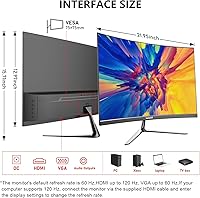
  • Refresh Rate: The panel runs at up to 120Hz when connected via HDMI 2.0, but is limited to 60Hz when using the VGA port.
  • Response Time: A 1ms GTG (gray-to-gray) response time minimizes motion blur and trailing during fast-paced gaming sequences.
  • Curvature: The screen features a 3000R curvature radius, producing a gentle wrap-around effect intended to increase perceived depth and immersion.
  • Contrast Ratio: The static contrast ratio is rated at 3500:1, which allows for noticeably richer dark tones compared to most IPS panels in this price range.
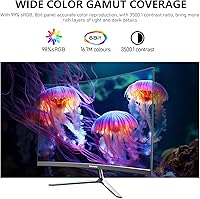
  • Color Gamut: Color coverage reaches 98% of the sRGB color space, supporting vibrant and reasonably accurate color reproduction for gaming and casual media.
  • Color Depth: The panel supports 8-bit color depth, rendering up to 16.7 million colors for smooth gradients and consistent tone across the display.
  • Connectivity: The monitor includes one HDMI 2.0 port and one VGA port, covering modern and legacy connection needs for laptops and desktop PCs.
  • Built-in Audio: Integrated stereo speakers are included as a convenience feature, eliminating the need for a separate audio device in minimal desk setups.
  • VESA Compatibility: The rear of the monitor supports a standard 75x75mm VESA mount pattern, compatible with most aftermarket monitor arms and wall brackets.
  • Stand Adjustment: The included stand supports tilt adjustment only; height, swivel, and pivot adjustments are not available with the stock stand.
  • Panel Surface: The screen uses a matte anti-glare coating that reduces reflections in moderately lit rooms without introducing significant grain to the image.
  • Dimensions: The monitor measures 21.9 inches wide, 15.7 inches tall, and 6.4 inches deep with the stand attached.
  • Weight: The full unit with stand weighs 6.16 pounds, making it light enough to reposition or mount without difficulty.
  • Power Input: The monitor operates on 12V DC input, and is designed for standard household electrical environments.
  • Model Number: The official model identifier for this display is GF245A, manufactured and sold under the Gawfolk brand.

Related Reviews
Gawfolk GF240A 24.5-inch 200Hz Gaming Monitor

68%
83%
Refresh Rate Performance
79%
Response Time & Motion Clarity
71%
Image & Color Quality
88%
Value for Money
57%
Build Quality & Stand
More
CRUA CR245ZB 24.5″ Gaming Monitor

78%
83%
Gaming Performance
86%
Refresh Rate & Smoothness
74%
Color Accuracy & Vibrancy
91%
Ergonomics & Adjustability
68%
Build Quality & Materials
More
Sealan 24-Inch Curved Gaming Monitor
86%
92%
Gaming Performance
88%
Visual Quality
91%
Refresh Rate Smoothness
85%
Design & Build
87%
Eye Care Features
More
Gawfolk GF270C 27-Inch Curved Gaming Monitor

72%
83%
Value for Money
78%
Image Quality
81%
Refresh Rate Performance
74%
Response Time & Motion Clarity
62%
Build Quality
More
KOORUI G2511E 24.5-Inch 320Hz Gaming Monitor
78%
93%
Refresh Rate Performance
88%
Response Time
84%
Color Accuracy
51%
HDR Quality
67%
Panel Uniformity
More
Samsung CRG5 24-Inch Curved Gaming Monitor
78%
88%
Value for Money
83%
Image Quality
81%
Gaming Performance
86%
Curvature & Immersion
84%
FreeSync Performance
More
Gawfolk GF320C 32-Inch Curved Gaming Monitor
75%
88%
Refresh Rate Performance
83%
Image Quality
76%
Motion Clarity
86%
Curvature & Immersion
91%
Value for Money
More
Dell G2524H Gaming Monitor 24.5-inch
87%
92%
Performance
96%
Refresh Rate
88%
Build Quality
91%
Ergonomics
93%
Display Quality
More
KTC 24-inch 1500R Curved Gaming Monitor

86%
94%
Gaming Performance
89%
Display Quality
92%
Value for Money
87%
Build Quality
83%
Ergonomics
More
Samsung CF390 24-inch Curved Gaming Monitor
78%
88%
Value for Money
79%
Image Quality
71%
Gaming Performance
86%
Design & Aesthetics
43%
Ergonomics & Stand
More

FAQ

Yes, it will work with current-gen consoles via HDMI. Just keep in mind that console output is typically capped at 60Hz for most titles, so you may not take full advantage of the 120Hz capability depending on what you are playing and your console settings.

Absolutely. The back of this curved gaming monitor has a standard 75x75mm VESA mount pattern, so it is compatible with most third-party monitor arms and wall brackets. Just note that the wall mount hardware itself is not included in the box — you will need to purchase that separately.

No, and this is worth knowing before you buy. The 120Hz refresh rate is only available when you connect via HDMI 2.0. If you use the VGA port, the monitor is capped at 60Hz. So if your PC or GPU only has VGA output, you will not see any benefit from the higher refresh rate.

They are functional, but do not expect much. The built-in stereo speakers are best thought of as a backup option — handy for video calls or background music, but not something you would choose over a decent headset or external speakers for gaming. If audio quality matters to you, plan on using separate speakers or headphones.

Adaptive sync support is not officially listed for this monitor, so you should not count on FreeSync or G-Sync compatibility. That means you may encounter some screen tearing during graphically demanding games if your frame rate dips below the refresh rate.

The included stand only supports tilt adjustment — you can angle the screen forward or backward, but there is no height, swivel, or pivot movement. If you need a more ergonomic setup, your best option is to pick up a compatible VESA monitor arm, which gives you full positional freedom.

It is fine for casual use, but not ideal for color-critical work. The 98% sRGB coverage is decent, and colors look good for everyday tasks, but a VA panel without factory calibration is not the tool of choice for photo editors or designers who need precise, consistent color accuracy. An IPS panel with a wider color gamut would serve those needs better.

Setup is straightforward. Most buyers report having the monitor assembled and connected in under 15 minutes. The stand attaches without tools, and the included cables get you started right away. The on-screen menu is basic but gets the job done for adjusting brightness and input selection.

It works well in that role. As a secondary screen for communication apps, a browser, or media playback, this budget gaming screen performs exactly as expected. You do not need color accuracy or ultra-high resolution for those tasks, so the trade-offs that matter for a primary gaming monitor are much less relevant here.

Gawfolk is a newer brand without an extensive track record, which is a fair concern. That said, buyers have noted positive experiences with their customer support responsiveness, including for issues like damage or missing accessories. It is worth holding onto your receipt and keeping an eye on the return window, just as you would with any product from a newer manufacturer.