


Overview

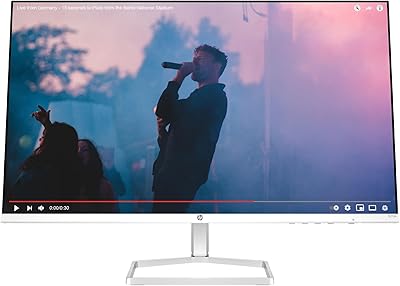
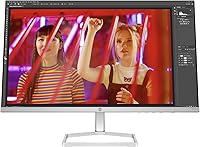
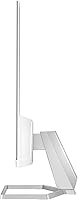
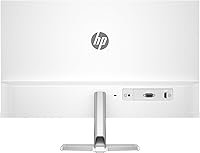
The HP Series 5 524sw 23.8-inch FHD Monitor is HP's answer to the growing demand for practical, eye-friendly displays that don't ask too much of your budget. It stands out in its tier with a clean white finish and a notably slim profile — details that feel intentional rather than incidental. The Eyesafe certification is a genuine differentiator; it's not just a marketing badge but a third-party-verified standard for reduced blue light exposure. Think of this HP monitor as a solid workhorse for everyday tasks — email, documents, video calls, occasional streaming — rather than a tool for color-critical design work or competitive gaming.

Features & Benefits

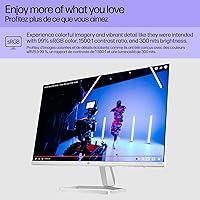
The IPS panel here does what IPS panels do best: it keeps colors looking consistent whether you're sitting directly in front or off to one side — useful when you're sharing your screen with someone or working from an awkward angle. The 99% sRGB coverage is more than adequate for spreadsheets, web browsing, and casual photo viewing, though don't expect it to replace a dedicated display for print design work. A 1500:1 contrast ratio means shadows and highlights read more distinctly than on typical budget panels. The 100Hz refresh rate adds a subtle but noticeable smoothness to scrolling and cursor movement. Cable routing is built in, which keeps things tidy without extra accessories.

Best For

The 524sw fits naturally into home office and student setups — anyone who stares at a screen for hours and wants something that won't leave their eyes feeling worn out by mid-afternoon. The slim bezels make it an easy candidate for a dual-monitor arrangement, and the 23.8-inch size strikes a practical balance between workspace footprint and screen real estate. It also handles casual gaming at 1080p without much fuss, and the matte surface keeps reflections from becoming a distraction. If your desk aesthetic skews minimal or modern, the white colorway is a rare find in this display category. It is not the pick for fast-paced competitive gaming or professional photo editing.

User Feedback

Across hundreds of verified purchases, the pattern in reviews is fairly consistent: buyers appreciate the out-of-box image quality and specifically call out how comfortable the display feels during long sessions. Eye strain reduction comes up repeatedly, which tracks with the Eyesafe certification. On the critical side, the stand draws the most consistent complaints — it lacks height and tilt flexibility that some users expect, and a VESA-compatible arm is often the suggested workaround. A handful of reviewers also flag that the brightness tops out lower than ideal for very bright rooms. Still, with a 4.6-star average, the overall satisfaction rate is notably high for a value-tier display.

Pros

  • Third-party Eyesafe certification gives genuine credibility to the eye comfort claim, not just a marketing label.
  • The IPS panel keeps colors consistent even when viewing from wide angles, which is rare at this price point.
  • A 1500:1 contrast ratio delivers noticeably better shadow and highlight detail than standard budget panels.
  • The 100Hz refresh rate makes everyday scrolling and cursor movement feel smoother than typical 60Hz office displays.
  • Integrated cable management is a small but practical feature that keeps the desk cleaner without extra accessories.
  • The slim bezels make this 23.8-inch display a natural fit for multi-monitor setups without bulky gaps between screens.
  • Matte screen coating reduces glare effectively in moderately lit office or home environments.
  • The white colorway is a genuine rarity among monitors in this tier, suiting modern or minimalist desk setups well.
  • Out-of-box color accuracy is consistently praised by buyers, requiring little to no manual calibration for everyday use.
  • At its price, the overall build quality and feature set represent solid value for a productivity-focused display.

Cons

  • The stand offers very limited adjustability — no height range and minimal tilt, which can be a real ergonomic problem.
  • At 300 nits, brightness tops out lower than ideal for use in rooms with strong natural or overhead lighting.
  • No VESA mount is included out of the box, so ergonomic repositioning requires a separately purchased monitor arm.
  • Resolution is capped at 1080p, which may feel limiting on a 23.8-inch screen for users coming from higher-DPI displays.
  • The 524sw is not suited for professional color work despite its decent sRGB coverage — the gamut falls short of DCI-P3 or AdobeRGB standards.
  • Connectivity options are basic and may not satisfy users needing multiple input types or USB hub functionality.
  • The 100Hz refresh rate, while above average for office use, won't satisfy fast-paced competitive gaming needs.
  • Buyers in very bright environments have reported the display can look dim compared to higher-nit alternatives in the same price range.

Ratings

Our AI rating system analyzed hundreds of verified global buyer reviews for the HP Series 5 524sw 23.8-inch FHD Monitor, actively filtering out incentivized, bot-generated, and outlier feedback to surface what real everyday users consistently experience. The scores below reflect an honest, balanced picture — genuine strengths are recognized and real friction points are not glossed over. Where this display earns praise, the data is clear; where it falls short, we say so directly.

Image Clarity
88%
Users repeatedly note that text looks crisp and images pop with natural color right out of the box, with very little need for manual calibration. For daily tasks like reading documents, browsing, or watching videos, the 1080p IPS output consistently meets or exceeds expectations at this price tier.
A small segment of buyers transitioning from higher-resolution panels find the pixel density slightly lacking at close viewing distances, where fine text and UI elements can look marginally softer than on a 1440p display of similar size.
Eye Comfort
91%
The Eyesafe-certified panel earns consistent praise from users who work six to eight hours daily in front of a screen. Many reviewers specifically call out reduced end-of-day eye fatigue compared to previous monitors, and unlike software blue-light filters, the hardware-level approach does not noticeably shift color temperature.
A minority of users with extreme light sensitivity report that the Eyesafe certification alone is not a complete solution and still pair it with additional software filters or ambient lighting adjustments, suggesting it helps significantly but does not eliminate strain for everyone.
Color Accuracy
79%
21%
For the target audience — remote workers, students, and general home users — the 99% sRGB coverage delivers pleasing, consistent color that looks accurate for web content, casual photography, and streaming. Colors hold up well across viewing angles thanks to the IPS panel, which keeps things looking natural from multiple seating positions.
Users with a background in photography or design quickly notice the display's limitations when comparing it against wider-gamut monitors. It is not suited for DCI-P3 or AdobeRGB workflows, and a few buyers report that certain deep reds and saturated tones can look slightly clipped versus more color-accurate panels.
Brightness & Visibility
67%
33%
In a typical home office or shaded workspace, the 300-nit output is entirely adequate — the matte coating reduces reflections well, keeping the screen comfortable during long sessions without requiring constant brightness adjustment.
In rooms with large windows or overhead lighting that is particularly intense, several reviewers note the image starts to look dim and washed out. This is arguably the most common practical complaint and is a real limitation for anyone whose workspace gets significant natural daylight.
Refresh Rate & Motion
83%
Stepping up from a 60Hz panel, users notice an immediate difference in how smoothly the cursor moves and how content scrolls — it is a subtle but tangible improvement that makes the display feel more responsive during everyday computing tasks and light gaming sessions.
Competitive or fast-paced gamers will hit the ceiling of 100Hz quickly, especially those used to 144Hz or faster displays. The monitor was not designed for high-performance gaming, and the response time spec is not optimized for scenes with rapid motion transitions.
Stand & Ergonomics
48%
52%
The stand is stable on a flat desk surface and gives the monitor a clean, minimal footprint that works well for compact setups. For users who sit at a fixed height desk and never need to reposition their display, the stand does its basic job without complaint.
This is the single most cited frustration across buyer reviews — the stand lacks height adjustment and offers very limited tilt range, making ergonomic positioning a real challenge. Users who spend long hours at a desk frequently end up purchasing a separate monitor arm just to get a comfortable viewing angle.
Build Quality
81%
19%
The chassis feels solid and the slim-bezel design looks noticeably more refined than many competing monitors in this price range. The white colorway, while purely aesthetic, holds up well and does not show smudges or discoloration with typical use.
Some users report slight flex in the plastic back panel when adjusting the monitor, and a few note that the white plastic shows fine scratches over time with regular handling. Nothing structural, but the finish requires a bit more care than a matte black alternative.
Cable Management
77%
23%
The integrated cable containment channels in the stand are a practical and appreciated feature — buyers setting up clean desk environments consistently mention this as a small but satisfying detail that reduces the mess without any additional accessories or effort.
The channels work well for a basic cable setup but can feel cramped if you are routing multiple cables simultaneously, and the containment does not extend very far down the stand, leaving some slack visible near the desk surface.
Setup & Out-of-Box Experience
86%
Assembly is quick and intuitive — most buyers report having the monitor up and running in under ten minutes with no tools required. The display is well-calibrated from the factory, and for most everyday use cases, there is no need to dive into the on-screen menu at all.
The on-screen display menu interface is functional but dated compared to competitors, and navigating it through the physical buttons requires some patience. A handful of users with accessibility needs or less technical familiarity find the button layout unintuitive at first.
Connectivity
62%
38%
For straightforward single-device setups, the available inputs are sufficient and get the job done without complications. Connecting a laptop or desktop is quick, and the ports are positioned accessibly enough that cable swapping does not require moving the monitor.
The port selection is limited for a modern monitor — users expecting multiple input types, USB hub functionality, or audio pass-through will be disappointed. Power users managing several devices frequently flag the connectivity as the biggest functional gap relative to similarly priced competitors.
Value for Money
85%
Relative to what it offers — IPS panel, Eyesafe certification, 100Hz, and a clean design — the 524sw delivers a compelling package for its price tier. Buyers coming from older or cheaper displays consistently feel the upgrade is well justified.
As the competition in the sub-150-dollar monitor space has grown more aggressive, a few buyers note that some competing brands now offer slightly better stand ergonomics or port selection at the same price point, making the value proposition feel slightly less dominant than it was at launch.
Multi-Monitor Compatibility
82%
18%
The slim bezels make side-by-side dual-monitor configurations look clean and nearly seamless, which is frequently highlighted by home office users who run two-screen workflows. The compact profile also means the combined desk footprint stays manageable even in smaller workspaces.
Because the stand offers no height adjustment, getting two units perfectly aligned at eye level without a monitor arm or riser is unnecessarily fiddly and often results in one screen sitting fractionally higher or lower than the other.
Gaming Performance
61%
39%
For casual and story-driven gaming, the 524sw handles 1080p gameplay smoothly and the IPS panel keeps colors looking lush even in dark game environments. The 100Hz rate gives motion a noticeably cleaner feel compared to a standard 60Hz gaming session.
Dedicated gamers will find the response time and lack of adaptive sync support frustrating, particularly in fast-paced titles where ghosting and screen tear become visible. This monitor was built for productivity first, and gaming performance reflects that prioritization clearly.

Suitable for:

The HP Series 5 524sw 23.8-inch FHD Monitor is a strong fit for anyone who spends the bulk of their day in front of a screen and wants that experience to feel less taxing on their eyes. Remote workers handling documents, video calls, and browser-based tools will find the IPS panel and Eyesafe certification genuinely useful rather than just box-checking features. Students setting up a first proper desk will appreciate the clean white design and the compact footprint that doesn't dominate a small room. If you're building a dual-monitor setup on a sensible budget, the slim bezels make side-by-side pairing feel cohesive. Casual gamers who play at 1080p and don't need ultra-fast refresh rates will also get solid mileage out of the 100Hz panel without overpaying for specs they won't fully use.

Not suitable for:

The HP Series 5 524sw 23.8-inch FHD Monitor is not the right tool for everyone, and it's worth being honest about where it falls short. Photographers, graphic designers, or anyone doing color-critical work should look elsewhere — 99% sRGB is respectable for general use, but it won't satisfy professional color-grading workflows that demand wider gamut coverage. Competitive gamers who prioritize reaction-time margins will likely find the 100Hz ceiling limiting compared to 144Hz or 165Hz alternatives built specifically for that purpose. If your workspace gets a lot of direct sunlight, the 300-nit brightness cap can make the display feel washed out during peak daylight hours. The stand is also a real limitation — it lacks height adjustment and meaningful tilt range, so users who need precise ergonomic positioning will likely need to budget for a separate monitor arm. Anyone expecting a premium, fully adjustable out-of-box experience may come away frustrated.

Specifications

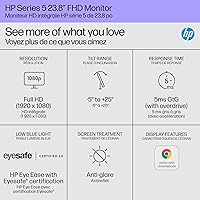
  • Screen Size: The display measures 23.8 inches diagonally, offering a practical workspace footprint without dominating a small desk.
  • Resolution: Native resolution is 1920 x 1080 (Full HD), delivering sharp text and clear visuals for everyday productivity and media use.
  • Panel Type: Uses an IPS (In-Plane Switching) panel, which provides consistent color and contrast across wide horizontal and vertical viewing angles.
  • Refresh Rate: Runs at 100Hz, a step above standard 60Hz office monitors, resulting in smoother motion during scrolling and light gaming.
  • Brightness: Peak brightness is rated at 300 nits, suitable for indoor and moderately lit environments but potentially limiting in bright sunlit rooms.
  • Contrast Ratio: Rated at 1500:1, which enables more distinguishable shadow and highlight detail compared to typical budget-tier IPS panels.
  • Color Gamut: Covers 99% of the sRGB color space, making it well-suited for general productivity, web use, and casual photo browsing.
  • Viewing Angles: Supports 178-degree horizontal and vertical viewing angles, ensuring minimal color shift when viewed from off-center positions.
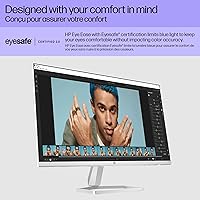
  • Eye Safety: Carries Eyesafe certification, a third-party standard verifying reduced blue light output without relying solely on color-shifting software filters.
  • Surface Finish: The screen uses a matte anti-glare coating that reduces reflections from ambient light sources in typical indoor environments.
  • Aspect Ratio: Standard 16:9 widescreen aspect ratio, compatible with virtually all modern content formats, applications, and operating systems.
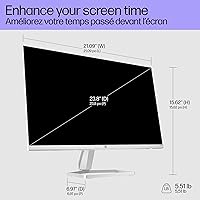
  • Dimensions: Assembled dimensions measure approximately 21.09 x 12.42 x 1.33 inches (W x H x D), reflecting a slim and compact physical profile.
  • Weight: The monitor weighs 5.51 pounds including the stand, making it straightforward to reposition or transport between workspaces.
  • Color: Available in white, an uncommon finish in this display category that suits modern and minimalist desk setups.
  • Cable Management: The stand includes integrated cable containment channels to route cords cleanly and reduce desk clutter without additional accessories.
  • Power Source: Powered via a standard AC connection; no external power brick is required for most regional configurations.
  • Aspect Ratio: The 16:9 native format is fully compatible with standard HD video, productivity software, and web-based content without letterboxing.
  • Amazon Rating: Holds a 4.6 out of 5 star rating based on 446 verified customer ratings at time of review, placing it at #463 in Computer Monitors.

Related Reviews
HP 24mh 23.8-inch IPS Monitor
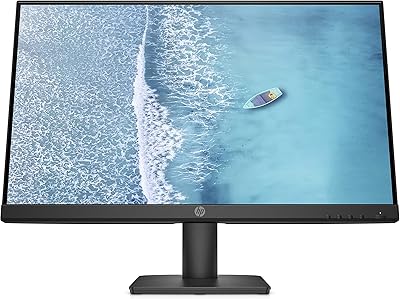
79%
83%
Image Clarity
81%
Color Accuracy
88%
Ergonomics & Stand
71%
Refresh Rate & Motion
63%
Brightness & Glare Handling
More
HP V241ib 23.8-inch FHD Monitor
85%
91%
Display Clarity & Color Accuracy
88%
Ergonomics & Adjustability
92%
Value for Money
70%
Setup & Installation
90%
Viewing Angles
More
HP Series 5 27-inch FHD Monitor
77%
78%
Image Quality
61%
Pixel Density
88%
Eye Comfort
86%
Design & Aesthetics
53%
Ergonomics & Stand
More
Dell 24 SE2425H Monitor 23.8-inch FHD
83%
92%
Value for Money
88%
Display Quality
91%
Eye Comfort
60%
Ergonomics
85%
Color Accuracy
More
Dell S2425HS 23.8-inch FHD Monitor
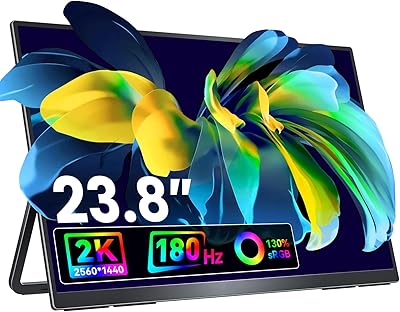
84%
88%
Image & Color Accuracy
83%
Refresh Rate & Motion Smoothness
91%
Eye Comfort & Blue Light Reduction
93%
Ergonomics & Stand Adjustability
87%
Build Quality & Materials
More
HP V27i 27-inch FHD Monitor
85%
92%
Display Quality
89%
Eye Comfort
91%
Value for Money
85%
Build Quality
78%
Ergonomics
More
Dragolftie FHD-238 23.8″ Touchscreen Monitor
84%
94%
Touch Responsiveness
90%
Display Quality
91%
Color Accuracy
88%
Ergonomic Adjustability
72%
Built-in Audio
More
InnoView 23.8-inch 144Hz Portable Monitor
79%
88%
Display Quality
83%
Refresh Rate Performance
61%
Portability & Form Factor
86%
Stand & Ergonomics
79%
Connectivity & Compatibility
More
HP 524sf 24-inch FHD IPS Monitor
85%
88%
Display Quality
91%
Value for Money
85%
Build Quality
94%
Ease of Setup
87%
Eye Care Features
More
VisionOwl 23.8-Inch 2K Portable Monitor
87%
94%
Gaming Performance
92%
Display Quality
88%
Portability
90%
Build Quality
81%
Setup & Installation
More

FAQ

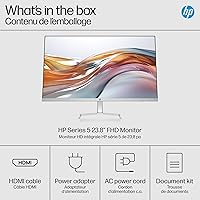
HP typically includes a power cable and a DisplayPort or HDMI cable in the box, but the exact bundle can vary by regional SKU. It is worth checking the specific listing or box contents before assuming — if you need a particular cable type for your setup, have a spare ready just in case.

Yes, it works with any device that has a compatible video output port — Windows PCs, Macs, and even some laptops and mini PCs. Since it connects via standard display inputs, there is no proprietary software required. macOS may cap the refresh rate depending on your output hardware, so verify your Mac supports 100Hz over the connection type you plan to use.

The stand on the 524sw is fairly basic — it offers limited tilt adjustment but no height range. If ergonomics matter to you, a VESA-compatible monitor arm is the practical fix, though you will need to confirm VESA mount compatibility before purchasing one separately.

Eyesafe is a hardware-level certification, not just a software blue light filter that shifts the display toward yellow. It means the panel itself is verified to emit reduced levels of high-energy visible light while maintaining more accurate color than typical night-mode filters. For users sensitive to eye fatigue, this is a more reliable solution than software-only adjustments.

At 23.8 inches, 1080p works well for most everyday tasks — text, spreadsheets, web browsing, and video all look clean and readable. You will not get the pixel density of a higher-resolution display, but for the typical use cases this monitor is designed for, it is more than adequate. Users coming from a 27-inch 1080p screen may actually notice the image looks crisper at this smaller size.

It handles casual gaming at 1080p reasonably well. The 100Hz refresh rate produces noticeably smoother gameplay than a 60Hz panel, and the IPS display keeps colors looking natural. It is not built for competitive gaming — response time and adaptive sync support are not its strengths — but for story-driven games, indie titles, or occasional play sessions, it performs without frustration.

The matte finish does a solid job of cutting down on direct reflections, but the 300-nit brightness ceiling means the image can feel a bit dim if strong sunlight is hitting your workspace. For rooms with controlled or moderate lighting, it works well. If your desk gets a lot of direct sun, you may want a monitor with a higher brightness rating.

Yes, and it is actually well-suited for it. The slim bezels minimize the visible gap between screens when placed side by side, and the compact form factor helps keep the overall desk footprint manageable. Just make sure your graphics card or docking station has enough video outputs for two connections.

The 524sw is compatible with VESA mounting, which means you can attach it to a third-party monitor arm for better ergonomic positioning. If the fixed stand does not give you the height or angle you need, this is the practical upgrade path. Always confirm the VESA pattern (typically 100 x 100mm) matches the arm you are considering before purchasing.

The 99% sRGB coverage is genuinely good for casual photo browsing and basic editing — colors look natural and consistent without much tinkering. However, if your work involves preparing files for print, professional retouching, or working in DCI-P3 or AdobeRGB color spaces, this display will not meet that standard. It is a capable general-use monitor, not a color-critical workstation display.

Where to Buy