Overview

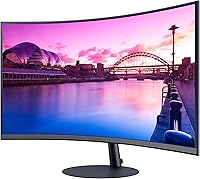
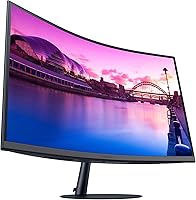
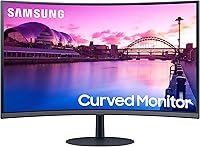
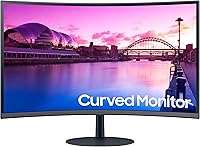
The Samsung S39C 27-Inch Curved Gaming Monitor sits in a sweet spot for buyers who want a real curved display without spending big. Samsung has been building panels long enough that even their entry-level offerings tend to punch above their weight, and the S39C is no exception. The 1000R curvature is the standout feature at this price — most flat monitors at this tier simply cannot match the wraparound feel it creates. That said, this is a 75Hz FHD display, so expectations should be calibrated accordingly. It is not built for competitive gaming at high frame rates. What it is built for is everyday use, casual gaming, and long hours in front of a screen without leaving you squinting.
Features & Benefits

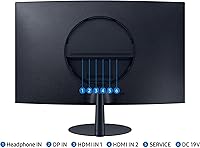
The 1000R VA panel is where this curved Samsung monitor makes its strongest case. Colors are rich and blacks are noticeably deep compared to IPS panels at this price, which suits both gaming and movie watching. AMD FreeSync keeps things tearing-free at 75Hz, and while that refresh rate will not satisfy anyone chasing high frame rate performance, it is genuinely smooth for casual play. Long sessions are handled with Flicker-Free technology and an Eye Saver Mode that dials back blue light — a real benefit for students or remote workers logging hours in front of a screen. Connectivity covers two HDMI ports and a DisplayPort, and there are built-in 5W speakers that work fine for background audio without routing cables to external hardware.

Best For

This 27-inch curved display makes the most sense for a specific kind of buyer. If you are a casual or entry-level gamer who values immersion over raw speed, the 1000R curve delivers without requiring a premium price. Students and home office users will appreciate having a display that handles spreadsheets and Netflix equally well, especially with eye comfort features built in for long days. It is also a solid pick for console gamers — dual HDMI inputs mean two devices can stay connected at once, and setup is refreshingly straightforward. Where it falls short: anyone wanting height or swivel adjustment will be frustrated by the tilt-only stand, and the 75Hz ceiling rules it out for competitive PC gaming.

User Feedback

With over 2,500 ratings averaging 4.4 out of 5, the S39C has clearly earned its place with real buyers. The most consistent praise centers on color and picture quality — people are genuinely surprised by how vibrant the VA panel looks at this price. On the critical side, competitive PC gamers are the most vocal group expressing disappointment; 75Hz simply is not enough for fast-paced titles, and that frustration shows up repeatedly. A handful of users flag the tilt-only stand as a daily annoyance, particularly those at non-standard desk heights. The built-in speakers get a pass — practical, not praised. And a few buyers seated close to the screen feel 1080p at 27 inches pushes pixel density a bit thin.

Pros

  • The 1000R curved VA panel delivers noticeably rich contrast and color depth that outperforms flat IPS displays at a similar price.
  • AMD FreeSync keeps gameplay tear-free, making 75Hz feel smoother than a standard 60Hz display.
  • Flicker-Free and Eye Saver Mode genuinely reduce fatigue during long work or study sessions.
  • Dual HDMI inputs let you keep two devices connected simultaneously with no cable juggling.
  • The virtually frameless design and slim metal stand look significantly more premium than the price suggests.
  • Matte screen coating handles bright room lighting well, reducing glare without heavy image degradation.
  • A three-input setup — two HDMI and one DisplayPort — gives real flexibility for mixed device use.
  • Setup is fast and tool-free, with an intuitive on-screen menu that most users get through in minutes.
  • The compact footprint works well on smaller desks where a deep monitor base would cause problems.
  • VESA mount compatibility gives ergonomic-focused buyers a clear upgrade path beyond the stock stand.

Cons

  • 75Hz is a hard ceiling that competitive PC gamers will feel immediately, especially in fast-paced titles.
  • FHD 1080p resolution on a 27-inch panel produces softer text and images than a 1440p display at the same size.
  • The stand offers tilt adjustment only — no height, swivel, or pivot, which limits ergonomic flexibility.
  • VA panel color shifts at steep off-axis viewing angles are noticeable when sharing the screen with others.
  • Built-in 5W speakers are barely adequate for background audio and fall short for any serious listening.
  • The OSD lacks advanced calibration options, leaving color enthusiasts without enough fine-tuning control.
  • The FreeSync range is narrow, meaning frame rate drops outside the supported window can still cause stuttering.
  • The bottom bezel is visibly thicker than the other three sides, which disrupts the clean look in a dual-monitor arrangement.
  • No built-in USB hub means one less convenience that competing monitors at a similar price sometimes include.
  • Cable management around the slim stand becomes messy once multiple inputs are in active use.

Ratings

Our AI rating system analyzed thousands of verified global user reviews for the Samsung S39C 27-Inch Curved Gaming Monitor, actively filtering out incentivized, duplicate, and bot-generated submissions to surface what real buyers consistently experience. The scores below reflect an honest cross-section of sentiment — where this curved display genuinely impresses and where it falls short of expectations. Both sides of the story are represented here, so you can make a confident, informed decision.

Picture Quality & Color Accuracy
83%
The VA panel produces noticeably rich, saturated colors that routinely surprise buyers who expected a flat, washed-out look at this price point. Watching movies or loading up a vibrant open-world game, the contrast depth feels punchy in a way that IPS panels at this tier rarely match.
Colors can shift slightly when viewed from steeper off-axis angles — a common VA panel trait. Users who sit far to the side or share the screen regularly may notice this, and color calibration out of the box is not always perfectly accurate for creative work.
Curvature & Immersion
88%
The 1000R curve is aggressive enough to genuinely wrap the image around your field of view, and buyers upgrading from flat monitors consistently describe it as a tangible improvement rather than a gimmick. For single-player games and long movie sessions, the depth it adds is real.
A small number of users find 1000R too pronounced for productivity tasks like reading documents or working in spreadsheets, where straight lines can appear slightly bowed. It is ultimately a matter of personal preference, but first-time curved monitor buyers should be aware before purchasing.
Refresh Rate & Gaming Performance
61%
39%
For casual gaming — story-driven titles, RPGs, slower-paced shooters — 75Hz with AMD FreeSync delivers a clean, tear-free experience that feels noticeably smoother than a 60Hz display. Console gamers in particular tend to be satisfied since most console titles target 60fps anyway.
Competitive PC gamers are the most vocal critics of the S39C, and with good reason. At 75Hz, fast-paced shooters or racing games expose the refresh rate ceiling clearly, and anyone coming from a 144Hz or higher panel will feel the difference immediately. This is a genuine limitation, not a minor one.
Eye Comfort & Long-Session Usability
86%
Flicker-Free technology and the Eye Saver Mode make a noticeable difference during marathon work or study sessions. Students and remote workers who log six or more hours a day in front of this display regularly cite reduced end-of-day eye fatigue compared to their previous monitors.
The Eye Saver Mode does shift the color temperature toward a warmer, yellowish tone that some users find unflattering for media consumption. Those who want accurate colors and eye protection simultaneously will need to experiment with manual settings, which takes a bit of patience to dial in.
Build Quality & Aesthetics
79%
21%
For an entry-level display, the slim metal stand and fabric-textured backside give the S39C a look that sits well above its price class. The virtually frameless front panel looks clean on a desk, and the overall construction feels more deliberate than the plastic-heavy competition.
The stand, while good-looking, is plastic in parts and wobbles slightly if the desk surface is uneven. The slim metal aesthetic is more about visual impression than structural rigidity, and a few users report the monitor feeling less solidly anchored than expected.
Stand Ergonomics & Adjustability
44%
56%
The stand looks premium and keeps the footprint compact, which works well for smaller desks where space is limited. Setup is fast — the monitor arrives mostly assembled and takes only minutes to place and connect.
Tilt is the only adjustment available, which is a real frustration for users at non-standard desk heights or those with ergonomic setups. No height adjustment, no swivel, no pivot — buyers who need flexibility will either need a VESA arm (which is supported) or will find themselves constantly compromising their posture.
Connectivity & Input Options
81%
19%
Dual HDMI inputs plus a DisplayPort is a genuinely practical setup, especially for users running a PC and a console simultaneously. Switching between sources is straightforward, and having three inputs at this price point is not something every competitor offers.
There is no USB hub built into the monitor, which is increasingly common even in budget displays and would have added real day-to-day convenience. Cable management at the back of the slim stand is also a bit awkward once multiple inputs are in use.
Built-in Speaker Quality
53%
47%
The 5W built-in speakers mean you can unbox this monitor, plug it in, and have audio without hunting for a separate speaker or headphones — genuinely useful for a secondary setup, a dorm room, or a guest space where audio quality is not the priority.
Anyone who cares even a little about sound will reach for external speakers or headphones quickly. The built-in audio is thin and lacks bass, and at higher volumes it can sound strained. It is a convenience checkbox, not a feature worth factoring into a purchase decision.
Resolution & Pixel Clarity
63%
37%
At typical desk distances — around 60 to 80 centimeters — FHD 1080p on a 27-inch screen looks acceptable for gaming and general use. The matte surface handles reflections well and keeps the image looking clean in bright rooms.
Sitting closer than arm's length, the pixel density starts to show its limits. Text in particular can look softer than it would on a 1440p panel of the same size, and users doing detailed design or photo work may find the resolution frustrating. For a 24-inch display this resolution would be a better fit.
Value for Money
84%
Considering the 1000R curve, VA panel, AMD FreeSync, triple inputs, and eye comfort features together, this curved Samsung monitor offers a bundle of features that would cost considerably more from competing brands at a comparable size. For first-time curved monitor buyers, the value proposition is strong.
The value calculation shifts depending on what you compare it against. A flat 1080p monitor with a higher refresh rate can be found for less, and for competitive gamers that trade-off may not favor the S39C. Value is high only if the curve and eye comfort features align with how you actually use a monitor.
Setup & Out-of-Box Experience
87%
Assembly takes under ten minutes with no tools required, and the on-screen display menu is clean and easy to navigate. Most users report being up and running — monitor connected, settings adjusted, FreeSync enabled — within a quarter hour of opening the box.
The OSD (on-screen display) lacks some of the finer calibration controls that enthusiasts expect, and documentation in the box is minimal. Users who want to fine-tune gamma or color profiles may need to rely on third-party calibration tools rather than the built-in menu options.
Matte Screen Coating
78%
22%
The anti-glare matte coating handles ambient light well, making this display comfortable to use near windows or in well-lit rooms without significant washed-out reflections. Office and home users working during daylight hours especially appreciate not having to close blinds or reposition their desk.
The matte coating does introduce a very slight texture to the image that glossy panel fans will notice immediately. Fine detail and deep blacks look marginally less crisp than they would on a glossy surface, which is a minor but real trade-off.
AMD FreeSync Implementation
77%
23%
FreeSync works reliably across the supported range and eliminates the screen tearing that makes 60Hz displays feel jarring in motion-heavy games. For the types of games and frame rates this display is realistically paired with, sync technology makes a visible, worthwhile difference.
The FreeSync range is relatively narrow compared to more premium implementations, which means the benefit is most pronounced when frame rates stay within that window. Users who dip significantly below or push above the supported range may still encounter occasional stuttering.
Bezel & Desk Presence
82%
18%
The three-sided near-frameless design makes the S39C look more expensive than it is, and it works well in a dual-monitor setup where thin bezels reduce visual interruption between screens. On a clean desk it presents itself with a quiet, modern look that does not shout budget monitor.
The bottom bezel is thicker than the other three sides, which is noticeable in a side-by-side dual-monitor arrangement. It is a cosmetic detail, but buyers specifically going frameless for a multi-monitor setup should factor this in.

Suitable for:

The Samsung S39C 27-Inch Curved Gaming Monitor is a strong fit for buyers who want a meaningful upgrade from a basic flat display without committing to a premium price. Casual gamers who spend their time in story-driven RPGs, open-world adventures, or slower-paced co-op titles will get genuine value from the 1000R curve and FreeSync combination — the immersion is real, even if the refresh rate is modest. Students and remote workers who split their screen time between productivity and entertainment are another natural audience, especially those who battle eye fatigue during long sessions; the Flicker-Free and Eye Saver Mode features are not marketing fluff here, they make a practical difference over a full workday. Console gamers will also find this curved Samsung monitor particularly easy to live with — dual HDMI inputs mean a PlayStation and an Xbox can stay plugged in simultaneously with no cable swapping. If you are buying your first curved display and want to understand what the format actually feels like without a significant financial risk, this is a sensible, low-stakes entry point backed by a brand with real display engineering behind it.
Not suitable for:

There is a specific type of buyer who will quickly find themselves disappointed with the Samsung S39C 27-Inch Curved Gaming Monitor, and that is the competitive PC gamer. If your library leans toward fast-paced first-person shooters, battle royale titles, or any game where a high frame rate meaningfully affects your performance, 75Hz is going to feel like a ceiling you hit immediately — especially if you are coming down from 144Hz or higher. Creative professionals should also pause before purchasing; FHD 1080p spread across a 27-inch panel is not the sharpest canvas for photo editing, detailed illustration, or any work where pixel-level precision matters. Users who need a fully ergonomic setup will run into the tilt-only stand fairly quickly — there is no height adjustment or swivel, so anyone with a non-standard desk height or back concerns will either need to budget for a separate VESA arm or accept a compromised sitting position. And if audio quality is something you care about beyond background noise, the built-in speakers will send you reaching for alternatives almost immediately.

Specifications

  • Screen Size: The display measures 27 inches diagonally, offering a wide viewing area well-suited for both gaming and everyday computing at a standard desk distance.
  • Panel Type: A VA (Vertical Alignment) panel is used, delivering deeper blacks and higher contrast ratios compared to IPS panels commonly found in this price range.
  • Resolution: Native resolution is 1920x1080 (Full HD), providing a standard 1080p image across the 27-inch surface.
  • Refresh Rate: The maximum refresh rate is 75Hz, offering smoother motion than a standard 60Hz display while remaining within the entry-level performance tier.
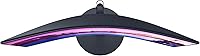
  • Curvature: The screen features a 1000R curvature radius, the most aggressive consumer curve available, designed to match the natural arc of human peripheral vision.
  • Sync Technology: AMD FreeSync is supported, dynamically syncing the display's refresh rate with a compatible GPU's output to reduce screen tearing and stuttering.
  • Inputs: Connectivity includes two HDMI ports and one DisplayPort, allowing simultaneous connection of up to three devices without cable swapping.
  • Built-in Audio: Two integrated 5W speakers provide basic stereo audio output, eliminating the need for a separate speaker in low-demand listening environments.
  • Eye Comfort: Flicker-Free technology and an Eye Saver Mode (blue light reduction filter) are built in to reduce visual fatigue during extended screen sessions.
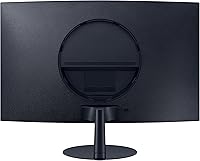
  • Stand Type: The monitor ships with a slim metal stand that supports tilt adjustment only; height, swivel, and pivot adjustments are not available on the stock stand.
  • VESA Compatibility: The display supports VESA wall and arm mounting, giving buyers the option to replace the stock stand with a third-party ergonomic solution.
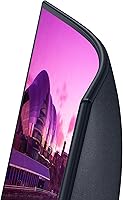
  • Bezel Design: Three sides of the monitor feature a virtually frameless design, with only the bottom edge retaining a more traditional bezel width.
  • Screen Coating: A matte anti-glare coating is applied to the screen surface, reducing reflections and improving usability in well-lit or windowed environments.
  • Aspect Ratio: The display uses a standard 16:9 widescreen aspect ratio, fully compatible with HD and Full HD content, gaming, and productivity applications.
  • Back Finish: The rear panel features a fabric-textured surface that adds a tactile, design-forward aesthetic uncommon at this price tier.
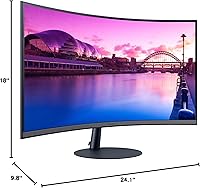
  • Dimensions: The monitor measures 24.1 x 18 x 9.8 inches with the stand attached, making it compact enough for most standard desk setups.
  • Weight: Total weight with stand is 11.2 pounds, light enough for a single person to position and reposition without assistance.
  • Power Input: The monitor operates at 19 volts and includes an external power adapter compatible with standard wall outlets.

Related Reviews

Samsung 32-Inch S39C Curved Gaming Monitor
83%
88%
Display Quality
91%
Value for Money
86%
Eye Comfort
89%
Ease of Setup
85%
Build Quality
More
Samsung Odyssey G55C 27-inch Curved Gaming Monitor
76%
91%
Image Sharpness
89%
Refresh Rate & Motion
84%
Curvature & Immersion
86%
Value for Money
58%
HDR Performance
More
Skytech Gaming Moonshadow 27-inch Curved Gaming Monitor
83%
88%
Image Quality
91%
Refresh Rate Performance
86%
Adaptive-Sync
83%
VA Panel Contrast
84%
Stand & Ergonomics
More
Sealan 27-inch Curved Gaming Monitor
82%
85%
Display Quality
90%
Ease of Setup
91%
Value for Money
87%
Performance in Gaming
83%
Color Accuracy
More
CRUA CR270C 27″ Curved Gaming Monitor
71%
83%
Value for Money
78%
Image Quality
81%
Refresh Rate Performance
86%
Panel Contrast & Blacks
67%
Build Quality
More
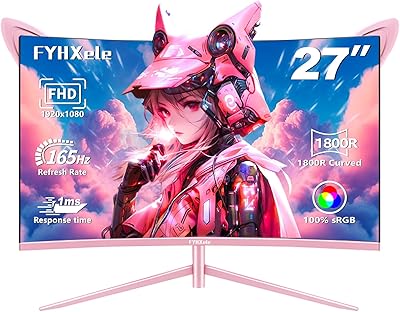
FYHXele 27-inch Curved Gaming Monitor 165Hz
85%
91%
Gaming Performance
94%
Display Quality
88%
Value for Money
76%
Build Quality
89%
Ease of Setup
More
SAMSUNG Odyssey G50A 27-Inch Gaming Monitor
84%
94%
Gaming Performance
89%
Display Quality
86%
Ergonomics and Adjustability
92%
Color Accuracy
91%
G-Sync Compatibility
More
Gawfolk GF270C 27-Inch Curved Gaming Monitor
86%
91%
Performance
88%
Display Quality
92%
Value for Money
90%
Response Time
89%
Color Accuracy
More
DJiEX Q27P28 27-inch Curved Gaming Monitor
84%
91%
Display Quality
88%
Gaming Performance
89%
Color Accuracy
72%
Setup & Calibration
85%
Eye Care Features
More
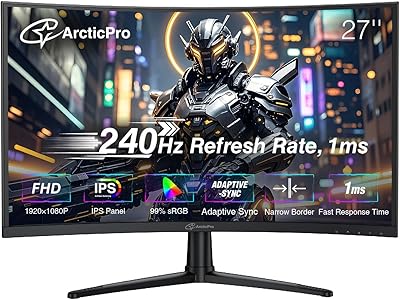
ArcticPro 27-inch 240Hz Curved Gaming Monitor
87%
94%
Performance in Gaming
90%
Display Quality
85%
Setup and Installation
88%
Visual Comfort (Low Blue Light)
91%
Design and Aesthetics
More

FAQ

Honestly, not ideal. The 75Hz refresh rate is fine for casual or single-player gaming, but competitive players — especially those coming from 144Hz or 240Hz displays — will notice the difference in fast-paced titles. If your primary focus is competitive multiplayer, you will want to look at monitors with at least 144Hz.

Yes, and this is actually one of the more practical strengths of the S39C. With two HDMI ports and a DisplayPort, you can keep three devices plugged in simultaneously and switch between them through the on-screen menu — no unplugging required.

It depends on your card. Nvidia GPUs from the GTX 10 series and newer support FreeSync displays through Nvidia's G-Sync Compatible program, though you may need to enable it manually in the Nvidia Control Panel. AMD GPU owners get full native support without any extra steps.

Quite good for the price, actually. The VA panel produces deep blacks and vibrant colors that make streaming content look noticeably better than most flat budget monitors. The 1000R curve also adds a subtle cinematic quality when watching widescreen films. Just keep in mind this is still 1080p, so very large 4K content will be downscaled.

Yes, the display is VESA-compatible, so any standard VESA arm will work. In fact, for anyone bothered by the tilt-only stand limitation, a monitor arm is a practical upgrade that also frees up desk space. Just check that your arm supports the monitor's weight of around 11 pounds.

Most people adapt to it quickly, and for general use it is rarely a problem. A small number of users find that straight horizontal lines — like spreadsheet rows or document margins — appear very slightly bowed at the edges, but the majority of buyers report no discomfort for productivity tasks after the first day or two.

They are functional for background audio, notifications, or casual video calls, but they are not a substitute for even a modest external speaker. The audio is thin and lacks any real bass. Think of them as a backup option rather than a daily driver.

It is a solid home office choice, particularly if you spend long hours at a desk. The Eye Saver Mode and Flicker-Free technology make extended workdays more comfortable, and the three-input setup handles switching between a work laptop and a personal PC without hassle. The tilt-only stand is the main ergonomic limitation to factor in.

At normal desk distances — roughly 60 to 80 centimeters — it looks acceptable for most uses. If you sit very close to the screen or do detailed work that requires sharp text rendering, you may notice the pixel density is not as tight as it would be on a 24-inch 1080p or a 27-inch 1440p display. For gaming and media consumption, most users find it perfectly fine.

Setup is very straightforward — the stand attaches to the monitor with a simple click mechanism and requires no screwdrivers. Most buyers report being fully set up, connected, and into their first session within ten to fifteen minutes of opening the box. The on-screen display menu is clear enough that you can navigate settings without digging into the manual.

Where to Buy