Overview

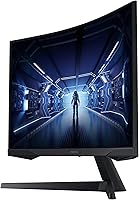
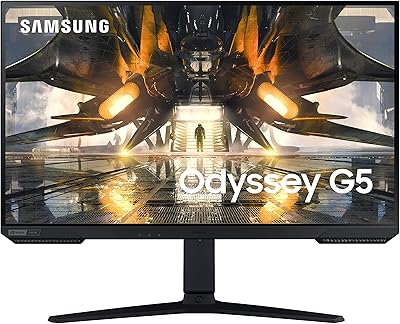
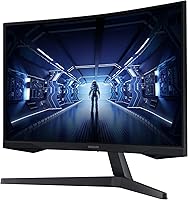
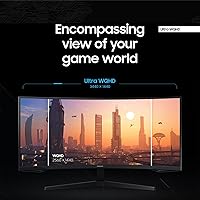
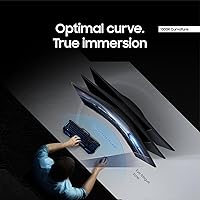
The Samsung 34″ Odyssey G5 Ultrawide Gaming Monitor sits in an interesting spot — it delivers a genuinely large, curved ultrawide experience without pushing into premium territory. That 34-inch, 21:9 canvas changes how you interact with both games and your desktop in ways a standard 16:9 display simply cannot replicate. The 1000R curvature is aggressive enough that the screen wraps noticeably into your peripheral vision, adding real immersion rather than just looking good in photos. Samsung chose a VA panel here, which brings richer contrast and deeper blacks than most IPS alternatives at this price — though trade-offs in color accuracy and viewing angles are worth understanding before you commit.
Features & Benefits

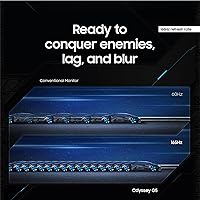
The 165Hz refresh rate is the headline gaming spec, and in fast-paced titles it genuinely smooths out motion compared to a typical 60Hz panel. The 1ms response time is quoted as MPRT — a measurement of pixel hold time, not actual gray-to-gray transition speed — so direct comparisons to other monitors can be misleading. The UWQHD resolution looks sharp and delivers noticeably more horizontal workspace, but your GPU will feel the demand, especially pushing high framerates. AMD FreeSync Premium works well out of the box; Nvidia users can often enable it through driver settings, though official G-Sync certification is absent. HDR10 is present but modest — a minor bonus rather than a headline feature. There is no USB hub or USB-C port, which feels like a real omission at this price tier.

Best For

This ultrawide curved monitor is best suited to single-player and open-world gamers who care more about how a game feels than shaving milliseconds off kill times. If you are running dual monitors and find the visual clutter frustrating, the wide format makes a compelling case for consolidating into one display. AMD GPU owners get everything FreeSync Premium offers without configuration headaches. It also works reasonably well for productivity tasks like keeping a browser, document, and reference window open side by side — though serious content creators may find the VA panel limiting. Competitive esports players who rely on refresh rates above 200Hz should look elsewhere. This is a display built around immersion over raw speed.

User Feedback

Owners of the Odyssey G5 34-inch consistently highlight the immersive screen size and value as the strongest positives, and it is easy to see why. On the downside, backlight bleed is a recurring complaint — a known VA panel trait, not unique to this model, but noticeable in dark scenes. The stand only tilts, with no height or swivel adjustment, which catches some buyers off guard and may push you toward a third-party monitor arm. HDR draws mixed opinions; most find it underwhelming against the marketing imagery. On the brighter side, the OSD navigation is straightforward, setup is quick, and overall build quality feels appropriately solid given where this display sits in the market.

Pros

  • The 1000R curve creates a level of peripheral immersion that flat monitors at any price struggle to match.
  • UWQHD resolution delivers sharp, detailed visuals and meaningful extra horizontal workspace over standard widescreen.
  • AMD FreeSync Premium with low framerate compensation keeps gameplay smooth without manual driver tweaks.
  • VA panel contrast produces deep, rich blacks that make dark gaming environments look genuinely atmospheric.
  • The wide 21:9 format is a practical replacement for a dual-monitor setup, reducing desk clutter significantly.
  • High refresh rate performance feels smooth and responsive in fast-paced single-player and mid-core gaming.
  • Out-of-box setup is quick, and the OSD joystick control makes display adjustments easy to navigate.
  • Build quality feels appropriately solid, with a matte panel finish that handles ambient room lighting well.
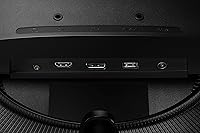
  • Dual HDMI inputs alongside DisplayPort make it easy to connect a PC and a console simultaneously.

Cons

  • Backlight bleed near screen edges is a recurring complaint and is clearly visible during dark scenes.
  • The stand only tilts — there is no height, swivel, or pivot adjustment, which creates real ergonomic limitations.
  • HDR10 performance is modest at best; do not buy this display expecting meaningful HDR impact.
  • No USB hub or USB-C port makes clean laptop connectivity awkward and adds hidden cost to the full setup.
  • Driving UWQHD resolution at high framerates demands a capable GPU — mid-range cards will face trade-offs.
  • Nvidia users may encounter adaptive sync inconsistencies due to the absence of official G-Sync certification.
  • No built-in speakers means additional peripherals are required for any audio output from the display itself.
  • Color accuracy off-axis degrades noticeably, making the Odyssey G5 34-inch a poor choice for shared viewing angles.
  • The 1ms response figure is MPRT, not gray-to-gray — real-world pixel transitions are slower than that spec implies.

Ratings

The Samsung 34″ Odyssey G5 Ultrawide Gaming Monitor earned its scores through AI analysis of thousands of verified global buyer reviews, with spam, bot-generated, and incentivized submissions actively filtered out. Ratings reflect the honest consensus across real owners — covering everything from daily gaming sessions to long work-from-home shifts — so both genuine strengths and recurring frustrations are represented without sugarcoating.
Immersion & Curvature
91%
The aggressive 1000R curve is the single most praised aspect of this display across owner feedback. Gamers switching from flat monitors consistently describe open-world titles like a genuinely different experience, with the curved edges pulling peripheral content into natural view rather than forcing eye or head movement.
A small number of users — particularly those who split time between gaming and spreadsheet-heavy work — find the curvature disorienting during straight-line tasks. It is a subjective response, but worth sitting with a demo unit if possible before committing.
Display Resolution & Sharpness
88%
The UWQHD resolution delivers noticeably sharper text and game assets compared to 1080p ultrawides at the same screen size. Owners frequently mention that UI elements in MMOs and strategy games finally feel readable without scaling tricks, and the wider canvas reduces the need to alt-tab between windows.
Driving this resolution at high framerates requires a capable GPU, and several owners report being caught off-guard by the performance demands. Budget builds with mid-range cards may find themselves choosing between resolution and smooth framerates rather than getting both.
Refresh Rate & Motion Clarity
84%
At its top refresh rate, this Samsung gaming display produces visibly smooth motion in racing games, action RPGs, and fast-paced shooters. Owners upgrading from 60Hz panels describe the difference as immediately noticeable, particularly during camera panning and high-speed movement sequences.
The 1ms spec is an MPRT figure, not a gray-to-gray measurement, which means direct comparisons to IPS monitors quoting GtG times can be misleading. Some competitive players notice residual motion artifacts in extreme scenarios, though this is rarely a dealbreaker outside of professional-level esports.
Contrast & Black Levels
86%
The VA panel earns its keep here — dark scenes in horror titles and cinematic games look genuinely deep, with blacks that IPS monitors at this price simply cannot replicate. Night-sky environments and shadow-heavy cutscenes retain detail rather than washing out into grey.
Backlight bleed is a consistent complaint, showing up as uneven brightness patches near screen edges in dark or full-black content. It is a known VA characteristic, not unique to this model, but owners who game in dim rooms notice it and some find it distracting during loading screens.
Color Accuracy & Vibrancy
71%
29%
For gaming purposes, colors read as punchy and saturated enough to make environments feel lively. Casual users and gamers generally find the out-of-box calibration more than acceptable, and the HDR10 mode adds a modest pop to supported content.
Professional color work on this display is a stretch. Off-axis color shift is noticeable when viewing from wider angles, and side-by-side comparisons with wide-color-gamut IPS panels reveal less accurate hue reproduction. HDR10 implementation is underwhelming by modern standards — functional, not transformative.
HDR Performance
58%
42%
HDR10 support means compatible games and media will engage the mode automatically, and there is a visible brightness boost in highlight-heavy scenes. For buyers who have never used an HDR display before, the improvement over SDR is noticeable.
Anyone coming from a mini-LED or OLED HDR display will be disappointed. The peak brightness is insufficient for convincing specular highlights, and the lack of local dimming means bright objects in dark scenes create a glow rather than a sharp contrast. It is better treated as a secondary feature than a buying reason.
Adaptive Sync & Tear-Free Performance
87%
AMD FreeSync Premium works reliably out of the box, and the low framerate compensation feature keeps things smooth even when frame output dips — useful during GPU-intensive sequences. Owners with AMD cards report near-zero screen tearing without needing manual configuration.
Nvidia users can often enable adaptive sync through driver-level settings, but without official G-Sync certification there is no guarantee of full compatibility across all titles and driver versions. A handful of Nvidia owners report occasional flickering that AMD users do not experience.
Connectivity & Port Selection
63%
37%
Having both DisplayPort and dual HDMI inputs covers most common setups — a PC plus a console on a second input is a straightforward configuration that many owners take advantage of. Input switching is quick and reliable according to user reports.
The absence of a USB hub is a real convenience gap at this price point. There is also no USB-C input, which limits compatibility with modern laptops that rely on it for display output. Users who expected a one-cable desk solution will need to budget for a separate hub or dock.
Ergonomics & Stand Adjustability
52%
48%
The stand is stable enough that the display does not wobble during typing, and the tilt adjustment works smoothly. For users whose desk height naturally aligns with the fixed stand height, day-to-day comfort is not an issue.
Tilt-only adjustment is genuinely limiting for a 34-inch display. Owners who share a desk setup between different users, or those who alternate between sitting and standing, report real discomfort from the inability to raise, lower, or swivel the screen. A monitor arm purchase almost becomes a necessity.
Build Quality & Materials
79%
21%
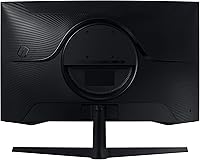
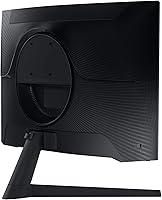
The overall construction feels solid and consistent with what buyers expect from Samsung at this tier. The matte finish on the panel reduces ambient glare effectively, and the rear panel design is clean enough that the monitor looks intentional from all angles.
The plastic used on the stand and base does not feel premium, and a few owners note minor flex when adjusting tilt. Nothing that affects display performance, but buyers accustomed to higher-end monitor materials may notice the cost-cutting.
Setup & OSD Usability
82%
18%
Initial setup receives consistently positive comments — the monitor is up and running quickly, with no complicated driver installation required. The on-screen display is logically laid out and the joystick-style navigation button makes adjusting settings straightforward even without consulting the manual.
Some of the deeper picture mode settings are buried across multiple sub-menus, and the labeling is occasionally ambiguous. Users who want fine-grained control over color temperature or gamma curves may need a few sessions to locate and test each option.
Ultrawide Productivity Performance
74%
26%
Running two or three application windows side by side on the Odyssey G5 34-inch is genuinely productive — the horizontal space handles a code editor, browser, and terminal without any window feeling cramped. Writers and researchers who work with multiple documents open simultaneously also appreciate the layout flexibility.
Not every application handles the 21:9 aspect ratio gracefully. Some older software and video conferencing tools either pillarbox or stretch, and the curvature that enhances gaming can make long horizontal documents feel slightly curved at the edges during extended reading sessions.
Value for Money
83%
Buyers consistently note that the combination of screen size, resolution, and refresh rate is hard to match at a comparable price. For gamers who want a meaningful upgrade from standard widescreen without jumping to a flagship panel, the value proposition holds up well in real-world use.
The missing features — no height adjustment, no USB hub, no speakers, no USB-C — each represent a small additional cost if you need them separately. When those add-ons are factored in, the effective price of a complete setup climbs noticeably above the monitor-only sticker price.

Suitable for:

The Samsung 34″ Odyssey G5 Ultrawide Gaming Monitor is built for gamers and everyday users who want a genuinely immersive screen without paying flagship prices. If your library leans toward open-world RPGs, adventure titles, or narrative-driven games where atmosphere matters, the wide 21:9 canvas and aggressive curve work together in a way that a standard widescreen simply cannot replicate. AMD GPU owners will particularly benefit here — FreeSync Premium runs natively without workarounds, keeping gameplay smooth across a wide framerate range. This display also makes a convincing case for anyone tired of managing a dual-monitor setup; consolidating two screens into one wide panel cleans up cable clutter and creates a more focused workspace. Budget-conscious buyers who want a large, high-refresh curved monitor without crossing into OLED or premium IPS pricing will find the overall package hard to argue with at this tier.
Not suitable for:

The Samsung 34″ Odyssey G5 Ultrawide Gaming Monitor is not the right call for every buyer, and it is worth being direct about where it falls short. Competitive esports players who prioritize ultra-high refresh rates above everything else should look at displays pushing beyond 200Hz — this one is built more for immersion than raw reaction-time advantage. Creative professionals who depend on accurate color reproduction for photo editing, video grading, or design work will find the VA panel limiting; off-axis color shift and restrained color volume make it a poor fit for color-critical tasks. If you share a desk with others of different heights, or alternate between sitting and standing throughout the day, the tilt-only stand will become a genuine daily frustration — budgeting for a third-party monitor arm is almost mandatory. Nvidia GPU owners should verify adaptive sync compatibility with their specific card and driver version before purchasing, as the lack of official G-Sync certification means results are not guaranteed. Anyone expecting USB-C connectivity or a built-in USB hub for a clean single-cable laptop setup will also need to look elsewhere.
Specifications

  • Panel Type: This display uses a VA (Vertical Alignment) panel, which delivers higher native contrast ratios and deeper blacks compared to IPS panels at a similar price point.
  • Screen Size: The viewable screen measures 34 inches diagonally, providing a wide field of view suited to both gaming and multi-window productivity work.
  • Resolution: Native resolution is 3440x1440 (Ultra-Wide Quad HD), offering noticeably sharper detail than 1080p ultrawide displays at the same screen size.
  • Aspect Ratio: The 21:9 ultrawide aspect ratio provides substantially more horizontal screen real estate than a standard 16:9 monitor of comparable height.
  • Refresh Rate: The panel supports a maximum refresh rate of 165Hz, enabling smoother motion rendering in fast-paced games compared to standard 60Hz or 144Hz displays.
  • Response Time: Samsung rates response time at 1ms using the MPRT (Moving Picture Response Time) measurement method, which reflects pixel hold time rather than gray-to-gray pixel transition speed.
  • Curvature: The screen uses a 1000R curvature radius, meaning the curve is designed to approximate the natural focal arc of human vision for reduced eye strain during extended sessions.
  • HDR Support: HDR10 is supported, providing improved highlight detail and color volume in compatible games and media, though peak brightness limits the impact compared to premium HDR implementations.
  • Sync Technology: AMD FreeSync Premium is natively supported, including low framerate compensation to maintain smooth visuals even when GPU output drops below the monitor's minimum sync threshold.
  • Connectivity: Port options include one DisplayPort 1.2 and two HDMI 2.0 inputs, allowing simultaneous connection of a PC and a gaming console without swapping cables.
  • USB Hub: No USB hub is built into this display; users requiring USB pass-through ports for peripherals or storage will need a separate hub or docking solution.
  • Audio Output: There are no integrated speakers, and no dedicated headphone jack is included on the monitor itself — audio routing must be handled through the connected source device.
  • Stand Adjustment: The included stand supports tilt adjustment only, with no provision for height, swivel, or pivot changes; VESA mounting is available for users who need greater flexibility.
  • VESA Compatibility: The monitor supports standard 100x100mm VESA mounting, making it compatible with most third-party monitor arms and wall-mount brackets.
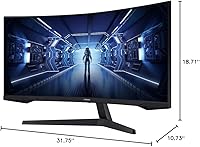
  • Dimensions: With the stand attached, the monitor measures approximately 31.76 inches wide, 18.71 inches tall, and 10.73 inches deep.
  • Weight: The assembled unit weighs approximately 12.3 pounds, which is typical for a 34-inch curved display and manageable for single-person desk installation.
  • Power Input: The monitor operates on 110V AC power and includes an internal power supply, so no external power brick is required on the desktop.
  • Color Depth: The display supports 8-bit color depth, which is standard for this panel class and sufficient for gaming and general consumer use.

Related Reviews

Samsung 34-Inch SJ55W Ultrawide Monitor
77%
88%
Picture Quality
91%
Contrast & Blacks
86%
Resolution & Sharpness
67%
Refresh Rate & Gaming Smoothness
93%
Ultrawide Productivity
More
Samsung 34-inch Odyssey G85SB Curved Gaming Monitor
79%
94%
Image Quality
91%
Refresh Rate & Responsiveness
93%
Panel Technology
58%
Burn-In Risk
88%
Ultrawide Format
More
Samsung 34″ Class Ultrawide Monitor S34J552WQNXZA
83%
92%
Display Quality
88%
Value for Money
85%
Curved Screen Experience
80%
Connectivity Options
90%
Ease of Setup
More
Samsung 27″ Odyssey G32A Gaming Monitor
80%
91%
Gaming Performance
93%
Refresh Rate & Smoothness
84%
Response Time & Motion Clarity
88%
Adaptive Sync (FreeSync Premium)
63%
Image Sharpness & Pixel Density
More
Samsung S50GC 34″ Ultrawide QHD Monitor
75%
88%
Image Quality
91%
Resolution & Sharpness
84%
Refresh Rate & Smoothness
57%
HDR Performance
82%
Color Accuracy
More
Samsung Odyssey G32A 32″ Gaming Monitor
75%
91%
Refresh Rate Performance
74%
Response Time & Motion Clarity
53%
Image Sharpness & Pixel Density
67%
Color Accuracy & Vibrancy
83%
Contrast & Black Levels
More
Samsung 34″ ViewFinity S65UA Ultrawide Monitor
84%
94%
Display Quality
89%
Ergonomics & Adjustability
91%
Color Accuracy
92%
Performance for Productivity
85%
Build Quality
More
Samsung Odyssey G55C 32″ Curved Gaming Monitor
78%
88%
Image Sharpness & Resolution
84%
Refresh Rate & Motion Clarity
91%
Curvature & Immersion
93%
Value for Money
57%
HDR Performance
More
Samsung 32″ Odyssey G65B Curved Gaming Monitor
77%
88%
Image Clarity
91%
Refresh Rate Performance
74%
HDR Quality
87%
Motion & Response
83%
Curvature & Immersion
More
Westinghouse 34-Inch Curved Ultrawide Gaming Monitor
72%
84%
Value for Money
78%
Image Quality
81%
Refresh Rate & Motion
82%
Adaptive Sync
83%
Curve & Immersion
More

FAQ

It works with Nvidia GPUs, but with some caveats. The Samsung 34″ Odyssey G5 Ultrawide Gaming Monitor is certified for AMD FreeSync Premium, not G-Sync. That said, many Nvidia cards can enable adaptive sync on FreeSync displays through the Nvidia Control Panel — most users report it works fine, though occasional flickering has been noted depending on the driver version. If you are running a newer Nvidia card, it is worth testing before assuming full compatibility.
The 1ms figure is an MPRT measurement, which tracks how long a pixel is held during a refresh cycle rather than how fast it actually transitions between gray shades. Gray-to-gray response time on VA panels is typically slower — usually in the 4–8ms range. For most gaming scenarios this is not a problem, but if you are comparing spec sheets against IPS monitors quoting GtG times, they are not measuring the same thing.

Backlight bleed is a real and recurring issue on this panel, as it is with most VA displays. It tends to show up as brighter patches along the edges or corners when viewing full-black screens or very dark scenes. The severity varies unit to unit — some owners barely notice it, others find it distracting in dark games. If you game frequently in unlit rooms with a lot of dark content, it is worth factoring into your decision.

Yes, the two HDMI inputs make it easy to connect a console alongside a PC without any adapters. Keep in mind that most current consoles output at standard 16:9 resolutions, so you may see black bars on the sides unless the console or game supports ultrawide output — which is still relatively uncommon on console platforms.

Unfortunately, the stand only tilts — there is no height, swivel, or pivot adjustment at all. If ergonomics matter for your setup, especially for a shared workstation, you will almost certainly want to pick up a VESA monitor arm. The good news is the display does support 100x100mm VESA mounting, so there are plenty of affordable arm options available.

HDR10 is present, but realistic expectations help here. The panel does not have local dimming or the peak brightness needed to produce dramatic HDR contrast, so the effect is more of a subtle improvement than a wow moment. In supported games you will see slightly better highlight detail and color saturation, but if you have experienced HDR on an OLED or a high-end mini-LED display, this will feel modest by comparison. It is a bonus feature, not a headline reason to buy.

Driving 3440x1440 at high framerates consistently requires a fairly capable card. In practice, you are looking at a mid-to-high-range GPU — something in the range of an RX 6700 XT, RTX 3070, or better — to handle demanding modern titles at high settings without dropping well below the monitor's refresh rate. Lighter games and older titles will run more easily, but budget GPUs will struggle to take full advantage of both the resolution and the high refresh rate simultaneously.

Neither, unfortunately. There are no built-in speakers and no headphone jack on the monitor itself. All audio has to be handled by your PC, console, or an external speaker or headset setup. For most dedicated gamers this is not a dealbreaker since they already use headsets, but if you were counting on the monitor for audio output you will need to plan accordingly.

It handles productivity work reasonably well — the wide 21:9 format is genuinely useful for keeping multiple windows open side by side, and the resolution makes text crisp enough for long reading sessions. The curvature can feel slightly odd for certain tasks like reading full-width documents, and color accuracy is not at the level you would want for serious photo or video work. For most general office tasks, writing, browsing, and video calls, it is a comfortable and practical daily driver.

Setup is straightforward — the stand attaches with a few screws, the cables are standard, and the display is recognized immediately on both Windows and console platforms without any driver installation. The OSD is controlled via a small joystick on the underside of the monitor, and the menu layout is logical enough that most users get through initial calibration without needing the manual. Deeper settings like gamma and color temperature adjustments take a bit of digging, but nothing is unreasonably buried.

Where to Buy