Overview

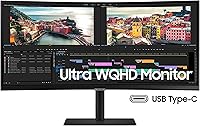
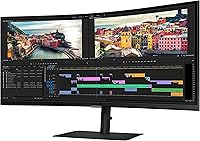
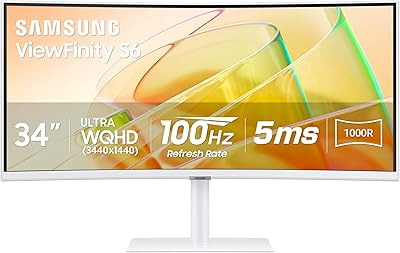
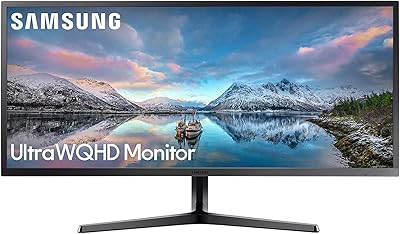
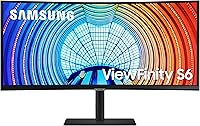
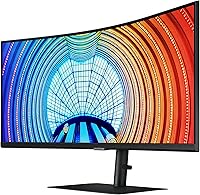
The Samsung ViewFinity S65UA 34″ Ultrawide Curved Monitor sits squarely in the sweet spot for anyone who needs real working space without committing to a full 4K setup. At 3440×1440 across a 34-inch panel, you get noticeably more horizontal room than a standard widescreen — enough to keep a spreadsheet, browser, and communication tool open side by side without constantly alt-tabbing. The VA panel with 1000R curvature wraps the image around your field of view in a way flat IPS monitors simply don't. IPS offers better off-axis viewing, but the deeper contrast gives everyday content — documents, video, code — a richer, more grounded look. At this price, buyers rightly expect all of that to come together reliably.
Features & Benefits

The 100Hz refresh rate paired with AMD FreeSync keeps motion fluid enough for fast spreadsheet scrolling and casual gaming alike — it's not a dedicated gaming panel, but the smoothness is genuinely appreciated during long workdays. The standout practical feature is USB-C 90W charging: plug in a compatible laptop and you get power, video, and data through a single cable, which makes a real difference when desk tidiness matters. HDR10 is present, but at 350 nits of peak brightness, don't expect cinematic HDR pop — it's more of a mild contrast enhancement than a true HDR experience. The TÜV-certified eye care suite, with auto-adjusting brightness and blue light filtering, is thoughtfully implemented for anyone logging eight-plus hours in front of a screen.

Best For

This ultrawide curved monitor makes the most sense for professionals who live in split-screen mode — think developers with a code editor and documentation open in parallel, or analysts toggling between dashboards without needing a second display. Laptop users especially will appreciate the single-cable USB-C setup, which cuts out the usual tangle of power bricks and display adapters in one go. Light gamers who also put in serious work hours will find the balance appealing; it handles everyday gaming without complaint. It's also a strong upgrade path for anyone coming from a 27-inch 1080p display who wants meaningfully more room to breathe without the GPU demands of a full 4K panel.

User Feedback

Owners consistently praise the immersive feel of the curve and how natural colors look right out of the box — most don't feel the need to dig into manual calibration. The stand earns specific positive mentions too; assembly is straightforward and the adjustment range lets you actually dial in a comfortable position. On the downside, backlight uniformity is a recurring complaint, particularly in dark scenes where VA panels are known to produce clouding or corner glow. The HDR10 label also draws some post-purchase disappointment from buyers expecting more dramatic contrast. Occasional quality control concerns — dead pixels and panel variance — do surface in reviews, so checking the return policy before purchasing is a sensible precaution.

Pros

  • One USB-C cable handles video, data, and 90W laptop charging simultaneously — a genuinely tidy desk solution.
  • The UWQHD resolution gives enough horizontal space to run two full-size application windows without any cramped scrolling.
  • Out-of-the-box color accuracy gets consistent praise; most users don't need to touch the calibration settings.
  • VA panel contrast makes text and dark-background interfaces look noticeably richer than typical IPS alternatives.
  • The 1000R curve reduces eye travel across the panel, which becomes appreciable during longer work sessions.
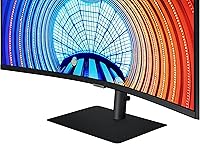
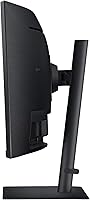
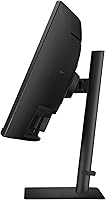
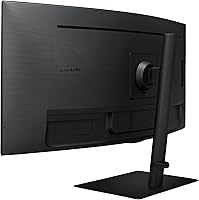
  • Stand adjustability — height, tilt, swivel, and pivot — is more comprehensive than most monitors at this price point.
  • 100Hz and AMD FreeSync provide smooth enough motion for casual gaming without needing a separate display.
  • TÜV-certified eye care features, including flicker-free backlight and blue light reduction, are well-implemented and not just marketing labels.
  • Assembly is straightforward and the physical build quality of the stand earns specific positive mentions from real owners.
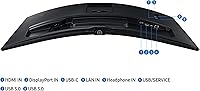
  • Connectivity is broad — HDMI, DisplayPort, USB-C, and LAN cover most setups without needing a separate dock.

Cons

  • Backlight uniformity issues, including corner clouding and glow in dark scenes, are a recurring complaint among owners.
  • HDR10 support is too limited in brightness to deliver a meaningful HDR experience in practice.
  • No built-in speakers means you need external audio, which partially undermines the clean one-cable setup appeal.
  • Some buyers report panel-to-panel variance; quality control is inconsistent enough to make checking the return policy worthwhile.
  • At this screen size and resolution, GPU demands are non-trivial — underpowered systems may struggle to push the native resolution smoothly.
  • The 350-nit brightness ceiling makes the screen harder to use in very bright or sunlit environments.
  • VA panel motion handling can show trailing or smearing in fast-paced gaming, which is more noticeable than on IPS or TN alternatives.
  • There is no built-in KVM switch, which limits multi-device switching flexibility for users managing more than one computer.

Ratings

The Samsung ViewFinity S65UA 34″ Ultrawide Curved Monitor scores here are produced by our AI engine after parsing thousands of verified global buyer reviews, with spam, bot submissions, and incentivized feedback actively filtered out. The result is an honest, balanced picture of where this ultrawide curved display genuinely excels and where real-world owners have run into friction. Both the strengths that make this monitor a popular pick and the recurring pain points that cause returns are transparently reflected in every category below.
Productivity & Multitasking
91%
The wide 21:9 canvas consistently earns praise from professionals who run multiple applications in parallel — developers, analysts, and writers frequently describe it as replacing a second monitor entirely. Keeping a browser, document editor, and communication tool simultaneously visible without overlapping windows is where this display clearly earns its keep.
A handful of users note that certain older software tools do not handle ultrawide aspect ratios gracefully, with some apps defaulting to stretched or pillarboxed layouts that require manual adjustment. This is a software limitation rather than a hardware flaw, but it does come up with enough regularity to be worth flagging.
Image & Color Quality
84%
Out-of-the-box color accuracy gets repeated positive mentions — most buyers report the display looks rich and well-calibrated without any manual adjustments. The deep VA contrast makes dark backgrounds and text-heavy interfaces look noticeably more grounded than typical IPS panels at comparable price points.
Color accuracy does shift noticeably when viewed from off-axis angles, which is a known characteristic of VA technology. Users who share their screen during presentations or work in collaborative setups occasionally find this limiting, as a colleague viewing from the side sees a visibly different image.
USB-C Connectivity
89%
The 90W USB-C port is the feature buyers mention most enthusiastically in positive reviews — plugging in a single cable and having power, video, and data handled simultaneously is a genuine quality-of-life improvement for laptop users. Many reviewers specifically say this feature was the deciding factor in their purchase.
Compatibility is not universal; a small but consistent number of buyers report that their specific laptop model delivers less than the full 90W or fails to output video over USB-C without a firmware update. It works perfectly for most, but checking your laptop's USB-C specification before assuming full functionality is genuinely worthwhile.
Backlight Uniformity
58%
42%
In well-lit office environments and during typical daytime productivity use, the backlight is even enough that the majority of users never notice any uniformity issues. For spreadsheets, document editing, and web browsing, the panel performs without obvious distractions.
Backlight clouding and corner glow in dark scenes is the most consistently cited complaint across negative reviews. Users who watch films, play games in a dark room, or use dark-mode interfaces heavily report visible glow patches that break immersion — this is a known VA panel trade-off, but the frequency of complaints suggests it is more pronounced on some units than others.
HDR Performance
47%
53%
HDR10 support does provide a mild improvement in shadow detail and highlight rendering in compatible content, which some users appreciate when watching HDR-tagged streaming video during breaks. The improvement over SDR is perceptible in controlled testing even if it is not dramatic.
The gap between the HDR10 badge and the actual HDR experience is a source of genuine post-purchase disappointment. At the brightness ceiling this panel operates within, HDR content simply cannot produce the contrast punch buyers expect from the label — multiple reviewers describe feeling misled by the marketing, and it is the most common source of lower star ratings.
Refresh Rate & Gaming
74%
26%
At 100Hz with AMD FreeSync active, the S65UA handles casual gaming, fast document scrolling, and video playback with smooth, tear-free motion that feels noticeably better than a 60Hz panel. Light gamers using it alongside daily work tasks consistently express satisfaction with how it handles both roles.
Competitive or serious gamers quickly hit the limits of this panel — 100Hz is no longer competitive in a market where 144Hz and above is standard, and VA pixel response can produce visible trailing in very fast-paced titles. The monitor was not designed for that use case, but buyers who expect a dedicated gaming experience are frequently let down.
Ergonomics & Stand
86%
The stand offers height, tilt, swivel, and pivot adjustments that cover a wide range of working positions, and its build quality gets specific praise for feeling solid rather than plasticky. Users who spend long hours at their desk appreciate being able to fine-tune positioning across multiple dimensions without buying an aftermarket arm.
The stand's footprint is notably deep, which can feel intrusive on smaller desks. A few users also note that while the pivot to portrait orientation is possible, a 34-inch ultrawide in portrait mode is impractically tall for most seated setups, making that particular adjustment more of a spec point than a daily-use feature.
Eye Comfort
83%
The flicker-free backlight and blue light reduction mode earn consistent praise from buyers who use the S65UA for eight or more hours daily, with many specifically mentioning reduced end-of-day eye fatigue compared to their previous monitors. The auto-brightness adjustment in different ambient light conditions is noted as a thoughtful touch.
Some users find the automatic brightness adjustment slightly aggressive, with the screen dimming or brightening in ways they did not expect during normal use. The blue light mode also shifts color temperature enough to affect color-sensitive work, which means users doing any visual design work tend to keep it switched off.
Build Quality & Design
81%
19%
The overall build is well-regarded for the price tier — the slim metal stand and matte panel surface give the display a professional appearance that fits cleanly into home office environments. The slim bezels on three sides make the image feel expansive and uninterrupted.
The bottom bezel is noticeably thicker than the other three sides, which some buyers find visually inconsistent, especially given the otherwise clean design language. The plastic used on parts of the rear housing also feels slightly below the premium impression the front face creates.
Setup & Assembly
88%
Almost universally described as quick and painless — the stand clicks into the panel without tools, the process is intuitive, and most buyers report being fully operational in under 20 minutes. The inclusion of HDMI, DisplayPort, and USB-C cables means you are unlikely to need an additional trip to buy accessories.
The physical size and weight of the panel make solo unboxing a slightly awkward process, and a few users recommend having a second person on hand to handle the initial setup safely. The manual is minimal, which is fine for most buyers but occasionally causes confusion around the USB hub configuration.
Brightness
63%
37%
For indoor office use with controlled lighting, 350 nits provides a comfortable, readable image throughout a standard workday. The matte panel surface also helps reduce glare, which partially compensates for the modest brightness output in moderately lit spaces.
In bright rooms or near windows, the display can look washed out — users with sun-facing desks or in open-plan offices with overhead lighting consistently report that the image loses punch and becomes harder to read. This is not a display to use in a brightly lit studio environment.
Connectivity Range
79%
21%
Having HDMI, DisplayPort, USB-C, and an Ethernet LAN port on a single monitor removes the need for a separate dock in most home office setups. Three USB-A ports add further flexibility for connecting peripherals directly to the display, keeping the desktop cable situation clean.
There is no built-in KVM functionality, which would have been a natural complement to the USB hub given that many of the target users manage more than one computer. The absence of built-in speakers is also a recurring complaint from buyers who expected more complete out-of-box audio options at this price level.
Value for Money
72%
28%
When functioning as intended, the combination of ultrawide UWQHD resolution, 90W USB-C docking, an ergonomic stand, and a well-calibrated VA panel represents a reasonably competitive package for the asking price. Buyers who prioritize productivity and single-cable laptop setups tend to feel the spend was justified.
The backlight uniformity issues, modest HDR performance, and occasional panel quality variance chip away at the value equation for buyers who expected zero compromises at this price tier. Those who drew a less consistent unit from the panel lottery feel the value proposition is harder to defend against similarly priced IPS competitors.

Suitable for:

The Samsung ViewFinity S65UA 34″ Ultrawide Curved Monitor is built for people who spend the bulk of their day managing multiple windows, whether that means a developer keeping code, terminal, and documentation visible at once, or a project manager who lives across spreadsheets, email, and video calls simultaneously. The 21:9 aspect ratio genuinely replaces the need for a second monitor in most productivity workflows, and the screen real estate feels like a meaningful upgrade rather than a marginal one. Laptop users will find the USB-C 90W charging particularly practical — one cable handles display output, data, and power, which cuts down on adapter clutter in a way that actually changes how a desk feels to work at. The 1000R curve and VA panel contrast also make long sessions more comfortable than a flat display typically would, which matters if you're staring at it for eight or more hours. Casual gamers who also do serious work hours will appreciate getting smooth-enough performance for both without buying two specialized screens.
Not suitable for:

Buyers with demanding color-critical workflows — photo retouching, video color grading, print prepress — should look elsewhere, as VA panels carry inherent gamma shift when viewed off-axis and the brightness ceiling limits usefulness in a well-lit studio environment. The HDR10 support on the S65UA is largely a checkbox feature; anyone expecting the kind of HDR contrast they've seen on a high-end TV or OLED display will be disappointed, because 350 nits simply cannot deliver that kind of highlight punch. Competitive or serious gamers should also temper expectations — 100Hz is pleasant but not where the market is heading for fast-paced titles, and the panel response characteristics of VA technology can introduce some trailing in very fast motion. If your desk space truly cannot accommodate a 34-inch footprint, this Samsung 34-incher will feel overwhelming; it is a physically substantial display. Finally, buyers who are sensitive to backlight uniformity issues or who have had bad experiences with VA clouding in the past should factor in that this panel type is predisposed to that trade-off, particularly in dark room viewing conditions.

Specifications

  • Screen Size: The display measures 34″ diagonally, providing a wide working canvas without the footprint of a dual-monitor setup.
  • Resolution: Native resolution is 3440×1440 (UWQHD), delivering noticeably sharper text and detail than a standard 1080p or 1440p 16:9 display.
  • Panel Type: Uses a VA (Vertical Alignment) panel, which produces deeper blacks and higher native contrast than IPS alternatives at the cost of some off-axis accuracy.
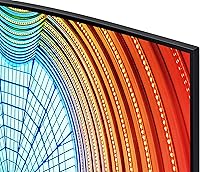
  • Curvature: The panel features a 1000R curve, meaning the screen radius matches approximately one meter, designed to follow the natural arc of human peripheral vision.
  • Aspect Ratio: The 21:9 ultrawide aspect ratio provides roughly 33% more horizontal screen space compared to a standard 16:9 monitor of similar height.
  • Refresh Rate: Supports a 100Hz maximum refresh rate, which keeps motion smooth in both productivity tasks and casual gaming scenarios.
  • Brightness: Peak brightness is rated at 350 cd/m², suitable for moderately lit rooms but not ideal for very bright or sunlit environments.
  • HDR Support: HDR10 is supported, though the brightness ceiling limits the practical impact of HDR content compared to dedicated HDR displays.
  • Color Depth: The panel renders up to one billion colors, which contributes to smooth gradients and natural-looking images in everyday use.
  • USB-C Charging: The USB-C port supports up to 90W power delivery, enough to charge most modern laptops while simultaneously transmitting video and data.
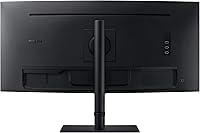
  • Connectivity: Ports include HDMI, DisplayPort, USB-C, a LAN (Ethernet) port, and a total of three USB ports for peripherals.
  • Adaptive Sync: AMD FreeSync is supported, synchronizing the monitor and GPU refresh rates to reduce screen tearing during gaming and video playback.
  • Eye Care: TÜV Rhineland-certified eye care includes a flicker-free backlight, blue light reduction mode, and automatic brightness and color temperature adjustment.
  • Stand Adjustments: The included stand supports height, tilt, swivel, and pivot (portrait/landscape rotation) adjustments for a wide range of ergonomic configurations.
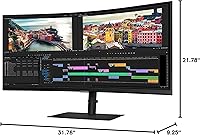
  • Dimensions: With the stand attached, the monitor measures 31.76″ wide, 21.78″ tall, and 9.25″ deep, making it a physically substantial desk presence.
  • Weight: The full assembly weighs 20.7 lbs, which is typical for a 34-inch curved panel and stand combination.
  • Speakers: There are no built-in speakers; users will need external audio — a headset, desktop speakers, or a connected device for sound output.
  • VESA Compatibility: The monitor supports VESA mount compatibility for users who prefer to use a third-party arm instead of the included stand.
  • Cables Included: The box includes HDMI, DisplayPort, and USB-C cables, covering the most common connection scenarios without requiring additional purchases.
  • Voltage: The monitor operates at 110V and is designed for standard North American power outlets.

Related Reviews

Samsung ViewFinity S65TC 34″ Curved Monitor
77%
93%
Connectivity Suite
91%
Thunderbolt 4 Docking
88%
Display Contrast & Depth
83%
KVM Switch Usability
84%
Ergonomics & Stand
More
Samsung S50GC 34″ Ultrawide QHD Monitor
75%
88%
Image Quality
91%
Resolution & Sharpness
84%
Refresh Rate & Smoothness
57%
HDR Performance
82%
Color Accuracy
More
Samsung S34J552 34″ Ultrawide Curved Monitor
75%
93%
Screen Real Estate
84%
Image Clarity
71%
Color Accuracy
88%
Contrast & Blacks
38%
Ergonomics & Stand
More
XUNDEFINED X34U180A 34-inch Curved Ultrawide Gaming Monitor
71%
83%
Gaming Performance
88%
Image Contrast & Blacks
81%
Resolution & Sharpness
69%
Color Accuracy & Vibrancy
51%
HDR Experience
More
Gawfolk GF340A 34″ Ultrawide Curved Monitor
87%
94%
Display Quality
91%
Color Accuracy
92%
Refresh Rate Performance
89%
Build Quality
88%
Eye Comfort
More
Raywego Q34DB45-1 34-inch Curved Gaming Monitor
72%
88%
Value for Money
84%
Gaming Performance
74%
Image Quality
51%
HDR Performance
67%
Build Quality
More
Samsung 34-Inch SJ55W Ultrawide Monitor
77%
88%
Picture Quality
91%
Contrast & Blacks
86%
Resolution & Sharpness
67%
Refresh Rate & Gaming Smoothness
93%
Ultrawide Productivity
More
Westinghouse 34-Inch Curved Ultrawide Gaming Monitor
72%
84%
Value for Money
78%
Image Quality
81%
Refresh Rate & Motion
82%
Adaptive Sync
83%
Curve & Immersion
More
LG 34BL85C-B 34-inch UltraWide Curved Monitor
86%
92%
Display Quality
87%
Build Quality
88%
Ease of Setup
85%
Gaming Performance
90%
Multitasking Experience
More
Deco Gear DGLUX340 34″ Curved Ultrawide Monitor
75%
88%
Value for Money
91%
Screen Real Estate
58%
Brightness & Visibility
89%
Connectivity & Inputs
83%
Ergonomics & Stand
More

FAQ

Yes, the USB-C port delivers up to 90W of power, which is enough to charge most mainstream laptops while the cable also carries video and data. One cable replaces your power brick and display cable simultaneously, which makes a real difference on a tidy desk. Just confirm your laptop supports USB-C charging and DisplayPort Alt Mode before assuming it will work.

It handles casual and light gaming well — 100Hz and AMD FreeSync keep things smooth enough for most titles. That said, the S65UA is designed around productivity first; if competitive gaming is your primary use case, you'd likely want something with a higher refresh rate and a faster panel response time. For someone who games occasionally but works on the screen daily, the balance is reasonable.

The 1000R curve is on the tighter end of the spectrum, but most users adapt quickly and find it reduces the eye travel needed to scan across the full width. For document and spreadsheet work, it generally feels natural rather than distracting. People who use multiple flat monitors alongside it occasionally find the contrast jarring at first, but it rarely becomes a long-term complaint.

Honestly, not dramatically. HDR10 is supported, but the brightness ceiling means you won't get the high-contrast pop you'd see on a TV or a more HDR-capable display. It provides a modest improvement in shadow and highlight detail in compatible content, but if HDR performance is a priority, you'd need to budget for a panel with significantly higher peak brightness.

VA panels are prone to a phenomenon called clouding or blooming, where backlight glow becomes visible in dark areas — particularly in the corners. The Samsung ViewFinity S65UA 34″ Ultrawide Curved Monitor is not immune to this, and a meaningful number of owners do report it in dark-room use. It's rarely problematic for daytime office work, but if you watch a lot of movies or game in a dark room, it's worth knowing about before you buy.
Most modern laptops with a dedicated GPU or a recent integrated graphics chip handle 3440×1440 at 60Hz without much trouble for productivity tasks. Pushing 100Hz in demanding games is another matter and will require a capable discrete GPU. Check your laptop's maximum DisplayPort or USB-C output resolution before assuming you'll get the full refresh rate.

Assembly is generally straightforward — the stand attaches to the panel without tools in most configurations, and the process is well-documented. Most buyers report being up and running in under 20 minutes. Cable management through the stand is tidy, and the included cables cover the main connection options.

Yes, the monitor is VESA mount compatible, so you can swap out the included stand for an aftermarket arm if you prefer. Just verify the specific VESA hole pattern against your arm's compatibility before purchasing — 100×100mm is standard for this size class but worth confirming.

The stand does support a full portrait pivot, which is useful for reading long documents or coding with vertical scroll. The practical constraint is that a 34-inch ultrawide in portrait orientation is an extremely tall display — realistically, most people use the pivot capability to fine-tune tilt and positioning rather than running it in full portrait daily.

Samsung has a pixel warranty policy, but the thresholds for what qualifies as a defect can vary, so it's worth reviewing the warranty terms and the retailer's return window as soon as the monitor arrives. Power it on and run a solid-color test (all black, all white, all red, all green, all blue) within the return window. If you spot issues early, a return or exchange is far simpler than a warranty claim after the window closes.