
Overview

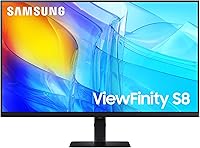
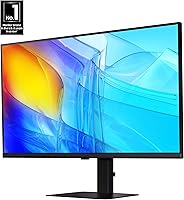
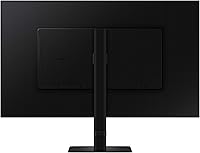
The Samsung ViewFinity S80D 32″ 4K Monitor sits in a comfortable mid-range position — capable enough for serious creative work, priced without the premium-tier anxiety. At 32 inches, the screen occupies a useful amount of desk real estate without dominating smaller setups. Samsung released it in 2024 with a three-year warranty attached, which signals genuine confidence in the build. Samsung has spent years refining its display lineup, and this Samsung display carries that pedigree well. It targets designers, creators, and productivity-minded professionals who want a meaningful resolution upgrade without stepping into enthusiast pricing territory.

Features & Benefits

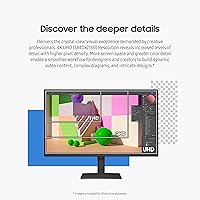
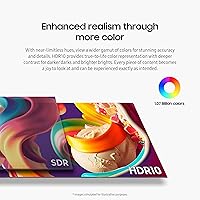
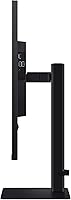
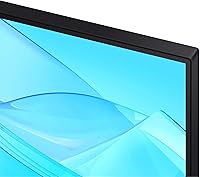
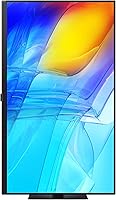
At the heart of this 32-inch 4K screen is a 3840×2160 resolution panel that makes a real difference the moment you open a detailed design file or a spreadsheet dense with small type — text is genuinely crisp and you can fit considerably more on screen without squinting. HDR10 adds depth to darker scenes and punchy highlights, which matters for video editors and photographers checking true-to-life color. The stand adjusts in height, tilts, swivels, and pivots 90 degrees, so you can dial in a comfortable viewing angle without buying a separate monitor arm. Port selection covers HDMI, DisplayPort, and multiple USB slots, keeping most multi-device setups tidy. Flicker-free technology and blue light filtering round out a package clearly built with long working hours in mind.

Best For

The S80D makes most sense for graphic designers and creators who spend hours on detailed visuals and need accurate colors with high pixel density — the jump from a 1080p or even 1440p display is noticeable and genuinely worth it. Remote workers upgrading a home office will appreciate how much more comfortable this Samsung display is for extended document and browser work. The pivot function is useful for developers or writers who prefer reading long pages of code or text in vertical orientation. Anyone juggling a laptop, desktop, and peripherals will find the straightforward port layout cuts daily friction. Competitive gamers, though, should look elsewhere — the 60Hz refresh rate was not designed for fast-paced titles.

User Feedback

With around 80 ratings and a 4.5-star average, the sample is still relatively early but consistent in its patterns. Buyers repeatedly highlight sharpness and color accuracy as standout qualities, and the tool-free assembly earns praise from users who expected a far more involved process. On the critical side, a handful of reviewers mention the stand can feel slightly less rigid than expected at maximum height, and a few note the panel coating could handle bright ambient light better. Notably, the negative comments skew toward packaging and shipping concerns rather than faults with the display itself. For a monitor launched in 2024, the early trend is encouraging and points to a solid overall package for its category.

Pros

  • True 4K sharpness makes a visible difference for detailed design work, photo editing, and dense spreadsheets.
  • HDR10 support adds genuine depth and punch to color-heavy content without requiring premium-tier pricing.
  • The tool-free stand assembly is genuinely quick and frustration-free straight out of the box.
  • Height adjustment and 90-degree pivot solve real ergonomic problems for users who sit at a desk for hours.
  • HDMI, DisplayPort, and multiple USB ports cover most multi-device setups without needing a separate dock.
  • TÜV-certified flicker reduction and blue light filtering make long work sessions noticeably easier on the eyes.
  • The three-year warranty offers solid long-term coverage and reduces the risk of an expensive mid-life repair.
  • At 32 inches, the S80D fits comfortably on most desks without overwhelming the workspace.
  • Early buyer ratings skew positive on image clarity and build quality, with complaints focusing on shipping rather than the display itself.
  • The 2024 release means you are getting current-generation panel technology rather than a refreshed older design.

Cons

  • The 60Hz refresh rate rules out this Samsung display for anyone serious about fast-paced or competitive gaming.
  • No USB-C or Thunderbolt port means laptop users cannot charge and connect with a single cable.
  • The stand can feel slightly wobbly at its maximum height extension, which may bother detail-oriented users.
  • The panel coating handles direct overhead light adequately but can struggle with bright ambient light from windows.
  • HDR10 is the entry-level HDR standard — buyers needing wide-gamut or high-brightness HDR will need to look elsewhere.
  • With roughly 80 ratings at time of writing, long-term reliability data is still limited compared to more established models.
  • The display lacks built-in speakers, so users without external audio will need to budget for that separately.
  • At 15 pounds, the S80D is not particularly easy to reposition frequently on a shared or flexible desk setup.

Ratings

The Samsung ViewFinity S80D 32″ 4K Monitor has been evaluated by our AI system after analyzing verified global buyer reviews, with spam, bot activity, and incentivized feedback actively filtered out to protect accuracy. Scores reflect the honest balance of what real users praised and where they ran into frustration — nothing is glossed over. Both the standout strengths and the genuine weak spots are represented transparently in the categories below.

Image Clarity
93%
Buyers consistently describe the jump to 4K on this Samsung display as immediately noticeable — fine text in spreadsheets, intricate details in design files, and subtle gradients in photography all render with a sharpness that makes returning to 1080p feel impossible. For professionals who stare at screens all day, this is the category that earns the most praise.
A small number of users working in very demanding color-critical environments note that while the panel is sharp, it does not fully satisfy professional-grade accuracy standards without manual calibration. Out-of-box color tuning is good but not perfect for print-matching workflows.
Color Accuracy
81%
19%
HDR10 support gives the S80D a meaningful edge over non-HDR displays in its class — photographers and video editors report that color depth feels richer and contrast more lifelike, particularly when reviewing footage or retouching portraits. Casual creative work benefits clearly from the improved tonal range.
HDR10 is the entry tier of the HDR standard, and buyers coming from wide-gamut professional panels will notice the gap. Coverage of DCI-P3 and Adobe RGB falls short of what dedicated color-grading monitors offer, so cinema professionals and print designers may need to set expectations accordingly.
Ergonomics & Stand
78%
22%
The ability to raise, lower, tilt, swivel, and pivot the screen solves genuine day-to-day comfort problems — remote workers switching between sitting and standing positions, or developers who flip to portrait mode for code reviews, find the stand flexibility genuinely useful rather than a checkbox feature.
At maximum height extension, a handful of users report subtle wobble when touching the desk, which can be distracting during typing-heavy sessions. The stand is functional and well-designed overall, but it does not feel quite as rigid as premium-tier monitor stands in a higher price bracket.
Connectivity
84%
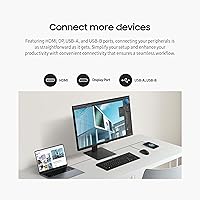
Having HDMI, DisplayPort, and multiple USB 3.0 ports on a single monitor removes the need for a separate hub in most home office setups. Users with a laptop and a desktop running side by side find the port layout genuinely practical for day-to-day switching without cable chaos.
The absence of a USB-C or Thunderbolt port is a real gap for MacBook and modern laptop users who want a single-cable connection for video and power simultaneously. This omission forces an extra adapter into the workflow and feels like an oversight for a 2024 display targeting professionals.
Eye Comfort
88%
The TÜV-certified flicker-free operation and Eye Saver Mode make a tangible difference for users logging eight or more hours in front of the screen. Several buyers specifically noted reduced end-of-day headaches and less overall eye fatigue compared to their previous monitors, which is a credible and consistent pattern in the feedback.
The automatic brightness and color temperature adjustment, while useful, can occasionally feel inconsistent in rooms with changing light conditions — some users prefer to disable the automatic mode and set parameters manually. It works well once dialed in but requires a short learning curve.
Build Quality
79%
21%
The overall construction feels appropriately solid for a mid-range display, with a clean matte black finish that blends into professional desk setups without drawing attention. The plastics used do not feel cheap, and the panel-to-stand connection inspires reasonable confidence in long-term stability.
Compared to higher-end Samsung display tiers or competing monitors from premium brands, the chassis materials feel slightly utilitarian on close inspection. The back panel in particular lacks the refined texture that some buyers in this segment expect, though it does not affect performance.
Setup Experience
92%
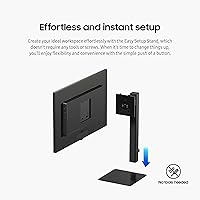
The tool-free stand assembly is one of the most consistently praised aspects of this 32-inch 4K screen — buyers report going from box to working display in under five minutes without hunting for screwdrivers or fumbling with loose hardware. It is a small thing that leaves a strong first impression.
A few buyers noted that the cable management routing along the stand arm is a bit tight, making it awkward to route thicker HDMI or DisplayPort cables cleanly. It is a minor inconvenience rather than a serious flaw, but worth knowing if a tidy desk setup is a priority.
Refresh Rate
54%
46%
For the core target audience — designers, writers, developers, and productivity users — 60Hz is entirely adequate and the motion rendering feels smooth and stable during typical work tasks, document editing, and casual media consumption.
60Hz is simply not competitive for gaming in 2024, and this is where the S80D draws its sharpest criticism from buyers who hoped to use it across both work and play. Fast-paced titles reveal motion blur and input lag that dedicated gaming monitors at similar price points handle far more capably.
HDR Performance
67%
33%
HDR10 support adds visible pop to streaming content and photo work compared to SDR-only monitors, and buyers watching HDR-enabled media on platforms like YouTube or Netflix report a noticeably more engaging experience than their previous displays offered.
Peak brightness levels limit how dramatic the HDR effect actually looks in a bright room — the display is not capable of the high-nit output that makes HDR truly impactful. Users who have experienced high-brightness HDR on premium panels will find this implementation modest rather than impressive.
Glare & Reflection Control
71%
29%
In a controlled office environment with neutral overhead lighting, the anti-glare coating does its job reliably and the image stays legible and comfortable throughout the workday. Most home office users in typical lighting conditions will not find reflections a disruptive issue.
Place this monitor near a bright window or in a room with inconsistent natural light and reflections become noticeably distracting, particularly on dark content. The coating handles diffused light well but struggles with direct light sources, which is a real limitation for users without control over their room's brightness.
Value for Money
86%
For buyers whose primary needs are sharp productivity visuals, reliable ergonomics, and clean connectivity at a mid-range price point, the S80D delivers a compelling package. The three-year warranty strengthens the long-term value proposition considerably and reduces the perceived risk of the purchase.
As the price approaches competing options with USB-C connectivity or higher refresh rates, the value calculus gets tighter. Buyers who stretch their budget slightly could access panels that address the connectivity gap or the 60Hz limitation, making careful comparison worthwhile before committing.
Pivot & Portrait Mode
83%
Developers who flip the S80D into portrait mode for code review and writers who use it for long-form document editing consistently rate this feature as more useful in practice than they expected. The transition is smooth and the display auto-rotates cleanly on both Windows and macOS.
In portrait orientation at 32 inches, the screen height becomes quite tall and can feel physically awkward on desks with limited depth, requiring the user to push the monitor further back than ideal. It works well at mid-height stand settings but becomes less practical at the uppermost height positions.
Out-of-Box Calibration
74%
26%
For most buyers coming from budget or older monitors, the default color and brightness settings are accurate enough to use immediately without adjustment. Everyday content consumption, web browsing, and general office work all look good straight out of the box.
Creative professionals doing color-sensitive work typically need to spend time with calibration settings before the panel meets their standards. Gamma and white balance defaults lean slightly cool for some users, and without a hardware colorimeter, achieving consistent accuracy requires patient manual adjustment.
Long-Term Reliability
77%
23%
Samsung's track record with display hardware and the inclusion of a three-year warranty give buyers reasonable confidence in the monitor's longevity. Early buyers have not flagged any systematic hardware failure patterns, which is an encouraging signal even given the still-modest review sample.
With roughly 80 reviews at this stage, long-term reliability data is genuinely limited — panels are simply too new to draw firm conclusions about multi-year durability. Buyers who prioritize proven long-term track records may prefer waiting for a larger feedback pool before committing.

Suitable for:

The Samsung ViewFinity S80D 32″ 4K Monitor is a strong match for anyone whose daily work lives or dies by screen clarity — graphic designers, illustrators, photographers, and video editors will notice an immediate and meaningful difference coming from a 1080p or 1440p display. The 32-inch size is genuinely practical for home offices and mid-size desks, large enough to keep multiple windows open side by side without constant alt-tabbing, but not so large that it demands a dedicated workstation. Remote workers who spend long hours in front of a screen will appreciate the ergonomic stand, which solves real posture problems by letting you raise, tilt, or pivot the display to match your exact seating position rather than adjusting your chair to suit a fixed screen. Developers and writers will find the 90-degree pivot mode surprisingly useful for reading long documents or scrolling through code without constantly reaching for the scroll bar. The versatile port selection also makes this Samsung display a sensible hub for anyone connecting a laptop, desktop, and a couple of USB peripherals simultaneously.

Not suitable for:

The Samsung ViewFinity S80D 32″ 4K Monitor is not the right call for competitive or fast-paced gamers — the 60Hz refresh rate is a hard ceiling that will feel limiting compared to 144Hz or 165Hz panels purpose-built for gaming. Users in very bright rooms or near large windows may also find the panel coating struggles with glare and reflections in ways that interrupt focus. Buyers who need wide color gamut coverage beyond standard HDR10 — such as those doing cinema-grade color grading requiring DCI-P3 or Adobe RGB certification — should look at more specialized display options before committing. If a very large screen is a priority, the 32-inch footprint, while versatile, will not satisfy users who have grown accustomed to ultrawide or 34-inch-plus displays. Finally, buyers expecting a monitor that doubles as a USB-C charging hub for a laptop will be disappointed, as this 32-inch 4K screen does not include a USB-C or Thunderbolt port.

Specifications

  • Screen Size: The display measures 32 inches diagonally, offering a generous viewing area well suited to multi-window productivity workflows.
  • Resolution: Native resolution is 3840×2160 (4K UHD), delivering approximately 140 pixels per inch for noticeably crisp text and fine image detail.
  • Aspect Ratio: The panel uses a standard 16:9 widescreen aspect ratio, compatible with virtually all modern operating systems and content formats.
  • Panel Surface: The screen features a flat panel with an anti-glare coating designed to reduce reflections in moderately lit office environments.
  • HDR Support: HDR10 is supported, enabling broader contrast range and more accurate highlight and shadow rendering for compatible content.
  • Refresh Rate: The display operates at a 60Hz refresh rate, which is standard for productivity and creative work but not optimized for fast-paced gaming.
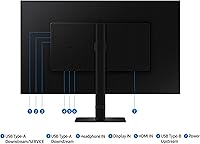
  • Ports: Connectivity includes one HDMI port, one DisplayPort, USB-A outputs, and a USB-B upstream port for peripheral passthrough.
  • USB Ports: Three USB 3.0 ports are available for connecting keyboards, mice, drives, and other peripherals directly to the monitor.
  • Stand Adjustments: The included stand supports height adjustment, tilt, swivel, and a full 90-degree pivot for vertical orientation use.
  • Eye Care: The monitor is TÜV Rheinland certified for flicker-free operation and includes an Eye Saver Mode that reduces blue light output.
  • Dimensions: With the stand attached, the monitor measures 8.66 × 28.11 × 23.03 inches (depth × width × height).
  • Weight: The complete unit including stand weighs 15.21 pounds, which is typical for a 32-inch display of this class.
  • Color Finish: The monitor is finished in matte black, consistent with a neutral professional aesthetic that suits most desk setups.
  • Power Input: The display is rated for 120V input, making it compatible with standard North American power outlets without an adapter.
  • Warranty: Samsung provides a three-year manufacturer warranty covering defects in materials and workmanship from the date of purchase.
  • Model Number: The official model identifier is LS32D806EANXGO, part of Samsung's S32D804EAN series released in 2024.
  • Brand: Manufactured by Samsung, a company with an extensive history in consumer and professional display panel production.
  • Assembly: The stand uses a tool-free attachment system, requiring no screws or additional hardware to complete initial setup.

Related Reviews
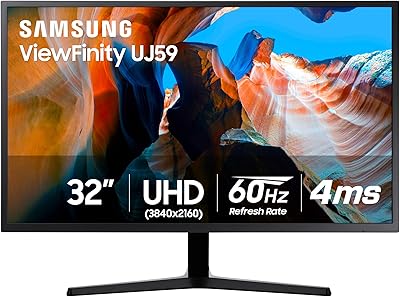
Samsung 32″ UJ59 4K UHD Monitor
74%
91%
Image Clarity & Resolution
83%
Color Reproduction
88%
Contrast & Black Levels
61%
Gaming Performance
43%
Ergonomics & Stand Design
More
Samsung 37″ ViewFinity S7 4K UHD Monitor
86%
94%
Image Quality
88%
Ease of Setup
91%
Ergonomics and Comfort
85%
Connectivity
92%
Color Accuracy
More
Samsung ViewFinity S8 27″ 4K Monitor
75%
91%
Image Clarity
78%
Color Accuracy
88%
Ergonomics & Stand
93%
Setup Experience
74%
Connectivity
More
Samsung 32″ Odyssey Neo G8 Gaming Monitor
77%
93%
Image Quality
91%
HDR Performance
89%
Refresh Rate & Smoothness
88%
Contrast & Black Levels
86%
Response Time & Motion Clarity
More
Samsung Odyssey Neo G7 32″ 4K Gaming Monitor
86%
94%
Gaming Performance
91%
Display Quality
88%
Value for Money
90%
Ease of Setup
93%
Color Accuracy
More
Samsung TU872 Series 32-Inch 4K UHD Monitor
83%
92%
Display Quality
88%
Ergonomics and Adjustability
85%
Connectivity Options
70%
Color Accuracy for Professional Work
80%
Build Quality and Durability
More
Samsung M8 32-Inch 4K Smart Monitor
71%
84%
Picture Quality
88%
Smart TV Experience
81%
Webcam Quality
73%
PC-Free Productivity
91%
Design & Aesthetics
More
Samsung Odyssey G70B 32-inch 4K Gaming Monitor
70%
84%
Image Quality
47%
HDR Performance
76%
Gaming Performance
53%
Panel Consistency
71%
Samsung Gaming Hub
More
Samsung Odyssey G8 32″ OLED Gaming Monitor
77%
94%
Image Quality
92%
Gaming Performance
76%
Burn-in Protection
89%
Build Quality
61%
Value for Money
More
ViewSonic VP3256-4K 32-Inch 4K UHD Monitor
88%
94%
Display Quality
92%
Color Accuracy
88%
Ergonomics & Comfort
86%
Build Quality
90%
Ease of Setup
More

FAQ

It works with MacBooks without issue, but you will likely need an adapter or cable since the S80D does not include a USB-C or Thunderbolt port. A USB-C to DisplayPort or USB-C to HDMI cable will get you connected cleanly, and both are widely available and inexpensive.

Yes, it is a capable choice for photo and video editing at this price level. The 4K resolution gives you plenty of pixel density to check fine details, and HDR10 support helps you evaluate contrast and color more accurately than a standard monitor. It is not a professional-grade color-critical display, but for most creators it performs well above expectations.

Yes, the stand supports a full 90-degree pivot so you can rotate the screen into portrait orientation. This is particularly useful for reading long documents, scrolling through code, or working with vertical content layouts without constantly scrolling.

For casual gaming, story-driven titles, or anything that is not fast-paced or competitive, 60Hz is perfectly acceptable. However, if you play first-person shooters, racing games, or any genre where smooth motion at high frame rates matters, the 60Hz ceiling will feel limiting compared to gaming-specific monitors running at 144Hz or higher.

Setup is straightforward and does not require any tools or loose screws — the stand clips and locks into the display with a simple push mechanism. Most buyers report having it assembled and running within a few minutes of opening the box.

No, the S80D does not include built-in speakers. If you need audio, you will need to connect external speakers or headphones through your computer or a separate audio device.

The anti-glare coating manages overhead lighting reasonably well, but direct sunlight or bright windows positioned behind you can cause some noticeable reflection. Ideally, position the screen so windows are to the side rather than directly in front of or behind you.

The stand is solid for everyday use and handles the weight of the panel without issue, but a small number of users have noted minor wobble at the maximum height setting. If you tend to tap your desk frequently or want more precise positioning, a VESA-compatible monitor arm is a worthwhile upgrade — the display does support VESA mounting.

The eye care system works on two fronts: it eliminates the rapid flickering that some panels use to control brightness (which can cause eye fatigue over time), and it reduces blue light output through Eye Saver Mode. The TÜV certification means these claims have been independently verified rather than being purely marketing language. Many long-hour users do report less end-of-day eye strain compared to older monitors.

The S80D does support picture-by-picture and picture-in-picture modes, which lets you display input from two separate sources simultaneously on the same screen — useful if you regularly switch between a laptop and a desktop or want to monitor a secondary device without switching inputs manually.

Where to Buy