Overview

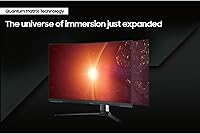
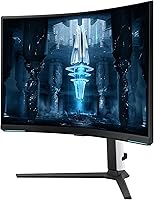
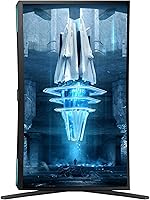
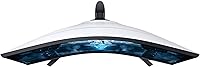
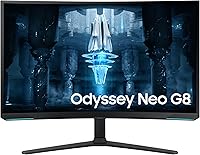
The Samsung 32″ Odyssey Neo G8 Gaming Monitor sits at the absolute top of Samsung's gaming lineup — a 32-inch curved panel built for PC gamers who refuse to compromise on either resolution or speed. The 1000R curvature is noticeably more aggressive than the shallow curves on most flat or mildly curved alternatives, wrapping your peripheral vision in a way that genuinely changes how enclosed a game feels. It works with both AMD and NVIDIA graphics cards via adaptive sync, which removes one compatibility headache from the buying decision. Samsung earned a CES 2022 Best of Innovation nod for this screen, and while awards don't pay the bills, it reflects just how unusual this combination of specs was at launch.
Features & Benefits

What sets the Neo G8 apart from most high-refresh monitors is the Quantum Mini LED backlighting underneath the panel. Instead of a few large dimming zones, thousands of tiny LEDs allow precise, independent control over brightness across the screen — so dark cave scenes stay genuinely dark while a nearby explosion stays punchy. Running at 240Hz at native 4K was nearly unheard of when this curved gaming monitor launched, and it still matters: fast-paced shooters feel noticeably crisper than on 144Hz panels. The 1ms response time keeps motion blur in check, and the matte coating cuts glare well enough that you can game near a window without the screen turning into a mirror.

Best For

This Samsung screen makes the most sense for dedicated PC gamers who already own — or are planning to buy — a high-end GPU. Without something like an RTX 4080, 4090, or RX 7900 XT pushing frames, a 240Hz 4K panel is just an expensive 4K monitor running well below its potential. Creators who also game will appreciate the HDR accuracy and color depth for editing alongside play. The deep 1000R curve is a particular asset for sim racing and flight sim enthusiasts, where wraparound visuals genuinely affect immersion. And if your setup is in a bright room, the matte surface handles ambient light far better than glossy alternatives do.

User Feedback

Across verified buyer reviews, image quality and HDR impact draw consistent praise — people regularly describe the brightness ceiling and contrast depth as things you have to see in person to fully appreciate. The 240Hz smoothness at 4K is another recurring highlight, especially among users upgrading from 1440p 144Hz setups. That said, mini-LED blooming in dark scenes is the most frequently mentioned drawback; bright objects against black backgrounds can produce a faint halo that VA panels are generally prone to. A handful of users also find the on-screen menu clunky and the stand footprint larger than expected. Some early adopters flagged backlight uniformity differences between units, so quality control appears inconsistent across batches.

Pros

  • Exceptional HDR performance — the brightness ceiling and contrast depth make supported games look dramatically different from SDR.
  • 240Hz at native 4K is still one of the fastest combinations available in a 32-inch panel.
  • Quantum Mini LED backlighting delivers precise local dimming with far more control than edge-lit or traditional full-array panels.
  • The 1000R curve creates genuine peripheral immersion, especially noticeable in racing and open-world titles.
  • Matte display coating performs well in bright rooms, cutting glare without washing out colors.
  • Compatible with both AMD and NVIDIA adaptive sync, so GPU choice does not lock you out of smooth variable refresh.
  • The 1ms response time keeps fast-paced action clean with minimal motion blur or trailing artifacts.
  • VESA mount support gives flexibility to replace the bulky stock stand with a preferred arm.
  • Buyers with high-end GPUs consistently report strong satisfaction — the monitor rewards powerful hardware.

Cons

  • Mini-LED blooming is noticeable in dark scenes with bright objects — not a defect, but a real visual trade-off.
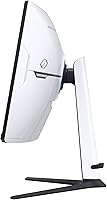
  • The included stand has a large footprint and feels oversized for many desk setups.
  • The on-screen display menu is unintuitive and takes time to navigate, which gets old during calibration.
  • Backlight uniformity has varied noticeably between units, meaning some buyers receive a better panel than others.
  • Firmware quirks have been reported by early adopters, with occasional stability or settings-retention issues.
  • Long-term reliability data is still limited, and mixed durability feedback from early buyers warrants caution.
  • Getting close to 240fps at 4K in modern AAA titles requires GPU hardware that costs nearly as much as the monitor itself.
  • At nearly 20 pounds, repositioning or mounting this screen solo is awkward and requires a sturdy arm or desk mount.
  • The price tier puts it out of reach for buyers who would get equal practical value from a less expensive 4K 144Hz panel.

Ratings

The Samsung 32″ Odyssey Neo G8 Gaming Monitor scores below are generated by AI after analyzing thousands of verified global buyer reviews, with spam, bot-driven, and incentivized submissions actively filtered out. The result is an honest look at where this curved gaming monitor genuinely excels and where real users have run into friction — both sides of the story, transparently reflected in every score.
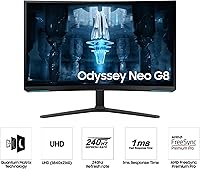
Image Quality
93%
Buyers consistently describe the picture as the best they have ever seen on a desktop monitor, with HDR content in particular drawing strong reactions. The combination of deep blacks, punchy highlights, and rich color volume makes everything from cinematic cutscenes to competitive shooters look noticeably more alive than on IPS or standard VA panels.
A small number of users note that SDR content does not always look as refined as HDR, and some feel colors require careful calibration out of the box to avoid appearing oversaturated in certain color modes.
HDR Performance
91%
The high peak brightness ceiling and the precision of the mini-LED dimming system make this one of the most impactful HDR experiences available on a consumer gaming monitor. Games and videos with strong HDR grading — particularly those with bright explosions against dark night skies — look dramatically different from what most buyers have seen before.
Mini-LED blooming remains the defining limitation: bright objects against dark backgrounds produce a faint but visible halo, which breaks immersion for some users during horror or space exploration titles where high-contrast scenes are frequent.
Refresh Rate & Smoothness
89%
Users who upgraded from 144Hz panels describe the jump to 240Hz as immediately noticeable, particularly in fast-paced shooters and racing games where on-screen motion becomes cleaner and more readable. With adaptive sync working across both major GPU ecosystems, stuttering and screen tearing are effectively eliminated for most setups.
The practical benefit of 240Hz is directly tied to what your GPU can actually deliver, and many users report running well below that ceiling in demanding AAA titles at native 4K — meaning the full refresh rate advantage is only consistently accessible in lighter or older games.
Contrast & Black Levels
88%
The VA panel foundation gives this Samsung screen a native contrast advantage that IPS monitors simply cannot match, and the mini-LED backlighting pushes it further with localized dimming that produces genuinely dark blacks in the right conditions. In a dimly lit room, the visual difference compared to most gaming monitors is striking.
Blooming in dark scenes is the unavoidable cost of this technology — the dimming zones, while numerous, are not infinite, and transitional scenes or high-contrast UI elements in dark environments can reveal the limitation more visibly than some buyers expect.
Response Time & Motion Clarity
86%
Fast-moving scenes in competitive shooters and racing titles stay clean and well-defined, with trailing or ghosting rarely reported as a serious concern among buyers using the recommended response time settings. The 1ms GTG rating translates into a noticeably sharper feel compared to slower VA panels that many users had previously owned.
Some users report that pushing the response time to its most aggressive setting introduces inverse ghosting or overshoot artifacts, meaning finding the right balance in the monitor settings takes some experimentation before the motion performance feels optimal.
Build Quality & Design
78%
22%
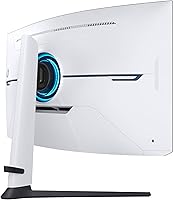
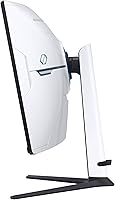
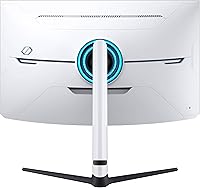
The physical construction feels solid and premium, with a rigid panel housing and a stand that, while large, does not wobble or flex once assembled. The dual-tone black and white colorway is distinctive and intentional, standing out from the all-black aesthetic that dominates most competing gaming monitors.
The stand's footprint is genuinely oversized for many desks, and several users mention that cable management through the stand is awkward. The sheer weight of the unit — just under 20 pounds — also makes solo installation onto a monitor arm more difficult than expected.
Ease of Setup
72%
28%
Physical assembly of the stand and panel is straightforward, and connecting via DisplayPort to a compatible PC is a plug-and-play experience for most users. Adaptive sync activates automatically on supported GPUs without requiring manual configuration in most driver setups.
Initial software and OSD configuration is where setup friction appears — users frequently report spending more time than expected navigating the on-screen menu to dial in brightness, HDR settings, and refresh rate confirmation, particularly for first-time high-refresh-rate monitor owners.
OSD & Controls
58%
42%
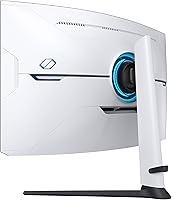
The rear joystick control is responsive and physically accessible once you learn its position, and the menu does offer a comprehensive set of adjustment options for color, motion, and HDR tuning that enthusiast users will appreciate having access to.
The menu structure itself is non-intuitive, with settings buried in submenus that do not follow a logical hierarchy — a recurring frustration in user reviews. Several buyers describe the OSD as the weakest aspect of an otherwise premium product, and firmware updates have not fully resolved the complaints.
Matte Display Coating
84%
Gamers in bright rooms or near windows consistently praise the matte surface for keeping reflections out of view without significantly degrading perceived color saturation or sharpness at normal viewing distances. It is one of the features that makes this curved gaming monitor genuinely practical for real-world home setups rather than dark studio environments only.
Close-up inspection reveals the slight grain that is inherent to matte coatings, and users switching from high-quality glossy OLED or IPS panels may notice a very subtle reduction in perceived pixel clarity, particularly when viewing fine text or static UI elements.
Connectivity
74%
26%
Having two USB ports built into the monitor body is a convenience most users appreciate for connecting peripherals like keyboards, mice, or headset dongles without reaching around to a PC tower, and the inclusion of both DisplayPort and HDMI ensures compatibility with a range of sources.
The port selection is functional but not generous by the standards of a premium display — buyers expecting a full USB hub, USB-C connectivity, or multiple HDMI ports will find the options limited, and there is no built-in KVM functionality for multi-PC users.
Value for Money
67%
33%
For buyers who own the GPU required to actually leverage the 240Hz 4K capability, the Neo G8 delivers a visual and performance experience that justifies its position in the premium tier — there are very few alternatives that match all of these specifications simultaneously in a 32-inch curved form factor.
For anyone without a top-tier GPU, or who games predominantly on console, the premium feels difficult to justify since the defining feature — maximum refresh rate at full resolution — remains out of practical reach. The price-to-performance calculation is only favorable when the rest of your setup is already elite.
HDR Calibration Out of Box
69%
31%
When HDR is functioning correctly in a supported game or application, the results are immediately impressive without requiring deep user calibration — the monitor handles tone mapping well for most content without manual intervention.
Some users report that the out-of-box color temperature and brightness defaults are not ideal for SDR use, and that achieving a balanced everyday picture requires time spent in the OSD — something casual users who do not want to calibrate may find off-putting.
Quality Control Consistency
61%
39%
The majority of buyers receive a unit with no visible defects, and those who do experience a smooth out-of-box setup tend to rate overall satisfaction very highly — when the panel is right, it is noticeably right.
A meaningful minority of reviews reference backlight uniformity issues, with uneven brightness particularly visible on gray or near-black backgrounds. The variance between units is wide enough that inspecting the display carefully within the return window is strongly advisable.
Long-Term Reliability
63%
37%
Many users who have owned the Neo G8 for an extended period report no hardware failures, and Samsung's firmware update cadence suggests ongoing software support commitment for the product line, which is reassuring for a premium investment.
Early adopter feedback has been mixed, with some users reporting firmware instability, settings resets after power cycles, and in isolated cases hardware faults appearing after several months of use — enough to suggest that the long-term track record is still developing.
Immersion & Curvature
87%
The 1000R curve earns consistent praise from sim racing and flight sim players who say it fundamentally changes how enclosed and present the virtual environment feels — particularly on a 32-inch screen where the curvature reaches the edges of peripheral vision at typical desk distances.
For users doing productivity work alongside gaming, the aggressive curve can make straight lines in spreadsheets or document editors appear slightly bowed near the edges, which is a minor but real annoyance for those who split time between work and play on the same display.

Suitable for:

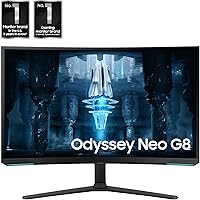
The Samsung 32″ Odyssey Neo G8 Gaming Monitor is built for a specific kind of buyer: someone who has already invested heavily in their PC build and wants a display that can actually keep up. If you're running a top-tier GPU and play a mix of competitive shooters, open-world titles, and the occasional sim, this curved gaming monitor delivers a combination of speed and visual depth that very few panels can match at this size. The 1000R curvature is genuinely immersive for single-monitor setups, making it a strong pick for sim racing and flight sim enthusiasts who want their peripheral vision engaged. Content creators who also game will appreciate the HDR accuracy and color volume for photo or video work, not just gameplay. Gamers in bright rooms benefit from the matte coating, which handles window glare far better than glossy alternatives. If your priority is having the absolute best 4K experience at the fastest available refresh rate in a 32-inch form factor, this is a serious contender.
Not suitable for:

The Samsung 32″ Odyssey Neo G8 Gaming Monitor is a poor fit for anyone who does not have the GPU firepower to back it up — pairing this panel with a mid-range card means paying a premium price for a refresh rate you will rarely touch in demanding titles at native 4K. Buyers sensitive to mini-LED blooming should be cautious: dark scenes with bright elements, think starfields or horror game corridors, can show faint halos around lit objects, which is a known trade-off of this backlighting approach rather than a defect. Console gamers will find limited benefit here, as current-generation consoles cap out well below 240Hz at 4K. The aggressive 1000R curve, while immersive for gaming, does not suit spreadsheet work or multi-window productivity layouts where straight lines need to look straight. Those who prefer a refined, intuitive on-screen menu system may find the OSD frustrating. If budget is a concern and a 144Hz 4K or 1440p 240Hz monitor would serve your actual frame rates better, the premium here is hard to justify.
Specifications

  • Panel Size: The display measures 32 inches diagonally, offering substantial screen real estate without requiring an ultrawide desk footprint.
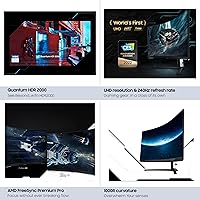
  • Resolution: Native resolution is 3840x2160 (4K UHD), delivering sharp pixel density across the full 32-inch curved surface.
  • Refresh Rate: The panel runs at a maximum of 240Hz, making it one of the fastest 4K displays available in this size class.
  • Response Time: Gray-to-gray response time is rated at 1ms, which helps minimize motion blur and trailing artifacts during fast-paced gameplay.
  • Panel Type: Uses a VA panel with Quantum Mini LED backlighting, enabling precise local dimming across a large number of independent zones.
  • Curvature: The screen has a 1000R curvature radius, which is among the most aggressive curves commonly found on single-panel desktop monitors.
  • Peak Brightness: Rated at 2000 nits peak brightness under HDR conditions, with typical SDR brightness significantly lower in everyday use.
  • Contrast Ratio: Samsung rates the static contrast ratio at 1,000,000:1, achievable through the mini-LED zone dimming system rather than native panel contrast alone.
  • HDR Certification: Certified as Quantum HDR2000, indicating compliance with peak brightness and color volume thresholds required for that VESA DisplayHDR tier.
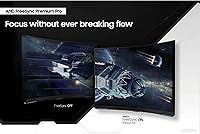
  • Sync Technology: Supports AMD FreeSync Premium Pro natively and is also compatible with NVIDIA G-Sync, covering the two dominant GPU ecosystems.
  • Display Surface: The screen uses a matte anti-glare coating, which reduces reflections from ambient and artificial light sources in the gaming environment.
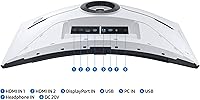
  • Connectivity: Includes DisplayPort and HDMI inputs alongside two USB 2.0 downstream ports for peripheral connectivity directly from the monitor.
  • Aspect Ratio: Standard 16:9 widescreen aspect ratio, compatible with all common gaming resolutions and content formats without letterboxing.
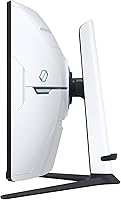
  • VESA Mounting: The monitor supports 100x100mm VESA mounting, allowing the stock stand to be swapped out for a third-party arm or wall bracket.
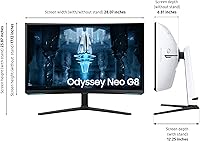
  • Dimensions: With the stock stand attached, the monitor measures approximately 29.1 inches wide, 23.9 inches tall, and 12.2 inches deep.
  • Weight: The full unit including stand weighs 19.6 pounds, which is on the heavier side and relevant for desk arm load ratings.
  • Color: The monitor ships in a black and white dual-tone colorway applied to the chassis, rear housing, and stand assembly.
  • Release Date: The Neo G8 was first made available in June 2022, following its CES 2022 Best of Innovation recognition earlier that year.

Related Reviews

Samsung Odyssey Neo G7 32″ 4K Gaming Monitor
86%
94%
Gaming Performance
91%
Display Quality
88%
Value for Money
90%
Ease of Setup
93%
Color Accuracy
More
Samsung Odyssey G8 32″ OLED Gaming Monitor
77%
94%
Image Quality
92%
Gaming Performance
76%
Burn-in Protection
89%
Build Quality
61%
Value for Money
More
Samsung Odyssey G32A 32″ Gaming Monitor
75%
91%
Refresh Rate Performance
74%
Response Time & Motion Clarity
53%
Image Sharpness & Pixel Density
67%
Color Accuracy & Vibrancy
83%
Contrast & Black Levels
More
Samsung Odyssey G55C 32″ Curved Gaming Monitor
78%
88%
Image Sharpness & Resolution
84%
Refresh Rate & Motion Clarity
91%
Curvature & Immersion
93%
Value for Money
57%
HDR Performance
More
Samsung 32″ Odyssey G65B Curved Gaming Monitor
84%
91%
Display Quality
93%
Gaming Performance
87%
Curvature Immersion
88%
HDR Performance
90%
Response Time
More
Samsung 43″ Odyssey Neo G7 Gaming Monitor
75%
83%
Picture Quality
74%
HDR Performance
86%
Gaming Performance
78%
Smart TV & Streaming Features
61%
Build Quality & Stand
More
Samsung Odyssey G50D 32-inch QHD Gaming Monitor
78%
91%
Gaming Performance
88%
Image Sharpness & Clarity
83%
Color Accuracy & Vibrancy
79%
Panel Uniformity & Viewing Angles
58%
HDR Performance
More
Samsung Odyssey G70B 32-Inch 4K UHD Gaming Monitor
82%
88%
Display Quality
91%
Gaming Performance
85%
Ergonomics & Comfort
70%
Color Accuracy
80%
Setup & Installation
More
Samsung Odyssey G81SF 27-inch Gaming Monitor
80%
96%
Image Quality
97%
Contrast & Black Levels
89%
Refresh Rate & Motion Clarity
88%
Glare Resistance & Matte Coating
91%
HDR Performance
More
Samsung 27″ Odyssey G32A Gaming Monitor
80%
91%
Gaming Performance
93%
Refresh Rate & Smoothness
84%
Response Time & Motion Clarity
88%
Adaptive Sync (FreeSync Premium)
63%
Image Sharpness & Pixel Density
More

FAQ

It works with both. The Samsung 32″ Odyssey Neo G8 Gaming Monitor supports AMD FreeSync Premium Pro natively, but it is also G-Sync compatible, meaning NVIDIA GeForce cards can take full advantage of adaptive sync as well. You do not need to be on a specific GPU brand to get a smooth, tear-free experience.

It depends heavily on the game and your hardware. In lighter or older titles — think esports games, older RPGs, or well-optimized competitive shooters — a high-end GPU can push close to or above 240fps at 4K. In modern AAA titles with ray tracing enabled, you will likely land well below that. The 240Hz ceiling gives you headroom, but realistically most users will run demanding titles somewhere between 80 and 160fps at this resolution.

It is there, and it is worth knowing about before you buy. Bright objects against very dark backgrounds — like a menu screen, a star field, or a lit doorway in a dark corridor — can produce a soft halo of light around them. How much it bothers you depends on your sensitivity to it and the types of games you play. If you spend a lot of time in dark atmospheric titles, it is a real consideration. If you mostly play brighter games, you may rarely notice it.

You can connect a console to it via HDMI, and it will output a great 4K image. That said, current consoles do not output 4K at 240Hz, so you will not be using the panel anywhere near its full refresh rate capability. If console gaming is your primary use case, a less expensive 4K 120Hz monitor would serve you just as well for a fraction of the cost.

Yes, and many users do exactly that. The Neo G8 supports standard 100x100mm VESA mounting, so you can remove the stock stand and attach a compatible desk arm or wall mount. Just make sure the arm you choose is rated for at least 20 pounds, since this curved gaming monitor is on the heavier side.

Matte coatings always involve a small trade-off — they do add a very slight grain or haze compared to glossy panels when viewed up close. On this screen, most users find it a worthwhile compromise because the glare reduction in bright rooms is significant. If you game in a dark, controlled environment and care deeply about perceived sharpness, a glossy panel might feel crisper, but for mixed-light setups the matte surface is genuinely useful.

Honestly, it has a learning curve. The OSD relies on a joystick control at the rear of the monitor, and the menu structure is not the most intuitive Samsung has ever designed. Getting initial calibration settings dialed in can take longer than expected. Once you have it set up the way you want, you rarely need to go back in, but the first hour with the menu can be a bit frustrating.

There have been reports from some buyers of backlight uniformity differences — meaning some panels show slightly uneven brightness across the screen, particularly visible on gray or low-light backgrounds. This is not universal, and many units ship without any noticeable issues, but it is worth inspecting your panel when it arrives and testing it thoroughly within the return window.

It is primarily designed for gaming, but the high color volume, wide brightness range, and 4K resolution make it reasonably capable for creative work as well. HDR-graded content looks particularly impressive on this Samsung screen. For professional color-accurate work where calibrated accuracy is critical, a dedicated professional display is still the better tool, but for enthusiast-level editing alongside gaming use, it performs well.

To regularly push frame rates that take advantage of the 240Hz panel at 4K, you are looking at something in the range of an RTX 4080 or above, or an RX 7900 XT or higher on the AMD side. Midrange GPUs will still output a sharp 4K image and benefit from adaptive sync, but they will not sustain high frame rates in demanding titles. The honest answer is that this monitor rewards the most powerful consumer GPUs available right now.

Where to Buy