Overview

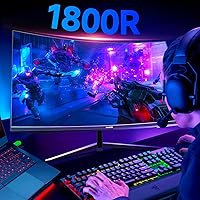
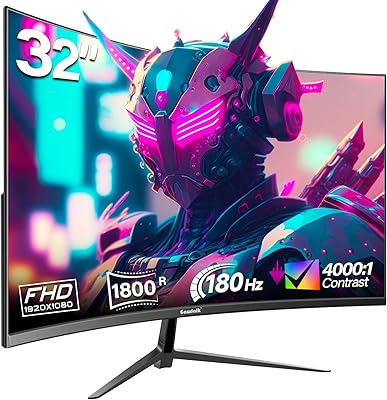
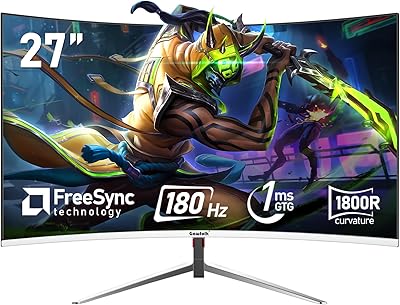
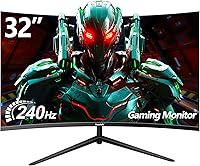
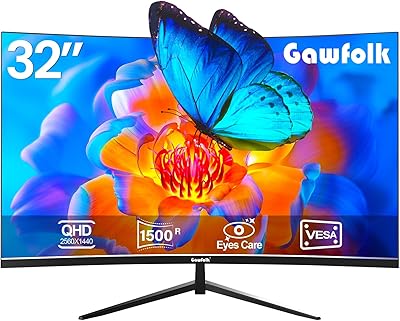
The Gawfolk GF320C 32-Inch Curved Gaming Monitor enters a crowded budget segment with a clear pitch: a large, fast-refresh curved screen at a price most gamers can actually justify. The 1800R curvature is immediately noticeable — it pulls the display into your peripheral vision in a way flat panels at this size simply cannot match. Gawfolk is not a name with decades of recognition behind it, and that is worth stating plainly. Buyer confidence here comes from the numbers and user reports rather than brand heritage. At this price tier, though, the spec sheet makes a compelling case on its own merits.
Features & Benefits

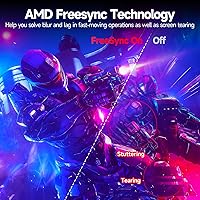
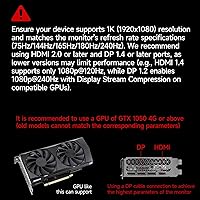
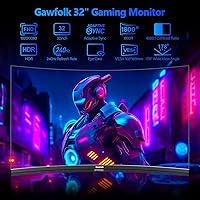
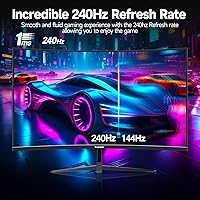
Run this curved gaming monitor through DisplayPort and you get a full 240Hz — fast enough that motion in competitive shooters looks almost liquid-smooth. Drop to HDMI and you are capped at 120Hz, which matters if you are a console gamer who assumes the headline number applies across all connections. The VA panel brings a 4000:1 contrast ratio to the table, making dark scenes genuinely dark rather than washed-out grey. AMD FreeSync keeps tearing at bay across a range of frame rates without locking you into a single GPU brand. Built-in flicker-free and low blue light modes make long sessions easier on the eyes, and VESA 100x100mm support means you can skip the stock stand entirely if you prefer an arm.

Best For

This 32-inch monitor makes the most sense for budget-focused PC gamers who want smooth, high-refresh gameplay without stepping into premium-brand pricing. If you are upgrading from a 60Hz or 144Hz panel, the difference in motion clarity is real and immediately felt. Console players should go in with clear expectations — HDMI tops out at 120Hz here, so the 240Hz spec does not apply to PS5 or Xbox setups. The wall-mount option is genuinely useful for smaller desks or anyone who dislikes the included stand. Home office users who also game will appreciate the eye-care features, which reduce fatigue across back-to-back work and play sessions.

User Feedback

Across nearly 2,000 ratings, the Gawfolk display holds a 4.2-star average — solid for a newer brand in a competitive category. Buyers consistently highlight image quality straight out of the box and the immersive feel of the curve as standout positives, with many noting how noticeably smoother gameplay feels after switching from slower panels. On the critical side, the stock stand draws fair complaints: it tilts but offers no height adjustment, which can be awkward for taller setups. Some reviewers mention occasional backlight bleed near the corners — a known VA trade-off at this price point. Brand support response times are flagged as inconsistent, but the majority of buyers still feel the overall value holds up.

Pros

  • 240Hz via DisplayPort delivers genuinely smooth motion in fast-paced competitive games.
  • The 1800R curve creates real immersion on a 32-inch screen that flat panels cannot replicate.
  • A 4000:1 contrast ratio produces deep blacks that make dark environments in games look convincing.
  • AMD FreeSync works across both major GPU brands, keeping things tear-free without extra cost.
  • Flicker-free and low blue light modes make this curved gaming monitor comfortable during long sessions.
  • VESA 100x100mm support lets you swap the stand for a monitor arm immediately out of the box.
  • At this price point, the out-of-box image quality consistently surprises buyers coming from older panels.
  • The matte screen surface handles ambient light well, reducing glare in mixed lighting environments.
  • Nearly 2,000 user ratings averaging 4.2 stars signal broad satisfaction for a budget-tier display.

Cons

  • HDMI is capped at 120Hz, which catches console gamers off guard expecting the full refresh rate.
  • The included stand only tilts — no height adjustment makes ergonomic positioning genuinely frustrating for many users.
  • VA panel ghosting on fast dark transitions is a known trade-off that competitive gamers may notice.
  • Backlight bleed near screen corners has been flagged by multiple buyers, particularly in dark room conditions.
  • At 32 inches with 1080p resolution, pixel density is noticeably lower than smaller or higher-resolution alternatives.
  • Brand support response times are inconsistent, which adds risk for buyers who encounter issues post-purchase.
  • Color accuracy near panel edges falls short for anything beyond casual gaming or general media consumption.
  • Gawfolk lacks the established repair and warranty infrastructure of more recognized monitor brands.

Ratings

The Gawfolk GF320C 32-Inch Curved Gaming Monitor has been evaluated by our AI rating system after analyzing thousands of verified global purchases, actively filtering out incentivized and bot-generated feedback to surface only genuine buyer experiences. Scores across all categories reflect both what this curved gaming monitor genuinely delivers and where it falls short, giving you a transparent picture before you commit. Strengths and pain points are weighted equally so the ratings tell the full story, not just the highlights.
Refresh Rate Performance
88%
For PC users running DisplayPort, the 240Hz experience is a clear step up — fast-paced shooters and racing titles feel noticeably more fluid, and buyers upgrading from 144Hz panels consistently remark on the difference. FreeSync adds another layer of smoothness by keeping frame delivery steady even during GPU load spikes.
The 240Hz ceiling only applies to DisplayPort connections, and HDMI users are capped at 120Hz — a distinction that catches many console gamers off guard post-purchase. This hard limitation has generated a recurring wave of buyer frustration from those who assumed the headline number applied universally.
Image Quality
83%
The VA panel's 4000:1 contrast ratio gives dark scenes a depth that IPS panels at this price simply cannot match — shadow detail in horror and action games looks convincing rather than grey and flat. Out-of-box calibration gets frequent praise, with buyers noting colors feel rich and punchy without needing manual adjustments.
Color accuracy near the panel edges shows the typical VA falloff, with a slight shift in tone when viewing off-center. Buyers doing anything color-sensitive beyond casual gaming will likely notice inconsistencies that a quality IPS display would not produce.
Motion Clarity
76%
24%
In bright, high-contrast scenes — open-world maps, sports games, fast-paced arenas — motion tracking feels sharp and transitions clean at high frame rates. The 2ms GTG response time holds up well during the kinds of gameplay most users actually run day to day.
Dark-to-dark pixel transitions reveal the classic VA ghosting weakness: faint smearing appears in shadowy environments during quick camera pans, which competitive FPS players with sharp eyes will notice. It is not severe enough to ruin gameplay for casual users, but it is a real trade-off compared to fast IPS alternatives.
Curvature & Immersion
86%
At 32 inches, the 1800R curve genuinely changes how the screen feels to use — peripheral content curves toward the viewer naturally, and long gaming sessions feel less fatiguing because the eyes do not have to work as hard to reach the corners. Buyers who switch from flat panels of the same size frequently describe a noticeable improvement in perceived immersion.
A small number of users find the curve disorienting for productivity tasks like document editing or spreadsheet work, where straight lines can appear to bow slightly at the edges. It is a matter of personal preference, but it is worth knowing if the monitor will serve double duty beyond gaming.
Value for Money
91%
At this price tier, delivering a 32-inch 240Hz curved VA panel with FreeSync and eye-care features in a single package is genuinely difficult to argue with — buyers repeatedly call it the best purchase they made for their desk setup relative to what they spent. The performance-per-dollar ratio holds up well when compared against similarly priced flat alternatives.
The value calculus shifts if you factor in the cost of a third-party monitor arm to compensate for the limited stand, which some buyers feel should be included at this price point. Brand uncertainty also adds a soft risk premium that more established competitors do not carry.
Stand & Ergonomics
52%
48%
Assembly is quick and the stand keeps the panel stable on most flat surfaces without wobble during normal desktop use. The tilt range covers enough forward and backward movement for basic angle adjustments.
The stand's tilt-only design is a genuine ergonomic shortcoming — there is no height adjustment whatsoever, which forces taller users or those with specific chair-desk combos to prop the monitor up manually or invest in an arm. This is one of the most consistently mentioned frustrations across user reviews.
Build Quality
71%
29%
The chassis feels reasonably solid for the price category, and the frameless panel design gives it a cleaner look than many budget competitors with thick bezels. Most buyers report no creaking or flex in the panel during normal use.
The plastic used in the base and rear housing feels noticeably lightweight, which contributes to some doubt about long-term durability. A few users have noted that the stand connection point feels less secure than expected when nudging the monitor during repositioning.
Connectivity
74%
26%
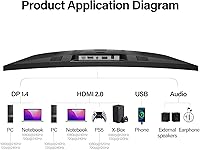
Having both DisplayPort and HDMI on board covers most common desktop and console connection scenarios without needing adapters. The port placement is accessible enough for initial cable setup without requiring you to reach awkwardly behind the panel.
The port selection is minimal — two inputs total — which limits flexibility for users who regularly switch between multiple source devices. There is no USB hub, headphone jack, or additional video input, which some buyers in this price range reasonably expect.
Eye Care & Comfort
82%
18%
The combination of a flicker-free backlight and low blue light mode makes a tangible difference during extended work-from-home or late-night gaming sessions — eye fatigue sets in more slowly than on monitors without these features. Home office users pulling 8-plus-hour days in front of this display report it holds up comfortably.
The low blue light mode shifts the white balance toward warmer tones, which some users find slightly yellowish for everyday tasks. There is no software-based control for fine-tuning the intensity, so you are working with a binary on-off toggle rather than a gradual adjustment.
OSD & Controls
63%
37%
The on-screen display covers all the essential settings — brightness, contrast, input selection, and eye-care modes — without being buried in confusing submenus. Basic configuration after unboxing is manageable for most users within a few minutes.
Navigation relies on physical buttons at the rear of the panel, which are difficult to locate by touch without looking behind the monitor. The button feel is mushy and imprecise, and several users report accidentally cycling through inputs when trying to adjust brightness.
Screen Uniformity
67%
33%
In standard gaming and mixed-light environments, brightness distribution across the panel looks acceptable and does not interfere with the viewing experience during typical use cases. Most buyers do not report issues during normal daytime content consumption.
Backlight bleed along the corners and edges becomes apparent in dark rooms with predominantly black content on screen — a known VA panel characteristic at this price level. The severity varies between individual units, so some buyers receive clean panels while others notice it immediately.
Glare & Reflection Handling
79%
21%
The matte anti-glare coating does a solid job of diffusing overhead lighting and preventing the mirror-like reflections that glossy panels produce — useful for desk setups near windows or with overhead lighting that cannot be repositioned easily.
In very bright rooms or with direct sunlight hitting the screen, the coating reduces but does not eliminate the visibility impact on contrast. The panel's peak brightness is not high enough to overpower strong ambient light sources the way higher-nit displays can.
Setup & Unboxing
84%
Assembly is straightforward and takes most users under 15 minutes — the components are clearly laid out in the box and the stand attachment requires minimal effort. Buyers report the panel arrives well-protected and free of damage in the vast majority of cases.
The included documentation is thin, and there is no detailed guide for optimizing display settings out of the box. First-time monitor buyers may spend extra time digging through the OSD to find the right configuration for their use case.
Brand Reliability
58%
42%
The product itself, judged on physical build and performance, holds up reasonably well against the unit price. A 4.2-star average across nearly 2,000 ratings suggests the majority of buyers received a functioning, satisfying product without major issues.
Gawfolk's limited track record means there is less confidence in long-term support, warranty follow-through, and parts availability compared to established names. Customer service response times have been flagged as inconsistent, adding uncertainty for buyers who encounter problems after the return window closes.

Suitable for:

The Gawfolk GF320C 32-Inch Curved Gaming Monitor is a strong fit for PC gamers who want a noticeably fast, large-screen experience without stretching their budget to cover premium brand names. If you are currently on a 60Hz or 144Hz flat panel, the jump to 240Hz on a curved VA screen is genuinely felt during fast-paced gameplay — enemies track more cleanly, motion looks sharper, and the 1800R curve adds a sense of depth that flat displays at this size cannot replicate. Home office workers who double as casual gamers will also find real value here, since the flicker-free backlight and low blue light mode make it comfortable to sit in front of for extended hours. Anyone running an AMD or Nvidia GPU on a mid-range PC will benefit from FreeSync keeping frame delivery smooth even when performance dips. The VESA mount support is a genuine perk for users with limited desk space or those who already own a monitor arm.
Not suitable for:

Buyers expecting the full 240Hz experience through a console will be disappointed — the Gawfolk GF320C 32-Inch Curved Gaming Monitor caps HDMI connections at 120Hz, meaning PS5 and Xbox Series X users never actually reach the headline refresh rate. Color-critical users such as graphic designers, photo editors, or video producers should also look elsewhere: VA panels at this price tier tend to struggle with color consistency near the edges and fall short of the accuracy offered by quality IPS panels. The stock stand is a real ergonomic weak point — tilt-only adjustment with no height range means taller users or those with specific seating setups may find the viewing angle uncomfortable over long sessions. Buyers who prioritize after-sales support and long-term brand reliability may feel uneasy committing to a newer, lesser-known manufacturer. Finally, those chasing ultra-sharp visuals for creative work or high-resolution gaming should note that 1080p at 32 inches produces a lower pixel density than many competing displays at the same size.
Specifications

  • Screen Size: The active display area measures 31.5 inches diagonally, housed in a frameless chassis marketed as 32 inches.
  • Panel Type: Uses a VA (Vertical Alignment) panel, which prioritizes deep contrast and rich blacks over the wide viewing angles typical of IPS displays.
  • Resolution: Native resolution is 1920x1080 (Full HD), delivering a standard 16:9 aspect ratio across the entire screen.
  • Refresh Rate: Reaches 240Hz when connected via DisplayPort, and is limited to 120Hz when using an HDMI connection.
  • Response Time: Rated at 2ms GTG (gray-to-gray), which represents the fastest pixel transition under ideal switching conditions.
  • Curvature: The screen uses an 1800R curve radius, meaning the panel is bent to match a circle with an 1800mm radius for a wraparound viewing effect.
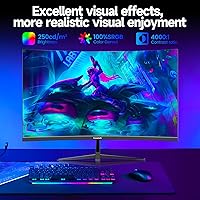
  • Contrast Ratio: Dynamic contrast ratio is rated at 4000:1, allowing for noticeably deeper blacks compared to typical IPS panels in this price range.
  • Color Depth: Supports 8-bit color rendering, producing up to 16.7 million distinct colors across the visible spectrum.
  • Color Gamut: Covers 100% of the sRGB color space, making it suitable for standard content consumption and casual gaming.
  • Connectivity: Includes one DisplayPort input (supporting up to 240Hz) and one HDMI port (supporting up to 120Hz) for video signal input.
  • AMD FreeSync: Built-in AMD FreeSync support dynamically synchronizes the monitor's refresh rate with compatible GPU output to reduce tearing and stuttering.
  • Eye Care: Features both a flicker-free backlight and a low blue light mode to reduce eye strain during extended use.
  • VESA Mount: Compatible with standard 100x100mm VESA mounting patterns, allowing attachment to most third-party monitor arms and wall brackets.
  • Tilt Adjustment: The included stand supports a tilt range of -5° (forward) to +10° (backward), with no height or swivel adjustment available.
  • Surface Finish: The screen uses a matte anti-glare coating that diffuses ambient light to reduce reflections in bright room conditions.
  • Weight: The complete unit including the stand weighs approximately 12.87 pounds (roughly 5.8 kg).
  • Power Input: Operates on a 12V DC power supply, compatible with standard regional power adapters included in the box.
  • Aspect Ratio: Standard 16:9 widescreen aspect ratio, consistent with the vast majority of gaming content and desktop applications.

Related Reviews

KOORUI 32-inch Curved Gaming Monitor
84%
89%
Display Quality
92%
Gaming Performance
78%
Build Quality
85%
Color Accuracy
82%
Ergonomics & Comfort
More
Gawfolk 32-inch Gaming Monitor GF320D
87%
94%
Gaming Performance
89%
Display Quality
92%
Refresh Rate & Response Time
88%
Ease of Setup
85%
Design & Build Quality
More
Gawfolk GF320E 32-inch 2K Curved Monitor
81%
91%
Display Quality
88%
Ease of Setup
90%
Value for Money
80%
Build Quality
85%
Curvature Experience
More
KTC H32S17C 32-inch Curved Gaming Monitor
72%
91%
Value for Money
84%
Gaming Performance
76%
Picture Quality
52%
HDR Experience
67%
Color Accuracy
More
Gawfolk GF270C 27-Inch Curved Gaming Monitor

86%
91%
Performance
88%
Display Quality
92%
Value for Money
90%
Response Time
89%
Color Accuracy
More
Samsung 32-Inch S39C Curved Gaming Monitor
83%
88%
Display Quality
91%
Value for Money
86%
Eye Comfort
89%
Ease of Setup
85%
Build Quality
More
AOC C32G2 32-inch Curved Gaming Monitor
87%
94%
Gaming Performance
89%
Display Quality
72%
Build Quality
88%
Color Accuracy
85%
Ease of Setup
More
Z-Edge UG32 32-inch Curved Gaming Monitor
84%
91%
Gaming Performance
88%
Display Quality
85%
Design and Build Quality
84%
Ease of Setup
90%
Refresh Rate and Responsiveness
More
KTC H32S25E 32-Inch 240Hz Curved Gaming Monitor
88%
93%
Gaming Performance
88%
Visual Quality
94%
Refresh Rate & Response Time
82%
Ergonomics/Adjustability
91%
Setup & Installation
More
Gawfolk 24.5-inch Gaming Curved Monitor GF245A
84%
86%
Display Quality
88%
Gaming Performance
92%
Value for Money
80%
Build Quality
90%
Ease of Setup
More

FAQ

Unfortunately, no. The 240Hz refresh rate is only available through the DisplayPort connection, and current gaming consoles use HDMI exclusively. When connected via HDMI, this curved gaming monitor runs at a maximum of 120Hz — which is still a solid experience for console gaming, but worth knowing before you buy.

FreeSync is AMD's technology, but Nvidia has supported it on most of their cards since the GTX 10 series through a feature called G-Sync Compatible mode. In practice, most modern Nvidia GPUs will work with this display's FreeSync implementation over DisplayPort, though the experience may vary slightly compared to a certified G-Sync monitor.

At 32 inches, the 1800R curve is genuinely noticeable in everyday use — more so than on smaller panels where the same curvature can feel subtle. Sitting at a normal desk distance, the screen edges curve slightly toward you, which reduces the need to shift your gaze to the corners. Whether you find it immersive or distracting is personal, but most users at this size appreciate it.

VA panels have a known weakness with pixel transitions in dark areas — dark-to-dark shifts can produce a faint smearing effect in certain scenes, like shadowy corridors in shooters. At 240Hz with a 2ms GTG rating, it performs better than most budget VA panels, but users who are particularly sensitive to motion artifacts in dark environments may still notice it during demanding sequences.

Yes, the monitor supports the standard 100x100mm VESA pattern, so it is compatible with the vast majority of monitor arms and wall mounts sold today. Just keep in mind that the wall mount hardware is not included in the box — you will need to purchase that separately. Given that the stock stand has no height adjustment, many users find that switching to an arm is well worth the extra step.

The matte coating helps manage reflections reasonably well, but like most budget monitors this display is not particularly high in peak brightness. Near a bright window you may find the image looks a bit washed out, especially during daytime hours. For desk setups away from direct sunlight, brightness is generally adequate for both gaming and general use.

You need a DisplayPort cable — not HDMI. Specifically, a DisplayPort 1.2 or higher cable will support 240Hz at 1080p without issues. Make sure your GPU also has a DisplayPort output, as many budget graphics cards only offer HDMI ports. If you are shopping for a cable separately, any quality DP 1.2 cable should do the job.

Most users report a straightforward setup that takes under 15 minutes. The stand attaches with a few screws or a tool-free click mechanism, and cable management is basic but functional. Input source selection is handled through the OSD (on-screen display) menu, which is navigated via buttons on the rear of the monitor.

Some buyers have reported light bleed along the corners and edges, particularly when viewing dark content in a dim room. This is a fairly common characteristic of VA panels at this price point and is not unique to this display. The extent varies unit to unit — some users notice nothing, while others find it mildly distracting in pitch-black scenes. If backlight uniformity is a top priority for you, it may be worth reading recent buyer reviews before committing.

Gawfolk is a relatively newer brand, and their after-sales support infrastructure is not as established as names like LG, ASUS, or BenQ. Some buyers report slower response times from customer service. Your best safety net is purchasing through Amazon directly, which gives you access to Amazon's standard return window and buyer protection policies regardless of the manufacturer's own support quality.