Overview

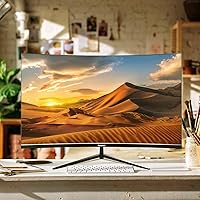
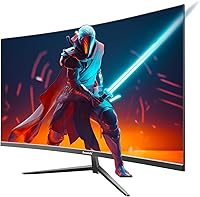
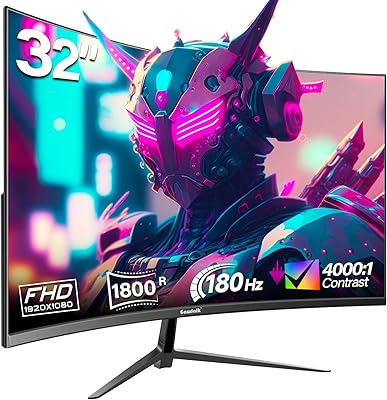
The Gawfolk GF320E 32-inch Curved Monitor entered the market in late 2023 and has quietly built a respectable following among students, home office workers, and everyday multitaskers looking for a large screen without a premium price tag. The 1500R curved VA panel is really what defines the experience here — it pulls the image around your field of view in a way flat screens simply don't. The chassis is impressively thin, with nearly borderless edges that give any desk setup a clean, modern look. At 75Hz, this isn't a display built for competitive gaming or color-critical creative work, but for the audience it targets, that's a fair trade-off.
Features & Benefits

Jumping to 1440p on a 32-inch screen makes a real difference — text sharpens noticeably compared to 1080p at this size, and you gain meaningful workspace for side-by-side windows. The VA panel contrast is a genuine advantage; dark scenes in movies or moody desktop wallpapers have real depth that IPS panels at this price typically can't match. The curve also reduces how much you need to shift your gaze during long sessions. Eye comfort features — flicker-free backlight and a low blue light mode — are genuinely useful for anyone logging hours at a desk. Connectivity is practical: HDMI 2.0, DisplayPort 1.2, and an audio output cover the essentials without overcomplicating the back panel.

Best For

This curved QHD monitor is a strong fit for students setting up a dorm or apartment workspace — the large screen feels immersive without requiring a massive footprint, and the slim bezel design pairs cleanly in dual-monitor configurations. Remote workers who spend their days in spreadsheets, documents, or video calls will appreciate the jump in pixel density; reading dense text all day is just less tiring at this resolution. Streaming movies on this VA panel display looks noticeably richer than on a flat 1080p screen. For anyone running a monitor arm, VESA compatibility makes the setup flexible. This is not the right pick for competitive gaming or professional photo editing work.

User Feedback

Sitting at 4.2 stars across nearly 2,000 ratings, the Gawfolk 32-inch screen has earned a broadly positive reception — impressive for a newer brand still building its reputation. Buyers who upgraded from 1080p monitors frequently mention that the resolution bump alone justified the purchase, and the curve consistently gets praise for reducing fatigue during long work sessions. On the critical side, some users flag the included stand as less sturdy than expected, and a handful note that colors benefit from manual calibration out of the box. A few flag the OSD navigation as clunky. Worth noting: the 12-month warranty is shorter than the three-year coverage typical of established brands, which is a real consideration before committing.

Pros

  • QHD resolution at 32 inches makes text and detail noticeably sharper than 1080p screens at this size.
  • The 1500R curve reduces eye and neck strain during long work or study sessions at a desk.
  • VA panel contrast delivers deep, rich darks that IPS alternatives at this price often struggle to match.
  • Flicker-free backlight and low blue light mode are practical additions for anyone logging long screen hours.
  • The ultra-slim, nearly borderless chassis looks genuinely modern and works well in dual-monitor setups.
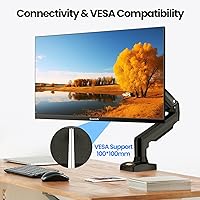
  • VESA 100x100mm support gives you the option to mount it on an arm or wall and free up desk space.
  • HDMI 2.0 and DisplayPort 1.2 inputs cover most desktop and laptop connection scenarios without adapters.
  • Nearly 2,000 buyer ratings averaging 4.2 stars suggests consistent satisfaction across a broad range of users.
  • The matte screen surface handles ambient light well, reducing glare in brightly lit rooms.

Cons

  • The included stand has been flagged by some buyers as less sturdy than expected for a 32-inch panel.
  • Colors may require manual calibration out of the box before they look accurate or balanced.
  • The OSD menu interface is reported by some users to be unintuitive and slow to navigate.
  • At 75Hz, this VA panel display will disappoint anyone accustomed to faster refresh rates.
  • The 12-month warranty is significantly shorter than the two-to-three-year coverage standard among established monitor brands.
  • No adaptive sync support limits smoothness even in the casual gaming scenarios where 75Hz might otherwise be acceptable.
  • Color gamut coverage is not specified, making this a risky pick for any color-sensitive professional work.
  • As a newer brand, long-term availability of customer support and replacement parts remains an open question.
  • A single HDMI port limits flexibility if you need to switch between multiple devices frequently.

Ratings

The Gawfolk GF320E 32-inch Curved Monitor earns a broadly positive reception among everyday users, and the scores below reflect our AI-assisted analysis of verified global reviews — with spam, incentivized submissions, and bot activity actively filtered out before any scoring took place. Across close to 2,000 ratings, clear patterns emerged in what buyers genuinely appreciate and where the screen consistently falls short. Both the strengths and the friction points are weighted transparently, so the scores reflect real-world experience rather than manufacturer claims.
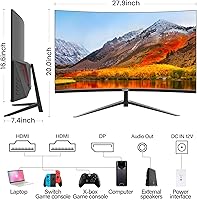
Image Sharpness & Resolution
88%
The upgrade from 1080p is the most commonly cited reason buyers feel good about this purchase. At 32 inches, QHD makes a tangible difference — text in documents and spreadsheets looks noticeably crisper, and detailed images don't show the softness that makes large 1080p screens harder to read over long working hours.
A handful of users with particularly close viewing distances or high baseline expectations point out that absolute pixel-level clarity doesn't quite compete with higher-end QHD panels. For everyday productivity tasks this won't matter, but photographers or designers may notice it.
Contrast & Color Depth
83%
The VA panel's contrast characteristics are genuinely one of this screen's strongest suits relative to its price. Watching dark movies or working with darker interfaces — think code editors with dark themes or moody desktop wallpapers — produces noticeably richer blacks than most IPS panels available at a comparable price point.
Some buyers find that extremely bright highlights and very dark shadows in the same scene can look slightly inconsistent, a known trade-off of VA panel technology. This doesn't affect everyday work meaningfully, but it's occasionally visible during high-dynamic-range content.
Curvature & Immersion
86%
The 1500R curve consistently draws positive feedback from users who spend extended hours at their desk. Several buyers specifically mention that transitioning from a flat monitor felt immediately more comfortable — less lateral eye movement and a more natural sense of depth when working across multiple open windows.
A small group of users, particularly those who share their monitor or view it from wider angles, note that the curvature can introduce slight distortion at the screen's edges when not seated directly in front. It's a single-user display designed for centered viewing, and it shows.
Value for Money
84%
At its price point, this curved QHD monitor offers a combination of screen size, resolution, and visual depth that would cost noticeably more from an established brand. Buyers repeatedly describe it as punching above its weight class, especially first-time 1440p buyers who weren't expecting this level of clarity and screen real estate for the outlay.
The value calculus shifts somewhat when you factor in the shorter-than-average warranty and the build compromises — particularly the stand. Buyers who need long-term reliability may find that the total cost of ownership, including potential replacement or upgrades, closes the gap with slightly pricier alternatives.
Stand Stability
52%
48%
For users who immediately swap to a VESA monitor arm — a popular choice given that native arm support is included — the stand's limitations become a non-issue. Buyers who made that upgrade report a much improved experience and appreciate that the option is there without needing an adapter.
This is one of the most consistently flagged pain points in buyer feedback. The included stand is criticized for wobble, limited ergonomic adjustment (tilt-only), and a general sense that it does not match the apparent quality of the panel. For a 32-inch screen, this stability shortfall is hard to overlook.
Eye Comfort
81%
19%
The combination of a flicker-free backlight and a built-in low blue light mode is genuinely appreciated by buyers who clock long hours studying or working. Several users note reduced eye tiredness at the end of the day compared to their previous displays, particularly when using the blue light mode during evening sessions.
The low blue light filter shifts the display noticeably warmer, which some users find uncomfortable for color-sensitive tasks or simply unappealing aesthetically. There is no automatic adjustment tied to time of day, so it requires manual toggling through the OSD each time.
Build Quality
67%
33%
The ultra-slim panel and near-borderless bezel genuinely look premium on a desk, and the overall fit and finish of the screen itself is better than the price might suggest. The thin profile and clean lines are consistently praised by buyers setting up modern workstations or multi-monitor arrangements.
Build quality drops off at the stand and base, which some users describe as feeling noticeably cheaper than the panel itself. Several buyers mention wobble when typing nearby or during minor desk vibrations, which can be distracting during typing-heavy work sessions.
Connectivity
74%
26%
Having both HDMI 2.0 and DisplayPort 1.2 available means most setups — whether desktop, laptop, or even a game console — connect without hunting for adapters. The 3.5mm audio output is a practical touch, letting users plug in headphones or powered speakers directly into the monitor rather than routing through the PC.
With only a single HDMI port, users who want to connect two HDMI sources simultaneously — such as a laptop and a console — are out of luck without an external switch. There is also no USB hub functionality, which would have been a welcome addition at this screen size.
OSD & Controls
58%
42%
The OSD does cover the necessary adjustment options — brightness, contrast, color temperature, and input selection are all accessible — and buyers who take the time to navigate it report being able to get the image to a comfortable baseline without needing third-party software.
The physical button navigation is repeatedly flagged as unintuitive and slow, requiring multiple presses to reach common settings. Several users describe the menu layout as confusing, and the lack of a joystick-style controller — standard on many competing displays — is a noticeable quality-of-life miss.
Setup & Assembly
77%
23%
Most buyers describe the unboxing and physical assembly as straightforward, with the stand attaching to the panel without tools and cables fitting their ports without fuss. The packaging appears to be adequate, with few reports of damage in transit, which matters for a large curved panel.
Some buyers note that the instruction manual is minimal and that cable management behind the stand is awkward given the limited routing options. The VESA hole access also requires removing the stand first, which is slightly fiddly if you decide to switch to an arm after initial setup.
Color Accuracy
63%
37%
For general everyday use — streaming, web browsing, casual document work — the default color output is broadly acceptable and does not require immediate intervention. Users who are not particularly color-sensitive often report being satisfied without ever touching the OSD color settings.
Buyers with any eye for color accuracy note that the factory calibration tends to run warm and slightly oversaturated. Getting it to a more neutral baseline requires time in the OSD, and without a colorimeter, it is difficult to know how close you have actually gotten to accurate output.
Refresh Rate & Motion
69%
31%
For the target audience — students, remote workers, and casual streamers — 75Hz is smooth and comfortable for everything they are likely to do on the Gawfolk 32-inch screen day to day. Video playback, scrolling, and cursor movement all feel fluid without any notable stutter or lag during normal desktop use.
Anyone accustomed to 120Hz or higher will find 75Hz visibly slower in fast-moving content or games. There is no adaptive sync support noted in the specifications, which means occasional tearing can occur in games or applications that push frame rates past the panel's ceiling.
VESA & Mount Flexibility
86%
Native 100x100mm VESA support is one of the practical highlights of this display, and buyers who use monitor arms specifically call it out as making the screen far more versatile than the stock stand allows. It fits standard single-arm and dual-arm mounts without any modification or adapter plate.
The VESA mount holes are not accessible while the stand is attached, meaning users who want to switch to an arm need to lay the panel face-down and remove the stand first — a slightly awkward process that is manageable but not as clean as it could be.
Design & Aesthetics
82%
18%
The ultra-slim profile and near-borderless bezel genuinely look modern and intentional — not like a budget screen trying to hide its origins. Buyers setting up clean desk arrangements or pairing this VA panel display in a multi-monitor configuration frequently comment that it looks more expensive than it is.
The back of the panel and the stand base use materials that feel less premium under the hand than the front suggests visually. Color options are limited to black, and the glossy stand base is a minor fingerprint magnet that can look scruffy in lighter desk setups.
Warranty & Brand Support
47%
53%
Gawfolk does appear to respond to customer service inquiries, and buyers who have contacted support for missing accessories or minor defects report reasonable resolution times. For a newer brand, the existence of an active support channel is a baseline reassurance worth acknowledging.
A 12-month warranty is the most significant long-term risk with this screen. Established monitor brands typically offer two to three years of coverage, and the gap matters for a display you plan to use daily for several years. If something fails in month 14, you are on your own.

Suitable for:

The Gawfolk GF320E 32-inch Curved Monitor is genuinely well-matched for students, remote workers, and casual home users who want a meaningful upgrade from a standard 1080p flat screen without stretching their budget to cover premium-brand pricing. If you spend most of your screen time in documents, spreadsheets, browser tabs, or video calls, the jump to QHD at this size makes text noticeably crisper and gives you more usable space to work with side by side. The 1500R curve is a real comfort improvement for people sitting close to a large screen all day — it reduces the subtle eye and neck strain that comes from constantly scanning a flat 32-inch panel. Casual streamers and media consumers will also find the curved VA panel rewarding, particularly for darker content where the contrast depth punches above what you'd expect at this price point. Anyone planning to mount their monitor on a VESA arm or wall bracket will appreciate that this screen supports it natively, keeping desk setups clean and flexible.
Not suitable for:

The Gawfolk GF320E 32-inch Curved Monitor is not the right choice for competitive or fast-paced gamers — 75Hz is workable for casual single-player titles, but anyone used to 144Hz or higher will feel the difference immediately, and there is no adaptive sync mentioned to smooth things out further. Graphic designers, photo editors, or video colorists should also look elsewhere: VA panels at this price tier typically lack the out-of-box color accuracy and wide color gamut coverage that professional visual work demands, and colors may need meaningful calibration just to hit a usable baseline. Buyers who prioritize long-term brand support should factor in that this curved QHD monitor ships with a 12-month warranty — about a third of the coverage that established monitor brands typically offer — which is a real risk consideration for a screen you plan to rely on daily for years. If the included stand's stability matters to you and a monitor arm is not in your plans, some users have flagged it as less rigid than expected, so that is worth weighing before purchasing.
Specifications

  • Screen Size: The display measures 32 inches diagonally, providing a wide viewing area well suited to multitasking and media consumption at typical desk distances.
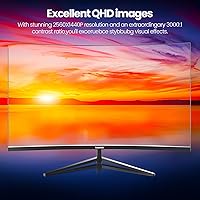
  • Resolution: Native resolution is 2560x1440 (QHD), delivering noticeably sharper text and finer image detail than a standard 1080p panel at this screen size.
  • Panel Type: Uses a VA (Vertical Alignment) panel, which produces deeper blacks and higher native contrast compared to IPS panels in the same price range.
  • Refresh Rate: The maximum refresh rate is 75Hz, appropriate for everyday desktop tasks, document work, and casual media playback.
  • Curvature: The screen uses a 1500R curvature radius, a moderate curve designed to reduce peripheral eye strain during extended single-user sessions.
  • Contrast Ratio: Dynamic contrast is rated at 4000:1, allowing the panel to render darker scenes with more visible depth than lower-contrast alternatives at this price point.
  • Connectivity: The monitor includes one HDMI 2.0 port, one DisplayPort 1.2 port, and one 3.5mm audio output jack for routing sound to external speakers or headphones.
  • VESA Support: Compatible with the standard 100x100mm VESA mounting pattern, enabling installation on most third-party monitor arms or wall mounts.
  • Screen Surface: The panel features a matte anti-glare coating that diffuses ambient light and reduces distracting reflections in brightly lit rooms.
  • Eye Care: Includes a flicker-free backlight and a low blue light filter mode intended to reduce eye strain during prolonged work or study sessions.
  • Dimensions: The monitor body measures approximately 27.8 x 20 x 0.5 inches (width x height x depth at its thinnest point, excluding the stand).
  • Weight: The panel weighs approximately 12.97 pounds, which is typical for a curved 32-inch display of this panel construction.
  • Aspect Ratio: Standard 16:9 widescreen aspect ratio, compatible with virtually all modern operating systems, video formats, and applications without letterboxing.
  • Power Source: Powered via an external DC adapter rated at 12 volts, which should be included in the retail packaging.
  • Warranty: Covered by a 12-month manufacturer warranty from Gawfolk, which is shorter than the two-to-three-year coverage commonly offered by established monitor brands.
  • Model Number: The official model designation is GF320E, useful for identifying compatible accessories, support documentation, or firmware references.

Related Reviews

Gawfolk GF320C 32-Inch Curved Gaming Monitor
75%
88%
Refresh Rate Performance
83%
Image Quality
76%
Motion Clarity
86%
Curvature & Immersion
91%
Value for Money
More
Gawfolk GF320F 32-Inch 4K UHD Monitor
72%
88%
Image Clarity
83%
Contrast & Color Depth
51%
Brightness
74%
Color Accuracy
81%
Viewing Angle
More
Samsung 32-inch S39GD Curved Monitor

73%
83%
Value for Money
58%
Image Sharpness & Resolution
88%
Curve & Immersion
79%
Refresh Rate & Motion Smoothness
84%
Eye Comfort & Fatigue
More
KOORUI G3221SC 32″ Curved QHD Gaming Monitor
69%
83%
Picture Quality
81%
Gaming Performance
86%
Value for Money
41%
HDR Performance
67%
Color Accuracy
More
Gawfolk GF320D 32-inch Curved Gaming Monitor
72%
83%
Value for Money
76%
Image Quality
81%
Refresh Rate Performance
54%
Brightness & Visibility
79%
Contrast & Black Levels
More
CRUA CR320C 32″ Curved 4K Monitor
73%
91%
Image Sharpness
78%
Color Accuracy
88%
Contrast & Black Levels
84%
Curvature & Immersion
67%
Refresh Rate & Smoothness
More
KTC H32S17C 32-inch Curved Gaming Monitor
72%
91%
Value for Money
84%
Gaming Performance
76%
Picture Quality
52%
HDR Experience
67%
Color Accuracy
More
Samsung 32-Inch S39C Curved Gaming Monitor
83%
88%
Display Quality
91%
Value for Money
86%
Eye Comfort
89%
Ease of Setup
85%
Build Quality
More
Gawfolk GF270C 27-Inch Curved Gaming Monitor
72%
83%
Value for Money
78%
Image Quality
81%
Refresh Rate Performance
74%
Response Time & Motion Clarity
62%
Build Quality
More
AOC C32G2 32″ Curved Gaming Monitor
76%
91%
Value for Money
84%
Gaming Performance
73%
Image Quality
88%
Refresh Rate & Smoothness
83%
Curvature & Immersion
More

FAQ

Yes — both consoles connect over HDMI, and this curved QHD monitor has an HDMI 2.0 port that handles that without any adapter. Just keep in mind the panel tops out at 75Hz, so games running above that frame rate will be capped. For casual console use it works well, but competitive players chasing high frame rates will want a faster display.

Absolutely. The monitor supports the standard 100x100mm VESA pattern, so it fits the vast majority of arms and wall mounts on the market. This is actually a popular choice among buyers, since some have noted the stock stand is less rigid than ideal for a panel this size. Just confirm your arm is rated for at least 13 pounds before purchasing.

For typical daily use — browsing, writing, spreadsheets, streaming, video calls — 75Hz is smooth and you likely won't think about it. If you're coming from a 144Hz gaming monitor, the difference will be obvious in fast-paced games. This is an everyday productivity and media screen, and within that context the refresh rate is appropriate.

No, there are no built-in speakers. The monitor does include a 3.5mm audio output jack on the back panel, which lets you plug in external speakers or a headset directly rather than routing audio through your computer.

Most users adjust within a day or two, and many find it more comfortable than a flat screen at this size because your eyes travel less to reach the edges of the panel. The 1500R curvature is relatively moderate — less dramatic than many ultrawide monitors — so it rarely feels intrusive during document work or general browsing.

Results vary by unit, but a fair number of buyers mention the default settings run slightly warm or oversaturated and benefit from a quick manual tune in the OSD. It's worth spending 10 to 15 minutes adjusting brightness, contrast, and color temperature before settling in. For casual use this is minor, but if color accuracy matters to your work, factor in that extra step.

The included stand supports tilt adjustment only — there is no height adjustment, swivel, or pivot. If you need to raise the screen to a comfortable eye level or want more ergonomic flexibility, pairing it with a VESA arm is a straightforward upgrade that the monitor's mount pattern supports natively.

You can connect two sources simultaneously — one via HDMI and one via DisplayPort — and toggle between them using the input selection in the OSD menu. There is no hardware KVM switching or automatic source detection, so you will need to manually select the active input using the monitor's physical buttons each time you switch.

At 32 inches, the jump from 1080p to 1440p is genuinely noticeable — text looks sharper, images have more definition, and the overall picture feels less pixelated at normal viewing distances. Buyers who specifically upgraded from 1080p screens to the Gawfolk 32-inch screen frequently single this out as the most immediately satisfying part of the switch.

The warranty covers manufacturing defects and hardware malfunctions reported within 12 months of purchase. It is shorter than the two-to-three-year coverage you would typically get from major monitor brands, which is a real consideration if you plan to rely on this screen daily for several years. For the price tier, a one-year warranty is not unusual, but it is worth knowing upfront rather than assuming otherwise.