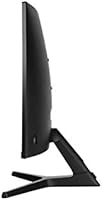
Overview

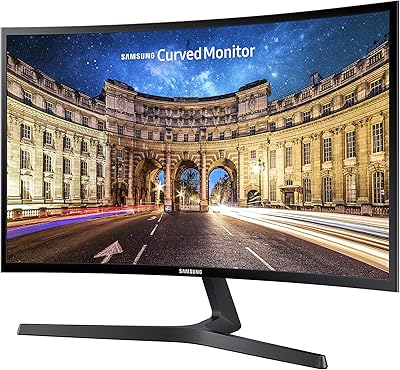
The Samsung CR50 32-inch Curved Monitor is Samsung's entry into the accessible end of the curved display market, and it makes a reasonable case for itself without overselling. Built around an 1800R curved VA panel and Full HD 1080p resolution, it targets buyers who want more screen presence and a bit of wrap-around immersion without a large outlay. This is not a monitor for professional color grading or competitive esports at triple-digit frame rates. Think of it more as a capable everyday screen — good for casual gaming, streaming, and general desktop use — that happens to cost less than most curved alternatives of this size.

Features & Benefits

The 1800R curvature is the first thing you notice, pulling the edges of the screen slightly toward you in a way that feels genuinely different from a flat panel, especially at this size. AMD FreeSync helps keep motion smooth during gaming, useful even without a high-end GPU. The Black Equalizer feature is genuinely handy — it lifts shadow detail in darker scenes without washing out brighter areas, which matters in games where visibility counts. Pixel density at 1080p across 32 inches is a real trade-off; text looks acceptable from a normal sitting distance, but don't expect the sharpness of a smaller display. Eye Saver Mode and the three-sided slim bezel are practical touches for long sessions or dual-monitor setups.

Best For

This curved Samsung display makes the most sense for casual or entry-level gamers drawn to the curved form factor but who don't need high refresh rates to enjoy their setup. It's also a natural fit for home office upgrades — going from a 24-inch flat monitor to a 32-inch curved one is a meaningful change in usable screen space. Console players connecting via HDMI will find it straightforward and comfortable. Students and remote workers splitting time between documents, video calls, and streaming will likely appreciate the screen size and eye strain reduction. If you're building a dual-monitor workstation, the slim bezel helps both screens sit together without an obvious visual gap.

User Feedback

Most buyers who leave reviews for the CR50 come away satisfied, particularly when expectations are framed around value rather than premium performance. Assembly and build quality get fairly consistent praise — the stand goes together without drama, and the unit feels solid on a desk. Where things get more nuanced: a handful of users mention the stand offers limited height and tilt adjustment compared to pricier monitors, which can frustrate taller users or those without ideal desk ergonomics. A few reviewers with experience on higher-resolution screens found 1080p across 32 inches noticeably soft for text-heavy work. For anyone doing photo editing or design work that demands accurate, consistent color, this simply isn't the right tool.

Pros

  • The 1800R curve adds genuine immersion at this screen size, especially for movies and open-world games.
  • AMD FreeSync keeps gameplay smooth even with mid-range graphics cards, reducing tearing without extra cost.
  • The three-sided slim bezel makes dual-monitor setups look clean and professional on any desk.
  • Eye Saver Mode and flicker-free technology make extended work or gaming sessions noticeably easier on the eyes.
  • Assembly is straightforward and the stand feels stable once set up, with no wobble during normal use.
  • Black Equalizer lifts shadow detail in dark game scenes without overexposing brighter areas.
  • At this screen size and price tier, the CR50 offers one of the more competitive value propositions in curved displays.
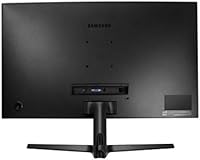
  • VESA mount compatibility gives buyers the option to ditch the stand and wall-mount for a cleaner setup.
  • Console connectivity via HDMI is simple and reliable, with no complicated configuration required.
  • The overall build quality feels solid and consistent with what you would expect from a mainstream Samsung product.

Cons

  • Pixel density at 1080p across 32 inches can make text and fine detail look soft, especially at close viewing distances.
  • The stand offers limited ergonomic adjustment, which can be frustrating for users with specific posture or height needs.
  • 60Hz refresh rate puts a hard ceiling on the experience for anyone who has used a 144Hz or faster display.
  • Color accuracy is adequate for casual use but falls short for any professional creative or photo editing work.
  • At 250 cd/m2, brightness is on the lower side and may struggle in rooms with significant ambient light or direct sunlight.
  • There is no USB hub built into the monitor, which limits desk connectivity options without an external solution.
  • The 4ms response time is acceptable but not best-in-class, and fast-motion blur can appear in very quick game scenes.
  • Limited port selection means fewer options for users juggling multiple input sources like a PC and a console simultaneously.

Ratings

The Samsung CR50 32-inch Curved Monitor has been evaluated by our AI rating system after processing verified buyer reviews from global markets, with spam, bot-generated, and incentivized feedback actively filtered out. Scores reflect the honest consensus of real owners across casual gaming, home office, and everyday desktop use scenarios. Both the genuine strengths and the recurring frustrations are factored in transparently, so the numbers tell the full story.

Value for Money
82%
18%
Most buyers feel the CR50 delivers more than its price tag suggests, particularly given the 32-inch curved panel and Samsung branding. For first-time curved monitor buyers, the combination of size and immersion at this cost is genuinely hard to argue against among comparable options.
As soon as buyers compare it to slightly pricier 1440p alternatives, the value equation gets murkier. Users who stretch their budget a little further often report wishing they had, given the pixel density trade-off at this screen size.
Image Quality
74%
26%
Colors on the VA panel are rich and punchy for everyday content — streaming movies and playing games with vibrant environments looks noticeably better than on a typical budget TN panel. Contrast depth is a real strength, especially in darker scenes.
At 32 inches, 1080p resolution means pixel density is low enough that text and fine detail can look visibly soft, particularly for users sitting closer than arm's length. Those coming from a sharper 27-inch display at the same resolution often notice the difference immediately.
Curvature & Immersion
86%
The 1800R curve is one of the most consistently praised aspects of the CR50 among buyers. At 32 inches, the subtle bend genuinely wraps the peripheral edges of the screen into the viewer's natural line of sight, making movies and open-world games feel more enveloping than a flat panel of the same size.
Users coming from a tighter 1500R curved display may find the 1800R curve feels relatively mild by comparison. In a bright office environment with overhead lighting, the curved surface can also introduce slightly more glare variation across the panel than a flat matte screen would.
Gaming Performance
67%
33%
AMD FreeSync works reliably with compatible Radeon GPUs and eliminates the visual tearing that plagues fixed-sync panels at this price point. The Black Equalizer feature earns genuine praise from gamers who play in dark environments, adding meaningful visibility without washing out the rest of the image.
The 60Hz refresh rate is the CR50's clearest gaming limitation, and buyers who have previously owned a 144Hz or faster monitor find it difficult to go back. The 4ms response time is serviceable but leaves fast-motion blur visible in high-speed action sequences, which competitive gamers will notice.
Build Quality
79%
21%
The monitor feels solid and well-constructed for its segment, with no creaking or flex in the panel housing during normal desk use. Assembly is consistently described as simple and quick, with the stand snapping together without tools in most setups.
The plastic finish, while tidy, does not convey the premium feel of higher-end Samsung models and picks up fingerprints and dust fairly visibly. A few users noted minor wobble when bumping the desk, suggesting the stand's base could be weighted more substantially.
Ergonomics & Adjustability
53%
47%
The stand offers basic tilt adjustment, which covers the needs of users with a standard desk and chair setup where the monitor height roughly matches eye level. VESA compatibility at least gives buyers an escape route to a proper adjustable arm if needed.
The lack of height adjustment is a recurring complaint, especially from taller users or those with non-standard desk setups. There is no pivot or swivel on the stock stand, which limits flexibility for anyone who wants to fine-tune their viewing angle beyond a simple tilt.
Eye Comfort
81%
19%
Eye Saver Mode and the flicker-free backlight make a meaningful difference for users who spend four or more hours a day in front of this screen. Remote workers and students who rely on the CR50 as their primary daily display report noticeably less fatigue compared to older non-certified panels they previously owned.
Eye Saver Mode shifts the color temperature noticeably warm, which some users find unflattering for general-purpose viewing and disable after a short trial. The 250 cd/m2 brightness ceiling also means that in bright rooms, users may be pushing the display near its limit just to see comfortably.
Connectivity
61%
39%
HDMI connectivity covers the basics cleanly and makes connecting a console, laptop, or desktop a simple one-cable job. The wide voltage range means the monitor travels well internationally without needing an adapter.
The port selection is limited, and users managing multiple input sources — say, a PC and a console — find themselves swapping cables rather than switching inputs. The absence of a USB hub is a genuine inconvenience for desk setups where port access matters.
Brightness & Visibility
63%
37%
In a typical indoor office or bedroom setup with controlled lighting, the 250 cd/m2 brightness is adequate and the image reads clearly. Contrast from the VA panel helps compensate somewhat for the modest brightness by keeping dark areas dark and colors from washing out.
In rooms with large windows or direct sunlight, the display can feel dim and the curved glossy-adjacent surface introduces enough reflectance to become distracting. Users in bright environments consistently rate brightness as one of the CR50's weakest real-world characteristics.
Bezel & Aesthetics
83%
The three-sided slim bezel is a practical and visual win, especially for buyers pairing two units side by side. The overall design is clean and understated, fitting naturally into both gaming and office desk setups without looking out of place.
The bottom bezel is noticeably thicker than the three slim sides, which breaks the symmetry slightly when viewed straight on. The all-plastic construction, while tidy, does not have the premium matte texture or muted color tones of more expensive monitors in Samsung's own lineup.
Setup & Ease of Use
88%
Almost universally praised in user feedback, setup is fast and intuitive out of the box. The on-screen menu navigation is logical and the monitor reaches a usable state within minutes of unpacking, which buyers with limited technical experience particularly appreciate.
The OSD (on-screen display) buttons are located on the underside rear of the monitor and can be fiddly to locate without looking. Users who frequently adjust settings like Black Equalizer or input source find the button placement mildly frustrating after the initial setup is complete.
Color Accuracy
57%
43%
For watching streaming content, casual photo browsing, and everyday productivity tasks, the color output looks natural and pleasing enough that most buyers do not feel the need to calibrate. Skin tones and saturated game palettes in particular tend to look warm and appealing straight out of the box.
Users with experience in color-critical work quickly identify inaccuracies in gradients and neutral tones that the VA panel does not handle with precision. The display is not factory calibrated, and delta-E performance at this tier is not suitable for any work where color fidelity directly affects the output.
Dual Monitor Suitability
84%
The slim three-sided bezel is genuinely well-suited to side-by-side pairing, and buyers who set up two CR50 units report that the gap between screens is minimal and visually manageable. The consistent panel finish means two units look matched and intentional rather than mismatched.
The lack of ergonomic adjustability on the stand makes it harder to perfectly align two monitors at the same height without using third-party arms. Users have also noted that sourcing a second identical unit later can be a challenge if the model has shifted in availability.

Suitable for:

The Samsung CR50 32-inch Curved Monitor is a strong fit for anyone stepping into curved displays for the first time without wanting to spend heavily to get there. Casual gamers who play story-driven or slower-paced titles will appreciate the 1800R curvature and the added sense of depth it brings to the screen, even if they never push past 60 frames per second. Home office workers making the jump from a smaller flat panel will find the larger footprint genuinely useful for multitasking, keeping multiple windows open, or simply reducing the need to constantly resize apps. Students and remote workers who spend hours daily in front of a screen will benefit from the flicker-free panel and the Eye Saver Mode, both of which do make a measurable difference over long sessions. Console players connecting a PS or Xbox via HDMI will find the setup plug-and-play simple, with no need to fiddle with display drivers or sync settings. Those building a dual-monitor arrangement on a budget will also find the slim three-sided bezel makes the pairing look clean and intentional rather than cobbled together.

Not suitable for:

The CR50 is not the right choice for buyers who prioritize sharp, pixel-dense text and image clarity above all else. At 32 inches with a 1080p panel, pixel density sits at a level where close-up viewing — especially of small fonts or detailed spreadsheets — can appear noticeably soft compared to a 27-inch 1080p or any 1440p display of similar size. Competitive or enthusiast-level gamers who rely on high refresh rates for an edge will hit the 60Hz ceiling quickly and find it limiting. Creative professionals doing photo editing, video color work, or any task requiring accurate, calibrated color reproduction should look elsewhere entirely, as VA panels at this tier are not designed for that kind of precision work. Anyone expecting a fully ergonomic stand with height adjustment, pivot, and swivel will likely find the included stand underwhelming. In short, the Samsung CR50 32-inch Curved Monitor is built for accessibility and everyday comfort, not for specialists or performance-driven users who need more from their hardware.

Specifications

  • Screen Size: The panel measures 32 inches diagonally, offering a wide viewing area suited to multitasking and immersive media consumption.
  • Panel Type: Uses a VA (Vertical Alignment) curved panel, which provides deeper blacks and better contrast than typical TN panels at this price tier.
  • Curvature: The 1800R curvature radius gently wraps the screen around the viewer's natural field of vision for a more enveloping experience.
  • Resolution: Native resolution is 1920x1080 Full HD, delivering standard 1080p output across the 32-inch display surface.
  • Refresh Rate: The panel runs at a native 60Hz refresh rate, suitable for everyday computing, casual gaming, and media playback.
  • Response Time: Rated at 4ms response time, which is adequate for general use and casual gaming but not optimized for fast-paced competitive play.
  • Brightness: Peak brightness is rated at 250 cd/m2, which performs well in moderately lit rooms but may appear dim in bright or sunlit environments.
  • Aspect Ratio: The display uses a standard 16:9 widescreen aspect ratio, compatible with virtually all modern content formats and operating systems.
  • AMD FreeSync: FreeSync adaptive sync technology is built in, synchronizing the display's refresh rate with a compatible GPU to reduce screen tearing during gameplay.
  • Black Equalizer: Samsung's Black Equalizer feature selectively brightens dark areas of the screen without overexposing highlights, improving visibility in shadowed game scenes.
  • Eye Saver Mode: Eye Saver Mode reduces blue light output and operates with a flicker-free backlight to minimize eye fatigue during long viewing sessions.
  • Bezel Design: A three-sided borderless bezel design minimizes the frame around the active display area, making it well-suited for side-by-side dual-monitor arrangements.
  • Connectivity: The monitor includes HDMI input for connecting PCs, laptops, and consoles; specific port count should be verified against the retail unit.
  • VESA Mount: The display is VESA mount compatible, allowing users to remove the included stand and attach a third-party wall or desk arm mount.
  • Dimensions: With the stand attached, the monitor measures approximately 28 x 20.5 x 10.3 inches (width x height x depth).
  • Weight: The full unit including the stand weighs approximately 12.98 pounds, making it manageable for a single person to position and adjust.
  • Voltage: The monitor supports a wide input voltage range of 100–240V, making it compatible with power standards in most countries worldwide.
  • Color Gamut: The VA panel covers the standard sRGB color space at a level appropriate for everyday use, though it is not factory-calibrated for professional color work.

Related Reviews
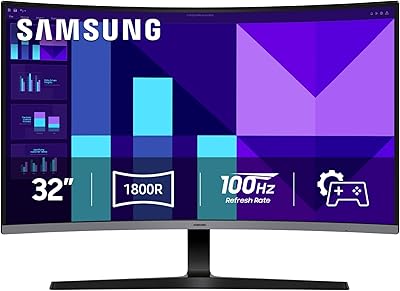
Samsung 32-inch S39GD Curved Monitor

73%
83%
Value for Money
58%
Image Sharpness & Resolution
88%
Curve & Immersion
79%
Refresh Rate & Motion Smoothness
84%
Eye Comfort & Fatigue
More
Samsung 32-Inch S39C Curved Gaming Monitor
83%
88%
Display Quality
91%
Value for Money
86%
Eye Comfort
89%
Ease of Setup
85%
Build Quality
More
KOORUI G3221SC 32″ Curved QHD Gaming Monitor
69%
83%
Picture Quality
81%
Gaming Performance
86%
Value for Money
41%
HDR Performance
67%
Color Accuracy
More
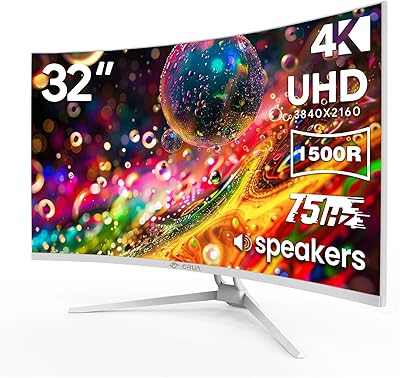
CRUA CR320C 32″ Curved 4K Monitor

73%
91%
Image Sharpness
78%
Color Accuracy
88%
Contrast & Black Levels
84%
Curvature & Immersion
67%
Refresh Rate & Smoothness
More
KTC H32S17C 32-inch Curved Gaming Monitor
72%
91%
Value for Money
84%
Gaming Performance
76%
Picture Quality
52%
HDR Experience
67%
Color Accuracy
More
Samsung S39C 27-Inch Curved Gaming Monitor

75%
83%
Picture Quality & Color Accuracy
88%
Curvature & Immersion
61%
Refresh Rate & Gaming Performance
86%
Eye Comfort & Long-Session Usability
79%
Build Quality & Aesthetics
More
Samsung CF396 23.5-inch Curved Monitor
75%
83%
Picture Quality
81%
Curvature & Immersion
88%
Design & Aesthetics
69%
Gaming Performance
84%
Eye Comfort
More
Samsung 32″ UJ59 4K UHD Monitor
74%
91%
Image Clarity & Resolution
83%
Color Reproduction
88%
Contrast & Black Levels
61%
Gaming Performance
43%
Ergonomics & Stand Design
More
Samsung S32B304 32-Inch FHD Monitor
76%
88%
Value for Money
61%
Image Sharpness & Resolution
93%
Screen Size & Workspace Impact
79%
Build Quality & Design
54%
Stand & Ergonomics
More
AOC C32G2 32″ Curved Gaming Monitor
76%
91%
Value for Money
84%
Gaming Performance
73%
Image Quality
88%
Refresh Rate & Smoothness
83%
Curvature & Immersion
More

FAQ

Unfortunately, the stand on the CR50 offers limited ergonomic adjustment. You can tilt the panel forward and back slightly, but there is no height adjustment built into the stand. If that is a priority for your setup, a VESA-compatible desk arm is a practical workaround since the monitor does support third-party mounting.

Yes, connecting a console via HDMI is straightforward and works well. The 60Hz refresh rate is perfectly aligned with how most consoles output video, so you will not be leaving anything on the table there. Just plug in and you are ready to go.

This is worth being upfront about: pixel density at 1080p across 32 inches is lower than on a smaller screen at the same resolution. Sitting at a normal desk distance, most people find it perfectly fine for gaming and general use, but if you work with small text, spreadsheets, or detailed graphics all day, you may notice it looks a touch soft compared to a 1440p alternative.

It selectively lifts the brightness in the darker areas of whatever is on screen, which is most useful in games where enemies or details can hide in shadows. It does this without blowing out the brighter parts of the image, so it is not just a blanket brightness boost. In practice it makes a genuine difference in darker game environments.

AMD FreeSync is natively supported on AMD Radeon graphics cards. Nvidia GPUs do support FreeSync displays through their G-Sync Compatible program, but compatibility can vary by card and driver version. It is worth checking Nvidia's compatibility list if you are running a recent GeForce card before assuming it will work out of the box.

For casual or hobbyist use it can get the job done, but we would not recommend it for serious creative work. The VA panel is not factory-calibrated and the color accuracy is not at the level professional editors need. If precise, consistent color matters to your workflow, a monitor with an IPS panel and proper color calibration would serve you much better.

Most users report that setup is quick and uncomplicated. The stand attaches without tools in most cases, and the overall construction feels sturdy once assembled. You should be up and running within ten to fifteen minutes of opening the box.

Yes, and the three-sided slim bezel actually makes it a good candidate for pairing. The narrow frame around the panel means the gap between two screens side by side is minimal, which keeps the visual transition between monitors feeling natural rather than jarring.

It does shift the color temperature warmer and reduces blue light output, which can make the image look slightly yellow or less vivid compared to the standard mode. Most people adapt to it quickly, especially in the evening. You can toggle it on and off easily depending on what you are doing.

Samsung typically covers their consumer monitors with a one-year limited warranty in the United States, which covers manufacturing defects. It is always a good idea to verify the current warranty terms directly with Samsung or the retailer at the time of purchase, as coverage terms can vary by region and change over time.

Where to Buy