


Overview

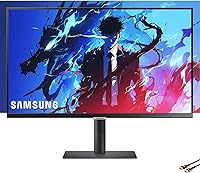
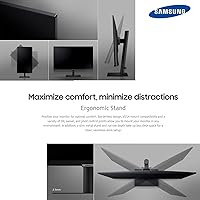
The Samsung S8 27-inch 4K IPS Monitor sits in a comfortable mid-to-premium sweet spot — sharp enough for serious creative work, practical enough for daily professional use. What immediately stands out is the ergonomic stand, which offers tilt, height, pivot, and swivel adjustments that most competitors at this price charge extra for. The USB-C 90W power delivery is genuinely useful: one cable connects a MacBook or laptop, charges it, and handles the display signal simultaneously. The slim metal base keeps things looking clean and uncluttered. One thing worth stating upfront — at 60Hz, this is a work-first display. If gaming or fast-motion content is a priority, look elsewhere.

Features & Benefits

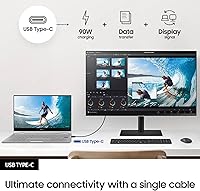
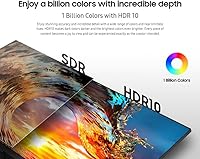
The 3840×2160 IPS panel is the core of what this Samsung 4K monitor does well — colors are rich and consistent across wide angles, which matters when color-grading photos or reviewing design files with a colleague beside you. That single USB-C cable does the heavy lifting: display, data, and up to 90W of charging through one port. Eye Saver Mode and flicker-free technology are not just marketing checkboxes; after a long day of spreadsheets and documents, the reduction in eye fatigue is real. HDR10 adds some contrast punch to video content, though at 300 nits peak brightness, the effect is noticeable rather than dramatic. Split-screen PBP and PIP let you run two input sources simultaneously without swapping cables.

Best For

The S8 Series display is a natural fit for remote workers and office professionals who want to connect a laptop and immediately have a clean, functional workstation — no separate docking station required. Photographers and video editors will appreciate the color accuracy an IPS panel delivers without expensive post-purchase calibration. If you switch frequently between a laptop and a desktop, PBP split-screen mode makes the dual-device workflow far less clunky than it sounds. Long-hours screen users dealing with eye strain will find the flicker-free setup genuinely helpful. Anyone who wants full ergonomic control without bolting on a separate monitor arm will also be well served by the included adjustable stand.

User Feedback

Buyers consistently praise the sharpness and out-of-box color accuracy on this 27-inch IPS panel — most report it looking great without any manual calibration. The one-cable USB-C setup draws particular appreciation from MacBook users who describe the desk cleanup alone as worth the purchase. On the flip side, the 60Hz cap is the most common criticism from those who assumed higher refresh rates; some buyers also feel the HDR10 performance, while visible, falls short of what the spec sheet implies at this brightness level. Stand feedback is mostly positive — height and pivot adjustments feel solid and well-built — though a handful of buyers consider the price steep compared to competing 4K options with comparable specifications.

Pros

  • The 4K IPS panel delivers sharp, color-accurate visuals that hold up well for photo editing and design work without manual calibration.
  • A single USB-C cable handles display, data transfer, and up to 90W laptop charging — a genuinely useful setup for MacBook and ultrabook users.
  • The ergonomic stand offers tilt, height, pivot, and swivel adjustments that most competitors charge extra to include.
  • Eye Saver Mode and flicker-free technology make long work sessions noticeably more comfortable over time.
  • The 178-degree viewing angle means colors stay consistent whether you are sitting directly in front or reviewing content with someone beside you.
  • PBP and PIP multi-source modes let you connect and display two devices simultaneously without swapping cables.
  • VESA mount compatibility gives you the option to ditch the stand entirely and use a third-party arm.
  • The slim metal base and clean industrial design suit professional desk setups without looking bulky or cheap.
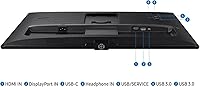
  • HDMI and DisplayPort inputs alongside USB-C give you flexible connectivity for a range of devices.

Cons

  • At 60Hz, the display is a hard pass for anyone who games or wants a smoother high-refresh-rate experience.
  • HDR10 at 300 nits peak brightness produces only a modest improvement in contrast — do not expect a dramatic HDR effect.
  • The glossy screen surface can pick up significant glare in bright rooms or near windows.
  • Some buyers feel the price is difficult to justify when competing 4K IPS panels offer similar core specs for less.
  • 300 nits maximum brightness may feel dim to users coming from brighter panels, especially in well-lit environments.
  • The Easy Setting Box software for window management has received mixed reviews for reliability and ease of use.
  • At 14.8 pounds, the monitor is on the heavier side if you need to reposition or transport it regularly.

Ratings

Our AI-generated scores for the Samsung S8 27-inch 4K IPS Monitor are based on a deep analysis of verified global buyer reviews, with spam, incentivized, and bot-flagged submissions actively filtered out before scoring. The ratings reflect a balanced picture of what real owners praise and where they feel let down — no inflated averages, no glossing over genuine frustrations. Both the standout strengths and the legitimate trade-offs of this 27-inch IPS panel are transparently baked into every score below.

Image Quality
88%
The IPS panel consistently earns high marks from photographers and designers who report accurate, vivid colors straight out of the box with minimal calibration needed. At 4K resolution on a 27-inch screen, text is sharp and fine image detail holds up well even at close viewing distances, which reviewers working on detailed graphics or document-heavy workflows appreciate enormously.
A handful of users note that the glossy panel surface introduces reflections in bright rooms, which can undercut the otherwise excellent image quality. Some reviewers also flag minor backlight inconsistency toward screen edges, though this is not a universal complaint.
Color Accuracy
86%
IPS technology gives this display a meaningful edge over VA or TN panels when it comes to color consistency across the screen, and most creative professionals report that colors look reliable and stable at wide viewing angles. Buyers editing photos or reviewing brand assets note that hues remain faithful even when the screen is viewed from the side, which matters in collaborative desk setups.
The S8 Series display does not ship with a factory calibration report, so users who need strict color accuracy for print production may want to invest in a colorimeter to confirm the panel is performing to spec. A small number of reviewers also noticed a slight warm color cast at default settings that required manual adjustment.
Connectivity & USB-C
91%
The 90W USB-C Power Delivery is the most praised feature among laptop users, particularly those running MacBooks or USB-C Windows ultrabooks, who can arrive at their desk and be fully docked with a single cable in seconds. The combination of HDMI, DisplayPort, and USB-C inputs gives this 27-inch IPS panel genuine flexibility across different setups without requiring an external hub for most workflows.
A few buyers point out that the USB-C cable included in the box is shorter than ideal for some desk configurations, requiring a third-party replacement. There is also no built-in SD card reader or audio jack on the display itself, which some users expected at this price tier.
Ergonomic Stand
89%
The stand is consistently highlighted as one of the best-included stands buyers have encountered in this price bracket — height adjustment, tilt, swivel, and pivot are all available without any additional purchase. Remote workers who switch between sitting and standing configurations report that repositioning the screen is quick and the mechanism feels solid rather than loose or wobbly.
The stand base has a moderate footprint that can feel intrusive on smaller desks, and a few users wished the height range extended slightly higher for use with taller chairs or standing desks. Those who prefer a fully floating setup will need to purchase a VESA arm separately, though the compatibility is at least present.
Eye Comfort
84%
Flicker-free technology and Eye Saver Mode are features that reviewers who log long daily hours in front of a screen genuinely notice, with multiple users reporting less end-of-day eye fatigue compared to previous monitors they owned. The ability to reduce blue light output without drastically distorting colors is something that night-shift workers and late-project professionals mention repeatedly as a quiet but appreciated benefit.
Eye Saver Mode does shift the color temperature noticeably toward warmer tones, which some color-sensitive users find disruptive for design work and prefer to disable during creative tasks. The 300 nits brightness ceiling also means the display can feel dim in very bright environments, which can cause some users to squint rather than relax.
HDR Performance
58%
42%
HDR10 support does produce a visible improvement in contrast and depth on supported content — streaming video and HDR-flagged photos show richer shadow detail and slightly more punch in highlights compared to standard dynamic range output. For casual media consumption, the enhancement is a legitimate step up from non-HDR panels in the same class.
At only 300 nits peak brightness, the HDR effect is far more subtle than the marketing implies, and buyers who have experienced proper high-brightness HDR displays will find the difference underwhelming. This is one of the more common sources of disappointment in user reviews, with several buyers feeling the HDR labeling sets expectations that the hardware simply cannot meet.
Refresh Rate & Motion
54%
46%
For productivity tasks, document work, web browsing, and video playback, 60Hz is entirely adequate and most non-gaming users report no issues with the display feeling sluggish or unresponsive in day-to-day use. The 5ms response time keeps general motion reasonably clean for casual video viewing.
The 60Hz cap is the single most cited dealbreaker among buyers who cross-shopped this monitor against gaming-oriented alternatives, and it makes the S8 Series display a difficult sell for anyone who plays competitive or fast-paced games. Even outside gaming, users accustomed to 120Hz or higher displays may notice that cursor movement and scrolling feel comparatively less fluid.
Multi-Source Viewing
79%
21%
The Picture-by-Picture and Picture-in-Picture modes work reliably for dual-device users who want to monitor two computers simultaneously — a popular use case among professionals who run a work laptop alongside a personal desktop without wanting to buy a separate display. Setup is reasonably intuitive once the input menu is explored.
The PBP mode splits the screen resolution between two sources, which can make each side feel cramped on a 27-inch panel compared to a larger ultrawide alternative. A few users also report that switching between PIP and PBP modes requires more menu navigation than it should, which becomes tedious when done frequently.
Build Quality & Design
82%
18%
The slim metal base and clean matte-black design are regularly complimented by buyers who want a professional-looking desk setup without a bulky or plasticky monitor frame. The overall build feels appropriately premium for the price tier, with the stand mechanism in particular receiving positive feedback for its solidity and smooth adjustability.
The rear of the monitor housing is plastic rather than metal, which feels slightly inconsistent with the quality of the front and base. Some buyers also report minor flex in the panel housing when adjusting the pivot position, though this does not appear to affect long-term durability for most users.
Value for Money
67%
33%
For buyers who fully utilize the USB-C docking functionality, the ergonomic stand, and the 4K IPS panel together, the pricing feels defensible — you are effectively getting monitor, dock, and ergonomic arm in a single purchase. Professionals who would otherwise spend separately on a docking station find the total cost of ownership argument reasonably compelling.
Buyers who do not need USB-C charging or who game even occasionally will find competing 4K IPS panels at lower prices that match or exceed core image quality metrics. The value equation is narrow — it works well for a specific buyer profile, but outside that profile, the price feels harder to justify when benchmarked against the wider market.
On-Screen Menu & Software
63%
37%
The hardware on-screen display buttons are responsive and the menu layout is familiar to anyone who has used a Samsung monitor before, making basic adjustments like brightness and input switching quick to navigate. Easy Setting Box software adds genuine window-snapping utility for users who want to divide the 4K desktop into defined work zones.
Easy Setting Box has a mixed reputation for stability — some users report it running reliably in the background, while others experience crashes or conflicts with certain operating systems that require them to reinstall or abandon the software entirely. The OSD button placement on the underside of the panel is also a minor ergonomic frustration that several reviewers mention.
Setup Experience
81%
19%
Stand assembly is tool-free and takes most buyers under five minutes, and the included cable selection covers the most common connection scenarios without requiring an immediate trip to buy accessories. First-time setup of the display signal and basic brightness calibration is quick and uncomplicated.
The included documentation is minimal, and buyers who want to configure advanced features like PBP mode or Eye Saver Mode scheduling will likely need to consult online resources rather than the printed guide. A few users also noted that the USB-C cable length included in the box required them to rearrange their desk to accommodate the short reach.
Compatibility
83%
Broad input compatibility across USB-C, HDMI, and DisplayPort means this display works out of the box with a wide range of devices from MacBooks and Windows laptops to gaming consoles and desktops without adapter frustration. The 90W USB-C power delivery is compatible with the vast majority of modern laptops that support USB-C charging.
A small number of users running older laptops with USB-C ports that do not support DisplayPort Alt Mode found that the single-cable setup did not function as expected, requiring a separate HDMI or DisplayPort cable instead. Compatibility with certain Thunderbolt configurations and older docking stations has also produced occasional setup headaches.

Suitable for:

The Samsung S8 27-inch 4K IPS Monitor was clearly designed with desk-bound professionals in mind, and it shows. Remote workers who rely on a single laptop — especially MacBook or USB-C-equipped Windows machines — will find the 90W power delivery a genuine convenience, eliminating the need for a separate charger or docking station. Photographers and graphic designers who need consistent, accurate color reproduction across wide viewing angles will benefit from the IPS panel's real-world performance, which holds up well without requiring expensive third-party calibration tools. If you regularly switch between two computers or want to run a laptop and a desktop side by side, the built-in PBP and PIP modes handle that workflow cleanly. People who log eight or more hours daily in front of a screen will also appreciate the flicker-free display and Eye Saver Mode — small features that add up over a long week. The fully adjustable stand, which supports height, tilt, pivot, and swivel, makes this a strong fit for anyone who wants ergonomic flexibility without buying a separate monitor arm.

Not suitable for:

The Samsung S8 27-inch 4K IPS Monitor has real limitations that certain buyers should weigh carefully before committing. The 60Hz refresh rate is the biggest dealbreaker for anyone who games, edits fast-motion video, or simply prefers the smoother feel of a 120Hz or 144Hz display — this panel was not designed for that audience. The 300 nits peak brightness also means the HDR10 experience is mild at best; buyers expecting vivid, high-contrast HDR performance similar to an OLED or high-brightness VA panel will likely be disappointed. At its price point, shoppers who are primarily budget-conscious may find competing 4K IPS options that offer comparable image quality for less, making value-for-money a legitimate concern. Those who work in very bright, sunlit rooms may also find 300 nits insufficient to combat glare on the glossy screen surface. If raw gaming performance, HDR punch, or strict budget adherence are the primary criteria, this display is not the right match.

Specifications

  • Screen Size: The display measures 27 inches diagonally, providing ample workspace for multitasking without dominating a standard desk.
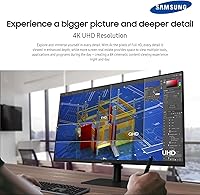
  • Resolution: Native resolution is 3840×2160 (4K UHD), delivering four times the pixel density of a standard Full HD panel.
  • Panel Type: Uses an IPS (In-Plane Switching) panel, which ensures consistent color accuracy and wide viewing angles compared to TN or VA alternatives.
  • Refresh Rate: The display runs at a maximum of 60Hz, making it well-suited for productivity and creative work rather than fast-paced gaming.
  • Response Time: Rated at 5ms (gray-to-gray), which is adequate for general use and video playback but not optimized for competitive gaming.
  • Brightness: Maximum brightness is rated at 300 cd/m², which is standard for office-oriented IPS monitors in this category.
  • HDR Support: Compatible with HDR10, offering improved contrast and color range for supported content, though peak brightness limits the overall HDR impact.
  • Viewing Angle: Supports a 178-degree viewing angle both horizontally and vertically, so colors remain accurate when viewed from most positions.
  • USB-C Power: The USB-C port delivers up to 90W of Power Delivery, enough to charge most laptops and ultrabooks through a single cable connection.
  • Ports: Connectivity includes one USB-C, one HDMI, and one DisplayPort input, plus a total of three USB ports for peripherals.
  • Color Depth: Capable of displaying approximately 1 billion colors, supporting rich gradients and smooth tonal transitions for design and photo work.
  • Aspect Ratio: Standard 16:9 widescreen aspect ratio, compatible with virtually all modern operating systems and content formats.
  • Stand Adjustments: The included stand supports tilt, height, pivot, and swivel adjustments, eliminating the need for a separate monitor arm in most setups.
  • VESA Compatibility: VESA mount support is included, allowing the monitor to be attached to third-party wall mounts or articulating arms.
  • Eye Care: Features Eye Saver Mode for reduced blue light output and flicker-free technology to minimize eye fatigue during extended use.
  • Multi-Source View: Supports Picture-by-Picture (PBP) and Picture-in-Picture (PIP) modes, allowing two input sources to be displayed on screen simultaneously.
  • Dimensions: With the stand attached, the monitor measures approximately 24.2 × 21.7 × 7.73 inches (W × H × D).
  • Weight: Total weight with stand is 14.8 pounds, which is typical for a 27-inch monitor in this class.
  • Screen Surface: The panel uses a glossy screen surface, which can enhance color vibrancy but may reflect light in bright environments.
  • Software: Includes Samsung's Easy Setting Box software, which assists with window layout management across the display.

Related Reviews

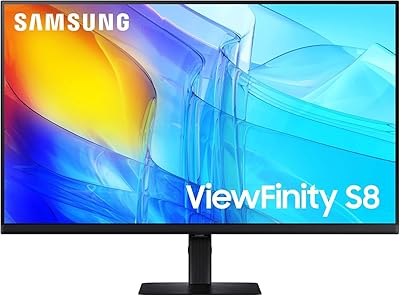
ViewSonic VG2756-4K 27-Inch 4K Docking Monitor
80%
91%
USB-C Docking Performance
88%
Display Clarity
74%
Connectivity & Port Selection
86%
Ergonomics & Stand Quality
71%
Color Accuracy
More
Samsung ViewFinity S8 27″ 4K Monitor
75%
91%
Image Clarity
78%
Color Accuracy
88%
Ergonomics & Stand
93%
Setup Experience
74%
Connectivity
More
LG 27UP850K-W 27-inch 4K IPS Monitor
76%
88%
Image Quality
91%
Color Accuracy
93%
USB-C Connectivity & Power Delivery
86%
Ergonomics & Stand
84%
Build Quality & Design
More
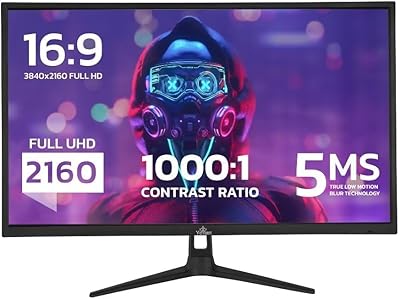
YEYIAN ODRAZ 27″ 4K UHD Gaming Monitor
72%
86%
Image Quality
88%
Color Accuracy
57%
Gaming Performance
83%
Value for Money
66%
Build Quality
More
ViewSonic VP2768a-4K 27-Inch 4K Monitor

86%
94%
Color Accuracy
88%
Ergonomics & Comfort
91%
Value for Money
89%
Build Quality
85%
Ease of Setup
More
ViewSonic VA2756-4K-MHD 27-Inch 4K Monitor
84%
92%
Display Quality
90%
Color Accuracy
88%
Design & Build Quality
85%
Ease of Setup
89%
Connectivity Options
More
ViewSonic VP3268A-4K 32-inch 4K Monitor
79%
93%
Color Accuracy
91%
Out-of-Box Calibration
88%
Build Quality
86%
Ergonomics & Stand
89%
Connectivity
More
ViewSonic VX2776-4K-MHDU 27-inch 4K IPS Monitor

75%
91%
Image Clarity
93%
USB-C Convenience
78%
Color Accuracy
54%
HDR Performance
46%
Stand & Ergonomics
More
Dell S2725QC 27-inch 4K USB-C Monitor
81%
93%
Image Clarity
88%
Color Accuracy
91%
USB-C Connectivity
86%
Refresh Rate & Smoothness
89%
Build Quality & Design
More
Gigastone LM-27FF51 27-Inch IPS Monitor
74%
82%
Image Clarity
54%
Brightness & Glare
76%
Color Accuracy
78%
Refresh Rate & Motion
71%
Build Quality
More

FAQ

Yes, and this is genuinely one of the strongest reasons to consider this display. If your MacBook has a USB-C or Thunderbolt port, a single USB-C cable will handle the video signal, any connected USB peripherals, and up to 90W of charging simultaneously. Most modern MacBook Air and MacBook Pro models fall well within that 90W threshold, so you can arrive at your desk, plug in one cable, and be ready to work.

Not really, and it is worth being direct about this. The Samsung S8 27-inch 4K IPS Monitor is capped at 60Hz, which is noticeably less smooth than the 120Hz or 144Hz panels that most gamers prefer today. If you play competitive games or anything where fast motion matters, you will likely feel the limitation. For casual gaming alongside productivity use, it is perfectly watchable — just do not buy it with gaming as the primary purpose.

Moderate, with tempered expectations recommended. The display supports HDR10, so HDR-flagged content does look better than standard dynamic range — contrast improves and colors feel a bit richer. That said, the 300 nits peak brightness means the effect is subtle rather than dramatic. If you have seen a high-brightness OLED or mini-LED HDR panel, the difference here will feel modest by comparison. For everyday media consumption it is a nice bonus; for HDR as a primary feature, it is not this monitor's strongest suit.

The stand is genuinely better than most in this price bracket. You get full height, tilt, pivot, and swivel adjustment, which covers the needs of most desk setups without spending extra on a separate arm. That said, if you have limited desk depth or prefer to free up the base footprint entirely, the VESA mount support means swapping to a third-party arm is straightforward. For the majority of users, the included stand is more than adequate.

Yes. The S8 Series display supports both Picture-by-Picture and Picture-in-Picture modes. PBP splits the screen and shows two full inputs side by side, while PIP displays a secondary source in a smaller window overlaid on the main feed. It works well if you regularly switch between a work laptop and a personal machine, for example, without wanting to unplug and replug cables constantly.

It can be. Glossy panels tend to produce richer, more saturated colors than matte alternatives, but they also reflect ambient light more noticeably. If your desk sits in front of a window or under bright overhead lighting, glare may be a frustration. Positioning the monitor away from direct light sources or using blinds usually resolves the issue, but it is worth factoring in if your workspace is particularly bright.

The monitor includes a total of three USB ports, which means you can connect peripherals like a keyboard, mouse, or USB hub directly to the display and have them work through the single USB-C connection back to your laptop. It is not a full-featured KVM switch, but it does reduce the number of things you need to plug and unplug when switching between workstations.

Quite well for most professional workflows. The IPS panel delivers consistent color across the full screen, and the 4K resolution means you can zoom into fine image detail without the pixel grain you would see on a 1080p display. The wide color gamut and 1 billion color support make it a reasonable choice for photographers and designers who need reliable on-screen color. It is not a factory-calibrated professional reference monitor, but most users report strong accuracy straight out of the box.

Generally straightforward. The stand attaches to the monitor base without tools in most cases, and Samsung includes the necessary cables to get started. The on-screen menu is familiar if you have used any Samsung display before. The Easy Setting Box software for window management takes a few minutes to configure to personal preference, but the core display setup itself is quick.

27 inches is widely considered a comfortable sweet spot for 4K resolution on a desk monitor. At typical viewing distances of around two feet, the pixel density is high enough that text and UI elements look crisp and clean. Most operating systems allow you to adjust display scaling, so if default text size feels small, you can bump the scaling to 125% or 150% without losing much of the resolution benefit. It tends to feel more natural than 4K on a smaller 24-inch screen, where scaling becomes almost mandatory.


