
Overview
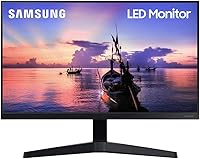
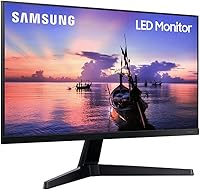
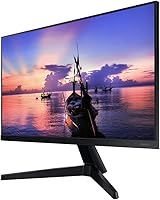
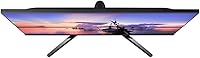
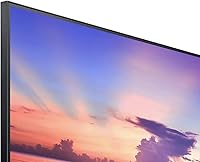
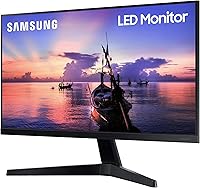
The Samsung T350 24-inch IPS Monitor is one of those quietly competent displays that doesn't try to impress you with flashy specs — it just does its job well. At this price tier, choosing an IPS panel over a cheaper TN alternative is a meaningful upgrade: colors stay consistent whether you're looking straight on or from an angle, and extended work sessions feel noticeably less straining. The dark blue-gray finish is understated enough to blend into virtually any desk setup without looking cheap. Don't expect advanced ergonomics or built-in speakers. This is a no-frills workhorse built for people who want a reliable, good-looking screen without paying flagship prices.
Features & Benefits
The IPS panel inside the T350 is the real story here. At 24 inches with a 1920x1080 resolution, sharpness lands exactly where it needs to be — text is crisp, images look clean, and you rarely feel the urge to squint or zoom in. AMD FreeSync is a genuine perk: it smooths out screen tearing during casual gaming at 60Hz, which makes a noticeable difference without requiring a premium display. The 4ms response time keeps motion from looking smeared during fast-paced content. Brightness at 250 cd/m² handles most indoor environments comfortably. The dual USB ports are a small but appreciated touch — plug in a keyboard or drive without reaching around your tower.
Best For
This 24-inch IPS panel hits its stride as a home office display. If you spend hours looking at documents, spreadsheets, or video calls, the IPS color consistency and flat surface are noticeably easier on the eyes than a budget TN screen. Students setting up a first workstation will find it punches well above its cost. Casual gamers can appreciate the FreeSync support, but be clear-eyed: at 60Hz, this isn't built for competitive play. Where the T350 arguably performs best is as a secondary monitor — paired with another display, its color accuracy keeps things visually consistent across a dual-screen setup. Anyone still running an older 1080p TN panel will notice an immediate improvement.
User Feedback
Buyers who have lived with this Samsung display for months tend to land in the same place: satisfied, but not without a few complaints. Consistent praise focuses on image clarity and color accuracy — users regularly note it looks better than expected at this price point. Setup earns high marks too; most people have it assembled and running in minutes. The criticism, though, is real. The stand offers tilt only — no height adjustment, no pivot — which frustrates anyone who takes ergonomics seriously. Buyers in bright, sun-facing rooms flag the 250 cd/m² brightness ceiling as a limiting factor. A few were caught off guard by the absence of built-in speakers. Given its 2020 launch, the T350 has held up, though competition at this price has grown noticeably stronger.
Pros
- The IPS panel produces noticeably more consistent colors and wider viewing angles than TN monitors at a similar price.
- Full HD resolution looks crisp and sharp at 24 inches — text, images, and video all render cleanly.
- AMD FreeSync reduces screen tearing during casual gaming at no extra cost over a comparable non-FreeSync display.
- Setup is genuinely simple; most buyers have the T350 assembled and connected within minutes.
- The dark blue-gray design is understated and fits most desk aesthetics without looking cheap.
- Two built-in USB ports let you plug in peripherals directly, saving you a trip around the back of your tower.
- At its price point, getting a Samsung IPS display with FreeSync represents solid long-term value.
- The 24-inch flat screen is an ideal size for single-monitor productivity without overwhelming a small desk.
- The monitor has been on the market since 2020 with consistent buyer satisfaction, suggesting reliable build quality.
Cons
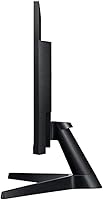
- The stand offers tilt adjustment only — no height, swivel, or pivot options, which is a real ergonomic limitation.
- At 250 cd/m², brightness can feel insufficient in well-lit or sun-facing rooms.
- No built-in speakers means you need external audio hardware, even for basic video call sound.
- The 60Hz refresh rate makes this 24-inch IPS panel unsuitable for fast-paced or competitive gaming.
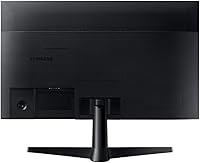
- VESA mount compatibility is unconfirmed in the official listing, making monitor arm upgrades uncertain.
- Color coverage is adequate for everyday use but falls short of what photo or video editors need.
- The design includes fairly thick bezels by current standards, which can feel dated on a modern desk.
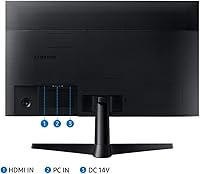
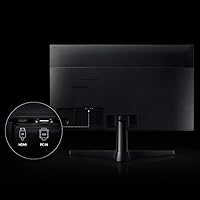
- Connectivity options are limited; buyers with multiple HDMI devices may find input switching inconvenient.
Ratings
The scores below reflect an AI-driven analysis of verified global buyer reviews for the Samsung T350 24-inch IPS Monitor, with spam, bot activity, and incentivized feedback actively filtered out. Both the genuine strengths and the recurring frustrations are represented transparently, so you get an honest picture of what real owners think after weeks and months of daily use. The T350 earns consistent appreciation in some areas and equally consistent criticism in others — and this breakdown covers both.
Image Clarity
Color Accuracy
Viewing Angles
Ergonomics & Stand
Brightness & Glare Handling
Gaming Performance
Response Time
Build Quality
Connectivity
Audio
Setup Experience
Value for Money
Long-Term Reliability
Suitable for:
The Samsung T350 24-inch IPS Monitor is a strong match for home office workers who sit in front of a screen for long stretches and want accurate, consistent colors without paying a premium. Students furnishing a first desk or dorm room will find the value proposition hard to beat — they get a reputable brand, a proper IPS panel, and a clean aesthetic without breaking their budget. Casual gamers who already own a mid-range GPU and simply want FreeSync to smooth out occasional tearing will appreciate that bonus at this price tier, even if 60Hz keeps this firmly out of competitive gaming territory. It also works well as a secondary display in a dual-monitor setup, since the IPS panel keeps colors consistent and avoids the washed-out look you often get from mismatched TN screens. Anyone still running an older low-resolution or TN-based monitor will notice a genuine, day-to-day improvement in comfort and visual quality.
Not suitable for:
The Samsung T350 24-inch IPS Monitor is not the right pick for buyers who care about ergonomics — the stand offers tilt only, with no height adjustment or pivot, which becomes a real problem during long work sessions if your desk-and-chair setup isn't already optimized. Serious or competitive gamers should look elsewhere entirely; 60Hz with a 4ms response time is adequate for casual use, but it simply cannot keep up with the demands of fast-paced titles where high refresh rates matter. Creative professionals working in photography, video editing, or graphic design will find the color coverage and brightness ceiling limiting — this is not a display calibrated for accurate color work. Anyone in a sun-facing room or bright studio environment may find the 250 cd/m² brightness insufficient to combat glare. Finally, buyers hoping to add external speakers via a monitor-mounted audio output will be disappointed, as there are no built-in speakers and the listing does not confirm an audio pass-through.
Specifications
- Panel Type: Uses an IPS (In-Plane Switching) panel, which provides wider viewing angles and more consistent color reproduction compared to TN alternatives.
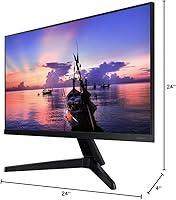
- Screen Size: 24-inch flat display with a 16:9 aspect ratio, offering a comfortable workspace footprint for single-monitor setups.
- Resolution: Native resolution of 1920x1080 (Full HD), delivering sharp detail and clean text rendering at this screen size.
- Refresh Rate: Operates at a standard 60Hz refresh rate, suitable for everyday productivity tasks, media consumption, and casual gaming.
- Response Time: Rated at 4ms response time over HDMI, keeping motion reasonably smooth during fast-moving content and light gaming sessions.
- Brightness: Peak brightness is rated at 250 cd/m², which performs well in controlled indoor lighting but may feel limited in very bright or sun-facing environments.
- AMD FreeSync: Supports AMD FreeSync technology, which synchronizes the display refresh rate with a compatible GPU to reduce screen tearing during gaming.
- USB Ports: Includes 2 USB ports built into the monitor body, allowing direct connection of peripherals such as keyboards, mice, or flash drives.
- Screen Surface: Features a flat, non-curved panel surface with a matte-style finish that helps reduce reflections in typical office and home environments.
- Dimensions: Product dimensions are approximately 3.6 x 8.35 x 6.59 inches, with a total weight of 6 pounds including the attached stand.
- Stand Adjustments: The included stand supports tilt adjustment only; height adjustment, swivel, and pivot functions are not available on this model.
- VESA Compatibility: VESA mount compatibility is not officially confirmed in the product listing, so buyers planning to use a monitor arm should verify before purchasing.
- Color & Finish: Ships in a dark blue-gray colorway with a clean, understated aesthetic designed to blend into most home and office desk environments.
- Voltage: Rated for 110V operation, making it compatible with standard North American power outlets without an adapter.
- Release Date: First made available in September 2020, giving the product a multi-year track record of real-world buyer feedback and usage data.
- Manufacturer: Manufactured by Samsung Electronics, model number LF24T350FHNXZA, under the T350 Series product line.
Related Reviews
Samsung S22R350FHN 22-inch IPS Monitor
Samsung S33GC 24-Inch IPS Monitor
Samsung S60A 24-inch QHD Monitor

ViewSonic VG2448A 24-inch IPS Monitor
KTC H24T27 24-inch QHD Gaming Monitor

Samsung CRG5 24-Inch Curved Gaming Monitor

HP Series 5 524sf 24-inch Monitor

Dell P2419H 24-Inch IPS Monitor

ReHisk 241KV2 24-inch Gaming Monitor
