Overview
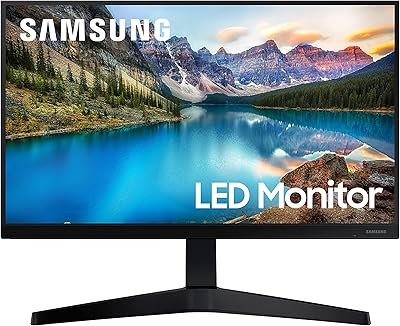
The Samsung S33GC 24-Inch IPS Monitor is Samsung's answer to the growing demand for capable, no-nonsense office displays that don't ask much of your wallet. Launched in late 2023, it sits squarely in the entry-level business category — practical, straightforward, and built around daily productivity rather than any specialized use case. The IPS panel is a genuine step up from TN alternatives at this price tier, offering noticeably better color consistency and wider viewing angles. Samsung has a long track record with display hardware, which lends some confidence here, but be clear: this is a workhorse screen, not a tool for color grading or serious gaming.
Features & Benefits
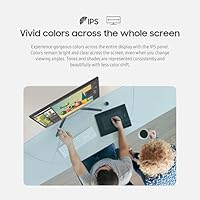
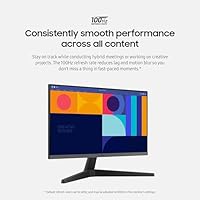
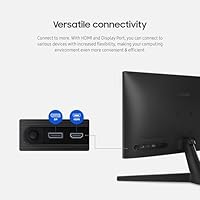
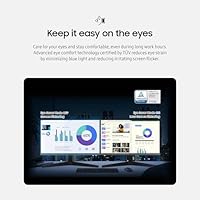
The IPS panel is where this 24-inch office screen earns its keep. Colors stay accurate and consistent whether you're viewing straight-on or from an angle — a real advantage in shared workspace setups. The 100Hz refresh rate is a welcome bonus, smoothing out fast-scrolling spreadsheets and video calls without the choppiness you'd get from a standard 60Hz display. HDMI and DisplayPort connectivity means you can hook up a laptop and a desktop simultaneously, which adds real flexibility to a dual-device setup. AMD FreeSync helps reduce screen tearing for casual use. The matte anti-glare coating handles bright ambient light well, and the TÜV-certified eye comfort features — blue light filtering and flicker reduction — make long days noticeably less taxing.
Best For
This Samsung business monitor makes the most sense for people who spend long hours in front of a screen and need something reliable without overspending. Remote and hybrid workers will appreciate the plug-and-play setup and dual-port connectivity. Students get a solid, distraction-free display for reading, writing, and streaming. If you're currently running an older 60Hz TN panel, the jump to this screen will feel significant — better colors, smoother motion, and less eye fatigue by end of day. It's not the right pick if you need height or pivot adjustments, and those chasing higher pixel density for detailed photo work may want to look elsewhere. For straightforward office productivity, though, it covers the essentials well.
User Feedback
With a 4.6-star average across 141 ratings, the S33GC display lands in solidly positive territory, though the sample size is still relatively modest. Buyers frequently call out the color accuracy and how easy it is to get up and running straight out of the box. The eye care features get genuine credit from users who work long shifts — this isn't purely a spec-sheet claim. The main friction point, and it comes up consistently, is the tilt-only stand. No height adjustment, no pivot, no swivel — for a business-labeled monitor, that's a real omission ergonomics-minded buyers should factor in. A handful of users also note that 1080p at 24 inches looks fine but isn't exceptional for those sensitive to pixel density.
Pros
- The IPS panel produces accurate, consistent colors that hold up well even when viewed from an angle.
- A 100Hz refresh rate keeps motion noticeably smoother than standard 60Hz office displays during video calls and scrolling.
- Both HDMI and DisplayPort inputs allow easy connection to multiple devices without an adapter.
- The matte anti-glare screen surface handles bright rooms and window light far better than glossy alternatives.
- TÜV-certified blue light filtering and flicker reduction genuinely help reduce eye fatigue over long work sessions.
- Setup is straightforward and fast — most buyers report being up and running within minutes of unboxing.
- AMD FreeSync reduces screen tearing for casual gaming or fast-moving video content without any configuration needed.
- Samsung's build quality feels solid and consistent with what you would expect from a reputable display brand.
- At this price tier, the combination of IPS panel quality and 100Hz refresh rate is difficult to match.
Cons
- The tilt-only stand offers no height, pivot, or swivel adjustment, which is a notable ergonomic limitation for a business monitor.
- Full HD 1080p resolution at 24 inches can look slightly soft to users accustomed to higher pixel-density displays.
- No USB hub or built-in ports means the desk setup stays dependent on your PC or laptop for peripheral connections.
- The 100Hz refresh rate and FreeSync are light additions — buyers expecting real gaming performance will find the spec set limiting.
- The stand cannot be replaced without a VESA-compatible mount, adding potential extra cost for ergonomic flexibility.
- Speaker output is absent, so a separate audio solution is required for calls or media with sound.
- The relatively modest 141 ratings make it harder to draw firm long-term reliability conclusions compared to more established models.
- Color gamut coverage is not specified for sRGB or DCI-P3, which makes it a risky choice for any color-sensitive professional work.
Ratings
Our AI-generated scores for the Samsung S33GC 24-Inch IPS Monitor were produced by systematically analyzing verified global buyer reviews, actively filtering out incentivized, bot-generated, and duplicate submissions to reflect only genuine user experiences. Every category score transparently weighs both the praise and the frustrations that real owners have reported across daily use. Where this 24-inch office screen excels, the scores reflect that clearly — and where it falls short, we have not softened the numbers.
Image Quality
Eye Comfort
Ergonomics & Stand
Value for Money
Connectivity
Refresh Rate Performance
Anti-Glare Performance
Setup & Ease of Use
Build Quality
Color Accuracy
Compatibility
Brightness & Contrast
Noise & Heat
Packaging & Unboxing
Suitable for:
The Samsung S33GC 24-Inch IPS Monitor is a strong fit for anyone who spends the majority of their workday in front of a screen and needs dependable image quality without a premium price tag. Remote workers and hybrid employees who jump between a laptop and a desktop will appreciate the dual HDMI and DisplayPort inputs, which make switching between devices genuinely painless. Students handling coursework, research, and the occasional Netflix session will find the IPS panel a noticeable upgrade over the glossy or washed-out screens on budget laptops. If you're currently working off an aging 60Hz TN display, the color consistency and smoother motion alone will feel like a meaningful improvement. The TÜV-certified eye comfort features are also worth flagging for anyone logging eight or more hours daily — the reduced flicker and blue light filtering add up over a long week.
Not suitable for:
The Samsung S33GC 24-Inch IPS Monitor will disappoint buyers who need serious ergonomic flexibility in their setup. The stand supports tilt only — no height adjustment, no pivot, no swivel — which is a real problem for users who require a specific screen position to avoid neck or back strain, and no amount of workarounds fully substitutes for a proper adjustable stand. Graphic designers, photo editors, and video professionals should look elsewhere, as Full HD at 24 inches does not deliver the pixel density or color volume that accurate creative work demands. Dedicated gamers will also find this 24-inch office screen underwhelming; while 100Hz and AMD FreeSync are present, the overall spec sheet is built around productivity, not fast-paced gaming performance. Anyone hoping to run a multi-monitor arm setup may also find the VESA compatibility worth verifying before purchasing.
Specifications
- Panel Type: The display uses an IPS (In-Plane Switching) panel, which provides consistent color accuracy and wide viewing angles compared to TN alternatives.
- Screen Size: The active display area measures 24 inches diagonally, making it a standard size for single-monitor home office and business setups.
- Resolution: Native resolution is 1920 x 1080 pixels (Full HD), which delivers a pixel density suited to everyday productivity and general media viewing at this screen size.
- Refresh Rate: The panel runs at a maximum refresh rate of 100Hz, providing smoother motion than standard 60Hz displays during fast-scrolling content and video calls.
- Aspect Ratio: The screen uses a 16:9 widescreen aspect ratio, which is the standard format for most office applications, video conferencing, and streaming content.
- Connectivity: Input options include one HDMI port and one DisplayPort, allowing connection to two separate devices without requiring additional adapters or switches.
- Adaptive Sync: AMD FreeSync support synchronizes the monitor refresh rate with compatible AMD GPU output to reduce screen tearing during fast-moving content.
- Eye Care: The display is TÜV Rheinland certified for blue light reduction and low-flicker performance, intended to reduce eye strain during extended viewing sessions.
- Screen Surface: The panel features a matte anti-glare coating that diffuses ambient light and reduces reflections in bright office or home environments.
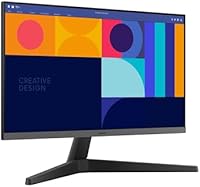
- Stand Adjustment: The included stand supports tilt adjustment only; it does not offer height, pivot, or swivel movement.
- VESA Mount: The monitor is compatible with VESA mounting patterns, allowing users to replace the stock stand with a third-party monitor arm for improved ergonomic flexibility.
- Dimensions: With the stand attached, the monitor measures 9.98 inches deep, 21.24 inches wide, and 16.63 inches tall.
- Weight: The complete unit including the stand weighs 6.39 pounds, which is lightweight enough for easy desk repositioning or wall-mount installation.
- Power Input: The monitor operates on 110 volts, compatible with standard North American power outlets without a voltage converter.
- Color: The monitor is available in a matte black finish that blends into most neutral office and home workspace aesthetics.
- Release Year: This model was first made available in October 2023 as part of Samsung's S33GC business display lineup.
Related Reviews

ViewSonic VG2448A 24-inch IPS Monitor
Samsung S60A 24-inch QHD Monitor
Samsung S22R350FHN 22-inch IPS Monitor
Samsung T350 24-inch IPS Monitor

ReHisk 241KV2 24-inch Gaming Monitor

Dell P2419H 24-Inch IPS Monitor
Samsung FT45 24-Inch FHD IPS Monitor

Samsung CRG5 24-Inch Curved Gaming Monitor

Dell E2420H 24-inch FHD IPS Monitor