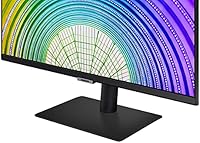

Overview

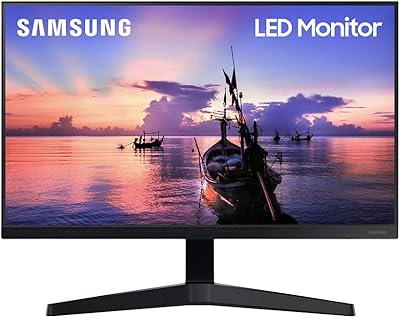
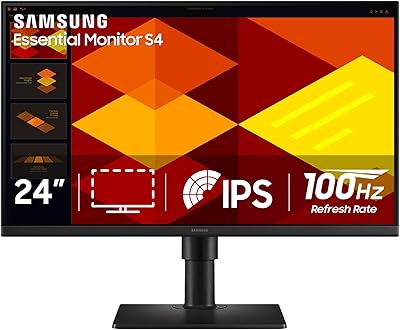
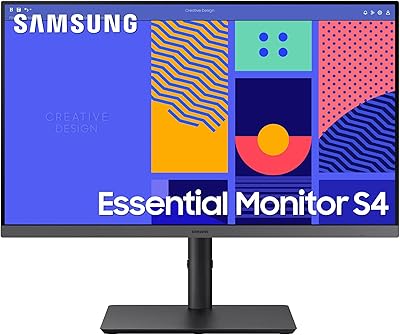
The Samsung S60A 24-inch QHD Monitor sits in a crowded but rewarding segment — mid-range displays aimed at desk workers who want a meaningful upgrade without spending on professional-grade hardware. At 24 inches, you get enough screen real estate to work comfortably across multiple windows, yet it won't dominate a compact desk. The IPS panel is a genuine advantage here; compared to TN alternatives at similar prices, colors hold up far better from off-angles, which matters in shared workspaces. One underrated feature is the portrait mode pivot, making this a surprisingly practical choice for developers or anyone who reads long documents all day. It's not built for gaming, though — keep that in mind.

Features & Benefits

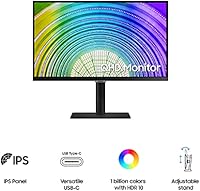
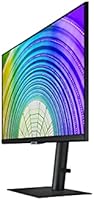
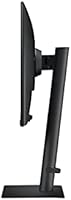
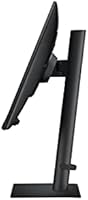
The 2560x1440 IPS panel is the real draw here. Text is noticeably crisper than on a 1080p screen — if you spend hours reading code or long documents, you'll feel that difference quickly. HDR10 support sounds exciting on paper, but manage expectations: this is entry-level HDR that adds some extra depth in compatible content, not the dramatic contrast you'd see on a dedicated HDR display. The ergonomic stand covers height, tilt, swivel, and a full 90-degree pivot, which is genuinely useful. Flicker-free technology and Eye Saver Mode, both TUV-certified, reduce fatigue during extended sessions. VESA compatibility and multiple USB ports round out a setup that adapts well to different workspace configurations.

Best For

This 24-inch IPS monitor makes the most sense for home office upgrades — particularly people moving up from a 1080p display who want noticeably sharper text without jumping into large or expensive territory. Programmers will appreciate the vertical pivot, which turns long code files and documentation into something far more readable at a glance. Writers get the same benefit. For anyone building a dual-monitor setup, the slim three-sided bezels keep things visually clean side by side. It's also a reasonable choice for casual content consumption where color accuracy matters more than motion performance. Dedicated gamers, however, will hit the 75Hz ceiling fast and should look elsewhere.

User Feedback

Sitting at 4.2 stars across several hundred ratings, the S60A earns consistent praise for its color accuracy out of the box and the stand's flexibility — buyers frequently call out the pivot feature as a bonus they didn't expect to use but now rely on. Build quality gets positive mentions too, with the slim metal base coming across as more substantial than the price suggests. The main complaint that surfaces repeatedly is the 75Hz refresh rate, which frustrates buyers who later realize it limits smooth motion. A smaller number of users report backlight bleed or slight factory calibration variance. Samsung's customer support reputation in this category is generally adequate, though not exceptional.

Pros

  • The 1440p IPS panel delivers noticeably sharper text than 1080p, making long reading and writing sessions much easier on the eyes.
  • Portrait mode pivot is a genuine productivity feature, especially for developers and anyone who works with long vertical documents.
  • TUV-certified flicker-free technology and Eye Saver Mode make a real difference during extended work sessions.
  • Three-sided near-borderless design keeps dual-monitor setups looking clean without distracting gaps.
  • The ergonomic stand covers height, tilt, and swivel adjustments, reducing the need for third-party mounting solutions.
  • VESA compatibility gives power users the option to switch to a monitor arm without hassle.
  • Color accuracy out of the box earns consistent praise from verified buyers across a wide range of use cases.
  • The slim metal base feels more premium than typical plastic stands in this price range.
  • At 24 inches, the display hits a practical size that suits most desk setups without overwhelming limited workspaces.
  • HDR10 support adds a subtle but noticeable depth improvement for compatible streaming content.

Cons

  • 75Hz refresh rate is a hard limit that makes this a poor choice for gaming or any motion-sensitive work.
  • Some units arrive with noticeable backlight bleed, and factory calibration consistency is not guaranteed across the batch.
  • No USB-C input is a real inconvenience for users with modern ultrabooks or MacBooks as their primary machine.
  • Entry-level HDR10 implementation delivers only modest contrast improvements, not the dramatic results the spec implies.
  • At 300 cd/m² typical brightness, the S60A can struggle in brightly lit rooms or near windows.
  • The 24-inch size, while practical for many, will feel limiting for users accustomed to 27-inch or ultrawide displays.
  • Multiple USB ports are present but the connectivity suite overall is basic compared to some rivals at a similar price.
  • Samsung customer support response times and resolution quality receive mixed feedback, which matters if you get a faulty unit.

Ratings

The scores below for the Samsung S60A 24-inch QHD Monitor were generated by our AI system after analyzing verified buyer reviews from multiple global markets, with spam, bot activity, and incentivized feedback actively filtered out. Each category reflects the honest distribution of real user sentiment — strengths are credited where earned, and recurring pain points are not softened or hidden. The result is a transparent, balanced snapshot of what actual owners experience day to day.

Image Clarity
88%
Buyers who upgraded from 1080p displays consistently describe the jump to 1440p as immediately noticeable, especially when reading dense text, writing code, or working with detailed spreadsheets. At 24 inches, the pixel density hits a sweet spot that makes on-screen content feel crisp without requiring display scaling on most operating systems.
A handful of users note that the out-of-box sharpness can vary slightly between units due to factory calibration inconsistencies, meaning a small number of buyers end up doing manual color and sharpness adjustments before the panel reaches its full potential.
Color Accuracy
83%
The IPS panel earns consistent praise from home office users and casual creative workers who find colors vivid and consistent across wide viewing angles — a clear step above the washed-out look TN panels produce. For everyday document work, video calls, and streaming, the color rendering feels natural and pleasing without any special setup.
It is not a factory-calibrated professional display, and users with color-critical workflows like photo editing or graphic design occasionally report that the default color profile drifts slightly warm or cool. Backlight bleed on some units can also skew perceived color uniformity in darker content.
Ergonomics & Stand
86%
The stand is one of the most frequently praised physical features of the S60A, with buyers calling out how rarely a monitor at this price point offers height adjustment, tilt, swivel, and full portrait pivot in one package. Developers and writers in particular appreciate the portrait mode, which they describe as genuinely transforming how they interact with vertical content daily.
The stand mechanism, while functional, lacks the smooth damped resistance of higher-end monitor stands, and a few users report that the height adjustment clicks rather than glides. The overall stand footprint is also wider than some compact desk setups can comfortably accommodate.
Eye Comfort
84%
The TUV-certified flicker-free backlight and Eye Saver Mode are features that long-hours desk workers notice and appreciate in practice — not just on paper. People who previously used non-eye-care monitors report less end-of-day eye fatigue, making this a meaningful differentiator for anyone clocking eight or more hours at a desk.
Eye Saver Mode noticeably shifts the white balance toward a warmer, yellowish tone that some users find more distracting than helpful, so it is not universally left enabled. The 300 cd/m² brightness ceiling also means the display can feel slightly dim in bright rooms even before activating any blue light filtering.
Build Quality
79%
21%
The slim metal base stands out as a premium touch that buyers consistently mention, giving the overall setup a cleaner, more considered look than the generic plastic-only stands that dominate this price range. The chassis panels fit together well with no reported creaking or flex under normal desk conditions.
Outside of the base, the monitor body is standard plastic, which feels slightly out of step with the metal base's quality signal. A small number of buyers note that the rear panel has a slightly hollow feel when pressed, which is not a functional issue but affects the perceived premium quality.
Connectivity
62%
38%
The HDMI input works reliably and covers the majority of standard home office and productivity setups without issue. The additional USB ports add genuine day-to-day utility for peripherals, reducing cable clutter on the desk for users with keyboards, mice, or USB drives to manage.
The absence of USB-C and DisplayPort is a real limitation that trips up buyers with modern ultrabooks or MacBooks, who frequently discover the gap only after unboxing. For a monitor at this price point competing against displays with full connectivity suites, the port selection feels behind the curve.
HDR Performance
51%
49%
HDR10 support does add a visible, if modest, layer of color depth when streaming HDR-flagged content on services like Netflix, and buyers who are not comparing directly to dedicated HDR displays tend to find it a pleasant bonus.
Users who enable HDR mode expecting a dramatic visual improvement are routinely disappointed — the display lacks local dimming, so blacks stay elevated and contrast does not meaningfully improve. Several reviewers specifically warn others not to factor HDR into their buying decision for this monitor.
Gaming Performance
43%
57%
For slow-paced genres like strategy, simulation, or narrative RPGs, the S60A gets the job done adequately, and the sharp 1440p resolution does make environments and menus look noticeably better than on a 1080p display.
The 75Hz ceiling and 5ms response time are hard limits that frustrate buyers who later try to use this monitor for action or competitive gaming. Motion blur in fast scenes is visible and reported regularly, and there is no variable refresh rate support to compensate, making this a genuine dealbreaker for the gaming segment.
Brightness & Glare
67%
33%
The matte anti-glare surface coating handles reflections reasonably well in standard indoor lighting, reducing the distraction of overhead lights or nearby windows during a typical home office setup. Most users working in controlled lighting report no major brightness complaints.
At 300 cd/m² typical brightness, the S60A can struggle to maintain legibility in sunlit rooms or near bright windows, and the minimum brightness floor of 250 cd/m² means it cannot dim as much as some users would prefer for low-light evening sessions.
Setup & Installation
81%
19%
Assembly is straightforward and tool-free, with the stand and base snapping together in a few minutes — a detail buyers consistently mention as an unexpectedly smooth out-of-box experience. VESA compatibility also makes it easy to skip the stand entirely and mount directly to an arm if needed.
The included documentation is minimal, and a few buyers report confusion around enabling portrait mode at the OS level when first pivoting the display. Cable management routing on the stand is present but fairly basic.
Value for Money
74%
26%
For home office workers focused on productivity, the combination of a 1440p IPS panel, full ergonomic stand, and eye care features at this price is a compelling package that competes well against similarly priced alternatives from other brands. The portrait pivot alone adds functional value that many competing monitors charge more to include.
Buyers who later discover the 75Hz ceiling, absent USB-C, or inconsistent HDR implementation sometimes feel the price does not fully account for these gaps, especially as competing monitors at or slightly above this price tier begin offering stronger all-round specifications.
Portrait Mode Usability
82%
18%
The 90-degree pivot works smoothly and the IPS panel's color consistency holds up in vertical orientation, making this a legitimately useful mode for developers, writers, and anyone reading long-form vertical content. Several buyers describe it as the feature that sealed their purchase decision.
Rotating the panel to portrait requires manual OS configuration, which is not guided in the box and trips up less technically confident users. At 24 inches, portrait mode also results in a fairly narrow visible width that may feel cramped for users accustomed to wider displays.
Bezel Design
77%
23%
The three-sided near-borderless design is well-executed and holds up in real-world use, particularly in side-by-side dual-monitor configurations where minimal bezels keep the visual join between screens from becoming distracting. Buyers building multi-monitor setups specifically cite the bezel width as a factor in their choice.
The bottom bezel is noticeably thicker than the three slim sides, which is a common design compromise but still breaks the uniformity that buyers expect when the product is marketed as borderless. Up close in single-monitor use, the asymmetry is visible.

Suitable for:

The Samsung S60A 24-inch QHD Monitor is a strong fit for anyone spending long hours in front of a screen for work rather than play. Home office professionals upgrading from a standard 1080p display will notice an immediate improvement in text sharpness and color fidelity — the kind of difference that actually reduces the mental effort of reading dense documents or spreadsheets all day. Developers and programmers in particular get a lot of mileage from the portrait pivot, since vertical code files and documentation simply read better in that orientation. Writers, researchers, and anyone managing multiple information-heavy windows will find the extra pixel density at 24 inches genuinely useful without needing a large desk footprint. It also works well as one half of a dual-monitor setup, where the slim bezels keep the visual gap between screens minimal and tidy.

Not suitable for:

The Samsung S60A 24-inch QHD Monitor has a clear ceiling when it comes to motion performance, and that ceiling will frustrate the wrong buyer quickly. At 75Hz with a 5ms response time, it simply is not built for fast-paced gaming — anyone who plays competitive titles or action games will notice motion blur and input lag that a 144Hz or 165Hz display would eliminate. Graphic designers and photographers who need precise, calibrated color output should also pause: this is a solid consumer IPS panel, not a factory-calibrated pro display, and factory variance means some units may need manual color adjustment. Users who need USB-C connectivity for a modern laptop will find the port selection limiting. And if screen size is a priority — for immersive media, large-canvas creative work, or simply spreading out — 24 inches may feel restrictive compared to 27-inch alternatives available at nearby price points.

Specifications

  • Panel Type: The display uses an IPS (In-Plane Switching) panel, which provides consistent color accuracy and wide viewing angles compared to TN alternatives.
  • Resolution: Native resolution is 2560x1440 pixels (QHD), delivering roughly 1.7 times the pixel density of a standard 1080p display at this screen size.
  • Screen Size: The viewable screen diagonal measures 23.8 inches, marketed and commonly referred to as a 24-inch display.
  • Refresh Rate: The panel supports a maximum refresh rate of 75Hz, suited for productivity and general media consumption but not high-frame-rate gaming.
  • Response Time: Rated response time is 5ms, which is adequate for office work and casual content viewing but may show minor motion blur in fast-moving scenes.
  • HDR Support: The monitor supports HDR10 with a reported color depth of 1 billion colors, offering entry-level high dynamic range performance in compatible content.
  • Brightness: Typical brightness is rated at 300 cd/m², with a minimum of 250 cd/m², which is sufficient for indoor use under controlled lighting conditions.
  • Viewing Angles: IPS panel delivers 178-degree viewing angles both horizontally and vertically, maintaining color accuracy when viewed from wide off-axis positions.
  • Aspect Ratio: The display uses a standard 16:9 widescreen aspect ratio, compatible with all mainstream content formats and operating systems.
  • Stand Adjustments: The included ergonomic stand supports height adjustment, tilt, swivel, and a full 90-degree pivot for portrait orientation.
  • VESA Mounting: The monitor is VESA mount compatible, allowing users to attach it to a third-party monitor arm or wall mount using a standard pattern.
  • Connectivity: Input options include HDMI along with multiple USB ports; there is no USB-C or DisplayPort input included on this model.
  • Eye Care: TUV Rheinland-certified Eye Saver Mode reduces blue light emission, and flicker-free technology eliminates backlight flicker at all brightness levels.
  • Surface Finish: The screen uses a flat panel with an anti-glare matte surface treatment to reduce reflections in typical indoor environments.
  • Dimensions: With the stand attached, the monitor measures approximately 1.6 x 21.4 x 12.9 inches (depth x width x height).
  • Weight: The complete unit including stand weighs 10.8 pounds, making it manageable for single-person desk setup or repositioning.
  • Color: The monitor is available in Black, with a slim metal base and plastic chassis that maintain a clean, understated appearance.
  • Voltage: The monitor operates at 240 volts; buyers in regions using different voltage standards should verify compatibility or use an appropriate adapter.

Related Reviews
Samsung T350 24-inch IPS Monitor
71%
86%
Image Clarity
78%
Color Accuracy
83%
Viewing Angles
41%
Ergonomics & Stand
62%
Brightness & Glare Handling
More
Samsung S33GC 24-Inch IPS Monitor
78%
83%
Image Quality
88%
Eye Comfort
41%
Ergonomics & Stand
86%
Value for Money
79%
Connectivity
More
Samsung T37F 24-inch FHD IPS Monitor
77%
83%
Color Accuracy
88%
Viewing Angles
86%
Eye Comfort
74%
Refresh Rate & Smoothness
71%
Build Quality
More
KTC 24-inch QHD IPS 100Hz Monitor
85%
92%
Display Quality
88%
Ease of Setup
91%
Color Accuracy
89%
Gaming Performance
94%
Eye Comfort Features
More
Samsung FT45 24-Inch FHD IPS Monitor
80%
91%
Ergonomics & Stand
84%
Image Clarity
72%
Color Accuracy
86%
Eye Comfort
83%
Connectivity
More
Samsung CRG5 24-Inch Curved Gaming Monitor
78%
88%
Value for Money
83%
Image Quality
81%
Gaming Performance
86%
Curvature & Immersion
84%
FreeSync Performance
More
Samsung 24-Inch S43GC Series Business Monitor
86%
91%
Display Quality
88%
Ergonomics & Adjustability
85%
Ease of Setup
92%
Color Accuracy
89%
Performance for Work Tasks
More
Samsung S24D402GAN 24-inch Business Monitor
81%
88%
Image & Color Quality
83%
Refresh Rate & Motion Handling
91%
Ergonomics & Stand Adjustability
89%
Eye Comfort & Long-Session Usability
84%
Build Quality & Physical Design
More
Samsung Odyssey G50D 32-inch QHD Gaming Monitor
78%
91%
Gaming Performance
88%
Image Sharpness & Clarity
83%
Color Accuracy & Vibrancy
79%
Panel Uniformity & Viewing Angles
58%
HDR Performance
More
Samsung Odyssey G3 24-Inch FHD Gaming Monitor
83%
91%
Display Quality
94%
Gaming Performance (Refresh Rate/Response Time)
88%
Ease of Setup
85%
Ergonomics & Adjustability
89%
AMD FreeSync Performance
More

FAQ

It holds up well for full-day work sessions. The IPS panel keeps text sharp and colors consistent whether you are on a video call, a spreadsheet, or reading long documents, and the TUV-certified flicker-free backlight genuinely helps reduce the eye fatigue that cheaper monitors can cause over hours of use. The ergonomic stand also lets you dial in the height and angle properly, which matters more than most people expect.

Yes, but you will need to use the HDMI port since the S60A does not include a USB-C or Thunderbolt input. Most modern laptops can connect via an HDMI cable directly or through a USB-C to HDMI adapter. Just check that your laptop outputs video over HDMI or that your adapter supports video passthrough.

The pivot works smoothly in practice. The stand rotates the panel a full 90 degrees without requiring tools, and once you configure your operating system to rotate the display output, it locks in cleanly. Developers and anyone reading lengthy vertical content tend to find it genuinely useful rather than a novelty.

At this screen size the difference is clearly visible, especially for text. Fonts appear noticeably crisper, fine UI details are sharper, and there is less of the pixel-level softness you can see on 1080p at close viewing distances. For coding, writing, or spreadsheet work, the upgrade feels meaningful rather than marginal.

Casual gaming at 75Hz is perfectly fine for slower-paced genres like strategy games, RPGs, or indie titles. However, if you play fast-paced shooters or any competitive game where frame rate and motion clarity matter, the 75Hz ceiling will be a noticeable limitation compared to monitors purpose-built for gaming at 144Hz or higher.

Honestly, the HDR10 support is modest. It is entry-level implementation rather than full-array local dimming HDR, so you will notice a subtle improvement in color depth on compatible streaming content, but it won't transform dark scenes the way a dedicated HDR panel would. Treat it as a minor bonus rather than a headline reason to buy.

The Samsung S60A 24-inch QHD Monitor offers height, tilt, swivel, and portrait pivot adjustments, which covers most real-world desk situations. If your setup has unusual requirements — like mounting over a shelf or positioning at an extreme angle — the VESA compatibility means you can swap in a third-party monitor arm without much hassle.

A portion of buyers have reported backlight bleed, particularly visible in dark scenes or when the panel is used in a dark room. Factory color calibration can also vary slightly between units. Neither issue affects every unit, but if you receive one and the bleed is distracting, it is worth contacting Samsung support within the return window.

Samsung typically includes a power cable and at least one video cable in the box, but the exact cable bundle can vary by retailer and region. It is worth checking what is included with your specific purchase and having an HDMI cable on hand just in case, since that is the primary video input on this model.

The slim metal base is a standout detail — it feels more solid than the all-plastic stands common at this price point. The overall chassis is still mostly plastic, as expected, but the construction feels well-assembled and not flimsy. Buyers consistently mention build quality as one of the more pleasant surprises about this display.