KTC H24T27 24-inch QHD Gaming Monitor
KTC H24T27 24-inch QHD Gaming Monitor — image 1
KTC H24T27 24-inch QHD Gaming Monitor — image 2
KTC H24T27 24-inch QHD Gaming Monitor — image 3
KTC H24T27 24-inch QHD Gaming Monitor — image 4
KTC H24T27 24-inch QHD Gaming Monitor — image 5
KTC H24T27 24-inch QHD Gaming Monitor — image 6
68%
32%

Overview

The KTC H24T27 24-inch QHD Gaming Monitor sits in an interesting spot in the market — aimed squarely at buyers who want a meaningful upgrade from 1080p without spending serious money. KTC isn't a household name in Western markets; the brand originates from China and has been quietly building a range of value-focused displays over recent years. Early buyer impressions suggest quality control is generally solid, which helps offset some of that brand unfamiliarity. The IPS panel is a notable choice at this price point — TN alternatives in the same range tend to wash out colors at wider angles, whereas IPS holds up noticeably better. The borderless design on three sides also keeps things looking clean, whether you're running a single-monitor setup or pairing it with a second screen.

Features & Benefits

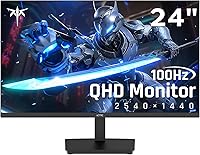
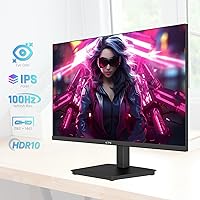
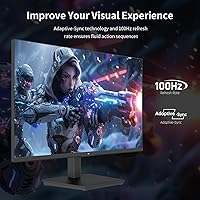
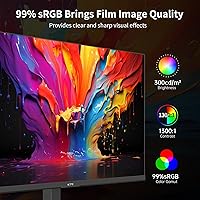
At the core of this KTC monitor is a 2560x1440 IPS panel running at 100Hz — a combination that hits a comfortable middle ground for anyone with a mid-range GPU. You get meaningfully more screen real estate than 1080p without the GPU demands of 4K. Adaptive Sync handles tearing well enough in practice; AMD and Nvidia card compatibility is generally a non-issue. HDR10 is technically present, but at 300 nits of brightness this is firmly entry-level territory — it adds a slight contrast boost in compatible content, but don't expect anything close to true HDR performance. Color accuracy out of the box is genuinely decent, with 99% sRGB coverage making it useful for light photo work. Worth noting: there's only a single USB 2.0 port, so this isn't a hub replacement by any stretch.

Best For

The H24T27 makes the most sense for a few specific types of buyers. If you're running a mid-range GPU like an RTX 3060 or RX 6600, 1440p at 100Hz is genuinely well-matched to that hardware — smooth frame rates in most titles without needing a flagship card. Students making their first jump from 1080p will notice the sharpness difference right away, both in games and everyday tasks like reading text or working in spreadsheets. It also holds up well as a work-from-home display, where the matte surface and low blue light mode help during longer sessions. One caveat worth stating plainly: the stand only tilts, with no height adjustment. If ergonomics matter to you, factor in the cost of a monitor arm alongside this purchase.

User Feedback

Buyers who've picked up this 24-inch QHD display tend to land on a similar set of impressions. The most consistent praise goes toward out-of-box image quality — colors look punchy and natural without much manual calibration needed. Setup is reported as straightforward; the OSD menu is basic but functional, and most users had it running within minutes. On the critical side, the stand's rigidity gets mixed remarks — some find it acceptable, while others note minor wobble. The absence of built-in speakers is a recurring complaint, especially at this price tier where even a basic audio option would be appreciated. Long-term reliability data is still limited given the product's relatively recent launch, but early returns suggest the panel holds up without obvious degradation over months of regular use.

Pros

  • Sharp 1440p IPS image quality is a clear and immediate upgrade over typical budget 1080p displays.
  • Color accuracy out of the box is strong, with 99% sRGB coverage useful for light creative work.
  • Adaptive Sync works reliably with both AMD and Nvidia GPUs, keeping gameplay smooth without tearing.
  • The three-sided borderless design looks clean and pairs well in a dual-monitor arrangement.
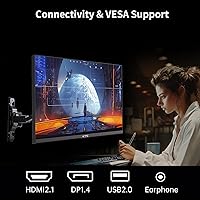
  • HDMI 2.0 and DisplayPort 1.4 ports cover most connection scenarios without needing adapters.
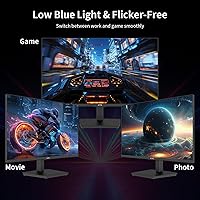
  • Low blue light and flicker-free modes make longer work or study sessions noticeably more comfortable.
  • VESA 100x100mm compatibility means upgrading to a monitor arm is straightforward if needed.
  • Setup is quick and uncomplicated — most buyers report having it running within a few minutes of unboxing.
  • At its price point, the overall value-to-performance ratio is hard to argue with for everyday use.

Cons

  • 100Hz refresh rate lags behind the 144Hz or 165Hz panels now common at similar price points.
  • HDR10 support is largely cosmetic at 300 nits — real-world HDR impact is minimal at best.
  • The stand offers tilt only, with no height, swivel, or pivot adjustment available.
  • No built-in speakers means you need external audio, which adds to the total setup cost.
  • Only one USB port is included, and it is USB 2.0 — there is no USB hub functionality.
  • KTC has limited brand recognition and a shorter reliability track record compared to established display makers.
  • The 7ms response time may produce some trailing in very fast-paced competitive gaming scenarios.
  • Long-term durability data is thin given the product has only been on the market since mid-2024.

Ratings

The scores below for the KTC H24T27 24-inch QHD Gaming Monitor were generated by our AI system after analyzing verified purchase reviews from buyers worldwide, with spam, bot activity, and incentivized feedback actively filtered out. Each category reflects the full spectrum of real user experiences — strengths and frustrations alike — so you get an honest picture before you buy. Nothing here is rounded up to make the product look better than it is.

Image Clarity
88%
Buyers upgrading from 1080p panels consistently describe the jump to 1440p as immediately and obviously noticeable — text looks crisper in documents, fine details sharpen up in games, and general desktop use feels more refined. For students and remote workers reading and writing for hours, the resolution improvement alone is frequently cited as worth the purchase.
A small number of users noted the panel can look slightly soft out of the box before sharpness settings are dialed in through the OSD. At typical desk viewing distances the difference is minor, but it is worth spending a few minutes on calibration after setup.
Color Accuracy
84%
The IPS panel delivers noticeably better color consistency than the TN monitors many buyers are replacing, and the 99% sRGB coverage means colors look natural and well-saturated for everyday content, casual photo editing, and streaming. Most users report the display looks good straight out of the box without needing significant manual adjustment.
Professional photographers or designers working to strict color standards may find the factory calibration slightly warm, and without a hardware calibrator there is limited ability to verify accuracy. The 8-bit color depth is adequate but not exceptional by current standards.
Gaming Performance
74%
26%
Adaptive Sync works reliably with both AMD and Nvidia cards, and most casual to mid-level gamers find 100Hz plenty smooth for the genres they play — RPGs, open-world titles, MOBAs, and slower-paced shooters all feel fluid. The combination of tearing-free output and 1440p sharpness gives a noticeably better visual experience than a standard 1080p 60Hz gaming monitor.
Competitive FPS players used to 144Hz or higher will feel the difference at 100Hz — it is a noticeable step down in motion smoothness for fast games. The 7ms response time also falls short of gaming-focused panels, and fast-moving objects can show minor trailing in particularly demanding scenes.
HDR Quality
41%
59%
HDR10 is technically present and does produce a mild improvement in perceived contrast on supported content, which some users found adds a bit of extra punch to movie watching or HDR-enabled games compared to SDR mode.
At only 300 nits of brightness and without any local dimming, the HDR implementation is entry-level at best. Most buyers who tested it found the improvement marginal enough that they left HDR disabled, and anyone expecting a meaningful HDR experience from this panel will come away disappointed.
Ergonomics & Adjustability
46%
54%
The tilt range of -5° to +15° covers the basic adjustment most users at a fixed desk height will need, and the monitor sits at a reasonable default height for someone seated at a standard desk. VESA compatibility means the stand limitation is fixable.
The lack of height, swivel, or pivot adjustment is a genuine daily-use frustration, particularly for taller users or anyone sharing the display. Several buyers mention the stand also has a slight wobble, which becomes noticeable when typing or if the desk vibrates. A monitor arm is effectively required for proper ergonomic use.
Build Quality
67%
33%
The overall construction feels acceptable for the price bracket — the front bezels are slim and tidy, the panel itself sits flat without obvious warping, and most buyers report it arrived well-packaged without transit damage.
The plastics on the stand and rear housing feel noticeably budget in hand, and a few users mention the stand feels less stable than expected. Long-term durability data is limited given the product is relatively new, which adds a degree of uncertainty for buyers who keep monitors for many years.
Connectivity
71%
29%
Having both HDMI 2.0 and DisplayPort 1.4 available covers the vast majority of setups, and the DP 1.4 connection supports the full 1440p 100Hz output without compromise. Switching between a PC and a console or laptop via the two video inputs is practical for mixed-use desks.
The single USB 2.0 port is barely useful as a hub replacement, and the absence of a proper USB hub means you cannot use this monitor as a central connectivity point for peripherals. No USB-C input is also a limitation for users with modern laptops.
Screen Uniformity
72%
28%
The matte anti-glare coating handles reflections well in moderately bright rooms, and most users find the panel reasonably uniform across the majority of the display surface during normal use.
A subset of buyers report mild backlight bleed along the lower or corner edges, which is characteristic of IPS panels at this price point. It tends to be visible mainly on dark scenes or in low-light rooms, and severity varies from unit to unit.
Ease of Setup
86%
Assembly is quick — the stand attaches without tools and the OSD menu is simple enough that most buyers have the monitor set up and running within ten minutes of opening the box. The menu navigation is functional and covers the key adjustments without being unnecessarily complicated.
The included documentation is minimal, and a small number of users had initial confusion about enabling Adaptive Sync or G-Sync Compatible mode, which requires a manual step in Nvidia or AMD driver settings rather than being automatic.
Value for Money
89%
At its price point, getting a 1440p IPS panel with Adaptive Sync, DisplayPort 1.4, and a borderless design is genuinely competitive — buyers repeatedly describe it as the best they found at this budget after comparing several alternatives. For first-time 1440p buyers especially, the perceived upgrade from 1080p justifies the cost easily.
The value calculation shifts if you factor in the cost of a monitor arm to compensate for the limited stand, or external speakers to replace the absent built-in audio. Total cost of ownership can creep closer to more fully-featured competitors once those additions are included.
Eye Comfort
81%
19%
Low blue light mode and flicker-free operation make a practical difference during long work or study sessions, and several buyers specifically mention eye fatigue being reduced compared to their previous displays. The matte surface also helps in environments with overhead lighting.
The low blue light mode shifts the white balance noticeably warm, which some users find affects color work. There is no software-based adjustment or preset that balances blue light reduction with accurate color simultaneously.
Audio
22%
78%
There is nothing to rate positively here on its own terms — the absence of speakers is simply a gap in the feature set that some buyers only notice once the monitor is on their desk.
No built-in speakers are included at any level, which is increasingly uncommon even in budget monitors and catches some buyers off guard. Users who relied on monitor audio from a previous display will need to budget for external speakers or a headphone solution immediately.

Suitable for:

The KTC H24T27 24-inch QHD Gaming Monitor is a strong fit for anyone who wants a meaningful visual upgrade from 1080p without committing to a high-end budget. Students setting up a first proper desk and remote workers who spend hours reading, writing, or working in spreadsheets will appreciate the sharper 1440p text clarity and the matte panel that cuts down on glare. Casual gamers running mid-range hardware — an RTX 3060, an RX 6600, or something in that range — will find the 100Hz refresh rate and Adaptive Sync pairing genuinely capable for most modern titles at comfortable frame rates. It also works well as a secondary display in a dual-monitor setup, where the borderless design on three sides helps the screens sit close together without a distracting thick border breaking up the view. If your priority is getting more screen real estate and better color than a typical budget 1080p panel, this display delivers on both counts.

Not suitable for:

Buyers with more demanding expectations will likely find the H24T27 falls short in a few meaningful ways. Competitive gamers who prioritize high refresh rates above all else should look elsewhere — 100Hz is a reasonable baseline but noticeably behind the 144Hz, 165Hz, or higher panels that have become standard in the mid-range gaming monitor category. The HDR10 implementation deserves an honest mention: with only 300 nits of peak brightness, the HDR mode produces a modest improvement at best, and anyone expecting punchy highlights or deep local dimming will be disappointed. The stand is another genuine limitation — tilt-only adjustment with no height or swivel range means users who care about proper ergonomic positioning will likely need to budget for a separate monitor arm. There are also no built-in speakers, which matters if you rely on monitor audio for casual use. Finally, buyers who prefer established brands with long Western market track records may want to weigh that uncertainty before purchasing from KTC.

Specifications

  • Screen Size: The panel measures 23.8 inches diagonally, marketed as a 24-inch display with a 16:9 aspect ratio.
  • Resolution: Native resolution is 2560x1440 pixels, commonly referred to as QHD or 1440p.
  • Panel Type: Uses an IPS (In-Plane Switching) panel, which provides wider viewing angles and more consistent color than TN alternatives.
  • Refresh Rate: Maximum refresh rate is 100Hz, suitable for casual gaming and smooth everyday desktop use.
  • Response Time: Rated at 7ms response time, which is adequate for most gaming scenarios though not optimized for competitive play.
  • Brightness: Peak brightness is rated at 300 cd/m², which is standard for office and casual gaming use but limits HDR effectiveness.
  • HDR Support: Supports HDR10, offering basic high dynamic range processing; local dimming is not present at this tier.
  • Color Gamut: Covers 99% sRGB and approximately 122% sRGB wide gamut, with 8-bit color depth for 16.7 million colors.
  • Contrast Ratio: Static contrast ratio is rated at 1300:1, which is slightly above average for IPS panels in this price range.
  • Sync Technology: Supports Adaptive Sync and is compatible with both AMD FreeSync and Nvidia G-Sync to reduce screen tearing.
  • Connectivity: Includes one HDMI 2.0 port, one DisplayPort 1.4 port, and one USB 2.0 port for peripheral connectivity.
  • VESA Mount: Supports standard 100x100mm VESA wall mounting, making third-party monitor arms and wall brackets compatible.
  • Stand Adjustment: The included stand supports tilt adjustment only, ranging from -5° to +15°; height, swivel, and pivot are not available.
  • Surface Finish: The screen uses a matte anti-glare coating to reduce reflections in brighter room environments.
  • Design: Features a zero-frame borderless design on three sides, minimizing visible bezel for a cleaner aesthetic.
  • Dimensions: With the stand attached, the monitor measures approximately 24.41 inches wide, 18.7 inches tall, and 4.53 inches deep.
  • Weight: Total weight with stand is 8.82 lbs, making it straightforward to reposition or mount without assistance.
  • Speakers: No built-in speakers are included; external audio output via connected device is required.

Related Reviews
KTC H24T7 24-inch QHD Gaming Monitor
78%
88%
Image Sharpness & Clarity
86%
Refresh Rate & Responsiveness
83%
Color Accuracy
47%
HDR Performance
81%
Build Quality & Stand
More
KTC 24-inch 190Hz Gaming Monitor
76%
88%
Refresh Rate Performance
76%
Color Accuracy
83%
Motion Clarity
54%
HDR Quality
91%
Value for Money
More
KTC 24-inch 1500R Curved Gaming Monitor
86%
94%
Gaming Performance
89%
Display Quality
92%
Value for Money
87%
Build Quality
83%
Ergonomics
More
KTC H25X7 24.5-inch 400Hz Gaming Monitor
75%
92%
Refresh Rate Performance
84%
Panel Color Quality
91%
Value for Money
88%
Input Lag & Responsiveness
86%
Connectivity Options
More
KTC M27T6 27-inch Mini LED Gaming Monitor
76%
84%
HDR Performance
88%
Contrast & Black Levels
86%
Peak Brightness
57%
Color Accuracy
71%
Motion Handling
More
SANSUI ES-G25F6Q Pro 24.5-inch QHD Gaming Monitor
78%
91%
Refresh Rate Performance
88%
Image Sharpness
79%
Color Accuracy
93%
Value for Money
76%
Motion Clarity
More
INFIEVO 24-inch 180Hz FHD Gaming Monitor
74%
91%
Refresh Rate Performance
83%
Response Time & Motion Clarity
74%
Image & Color Quality
47%
HDR Experience
88%
Connectivity & Compatibility
More
CRUA CR245ZB 24.5″ Gaming Monitor
78%
83%
Gaming Performance
86%
Refresh Rate & Smoothness
74%
Color Accuracy & Vibrancy
91%
Ergonomics & Adjustability
68%
Build Quality & Materials
More
KOORUI E2411K 24-inch Gaming Monitor
76%
91%
Value for Money
83%
Gaming Performance
74%
Image & Color Quality
88%
Refresh Rate & Smoothness
81%
Eye Comfort
More
memzuoix 27-inch QHD 165Hz Gaming Monitor
70%
88%
Image Clarity
84%
Refresh Rate Performance
91%
Value for Money
82%
Adaptive Sync (FreeSync/G-Sync)
77%
Color Accuracy
More

FAQ

It works with both. The H24T27 is listed as G-Sync compatible, which means Nvidia GPU owners can enable variable refresh rate through their driver settings. You may need to manually turn on G-Sync Compatible mode in the Nvidia Control Panel, but once done it functions reliably.

Yes, the difference is visible in everyday use, not just in games. Scrolling through web pages, moving windows around, and general desktop interaction all feel noticeably smoother at 100Hz. For gaming it helps too, though if you are coming from a 144Hz or higher panel, the step down will be apparent.

Honestly, manage your expectations here. At 300 nits peak brightness and without local dimming, the HDR10 mode produces a mild improvement in contrast and color pop rather than a dramatic visual difference. It is worth trying on HDR-enabled content, but this is entry-level HDR implementation, not the kind you see on higher-end monitors or TVs.

Yes, and many buyers actually recommend it. The KTC H24T27 24-inch QHD Gaming Monitor supports the standard 100x100mm VESA pattern, so any compatible monitor arm or wall bracket will fit. Given that the included stand only tilts, switching to an arm gives you the height and angle flexibility the stand lacks.

KTC typically includes at least one video cable in the box, though included cable configurations can vary by batch. It is worth having an HDMI or DisplayPort cable on hand just in case, particularly if your setup has specific cable length requirements.

For casual and semi-professional editing it holds up reasonably well. The 99% sRGB coverage and IPS panel deliver consistent, accurate colors across the screen, which matters when color-matching. If you are doing professional color-critical work that requires factory calibration or wide P3 gamut coverage, a more specialized display would be a better choice.

User feedback on the stand is mixed. Most people find it stable enough for a single fixed position on a desk, but the tilt mechanism can feel a little loose on some units. If you plan to frequently adjust the angle, the stand may not inspire much confidence. A monitor arm largely solves this.

Not at all — 1440p at 100Hz is actually a good target resolution for mid-range cards. With an RTX 3060 or RX 6600, you can expect to hit 100fps or close to it in many popular titles at medium-to-high settings. More demanding games may require some setting adjustments, but this resolution and refresh rate pairing is well-matched to that GPU tier.

The matte coating on this 24-inch QHD display is fine-grained and does not noticeably diffuse the image. Colors stay vibrant and text remains sharp. The main trade-off is a very slight reduction in perceived saturation compared to a glossy panel, but most users find the reduced glare worth it.

A small number of buyers have reported minor backlight bleed along the lower edges, which is fairly common with IPS panels at this price range. Dead-pixel reports are not widespread. If you notice significant bleed or defects on arrival, KTC offers a 30-day return policy through Amazon, which provides a reasonable safety net.

Where to Buy

