Overview

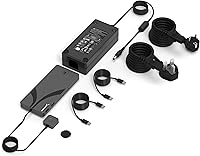
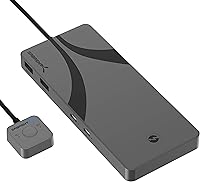
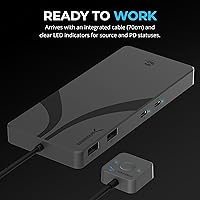
The SABRENT SB-TB4K Thunderbolt 4 KVM Switch sits in a niche that is surprisingly underserved: a well-built, high-bandwidth switch for professionals who genuinely need two computers running from one desk without compromise. The aluminum chassis feels solid in hand — nothing like the plastic KVM boxes that dominated this category for years. At roughly a pound and smaller than most external drives, it fits easily on a desk without demanding its own real estate. Sabrent ships it with a power brick and an integrated 70cm cable already attached, so you are not hunting for accessories on day one. This dual-host switch is priced firmly at the premium end, and it earns that tier — but only if your workflow genuinely requires Thunderbolt 4 bandwidth.
Features & Benefits

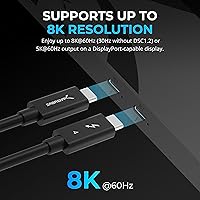
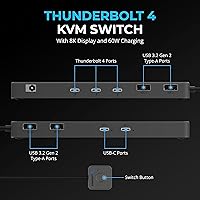
The three Thunderbolt 4 ports are the real story here. Each runs at up to 40Gbps, which means you can daisy-chain a fast NVMe enclosure, an eGPU, and a display off a single port without a separate hub complicating your setup. The four USB-A ports handle keyboards, mice, and other peripherals at speeds fast enough for most external drives. Power Delivery comes via two USB-C ports — up to 60W each — though only one can charge at a time, so plan around that if both hosts are laptops. EDID support is a quiet but meaningful addition: it keeps your monitor from losing its configuration every time you switch, which alone saves considerable frustration. Display output supports 8K with DSC on a single screen, or two 4K outputs when running dual monitors.

Best For

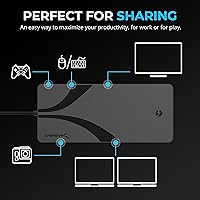
This Thunderbolt 4 KVM switch makes the most sense for people running two machines daily — a work MacBook docked alongside a personal Windows desktop, for instance — where constantly re-plugging cables is genuinely disruptive. Creative professionals with fast Thunderbolt storage or audio interfaces will appreciate keeping those connections live and just toggling the host. It is also a strong fit for developers who need a high-resolution display without sacrificing bandwidth to compression artifacts. If you are running a standard 1080p setup with basic USB peripherals, though, the price premium is hard to justify — cheaper KVMs cover that use case just fine. Where the Sabrent TB4 switch distinguishes itself is in setups that demand full Thunderbolt throughput and clean power delivery to laptops on both sides.

User Feedback

At 3.7 out of 5 stars, the Sabrent TB4 switch has earned fans and frustrated buyers in roughly equal measure. Mac users tend to report the smoothest experience — connect, switch, done. Windows setups can hit a rougher patch on initial configuration, with some users needing a driver update or a reboot cycle before everything settles. The magnetic switch button gets consistent praise for its satisfying, responsive feel. Where things get tricky: buyers expecting both USB-C ports to charge simultaneously will be caught off guard, and a few report that non-certified monitors with USB-C inputs do not always cooperate with DP Alt Mode. The cable length also divides opinions — 70cm works fine on a standard desk but falls short in rack or mounted shelf configurations.

Pros

  • Three full-bandwidth Thunderbolt 4 ports mean you can daisy-chain fast storage and displays without a separate hub.
  • The aluminum build feels solid and premium — noticeably better than plastic alternatives at lower price points.
  • EDID support prevents your monitor from losing its configuration every time you toggle between hosts.
  • The magnetic push-button switch is satisfying, responsive, and clearly better than the flimsy toggles on budget KVMs.
  • Mac users report a genuinely plug-and-play setup experience with no software installation required.
  • LED indicators make it immediately obvious which host is active and whether power delivery is live.
  • Supports dual 4K output across two monitors, covering most high-end workstation display configurations.
  • The included power adapter and pre-attached cable mean you are up and running without extra purchases.
  • Four USB-A ports at fast transfer speeds handle keyboards, mice, and peripheral drives without a separate hub.
  • Compact enough to sit flat on a desk without dominating your workspace.

Cons

  • Only one USB-C port delivers charging power at a time, which surprises buyers expecting simultaneous dual-laptop support.
  • Windows users frequently report driver or recognition issues during first-time setup that require extra troubleshooting steps.
  • The integrated cable is fixed at roughly 70cm, which limits placement flexibility in non-standard desk configurations.
  • Non-certified USB-C monitors without proper DP Alt Mode support may not work reliably with this switch.
  • Achieving 8K output requires a monitor with DSC 1.2 support — standard 8K displays without it are limited to 30Hz.
  • At a 3.7-star average rating, real-world reliability is inconsistent enough to warrant careful consideration before buying.
  • No support for more than two host computers, limiting scalability for users who expand their workstation setup later.
  • The power brick is required for full functionality, adding desk cable clutter despite the otherwise clean design.

Ratings

The scores below reflect our AI-driven analysis of verified global buyer reviews for the SABRENT SB-TB4K Thunderbolt 4 KVM Switch, with automated filtering applied to remove incentivized, duplicate, and bot-generated submissions. The result is an honest look at where this dual-host switch genuinely delivers and where real users have run into friction — no spin, no suppression of legitimate complaints.

Build Quality
88%
The aluminum chassis consistently earns praise from buyers who have owned cheaper plastic KVM switches before. It feels dense and purposeful in hand, and the compact footprint means it does not dominate a desk the way bulkier units do. Several users noted it runs cool even during extended sessions.
A small number of buyers reported that the fixed integrated cable feels slightly less premium than the chassis itself, with some flex at the connector end after repeated host-swapping. Nothing catastrophic, but it is a weak point on an otherwise solid build.
Thunderbolt 4 Performance
83%
For users running fast Thunderbolt NVMe enclosures or professional audio interfaces, the full 40Gbps bandwidth per port is a genuine advantage over USB4 or USB-C alternatives that throttle under load. Daisy-chaining a storage drive and a display off a single port works reliably on macOS setups.
A subset of Windows users experienced bandwidth inconsistencies during initial setup, with transfer speeds not reaching expected peaks until drivers were updated. The switch does not independently certify Thunderbolt throughput on each port simultaneously, which matters in multi-device daisy-chain configurations.
Display Compatibility
71%
29%
On certified DisplayPort-capable monitors, the display output is solid and the EDID support means your screen does not lose its resolution or refresh rate settings every time you toggle hosts. Dual 4K at 60Hz across two monitors works well for productivity-focused workstation setups.
The 8K at 60Hz headline requires DSC 1.2 support from your monitor — without it, you are looking at 30Hz, which is not usable for most people. Non-certified USB-C monitors that rely on DP Alt Mode have caused compatibility failures for a notable number of buyers, and Sabrent's guidance on this is not prominently communicated upfront.
Power Delivery
62%
38%
Having a USB-C charging port on a KVM switch is a thoughtful inclusion, and 60W is enough to keep most modern laptops topped up during a workday. The LED indicator clearly shows which host is receiving power, which removes any guesswork.
The single-active-at-a-time limitation is the most commonly cited disappointment in user reviews, and it is easy to see why — buyers spending this much on a dual-host switch reasonably expect both hosts to charge. The product description does not make this restriction obvious, and the surprise factor has driven several negative reviews.
Switching Mechanism
86%
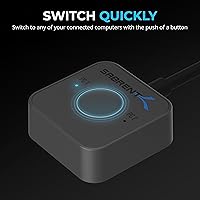
The magnetic push-button is one of the most praised physical elements of the switch. It has a satisfying, deliberate click that feels different from the wobbly toggles or soft buttons found on budget KVMs. LED status indicators for source and power delivery are clearly visible even at an angle.
A few users wished there was a keyboard shortcut or hotkey option to switch hosts without physically pressing the button, which is a standard feature on some competing KVM switches. For users with the switch positioned away from arm's reach, this becomes a genuine daily annoyance.
macOS Compatibility
91%
Mac users have the smoothest experience with this dual-host switch by a wide margin. Plug in, press the button, everything works — displays, storage, charging — without installing a single driver or visiting a settings menu. For MacBook-primary users, it is close to the ideal KVM experience.
Even on macOS, a handful of users reported that M-series MacBooks occasionally required a reconnect cycle after waking from deep sleep before the switch was fully recognized. It is infrequent, but worth noting for users in environments where sleep states are common.
Windows Compatibility
63%
37%
Once properly configured, Windows machines do function reliably with the Sabrent TB4 switch, and users who took the time to update Thunderbolt firmware and drivers report stable daily performance. The hardware itself is not inherently Windows-hostile.
The initial setup experience on Windows is noticeably rougher than on macOS, with driver conflicts and recognition failures being the most common complaints. Some users needed multiple reboots or had to manually adjust Thunderbolt security settings in BIOS before the switch was accepted, which is a significant ask for non-technical buyers.
Cable Management
58%
42%
The integrated cable eliminates the need to source a separate Thunderbolt cable for the primary host, which is a small but real convenience at setup time. The cable is thick and well-shielded, consistent with the overall build standard.
At roughly 70cm, the fixed cable length is simply inadequate for setups where the primary host sits at any real distance — under a desk, on a shelf, or in a rack. Because it is permanently attached, there is no upgrading it; you are buying a Thunderbolt extension cable as an extra expense or restructuring your desk layout.
USB-A Port Performance
79%
21%
Four USB-A ports at Gen 2 speeds means keyboards, mice, and even faster flash drives all share the switch simultaneously without a separate hub. For users who were previously running a hub off a laptop to cover peripherals, this consolidates the setup meaningfully.
The USB-A ports are not individually switched — they share activity across both hosts during transitions — which caused momentary dropout for a small number of users running real-time input devices. It is not a dealbreaker, but latency-sensitive users running gaming peripherals or audio controllers noticed it.
Setup Experience
67%
33%
For macOS users specifically, the out-of-box experience is genuinely impressive — connect both hosts, plug in the power brick, and the switch is ready to use. The included accessories mean you are not waiting on a parts order to get started.
Windows users face a more involved process, and the documentation included in the box is minimal. Several buyers resorted to Sabrent's website or community forums to resolve initial setup issues, which is not ideal for a product at this price point targeting professional buyers.
Value for Money
61%
39%
For a Mac-primary user who genuinely needs Thunderbolt 4 bandwidth shared across two hosts, the Sabrent TB4 switch is one of the few products that actually delivers on that specific requirement — and competitors at this tier are not dramatically cheaper.
At this price, the 3.7-star average rating signals that a meaningful portion of buyers feel the real-world experience does not fully match the premium positioning. The power delivery limitation, Windows setup friction, and display compatibility caveats collectively make the value proposition harder to defend for users who discover these issues post-purchase.
Thermal Management
81%
19%
The aluminum enclosure does genuine thermal work during sustained Thunderbolt transfers, staying warm but never uncomfortably hot. Users running NVMe enclosures and displays simultaneously for hours reported no throttling or thermal shutdowns.
In enclosed spaces or small desk setups with limited airflow, a few users noted the unit became noticeably warm to the touch after extended sessions. Sabrent does not publish thermal thresholds, so there is no official guidance on ventilation clearance requirements.
EDID & Monitor Stability
77%
23%
EDID emulation is a feature many buyers did not know they needed until they used a switch without it. With this Thunderbolt 4 KVM switch, monitors reliably retain their resolution and color profile settings between host toggles, which dramatically reduces the frustration of displays resetting after every switch.
A subset of users with multi-monitor configurations reported that the secondary display occasionally lost its EDID data after switching, requiring a manual refresh or a display power cycle. The behavior appears more common on Windows hosts than macOS.

Suitable for:

The SABRENT SB-TB4K Thunderbolt 4 KVM Switch is built for professionals who run two computers at a single desk and cannot afford to lose bandwidth or productivity switching between them. If you are a developer alternating between a work-issued MacBook and a personal Linux or Windows machine, this dual-host switch gives you a single-cable docking experience on each host without unplugging anything. Creative professionals — video editors, audio engineers, photographers — who rely on fast Thunderbolt storage or external interfaces will benefit most, since the high-bandwidth ports do not bottleneck NVMe drives or professional audio gear the way a cheaper USB hub would. It is also a strong pick for anyone running a high-resolution display, particularly those using a 4K or 5K monitor where display bandwidth is a genuine concern, not just a spec-sheet talking point. Mac users in particular will find the setup experience straightforward and largely trouble-free right out of the box.
Not suitable for:

The SABRENT SB-TB4K Thunderbolt 4 KVM Switch is a poor fit for buyers whose workflow does not genuinely demand Thunderbolt 4 throughput, because the premium price is hard to justify when standard USB-C or USB-A KVM alternatives handle basic keyboard, mouse, and display sharing at a fraction of the cost. Windows-primary users should go in with eyes open — initial setup can require driver updates or system restarts before the switch behaves reliably, and that friction is a real consideration if you are not comfortable troubleshooting connectivity issues. Anyone expecting both USB-C charging ports to power two laptops simultaneously will be disappointed, as only one delivers power at a time. If your monitors connect via HDMI rather than DisplayPort or USB-C with DP Alt Mode support, compatibility problems are genuinely possible. And users who need longer cable runs — for shelf-mounted or rack setups — will find the fixed integrated cable length limiting without purchasing an extension.
Specifications

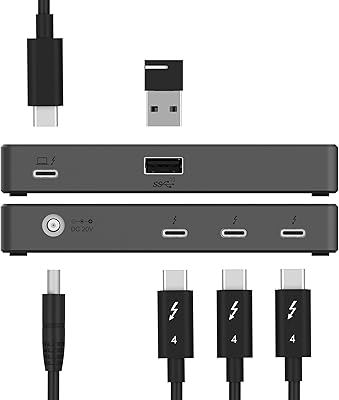
  • Thunderbolt 4 Ports: Three Thunderbolt 4 USB-C ports provide up to 40Gbps of bidirectional bandwidth each, supporting daisy-chaining of compatible devices.
  • USB-A Ports: Four USB Type-A ports operate at USB 3.2 Gen 2 speeds, delivering up to 10Gbps for peripherals and external storage.
  • Power Delivery: Two USB-C ports support PD 3.0 charging at up to 60W each, though only one port delivers power at any given time.
  • BC 1.2 Charging: All seven ports support BC 1.2 charging at 5V and up to 2.4A, providing basic device charging across the full port array.
  • Display Output: Single-monitor configurations support up to 8K at 60Hz when the connected display is DSC 1.2 compatible, or up to 5K at 60Hz otherwise.
  • Dual Display: When two screens are connected simultaneously, maximum output is 4K at 60Hz per display, splitting available bandwidth between both outputs.
  • Host Computers: The switch supports exactly two host computers, allowing all connected peripherals and displays to be toggled between them.
  • Dimensions: The unit measures 6.3 x 2.76 x 0.71 inches, giving it a slim, bar-style footprint suited to desktop placement.
  • Weight: The switch weighs approximately one pound, making it light enough to reposition easily without anchoring to a surface.
  • Chassis Material: The outer shell is machined aluminum, which aids heat dissipation and provides a more durable enclosure than typical plastic KVM housings.
  • Integrated Cable: A fixed 70cm Thunderbolt cable is permanently attached to the unit and connects to the primary host computer.
  • Power Adapter: A 24V/5A power brick is included in the box and is required for the switch to function at full capacity.
  • Switch Mechanism: Host toggling is handled by a magnetic push-button that provides tactile feedback, with LED indicators showing active source and power delivery status.
  • EDID Support: Built-in EDID emulation retains monitor configuration data between host switches, reducing display re-detection delays and resolution resets.
  • OS Compatibility: The switch is officially designed and tested for Windows and macOS systems, though it may function with other Thunderbolt 4 compliant devices.
  • Interface Standard: All Thunderbolt 4 ports conform to the Intel Thunderbolt 4 specification, which requires a minimum of 40Gbps bandwidth and mandates USB4 compatibility.
  • Model Number: The official model identifier is SB-TB4K, used for warranty registration, firmware inquiries, and Sabrent technical support requests.

Related Reviews
DiamondTiger KS304DL 4-Port DisplayPort KVM Switch
74%
88%
Ease of Setup
92%
Video Quality
74%
Switching Reliability
63%
Build Quality
86%
Value for Money
More
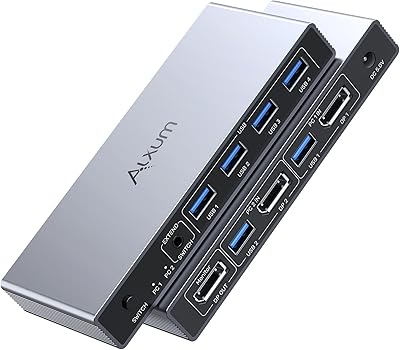
Alxum DP 1.4 KVM Switch
87%
89%
Performance
94%
Ease of Setup
90%
Video Quality (8K Support)
88%
USB Connectivity Speed
86%
Build Quality
More
SABRENT Thunderbolt 4 Hub HB-TBT4
86%
91%
Performance
94%
Data Transfer Speed
88%
Build Quality & Durability
89%
Charging Capabilities
92%
Compatibility with macOS and Windows
More
KAGO 4-Port VGA KVM Switch
84%
92%
Value for Money
96%
Ease of Setup
85%
Performance
78%
Build Quality
87%
Display Quality
More
DGODRT KS204V 4-Port VGA KVM Switch
83%
86%
Switching Reliability
89%
Desktop Controller Convenience
91%
Value for Money
78%
Cable Quality & Included Accessories
73%
USB Peripheral Compatibility
More
StarTech SV431HDU3A2 4-Port HDMI KVM Switch
73%
74%
Switching Reliability
69%
Video Quality
66%
USB 3.0 Hub Performance
71%
Audio Switching
83%
Setup & Installation
More
ANXQQ ANQ-8401B 4-Port HDMI KVM Switch
77%
91%
Ease of Setup
88%
Display Switching Reliability
86%
EDID Performance
67%
USB Device Recognition
61%
8K Resolution Capability
More
DGODRT KS604H 4-Port HDMI KVM Switch
80%
91%
Ease of Setup
74%
Switching Reliability
78%
Video Quality
79%
USB Peripheral Sharing
84%
Wired Remote Control
More
ANGEET KVM Switch 3 Monitors 4 Computers
87%
90%
Performance Stability
93%
Ease of Setup
85%
Display Quality
88%
Compatibility with Multiple OS
91%
Switching Convenience (Wired Remote)
More
MT-VIKI 460KL 4-Port VGA KVM Switch

80%
91%
Value for Money
93%
Ease of Setup
84%
Switching Reliability
78%
Build Quality
76%
Video Output Quality
More

FAQ

Yes, that is actually one of the most common setups for this dual-host switch. macOS tends to work without any configuration, while Windows may need a driver check or a reboot on first connection. Once both hosts are recognized, toggling between them is just a button press.

No, and this catches a lot of buyers off guard. The two USB-C charging ports deliver up to 60W, but only one is active at a time. Whichever host is currently selected receives the charge. If you switch hosts, the power delivery follows.

Only if your monitor supports DSC 1.2 compression. Without it, an 8K display connected through this Thunderbolt 4 KVM switch will be limited to around 30Hz, which is not ideal for daily use. Check your monitor specs before assuming full 8K at 60Hz is available.

Yes, dual 4K at 60Hz per screen is supported. Just keep in mind that running two displays splits the available bandwidth, so you would not simultaneously get the same throughput for data transfers as you would with a single display connected.

For a standard desk where both computers sit within arm's reach, the roughly 70cm fixed cable is usually fine. If one of your machines is mounted under a desk, on a shelf, or at a significant distance, you may find it restrictive and would need an extension cable.

On macOS, generally no — most users report it working immediately after plugging in. On Windows, you may need to ensure your Thunderbolt drivers are current, and some users have needed a system restart before the switch is fully recognized. No dedicated Sabrent software is required.

Yes, Thunderbolt 4 at 40Gbps supports eGPU enclosures, and you can connect one to any of the three TB4 ports. Keep in mind that the eGPU will only be active on whichever host is currently selected through the switch.

Thanks to EDID support, the monitor retains its configuration data between switches, so it does not have to fully re-handshake with a new signal source every time. In practice this means faster recovery and fewer instances of the display going blank or defaulting to a lower resolution after switching.

First confirm that your monitor supports DisplayPort Alternate Mode over USB-C, since not all USB-C monitors do. Non-certified or older USB-C displays are the most common source of compatibility complaints with this switch. If your monitor has a standard DisplayPort input, connecting via a Thunderbolt-to-DisplayPort cable is a more reliable path.

Not at full functionality. The included 24V power brick is what enables Power Delivery charging and ensures all ports operate at rated speeds. You can test basic connectivity without it, but for regular use you should keep the power adapter connected.

Where to Buy

SHI International
In stock $351.00