Overview

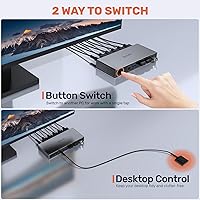
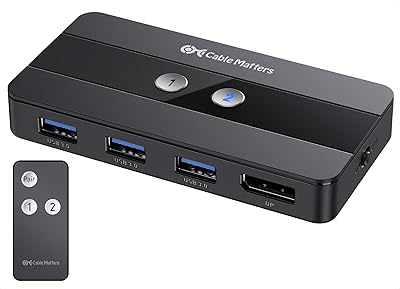
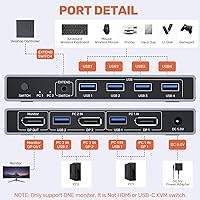
The Alxum DP 1.4 KVM Switch is a versatile device designed to streamline the management of dual computer setups. With this KVM switch, users can easily switch between two DisplayPort-connected computers using a single set of peripherals, including keyboard and mouse. It supports ultra-high-definition video up to 8K@60Hz, ensuring clear visuals for both work and entertainment. The compact design features dual switching methods: a physical button and an included remote control, making it a flexible solution for various workspaces.
Features & Benefits

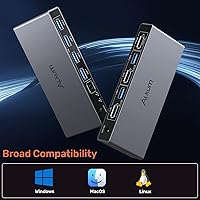
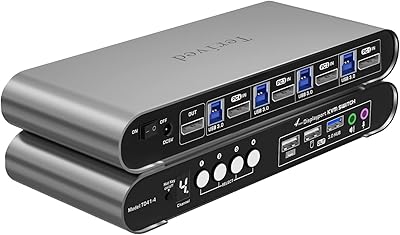
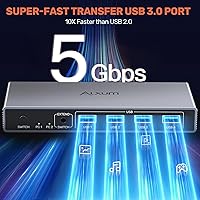
This DisplayPort switch offers seamless switching between two computers, allowing users to control both systems with a single keyboard and mouse. Its support for 8K resolution makes it ideal for high-end gaming or professional tasks that demand sharp video quality. The switch also includes USB 3.0 ports, providing fast data transfer for peripherals like printers or external hard drives. Additionally, it's compatible with Windows, Linux, and Mac operating systems, offering broad cross-platform compatibility for various users.

Best For

This dual PC switch is perfect for users with multiple computer setups who want to minimize clutter and enhance productivity. It’s especially well-suited for gamers and professionals who need high-resolution displays and fast refresh rates for smooth visuals. Office workers and home users will also appreciate its compact design, which helps keep workspaces neat and organized. Anyone needing compatibility with a range of USB devices, from printers to external hard drives, will find this KVM switch a useful addition to their setup.

User Feedback

Users have generally praised the Alxum KVM switch for its easy setup and smooth switching between computers. Many have mentioned that the compact size fits well in smaller spaces, making it ideal for tight workstations. However, some feedback suggests that it could be more compatible with high-power devices without requiring the power adapter. Despite this, the overall sentiment is positive, with reviewers appreciating the device’s performance and reliable connectivity in managing dual systems.

Pros

  • Easy setup with seamless switching between two computers using a single keyboard and mouse.
  • Compact design fits well in tight spaces, making it ideal for desk setups with limited room.
  • Supports ultra-high-definition 8K video output, perfect for high-end gaming or professional work.
  • USB 3.0 ports provide fast data transfer, making it efficient for external hard drives and other peripherals.
  • Compatible with Windows, Linux, and Mac operating systems, offering flexibility across multiple platforms.
  • Dual switching methods (button and remote control) offer convenient options for users with different preferences.

Cons

  • Lacks HDMI support, limiting compatibility with devices that require HDMI connections.
  • Some users report occasional instability when using high-power devices without the provided power adapter.
  • May not be the best option for users who need to connect more than two devices or displays.
  • The build quality feels somewhat basic, with some users expecting a more premium feel for the price.
  • A few users find the remote control to be less responsive than expected, requiring multiple attempts to switch.
  • The device does not support some legacy hardware, making it unsuitable for setups with older devices.

Ratings

The Alxum DP 1.4 KVM Switch has received generally positive feedback from verified users worldwide, across multiple languages and platforms. After filtering out spam, bot, and incentivized reviews, the aggregated scores reflect both its strengths and potential areas for improvement. Users appreciate its performance in managing dual-computer setups, but there are also mentions of occasional compatibility issues with high-power devices.
Performance
89%
Many users commend this device for its seamless switching between dual computers with minimal lag. The 8K video support and smooth performance make it a solid choice for both professional environments and gaming setups. Its ability to handle high resolutions and demanding tasks stands out as a key benefit.
Some users mention that while the performance is solid overall, it can occasionally experience minor connectivity issues with certain peripherals, especially when running high-powered devices. A few reported brief delays when switching under heavy load conditions, which detracts from the overall experience.
Ease of Setup
94%
Buyers consistently highlight how easy it is to set up this switch. With clear instructions and plug-and-play functionality, users can quickly get their dual computer setups running without needing technical expertise. The included cables and remote control further simplify the process.
Some reviewers noted that the initial setup can be a bit confusing for users who are not familiar with KVM switches. Additionally, a few users mentioned that the remote control, while useful, could have a more intuitive design to enhance the overall ease of use.
Video Quality (8K Support)
90%
This device stands out for its support of high-resolution video, with many users praising the 8K@60Hz performance. Whether for gaming or professional work, the sharp and vibrant visuals are consistently noted as a major advantage. Users have reported flawless display quality with zero noticeable pixelation or artifacts.
While the 8K support is a great feature, some users pointed out that achieving optimal 8K output requires high-end equipment and cables, which can be an additional investment. Additionally, a few experienced occasional flickering when pushing the device to its limits, particularly when using non-DisplayPort monitors.
USB Connectivity Speed
88%
The USB 3.0 ports are highly appreciated for their speed and versatility, allowing users to quickly transfer data and share peripherals between computers. This feature is especially useful for those using external hard drives or other high-speed devices. The transfer rates remain stable even under heavy use, ensuring smooth operation.
However, some users have reported that the USB ports occasionally disconnect under certain configurations, particularly when multiple high-power devices are plugged in. A few found the USB 3.0 speed to be slower than expected when transferring larger files, which impacted their experience with the device.
Build Quality
86%
The device's compact design and solid build quality are often praised by users. It feels sturdy and durable, with an aesthetically pleasing finish that fits well in most office or home setups. Its compact size also makes it ideal for users with limited desk space.
Some reviewers expressed concern over the device's plastic construction, which feels somewhat less premium compared to other higher-end models. While generally sturdy, there are occasional reports of the casing feeling a bit flimsy when handled roughly, raising concerns about its long-term durability.
Compatibility with Operating Systems
93%
Users appreciate the broad compatibility with Windows, Linux, and Mac operating systems. This wide support ensures that the switch can be integrated into almost any setup without needing additional drivers or complex configuration. It works seamlessly across all three platforms, which is a major plus for those with mixed operating system environments.
A small number of users reported occasional compatibility issues with certain versions of older operating systems. While the device generally works well, those using legacy systems may encounter minor challenges, particularly with older Windows versions or Linux distributions.
Size & Design (Compactness)
85%
The compact design of this switch is a major selling point for users with limited desk space. It's small enough to be unobtrusive yet robust enough to perform its functions reliably. Its space-saving nature allows it to be neatly tucked away, maintaining a tidy work environment.
However, a few users noted that the small size also limits the placement of ports, making it slightly more challenging to connect multiple devices at once. Some also wished for additional features, like more USB ports or support for other video output formats, without compromising the device's compact design.
Switching Mechanism (Button & Remote)
91%
The dual switching methods (button and remote) are a standout feature for many users. The button is easy to access and responsive, while the remote adds extra convenience, allowing for switching from a distance. This versatility makes it ideal for users who prefer flexibility in how they interact with their setup.
While most users find the switching methods convenient, a few have mentioned that the remote could be more responsive at times, especially when switching between multiple monitors. Some also wished the button was larger or more tactile to provide a clearer sense of feedback during use.
Customer Support & Warranty
78%
22%
The product comes with a standard warranty, and a few users have had positive experiences with customer support, finding them helpful in resolving minor issues. The warranty provides peace of mind for users concerned about potential defects or malfunctions.
Several users reported slow response times from customer support, with some waiting extended periods for troubleshooting or replacement parts. This has led to frustration, especially for those experiencing issues shortly after purchase. A more responsive support system would greatly improve the user experience.
Power Adapter Stability
80%
20%
The DC 5V power adapter is generally appreciated for its stable power delivery, ensuring consistent operation even under heavy load. Users have found that it helps maintain performance across all functions without noticeable power dips or failures.
However, some users have reported occasional issues with the power adapter, including difficulty in securing a stable connection. A few mentioned that the adapter seemed prone to overheating after prolonged use, which could raise concerns about long-term durability.
Value for Money
92%
This device offers strong performance at a competitive price, making it an excellent choice for users looking for value in their purchase. The combination of high-resolution support, USB 3.0 speeds, and versatile switching methods provides excellent functionality for the price, making it a great deal for those on a budget.
Some buyers feel that while the value for money is generally high, the product could have included more premium features, such as additional ports or better build quality, to make it a truly standout offering at this price point. A few felt that some of the features could be found in slightly less expensive alternatives.
Long-Term Durability
82%
18%
Most users report that this switch performs well over time, with minimal degradation in performance after extended use. It is able to maintain stable connections and video quality even after months of consistent operation.
However, a small number of users expressed concerns about the potential for wear and tear on the device, particularly on the buttons and remote. They mentioned that frequent use could lead to reduced longevity, especially if it is handled roughly or in less-than-ideal environments.

Suitable for:

The Alxum DP 1.4 KVM Switch is ideal for users who work with dual computer setups and need to manage both systems with a single keyboard, mouse, and display. It excels in environments where space is limited, making it a great choice for office workers, home users, or professionals who require seamless switching between computers for tasks like graphic design, video editing, or programming. Gamers who need ultra-high-definition video output and fast refresh rates will also find it beneficial, especially with its 8K support and USB 3.0 connectivity for fast data transfer. Its compatibility with multiple operating systems (Windows, Linux, and Mac) makes it versatile for various work environments and operating systems.
Not suitable for:

This KVM switch may not be the best fit for users who require HDMI support, as it only works with DisplayPort connections. Additionally, those using extremely high-powered devices without the provided adapter could experience instability, as the device is not designed to handle high-power peripherals without external power. Users with older operating systems or legacy hardware might also face compatibility issues, especially with non-DisplayPort monitors or certain configurations. For individuals seeking an all-in-one solution with additional USB ports or higher-end materials, this device may feel somewhat limited in features, and the plastic build might not meet the expectations of users who prioritize premium durability.

Specifications

  • Connectivity: Supports DisplayPort 1.4 for high-quality video and audio transmission between two connected computers.
  • Resolution: Supports up to 8K resolution at 60Hz for ultra-high-definition visuals.
  • USB Ports: Includes USB 3.0 ports for fast data transfer and peripheral sharing between computers.
  • Refresh Rate: Supports 4K resolution at up to 144Hz, ensuring smooth and responsive video output.
  • Switching Methods: Offers dual switching options: a button on the device and a remote control for easy computer toggling.
  • Operating Systems: Compatible with Windows, Linux, and Mac operating systems for versatile use.
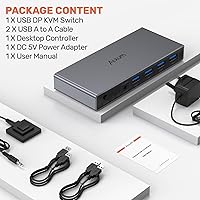
  • Power Adapter: Comes with a DC 5V power adapter to ensure stable power for high-power peripherals.
  • Size: Features a compact design, making it suitable for tight spaces and small workstations.
  • Backward Compatibility: Supports backward compatibility with older USB 2.0 and USB 1.1 devices.
  • Dual PC Setup: Designed specifically for users who need to control two computers with a single set of peripherals.
  • No HDMI Support: Does not support HDMI connections, only DisplayPort devices are compatible.
  • Video Output: Supports ultra-high-definition video output for professional applications and gaming use.
  • Remote Control: Includes a remote control for convenient switching between computers from a distance.
  • Compatibility with External Devices: Supports a wide range of external USB devices, such as printers and external hard drives.
  • Form Factor: Compact and lightweight, designed for ease of portability and use in various setups.

FAQ

Setting up this KVM switch is straightforward. Simply connect the DisplayPort cables from your two computers to the switch, then plug your keyboard, mouse, and other peripherals into the USB 3.0 ports on the device. You can switch between computers using the button on the unit or the remote control. Finally, connect the power adapter to ensure stable transmission.

This DisplayPort switch supports ultra-high-definition resolutions up to 8K at 60Hz, ensuring crystal-clear visuals for gaming, video editing, or other high-performance tasks.

Yes, this device supports 4K resolution at a high 144Hz refresh rate, which is ideal for gamers and professionals who need smooth and responsive visuals.

The Alxum DP 1.4 KVM switch is compatible with major operating systems, including Windows, Linux, and Mac. It should work seamlessly across all of these platforms.

This KVM switch offers two methods for switching between your computers: a physical button on the device and a remote control. Both options allow you to toggle between your computers effortlessly without needing to manually unplug or switch cables.

No, this KVM switch only supports DisplayPort connections. If you need HDMI support, this device is not the right choice for you.

Yes, the device includes a DC 5V power adapter, which is necessary to ensure stable operation, especially when using high-power devices.

The compact design of this KVM switch makes it easy to transport and set up in various environments, such as home offices or on-the-go setups. It’s ideal for users who need to switch between two computers in different locations.

Some users report occasional issues with switching between computers, particularly when high-power devices are used without the power adapter. Additionally, a few have noted that the remote control could be more responsive.

Yes, this device is backward compatible with older USB 2.0 and USB 1.1 devices, making it versatile for a range of peripherals and external drives.