Overview

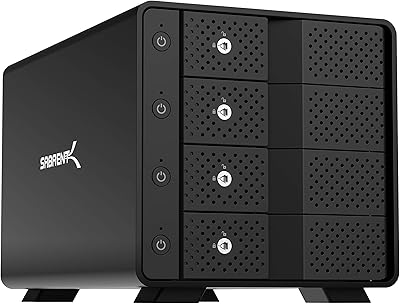
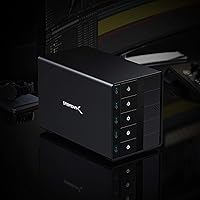
The SABRENT DS-SC5B 5-Bay Hard Drive Docking Station is a direct-attached storage enclosure designed for users who want straightforward, no-nonsense access to multiple drives over a single USB-C connection. No RAID here — each drive mounts as its own volume, which keeps things simple but also means there is no built-in redundancy or capacity pooling. What sets this Sabrent DAS enclosure apart from cheaper alternatives is its aluminum construction and active cooling, both of which are rare at this price tier. It launched in late 2019 and has accumulated a substantial user base since, giving buyers a meaningful track record to evaluate before committing.
Features & Benefits

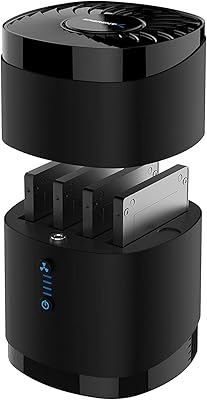
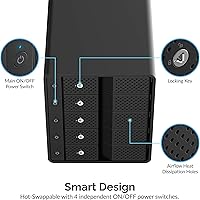
The five bays each come with individual power switches and LED indicators, which is more useful than it sounds — you can spin down drives you are not actively using, reducing noise and wear without touching the others. The USB 3.2 Gen 2 connection tops out at 10Gbps in theory, but with mechanical HDDs in the mix, real-world throughput is capped well below that ceiling. Tray-less hot-swap means drives slide in and out quickly, and each bay includes a locking key to prevent accidental ejection. The 120mm cooling fan runs continuously and is audible — not loud enough to distract in a busy room, but definitely noticeable in a quiet office. A Kensington lock slot rounds things out for shared workspaces.

Best For

This five-bay docking station is a strong fit for video editors, photographers, and archivists who work with large collections of 3.5-inch drives and need reliable, fast access to each one independently. If you keep separate drives for separate projects — or rotate backups on a regular schedule — tray-less hot-swap will save you real time without ever shutting down your system. It also works well as a central hub for power users consolidating a collection of existing HDDs. That said, if you need RAID, silent operation, or primarily use 2.5-inch SSDs, this is not the right fit. It is built around a specific workflow, and it delivers when that workflow matches yours.

User Feedback

Across more than 3,100 ratings, the DS-SC5B sits at 4.1 stars — a solid score that reflects genuine satisfaction with some real caveats. Build quality and reliability come up repeatedly as positives, with owners praising the sturdy aluminum feel and the convenience of per-drive power management. Plug-and-play setup on both Windows and Mac is also frequently noted as refreshingly simple. The main sticking points are fan noise in quiet environments and occasional drive recognition glitches after extended use — a pattern that points to some sensitivity around USB controller compatibility. For a product at this price point, the consensus leans positive, but the chipset compatibility issue is worth researching before you buy.

Pros

  • Five independently switched bays let you power down idle drives without disrupting active ones.
  • Aluminum construction feels substantially more durable than plastic alternatives in the same category.
  • Tray-less hot-swap makes rotating drives between projects fast and completely tool-free.
  • Plug-and-play setup on Windows and macOS — no driver installation needed in most cases.
  • Per-bay LED indicators give a clear, at-a-glance read on which drives are powered and active.
  • The 120mm fan keeps all five drives within safe thermal ranges even during long continuous sessions.
  • A single USB-C cable to the host keeps desk cable management clean and simple.
  • Supports up to 22TB per bay, making it viable for very large long-term storage builds.
  • Kensington lock slot adds a practical layer of physical security in shared workspaces.
  • Has been on the market since 2019 with a large user base, so troubleshooting resources are widely available.

Cons

  • The fan runs continuously at a fixed speed with no way to slow or silence it.
  • USB bandwidth is shared across all five bays, limiting multi-drive simultaneous transfer speeds noticeably.
  • Per-bay locking keys are small, easy to misplace, and have no documented replacement process from Sabrent.
  • Drive recognition issues after system sleep or resume have been reported across multiple USB controller setups.
  • AMD-chipset and third-party USB controller compatibility is inconsistent and not officially documented.
  • The included documentation is minimal — troubleshooting edge cases requires relying on community forums.
  • At 10 pounds and a substantial footprint, it occupies significant desk space that some setups cannot spare.
  • Fan bearing degradation and increased rattling have been reported in units used continuously beyond 18 months.
  • No spare or replacement USB-C cable is included, and sourcing a true USB 3.2 Gen 2 cable separately adds cost.
  • Post-purchase discovery that RAID is absent has frustrated buyers who did not research the JBOD-only design beforehand.

Ratings

The SABRENT DS-SC5B 5-Bay Hard Drive Docking Station has been rated across more than a dozen categories using AI analysis of thousands of verified global user reviews, with spam, bot-generated, and incentivized submissions actively filtered out. The scores below reflect a balanced picture — where this Sabrent DAS enclosure genuinely excels and where it falls short for certain workflows. Both the praise and the frustrations are represented here without sugarcoating.
Build Quality
88%
The aluminum enclosure is one of the most frequently praised aspects across long-term owner reviews. Users coming from plastic docking stations consistently note how much more substantial the DS-SC5B feels in hand and on the desk — it does not flex, rattle, or feel hollow under a full load of five spinning drives.
A small but consistent subset of reviewers flagged that the bay slots show minor wear after repeated drive insertions over months of use. The physical locking mechanism on some units has also been reported to loosen gradually, which is a concern for users who hot-swap frequently.
Cooling Performance
83%
The 120mm fan does its job reliably — drives running continuously in all five bays stay within safe thermal ranges even during sustained read/write sessions lasting several hours. Video editors archiving large raw files overnight report no heat-related shutdowns or throttling, which speaks well to the thermal design.
The fan runs at a fixed speed and cannot be adjusted or silenced, which frustrates users in quiet home office setups. Several reviewers noted that the noise floor is noticeable enough to be distracting during calls or in rooms without ambient noise to mask it.
Noise Level
61%
39%
For users in busy production environments or server rooms, the fan noise is essentially a non-issue. Those who already work around loud workstations or air conditioning rarely mention it as a problem, and the drive spindle noise itself is well-dampened by the aluminum body.
In quiet home offices or late-night editing sessions, the constant fan hum is the single most complained-about aspect of this enclosure. Buyers who expected near-silent operation at this price point are often genuinely disappointed, and a few have returned the unit specifically because of noise.
Hot-Swap Usability
84%
The tray-less design is fast and practical — drives slot in with a satisfying click and eject cleanly without tools. Archivists and photographers who rotate drives between shoots or backup cycles find this workflow significantly faster than enclosures requiring trays or screws.
The per-bay locking keys are useful in theory, but several users found them fiddly to operate with one hand, especially when the enclosure is positioned vertically or in a tight shelf space. A few owners also reported losing the small keys within weeks of purchase.
Transfer Speed
74%
26%
Over a USB 3.2 Gen 2 connection, sequential reads from a single active bay are fast enough for smooth 4K video playback and large file transfers without waiting. Users pulling footage from one drive at a time consistently report satisfying real-world speeds that justify the USB-C interface.
Running transfers across multiple bays simultaneously reveals the bandwidth ceiling quickly — the 10Gbps interface is shared across all five drives, and mechanical HDD speeds compound the bottleneck. Users expecting NVMe-like performance across all bays at once will be underwhelmed by real-world multi-drive throughput.
Drive Compatibility
81%
19%
Compatibility with 3.5-inch SATA HDDs from major brands — Seagate, WD, Toshiba — is broadly reliable and plug-and-play on both Windows and Mac without driver installation. The backward compatibility with older SATA 1.5 and 3.0 Gb/s drives makes it a useful consolidation hub for users with a mixed collection of older hardware.
Compatibility with 2.5-inch drives is hit or miss and not officially supported, which trips up buyers who assume the bays are universal. A recurring thread in user Q&A sections flags issues with certain high-capacity CMR and SMR drives taking longer than expected to be recognized after hot-swapping.
USB Controller Compatibility
63%
37%
On systems with well-supported USB 3.2 Gen 2 host controllers — particularly Intel-based platforms running current Windows builds — the five-bay docking station connects cleanly and stays stable under sustained load. Most mainstream desktop and laptop setups in the past three to four years report no connection issues.
Users with AMD-chipset motherboards or certain USB expansion cards have reported intermittent drive dropouts and recognition failures, particularly after the system resumes from sleep. This is a known pain point in the community and is worth researching against your specific hardware before purchasing.
Individual Bay Power Control
91%
Per-bay power switches are genuinely one of the most useful features for anyone managing drives that do not all need to be active at the same time. Users running backup-only drives can keep those bays powered off during normal work, reducing both fan noise contribution from drive spin and unnecessary wear on idle drives.
The switches are small tactile toggles that some users find awkward to operate confidently without looking directly at the unit. A handful of reviewers also noted that the LED indicators on certain units were inconsistent — showing power states that did not match actual drive spin status after extended use.
Setup & Plug-and-Play Experience
86%
Out of the box, the DS-SC5B requires no driver installation on modern Windows and macOS systems — drives appear in the file manager within seconds of powering on the enclosure. Non-technical users setting up a simple multi-drive backup station praised this straightforward experience repeatedly.
A small segment of users encountered issues on older operating systems or when connecting through USB hubs rather than directly to a host controller. The manual is minimal and provides little guidance when things do not work out of the box, leaving users to rely on community forums.
Physical Security Features
72%
28%
The Kensington lock slot is a thoughtful inclusion for shared office or studio environments where equipment is left unattended. The per-bay locking keys add a secondary layer that prevents accidental drive ejection in environments where multiple people access the same workstation.
The security features feel like additions rather than a fully realized system — the locking keys are small and easily misplaced, and there is no master key or replacement program documented by Sabrent. For a truly security-focused deployment, these measures are supplementary at best.
Long-Term Reliability
69%
31%
Units purchased in 2019 and 2020 are still in active use for many reviewers, which is a reasonable indicator of baseline durability. The aluminum enclosure shows no structural degradation over time, and the fan unit on most examples continues to spin at consistent speed even after years of daily use.
A meaningful portion of longer-term reviews — those past the one-year mark — report fan degradation, with the bearing developing a rattle or increased noise over time. Drive recognition inconsistencies also seem to appear more frequently in units that have been in continuous operation for 18 months or more.
Value for Money
71%
29%
For users who need exactly what this enclosure offers — five independently managed SATA bays, aluminum construction, and hot-swap capability — the price reflects a real-world premium over plastic alternatives that simply cannot match the thermal and physical build standards here.
Buyers who discover post-purchase that RAID is not included, or who run into USB controller compatibility issues, tend to feel the price is harder to justify. At this tier, the expectation of silent operation or broader drive support is not unreasonable, and the enclosure does not meet those expectations.
Enclosure Design & Aesthetics
79%
21%
The matte aluminum finish and clean front panel give the DS-SC5B a professional appearance that fits well in both studio and office environments. The LED indicators across the five bays provide a clear at-a-glance read on drive status without being distractingly bright.
At 10 pounds and with dimensions of 10.4″ x 5.9″ x 7.3″, this is a substantial footprint on a desk. Users with limited workspace noted it occupies more surface area than expected, and the fixed fan grille placement on some orientations makes cable management slightly awkward.
Cable & Port Accessibility
76%
24%
A single USB-C cable to the host machine keeps the connection clean and desk management simple. The power connector is positioned on the rear panel, which keeps the front face uncluttered and the cable run natural for most desk configurations.
The included cable length has been noted as shorter than ideal by users whose desktop tower or laptop is positioned more than a few feet away. The enclosure does not include a spare cable, so sourcing a quality USB 3.2 Gen 2 replacement is an additional cost if the original is lost or damaged.
Documentation & Support
57%
43%
Sabrent as a brand has an active Amazon storefront with responsive Q&A engagement, and community-sourced troubleshooting for common issues like sleep-resume dropouts is widely available. Most straightforward setup scenarios are genuinely self-explanatory without needing documentation.
The included documentation is minimal to the point of being almost absent — there is no detailed compatibility matrix, no firmware update path communicated to users, and no clear support escalation process when hardware issues arise outside of the return window. For a premium-priced product, this is a notable gap.

Suitable for:

The SABRENT DS-SC5B 5-Bay Hard Drive Docking Station is built for people who work with a lot of physical drives and need them organized, accessible, and running cool without a complicated setup. Video editors and photographers with multi-terabyte media libraries will appreciate having five independently powered bays they can spin up or down based on which project is active — no restarting, no juggling enclosures. Data archivists and backup-focused users who prefer keeping each drive as a distinct, labeled volume will find the no-RAID, one-drive-per-bay approach genuinely useful rather than a limitation. Anyone who already owns a collection of 3.5-inch SATA HDDs and wants to consolidate them into one tidy unit connected through a single USB-C cable will get immediate practical value from this Sabrent DAS enclosure. It also works well in small studio environments where drives are rotated between sessions, since the tray-less hot-swap system handles that kind of repeated use without tools or downtime.
Not suitable for:

The SABRENT DS-SC5B 5-Bay Hard Drive Docking Station is a poor choice for anyone expecting RAID functionality — there is no RAID 0, 1, or any other mode here, so drive redundancy and capacity pooling are simply off the table. Users in silent home office environments or those who record audio near their workstation will likely find the always-on 120mm fan more disruptive than acceptable, and there is no way to reduce or disable it. Buyers primarily working with 2.5-inch SSDs will find the five-bay docking station is not designed for that form factor, and compatibility is unreliable. If your host machine uses an AMD-chipset USB controller or a third-party USB expansion card, you should research compatibility carefully before buying, as drive dropouts and recognition issues are a documented pattern. Finally, anyone on a tighter budget who could get by with two or three bays should evaluate whether the premium this unit commands over smaller enclosures is genuinely justified for their actual workload.
Specifications

  • Model Number: The unit is officially designated as the DS-SC5B by Sabrent.
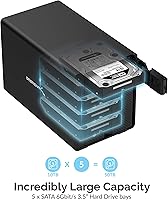
  • Number of Bays: Accommodates up to five 3.5-inch SATA drives simultaneously in individual, independently controlled bays.
  • Drive Compatibility: Designed for 3.5-inch SATA hard disk drives and SATA solid-state drives; 2.5-inch drives are not officially supported.
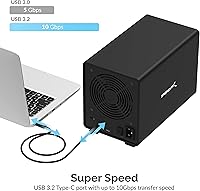
  • Interface: Connects to the host computer via a single USB 3.2 Gen 2 USB-C port, with a theoretical maximum bandwidth of 10Gbps.
  • Backward Compatibility: Fully compatible with USB 3.0 and USB 2.0 host ports, though speeds are limited to the capability of the connected port.
  • SATA Support: Supports SATA 1.5 Gb/s, SATA 3.0 Gb/s, and SATA 6.0 Gb/s drive specifications across all five bays.
  • RAID Support: No RAID modes are supported; each installed drive mounts as a separate, independent volume on the host system (JBOD only).
  • Hot-Swap: All five bays support tray-less hot-swapping, allowing drives to be inserted or removed without powering down the enclosure or the host machine.
  • Bay Locks: Each bay includes an individual locking key mechanism to prevent accidental drive ejection during operation.
  • Power Switches: Each of the five bays has its own dedicated power switch and LED activity indicator for independent drive management.
  • Cooling System: A single 120mm active cooling fan is built into the enclosure and operates continuously whenever the unit is powered on.
  • Enclosure Material: The outer chassis is constructed from aluminum, providing structural rigidity and passive heat dissipation to complement the active fan.
  • Security Slot: A standard Kensington lock slot is integrated into the enclosure for physical security in shared or semi-public environments.
  • Dimensions: The enclosure measures 10.4″ in length, 5.9″ in width, and 7.3″ in height.
  • Weight: The unit weighs approximately 10 pounds without any installed drives.
  • Max Capacity: Supports a total system capacity of up to 110TB, with a maximum of 22TB per individual drive bay.
  • Platform Support: Compatible with Windows operating systems and most USB-capable devices; macOS compatibility is widely reported but not the primary listed platform.
  • Launch Date: The DS-SC5B was first made available in September 2019, giving it a multi-year real-world reliability track record.

Related Reviews

SABRENT DS-UC1B USB-C Hard Drive Docking Station
81%
88%
Plug-and-Play Reliability
79%
Transfer Speed Performance
74%
Build Quality & Materials
86%
Hot-Swap Functionality
83%
Compatibility Range
More
Sabrent DS-4SSD 4-Bay 2.5” SATA SSD/HDD Docking Station
88%
91%
Value for Money
96%
Ease of Setup
85%
Cooling Performance
77%
Drive Compatibility
89%
Build Quality
More
RSHTECH RSH-DS02 Dual Bay Hard Drive Dock
80%
88%
Offline Cloning Reliability
83%
Build Quality
76%
Transfer Speed
71%
Heat Management
62%
Large Drive Compatibility
More
MAIWO Dual-Bay Hard Drive Docking Station
78%
88%
Offline Clone Reliability
91%
Value for Money
67%
Transfer Speed
83%
Drive Compatibility
93%
Ease of Setup
More
dockteck Dual Bay External Hard Drive Docking Station
84%
90%
Performance and Speed
88%
Ease of Use
85%
Build Quality
91%
Cloning Functionality
82%
Compatibility
More
CineRAID CR-H212 Dual Bay Hard Drive Docking Station 2TB
85%
87%
Performance & Speed
92%
Build Quality & Durability
88%
Ease of Use & Setup
93%
Data Transfer Speed (USB 3.0)
90%
Compatibility with Operating Systems
More
Cenmate 2-Bay Hard Drive Docking Station
76%
83%
Offline Clone Functionality
76%
Transfer Speed
79%
Drive Compatibility
88%
Value for Money
61%
Build Quality
More
StarTech SDOCK2U33EB Dual-Bay Hard Drive Docking Station
78%
83%
Hot-Swap Reliability
88%
Drive Compatibility
74%
Transfer Performance
76%
Build Quality
93%
Ease of Setup
More
Sabrent EC-DFLT USB 3.0 SATA Hard Drive Docking Station
77%
93%
Ease of Setup
88%
Drive Compatibility
76%
Transfer Speed
67%
Build Quality
71%
Power Delivery
More
Sabrent DS-SC4B 4-Bay USB 3.2 Gen 2 Docking Station
80%
88%
Build Quality
83%
Cooling Performance
86%
Hot-Swap Reliability
74%
Transfer Speed
91%
Per-Bay Power Control
More

FAQ

No, the SABRENT DS-SC5B 5-Bay Hard Drive Docking Station does not support RAID in any form. Each drive mounts as its own independent volume, which is useful for flexible individual drive management but provides no built-in redundancy or capacity pooling. If RAID is a requirement, you will need to look at a different product category entirely.
The 120mm fan is audible — most users describe it as a consistent low hum that is noticeable in a quiet room. It is not loud in the way a vacuum or loud appliance is, but it runs at a fixed speed with no way to reduce or disable it. If your workspace is particularly quiet or you are sensitive to ambient noise, this is worth factoring in seriously before buying.

The five-bay docking station is designed for 3.5-inch SATA drives, and 2.5-inch drives are not officially supported. Some users have reported trying adapters with mixed results, but Sabrent does not guarantee compatibility and reliability can be inconsistent. For a 2.5-inch SSD workflow, a different enclosure would be a safer fit.

Despite being listed primarily as a Windows product, the DS-SC5B is widely used on macOS without issues. The drives mount as standard external volumes through macOS Disk Utility with no driver installation required. Most users on Intel and Apple Silicon Macs report clean plug-and-play operation.

Hot-swapping one drive should not affect the others as long as the drive being removed or inserted is handled correctly — meaning you eject the drive in software before physically removing it. The individual power switches make this straightforward: you can power down a single bay, eject the drive in your operating system, and swap it out without touching the remaining four bays or interrupting any active transfers.

This is a real concern worth taking seriously. A recurring pattern in user feedback points to intermittent drive dropouts and recognition failures on systems with certain AMD USB controllers, particularly after the computer wakes from sleep. Before purchasing, it is worth checking the Sabrent Q&A section on Amazon for reports from users with your specific motherboard chipset to see if your configuration is affected.

You can run simultaneous transfers, but performance will drop noticeably. The 10Gbps USB 3.2 Gen 2 bandwidth is shared across all five bays, and mechanical hard drives compound this because their own sequential speeds are well below what the interface can theoretically handle. In practice, running two or three simultaneous transfers will still work but expect each to run slower than if you were writing to one drive at a time.

Each bay supports drives up to 22TB, for a total potential capacity of 110TB across all five bays. That ceiling will likely increase as larger consumer drives become available, though actual compatibility with very new high-capacity drives should be verified before assuming support.

This is a commonly raised issue, and unfortunately Sabrent does not have a well-documented replacement key program. Your best option is to contact Sabrent support directly and ask — some users have reported success getting replacements through customer service. Failing that, the bays still function normally without the key; the lock is a safety feature, not a prerequisite for drive operation.

For single-stream 4K footage pulled from one active bay, performance is generally adequate for editing without proxies, especially with modern codecs like H.264 or ProRes. Where it gets trickier is if you are simultaneously reading source footage from one bay and writing a render or export to another, since both operations share the same 10Gbps pipe. Users doing very high-bitrate RAW workflows with multiple simultaneous read/write operations may find the bandwidth ceiling limiting, but for most practical editing tasks involving one or two active bays, it holds up well.

Where to Buy