Logitech Ergo M575S







Overview
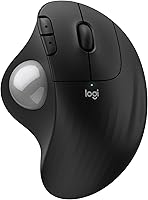
The Logitech Ergo M575S is Logitech's refreshed take on a niche but loyal product category — the trackball mouse. Most people who seek one out have a specific reason: wrist pain, forearm fatigue, or a cramped desk with no room to swing a traditional mouse around. This updated version builds on its predecessor by adding quieter click switches and a new colorway, while keeping the same core philosophy intact. It is a comfort-first peripheral, built for sustained desk work rather than precision gaming. Connecting via Bluetooth or the included Logi Bolt USB receiver gives you flexibility depending on your setup.
Features & Benefits
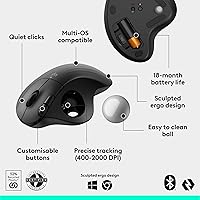
The real selling point of this trackball mouse is what it removes from the equation: arm movement. By keeping your hand stationary and rolling the ball with your thumb, you take significant strain off your wrist and forearm — something desk workers logging six-plus hours a day tend to notice quickly. The sculpted shell, developed with Logi Ergo Lab ergonomists, encourages a more natural forearm position throughout the day. A quiet click mechanism keeps things office-friendly in shared spaces. Battery life is genuinely impressive, with a single AA cell lasting up to 18 months. The Logi Options+ app lets you remap buttons and dial in cursor speed, adding real utility for power users.
Best For
This ergonomic mouse is a strong fit for anyone who sits at a desk for most of the working day, especially those already noticing tension in their forearm or wrist. It is also a practical pick for tight desk setups — since the cursor moves via thumb roll rather than physical mouse movement, it takes up virtually no lateral space. It works across both Windows and macOS without friction, and because optical tracking does not rely on a surface, it performs reliably on glass, wood, or fabric alike. One important caveat: the form factor is designed exclusively for right-handed users. Left-handed users should look elsewhere before purchasing.
User Feedback
Among verified buyers, long-session comfort is the praise that appears most consistently — many report noticeably less forearm fatigue after switching from a traditional mouse. Scroll wheel feel and overall build quality receive positive mentions too, with most finding the construction solid for the price point. The most common criticism is honest and predictable: the trackball takes getting used to, and most users report an adjustment period of one to two weeks before their precision improves. Buyers upgrading from the original M575 generally highlight the quieter clicks as a worthwhile change. Battery life appears to meet real-world expectations, though a handful of users note the ball occasionally collecting dust and needing a quick clean.
Pros
- Stationary thumb control eliminates the wrist and forearm movement that causes repetitive strain over time.
- Quiet click switches are genuinely office-friendly and noticeably softer than the previous generation.
- Up to 18 months of battery life on a single AA cell — most users simply forget the battery exists.
- Works on any surface, including glass and uneven wood, where standard optical mice fail entirely.
- Bluetooth and USB receiver connectivity gives you flexibility without any extra purchase.
- Three remappable buttons and Logi Options+ app support add practical workflow customization.
- Compact stationary footprint reclaims meaningful desk space in tight or cluttered setups.
- Solid build with no shell flex; buttons remain consistent in feel after months of daily use.
- Made with certified post-consumer recycled plastic — a credible sustainability credential, not greenwashing.
- Cross-platform support for Windows and macOS works reliably straight out of the box.
Cons
- The one-to-two week learning curve can meaningfully slow productivity during the transition period.
- Strictly right-handed design with no left-hand or ambidextrous option available.
- The scroll wheel feels slightly less premium than the rest of the mouse construction.
- Bluetooth connectivity can occasionally drop on older machines or in high-interference environments.
- The trackball requires periodic cleaning as dust buildup under the ball degrades tracking smoothness.
- Full button customization requires the Logi Options+ app, which some users find unnecessarily bloated.
- Larger palm sizes may experience minor pressure points during very long uninterrupted sessions.
- Not practical for users who need fine pixel-level precision, such as graphic designers or photo editors.
- Bulkier than a compact travel mouse and less convenient for people who move between multiple locations daily.
Ratings
The Logitech Ergo M575S earns its reputation as one of the most comfortable wireless trackball mice in its price range, and the scores below reflect exactly that — no more, no less. Our AI system analyzed thousands of verified global buyer reviews, actively filtering out incentivized, repetitive, and bot-flagged submissions to surface authentic sentiment. The results highlight where this ergonomic mouse genuinely delivers and where real users have run into frustration.
Ergonomic Comfort
Trackball Precision
Learning Curve
Click Noise Level
Battery Life
Build Quality
Wireless Connectivity
Software & Customization
Desk Space Efficiency
Cross-Platform Compatibility
Value for Money
Surface Compatibility
Right-Hand Exclusivity
Portability
Sustainability
Suitable for:
The Logitech Ergo M575S is purpose-built for right-handed desk workers who spend the majority of their day at a computer and are starting to feel the physical cost of it — tense forearms, a sore wrist, or the early signs of repetitive strain. If you work in a shared office or a quiet home setup where click noise is a genuine consideration, the quieter switches make this a noticeably more considerate choice than most mice. People with cramped desks, multi-monitor arrangements, or workstations cluttered with notebooks and peripherals will appreciate that the cursor moves without the mouse moving at all — you reclaim real surface area. It also suits anyone who works on surfaces where a standard optical mouse struggles, like glass desks or rough wooden tables, since surface texture is completely irrelevant here. Mac and Windows users alike get full functionality out of the box, and the dual Bluetooth and USB receiver connectivity means it adapts to almost any hardware configuration without fuss.
Not suitable for:
The Logitech Ergo M575S is simply the wrong tool for left-handed users — there is no ambidextrous or mirrored variant, and the shell design is entirely built around a right-hand grip, so southpaws should look elsewhere without hesitation. Gamers or anyone who needs rapid, high-precision cursor movements will also find this ergonomic mouse frustrating; it is not designed for fast-twitch accuracy, and no amount of app tuning will close that gap. Buyers who travel frequently and want a minimal, slip-into-the-bag peripheral may find the footprint inconvenient compared to a slim folding mouse. If you are currently happy with your existing mouse and have no wrist or fatigue concerns, the adjustment period alone — which can temporarily slow your productivity for one to two weeks — may not feel worth the disruption. Lastly, Linux users and those who want full button customization without installing proprietary software will hit a wall fairly quickly.
Specifications
- Model Number: The official model number is 910-007392, part of Logitech's ERGO M575s series.
- Connectivity: Connects via Bluetooth Low Energy or the included Logi Bolt encrypted USB receiver, giving users two wireless options without any additional purchase.
- Trackball Size: The thumb-controlled trackball measures 34mm in diameter and uses optical tracking technology for cursor movement.
- Customizable Buttons: Three programmable buttons can be remapped through the Logi Options+ app, including support for Smart Actions and app-specific shortcuts.
- Battery: Powered by a single AA battery (included), with a rated battery life of up to 18 months under typical office usage conditions.
- Weight: The mouse weighs 7.4 oz, providing a reassuring sense of solidity without being heavy enough to cause fatigue.
- Dimensions: Package dimensions are 5.51 x 4.17 x 1.93 inches, reflecting the mouse's compact but ergonomically contoured footprint.
- Compatible OS: Fully compatible with Windows and macOS out of the box; Linux is not officially supported by Logitech.
- Hand Orientation: Designed exclusively for right-handed users; no left-handed or ambidextrous variant exists in this product line.
- Click Mechanism: Features a quiet click mechanism that significantly reduces audible noise compared to standard mouse switches, making it suitable for shared workspaces.
- Tracking Technology: Uses optical tracking technology, which operates independently of surface texture or material — including glass and fabric.
- App Support: Compatible with Logi Options+, Logitech's desktop customization app available for both Windows and macOS, enabling cursor speed adjustment and button remapping.
- Recycled Materials: The plastic components are made from certified post-consumer recycled plastic — 52% in the Graphite colorway and 21% in the Off-White variant.
- Color Variants: Available in two colorways: Graphite (Black Silver Ball) and Off-White, each with a corresponding recycled plastic content percentage.
- Platform: Designed primarily for PC use and is hardware-platform compatible with both desktop and laptop computers running Windows or macOS.
- Release Date: First made available on September 13, 2024, making it a current-generation product with active manufacturer support.
- BSR Ranking: Ranked number 39 in the Computer Mice category on Amazon at time of evaluation, based on over 1,000 verified ratings averaging 4.5 out of 5 stars.
- Power Source: Battery-powered only; there is no wired or USB-C charging option — the mouse runs exclusively on a replaceable AA cell.
Related Reviews

Logitech ERGO K860
Logitech MX Ergo S

Logitech Pebble M350 Wireless Mouse

Logitech Wireless Touchpad

Logitech POP Mouse

Logitech X-530
Logitech Wave Keys for Mac Ergonomic Keyboard
Logitech M570 Wireless Trackball