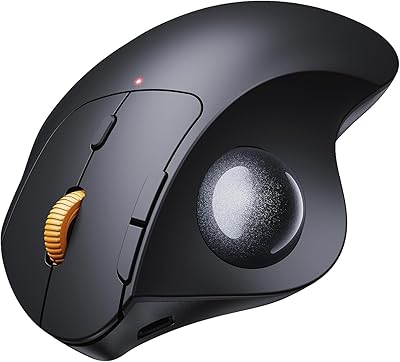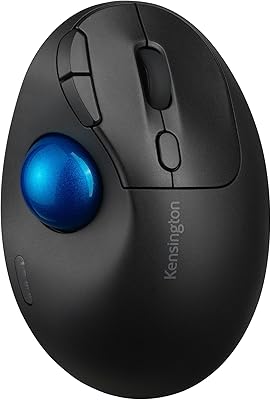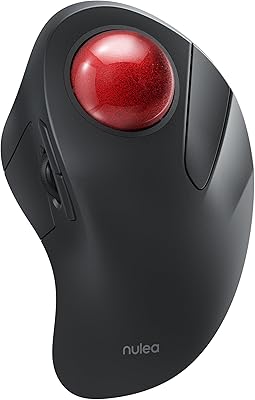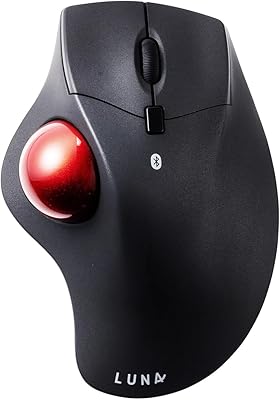
Overview

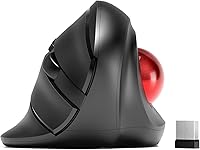
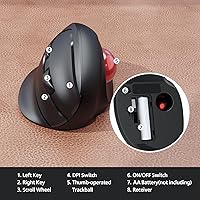
The MicroPack V02 Trackball Wireless Mouse occupies an interesting niche — it combines a vertical ergonomic grip with a thumb-operated trackball, a pairing you rarely find at this price point. Most ergonomic mice ask you to pick one or the other; this vertical trackball mouse attempts both. It connects via a 2.4G USB nano-receiver only — there is no Bluetooth support, which matters if you regularly switch between devices. Power comes from a single AA battery, which is not included in the box, so have one ready before you sit down. Since its early 2023 launch, it has held a consistent spot in the top 400 of Amazon's computer mice category.

Features & Benefits

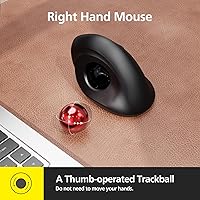
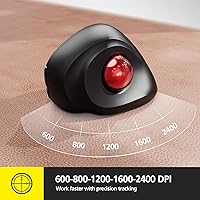
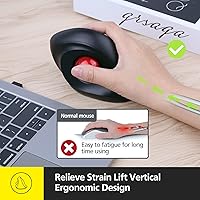
The vertical orientation is the foundation here — holding the mouse in a natural handshake posture significantly reduces the wrist pronation that causes strain after long sessions. The thumb-controlled trackball means you can navigate across multiple monitors or a large spreadsheet without nudging the mouse an inch across your desk. DPI adjusts across five levels, topping out at 2400, which handles everyday tasks comfortably; it is not tuned for competitive gaming, and the silent click mechanism reinforces that office-first identity. The trackball pops out easily for cleaning — something you will appreciate after a few weeks of daily use. The receiver range extends to around 10 meters, giving standing-desk users genuine flexibility.

Best For

This ergonomic wireless mouse is clearly aimed at right-handed users dealing with wrist fatigue, RSI, or early signs of carpal tunnel — the vertical grip addresses the root cause rather than just masking discomfort. If your desk is on the smaller side, the trackball format is particularly practical since the mouse itself stays in one spot. It is also a reasonable entry point for anyone curious about trackball navigation but not ready to invest in a premium model. Offices, libraries, and open-plan coworking spaces will appreciate the silent click switches. Left-handed users, however, should look elsewhere — the shell is shaped exclusively for the right hand.

User Feedback

Users who switch to the MicroPack thumb trackball from a conventional flat mouse consistently mention an adjustment period — thumb coordination for cursor control feels awkward in the first few days but becomes intuitive within a week or two. Wrist comfort draws the most praise; people logging long hours at a desk report noticeably less strain compared to their previous setup. On the downside, some buyers flag the plastic build quality as feeling modest, and a few note the buttons lack the satisfying click of pricier competitors. The absence of Bluetooth is a recurring complaint among Mac users who juggle multiple devices. The AA battery format divides opinion — easy to replace but adds a small ongoing cost.

Pros

  • Vertical grip genuinely reduces wrist pronation strain during long work sessions.
  • Thumb trackball keeps the mouse stationary, making it ideal for tight or cluttered desks.
  • Five DPI levels offer enough range for both precise document work and faster general navigation.
  • Silent click switches are quiet enough for libraries, open offices, and late-night use.
  • The trackball pops out easily for cleaning, which keeps cursor tracking accurate over time.
  • Wireless range of up to 10 meters works well for standing desks and flexible setups.
  • Solid sales rank suggests reliable availability and an established buyer base.
  • A practical, affordable entry point for anyone testing trackball navigation for the first time.
  • Compatible with Windows and Mac out of the box with no driver installation required.

Cons

  • No Bluetooth support limits this to single-device use via USB receiver only.
  • AA battery is not included in the box, which is an annoying surprise on first setup.
  • Build materials feel modest and may not hold up well under heavy daily use over years.
  • Buttons are not programmable, which rules it out for power users who rely on custom shortcuts.
  • New trackball users should expect a genuine adjustment period of several days before feeling comfortable.
  • Designed exclusively for right-handed users with no left-hand or ambidextrous option available.
  • No rechargeable battery means an ongoing cost and the hassle of keeping spare AAs on hand.
  • Button feedback feels soft compared to competitors at slightly higher price points.

Ratings

Our AI scoring model analyzed verified global buyer reviews for the MicroPack V02 Trackball Wireless Mouse, actively filtering out incentivized, bot-generated, and duplicate submissions to surface what genuine long-term users actually experienced. The scores below reflect both the real strengths that keep buyers recommending this ergonomic wireless mouse and the friction points that push some users toward alternatives. Nothing has been softened — where the product falls short, the numbers say so.

Ergonomic Comfort
86%
Users who switched from a flat mouse to this vertical trackball mouse consistently report reduced wrist tension within the first week of regular use. The handshake-style grip earns particular praise from people who work six or more hours at a desk, with many noting that shoulder and forearm fatigue also decreased noticeably.
A handful of users with smaller hands find the grip angle slightly awkward, as the shell dimensions are clearly optimized for medium to large right hands. Those with particularly small palms may feel they are stretching their thumb to reach the trackball comfortably during extended sessions.
Trackball Precision
74%
26%
For everyday office tasks — scrolling through documents, navigating spreadsheets, general web browsing — the thumb-controlled trackball performs reliably once users get past the initial adjustment period. The removable ball design also means precision stays consistent over time since debris buildup can be cleaned out easily.
Pixel-level precision work, such as detailed photo editing or illustration, exposes the trackball's limitations compared to higher-end models with optical trackball sensors. Some users also report that the ball occasionally feels slightly gritty if cleaning is neglected for more than a few weeks.
Build Quality
61%
39%
The overall assembly feels solid enough for daily office use, and most buyers report no rattling, creaking, or structural issues out of the box. At this price tier, the construction is generally considered acceptable rather than impressive.
The plastic used on the shell feels noticeably budget-grade when compared to pricier competitors, and the button surfaces show wear marks relatively quickly under heavy daily use. Some buyers mention that the scroll wheel feels slightly loose, which becomes more apparent after a few months of consistent use.
Wireless Reliability
83%
The 2.4G connection holds up well under typical office conditions — no meaningful lag, no dropouts during video calls or document editing, and a receiver range that comfortably covers a standard desk-to-monitor setup. Users working from a couch or standing desk also report clean connectivity without needing line-of-sight.
A small number of users report intermittent micro-stuttering when the nano-receiver is plugged into a USB hub rather than directly into the computer. Interference from other 2.4G devices in dense office environments occasionally causes brief cursor hesitation, though this is not a widespread complaint.
Click Feel & Sound
79%
21%
The silent switches genuinely deliver on their promise — buyers using this ergonomic wireless mouse in open-plan offices and during online meetings confirm the click noise is soft enough to avoid drawing attention. The reduced sound does not noticeably degrade tactile feedback for most users during general office work.
Users who prefer a firm, clicky button response find the silent switches feel mushy or under-responsive by comparison. The side buttons, in particular, receive criticism for feeling imprecise, with some users accidentally triggering them when repositioning their grip.
DPI Range & Switching
77%
23%
The five-step DPI range covers a practical spread from careful document navigation at 600 all the way up to fast cross-monitor sweeps at 2400, and the onboard DPI button makes switching between modes quick and straightforward. Most office users settle comfortably into the 1200 or 1600 setting for everyday tasks.
There is no software to customize or save DPI preferences, so the setting resets to default each time the mouse is power-cycled. Users who need DPI values outside the fixed five options — such as a specific 900 or 1800 setting for a particular workflow — have no way to configure that.
Battery Performance
68%
32%
Buyers report that a single AA battery lasts anywhere from four to eight weeks under typical daily office use, which is a reasonable return given the wireless feature set. The AA format is also convenient in situations where a rechargeable battery dies — any convenience store can supply a replacement instantly.
The fact that no battery is included in the box is a recurring frustration, catching first-time buyers off guard at setup. Users accustomed to rechargeable wireless mice also view the ongoing cost and disposal of AA batteries as an unnecessary inconvenience compared to USB-C charging alternatives.
Connectivity Options
44%
56%
The 2.4G nano-receiver setup is straightforward — plug it in, and the mouse works immediately with no software or pairing process required. For users who only ever connect to one device, this simplicity is perfectly adequate.
The complete absence of Bluetooth is a genuine dealbreaker for a meaningful segment of buyers, particularly Mac users and those who switch between a desktop and a laptop throughout the day. Single-receiver-only connectivity feels increasingly limiting as multi-device workflows become the norm, and this is the most frequently cited complaint in negative reviews.
Setup & Ease of Use
91%
Plug the receiver in, drop in a AA battery, and the mouse is ready to go — no app downloads, no driver installation, no pairing sequence. Users across Windows and Mac platforms consistently describe the initial setup as taking under two minutes.
The lack of any companion software means there is no onboarding guide, button remapping tool, or firmware update path for users who encounter issues down the line. For buyers who like to fine-tune their peripherals, the out-of-box-only experience can feel limiting.
Learning Curve
66%
34%
Most buyers who commit to the thumb trackball format for at least a week report that it becomes intuitive faster than expected, particularly for standard navigation and scrolling tasks. Users coming from any previous trackball experience adapt almost immediately.
For users who have never touched a trackball mouse before, the first two to four days can feel genuinely frustrating — thumb coordination for fine cursor movement requires deliberate retraining of muscle memory. Some buyers give up during this window and return the mouse before reaching the point where it becomes comfortable.
Desk Space Efficiency
88%
The static footprint of this vertical trackball mouse is a genuine practical advantage for users with cluttered or compact workstations — the mouse sits in one spot and the thumb does all the navigating. Buyers with dual-monitor setups particularly appreciate not needing a wide mousing area to sweep across screens.
The vertical profile, while ergonomically sound, takes up more vertical space than a flat mouse and can feel awkward if the desk surface is lower than an ideal ergonomic height. A small number of users also note that the elevated grip position occasionally causes the receiver to block adjacent USB ports.
Compatibility
84%
The mouse works plug-and-play across Windows, macOS, and most Linux distributions without requiring any driver downloads, making it a low-friction option for mixed-OS households or offices. Chromebook compatibility has also been confirmed by buyers in that ecosystem.
Multi-device users — particularly those running both a Windows desktop and a MacBook — will find the single 2.4G receiver approach frustrating since there is no way to pair to a second device without physically swapping the receiver. This is a hardware limitation with no software workaround.
Value for Money
82%
18%
Buyers who compare this ergonomic wireless mouse to pricier vertical trackball competitors consistently rate it favorably on a cost-per-function basis, especially for users who are not yet sure whether the trackball format will suit their long-term workflow. The core functionality holds up well relative to its price positioning.
Users who eventually upgrade to a higher-end vertical trackball often reflect that the build quality gap between this model and premium competitors is quite noticeable in hindsight. For buyers who decide early that trackball is their preferred format, spending more upfront on a better-built model may prove more economical over two to three years.

Suitable for:

The MicroPack V02 Trackball Wireless Mouse is a strong fit for right-handed office workers who spend long hours at a desk and have started noticing wrist fatigue, tension, or early repetitive strain symptoms. The vertical grip combined with thumb-controlled trackball navigation addresses the core mechanical problem — pronation — rather than just adding padding or a wrist rest. People working in compact setups will appreciate that the mouse stays stationary; no mousing area needed, just thumb movement. It also works well in shared or open-plan environments where silent clicking is a genuine courtesy, not just a nice-to-have. For anyone curious about trackball navigation but reluctant to spend heavily on a premium model, this ergonomic wireless mouse offers a practical, lower-risk way to test whether the format suits their workflow before committing further.

Not suitable for:

The MicroPack V02 Trackball Wireless Mouse has real limitations that certain buyers should weigh carefully before purchasing. There is no Bluetooth support whatsoever, which makes it a poor choice for anyone who switches regularly between a laptop, tablet, or multi-device workspace — you get one USB nano-receiver and one connected device, full stop. Left-handed users are excluded entirely; the shell is shaped around a right-hand grip and there is no ambidextrous version in this line. Those expecting premium build quality or programmable buttons will likely find the hardware underwhelming compared to more expensive competitors. Gamers drawn in by the DPI range should look elsewhere — the silent switches and ergonomic-first design make this an office tool, not a gaming peripheral. Finally, buyers who prefer rechargeable mice should know there is no built-in battery; a AA cell is required and is not included in the box.

Specifications

  • Model Number: This mouse is identified by the manufacturer model code V02.
  • Connectivity: It connects via a 2.4G wireless USB nano-receiver with no Bluetooth support of any kind.
  • Wireless Range: The USB receiver maintains a stable connection at distances of up to 10 meters.
  • DPI Settings: Five adjustable DPI levels are available: 600, 800, 1200, 1600, and 2400.
  • Trackball Position: The trackball is positioned on the right-thumb side of the mouse for cursor control.
  • Hand Orientation: The ergonomic shell is designed exclusively for right-handed users.
  • Click Mechanism: Both primary buttons use silent switches to minimize audible click noise during use.
  • Mouse Design: The vertical ergonomic form factor holds the hand in a natural handshake-style posture to reduce wrist pronation.
  • Battery: One AA battery is required for operation and is not included in the package.
  • Weight: The mouse weighs 6.4 ounces, offering a solid feel without being heavy on the desk.
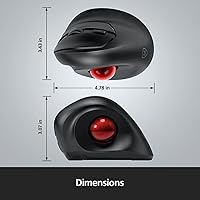
  • Dimensions: The body measures approximately 4.78 x 3.07 inches, sized for a comfortable full-hand right-handed grip.
  • Trackball Removal: The trackball can be physically removed from its housing for cleaning and maintenance.
  • Compatibility: The mouse works with Windows, Mac, and most Linux systems without requiring additional driver software.
  • Color: Available in black with a matte-finish housing.
  • Manufacturer: Made by MicroPack, a peripherals brand focused on affordable ergonomic and wireless input devices.

Related Reviews

SABLUTE Wireless Trackball Mouse

74%
83%
Ergonomic Comfort
79%
Adjustable Tilt Base
86%
Multi-Device Connectivity
67%
Trackball Precision & Feel
74%
DPI Range & Customization
More
seenda Wireless Trackball Mouse
78%
88%
Ergonomic Comfort
74%
Trackball Precision
86%
Multi-Device Connectivity
83%
Battery Life
71%
Build Quality
More
PORLEI TM550 Wireless Trackball Mouse
75%
88%
Ergonomic Comfort
84%
Trackball Size & Control
86%
Multi-Device Connectivity
73%
Battery Life
54%
DPI Adjustment Usability
More
ProtoArc EM04 Wireless Trackball Mouse
86%
88%
Ergonomics & Comfort
91%
Battery Life
84%
Ease of Use
89%
Connection Versatility
85%
Precision & Control
More
Nulea M501
Nulea M501
72%
83%
Ergonomic Comfort
78%
Trackball Smoothness
86%
Multi-Device Connectivity
91%
Value for Money
74%
Battery Life
More
Kensington TB450 Wireless Trackball Mouse
78%
88%
Ergonomic Comfort
71%
Tracking Precision
84%
Wireless Reliability
83%
Multi-Device Switching
93%
Battery Life
More
ProtoArc EM01 NL Wireless Trackball Mouse
74%
83%
Ergonomic Comfort
88%
Multi-Device Connectivity
74%
Trackball Precision & Smoothness
79%
Build Quality & Materials
61%
Learning Curve
More
Logitech Ergo M575S
Logitech Ergo M575S
79%
93%
Ergonomic Comfort
78%
Trackball Precision
61%
Learning Curve
88%
Click Noise Level
91%
Battery Life
More
Nulea M505 Wireless Trackball Mouse
75%
83%
Ergonomic Comfort
58%
Learning Curve
91%
Battery Life
78%
Multi-Device Connectivity
72%
Cursor Precision & DPI Control
More
SANWA GMABTTB41 Bluetooth Ergonomic Trackball Mouse
73%
82%
Ergonomic Comfort
67%
Trackball Precision
74%
Bluetooth Connectivity
89%
Noise Level
61%
Build Quality
More

FAQ

It is 2.4G wireless only — there is no Bluetooth option at all. You will always need the USB nano-receiver plugged into your device. If you use a laptop that is short on ports or you regularly switch between two computers, that is worth factoring into your decision.

No, it is not. The MicroPack V02 Trackball Wireless Mouse requires one AA battery to operate, but MicroPack does not include one in the package. Keep a AA on hand before you sit down to set it up, otherwise you will be making an unnecessary trip to the drawer.

Most people find it takes somewhere between three days and two weeks to feel fully comfortable. The adjustment is real — your thumb is doing work it has never done before — but it becomes second nature fairly quickly. Stick with it past the first day or two before making a judgment call.

No. The shell is shaped specifically around a right-handed grip, and the trackball sits on the right-thumb side. There is no way to adapt it for left-hand use, so left-handed buyers should look at a different model entirely.

The ball pops out of its socket without any tools — just push it from the underside or use a fingernail to ease it out. Once removed, wipe the ball itself with a dry or lightly damp cloth, and use a cotton swab to clean out any debris from the socket. Doing this every few weeks keeps tracking smooth and accurate.

Yes, it should work plug-and-play on macOS without any driver installation. The basic functions — cursor movement, left and right click, scroll — all operate natively. DPI switching via the onboard button also works without software.

The silent switches are noticeably quieter than a standard mouse — not completely inaudible, but well within acceptable range for an open-plan office or library. It is the kind of click you can use during a video call without it registering on the microphone.

It can be a meaningful improvement for people dealing with wrist strain, especially if you are coming from a flat mouse. The vertical orientation reduces the inward wrist rotation that causes a lot of RSI discomfort. That said, no mouse is a medical solution, and if your symptoms are serious, pairing it with proper ergonomic habits and breaks matters just as much as the hardware.

Technically yes, but it is not really suited for it. The silent switches and vertical ergonomic design are built around office use, and thumb trackball control introduces a ceiling on reaction speed and precision that competitive gaming demands. The DPI range covers general use well, but do not expect it to perform like a gaming mouse.

Unfortunately, replacement nano-receivers for budget wireless mice are often not available separately, and a lost receiver typically means the mouse becomes unusable. Keep the receiver plugged into a dedicated port or stored safely when not in use — it is small enough to misplace easily.