Overview

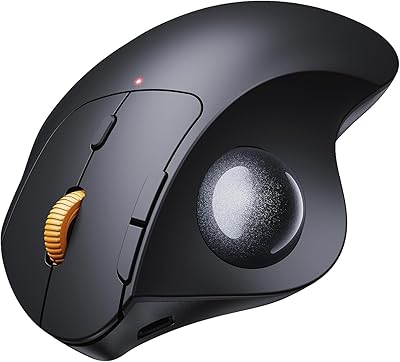
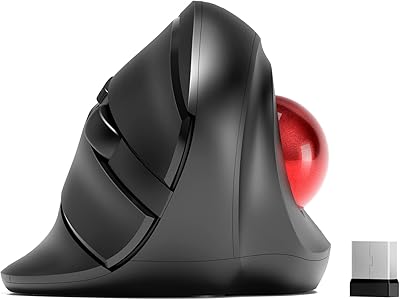
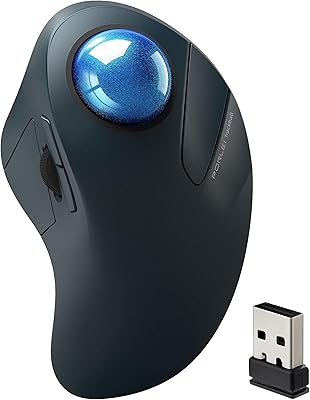
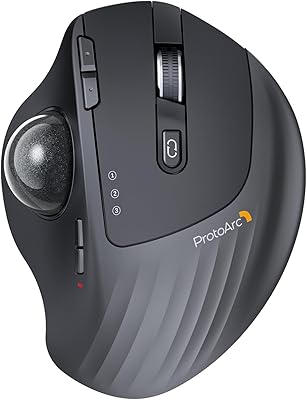
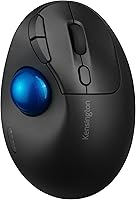
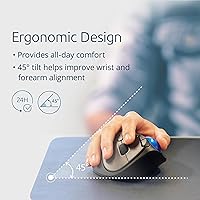
The Kensington TB450 Wireless Trackball Mouse sits in an interesting spot — a mid-range ergonomic option for anyone tired of dragging a conventional mouse across their desk all day. Its most distinctive physical trait is the 45-degree tilted body, which angles your wrist and forearm into a more natural resting position than a flat mouse ever allows. The thumb-operated ball stays fixed while your hand stays still — a genuinely different experience once you adjust. Dual wireless support, both Bluetooth LE and 2.4GHz, adds real flexibility. It is lightweight, compact, and designed for comfort-focused daily use — not gaming, not precision design work, just solid everyday computing without the wrist strain.
Features & Benefits

The ergonomic tilt is the first thing you notice when you pick this up — the body angles your hand into a more handshake-like position, which genuinely reduces the forearm rotation that causes tension over a long workday. The 34mm optical trackball responds well to thumb input at moderate speeds; don't expect pixel-level precision, but for spreadsheets, documents, and general browsing it performs reliably. Four DPI steps — 400 for careful cursor work up to 1600 for sweeping across wide displays — cover most needs, and switching between them is quick. The multi-device pairing for up to three devices is practical, and battery life is genuinely impressive: a single AA can last well over a year depending on your wireless mode.

Best For

This ergonomic trackball makes the most sense for people dealing with wrist or forearm pain — RSI sufferers, carpal tunnel folks, or anyone who has started noticing aches after long mouse-heavy workdays. It is also well-suited to anyone juggling multiple devices, since pairing up to three and switching between them takes only seconds. If your desk is tight on space, this is a natural fit: the ball moves, your hand stays put, so there is no mousing surface required. It works on both Windows and macOS with no software to install. Travelers and remote workers will appreciate how light and compact the TB450 is — it fits easily in a bag and runs for months on a single battery.

User Feedback

With over 400 ratings averaging 4.2 stars, this thumb trackball has earned a genuinely solid reputation — not a cult following, but a consistent pattern of satisfied buyers. The most common praise centers on real comfort improvements for people switching from a conventional mouse, along with reliable wireless range and effortless device switching. The criticisms are worth noting honestly: first-time trackball users frequently describe an awkward adjustment period, sometimes a week or two before things feel natural. A few buyers also found the ball felt slightly stiff right out of the box. Compared to the Logitech M570, some reviewers found the TB450 more comfortable ergonomically, though a portion felt the Logitech edges it out on overall build refinement.

Pros

  • The 45-degree tilted body puts your wrist and forearm in a noticeably more natural position during long work sessions.
  • Dual wireless modes — Bluetooth LE and 2.4GHz — give you real flexibility depending on your setup.
  • Pairing up to three devices and switching between them is quick and reliable in daily use.
  • Battery life is exceptional; a single AA can realistically last over a year with regular use.
  • The TB450 works plug-and-play on both Windows and macOS with no software installation needed.
  • Keeping the hand stationary eliminates the need for mousing space, which is a genuine relief on a cluttered desk.
  • Four DPI steps cover a practical range from careful precise work to fast navigation across wide displays.
  • At under five ounces, this ergonomic trackball is light enough to toss in a laptop bag without a second thought.
  • 128-bit AES encryption offers a reasonable layer of wireless security for corporate or sensitive work environments.
  • A solid 4.2-star average across hundreds of ratings suggests most buyers are genuinely satisfied after extended use.

Cons

  • New trackball users typically face a week or more of awkward adjustment before the thumb control feels natural.
  • The 34mm ball can feel stiff straight out of the box and may need some break-in time before rolling smoothly.
  • Right-hand-only design completely locks out left-handed users with no ambidextrous alternative.
  • Precision is adequate for office tasks but falls short for anything requiring fine cursor accuracy, like detailed design work.
  • There is no rechargeable battery option — you are committed to AA batteries for the life of the device.
  • The scroll wheel feel has drawn mixed feedback, with some buyers finding it less tactile than they expected.
  • Competing models in a similar price range, like the Logitech M575, offer a larger trackball that some users find easier to control.
  • No bundled software means programmable button customization is limited without a third-party remapping tool.
  • The compact footprint, while great for travel, can feel slightly cramped for users with larger hands during extended sessions.

Ratings

The scores below were generated by our AI review engine after analyzing verified buyer feedback for the Kensington TB450 Wireless Trackball Mouse from global retail platforms, actively filtering out incentivized, duplicate, and bot-generated submissions to surface genuine user sentiment. Each category reflects a balanced synthesis of real-world praise and documented frustrations — nothing is smoothed over or inflated. Whether this ergonomic trackball lands as a wrist-saver or a compromise depends heavily on the buyer, and these ratings are designed to reflect exactly that nuance.

Ergonomic Comfort
88%
The 45-degree tilt is the single biggest reason most people buy this device, and for the majority it delivers. Users who switched after developing wrist or forearm strain frequently report a noticeable reduction in discomfort within the first two to three weeks of consistent use.
A subset of users with larger hands find the body slightly cramped during extended sessions, and the fixed tilt angle cannot be adjusted, which means it either works for your anatomy or it doesn't — there is no middle ground to dial in.
Tracking Precision
71%
29%
For spreadsheet navigation, document work, and general web browsing, the optical sensor handles the 34mm thumb ball reliably enough that most office users never feel held back. The four DPI steps give a practical range that covers the majority of everyday computing tasks without much fuss.
This is not a precision instrument, and users who came from high-end mice notice it quickly — the cursor can feel slightly floaty at lower DPI settings and the thumb ball lacks the granularity needed for detailed image editing, fine drag-and-drop work, or anything requiring pixel-level accuracy.
Wireless Reliability
84%
The 2.4GHz nano receiver connection holds up consistently across typical office distances, and most users report zero dropout issues during their regular workday. Bluetooth performance is nearly as solid, with the added flexibility of connecting to devices that lack spare USB ports.
In environments saturated with competing Bluetooth devices — open-plan offices, co-working spaces — a small number of users noted occasional brief disconnections on the Bluetooth channel specifically, which the 2.4GHz mode generally avoided.
Multi-Device Switching
83%
The ability to pair three devices and flip between them with a single button press is one of the TB450's most genuinely useful daily features, particularly for professionals who bounce between a desktop and a laptop throughout the day. Setup across all three slots is straightforward and doesn't require re-pairing from scratch.
The switching button requires a deliberate press rather than a quick tap, which a few users found slightly awkward mid-workflow. There is also no visual indicator beyond the LED confirming which device profile is currently active, which can cause brief confusion.
Battery Life
93%
Battery longevity is one of the most consistently praised aspects of this ergonomic trackball across hundreds of buyer accounts — many report going eight to twelve months of daily use before needing their first replacement, which closely matches the rated figures. Using a standard AA means replacements are cheap and available anywhere.
The device has no rechargeable battery option, which is an increasingly common expectation at this price point, and there is no low-battery warning beyond erratic cursor behavior — a small on-device indicator light would meaningfully improve the experience.
Learning Curve
58%
42%
Users who stuck with the thumb-ball format past the first two weeks consistently reported that the adjustment became second nature, and several noted that switching back to a conventional mouse afterward felt noticeably clumsy by comparison.
The first week or two is legitimately frustrating for most new trackball users — thumb fatigue, imprecise cursor placement, and accidental clicks are common complaints during the adjustment period. Buyers expecting instant comfort are regularly disappointed, and a small percentage give up before the muscle memory develops.
Build Quality
74%
26%
The plastic shell feels solid enough for a mid-range device, and the overall construction doesn't rattle or flex under normal use. Most buyers describe it as feeling sturdy for daily desk use, and there are few reports of physical failures within the first year.
The materials don't feel premium by any stretch — the matte plastic shows fingerprints and minor scuffs over time, and a portion of users comparing it to higher-end Kensington models note a clear step down in tactile quality. The scroll wheel, in particular, draws mixed reactions for feeling less precise than the rest of the device suggests.
Button Feel & Layout
69%
31%
The primary click buttons have a clean, responsive feel that most users find satisfactory for standard office clicking, and the button layout keeps the most-used controls within easy thumb and finger reach without stretching.
The side and programmable buttons received more polarized feedback — some users found their placement slightly awkward relative to the thumb ball position, occasionally triggering accidental presses during ball movement. Without third-party remapping software, button customization is also fairly limited.
Software & Customization
62%
38%
Plug-and-play operation on both Windows and macOS means the TB450 is immediately usable right out of the box, which is genuinely appreciated by users who don't want to deal with driver installations or software accounts just to use a pointing device.
Out-of-the-box customization is minimal — users who want to remap buttons meaningfully or create per-application profiles need to lean on Kensington's optional software or a third-party tool, which adds friction for less technical buyers. The software itself has drawn lukewarm reviews for its interface and reliability.
Portability
86%
At under five ounces and with no mousing surface required, the TB450 travels exceptionally well — remote workers and frequent flyers consistently mention it as one of the more practical peripherals they carry, especially paired with the low-profile nano receiver tucked into a laptop port.
The nano receiver is small enough to lose easily during transit, and there is no onboard storage slot for it on the device itself — a recurring complaint from users who switch between travel and desk use regularly.
Value for Money
77%
23%
For buyers who genuinely need the ergonomic benefits and multi-device flexibility, the TB450 delivers enough capability to justify its mid-range position — particularly when factoring in the extraordinary battery life that eliminates ongoing charging costs and hassle.
Buyers who primarily want a precision pointing device, or who don't have a specific ergonomic need, may find the value proposition weaker when compared to a conventional wireless mouse at a similar price that offers better tracking and build refinement.
Desk Space Efficiency
91%
Because the device stays stationary while only the ball moves, it works on almost any surface and requires zero clearance area around it — users with crowded desks, small apartment setups, or laptop trays consistently highlight this as a practical everyday advantage.
The fixed footprint is genuinely small, but users with very large hands may find that the lack of any wrist rest or palm support leaves the heel of the hand hovering unsupported, which can introduce its own tension during long sessions.
Connectivity Setup
81%
19%
Initial pairing via both Bluetooth and the nano receiver is quick and straightforward — most users report having all three device slots configured within a few minutes of unboxing, with no technical knowledge required.
A handful of users experienced Bluetooth pairing hiccups on first setup, particularly on macOS, requiring a device restart to resolve. While not a widespread issue, it surfaced often enough in feedback to be worth flagging for Mac-primary users.
Security Features
79%
21%
The inclusion of 128-bit AES wireless encryption is a meaningful differentiator for corporate buyers or anyone working in environments where wireless security is a genuine consideration — it adds a credible layer of protection without any configuration required from the user.
For most home users, the encryption feature is invisible and largely irrelevant to the purchase decision, meaning it doesn't move the needle on perceived value for the majority of the buyer base even if it is genuinely useful for the segment it targets.

Suitable for:

The Kensington TB450 Wireless Trackball Mouse is a strong match for anyone whose wrists or forearms have started complaining after long days at a desk — particularly people managing RSI, carpal tunnel symptoms, or general mouse fatigue who need a pointing device that keeps the hand stationary rather than dragging across a surface. Office workers who toggle between multiple machines throughout the day will find the three-device pairing genuinely useful, especially since switching takes just a button press rather than disconnecting and re-pairing. People with limited desk space — think cluttered workstations, small standing desks, or hotel room tables — will appreciate that the TB450 needs no mousing area at all. It is equally at home on Windows and macOS without requiring any driver installation, which makes it a practical grab-and-go option for remote workers or frequent travelers who want one reliable peripheral that just works wherever they land.
Not suitable for:

The Kensington TB450 Wireless Trackball Mouse is not the right call for anyone who needs high-speed, pixel-precise cursor control — graphic designers, video editors working frame-by-frame, or CAD users will likely find the 34mm thumb ball limiting compared to a dedicated precision mouse or a finger-operated trackball with a larger ball surface. Gamers should look elsewhere entirely; the tracking response and ergonomic layout are built around office comfort, not reaction speed or competitive performance. Left-handed users will also run into problems, as the body and thumb ball placement are designed strictly for right-hand use with no ambidextrous option. If you have never used a trackball before, be aware that the first week or two can feel genuinely frustrating — the adjustment period is real, and buyers who expect an instant comfort win are sometimes disappointed. Finally, anyone who prefers rechargeable peripherals may be put off by the single AA battery setup, since there is no USB charging port.

Specifications

  • Model Number: This device carries the official model designation K72194WW, part of Kensington's ProFit Ergo TB450 series.
  • Tracking Tech: Cursor control is handled by a high-quality optical sensor reading a 34mm thumb-operated trackball.
  • DPI Options: Four selectable sensitivity levels are available: 400, 800, 1200, and 1600 DPI.
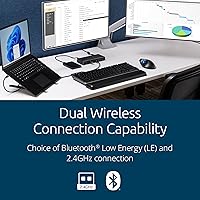
  • Connectivity: The device supports both Bluetooth Low Energy (LE) and 2.4GHz wireless via an included nano USB receiver.
  • Multi-Device: Up to three devices can be paired simultaneously, with switching handled directly on the device.
  • Tilt Angle: The body is inclined at a 45-degree ergonomic angle to encourage a more natural wrist and forearm position.
  • Dimensions: The unit measures 5.44 x 3.68 inches (L x W), with a very low profile height of approximately 0.1 inches at its base edge.
  • Weight: The TB450 weighs 4.6 oz, making it one of the lighter wireless trackballs in its category.
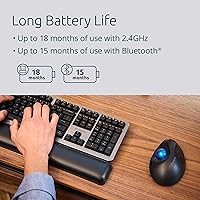
  • Battery: A single AA battery powers the device, with rated life of up to 18 months via 2.4GHz or up to 15 months via Bluetooth LE.
  • Battery Included: One AA battery is included in the box so the device is ready to use immediately out of packaging.
  • Power Source: The TB450 is battery-powered only and does not support USB charging or wired operation.
  • Security: Wireless transmissions are protected by 128-bit AES encryption to reduce exposure to wireless interception.
  • Compatibility: The device is compatible with Windows and macOS operating systems on both Mac and PC hardware platforms.
  • Handedness: The ergonomic body and thumb ball placement are designed exclusively for right-hand use.
  • Color: The device is finished in a two-tone Black and Blue colorway.
  • Buttons: The TB450 includes programmable buttons, allowing users to reassign functions to suit their workflow.
  • Software: The device operates plug-and-play without requiring driver installation, though Kensington's optional software can unlock additional customization.
  • Encryption: 128-bit AES government-grade wireless encryption is applied across both the Bluetooth and 2.4GHz connection modes.

Related Reviews

seenda Wireless Trackball Mouse
78%
88%
Ergonomic Comfort
74%
Trackball Precision
86%
Multi-Device Connectivity
83%
Battery Life
71%
Build Quality
More
SABLUTE Wireless Trackball Mouse
74%
83%
Ergonomic Comfort
79%
Adjustable Tilt Base
86%
Multi-Device Connectivity
67%
Trackball Precision & Feel
74%
DPI Range & Customization
More
Kensington Orbit Trackball Mouse

77%
83%
Ergonomic Comfort
76%
Tracking Accuracy
61%
Scroll Ring Usability
88%
Build Quality & Durability
57%
Button Layout & Customization
More
MicroPack V02 Trackball Wireless Mouse
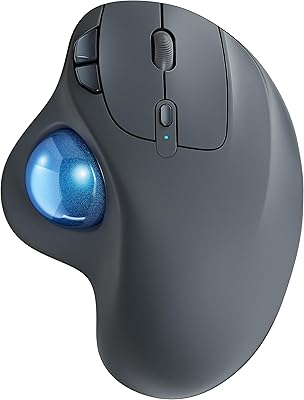
76%
86%
Ergonomic Comfort
74%
Trackball Precision
61%
Build Quality
83%
Wireless Reliability
79%
Click Feel & Sound
More
ProtoArc EM04 Wireless Trackball Mouse
86%
88%
Ergonomics & Comfort
91%
Battery Life
84%
Ease of Use
89%
Connection Versatility
85%
Precision & Control
More
PORLEI TM550 Wireless Trackball Mouse
75%
88%
Ergonomic Comfort
84%
Trackball Size & Control
86%
Multi-Device Connectivity
73%
Battery Life
54%
DPI Adjustment Usability
More
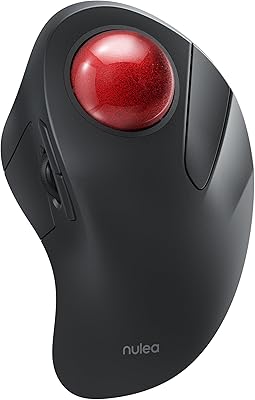
Nulea M501
Nulea M501
72%
83%
Ergonomic Comfort
78%
Trackball Smoothness
86%
Multi-Device Connectivity
91%
Value for Money
74%
Battery Life
More
Kensington MY630 EQ Wireless Rechargeable Mouse
86%
89%
Ergonomics and Comfort
90%
Battery Life
87%
Connectivity Options
88%
Ease of Setup
84%
Programmable Buttons
More
ProtoArc EM01 NL Wireless Trackball Mouse
74%
83%
Ergonomic Comfort
88%
Multi-Device Connectivity
74%
Trackball Precision & Smoothness
79%
Build Quality & Materials
61%
Learning Curve
More
Nulea M505 Wireless Trackball Mouse
75%
83%
Ergonomic Comfort
58%
Learning Curve
91%
Battery Life
78%
Multi-Device Connectivity
72%
Cursor Precision & DPI Control
More

FAQ

It can be, but go in with realistic expectations. Most first-time trackball users find the thumb-ball motion feels awkward for at least the first week — your thumb simply isn't trained yet for fine cursor control. Stick with it past that initial phase and the comfort benefits tend to become obvious, especially if wrist pain was the reason you were looking at trackballs in the first place.

Yes, it is genuinely plug-and-play on both platforms. Plug in the nano receiver or pair via Bluetooth and the device is recognized immediately — no driver disc, no software download required. If you want to remap buttons beyond the defaults, Kensington's optional desktop app adds that layer, but it is not needed for basic use.

The TB450 stores up to three paired devices — say a desktop, a laptop, and a tablet — and lets you switch between them with a dedicated button on the device. There is no complex re-pairing process; it is closer to the experience you get with a Bluetooth keyboard that has profile buttons. The switching itself is quick, usually just a second or two.

For everyday office tasks, most users won't notice a meaningful difference in latency between the two modes. The 2.4GHz connection via the nano receiver does tend to be slightly more stable in environments with heavy Bluetooth traffic, and it also offers the longer battery life rating. If you have a free USB port and don't need Bluetooth, 2.4GHz is the slightly safer daily choice.

Unfortunately, no. The sculpted body and thumb ball position are designed specifically for right-hand use, and there is no mirrored left-handed version of this model. Left-handed users would need to look at a different product category, such as a finger-operated trackball with a centered ball, which can often work for either hand.

Kensington rates the battery at up to 18 months on 2.4GHz and around 15 months on Bluetooth, which aligns with what most buyers report in practice for moderate daily use. When the battery gets low, most users notice the cursor becoming erratic or the device briefly disconnecting. Since it runs on a standard AA battery, a replacement costs almost nothing and takes about ten seconds to swap.

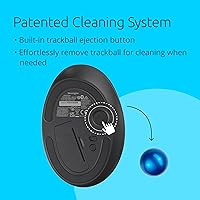
Yes, the 34mm ball pops out fairly easily for cleaning, which is important because dust and debris can accumulate around the sensor and cause the cursor to skip or drag over time. A quick wipe of the ball and the socket every few weeks keeps tracking smooth — it is one of the low-key maintenance habits that trackball users pick up quickly.

If you are new to trackballs, start at 800 DPI — it is the middle ground that gives you enough cursor speed without requiring hyper-precise thumb movements you haven't developed yet. Once you have a week or two of muscle memory built up, you can experiment with 1200 for a larger monitor or drop to 400 if you are doing anything that needs careful, deliberate cursor placement.

Both sit in a similar price and category bracket, and the choice often comes down to ergonomic preference. The TB450's 45-degree tilt is more aggressive, which some users find more comfortable for forearm alignment, while the M575 has a larger trackball that certain users find easier to control precisely. Kensington's multi-device pairing for three devices is a notable advantage over the M575 if you regularly switch between machines.

This is actually one area where trackballs shine compared to regular mice — because you are moving the ball rather than the whole device, the TB450 can sit on almost any surface, including your leg, a couch armrest, or a book. Stability matters more than flatness, so as long as the device doesn't wobble, your surface choice is pretty flexible.

Where to Buy