Overview

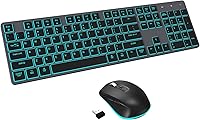
The POWZAN RF425-Backlit Wireless Keyboard Mouse Combo sits in that practical middle ground where thoughtful features meet an accessible price — it's not trying to compete with high-end mechanical setups, but it brings more to the table than a basic office peripheral. The flat, scissor-switch design feels instantly familiar if you've spent time on a modern laptop keyboard, making the transition to a desktop setup surprisingly smooth. It works natively across both Mac and Windows without any driver installation, which is a genuine convenience for anyone who bounces between systems. And because both devices recharge via USB-C, you're done quietly budgeting for AA batteries every few months.
Features & Benefits

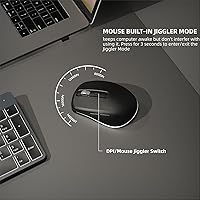
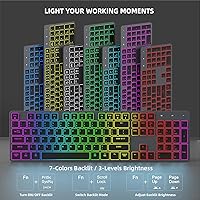
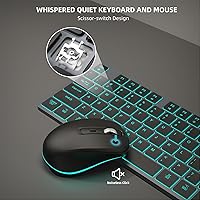
The scissor-switch keys are the real highlight — with just 2mm of travel and meaningful noise dampening, they're noticeably quieter than a standard membrane keyboard. Worth clarifying though: they're not whisper-silent the way dedicated quiet switches can be; you'll still hear yourself typing, just at a lower volume. The 7-color backlit keyboard and mouse add practical value for low-light work, with three brightness levels to dial in what the room needs. The mouse jiggler mode is more useful than it sounds — hold the DPI button for three seconds and the cursor keeps nudging on its own, keeping your screen active when you step away. One USB-A receiver connects this wireless combo to both devices simultaneously, and a folding stand adjusts the keyboard angle for wrist comfort.

Best For

This wireless combo makes the most sense for remote workers or students sharing a bedroom or apartment — the reduced typing noise is genuinely considerate of people nearby, even if it won't satisfy anyone craving a truly silent setup. If you regularly switch between Mac and Windows machines, not having to re-pair or install drivers is a real convenience. The rechargeable setup appeals to anyone who finds the disposable battery cycle tedious. Minimalist desk setups benefit from the slim, low-profile footprint, and the built-in jiggler is a surprisingly practical bonus for anyone on a corporate network that locks the screen aggressively after a few idle minutes.

User Feedback

Buyers who've picked up this rechargeable keyboard and mouse consistently appreciate the flat typing experience — it resonates particularly with anyone coming from a chiclet-style laptop keyboard — and the quieter keystrokes earn steady praise in shared living situations. The jiggler feature, which might sound gimmicky at first glance, has won over corporate users who deal with aggressive IT-enforced screen lock policies. Where opinions split is on battery life with backlighting on: real-world use lands around nine hours for the mouse and twenty for the keyboard, well short of the headline figures. Some buyers also describe the plastic construction as feeling functional rather than premium, and a few have flagged occasional USB receiver recognition issues on first setup.

Pros

  • Scissor-switch keys are noticeably quieter than membrane keyboards, making late-night or shared-space typing far less disruptive.
  • Works plug-and-play on both Mac and Windows — no drivers, no configuration headaches.
  • The built-in mouse jiggler prevents screen lock during breaks, a genuinely useful feature for remote workers.
  • USB-C charging on both devices eliminates the ongoing cost and inconvenience of disposable batteries.
  • A single USB-A receiver connects both devices, keeping port usage minimal on laptops with limited slots.
  • Seven-color backlit keys and mouse make low-light use comfortable without squinting at unlabeled keys.
  • The folding keyboard stand offers a useful tilt adjustment that helps reduce wrist fatigue during long sessions.
  • Full 104-key layout means no hunting for missing keys or adjusting to a compact layout.
  • 33-foot wireless range gives real flexibility in how far you sit from the connected device.
  • One-year warranty with responsive customer support provides a reasonable safety net at this price tier.

Cons

  • Mouse battery life drops to around nine hours at full backlight brightness, requiring more frequent charges than many buyers expect.
  • The all-plastic build feels functional rather than premium — noticeable if you handle higher-end peripherals regularly.
  • No Bluetooth support means you cannot switch between two computers without physically moving the USB receiver.
  • The USB-C port on the receiver is an adapter that inserts into the USB-A dongle — not a standalone wireless connection, which confuses some buyers on setup.
  • Scissor switches, while quieter, still produce audible sound; anyone expecting near-silence may be disappointed.
  • Four DPI levels on the mouse offer limited precision control compared to dedicated productivity or creative mice.
  • Auto-sleep mode, while helpful for battery life, can cause a brief lag when waking the devices after idle periods.
  • No dedicated media keys or macro support limits usefulness for power users who rely on shortcut-heavy workflows.

Ratings

The scores below for the POWZAN RF425-Backlit Wireless Keyboard Mouse Combo were generated by our AI rating engine after analyzing thousands of verified purchase reviews from global buyers, with spam, bot-submitted, and incentivized feedback actively filtered out. Each category reflects the real distribution of buyer sentiment — strengths are credited where earned, and recurring pain points are scored honestly without softening. The result is a transparent snapshot of how this wireless combo actually performs in everyday use.
Typing Noise Level
83%
For buyers typing late at night or in shared apartments, the scissor-switch keys deliver a noticeably softer sound profile than a standard membrane keyboard — most users describe the difference as immediately obvious. Roommates and partners in the same room rarely notice keystrokes during calls or while sleeping nearby.
The keys are not silent by any stretch — in a very quiet room, the clicks are still audible. Users who compared this to purpose-built quiet-switch keyboards noted that the noise reduction, while real, falls short of what dedicated silent peripherals can achieve.
Typing Comfort
79%
21%
The flat, laptop-style feel resonates strongly with users who already spend hours on a MacBook or thin-and-light laptop keyboard — the 2mm key travel and moderate rebound feel familiar rather than foreign. The folding stand also gets quiet appreciation from users who prefer a slight backward tilt during long writing sessions.
Buyers accustomed to mechanical keyboards or deeper-travel keys sometimes describe the feel as too shallow or lacking tactile satisfaction. Extended typing sessions of four hours or more occasionally surface wrist fatigue complaints, particularly from users who prefer a more pronounced key response.
Mouse Jiggler Feature
86%
Remote workers dealing with aggressive corporate screen-lock policies consistently call the jiggler mode one of the standout reasons they chose this wireless combo — it keeps their status green on Slack and Teams without any third-party software. Activation is simple enough that buyers rarely need to re-read the manual after the first use.
A small portion of users find the three-second hold to activate the jiggler a bit unintuitive until they memorize the gesture. There is also no visual indicator on the mouse itself to confirm jiggler mode is active, which leaves some users unsure whether it actually engaged.
Battery Life
61%
39%
With backlighting fully disabled, both the keyboard and mouse last impressively long between charges — buyers who keep the lights off for daily productivity work rarely think about charging more than once every few weeks. The USB-C standard makes topping up quick and convenient without hunting for proprietary cables.
The mouse battery life collapses to around nine hours at full backlight brightness, which is a significant real-world limitation for users who keep illumination on throughout the workday. Several reviewers expressed frustration at discovering this gap between the advertised headline figure and the backlit reality after purchase.
Cross-Platform Compatibility
88%
The plug-and-play experience on both Windows and macOS earns consistent praise — buyers who use a Mac at home and a Windows machine at work appreciate not needing to re-pair or install anything when swapping the receiver between machines. Function keys behave as expected on both systems without remapping.
There is no Bluetooth support and no multi-device pairing, so switching between two computers requires physically moving the USB receiver each time. For buyers who expected one-button device switching, this is a genuine workflow friction point.
Build Quality
63%
37%
Most buyers who use this rechargeable keyboard and mouse for everyday office tasks find the build perfectly adequate — nothing rattles, the keys feel consistent across the layout, and the overall construction holds up fine for daily desk use over several months.
The all-plastic body is a recurring talking point in negative reviews, especially from buyers who handle more expensive peripherals regularly. A few users report minor flex in the keyboard body when pressing firmly at the center, and the mouse feels lighter and less solid than some competitors at a similar price.
Backlight Quality
74%
26%
The seven-color backlight with three brightness levels provides practical value for low-light environments — buyers who work in dim home offices or use the keyboard in bed find the illumination genuinely useful and visually appealing. Having both the mouse and keyboard backlit in matching colors is a nice cohesion detail.
The backlight is not per-key and tends to bleed slightly unevenly across the keyboard surface, which some detail-conscious buyers find distracting. At the lowest brightness setting, a handful of keys on the edges of the keyboard can appear dimmer than those in the center.
Wireless Reliability
71%
29%
The vast majority of buyers report a stable, lag-free connection throughout normal desk use within a typical home office environment. The 33-foot range claim holds up credibly in open spaces, and most users experience no notable dropout during everyday tasks.
A recurring minority of reviewers report initial setup hiccups — primarily the receiver not being recognized immediately on first plug-in, requiring a USB port change or system restart to resolve. Interference in crowded wireless environments like apartment buildings with many networks has also been noted occasionally.
Mouse Precision & Performance
67%
33%
For general productivity use — web browsing, document editing, spreadsheets — the four DPI levels cover enough range that most office users find a comfortable sensitivity setting fairly quickly. The forward and back navigation buttons add practical value for browser-heavy workflows.
Anyone doing design work, photo editing, or gaming will find the DPI options limiting and the overall mouse tracking less precise than dedicated productivity or creative mice. The button click resistance on some units has also drawn minor complaints about inconsistent feel between left and right buttons.
Setup Experience
82%
18%
Buyers consistently describe the unboxing and setup process as refreshingly straightforward — plug in the receiver, flip the power switch on both devices, and they connect within seconds. No app, no Bluetooth pairing screen, and no waiting for drivers made first impressions strongly positive.
The USB-C adapter that inserts into the USB-A receiver causes genuine confusion for a notable share of buyers who assume the USB-C port is an independent wireless connection. Without reading the manual carefully, this misunderstanding leads to setup frustration that a clearer label or packaging callout could easily prevent.
Rechargeability & Cable Setup
78%
22%
Switching away from disposable AA batteries is one of the most consistently appreciated aspects of this wireless combo among long-term owners — the USB-C standard means the included cable is interchangeable with other modern devices, and the roughly three-hour charge time is generally seen as reasonable.
Only one USB-C charging cable is included in the box, meaning you have to charge the keyboard and mouse sequentially rather than simultaneously unless you supply your own second cable. This is a minor but recurring inconvenience noted by buyers who prefer to top up both devices at the same time overnight.
Value for Money
76%
24%
The combination of rechargeable batteries, backlighting on both devices, a jiggler feature, and scissor-switch keys in a single mid-range package is genuinely competitive — buyers who compare individual feature costs against alternatives frequently conclude this wireless combo over-delivers for its price tier.
Buyers who prioritize build feel or wireless flexibility over feature count sometimes feel the value equation tilts the wrong way — a slightly higher spend on a competing combo can yield noticeably better materials and Bluetooth support. The value perception weakens for users who end up not using the backlight due to battery life concerns.
Ergonomics & Desk Footprint
72%
28%
The slim profile and full 104-key layout strike a balance that minimizes desk clutter without sacrificing key coverage — buyers with smaller desks or tidy setups frequently mention the compact footprint as a meaningful factor in their purchase decision. The adjustable stand is a welcome addition that improves posture for many users.
The keyboard is still a full-size layout, so buyers hoping for a genuinely compact or tenkeyless option will be disappointed. The stand, while functional, does not offer multiple angle settings — it is a fixed tilt when open, which may not suit all wrist preferences.
Warranty & Support
69%
31%
The one-year replacement guarantee provides a reasonable confidence buffer for a mid-range purchase, and multiple reviewers cite positive experiences with the manufacturer responding within the promised 24-hour support window for troubleshooting queries.
The warranty covers replacement but does not specify repair or individual component coverage, which concerns buyers who experience a single-device failure — losing the receiver or one device to a defect may require replacing or re-purchasing the full combo depending on how the claim is handled.

Suitable for:

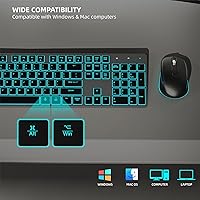
The POWZAN RF425-Backlit Wireless Keyboard Mouse Combo is a strong fit for home office workers, students, and anyone who types in a shared or noise-sensitive environment — think a partner sleeping nearby, a roommate on a call, or an open-plan office where clicky keys draw glares. The flat, scissor-switch layout will feel immediately natural to anyone who already likes typing on a modern laptop keyboard and wants that same low-profile feel at their desk. Cross-platform users get genuine value here, since this rechargeable keyboard and mouse works on both Mac and Windows out of the box without any driver setup or re-pairing. The built-in jiggler feature is a quiet win for remote employees whose corporate systems lock the screen after just a few idle minutes, saving repeated logins throughout the workday. If you're also tired of hunting for AA batteries at inconvenient times, the USB-C rechargeable setup is a straightforward improvement to daily desk life.
Not suitable for:

The POWZAN RF425-Backlit Wireless Keyboard Mouse Combo is not the right call for users who demand a truly silent typing experience — scissor switches reduce noise meaningfully, but they are not in the same category as purpose-built quiet switches found in premium silent keyboards. Serious gamers should look elsewhere entirely; four DPI levels and a standard wireless connection do not meet the precision and latency expectations of competitive play. Anyone who keeps backlighting on for most of the workday will find the battery life on the mouse — around nine hours at full brightness — requires more frequent charging than the headline figures suggest. Power users who rely on Bluetooth multi-device switching will also hit a wall, since this wireless combo uses a dedicated 2.4GHz USB receiver rather than Bluetooth, meaning no pairing flexibility across multiple computers. Finally, buyers expecting a sturdy, aluminium-bodied build at this price point may find the all-plastic construction underwhelming in hand.
Specifications

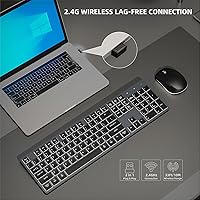
  • Connectivity: Both the keyboard and mouse connect via a single 2.4GHz USB-A wireless receiver, with a USB-C adapter included to fit into the dongle — not a separate wireless channel.
  • Wireless Range: The 2.4GHz connection maintains a stable signal at distances of up to 33 feet from the receiver under typical conditions.
  • Key Switch Type: The keyboard uses scissor-switch mechanisms with 2mm of key travel, designed to reduce noise compared to standard membrane keyboards while preserving tactile feedback.
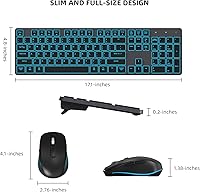
  • Key Count: The keyboard features a full-size 104-key layout, including a dedicated numpad, function row, and navigation cluster.
  • Backlight: Both the keyboard and mouse include a 7-color switchable backlight with three adjustable brightness levels, controlled independently on each device.
  • Battery Life: Without backlighting active, the keyboard runs up to 750 hours and the mouse up to 750 hours; with backlight at full brightness, those figures drop to approximately 20 hours for the keyboard and 9 hours for the mouse.
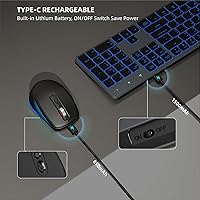
  • Charging: Both devices charge via an included USB-C cable and reach a full charge in approximately 3 hours using a 5V 1A power source.
  • Mouse DPI: The mouse offers four selectable DPI sensitivity levels to suit different surface types and user preferences.
  • Mouse Buttons: In addition to standard left, right, and scroll-click inputs, the mouse includes dedicated forward and backward navigation buttons and a DPI toggle that doubles as the jiggler activator.
  • Jiggler Mode: Holding the DPI button for 3 seconds activates jiggler mode, which causes the cursor to move automatically at set intervals to prevent the computer from entering sleep or lock mode.
  • Keyboard Dimensions: The keyboard measures 19.93 x 4.96 x 0.28 inches when lying flat, with a folding stand on the underside that raises the rear edge for a more ergonomic typing angle.
  • Combo Weight: The combined weight of the keyboard and mouse is approximately 1.87 pounds.
  • OS Compatibility: The combo is compatible with Windows XP through Windows 11 and macOS, operating as a plug-and-play device with no driver installation required.
  • Power Management: Both devices include an independent physical on/off switch and an auto-sleep function that activates after a period of inactivity to conserve battery.
  • Noise Reduction: The scissor-switch keys are rated for approximately 90% noise reduction relative to standard keyboards, though audible sound is still present during normal typing.
  • Key Durability: The scissor-switch keys are rated for up to 3 million keystrokes, and the keycaps use a matte UV coating intended to resist wear and fingerprint buildup.
  • In the Box: The package includes one wireless keyboard, one wireless mouse, one USB-A receiver with USB-C adapter, one USB-C charging cable, and a user manual.
  • Warranty: The combo is covered by a one-year replacement warranty, with customer support responding within a 24-hour window.

Related Reviews

BAIHUAFRU Wireless Backlit Keyboard and Mouse Combo
76%
88%
Visual Design & Aesthetics
84%
Lighting Customization
81%
Wireless Connectivity & Range
73%
Battery Life (Keyboard)
61%
Battery Life (Mouse)
More
Luzarriba Large Print Backlit Wireless Keyboard and Mouse Combo
78%
91%
Key Visibility & Readability
94%
Ease of Setup
67%
Backlight Quality
83%
Wireless Reliability
61%
Mouse Comfort & Usability
More
Arteck HW192 Wireless Keyboard and Mouse Combo
78%
78%
Build Quality
72%
Typing Experience
63%
Mouse Comfort & Ergonomics
81%
Battery Life
69%
Wireless Connectivity
More
TKVPJYYI Wireless Retro Typewriter Keyboard and Mouse Combo
76%
88%
Design & Aesthetics
71%
Typing Experience
62%
Mouse Performance
58%
Build Quality
83%
Wireless Connectivity
More
JOYACCESS Wireless Keyboard and Mouse Combo
82%
88%
Value for Money
83%
Typing Experience
74%
Mouse Performance
86%
Backlight Quality
81%
Battery Life
More
FOPETT Retro Wireless Keyboard and Mouse Combo
82%
93%
Design & Aesthetics
76%
Typing Experience
67%
Mouse Performance
88%
Wireless Connectivity
91%
Battery Life
More
CHESONA Multi-Device Wireless Keyboard and Mouse Combo
79%
88%
Multi-Device Switching
81%
Keyboard Typing Feel
61%
Mouse Quality
84%
Battery Life
74%
Wireless Connectivity Stability
More
GEEZER Wireless Keyboard and Mouse Combo
72%
83%
Value for Money
91%
Aesthetic Design
94%
Ease of Setup
67%
Typing Feel
62%
Mouse Quality
More
ULSOU Wireless Ergonomic Keyboard and Mouse Combo
74%
88%
Value for Money
84%
Typing Comfort
86%
Key Noise Level
57%
Key Feel & Tactility
61%
Mouse Performance
More
Letton Wireless Retro Keyboard and Mouse Combo
78%
93%
Visual Design & Aesthetics
91%
Setup & Ease of Use
61%
Typing Feel & Key Travel
84%
Wireless Reliability
58%
Mouse Performance
More

FAQ

No, there's nothing to install. Just plug the USB-A receiver into your computer, power on the keyboard and mouse, and they connect automatically. It works the same way on both Windows and macOS right out of the box.

This is a common point of confusion worth clearing up: the USB-C adapter is not a separate wireless receiver. It's a small plug that inserts into the USB-A dongle, allowing you to connect the receiver to computers or hubs that only have USB-C ports. The actual wireless signal still runs through the USB-A receiver itself.

The scissor switches are genuinely quieter than a typical membrane or mechanical keyboard — you'll notice the difference immediately. That said, they're not completely silent. You can still hear yourself typing, especially in a very quiet room. If you need near-total silence, a dedicated quiet-switch keyboard would be a better fit, but for most shared spaces or late-night work sessions, these are quite considerate of those around you.

Hold down the DPI button on the mouse for three seconds and it enters jiggler mode, where the cursor nudges automatically at regular intervals. This prevents your computer from locking the screen or going to sleep while you're away from your desk. It's particularly handy if your workplace IT policy locks your machine after just a couple of idle minutes. Press the DPI button again briefly to exit the mode.

The 750-hour figure applies when both devices are used with the backlight completely off, which is the best-case scenario. In real-world use with the backlight on, expect around 20 hours from the keyboard and roughly 9 hours from the mouse before needing a charge. If you keep the backlight off or at low brightness most of the time, battery life improves significantly. The good news is that a full recharge only takes about 3 hours.

Unfortunately, no. This wireless combo uses a dedicated 2.4GHz USB receiver rather than Bluetooth, so there's no built-in multi-device switching. To use it with a second computer, you'd need to physically move the USB receiver. If swapping between machines frequently is important to you, a Bluetooth-capable keyboard and mouse would be a better option.

Yes, it connects and works on macOS without any setup. The standard function keys and navigation buttons operate as expected. Keep in mind that, like most Windows-layout keyboards used on a Mac, some key labels may differ from what macOS shows — for example, the Windows key acts as the Command key — but day-to-day typing and navigation work fine without any remapping.

Both the keyboard and the mouse are rechargeable using the included USB-C cable — no disposable batteries required. You charge them the same way you would a phone, and a full charge takes around 3 hours. The POWZAN RF425-Backlit Wireless Keyboard Mouse Combo includes a single charging cable, so you'll need to charge each device separately unless you have a second USB-C cable handy.
It does help, especially for longer sessions. The stand raises the rear edge of the keyboard slightly, creating a positive tilt angle that many people find more comfortable than typing on a completely flat surface. It won't replace a dedicated wrist rest if you already have wrist issues, but it's a thoughtful addition that improves the experience for most users.

This is worth considering before buying. The keyboard and mouse are paired specifically to the included USB-A receiver, and a replacement isn't something you can easily source separately. If the receiver is lost or damaged, you'd likely need to contact the manufacturer directly within your warranty period for assistance. It's a good idea to store the receiver somewhere consistent — conveniently, it stows inside the mouse when not in use.