Overview

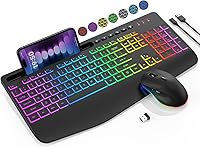
The SABLUTE KL3 Pro is a wireless keyboard and mouse combo that punches well above its price bracket, targeting students and home office workers who want a capable, rechargeable setup without spending a fortune. SABLUTE is a relatively new name in peripherals, but this keyboard combo has quietly climbed into the top rankings on Amazon — which tells you something. The full-size layout comes with an integrated wrist rest and a built-in phone holder, making it feel like a more complete desk solution than most budget sets. One thing to flag upfront: connectivity runs through a 2.4GHz USB-A dongle, so Bluetooth users and tablet owners should look elsewhere.

Features & Benefits

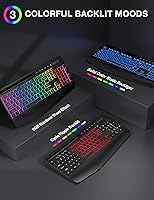
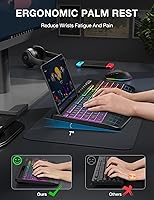
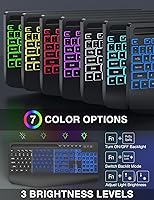
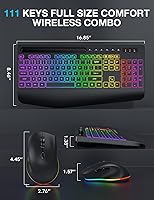
The wrist rest here is wider than what you typically find on combos in this range — at 2.8 inches, it genuinely supports your palm during long typing stretches rather than just sitting there for show. Lighting-wise, you get nine backlight effects including a rainbow cycle and seven solid colors, all toggled with a single key tap — handy when you share a space and need to kill the lights fast. The keys are quiet enough for late-night work, and the six-button mouse includes forward and back navigation buttons, which makes a real difference for everyday browsing. A smart sleep mode kicks in during idle periods, and both devices recharge over USB, so there are no disposable batteries to worry about.

Best For

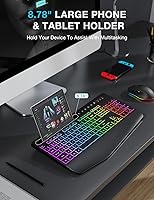
This wireless set hits the sweet spot for students and remote workers who need a full-featured desk setup without breaking the bank. If you share living space with roommates or family — or regularly type past midnight — the quiet keys and mouse clicks make it a considerate choice. The built-in phone holder is more useful than it sounds: prop your phone up during video calls or keep a tutorial visible while you work on the main screen. Mac users, however, should know that multimedia shortcut keys have limited macOS functionality, so if you rely heavily on those, this might not be your best fit. Windows, Chrome OS, and Linux users get the full experience.

User Feedback

Buyers consistently call out wrist comfort and the RGB lighting as standout wins — especially given what this keyboard combo costs. The quiet typing experience also earns consistent praise from people working in shared spaces. On the flip side, the mouse tops out at 1600 DPI, which is fine for general use but will feel limiting if you do any graphic work or gaming on the side. A few users have noted that the auto-sleep wake-up can sometimes lag a beat. Build quality is honest plastic — nothing feels cheap, but nothing feels premium either, which is exactly what you should expect here. Longevity reports are generally positive, though some buyers mention monitoring charging port wear over time.

Pros

  • Rechargeable internals mean no disposable batteries to buy or replace mid-workday.
  • The 2.8-inch wrist rest provides real palm support during long typing sessions, not just decorative padding.
  • Nine backlight effects with a one-tap toggle make lighting adjustments fast and practical in shared spaces.
  • Silent keys and a quiet mouse make this wireless set considerate for shared apartments and late-night work.
  • The built-in phone holder keeps your device visible during video calls without adding another accessory to the desk.
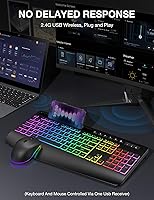
  • Plug-and-play setup through a single USB-A dongle — no drivers, no software, no configuration needed.
  • Forward and back mouse buttons add genuine everyday utility for browsing and document navigation.
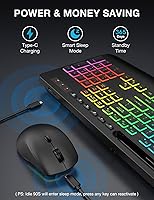
  • Smart sleep mode conserves charge during idle periods without requiring manual power management.
  • Full-size layout with numpad suits spreadsheet and data-entry users who find tenkeyless keyboards limiting.
  • Strong value density — wrist rest, phone holder, RGB, and rechargeable power in one budget-friendly package.

Cons

  • No Bluetooth support means you cannot switch between devices or connect to laptops with limited USB-A ports.
  • Mac users lose most multimedia shortcut key functionality, which is a significant daily inconvenience.
  • The 1600 DPI mouse ceiling feels restrictive for anyone doing creative work, detailed editing, or light gaming.
  • No USB-C dongle is included, so tablets, smartphones, and many modern ultrabooks cannot connect at all.
  • The wrist rest is fixed and non-adjustable, which may not suit users with larger hands or non-standard desk heights.
  • Key legends are printed rather than laser-etched, raising concerns about fading for heavy daily typists over time.
  • The auto-sleep wake-up occasionally lags a noticeable beat, which is frustrating if you return to your desk frequently.
  • Losing the USB dongle renders the entire combo unusable, with no backup pairing or connectivity option.
  • The charging port on the keyboard may loosen with frequent cable cycles, according to longer-term user reports.
  • Backlight brightness is uneven across some units, and the glow washes out noticeably in well-lit office environments.

Ratings

The SABLUTE KL3 Pro has been evaluated by our AI rating engine after processing thousands of verified global user reviews, with spam, bot activity, and incentivized feedback actively filtered out. What emerges is a nuanced picture of a budget wireless keyboard combo that genuinely delivers in some areas while showing predictable limitations in others. Both the strengths that keep buyers satisfied and the pain points that prompt returns are reflected transparently in the scores below.

Value for Money
91%
For the price bracket this wireless set occupies, the sheer number of included features — wrist rest, phone holder, RGB lighting, rechargeable batteries — is hard to argue with. Most buyers feel they received significantly more than they paid for, especially when comparing to similarly priced combos that lack even basic backlighting.
A small segment of buyers expected build quality closer to mid-range competitors and felt let down when the plastic construction reminded them of the actual price point. Value perception drops sharply for Mac users who discover multimedia key limitations after purchase.
Typing Comfort
83%
The 2.8-inch wrist rest is the feature buyers mention most positively. People logging four to six hours of daily typing — whether handling spreadsheets or writing assignments — report noticeably less wrist fatigue compared to combos with narrower or absent palm support. It feels substantial rather than decorative.
The wrist rest is fixed and non-removable, which means taller users or those with larger hands may find the ergonomic angle less than ideal. A few reviewers noted it sits slightly lower than their preference, and there is no height adjustment to compensate.
Key Quietness
88%
The silent membrane switches earn consistent praise from people sharing apartments or working while others sleep nearby. The muted click is soft enough to use during late-night work sessions without generating the kind of clatter that irritates roommates or partners in the same room.
Compared to dedicated quiet mechanical switches, the membrane feedback feels slightly mushy to touch typists who prefer tactile confirmation. It is quiet, but the trade-off is a softer, less satisfying keystroke for users accustomed to better key travel.
RGB Lighting Quality
79%
21%
Nine lighting effects — including seven solid colors and a full rainbow cycle — give this keyboard combo a visual range that typically costs more. The one-tap toggle is genuinely useful in shared spaces where you need to kill the glow quickly without hunting through software menus.
The backlighting is not individually addressable per key, so customization is limited to preset modes. In brighter room conditions, the glow loses some of its impact, and a handful of buyers noted slight unevenness in LED brightness across the keyboard.
Mouse Performance
67%
33%
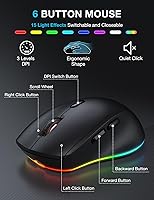
The six-button layout — with dedicated forward and back buttons — is a practical upgrade over basic three-button mice. For everyday tasks like web browsing, document navigation, and video streaming, the three DPI levels (800, 1200, and 1600) cover what most casual users actually need at a desk.
The 1600 DPI ceiling is the most common complaint from buyers who do any creative work, photo editing, or light gaming on the side. The mouse feels adequate but unexciting, and users upgrading from a quality standalone mouse will likely notice the drop in precision and scroll wheel feedback.
Wireless Connectivity & Stability
84%
The 2.4GHz USB-A dongle delivers a reliable, low-latency connection across typical desk distances. Buyers working from couches or across a room report no meaningful lag or dropout, which matters more in daily use than most spec sheets suggest.
The absence of Bluetooth is a real limitation for users who regularly switch between devices or own thin laptops with few USB-A ports. There is also no USB-C dongle option, which rules out direct use with tablets, smartphones, or newer ultrabooks that lack full-size USB ports.
Battery Life & Charging
81%
19%
Rechargeable internals are a meaningful convenience advantage over AA-battery combos in this price range. The smart sleep mode activates reliably during idle periods, and most buyers report charge cycles that last through multiple full workdays before needing to plug back in.
A subset of users flagged that the auto-sleep wake-up occasionally takes a beat longer than expected — noticeable when you return to the desk and tap a key expecting instant response. Long-term charging port durability has also been flagged in a handful of reviews, though it is not a widespread pattern yet.
Build Quality & Materials
63%
37%
For a budget wireless set, the construction holds together well under daily desk use. The keyboard frame resists minor flex during fast typing, and the mouse feels solid enough in hand without the hollow rattle common in the lowest price tier.
There is no getting around the all-plastic build — it looks and feels like a budget product at close range. The matte finish attracts smudges on the mouse, and the wrist rest material, while functional, is not particularly premium to the touch over extended sessions.
Phone Holder Utility
76%
24%
The built-in phone holder is a surprisingly practical addition that buyers use more than they expected. Propping up a phone during video calls, following a recipe, or keeping a tutorial visible while working on the main screen all become noticeably smoother with the holder in place.
The holder is fixed in position and offers no angle adjustment, so depending on your monitor height and seating setup, glare or viewing angle can be awkward. It also sits at the top of the keyboard, which shifts your viewing distance slightly further than a standalone phone stand would.
Setup & Plug-and-Play Ease
92%
Buyers consistently highlight how fast this keyboard combo is to get running — plug in the dongle, and both the keyboard and mouse connect without any driver installation or software setup. For first-time home office builders or less tech-savvy users, the zero-configuration experience is genuinely appreciated.
Because everything runs through a single shared dongle, losing or damaging it renders the entire set unusable. There is no pairing reset button or backup connectivity method, which is a practical concern for frequent travelers or anyone prone to misplacing small accessories.
Mac Compatibility
44%
56%
Basic keystroke input and cursor movement work fine on macOS — the keyboard and mouse function as generic HID devices without issue. For Mac users who only need standard typing and navigation, the KL3 Pro will technically operate without problems.
The multimedia shortcut keys — volume, brightness, media playback — do not function as expected on macOS, which is a significant drawback for buyers who rely on those keys daily. This limitation is not prominently disclosed at the point of purchase, and it is the single biggest driver of disappointed Mac user reviews.
Desk Footprint & Layout
77%
23%
The full-size layout with a dedicated numpad suits users who handle spreadsheets or data entry regularly. At just two pounds for the full set, the combo does not feel cumbersome, and the overall desk presence is tidy given how many features are packed into the keyboard frame.
The integrated wrist rest adds meaningful horizontal depth to the keyboard, which can feel crowded on smaller desks or compact workstations. Users working in tight spaces noted that the combo takes up more surface area than expected compared to standard tenkeyless or compact alternatives.
Multimedia & Shortcut Keys
72%
28%
Six dedicated one-touch media keys plus the full F1 through F12 row make daily workflow tasks — adjusting volume, skipping tracks, or launching shortcuts — faster without memorizing complex combinations. Windows and Chrome OS users get the most out of this feature set.
The shortcut key functionality is hard-coded and non-remappable, so power users who want custom assignments are out of luck. Mac users lose most of this utility entirely, and the physical labels on the shortcut keys are small enough to require a learning period before muscle memory kicks in.
Long-Term Durability
68%
32%
The majority of buyers who have used the wireless set for six months or more report no major failures — keys remain responsive, the mouse scroll wheel stays consistent, and the rechargeable cells hold charge reasonably well over time. For a budget combo, that is a solid reliability baseline.
Early indicators from longer-term reviewers suggest the USB charging port on the keyboard may loosen with frequent plugging and unplugging cycles. Key legends also show early signs of fading for heavy typists, which is a common trade-off with printed rather than laser-etched keycaps at this price tier.

Suitable for:

The SABLUTE KL3 Pro is a strong fit for students setting up their first real desk space and remote workers who want a capable, feature-rich combo without committing to a premium budget. If you share a home with light sleepers, roommates, or young children, the silent keys and quiet mouse clicks make this wireless set a genuinely considerate choice for late-night work or early morning sessions. The wide wrist rest and integrated phone holder mean you are getting a more complete desk setup than most combos in this range offer, which matters when you are trying to minimize clutter on a small study or home office desk. Windows, Chrome OS, and Linux users will get the full experience without any functionality gaps, and anyone stepping up from a basic non-backlit combo will notice an immediate improvement in both comfort and workspace ambiance. If your priority is a rechargeable, hassle-free setup that works out of the box without drivers or software fuss, this keyboard combo checks that box cleanly.

Not suitable for:

The SABLUTE KL3 Pro is not the right choice for Mac-primary users who depend on multimedia shortcut keys for daily workflow — volume controls, brightness adjustments, and media playback functions are significantly limited on macOS, and that frustration shows up repeatedly in buyer feedback. Anyone who regularly switches between two or more devices will also find this wireless set limiting, since it connects exclusively through a single USB-A dongle with no Bluetooth fallback and no way to pair with a second machine quickly. Tablet and smartphone users should look elsewhere entirely — there is no USB-C dongle included, and the combo cannot connect to mobile devices at all. Power users who do photo editing, detailed design work, or even casual gaming will likely outgrow the 1600 DPI mouse ceiling faster than expected. Finally, buyers who prioritize long-term build durability or want a keyboard they can still rely on three to four years from now should set their expectations accordingly — this is honest everyday plastic, not a heirloom peripheral.

Specifications

  • Brand & Model: Manufactured by SABLUTE under the model designation KL3 Pro.
  • Dimensions: The keyboard measures 16.85 x 8.46 x 1.38 inches, making it a full-size layout with dedicated numpad.
  • Weight: The combined keyboard and mouse set weighs approximately 2 pounds.
  • Connectivity: Connects via a 2.4GHz USB-A wireless dongle; no Bluetooth or USB-C dongle option is available.
  • Key Type: Low-profile silent membrane switches designed to minimize typing noise in shared environments.
  • Backlighting: Features 9 backlight effects including 7 solid colors and 1 rainbow cycling mode, toggled with a single key.
  • Wrist Rest: Integrated fixed wrist rest measuring 2.8 inches in width, built directly into the keyboard frame.
  • Phone Holder: Built-in phone holder at the top edge of the keyboard accommodates devices up to 11.9 inches in size.
  • Mouse DPI: Three selectable DPI levels: 800, 1200, and 1600, switchable via a dedicated button on the mouse.
  • Mouse Buttons: Six-button mouse layout including left, right, scroll wheel click, DPI toggle, and forward and back navigation buttons.
  • Media Keys: Includes 6 dedicated one-touch media keys and a full F1 through F12 function row for daily workflow shortcuts.
  • Power Source: Both keyboard and mouse are powered by internal rechargeable lithium batteries charged via USB cable.
  • Sleep Mode: Automatic smart sleep mode activates during idle periods to conserve battery charge on both devices.
  • OS Compatibility: Fully compatible with Windows, Chrome OS, and Linux; Mac is partially supported with limited multimedia key functionality.
  • Included In Box: Package includes the wireless keyboard, wireless mouse, one shared USB-A 2.4GHz dongle, and a USB charging cable.
  • Not Included: A USB-C dongle is not included, and the combo is not compatible with tablets or smartphones.
  • Wireless Range: Standard 2.4GHz wireless operating range suitable for typical desktop and home office distances up to approximately 10 meters.
  • Keycap Printing: Key legends are printed onto the keycaps rather than laser-etched, which may show wear with prolonged heavy use.

Related Reviews

Ubiquiti UniFi Dream Machine Pro UDM-Pro
86%
94%
Performance
88%
Ease of Use
90%
Reliability
92%
Connectivity
85%
Network Security Features
More
DS18 PRO-DR1PK44 Compression Driver with PRO-H44/BK Horn
86%
96%
High-Frequency Loudness
93%
Sensitivity & Efficiency
88%
Vocal Clarity & Naturalism
86%
Build Quality & Materials
81%
Installation Versatility
More
DS18 PRO-ZXI10MBASS 10-inch Pro Audio Mid Bass Loudspeaker
86%
88%
Sound Quality
91%
Bass Performance
85%
Ease of Installation
87%
Durability and Build Quality
92%
Value for Money
More
Cinema Secrets Pro Cosmetics Ultimate Corrector 5-In-1 Pro Palette No.1
86%
91%
Effectiveness for Color Correction
88%
Blendability
84%
Coverage Customization
85%
Longevity of Wear
93%
Suitability for All Skin Tones
More
Apple MacBook Pro 14-inch M1 Pro 16GB RAM 1TB SSD
87%
95%
Performance
92%
Display Quality
89%
Battery Life
91%
Build Quality
82%
Value for Money
More
Cinema Secrets Pro Cosmetics Ultimate Foundation 5-In-1 Pro Palette 500A

88%
93%
Coverage & Pigmentation
85%
Skin Compatibility (Sensitive Skin)
88%
Ease of Application
90%
Longevity & Wear
91%
Versatility (Contouring & Concealing)
More
HP Pro Tower 290 G9 Desktop (i5-12500, 32GB RAM, 1TB SSD)

81%
96%
Multitasking Capability
91%
Value for Money
88%
Port Selection
84%
Thermal & Acoustic Performance
93%
Boot Speed & Storage
More
Edifier NeoBuds Pro
Edifier NeoBuds Pro
86%
94%
Sound Quality
91%
Noise Cancellation
89%
Battery Life
87%
Comfort & Fit
78%
Bluetooth Connectivity
More
Epson Pro EX11000
Epson Pro EX11000
89%
96%
Brightness & Clarity
94%
Color Accuracy
88%
Connectivity Options
90%
Setup & Installation
85%
Build Quality
More
JLab JBuds Pro
JLab JBuds Pro
85%
88%
Sound Quality
85%
Bass Response
91%
Fit & Comfort
82%
Battery Life
78%
Bluetooth Connectivity
More

FAQ

Partially. The SABLUTE KL3 Pro will function as a basic keyboard and mouse on macOS — standard typing and cursor movement work fine. However, the dedicated multimedia shortcut keys (volume, brightness, media playback) do not operate as expected on Mac, which is a meaningful limitation if those shortcuts are part of your daily workflow.

No — this wireless set connects only through a USB-A dongle, and there is no Bluetooth or USB-C dongle option included. It is designed exclusively for desktop computers and laptops that have a standard USB-A port available.

Yes, both devices pair through a single shared USB-A dongle, which keeps your port usage to a minimum. The downside is that if you lose that dongle, both the keyboard and mouse become unusable — so treat it carefully.

Battery life varies based on backlight usage, but most users report getting through multiple full workdays before needing to recharge. Both the keyboard and mouse charge via a standard USB cable. The smart sleep mode helps extend charge cycles significantly during idle periods.

The wrist rest is built into the keyboard frame and is neither removable nor adjustable in angle or height. It provides a fixed palm-support surface that works well for many users, but those with larger hands or specific ergonomic setups may find the fixed position less than ideal.

Quite quiet for a membrane keyboard. The silent switches produce a noticeably muffled keystroke that is well-suited for shared apartments, library settings, or working near sleeping family members. The mouse clicks are similarly dampened. That said, do not expect the near-silent experience of a premium quiet mechanical keyboard — this is good for the price tier, not class-leading.

The holder supports devices up to 11.9 inches, so most smartphones and smaller tablets should fit physically. However, since the combo cannot connect to tablets wirelessly, the holder is best used to keep your phone or small tablet visible for reference rather than as an active input device.

The mouse offers three DPI levels: 800, 1200, and 1600. For standard office tasks, web browsing, and document work, 1600 DPI is perfectly adequate. If you do photo editing, detailed graphic design, or light gaming, you may find the ceiling limiting — a dedicated higher-DPI mouse would serve those use cases better.

You can toggle the backlight on or off with a single key tap, which makes it easy to cut the glow when you are in a meeting, sharing a screen, or simply do not want the distraction. The light does not turn off automatically during sleep mode, but it reactivates when you wake the keyboard.

This is a legitimate concern worth flagging. The key legends are printed rather than laser-etched or double-shot molded, which means heavy daily typists may notice fading over time — typically after a year or more of intensive use. For general home office or student use, most buyers do not report visible fading within the first year.