Overview

The Luzarriba Large Print Backlit Wireless Keyboard and Mouse Combo is a practical, accessibility-focused peripheral set built for people who genuinely struggle to read standard keyboard text. It connects via a single 2.4GHz nano USB receiver — plug it in and you're done, no drivers, no software fuss. The box includes both pieces with batteries already inside. Designed primarily for seniors and low-vision users, it also suits anyone who simply wants a quieter, wireless desk setup without the clutter. The backlit keys add a secondary layer of comfort when typing in a dim room. This is a value-tier combo — practical and purposeful, not a premium workstation peripheral.
Features & Benefits

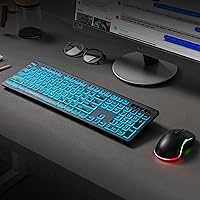
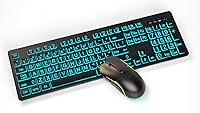
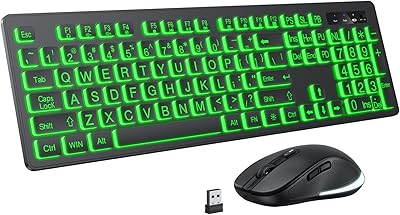
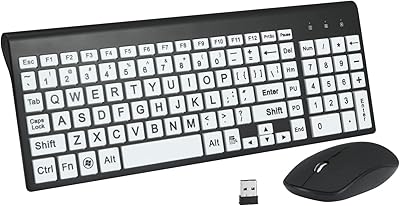
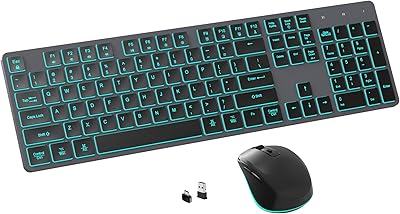
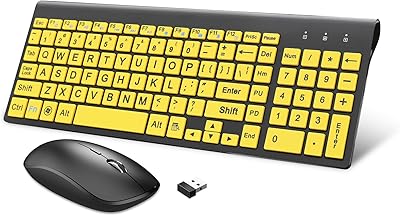
The keys here are noticeably larger than what you'd find on most standard keyboards, and the high-contrast lettering makes each character easy to spot at a glance — a real relief for extended typing sessions. The adjustable backlighting works well in dark or low-light rooms, though don't expect vivid studio brightness; it's sufficient without being dramatic. A built-in palm rest supports your wrist during longer stretches, and the full-size layout means no cramped keys or awkward spacing. The wireless reach extends up to 30 feet, and the auto-sleep mode helps stretch battery life so you're not constantly swapping cells. The contoured mouse fits comfortably in a right hand and scrolls smoothly.

Best For

This large-print keyboard combo is an especially good fit for seniors and older adults who've been squinting at tiny keyboard labels for too long. It's also worth considering if you have low vision or simply find standard-sized keys uncomfortable to read during extended computer use. Caregivers shopping for a parent or relative will appreciate the zero-setup experience — one USB receiver, no configuration needed. Work-from-home users who share a space will notice the pleasantly subdued key sound compared to a clicky mechanical board. And if you just want a no-fuss wireless combo for everyday browsing, writing emails, or video calls, this backlit wireless set keeps things simple and straightforward.

User Feedback

With over 128 ratings and a solid 4.2 out of 5 average, the Luzarriba combo has earned a respectable reception for a relatively new product. Reviewers frequently highlight how easy it is to read the keys and how quickly the whole thing sets up — many mention buying it as a gift for a parent. On the critical side, a few users find the mouse feels small, and some note that the backlight has a brightness ceiling that might disappoint those hoping for vivid illumination. The palm rest draws mixed reactions: appreciated by some for wrist support, found slightly awkward by others. Overall, expectations meet reality for most buyers here.

Pros

  • Oversized, high-contrast key labels make a real difference for users who struggle with standard keyboard text.
  • Plug-and-play setup with a single nano USB receiver — no software, no configuration, no hassle.
  • Batteries are included out of the box, so the set is ready to use immediately after unboxing.
  • Quiet key action suits shared spaces, home offices, and anyone sensitive to keyboard noise.
  • Auto-sleep mode actively preserves battery life during idle periods without any manual input.
  • The integrated palm rest adds wrist support that is rare and welcome at this price tier.
  • Wireless range handles typical room distances comfortably with no noticeable input lag.
  • The backlit wireless set works well for dim-room typing without harsh or distracting glare.
  • Full-size layout means no cramped keys or missing number pad — everything is where you expect it.

Cons

  • The bundled mouse is noticeably small and right-hand only, which will not suit all users.
  • Backlight brightness has a low ceiling — not suitable for anyone expecting vivid or adjustable multi-level illumination.
  • Key labels on some units have been reported to fade with heavy daily use, which is a real concern for the core audience.
  • The palm rest is fixed and non-detachable, making it awkward for some desk heights and sitting postures.
  • Key travel is shallow and feedback is minimal, which will disappoint anyone used to a more tactile typing experience.
  • Compatibility is effectively Windows-only — Mac and Chrome OS users may encounter limited or broken key functionality.
  • The nano USB receiver can feel loose in older USB ports, occasionally causing brief disconnections.
  • No Bluetooth option means users without a free USB port will need an additional hub.
  • Build materials feel lightweight, suggesting the combo may not hold up well to rough handling or frequent relocation.

Ratings

Our scores for the Luzarriba Large Print Backlit Wireless Keyboard and Mouse Combo were generated by AI after analyzing verified buyer reviews from multiple regions, with spam, bot-submitted, and incentivized feedback actively filtered out. The result is an honest picture of how real users — mostly seniors, caregivers, and low-vision PC users — actually experience this set day to day. Both what works well and what falls short are reflected transparently in every category below.
Key Visibility & Readability
91%
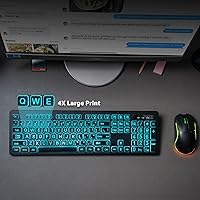
This is the standout strength of the backlit wireless set. Buyers consistently report that the oversized, high-contrast letters make a genuine difference — especially for users who previously had to lean in close just to find the right key. Several reviewers noted it removed daily frustration almost immediately.
A small number of users with more severe vision impairments felt the print, while larger than standard, still wasn't bold enough in certain lighting conditions. The contrast also depends on keeping the keys clean, as smudges dull the lettering over time.
Ease of Setup
94%
Plug the nano USB receiver in, insert the included batteries, and it works — that's genuinely the full setup process. Reviewers who described themselves as not tech-savvy repeatedly praised how nothing needed to be configured, downloaded, or figured out. Great for gifting to someone who just wants it to work.
A handful of users reported the receiver felt slightly loose in certain USB ports, which occasionally caused brief disconnections on older desktops. There's also no Bluetooth option, so users without an available USB port may find themselves needing a hub.
Backlight Quality
67%
33%
The backlighting does its job in a dim bedroom or home office with the lights turned low — letters are visible and the glow is comfortable rather than harsh. For evening browsing or writing emails after dark, most users find it perfectly adequate for casual use.
The brightness ceiling is modest. Users expecting vivid, multi-level illumination comparable to gaming keyboards will be disappointed. Several reviewers noted the backlight is essentially a single usable level in practice, and it has a measurable impact on battery life when left on continuously.
Wireless Reliability
83%
For typical home use — seated at a desk or on a couch within a normal room's distance — the 2.4GHz connection holds steady without noticeable lag or dropouts. Users appreciate not having to deal with Bluetooth pairing quirks or re-syncing after sleep.
The 30-foot range claim holds up in open spaces, but real-world interference from other wireless devices, thick walls, or dense furniture can shorten effective range. A few users flagged occasional brief input delays, though these were not consistent across reports.
Mouse Comfort & Usability
61%
39%
The contoured shape fits a right hand reasonably well for light daily tasks — browsing, clicking through documents, or video calls. The scroll wheel is smooth and responsive for its class, and the overall weight feels comfortable enough for extended casual sessions.
This is a recurring sore point. Users with larger hands or those accustomed to a full-size mouse find it notably small and somewhat cramped. It's strictly right-handed, and the click buttons offer less tactile feedback than most buyers expect, feeling a bit shallow.
Keyboard Typing Feel
69%
31%
The keys have a quiet, low-resistance feel that suits users in shared spaces or anyone who finds clicky keyboards fatiguing. For email writing, web browsing, and basic document work, the typing experience is smooth enough that most casual users won't have complaints.
Touch typists and anyone used to keyboards with meaningful key travel will find the feedback underwhelming. The keys feel slightly shallow and spring back quickly, which some describe as mushy. It's functional, but not satisfying in the way a mid-range keyboard would be.
Palm Rest & Ergonomics
72%
28%
Having an integrated palm rest at this price point is a genuine plus for users who type for stretches of 30 minutes or more. Several reviewers — particularly older adults — mentioned reduced wrist fatigue compared to keyboards they had used before.
The palm rest is fixed, not detachable, which doesn't suit everyone's desk height or sitting posture. A few users found it positioned their wrists at a slightly awkward angle depending on chair height, and the surface material can feel warm after extended contact.
Battery Life
78%
22%
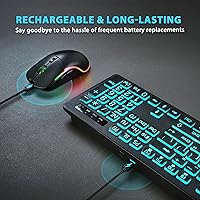
With the backlight off or used sparingly, battery life is solid for a value-tier wireless combo. The auto-sleep feature kicks in after periods of inactivity, which genuinely extends how long the included batteries last before needing replacement.
Leaving the backlight on significantly reduces longevity — some users report needing to replace batteries more frequently than expected when the light stays on all day. The keyboard and mouse also use different battery types, which adds a small inconvenience at replacement time.
Build Quality & Durability
62%
38%
For everyday home use, the construction feels adequate. The keyboard doesn't flex excessively during typing, and the mouse buttons don't rattle. Users who handle it gently and use it at a desk report no issues after several months of regular use.
This is clearly a budget build. The plastic feels lightweight in a way that suggests it won't hold up to rough handling or frequent relocation. A couple of reviewers noted key labels beginning to fade after heavy daily use, which is a concern for the core audience this combo is meant to serve.
Value for Money
84%
Considering what this large-print keyboard combo offers — wireless connectivity, backlighting, large keys, and a full-size layout — the price-to-feature ratio is genuinely strong. For buyers whose primary need is accessibility rather than performance, it delivers meaningfully more than bare-bones alternatives.
Buyers who stretch their expectations toward premium territory will feel the corners that were cut. If the mouse size or backlight brightness is a priority, spending more elsewhere may be worth it. The value proposition is tightly tied to the accessibility use case — it weakens outside that context.
Noise Level
87%
The subdued key sound is one of the quietly appreciated aspects of the Luzarriba combo. Users in shared apartments or home offices with others nearby mention that the keyboard doesn't disturb people in the same room, even during longer typing sessions.
There is still some audible click noise — it's not silent. Users who specifically need a near-silent keyboard for recording environments or very noise-sensitive spaces may find it just slightly louder than ideal, though it's not a common deal-breaker.
Compatibility & Plug-and-Play
88%
Works immediately on Windows laptops and desktops with no software installation — a real benefit for less tech-confident users. Reviewers who bought this for elderly relatives particularly appreciated that no technical support calls were needed after delivery.
Compatibility is limited to Windows in any officially supported sense. Mac users report partial functionality at best, and some special keys don't map correctly. There's no mention of Chrome OS or Linux support, so this combo has a narrower platform reach than some buyers might assume.
Gifting & Packaging Experience
76%
24%
A notable share of reviews mention this as a gift purchase — for a parent, grandparent, or older neighbor. The combo arrives ready to use with batteries included, which removes any assembly anxiety and makes it a thoughtful, practical choice for accessibility-focused gifting.
The packaging itself is functional but not polished — no premium unboxing experience here. For a gift, it works, but it won't impress on presentation alone. There's no printed quick-start guide included, which could confuse a recipient setting it up without help.

Suitable for:

The Luzarriba Large Print Backlit Wireless Keyboard and Mouse Combo was built with a very specific user in mind, and it genuinely delivers for that audience. Seniors and older adults who find themselves squinting at standard keyboard labels will notice an immediate improvement — the oversized, high-contrast keys simply make daily computer use less tiring and more confident. Caregivers and family members shopping for a less tech-savvy relative will appreciate that setup is truly plug-and-play: one USB receiver, batteries already included, nothing to install or configure. The quiet key action also makes this backlit wireless set a considerate choice for shared living spaces, home offices, or anyone who finds clicky keyboards unnecessarily loud. If your primary computer activities revolve around email, web browsing, video calls, and light document work on a Windows PC or laptop, this combo covers those bases reliably without overcomplicating anything.
Not suitable for:

The Luzarriba Large Print Backlit Wireless Keyboard and Mouse Combo has meaningful limitations that make it a poor fit for certain buyers, and it is worth being clear about those upfront. If you are a touch typist who relies on key travel and tactile feedback to maintain speed and accuracy, the shallow, low-resistance keys will likely frustrate you within a few days. Users with larger hands will find the bundled mouse notably small — it is right-hand only and sized more for compact grips, which rules out a good portion of potential buyers. The backlight, while useful in dim conditions, tops out at a modest brightness level, so anyone hoping for vivid illumination or multi-color customization should look elsewhere. Mac users and anyone on Chrome OS or Linux should also be aware that full compatibility is not guaranteed, and some keys may not function as expected outside of Windows. Finally, if durability under heavy daily use is a priority — or if key labels fading over time would be a particular frustration given that visibility is the whole point — a more robust build at a higher price point may serve better in the long run.
Specifications

  • Brand: Manufactured by Luzarriba, a brand focused on accessible and ergonomic computer peripherals.
  • Wireless Technology: Uses 2.4GHz wireless connectivity via a single nano USB receiver shared between keyboard and mouse.
  • Wireless Range: Rated for a maximum wireless operating range of up to 30 feet in open conditions.
  • Key Style: Full-size layout features oversized, high-contrast printed letters designed for improved readability at a normal viewing distance.
  • Backlight: Keyboard includes adjustable backlighting with illuminated keys to support comfortable typing in low-light environments.
  • Palm Rest: An integrated, non-detachable palm rest is built into the base of the keyboard for wrist support during extended use.
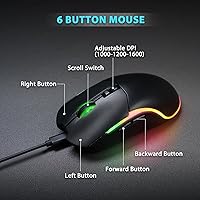
  • Mouse Design: Contoured ergonomic mouse sized for right-hand use, featuring a smooth scroll wheel and standard left and right click buttons.
  • Power Source: Both keyboard and mouse are battery-powered; batteries are included in the package and the set is ready to use out of the box.
  • Auto-Sleep: A built-in smart power management system automatically puts both devices into sleep mode after a period of inactivity to preserve battery life.
  • Package Dimensions: The retail package measures 17.56 x 8.11 x 2.05 inches, accommodating both the full-size keyboard and mouse together.
  • Item Weight: The complete packaged unit weighs 1.2 pounds, reflecting the lightweight plastic construction of both devices.
  • Compatible Devices: Designed to work with Windows-based laptops and desktop personal computers via the included USB receiver.
  • OS Compatibility: Officially compatible with Windows operating systems; full functionality on Mac, Chrome OS, or Linux is not guaranteed.
  • Setup Method: Plug-and-play design requires no driver installation or software download — the USB receiver connects directly and the devices work immediately.
  • Color: Available in black with high-contrast white lettering on the keycaps for maximum visual clarity.
  • Connectivity Port: Requires one standard USB-A port on the host computer to accommodate the nano wireless receiver for both devices.
  • Battery Requirement: Requires one nonstandard battery type (included); keyboard and mouse may use different battery formats so check each compartment before replacing.
  • Availability Date: This product was first made available for purchase in May 2025, making it a relatively recent market entry.

Related Reviews

Fonicer Large Print Wireless Keyboard and Mouse
85%
91%
Ease of Use for Visually Impaired Users
89%
Quiet Operation
87%
Comfort and Ergonomics
83%
Wireless Connectivity
93%
Key Size and Visibility
More
KOPJIPPOM Large Print Wireless Keyboard and Mouse Combo
78%
91%
Key Visibility & Legibility
83%
Backlight Quality
88%
Battery Life & Charging
76%
Typing Feel & Noise Level
61%
Mouse Performance
More
POWZAN RF425 Backlit Wireless Keyboard and Mouse Combo
86%
88%
Ergonomics & Comfort
90%
Backlighting Customization
91%
Quiet Typing Experience
87%
Battery Life
82%
Mouse Functionality
More
BAIHUAFRU Wireless Backlit Keyboard and Mouse Combo
76%
88%
Visual Design & Aesthetics
84%
Lighting Customization
81%
Wireless Connectivity & Range
73%
Battery Life (Keyboard)
61%
Battery Life (Mouse)
More
HXMJ Wireless Large Print Keyboard and Mouse Set E68 Yellow
86%
88%
Typing Comfort
91%
Visibility and Readability
89%
Wireless Connectivity
85%
Ergonomics
73%
Key Softness
More
Arteck HW192 Wireless Keyboard and Mouse Combo
78%
78%
Build Quality
72%
Typing Experience
63%
Mouse Comfort & Ergonomics
81%
Battery Life
69%
Wireless Connectivity
More
Arcwares Wireless Keyboard and Mouse Combo
78%
88%
Value for Money
91%
Aesthetic Design
76%
Keyboard Typing Experience
67%
Mouse Performance
84%
Wireless Connectivity
More
MOFII Wireless Keyboard and Mouse Combo
84%
94%
Ease of Setup
85%
Ergonomics and Comfort
90%
Wireless Connectivity
88%
Design and Aesthetics
83%
Battery Life
More
Kootop Wireless Keyboard Mouse Combo
87%
89%
Ergonomics and Comfort
91%
Typing Experience
85%
Wireless Connectivity
87%
Design and Aesthetics
83%
Battery Life
More
seenda Wireless Keyboard and Mouse Combo
88%
89%
Typing Comfort
87%
Ergonomics
82%
Wireless Connectivity
94%
Setup & Installation
88%
Key Spacing & Accuracy
More

FAQ

No, nothing to install at all. Just plug the nano USB receiver into an open USB port on your computer, make sure batteries are in both devices, and everything should work within a few seconds. It is genuinely plug-and-play.

The Luzarriba Large Print Backlit Wireless Keyboard and Mouse Combo is officially designed for Windows. Basic typing and mouse movement may work on other operating systems, but some keys — particularly function keys and shortcuts — may not behave as expected. If you are using a Mac or Chromebook as your primary machine, it is worth considering a combo with stated cross-platform support.
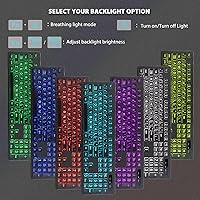
The backlight is adjustable, but it tops out at a modest brightness level — useful for dimly lit rooms, but not particularly vivid. Think of it as a comfortable glow rather than a bright studio light. It does its job well for evening browsing or working with the lights low, but it will not satisfy anyone expecting gaming-keyboard-style illumination.

Batteries are included for both the keyboard and the mouse, so the set is completely ready to use as soon as you open the box. Just insert them into each device, plug in the receiver, and you are good to go.

With the backlight off or used occasionally, battery life is reasonably good for casual daily use thanks to the auto-sleep feature that kicks in when the devices sit idle. Leaving the backlight on continuously will noticeably shorten battery lifespan, so if battery longevity matters to you, it helps to turn the backlight off when you do not need it.

Unfortunately, no. The mouse has a contoured shape designed specifically for right-hand use, and it is not symmetrical. Left-handed users will likely find it uncomfortable over extended sessions and may want to pair this keyboard with a separate ambidextrous mouse instead.

Yes, the difference is noticeable when you compare them side by side. The printed letters are meaningfully larger and set in a bold, high-contrast style that makes each character easier to spot at a glance — particularly helpful if you are not a touch typist and need to look down at the keys regularly.

They share a single nano USB receiver, so both devices connect to whichever computer that receiver is plugged into. There is no multi-device pairing or switching — it is a dedicated one-computer setup.

No, the palm rest is built directly into the keyboard base and cannot be detached. If your desk height or sitting posture does not align well with it, that could be a source of discomfort over time. It is worth factoring in if you have a specific ergonomic setup in mind.

For most people, yes — the setup really is as simple as plugging in the USB receiver and inserting the batteries. There is no software to navigate, no Bluetooth pairing sequence, and no settings to configure. That said, there is no printed quick-start guide included in the box, so if your parent is especially unfamiliar with computers, a quick phone call to walk them through the two-minute setup might be reassuring.