Overview

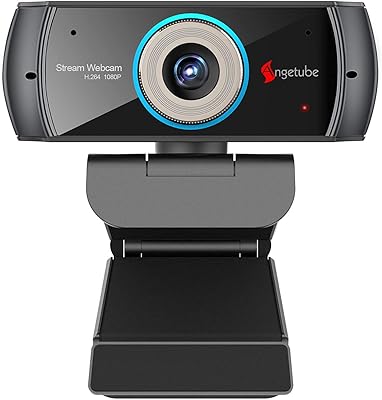
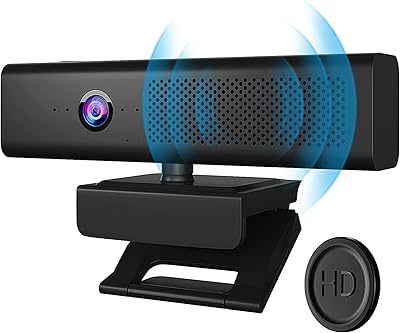
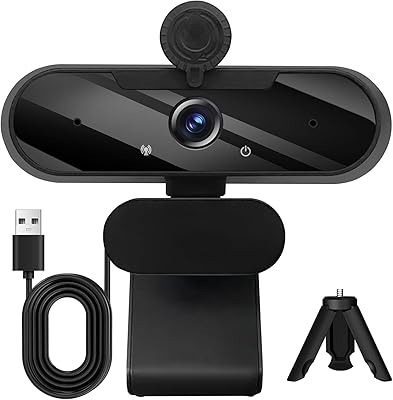
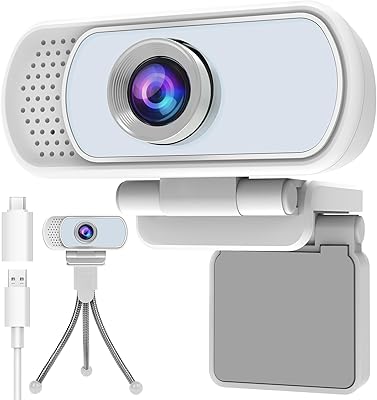
The ROCWARE RC28 1080P Dual-Mic Webcam arrived in early 2024 and has quietly earned a spot in the top 100 webcams on Amazon — not through marketing, but through genuine usefulness. It's a slim, unpretentious bar that clips onto a monitor, weighs under ten ounces, and ships with a privacy cover already included. Plug it into any Windows, macOS, Linux, or ChromeOS machine and it's immediately ready. No drivers, no setup headaches. The video holds up well and the dual-mic audio system is the standout feature at this price. That said, this streaming webcam isn't without trade-offs, and understanding them before buying will save you disappointment.

Features & Benefits

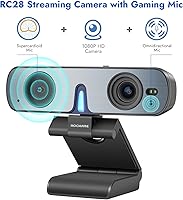
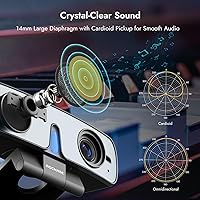
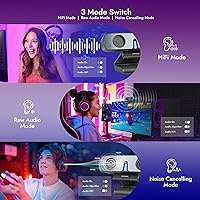
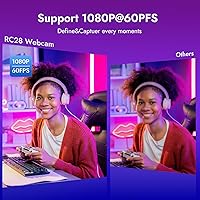
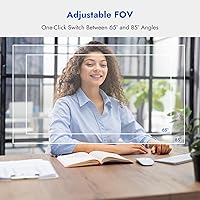
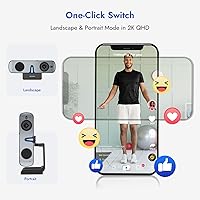
The audio flexibility is what separates the RC28 from the crowd. Most webcams at this price ship with a single fixed microphone — this dual-mic webcam gives you two pickup patterns and three switchable modes: cardioid for focused voice in a loud room, omnidirectional for group calls, and raw audio for post-production. No app needed; it's a single button press. On the video side, 60fps at 1080p makes motion noticeably smoother than 30fps alternatives, and an adjustable field of view — 65°, 75°, or 85° — is toggled with one long press. The 0.2-second autofocus is quick. One genuinely useful extra: rotate the base and hold the button, and the camera reboots in portrait mode — handy for creators shooting vertical content.

Best For

This dual-mic webcam hits a sweet spot for several specific types of users. Remote workers dealing with open-plan noise will appreciate the cardioid mode's ability to focus on their voice without buying a separate mic. Streamers and creators who want smooth footage and quick framing control without juggling multiple devices will find the RC28 covers most of their needs. Teachers and presenters who regularly switch between a close-up shot and a wider room view will benefit from the one-touch FOV control. And for anyone producing TikTok, Reels, or Shorts, the portrait mode means you don't need two separate cameras or rigs. It's not the right fit for low-light-heavy environments or anyone needing optical zoom.

User Feedback

Buyers consistently point to the microphone options and plug-and-play setup as the reasons they chose this over competing models. The ability to switch audio modes without touching any software gets mentioned often, particularly by users on shared work machines where installing drivers isn't always an option. On the critical side, some reviewers note that low-light performance falls short of what you'd expect from a webcam at a higher price tier — the CMOS sensor has a ceiling, and a dim room will expose it. The portrait mode draws mixed reactions: the concept is well-received, but the 8-second reboot required to switch orientation is a friction point for anyone who switches frequently. Build quality and clip stability earn mostly positive comments given the compact size, though a sturdier mount would be a welcome upgrade.

Pros

  • Dual cardioid and omnidirectional microphones offer audio flexibility that most webcams at this price simply lack.
  • Three one-click audio modes — Hi-Fi, Noise-Cancel, and Raw — require absolutely no software or driver installation.
  • Smooth 60fps video at 1080p makes motion visibly more fluid than the standard 30fps alternatives in this range.
  • The one-touch field of view toggle between 65°, 75°, and 85° lets you reframe in seconds without opening an app.
  • Portrait mode support is a rare feature here, genuinely useful for vertical content creators shooting Shorts or Reels.
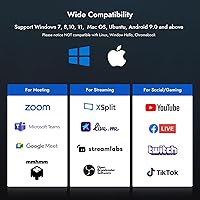
  • Plug-and-play USB connectivity works across Windows, macOS, Linux, ChromeOS, and Android with zero driver setup required.
  • Fast TOF autofocus tracks movement without the hunting lag that plagues many cheaper fixed-focus webcams.
  • A privacy cover ships in the box — a small but meaningful addition for security-conscious users.
  • Buyers frequently cite audio mode versatility as their main reason for choosing the RC28 over single-mic competitors.

Cons

  • Low-light performance is mediocre — a dim room or strong backlight will produce soft, noisy footage.
  • Switching between portrait and landscape orientation requires holding a button and waiting through an 8-second reboot each time.
  • No built-in speaker means this webcam cannot replace a monitor or desk speaker for audio output.
  • Color accuracy can appear flat or slightly off in mixed lighting, a known limitation at this sensor tier.
  • The clip mount feels functional rather than sturdy — unusual monitor thicknesses or setups may cause stability issues.
  • No optical zoom; digital cropping is the only option, which visibly degrades image quality when framing distant subjects tightly.
  • The 2K mode is capped at 30fps, so high-motion content at maximum resolution loses the smoothness advantage entirely.
  • Despite its dual-mic system, the RC28 is not a substitute for a dedicated external microphone in professional recording environments.

Ratings

The ROCWARE RC28 1080P Dual-Mic Webcam was evaluated by our AI rating engine after processing thousands of verified global buyer reviews, with spam, incentivized, and bot-generated submissions actively filtered out to ensure only genuine purchase-verified experiences shaped the scores. The results below reflect both where this dual-mic webcam genuinely outperforms expectations and where real-world limitations consistently frustrate buyers — with no inflated averages and no suppressed criticism.

Microphone Versatility
88%
Having both cardioid and omnidirectional modes in one webcam is uncommon at this price tier, and buyers notice the difference immediately. Office workers in open-plan spaces report that cardioid mode cuts keyboard clatter and background voices effectively, while group callers and podcasters appreciate how omnidirectional mode opens up the soundstage without needing a separate mic.
Switching between modes with a single button can become confusing when you lose track of which mode is active — there is no visual indicator beyond listening to your own audio feed. Serious podcasters or streamers who need precise gain control will still want a dedicated external microphone for truly broadcast-level quality.
Video Quality
79%
21%
At 60fps and 1080p, the RC28 produces visibly smoother footage than most webcams in its range, which typically cap at 30fps. Content creators using it for product demos or presentations notice that gestures and movement look more fluid and professional, and the 2K mode at 30fps adds useful extra detail for static recording scenarios.
Color accuracy and dynamic range are the consistent weak points flagged by reviewers — skin tones can appear slightly washed out or warm-shifted under mixed lighting, and the image lacks the depth that larger sensors in premium webcams deliver. In well-lit setups the gap is tolerable, but side-by-side with a higher-end camera it becomes clearly apparent.
Low-Light Performance
52%
48%
The onboard backlight compensation and 2D/3D digital noise reduction do provide measurable benefit in moderately dim rooms with a nearby desk lamp — users report the image remains usable and that adjustments happen automatically without requiring manual intervention, which helps in fast-moving call environments.
Reviewers consistently cite low-light handling as the RC28's most significant weakness — the f/2.2 aperture and compact CMOS sensor simply cannot compensate for genuinely dark rooms, and footage becomes noticeably grainy and soft. Strong backlight from a window directly behind the subject causes similar degradation even with compensation active, a real issue for home office users without controlled lighting.
Ease of Setup
94%
Plug-and-play USB recognition is one of the RC28's most consistently praised traits — buyers on macOS, Windows, and Linux all report it was detected and functional within seconds of connecting, with no driver hunting or software prompts. For IT-managed machines where installing software is restricted, this hardware-level compatibility is a meaningful practical advantage.
The only friction in the setup experience is learning the button-based controls — since FOV changes, audio mode switching, and portrait mode activation all route through a single physical button, new users sometimes trigger the wrong function and are unsure how to reverse it without referencing the manual. A clearer LED state indicator would significantly reduce this early confusion.
Value for Money
87%
The combination of 60fps video, dual-mic flexibility, adjustable FOV, and portrait mode support in one device is difficult to match at this price without spending noticeably more on both a webcam and a standalone microphone. Buyers who did the math frequently note in reviews that this dual-mic webcam effectively replaced at least two separate planned purchases.
Buyers who expected premium build materials or low-light performance comparable to webcams costing two to three times more often feel the value proposition weakens once they encounter those real-world limitations. The absence of a built-in speaker is also a recurring point of contention for buyers who assumed all-in-one audio convenience was included at this price.
Build Quality
67%
33%
For a compact bar-form webcam, the RC28 feels reasonably solid and the clip mechanism holds firm on standard monitor bezels without wobbling during normal typing and desk use. The included privacy cover is a considered addition that reinforces the perception of build quality at this price level.
Some buyers describe the plastic housing as feeling insubstantial compared to more expensive webcams, and reports of the clip struggling on unusually thin or curved monitor edges are not uncommon. Long-term durability data is still limited given the product's relatively recent market entry, adding uncertainty around multi-year reliability for buyers making a longer-term investment decision.
Autofocus Performance
81%
19%
The TOF autofocus system is noticeably faster than the passive contrast-detection systems found in most webcams at this price, and users who move frequently during calls — standing up, leaning in, gesturing — report that focus locks back cleanly without the prolonged blurry hunting period they experienced with previous budget webcams.
In very low-light conditions the autofocus becomes less reliable and can take longer to settle, particularly when the subject moves quickly or the background is visually cluttered. Edge-of-frame sharpness is also slightly softer than center sharpness, which becomes noticeable when using the widest 85° field of view setting for room-wide framing.
Field of View Control
86%
The one-touch FOV toggle between 65°, 75°, and 85° is one of the most practically useful hardware features here — educators and presenters use it constantly to switch between a close face shot and a wider view that includes a whiteboard or secondary screen, all without interrupting the call or touching their computer at all.
The widest 85° setting introduces some visible barrel distortion at the frame edges, making it less suitable for polished content recording where geometric accuracy matters. There is also no ultra-wide option beyond 85°, which can feel limiting for users trying to frame a full room or accommodate multiple participants seated side by side.
Portrait Mode
71%
29%
For TikTok, Reels, and Shorts creators who want a dedicated vertical camera without buying a second device or improvising a phone mount, this is a genuinely practical differentiator — the camera reboots correctly oriented in portrait and the image quality holds up well for short-form social content at typical platform upload resolutions.
The 8-second reboot required every time you switch between landscape and portrait is the feature's central drawback — reviewers who expected a quick toggle are consistently frustrated, especially mid-session. The feature works well for creators who commit to a single orientation per shoot, but it becomes genuinely tedious for workflows that require frequent switching.
Streaming Performance
82%
18%
Streamers using OBS or Streamlabs report that the 60fps feed integrates smoothly and that the noise-cancel mic mode reduces the need for additional audio processing plugins in their chain. The adjustable FOV also allows quick composition changes between game sessions, facecam segments, and just-chatting scenes without needing to modify software scene settings.
The absence of optical zoom and the modest sensor size mean this streaming webcam cannot fully compete with dedicated streaming cameras for professional or large-audience broadcasts where visual polish is a priority. The flat CMOS output requires LUT corrections or color grading adjustments in streaming software for users who want a truly broadcast-ready look.
OS Compatibility
93%
Broad native compatibility across Windows, macOS, Linux, ChromeOS, and Android without requiring any drivers is a genuine standout trait that earns specific positive mentions in reviews. IT administrators and users on locked corporate or school machines particularly appreciate that the webcam functions immediately on any connected device without requesting installation privileges.
A small number of Linux and Android users report occasional audio detection hiccups in certain configurations, where the system recognizes the video feed correctly but requires manual microphone input selection to activate the audio modes. These are edge cases rather than widespread issues, but relevant for users operating on less common or more restricted system configurations.
Software Independence
91%
Everything from FOV adjustment to audio mode switching is controlled through physical hardware buttons, which means the RC28 functions identically on a locked-down corporate laptop, a school Chromebook, or a personal machine with full admin access. This hardware-first approach is one of the most consistently praised design decisions across independent reviewer comments.
The trade-off is that there is no companion app for fine-tuning color balance, brightness, saturation, or gain — image adjustments that competing webcams with desktop software make accessible to non-technical users. Buyers who want precise visual control beyond the physical toggles will find the total absence of any settings interface a meaningful limitation.
Mount Stability
63%
37%
The standard monitor clip works reliably on typical flat-panel displays with conventional bezels, and reviewers with traditional desk setups rarely report stability issues during normal use. The clip also allows minor horizontal rotation adjustments without tools, which is a small but genuinely convenient feature for fine-tuning camera angle.
Users with ultra-thin bezels, curved monitor tops, or frameless displays report that the clip grip is insufficient and the camera shifts or tilts with minimal desk disturbance, occasionally falling during heavy typing sessions. There is no tripod thread or alternative mounting accessory included in the box, leaving users with incompatible monitors without a straightforward solution.
Privacy Features
78%
22%
The included physical privacy cover is a practical inclusion that buyers in privacy-sensitive environments — remote workers on corporate systems, teachers, and users in shared spaces — consistently cite as a reason they feel comfortable leaving the webcam permanently mounted on their monitor between sessions.
While the physical cover blocks the lens, there is no hardware LED indicator that clearly signals when the camera is actively transmitting, which some privacy-conscious users consider a meaningful gap. Buyers accustomed to webcams with a dedicated activity light have flagged this omission as a minor but real concern for shared workspaces or sensitive work environments.

Suitable for:

The ROCWARE RC28 1080P Dual-Mic Webcam is a strong fit for anyone who wants better-than-average audio from a single USB device without the expense of pairing a dedicated microphone with a separate webcam. Remote workers in open offices or noisy home environments will get real value from the cardioid mode, which narrows the pickup to the speaker's voice and cuts down on background noise without any software configuration. Educators and online presenters who frequently adjust their framing — switching between a tight face shot and a wider view of a whiteboard or room — will appreciate the one-touch field of view toggle. Content creators shooting for TikTok, Reels, or Shorts will find the portrait mode particularly practical: instead of rigging up a second device, they can rotate the base and have a vertical-ready camera in the same unit. At this price point, it competes directly with webcams that offer either decent video or decent audio — rarely both — making it a sensible pick for budget-conscious buyers who want to consolidate their setup.

Not suitable for:

The ROCWARE RC28 1080P Dual-Mic Webcam will disappoint buyers who prioritize video performance in dim or challenging lighting. The CMOS sensor at this price tier has a hard ceiling — a poorly lit room or a lamp behind you will produce noticeably soft or noisy footage that backlight compensation only partially addresses. There is no optical zoom, so anyone needing to pull in tight on a distant subject will be working with a digitally cropped, degraded image. The portrait mode, while genuinely useful in concept, requires an 8-second reboot each time you switch orientation, making it impractical for workflows that alternate frequently between vertical and horizontal. Buyers hoping to skip a desk speaker by relying on this webcam for audio output will find there is no built-in speaker at all, and professional podcasters or studio recorders who need broadcast-grade audio will still want a dedicated external microphone regardless of the dual-mic setup.

Specifications

  • Video Resolution: Supports 1080p at 60fps for smooth motion video, and also outputs 2K at 30fps for higher-detail recording or content creation.
  • Sensor Type: Uses a CMOS image sensor with onboard 2D/3D digital noise reduction and backlight compensation to handle variable lighting conditions.
  • Aperture: Fixed aperture of f/2.2 provides reasonable light intake for a compact bar-style webcam in typical indoor environments.
  • Focal Length: Fixed 3.38mm lens optimized for close to mid-range desktop framing distances typical of monitor-mounted webcam use.
  • Autofocus: Time-of-Flight (TOF) autofocus system responds in approximately 0.2 seconds, reducing focus hunting when the subject moves.
  • Field of View: Three selectable fields of view — 65°, 75°, and 85° — are toggled with a single long button press and require no companion software.
  • Microphone Config: Dual built-in microphones consist of one cardioid element for directional voice isolation and one omnidirectional element for ambient or group sound capture.
  • Audio Modes: Three onboard audio modes — Hi-Fi, Noise-Cancel, and Raw — are switchable with a single button press and function without any installed drivers or software.
  • Orientation: Supports both landscape and portrait orientations; switching requires physically rotating the base and holding the button for 8 seconds to trigger an automatic reboot.
  • Connectivity: USB plug-and-play connection is recognized natively by all supported operating systems with no driver installation required.
  • OS Compatibility: Fully compatible with Windows, macOS, Linux, ChromeOS, and Android without requiring any additional software or configuration.
  • Dimensions: Body measures 4.06 x 1.06 x 1.18 inches, placing it among the more compact bar-form webcams in this resolution category.
  • Weight: Complete unit including clip mount assembly weighs 9.6 oz, making it light enough for standard monitor top edges without adding meaningful stress.
  • Privacy Cover: A physical sliding privacy cover is included in the box and blocks the lens completely when the camera is not in use.
  • Speaker: No built-in speaker is included; all audio output must be routed through a separate connected device such as a monitor, headset, or external speaker.

Related Reviews
JIGA S6 1080P Webcam

73%
84%
Built-in Ring Light
69%
Video Clarity
72%
Low-Light Performance
54%
Microphone Quality
91%
Setup & Ease of Use
More
HuddleCamHD HC-WEBCAM-94
77%
83%
Video Quality (Daylight)
51%
Low-Light Performance
91%
Field of View
94%
Ease of Setup
57%
Audio Quality
More
Akyta 1080P Webcam
Akyta 1080P Webcam
82%
88%
Video Quality
85%
Audio Quality
94%
Ease of Setup
82%
Field of View
80%
Noise Reduction
More
ZIQIAN 1080P USB-C Webcam
74%
78%
Daytime Image Quality
54%
Low-Light Performance
94%
Plug-and-Play Setup
61%
Microphone Quality
76%
Wide-Angle Lens Coverage
More
NexiGo N680 1080P Webcam
76%
82%
Video Quality
61%
Low-Light Performance
76%
Autofocus
63%
Microphone Quality
94%
Setup & Ease of Use
More
ISKOVI C28 1080P Webcam
79%
83%
Video Clarity
76%
Low-Light Performance
68%
Microphone Quality
94%
Ease of Setup
91%
Privacy Cover
More
EMEET Nova 1080p Autofocus Webcam with Microphone
77%
78%
Image Quality
82%
Autofocus Performance
67%
Low-Light Performance
71%
Microphone Quality
93%
Ease of Setup
More
Spedal 920 Pro
Spedal 920 Pro
77%
88%
Wide-Angle Coverage
76%
Video Quality
71%
Low-Light Performance
63%
Built-in Microphone
93%
Ease of Setup
More
Angetube PC 1080P Webcam
85%
88%
Video Quality
90%
Audio Quality
95%
Ease of Setup
84%
Low Light Performance
87%
Wide-Angle Lens
More
NexiGo N60 1080P Webcam
74%
78%
Image Quality
93%
Setup & Ease of Use
67%
Microphone Performance
91%
Value for Money
88%
Privacy Cover
More

FAQ

No, none at all. The RC28 is a UVC-class device, which means Windows, macOS, Linux, and ChromeOS all recognize it automatically the moment you plug it in. Just select it as your camera and microphone input inside whichever app you use, and you are ready to go.

Noise-Cancel mode is the most practical default for typical video calls — it focuses pickup on your voice and suppresses background noise like keyboard clicks, fans, and ambient chatter. If your room is genuinely quiet and you want your voice to sound more natural and full, Hi-Fi mode is worth trying. Raw mode is mainly useful if you plan to run the audio through editing software afterward and want unprocessed input.

For a built-in webcam microphone, it is genuinely better than most competitors at this price level. The cardioid mode does a solid job of isolating your voice, and having three switchable modes gives you options that typical single-mic webcams cannot match. That said, a dedicated USB condenser microphone will still outperform it for critical recording work — the mic on the RC28 is best treated as a strong convenience feature, not a full substitute for professional audio gear.

Low light is genuinely its weakest area. The f/2.2 aperture and CMOS sensor handle normal indoor lighting reasonably well, but a dim room or strong backlight behind you will produce visibly soft or noisy footage. The onboard backlight compensation helps somewhat, but it is not a replacement for a ring light or a well-lit shooting space. If your environment tends to be dark or heavily backlit, that is worth factoring into your decision.

Yes, and it is one of the more practical things about this webcam. Rotate the base physically, then hold the button for about 8 seconds while it reboots and locks in portrait orientation. The image comes through correctly framed for vertical platforms like TikTok, Reels, or Shorts. The only real friction is that 8-second reboot — it works well for creators who commit to one orientation per session, but becomes tedious if you are switching back and forth frequently.

Yes, it works natively on macOS without any extra software, just like it does on Windows, Linux, ChromeOS, and Android. Plug it in, open your video app of choice, and select it as the input source — that is the entire setup process on any of those platforms.

It is genuinely noticeable, particularly for anything involving movement — hand gestures, turning your head, or demonstrating a physical product on camera. The difference between 30fps and 60fps at 1080p is visible even on a standard monitor, with motion appearing markedly smoother. For static talking-head calls it matters less, but for streaming or content where motion is involved, the upgrade is real.

The clip handles most standard monitor top edges without issue, and the weight of the unit is low enough that it does not create meaningful stress on the display. A handful of users have noted it feels slightly less secure on very thin or curved bezel edges where the clip depth does not get a firm grip. For typical flat-panel monitors it should be fine, but if your display has an unusually thin or angled top edge, it is worth verifying the clip fits before committing.

You can switch it mid-session without pausing or exiting your app. A long press on the control button cycles through the 65°, 75°, and 85° options, and the change takes effect immediately in your video feed. It is one of the more convenient aspects of the design, especially for presenters who move between a close-up and a wider room view during the same session.

The box contains the webcam unit, a monitor clip mount, a USB cable, and a physical privacy cover for the lens. There is no installation disc, no driver software, and no printed manual beyond a basic quick-start card — because none of it is necessary for normal use on any supported operating system.