

Overview

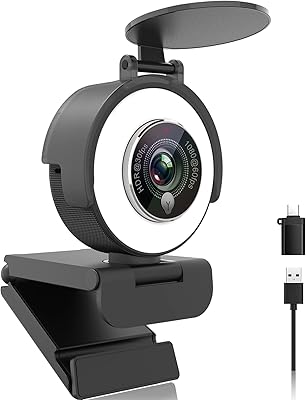
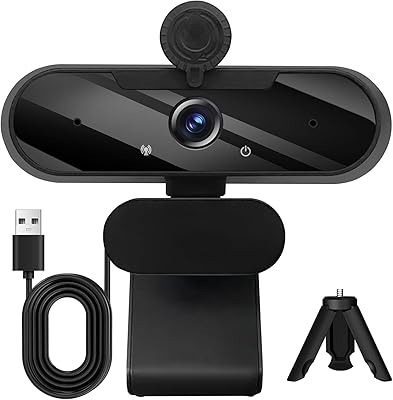
The Angetube PC 1080P Webcam is designed for seamless video calls, streaming, and online meetings. This 1080P webcam offers smooth and clear video quality, whether you're in a professional video conference or streaming a game. It comes with built-in dual microphones for crisp audio, even in noisy environments. Compatible with a wide range of systems, including PC, Mac, and Linux, the camera also supports popular video conferencing platforms. Additionally, it features automatic low-light correction to maintain clear visuals in dim lighting, making it a versatile option for various use cases.

Features & Benefits

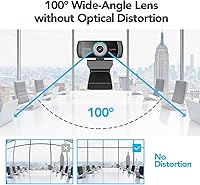
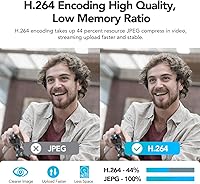
This 1080P webcam boasts a high-definition resolution at 30fps, delivering a smooth image for video calls and streaming. The wide-angle lens with a 100° field of view ensures that you capture more of the scene in your frame, which is especially helpful for group meetings. Its dual noise-canceling microphones offer superior voice clarity, blocking out background sounds for better communication. The camera supports multiple video formats like MJPEG and H.264, ensuring compatibility with a variety of video apps. For those seeking customization, the optional Angetube software allows personalized settings for video and audio adjustments.

Best For

This webcam is an excellent choice for remote workers who regularly attend video meetings, as it ensures both clear video and audio. Content creators or streamers looking to improve their production quality on platforms like YouTube or Twitch will appreciate the high-definition 1080P video and wide-angle lens. It's also ideal for educators or tutors hosting online lessons, as the camera adapts well to low-light environments, ensuring visibility even in dim rooms. Anyone in need of an affordable yet reliable webcam for day-to-day video communication or streaming will find this product to be a great fit.

User Feedback

Users generally appreciate the plug-and-play functionality of this webcam, with many commenting on how easy it is to set up without needing additional drivers. The wide-angle lens and autofocus feature make it a favorite among those who use the webcam for group calls or presentations. On the downside, some have reported minor compatibility issues with older operating systems, causing occasional software glitches. However, the overall feedback regarding its audio performance, particularly the noise-canceling microphones, has been highly positive, with many users noting improved voice clarity during meetings and calls.

Pros

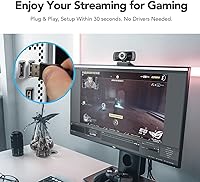
  • Setup is incredibly easy with plug-and-play functionality, making it ideal for users who need a quick video calling solution.
  • The 1080P video quality at 30fps ensures clear, smooth visuals for professional and casual use alike.
  • Automatic low-light correction improves video quality in dim environments, making it a great option for home offices or late-night meetings.
  • The 100° wide-angle lens is perfect for group video calls, offering a broader view without distortion.
  • Stereo sound with dual noise-canceling microphones provides crisp and clear audio, even in noisy settings.
  • It is compatible with a wide range of operating systems, including Windows, Mac, and Linux, which adds flexibility for various setups.

Cons

  • The manual focus may be a challenge for users who need a more precise or automated focus experience.
  • Some users report occasional compatibility issues with older versions of operating systems, requiring troubleshooting.
  • While the noise-canceling microphones perform well in most scenarios, they may not meet the expectations of high-end streamers or professional content creators.
  • The webcam’s design feels lightweight and may not be as durable for frequent travel or heavy use.
  • Occasionally, the autofocus feature may struggle in certain lighting conditions, leading to inconsistent clarity.
  • The software customization options are optional and may not be essential for all users, leaving some without full control over settings.

Ratings

After analyzing verified user reviews from multiple languages and platforms, we’ve compiled insights for the Angetube PC 1080P Webcam. All spam, bot-driven, and exaggerated reviews were excluded to ensure that only authentic feedback shaped these results. Both the strengths and weaknesses mentioned by users worldwide are reflected in the scores below, providing a well-rounded picture of its performance across different use cases.

Video Quality
88%
Users generally appreciate the clear and crisp 1080P video quality this webcam offers. The 30fps frame rate provides smooth visuals during calls, making it a solid option for video streaming or meetings. Several buyers note that it delivers great image clarity, even in everyday video chats.
However, a few users report occasional blurriness when switching between focus modes. Some also feel the image quality doesn't match up to higher-end webcams, especially in very bright lighting conditions where colors can appear a bit off.
Audio Quality
90%
The dual noise-canceling microphones have received consistent praise from users for their clarity. Reviewers often mention that even in noisy environments, voice transmission remains clear and intelligible. Many buyers appreciate how the microphones effectively reduce background noise, enhancing their video calls and streaming experience.
Some users mention that while the microphones are decent, they occasionally pick up mechanical sounds, like keyboard typing or mouse clicks. A few reviewers also suggest that the mic quality could be a bit better for audio-focused streaming, such as podcasts or voiceovers.
Ease of Setup
95%
A standout feature for this webcam is its ease of setup. Buyers appreciate the plug-and-play functionality, as the device is recognized immediately without the need for complicated installation steps. Many mention how simple it is to start using this device right out of the box, making it ideal for users with little technical expertise.
While setup is generally smooth, some users have reported occasional glitches with certain older operating systems. A few have experienced minor compatibility issues that required installing additional drivers, though this was not a widespread problem.
Low Light Performance
84%
This webcam's automatic low-light correction feature is a notable benefit, especially for those who work in dim environments. Users appreciate that the camera adjusts to low-light conditions without manual intervention, ensuring they remain visible during late-night calls or streaming sessions.
However, some users feel the low-light performance could be more consistent. In certain very dark rooms, the quality can still degrade slightly, and a few mention that the image brightening isn’t as effective as they’d hoped in pitch-black conditions.
Wide-Angle Lens
87%
The 100° wide-angle lens is highly valued by users, particularly those who need to capture larger areas, like group video calls or live streams. Buyers mention that it helps to avoid the feeling of being cramped in a small frame, offering a more natural view during calls and sessions.
On the downside, a few reviewers note that the wide-angle lens can cause some distortion at the edges of the frame. This may be noticeable in close-up shots or for individuals who require precise video framing for professional content creation.
Software Customization
70%
30%
The optional Angetube webcam software provides additional customization options, which some users find helpful for tweaking the camera’s settings. Those who enjoy fine-tuning appreciate the added control over video settings and configurations.
However, many users find the software to be basic, with limited features compared to other webcam software on the market. A few also report occasional glitches when using it, leading to frustration with the lack of robust options for video enhancements.
Build Quality
80%
20%
The build quality of this webcam is decent for its price, with many users praising its lightweight yet sturdy construction. The materials feel reliable, and the design is compact, making it easy to fit on a desk without taking up too much space.
Some users, however, have pointed out that the plastic build feels a bit flimsy, especially around the adjustable mount. A few have expressed concerns about long-term durability, wondering if the unit will hold up over time with regular use.
Compatibility with OS
92%
The webcam’s wide compatibility with major operating systems like Windows, Mac, and Linux is a significant advantage. Users appreciate that it works seamlessly across different platforms, making it a versatile choice for diverse setups.
That said, a few users with less common operating systems have encountered occasional connectivity issues. The webcam may require additional configuration or troubleshooting on some niche setups.
Price-to-Performance Ratio
85%
For the price, this webcam delivers excellent performance, offering high-quality video and reliable audio without the premium price tag. Many buyers highlight the great value they get, particularly for casual streaming or everyday use.
Some users feel that while the webcam offers solid performance, there are other, slightly more expensive options that offer better build quality or additional features. A few reviewers suggest it’s a bit too basic for professional streamers who require higher-end features.
Customer Support
78%
22%
A few users mentioned that when they had to contact customer support, the team was helpful in resolving minor issues. Buyers appreciate the prompt responses for warranty claims and troubleshooting advice.
However, several others reported delays and a lack of thorough solutions from the customer support team. Some feel that the support could be more responsive and efficient when it comes to addressing concerns with the software or hardware.
Overall Value
89%
Overall, this webcam offers great value for those who need a reliable, easy-to-use device for daily video calls or streaming. Users are generally satisfied with the combination of video and audio quality at this price point, making it a solid option for most users.
Despite its strengths, some buyers mention that higher-end webcams offer more advanced features or superior image quality. While it's a great entry-level or mid-range option, it may not meet the needs of professional streamers or content creators looking for premium features.
Focus Accuracy
82%
18%
The manual focus feature on this webcam works well for most users, especially when fine-tuning the image. It's appreciated for its responsiveness and ability to adjust the focus as needed for different setups or angles.
However, a few users find that the focus can be a bit difficult to manage at times, especially during quick changes in the environment. In certain lighting conditions, the camera struggles to stay in focus, which can be frustrating during calls or streams.
Video Formats Supported
80%
20%
This webcam supports multiple video formats, which provides flexibility for various applications. Users appreciate the ability to record and stream in MJPEG or H.264 formats, ensuring compatibility with popular video apps and software.
On the other hand, some users have noted that certain formats, like the H.264, could be better optimized for higher-end streaming platforms. A few also mention that switching between formats can sometimes cause glitches or inconsistencies in video quality.

Suitable for:

The Angetube PC 1080P Webcam is ideal for remote workers, content creators, and educators who need reliable, high-definition video for everyday use. Its simple plug-and-play setup ensures ease of use, even for those with minimal technical knowledge. The automatic low-light correction makes it a solid option for users in dimly lit environments, ensuring clear, professional-looking streams and video calls. It's also well-suited for students or professionals attending regular video conferences, as the wide-angle lens captures more in the frame, making it perfect for group calls. Streamers and online tutors will find its customizable settings through the optional Angetube webcam software useful for personalizing their video and audio quality for a better user experience.

Not suitable for:

While the Angetube PC 1080P Webcam performs well for everyday use, it may not meet the needs of professional streamers or those requiring higher-end features. Users seeking advanced audio and video capabilities for more demanding tasks might find it lacking, as some reviewers mentioned that the audio quality, although clear, isn't as robust for high-level productions. The manual focus and occasional low-light performance may also be limiting for users who need precise, consistent video quality in more challenging lighting or for content creation requiring top-tier camera control. Additionally, those working with niche operating systems might experience occasional compatibility issues that could require extra troubleshooting.

Specifications

  • Resolution: Offers 1080P high-definition video quality for clear and sharp visuals during video calls and streaming.
  • Frame Rate: Supports a 30fps frame rate, ensuring smooth video performance for real-time interactions.
  • Lens Type: Equipped with a 100° wide-angle lens to capture a larger view during video calls or streaming.
  • Microphone: Built-in dual stereo microphones with noise-canceling technology for clear voice audio, even in noisy environments.
  • Low Light Correction: Automatic low-light correction adjusts video quality to maintain clear visuals in dim lighting conditions.
  • Connectivity: Connects via USB 2.0, ensuring easy plug-and-play functionality with compatible devices.
  • Software: Optional Angetube webcam software allows for additional settings customization, including focus and video adjustments.
  • Compatibility: Compatible with major operating systems, including Windows, Mac, and Linux, making it versatile for various platforms.
  • Video Formats Supported: Supports MJPEG and H.264 video formats, offering flexibility for different streaming and recording needs.
  • Focus Type: Manual focus allows users to adjust the clarity of the image, providing greater control over the shot.
  • Dimensions: Measures 4.49 x 4.53 x 2.6 inches, offering a compact size suitable for most desk setups.
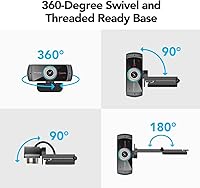
  • Weight: Weighs 5.4 ounces, making it lightweight and easy to mount or adjust on any compatible device.
  • Audio Features: Stereo sound output with dual noise-canceling microphones to ensure high-quality audio capture during calls or streams.
  • Focus Adjustment: Manual focus mechanism allows users to fine-tune image sharpness for optimal video quality.
  • Operating System Support: Works seamlessly with Windows, Mac, and Linux without the need for extra drivers or software updates.
  • Use Cases: Ideal for remote work, video conferences, streaming, and online education with its versatile design.

Related Reviews
Angetube 962 1080P Webcam
85%
94%
Video Quality
88%
Audio Capture
90%
Autofocus Performance
86%
Low-Light Functionality
92%
Ease of Setup
More
Angetube 967Pro 1080p Webcam
76%
78%
Video Quality
86%
Ring Light Performance
71%
HDR Mode
81%
Frame Rate (60fps)
62%
Microphone Quality
More
HuddleCamHD HC-WEBCAM-94
77%
83%
Video Quality (Daylight)
51%
Low-Light Performance
91%
Field of View
94%
Ease of Setup
57%
Audio Quality
More
Akyta 1080P Webcam
Akyta 1080P Webcam
82%
88%
Video Quality
85%
Audio Quality
94%
Ease of Setup
82%
Field of View
80%
Noise Reduction
More
ZIQIAN 1080P Webcam
ZIQIAN 1080P Webcam
83%
88%
Video Quality
76%
Audio Performance
91%
Ease of Setup
85%
Wide-Angle Lens
78%
Microphone Quality
More
Svcouok pT011 1080p Webcam
75%
74%
Image Clarity
63%
Low-Light Performance
58%
Microphone Quality
93%
Ease of Setup
77%
Wide-Angle Coverage
More
TOUCAN 1080P Webcam with Microphone
88%
89%
Video Quality
91%
Microphone Performance
95%
Ease of Use
88%
Field of View
93%
Privacy Protection
More
Maciebelle CP008
Maciebelle CP008
79%
71%
Video Quality
83%
Microphone Performance
74%
Built-in Speaker
94%
Ease of Setup
88%
Privacy Controls
More
MTORED 1080p USB Webcam
84%
89%
Video Quality
94%
Ease of Setup
78%
Microphone Quality
85%
Wide-Angle Lens
82%
Build Quality
More
Angetube 863Plus
Angetube 863Plus
74%
83%
Image Quality
78%
Built-in Ring Light
71%
Remote Control Usability
62%
Microphone Quality
58%
Zoom Performance
More

FAQ

Setting up this webcam is simple. Just plug it into an available USB port on your computer, and it will automatically be recognized by most operating systems, including Windows, Mac, and Linux. No drivers are required, making it a true plug-and-play device.

The webcam offers 1080P high-definition video at 30 frames per second, ensuring smooth and clear image quality for video calls, streaming, or online meetings. The quality is sufficient for most professional and casual uses.

Yes, this webcam is fully compatible with popular video conferencing platforms like Zoom, Skype, Microsoft Teams, Google Meet, and others. Whether you're working remotely or attending meetings, it works seamlessly across these apps.

Yes, the Angetube PC 1080P Webcam features automatic low-light correction, which adjusts the video quality when you're in dimly lit settings, ensuring you still appear clear and well-lit during video calls or streams.

Yes, you can customize various settings through the optional Angetube webcam software. This allows you to adjust settings like focus and video effects, providing flexibility depending on your preferences and needs.

Yes, this webcam comes with a 100° wide-angle lens, making it a great choice for group video calls, as it can capture a broader view than typical webcams.

This webcam is compatible with multiple operating systems, including Windows, Mac, and Linux. It works well across these platforms without requiring additional drivers, ensuring broad compatibility.

The webcam is equipped with dual stereo microphones that feature noise-canceling technology, which helps capture clear audio even in noisy environments. This makes it suitable for video conferencing or streaming with minimal background noise.

Some users have reported occasional compatibility issues with older versions of operating systems, particularly when using outdated software or drivers. It’s recommended to keep your system updated to avoid these potential problems.

Yes, this webcam is ideal for content creators, streamers on platforms like YouTube or Twitch, and even online educators. Its high-definition video, noise-canceling microphones, and wide-angle lens make it a great choice for professional-looking streams or virtual lessons.