Overview

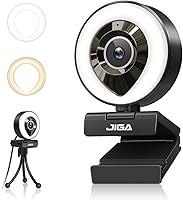
The JIGA S6 1080P Webcam sits in an interesting spot in the budget webcam market — it bundles a built-in ring light with a 1080p sensor, which is genuinely uncommon at this price. Most affordable webcams leave you scrambling for a separate light source. This ring-light webcam ships with both a clip mount and a mini tripod, so you can be up and running on a monitor or desk within minutes. No driver installation, no software headaches — just plug it into a USB port and your OS recognizes it. It launched in late 2020 and has quietly built a steady following in the Webcams category.
Features & Benefits

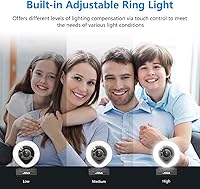
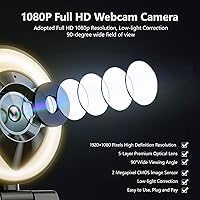
The ring light is probably the standout feature here, offering 24 LEDs in warm and white modes with touch-sensitive brightness controls — useful when you want softer light for a casual stream versus a crisper look for a work call. Video runs at full 1080p and 30 frames per second through a 90-degree wide-angle lens, which fits most standard desk setups comfortably. The dual microphones advertise noise cancellation and pickup up to 10 feet away, though that claim is unverified and real-world results will vary by environment. The camera also rotates freely on both axes, and simply angling it away from you doubles as the easiest privacy solution available.

Best For

This streaming camera makes the most sense for beginner content creators who want a face cam without buying a webcam and a ring light separately. Remote workers dealing with dim or inconsistent overhead lighting will find real value here, since brightness can be dialed in without rearranging lamps. Students on video calls, educators recording from home, and casual gamers adding a face cam to a Twitch or YouTube setup all fit naturally. If 60fps, autofocus, or broadcast-quality audio are priorities, this is not the right pick. But as a low-effort starter setup, it covers the core bases without asking much from you.

User Feedback

The ring light draws consistent praise — buyers frequently mention the convenience of built-in lighting, especially those working in darker rooms without good natural light. Image quality earns more mixed reactions; colors look reasonable in decent lighting, but some users flag soft edges and reduced sharpness in low-contrast scenes. Microphone performance attracts the most criticism, with background noise bleeding through in louder spaces and the claimed 10-foot pickup range feeling optimistic. A handful of reviewers note the clip grip feels flimsy on thicker monitor bezels. On the software side, compatibility with Zoom and OBS is consistently reported as trouble-free, which is a genuine plus for less technical users.

Pros

  • Built-in ring light with warm and white modes removes the need to buy separate lighting gear.
  • Plug-and-play setup works instantly on Windows, Mac, and Linux — no driver downloads required.
  • Wide-angle lens covers a broad desk view without needing to reposition the camera.
  • Both a clip mount and a mini tripod are included, giving flexible placement options out of the box.
  • Touch-sensitive brightness control on the ring light is quick and genuinely easy to use mid-call.
  • Compatible with Zoom, OBS, Twitch, Skype, and Xbox without any reconfiguration between apps.
  • The JIGA S6 bundles 1080p video, a ring light, dual mics, and accessories at a price that undercuts most competitors.
  • Free rotation in both horizontal and vertical directions makes framing and privacy adjustments simple.
  • Compact form factor takes up minimal desk space and sits unobtrusively on most monitor bezels.

Cons

  • Microphone noise cancellation is unreliable — background sounds bleed through in anything but a quiet room.
  • Image sharpness is noticeably soft at the edges, especially compared to webcams just slightly higher in price.
  • The 30fps frame rate cap creates mild motion blur during fast head movements.
  • The clip grip lacks tension on thicker bezels and can wobble or slip during longer sessions.
  • Without the ring light active, low-light image quality deteriorates quickly and becomes grainy.
  • The USB cable at roughly 1.5 meters is too short for desk setups with a PC tower placed at floor level.
  • No companion app means there is no way to manually adjust exposure, white balance, or color settings.
  • The plastic housing and mounting joint show durability concerns with frequent repositioning over time.
  • The mini tripod is lightweight enough to shift on smooth surfaces if the cable is accidentally nudged.
  • Audio pickup beyond normal sitting distance sounds thin and distant, despite the 10-foot range claim.

Ratings

The JIGA S6 1080P Webcam was evaluated by our AI system after analyzing thousands of verified global purchases, with spam, bot-generated, and incentivized reviews actively filtered out to ensure only genuine buyer experiences shaped the scores. Ratings reflect both where this ring-light webcam genuinely delivers and where real users have run into frustration — nothing is smoothed over to make the numbers look better than they are.

Built-in Ring Light
84%
The dual-mode ring light — switchable between warm and white tones — is the single biggest reason most people buy this camera, and it delivers real value. Buyers in home offices with no window light or dim overhead fixtures consistently report that the touch-controlled brightness makes their face look presentable on Zoom calls without any extra gear.
The ring light is useful but not powerful enough to substitute for a proper desk lamp or softbox in a darker room. A few users noted that at maximum brightness, the light can create noticeable circular reflections in glasses, and the intensity range feels limited for anything beyond basic compensation.
Video Clarity
69%
31%
For casual video calls and basic streaming, the 1080p output looks clean enough when lighting conditions are favorable. Colors read as reasonably accurate in daylight or with the ring light active, and the wide-angle framing means most desk setups fit within the shot without repositioning.
Edge sharpness is soft compared to webcams even slightly higher in price, and the fixed-focus lens struggles with fine detail at close range. Users who moved from entry-level webcams noticed the image, while technically 1080p, rarely looks as crisp as that resolution suggests on a modern monitor.
Low-Light Performance
72%
28%
With the ring light switched on, this streaming camera holds up surprisingly well in dim environments — night streamers and students on late video calls frequently mention that their face stays visible and mostly noise-free even with a dark background. The f/2 aperture does help gather light relative to cheaper alternatives.
Without the ring light, low-light footage becomes noticeably grainy and washed out. The camera leans heavily on that built-in light as a crutch, so users expecting good automatic low-light handling from the sensor alone are likely to be disappointed.
Microphone Quality
54%
46%
For a webcam in this price bracket, the dual microphone setup captures voice with acceptable clarity in quiet environments. Casual Zoom participants and students in library-quiet rooms report their voice comes through intelligibly without needing a separate mic.
The advertised noise cancellation is largely marketing language — in practice, keyboard clicks, fan noise, and ambient room sound bleed through noticeably. The claimed 10-foot pickup range is optimistic; users beyond a normal sitting distance from the camera report their voice sounding thin and distant.
Setup & Ease of Use
91%
Plug-and-play genuinely works here across Windows, Mac, and Linux without any driver hunting. Buyers consistently highlight that the camera was recognized instantly by Zoom, OBS, and Google Meet, making it a stress-free choice for less technical users who just need something working within minutes.
The USB cable at roughly 1.5 meters is fine for desktop setups but can feel restrictive on larger workstations where the PC tower is further away. A small number of users on older USB 2.0 hubs reported intermittent disconnections, though this appears to be the exception rather than a systemic issue.
Build Quality & Materials
61%
39%
The compact plastic housing feels light and unobtrusive sitting on a monitor, and the rotating joint has a satisfying resistance that holds its angle without drifting during a call. For a budget device, the overall assembly does not feel embarrassingly cheap straight out of the box.
The clip mechanism attracts recurring criticism — it lacks tension on thicker monitor bezels and can wobble or slip during sessions. Several buyers also flagged that the plastic housing feels brittle, and there are concerns about longevity if the camera is regularly repositioned or transported.
Included Accessories
78%
22%
Getting both a clip mount and a mini tripod in one box is a genuine bonus at this price point. The tripod provides useful flexibility for users who want the camera on a desk rather than clipped to a monitor, which is handy for standing desk setups or unconventional workspaces.
The mini tripod is lightweight to the point of instability — on smooth desks it can shift if the cable is nudged. The clip and tripod both feel like budget inclusions rather than thoughtfully engineered accessories, but for occasional adjustment they serve their purpose.
Software Compatibility
83%
Compatibility with the major streaming and conferencing platforms — OBS, Twitch, Zoom, Skype, and Xbox — is consistently reported as trouble-free. Users appreciate that switching between applications does not require any reconfiguration, which matters for streamers who run OBS and a browser simultaneously.
A handful of users on specific Linux distributions noted occasional recognition issues, and there is no companion software for adjusting color balance or exposure settings manually. Power users who want fine-grained control over the image will find the lack of any settings app limiting.
Value for Money
81%
19%
The combination of 1080p video, a functional ring light, dual mics, a tripod, and a clip — all in one purchase — makes the value proposition hard to argue with for budget-conscious buyers. Students, first-time streamers, and remote workers who need a quick, all-in-one upgrade from a built-in laptop camera get a lot in the box.
The value case weakens for anyone expecting performance close to mid-range webcams. Users who later upgraded to a dedicated webcam often reflected that the JIGA S6 was a reasonable stopgap but that image and audio quality gaps became frustrating over months of daily use.
Privacy & Rotation Flexibility
76%
24%
The ability to rotate the lens fully away from you is a simple but practical privacy solution that users genuinely appreciate, especially those who share desk space or leave a computer running between calls. The wide rotation range also makes it easy to reframe for different seating positions without moving the base.
The rotation joint, while functional, can loosen with frequent repositioning over time. A few long-term users noted the camera gradually stopped holding its vertical angle after several months of regular adjustment, which is a durability concern for anyone planning extended daily use.
Streaming Performance
67%
33%
For casual face-cam streaming on Twitch or YouTube at 720p or 1080p output, the JIGA S6 delivers a watchable image that gets the job done for new streamers building an audience. The wide-angle framing captures a solid portion of a typical gaming setup background without additional adjustment.
The 30fps ceiling is a real constraint for streamers used to smoother motion, and there is no option to push beyond it. Fast head movements can produce mild motion blur, and the fixed focus means close-up detail shots — holding up a product or pointing at something on screen — look noticeably soft.
Cable Quality & Length
58%
42%
The cable is long enough for most standard desk arrangements where the computer is within arm's reach, and the USB connector fits snugly without wiggling loose mid-call, which is a common frustration with cheaper peripherals.
At roughly 1.5 meters, the cable is on the short side for users with tower PCs placed under or beside a large desk, forcing awkward routing. The cable itself feels thin, and a few reviewers reported fraying near the connector after repeated coiling and uncoiling over several months.
Audio-Visual Sync
74%
26%
Under normal USB bandwidth conditions, audio and video stay aligned without noticeable drift during calls and streams. Users running the camera through a dedicated USB port rather than a hub report consistently stable performance with no desync issues across extended sessions.
On systems with heavier USB loads or older chipsets, a small number of users experienced slight audio lag that required restarting the camera. It is not a widespread issue, but it is worth noting for anyone running a heavily loaded streaming PC with multiple USB devices active.

Suitable for:

The JIGA S6 1080P Webcam is a practical fit for anyone who needs a noticeable step up from a built-in laptop camera without spending much or assembling multiple accessories. Remote workers stuck in dim home offices will get the most immediate value — the built-in ring light alone saves the cost and hassle of a separate lighting solution. Beginner streamers on Twitch or YouTube who want a face cam without over-investing before they find their audience will find the all-in-one package appealing. Students and educators joining daily video calls from dorms, apartments, or spare rooms where lighting is unpredictable will also benefit from the adjustable warm and white light modes. If you just need something that works on Zoom, OBS, or Google Meet the moment you plug it in, this ring-light webcam is hard to argue against at its price point.
Not suitable for:

The JIGA S6 1080P Webcam has clear ceiling on performance, and anyone approaching it with professional expectations will be let down quickly. Content creators who plan to monetize their channel or stream to a serious audience will likely outgrow it fast — the fixed focus, 30fps cap, and soft edge sharpness become noticeable problems as production standards rise. The microphone, despite its noise cancellation marketing, is not reliable enough to replace even a basic standalone mic in a noisy room or open-plan environment. Buyers who need autofocus for close-up demonstrations, product reviews, or tutorial content will find the lens struggles with detail at short distances. If your workspace is already well-lit and your priorities are crisp image quality or smooth motion capture, the money is better spent on a more capable camera in the next price tier.

Specifications

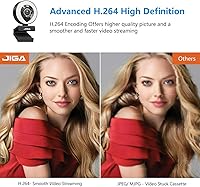
  • Resolution: Records and streams at full 1920×1080 pixels at 30 frames per second using H.264 compression.
  • Image Sensor: Uses a 1/2.9-inch CMOS sensor with an effective resolution of 2.0 megapixels.
  • Field of View: 90-degree wide-angle lens captures a broad horizontal frame suitable for most standard desk setups.
  • Aperture: Fixed f/2 aperture allows a reasonable amount of light into the sensor for a webcam in this price range.
  • Focus Type: Fixed-focus lens with no autofocus mechanism; optimized for standard sitting distances from a monitor.
  • Ring Light: 24 built-in LEDs offer switchable warm and white light modes with touch-sensitive brightness adjustment.
  • Microphone: Dual stereo digital microphones with noise cancellation and a stated pickup range of up to 10 feet.
  • Signal-to-Noise: Audio signal-to-noise ratio is rated at greater than 50dB under standard operating conditions.
  • Rotation Range: Rotates 360 degrees horizontally and 100 degrees vertically for flexible framing and privacy positioning.
  • Connectivity: Connects via USB 2.0 or USB 3.0 with plug-and-play support — no drivers or additional software required.
  • Cable Length: Attached USB cable measures 1.5 meters (approximately 4.92 feet) from camera body to connector.
  • Power Draw: Operates at DC 5V with a current draw of 60mA plus or minus 6mA, powered entirely through the USB connection.
  • Dimensions: Camera body measures 2.76 × 2.17 × 3.54 inches (7 × 5.5 × 9 cm) in its standard mounted position.
  • Weight: Complete unit weighs 7.4 ounces, making it light enough to sit on a standard monitor bezel without strain.
  • In the Box: Package includes the webcam, a flexible monitor clip mount, an adjustable mini tripod, and a USB cable.
  • OS Compatibility: Compatible with Windows, macOS, Android, and Linux operating systems without additional configuration.
  • Platform Support: Works with major video and streaming platforms including Zoom, Skype, OBS, Twitch, YouTube, Xbox, and Xsplit.
  • Operating Temp: Rated for use in environments ranging from -20°C to 60°C (-4°F to 140°F).
  • Video Format: Outputs video in H.264 format at 1920×1080 at 30fps for streaming and recording applications.
  • Model Number: Manufacturer model designation is S6, produced under the JIGA brand name.

Related Reviews

HuddleCamHD HC-WEBCAM-94
77%
83%
Video Quality (Daylight)
51%
Low-Light Performance
91%
Field of View
94%
Ease of Setup
57%
Audio Quality
More
Akyta 1080P Webcam
Akyta 1080P Webcam
82%
88%
Video Quality
85%
Audio Quality
94%
Ease of Setup
82%
Field of View
80%
Noise Reduction
More
ZIQIAN 1080P Webcam
ZIQIAN 1080P Webcam
83%
88%
Video Quality
76%
Audio Performance
91%
Ease of Setup
85%
Wide-Angle Lens
78%
Microphone Quality
More
Gsou 1080P Webcam W20
86%
88%
Video Quality
91%
Bluetooth Connectivity
94%
Ease of Setup
85%
Privacy Features
72%
Manual Focus Adjustment
More
Redragon GW800
Redragon GW800
76%
78%
Image Quality
74%
Microphone Performance
55%
Focus & Depth
91%
Value for Money
93%
Plug-and-Play Ease
More
NexiGo N60 1080P Webcam
74%
78%
Image Quality
93%
Setup & Ease of Use
67%
Microphone Performance
91%
Value for Money
88%
Privacy Cover
More
JETAKu XZC-920phro Webcam 1080P 60FPS
71%
83%
Video Smoothness at 60fps
71%
Image Clarity & Resolution
54%
Low-Light Performance
58%
Autofocus Reliability
66%
Microphone Quality
More
eMeet Nova 1080P Webcam
85%
92%
Value for Money
88%
Video Quality
83%
Audio Quality
95%
Ease of Setup
86%
Low-Light Performance
More
Spedal 920 Pro
Spedal 920 Pro
77%
88%
Wide-Angle Coverage
76%
Video Quality
71%
Low-Light Performance
63%
Built-in Microphone
93%
Ease of Setup
More
TOUCAN 1080P Webcam with Microphone
88%
89%
Video Quality
91%
Microphone Performance
95%
Ease of Use
88%
Field of View
93%
Privacy Protection
More

FAQ

No, the JIGA S6 1080P Webcam is fully plug-and-play. Just connect it to a USB port and your operating system — whether Windows, Mac, or Linux — will recognize it automatically. Zoom, OBS, and other platforms should detect it without any extra steps.
It works on both. The camera is compatible with macOS, Windows, Linux, and even Android, and does not require any platform-specific drivers. Most Mac users report it being recognized immediately by FaceTime, Zoom, and Google Meet.

It makes a genuine and noticeable difference for typical home or office use. The 24 LEDs in warm and white modes can brighten your face enough for a clean, presentable video call in a dim room. That said, it is not a substitute for a proper desk lamp or softbox if you are after broadcast-quality lighting — think of it as a solid fix for everyday video calls rather than a professional lighting solution.

It works fine for casual streaming. The camera is recognized by OBS, Streamlabs, and similar software without issue. The 1080p image at 30fps is acceptable for beginner face-cam setups, though serious streamers who want sharper detail or smoother motion will likely want to upgrade eventually.

For casual video calls in a quiet room, probably yes. For streaming, recording, or calls in a noisy environment, honestly no. The noise cancellation claim in the marketing is optimistic — in practice, background sounds like fans, keyboards, and ambient room noise do come through. If audio quality matters to you, pairing this with even a basic USB microphone is worth considering.

The clip fits most standard monitors but has some limitations with thicker bezels. A number of users have reported that the clip tension is not strong enough to grip securely on wider or heavier frames, causing occasional wobble. If your monitor bezel is on the thicker side, the included mini tripod is a more reliable mounting option.

You can simply rotate the lens away from you — the camera body swivels 360 degrees horizontally and 100 degrees vertically, so pointing it at a wall or the ceiling is the easiest privacy solution. No need to unplug it every time.

Yes, the camera is listed as compatible with Xbox. However, compatibility depends on how your Xbox setup handles USB peripherals, and results can vary depending on the specific console generation and app. For PC-based Xbox Game Bar streaming it works reliably.

The built-in cable is about 1.5 meters, which is fine for most desk setups where the PC is on or near the desk. If you need more reach, a standard USB extension cable should work, though using a poor-quality extension on a congested USB hub can occasionally cause connection instability. A short, quality active extension cable is the safest option.

In well-lit rooms with natural or overhead light, the image is perfectly usable for calls and casual streaming. In darker conditions without the ring light on, image quality drops noticeably — expect softer detail and some graininess. This streaming camera really relies on the ring light to look its best in low-light situations, so if you are often in a dim space, keeping the light on is the practical choice.