Overview

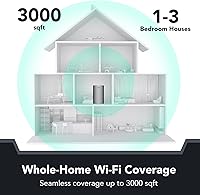
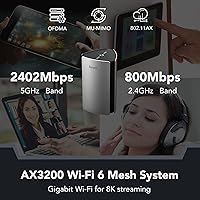
The Reyee RG-R6 AX3200 Mesh WiFi 6 System (1-Pack) comes from Reyee, a consumer-facing sub-brand of Ruijie Networks — a company with genuine enterprise networking credentials that most buyers have never heard of. That background matters, because it suggests the hardware engineering is not starting from scratch. As a single unit, this mesh router claims coverage up to 3,000 square feet, and additional units can be added later to extend that further. It runs dual-band WiFi 6, splitting 800Mbps across 2.4GHz and 2,400Mbps on 5GHz. For anyone tired of patchy coverage from an aging router or a daisy-chained extender setup, the Reyee R6 offers a credible upgrade path without a hefty price tag.
Features & Benefits

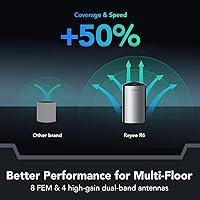
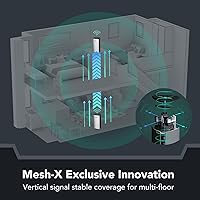
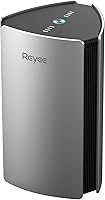
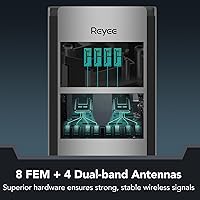
At its core, this WiFi 6 system runs on 802.11ax with both OFDMA and MU-MIMO technology — which, in practical terms, means it handles a crowded home network far better than older routers when everyone is streaming, gaming, or video calling at once. Eight omnidirectional antennas backed by high-power FEM amplifiers help push the signal further and more consistently. Reyee's proprietary MESH-X Matrix Antenna System uses a dual-axis design across both frequency bands, addressing coverage in horizontal and vertical directions. Expanding to multiple units takes just a button press — no app required — and beamforming helps the router focus its signal toward the devices that need it most.

Best For

This mesh router makes the most sense for people living in medium-sized homes or apartments — roughly 1,500 to 3,000 square feet — who want a real WiFi 6 upgrade without paying a premium. It handles households running 20 to 60 connected devices comfortably, covering everything from smart TVs and phones to thermostats and security cameras. If you have wrestled with dead zones using a traditional extender, the Reyee R6's mesh architecture keeps devices connected as you move room to room. It is also a strong fit for non-technical users who want a capable router that just works out of the box, with the option to scale by adding another unit later.

User Feedback

With a 4.2-star average across roughly 500 ratings, this WiFi 6 system lands in solid but not exceptional territory. Verified buyers frequently mention how quick and painless the initial setup is, and many report a noticeable speed bump coming from older AC-class routers. Some have even noted it holds its own against pricier mesh systems for everyday browsing and streaming. On the flip side, app reliability comes up as a recurring complaint — the companion software can be inconsistent. Power users flag the limited advanced configuration options. A number of reviewers also raise fair questions about long-term firmware support from a lesser-known brand. Overall, real-world feedback points to a capable budget pick with a few rough edges worth knowing about.

Pros

  • WiFi 6 technology handles crowded home networks far better than older AC routers at a comparable price.
  • One-button mesh expansion means adding a second unit later requires no technical knowledge whatsoever.
  • Most buyers are up and running in under 15 minutes straight out of the box.
  • Eight antennas with high-power amplifiers deliver stronger signal consistency than basic dual-antenna budget routers.
  • The Reyee R6 holds its own against pricier mesh systems for everyday streaming and video calls.
  • Beamforming focuses signal toward active devices rather than broadcasting blindly in all directions.
  • Scalable mesh architecture lets you grow coverage gradually instead of replacing the whole setup.
  • WPS and Ethernet support make connecting older wired devices or legacy smart home hardware simple.
  • Verified buyers upgrading from extender setups report eliminating dead zones that persisted for years.
  • Enterprise-grade parent company Ruijie Networks brings real networking engineering to a consumer price point.

Cons

  • The companion app crashes or fails to load frequently, especially during initial setup on iOS devices.
  • Real-world coverage through multiple walls falls well short of the 3,000 square foot specification.
  • Advanced network settings like VLAN support and custom DNS are either missing or deeply buried.
  • Firmware update changelogs are vague, and update frequency lags behind established router brands.
  • Customer support response times stretch to several days, with no live chat or phone option available.
  • The ecosystem is closed — you cannot mix in nodes from other brands if you expand the mesh later.
  • The unit runs noticeably warm during extended use and needs adequate ventilation around it.
  • Two-unit mesh handoff occasionally produces a brief dropout when moving between coverage zones.
  • Long-term software support beyond a few years is uncertain for a brand with limited consumer track record.
  • Power users running home labs or small business traffic will find the hardware underwhelming under sustained load.

Ratings

The scores below reflect an AI-driven analysis of verified buyer reviews for the Reyee RG-R6 AX3200 Mesh WiFi 6 System (1-Pack), sourced globally and filtered to remove incentivized, bot-generated, and spam submissions. Every category captures what real households consistently reported after living with this mesh router day to day. Strengths and shortcomings are weighted equally, so the picture you get here is as honest as the data allows.

Value for Money
88%
For buyers upgrading from an aging single-band or AC-class router, the Reyee R6 delivers a meaningful jump in speed and coverage at a price point that undercuts most WiFi 6 competitors by a wide margin. Reviewers frequently described it as punching well above its weight for streaming, video calls, and everyday browsing.
Buyers expecting flagship-tier throughput or tri-band performance will feel the compromise. The value story depends heavily on your use case — power users who push heavy file transfers or low-latency gaming on multiple devices simultaneously may find the trade-offs harder to accept.
Setup & Ease of Use
91%
Unboxing to working network in under 15 minutes was a common experience reported by non-technical buyers. The one-button mesh pairing removes the usual headache of logging into admin portals, and most reviewers said they needed zero outside help to get up and running.
A small but vocal group ran into trouble when the companion app failed to connect during initial setup, leaving them dependent on a web browser interface that is less intuitive. Users who wanted to configure VLANs, custom DNS, or QoS settings found the options frustratingly thin.
WiFi Coverage
76%
24%
In open-plan homes and single-story layouts under 2,500 square feet, this WiFi 6 system performed reliably across most rooms. Several buyers in apartments mentioned eliminating dead zones they had dealt with for years using a single unit alone.
Real-world signal strength through multiple walls or across two floors was noticeably weaker than the advertised 3,000 square foot claim suggests. Buyers in older homes with thick plaster or concrete walls reported meaningful drop-off beyond two rooms from the router.
Network Speed & Throughput
79%
21%
Devices connecting on the 5GHz band saw consistent real-world speeds that satisfied most streaming and remote work needs. Households running 20 to 40 simultaneous connections reported that the network held up without the slowdowns they experienced on their previous routers.
The 2.4GHz band tops out at 800Mbps on paper, and real throughput at range falls shorter still. Buyers expecting the full AX3200 figure across both bands were occasionally disappointed, especially when connecting older smart home devices that crowd the 2.4GHz spectrum.
Multi-Device Performance
82%
18%
OFDMA and MU-MIMO handling made a practical difference in households with smart TVs, laptops, phones, and IoT devices all running simultaneously. Reviewers noted that video calls stopped dropping when someone else started streaming, which had been a recurring issue on their previous routers.
At the upper edge of the claimed 110-device capacity, a handful of reviewers reported intermittent slowdowns during peak evening hours. The router handles a moderately busy home network well, but it is not the right tool for dense environments like small offices with heavy concurrent traffic.
App & Software Experience
58%
42%
The Reyee app covers the basics — network monitoring, guest network creation, and device management — in a reasonably clean interface. For users who just want to check what is connected or reboot the router remotely, it gets the job done without a steep learning curve.
App reliability was one of the most consistent complaints across verified reviews. Crashes during setup, difficulty reconnecting after firmware updates, and sluggish loading times were regularly cited. Android users reported more stability than iOS users, and several reviewers simply abandoned the app in favor of the browser interface.
Mesh Roaming Performance
77%
23%
Walking between rooms with an active video call or music stream connected showed noticeably fewer interruptions compared to setups relying on traditional extenders. The handoff between nodes was smooth enough that most buyers did not notice the switch happening.
True zero-interruption roaming was not universal. Some reviewers on two-unit setups reported a half-second dropout when moving between coverage zones, particularly on devices that hold onto a weaker signal longer before switching — a client-side issue, but worth knowing about.
Build Quality & Design
73%
27%
The white tower form factor is compact enough to sit on a shelf or bookcase without drawing attention. The chassis feels solid for its weight class, and nothing about the physical construction felt cheap or fragile during handling.
At just over 7.9 inches tall, the unit is slightly larger than expected for a single-node mesh router. Ventilation slots are modest, and a few buyers noted the unit runs warm after extended use — not alarming, but worth ensuring it has breathing room on a shelf.
Advanced Configuration Options
47%
53%
For users who want a router that just works without touching settings, the defaults are sensibly configured and the basic controls are easy to find. The web interface covers standard needs like port forwarding and guest networks without overwhelming beginners.
Network enthusiasts will hit a wall fast. VLAN support, custom DNS over HTTPS, detailed QoS controls, and granular band steering settings are either absent or buried. This is a known limitation of budget mesh systems, but it is a genuine dealbreaker for anyone running a home lab or a small business setup.
Firmware & Long-Term Support
54%
46%
Reyee has pushed firmware updates since launch, and some early buyers noted that stability improved meaningfully after the first few patches. The enterprise background of parent company Ruijie Networks provides some reassurance that the hardware platform is not a dead end.
Update frequency and transparency are not on par with established brands. Changelogs are sparse, the update process occasionally caused temporary connectivity drops, and there is genuine uncertainty about how many years of active support this consumer-tier product will receive — a fair concern for a lesser-known brand.
Signal Consistency
71%
29%
In well-positioned single-unit deployments, signal quality stayed stable over extended use without the gradual degradation some cheaper routers exhibit after weeks of uptime. The eight-antenna array does seem to distribute signal more evenly around the unit than simpler designs.
Placement sensitivity is higher than expected. Positioning the router on a low shelf or near competing electronics noticeably affected performance, and a few reviewers needed two or three location attempts before finding a spot where coverage was consistent throughout their home.
Customer Support Experience
52%
48%
Some buyers who reached out to Reyee support reported receiving helpful responses within a reasonable timeframe, and a few technical issues were resolved through direct email exchanges with the support team.
Support quality was inconsistent across reviewed experiences. Response times stretched to several days in multiple cases, and buyers dealing with app-related or firmware issues often found the guidance generic. The absence of live chat or phone support is a noticeable gap compared to what rivals like TP-Link or ASUS offer.
Compatibility & Interoperability
74%
26%
Standard ISP modem compatibility was broad, and most buyers had no trouble connecting the Reyee R6 to their existing cable or fiber modem. WPS made adding printers and older devices quick, and Ethernet passthrough performed reliably for wired desktop connections.
The system does not support third-party mesh standards, so expansion is locked to Reyee hardware. Buyers hoping to mix in a spare TP-Link or Netgear node will be out of luck. This closed ecosystem is a common limitation at this price tier but still worth factoring into a long-term decision.

Suitable for:

The Reyee RG-R6 AX3200 Mesh WiFi 6 System (1-Pack) is a strong fit for renters and homeowners in medium-sized spaces — think a two-bedroom apartment, a ranch-style house, or a single-story home under 2,500 square feet — who want a real WiFi 6 upgrade without spending heavily. If your current setup involves an aging single-band router or a range extender that drops connections whenever you walk to the other end of the house, this mesh router offers a meaningful and noticeably more stable alternative. Families running 20 to 50 devices simultaneously — phones, laptops, smart TVs, thermostats, security cameras — will appreciate how the network holds up during peak evening hours without the bottlenecks that plagued their previous hardware. Non-technical buyers who dread router setup will find the one-button mesh pairing and sensible default configuration genuinely refreshing. It also suits budget-conscious buyers who want a scalable foundation: start with one unit, and add a second later if coverage gaps appear in larger or multi-floor homes.
Not suitable for:

Buyers with more demanding requirements should think carefully before committing to the Reyee RG-R6 AX3200 Mesh WiFi 6 System (1-Pack), because its limitations become real obstacles in the wrong context. If you live in a large two-story home with thick walls, older plaster construction, or a layout spread across more than 3,000 square feet, a single unit will not reliably cover the full space — and even two units may fall short compared to premium tri-band mesh systems. Network enthusiasts who rely on VLAN segmentation, custom DNS configurations, advanced QoS controls, or detailed traffic monitoring will hit a wall with this router's stripped-back software. The companion app has a documented reliability problem that makes remote management frustrating, particularly for anyone who expects to manage their network frequently from a smartphone. Households in dense urban environments with dozens of competing WiFi networks may also find performance less predictable than in lower-interference suburban settings. Finally, buyers who prioritize long-term firmware support and responsive customer service from a well-established brand should look at TP-Link, ASUS, or Eero before settling on a lesser-known option with an uncertain support roadmap.

Specifications

  • WiFi Standard: This router operates on the 802.11ax (WiFi 6) standard, offering improved efficiency and throughput compared to the previous 802.11ac (WiFi 5) generation.
  • Frequency Bands: Dual-band design transmits simultaneously on both 2.4GHz and 5GHz frequencies to balance range and speed across connected devices.
  • Max Throughput: Combined theoretical maximum throughput is AX3200, comprising 800Mbps on the 2.4GHz band and 2400Mbps on the 5GHz band.
  • Antenna System: Eight omnidirectional antennas are arranged in the proprietary MESH-X Matrix dual-axis configuration, covering both horizontal and vertical signal planes.
  • Amplifiers: Four high-power FEM (Front-End Module) amplifiers per band — eight total — boost signal strength beyond what standard passive antenna setups provide.
  • Coverage Area: A single unit is rated for up to 3,000 square feet under optimal open-plan conditions; real-world coverage through walls will vary.
  • Device Capacity: The router officially supports up to 110 simultaneous connected devices, aided by OFDMA and MU-MIMO technology.
  • Key Technologies: OFDMA, MU-MIMO, and Beamforming are all supported, collectively improving efficiency, multi-device handling, and directed signal performance.
  • Mesh Expansion: Additional Reyee-compatible units can be added to the mesh network by pressing the dedicated Reyee Mesh button, requiring no app or portal access.
  • Special Features: WPS (Wi-Fi Protected Setup) is supported for quick, button-press pairing of compatible devices such as printers and smart home hardware.
  • Connectivity: At least one Ethernet port is included for wired device connections or modem uplink, providing a stable fallback for desktop computers and NAS devices.
  • Dimensions: The unit measures 4.69 x 5.04 x 7.91 inches, making it a compact tower form factor suitable for a shelf or desk placement.
  • Weight: The router weighs 1.45 pounds, making it lightweight and easy to reposition during placement testing.
  • Color: Available in white, with a clean minimalist exterior designed to blend into typical home or office environments.
  • Modem Requirement: This is a router only — a separate modem is required to connect to most residential ISP services, as no built-in modem is included.
  • Wireless Security: Supports WPA3 and WPA2 encryption standards for securing the wireless network against unauthorized access.
  • Manufacturer: Manufactured by Reyee, a consumer networking sub-brand of Ruijie Networks, a company with established enterprise and commercial networking infrastructure experience.

Related Reviews
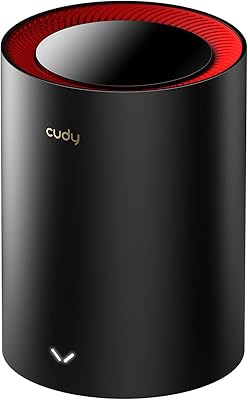
Cudy AX3000 Wi-Fi 6 Mesh System M3000 1-Pack
85%
88%
Overall Performance
91%
Wi-Fi Coverage
84%
Ease of Setup
87%
Speed & Stability
89%
Ethernet Backhaul Performance
More
D-Link Eagle Pro AI AX3200 Mesh WiFi 6 System
85%
88%
Wi-Fi Performance
91%
Ease of Setup
84%
Coverage Range
86%
App Functionality
89%
AI Optimization
More
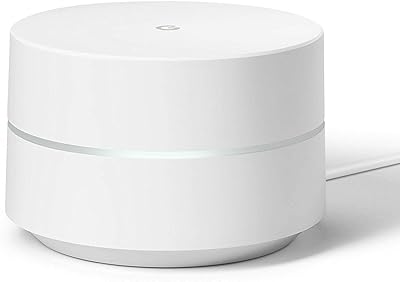
Google WiFi 1-Pack
Google WiFi 1-Pack
76%
93%
Ease of Setup
88%
App Experience
79%
Wi-Fi Coverage
76%
Network Speed & Performance
84%
Parental Controls
More
Tenda MX12 AX3000 Mesh WiFi 6 System
82%
88%
Performance
79%
Ease of Setup
93%
Coverage Area
85%
Speed & Reliability
82%
Multi-Device Support
More
NETGEAR Nighthawk MK62 Mesh WiFi 6 System
87%
94%
Setup & Installation
88%
Performance for Streaming & Gaming
83%
WiFi Coverage
90%
App Management Experience
92%
Security Features (NETGEAR Armor)
More
NETGEAR Nighthawk MK73S
77%
88%
Coverage & Dead Zone Elimination
91%
Setup & Installation Experience
76%
WiFi Speed & Throughput
82%
Device Capacity & Network Congestion
63%
Roaming & Handoff Between Units
More
ASUS ZenWiFi XD6 Mesh WiFi 6 System
86%
93%
Wi-Fi Coverage
85%
Ease of Setup
89%
Performance and Speed
80%
App Experience
91%
Parental Controls
More
NETGEAR Orbi RBK663 WiFi 6 Mesh System
87%
93%
WiFi Performance
90%
Coverage Area
85%
Ease of Setup
88%
Security Features
82%
App Experience
More
NETGEAR Nighthawk MK72 WiFi 6 Mesh System
84%
94%
WiFi Coverage
91%
Speed & Performance
88%
Setup & Installation
86%
App Experience
90%
Security Features
More
NETGEAR Orbi RBK853 WiFi 6 Mesh System
85%
93%
WiFi Coverage
89%
Speed & Performance
85%
Setup & Installation
92%
Security Features
80%
Value for Money
More

FAQ

You will need a separate modem. The Reyee R6 is a router only and does not have a built-in modem. Most ISPs provide a modem when you sign up for service, or you can purchase a compatible standalone modem — just make sure it matches your internet connection type (cable, DSL, or fiber).

Setup is genuinely straightforward. Most buyers plug it in, connect it to their modem via Ethernet, and follow the basic steps in the Reyee app or a browser interface to get online within 10 to 15 minutes. You do not need any networking background to get it working. The app has had some reliability complaints, so if it gives you trouble, the browser-based setup at the router's admin page is a solid fallback.

Yes, and it is one of the better features of this system. You simply press the Reyee Mesh button on both units and they pair automatically — no configuration screens or technical steps required. Keep in mind that expansion nodes must be other Reyee-compatible units; you cannot mix in routers from other brands like TP-Link or Netgear.

It is broadly compatible with standard cable and fiber modems from major ISPs. As long as your modem has an Ethernet output (which virtually all do), you connect it to the WAN port on the router and you are good to go. A small number of buyers with ISP-provided combo modem-router units reported needing to enable bridge mode first, which is a standard process your ISP can walk you through.

For casual and mid-level gaming — online multiplayer, game downloads, and streaming — the Reyee R6 performs adequately. WiFi 6 with MU-MIMO helps reduce congestion when other household members are streaming simultaneously. That said, serious competitive gamers who need consistent sub-10ms latency and advanced QoS prioritization may find the limited software controls a drawback compared to gaming-focused routers.

The 3,000 square foot figure assumes a relatively open layout with minimal obstructions. In practice, thick walls, concrete floors, or densely furnished rooms reduce that range noticeably. In straightforward single-story or open-plan homes, one unit comfortably handles 1,500 to 2,500 square feet. For larger or more complex layouts, a two-unit mesh setup is a smarter approach than pushing a single unit to its limits.

This system supports WiFi 6 (802.11ax) only — it does not include a 6GHz band, which is the defining feature of WiFi 6E. For most households this makes no practical difference right now, since very few consumer devices currently take advantage of the 6GHz band. If you are future-proofing for several years out, WiFi 6E routers are available but come at a significantly higher price.

Reyee has released firmware updates since the product launched, and the router can check for updates through the admin interface. Updates are not always automatic by default, so it is worth manually checking every few months. The honest caveat is that update frequency and long-term support cadence are less predictable with Reyee than with brands like ASUS or TP-Link, which have longer consumer track records.

Yes, guest network creation is supported through both the app and the browser-based admin interface. You can set a separate SSID and password for guests, keeping them isolated from your main network and devices. It is one of the more reliable features in the software, and most buyers found it quick to configure even without prior router experience.

The unit does run noticeably warm during continuous operation, which is common for routers with high-power amplifiers. It is not hot enough to be alarming, but you should avoid placing it in an enclosed cabinet or directly against other electronics. Leaving a few inches of clearance on all sides is enough to keep temperatures in a safe and stable range during normal use.