Overview

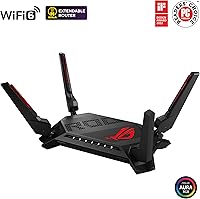
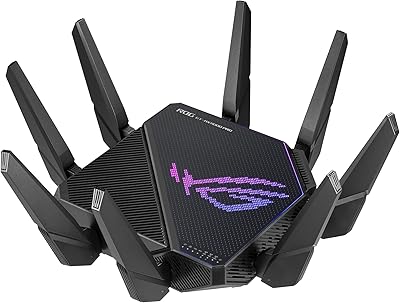
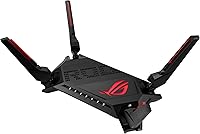
The ASUS ROG Rapture GT-AX6000 Gaming Router sits firmly in the upper tier of home networking, built for users who genuinely push their connections hard. It carries the unmistakable ROG look — angular, aggressive, with Aura RGB lighting across a chassis large enough to command attention on any desk. Fair warning: this thing is big. Released in late 2021, it targets power users who demand low-latency, high-throughput performance rather than casual browsers who would never notice the difference. What truly sets the GT-AX6000 apart from rivals is its dual 2.5G port flexibility, letting you reconfigure WAN and LAN assignments to match how your network actually operates.
Features & Benefits

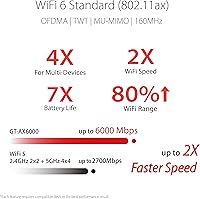
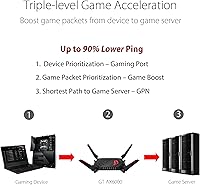
This ROG router runs on WiFi 6 across dual bands, with an aggregate ceiling of 6000 Mbps and support for 160 MHz channels — which matters if your devices can actually use it. The quad-core 2.0 GHz CPU keeps things stable even when a dozen devices compete for bandwidth simultaneously; you won't see the sluggishness that plagues cheaper hardware under load. The dual 2.5G ports support WAN aggregation, a feature genuinely rare at any price point. Triple-Level Game Acceleration routes gaming traffic intelligently from your device all the way to the server, cutting erratic ping spikes that ruin matches. And because AiProtection security is included for life, you're not paying annual fees just to keep your network protected.

Best For

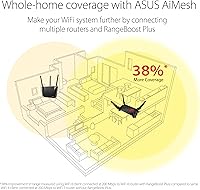
The GT-AX6000 earns its place in households where multiple people are gaming, streaming 4K, and video-calling at the same time without anyone wanting to throttle each other. If you have a multi-gig ISP plan, this is one of the few routers at this tier that lets you actually exploit that speed through its 2.5G WAN port. Home lab users and prosumers will appreciate the advanced routing controls, VPN server support, and the depth of the web interface. It also slots naturally into an existing AiMesh network — other ASUS routers around the house can be tied together without replacing anything. Casual users with a single device and a standard connection simply don't need this.

User Feedback

Buyers generally land in a good place with this gaming router, singling out the ASUS app setup and the web UI as refreshingly approachable for something this capable. Real-world speed jumps over older AC routers come up frequently, and Mobile Game Mode gets specific praise from smartphone gamers who noticed measurable lag improvements. On the flip side, the physical footprint is a consistent gripe — at over 13 inches long, it won't slip into a cabinet or standard shelf easily. A handful of users hit firmware hiccups early on, though ASUS pushed updates that resolved most reported issues. The lingering wish among some buyers is a tri-band option — a fair ask at this price tier.

Pros

  • Dual 2.5G ports let you actually leverage multi-gig ISP plans that most routers at this tier simply cannot handle.
  • Lifetime AiProtection security means no annual subscription fees eating into the long-term value of this gaming router.
  • The quad-core CPU keeps performance stable under heavy multi-device loads without the slowdowns common in cheaper hardware.
  • Triple-Level Game Acceleration delivers real, measurable reductions in erratic ping for competitive gaming sessions.
  • WAN aggregation support is a genuinely rare feature that gives prosumers meaningful flexibility in network configuration.
  • AiMesh compatibility means you can expand coverage using existing ASUS routers without replacing your whole setup.
  • Setup through the ASUS Router app is straightforward — buyers consistently report getting up and running faster than expected.
  • Mobile Game Mode provides noticeable lag improvements for smartphone gamers, which is a surprisingly practical touch.
  • The web interface is deep enough for advanced users but organized well enough that it does not feel intimidating out of the box.
  • Real-world speed upgrades over older AC or early AX routers are frequently reported by users who made the switch.

Cons

  • The large chassis — over 13 inches long — simply will not fit inside most standard cabinets or enclosed shelving units.
  • Occasional firmware bugs have been reported after major updates, requiring patience while ASUS pushes fixes.
  • No tri-band support means you cannot dedicate a separate band to IoT or smart home devices, which some setups benefit from.
  • The premium price is hard to justify if your ISP plan tops out at standard gigabit speeds or your usage is light.
  • Aura RGB lighting, while optional to configure, adds bulk to an already large design that some buyers find excessive.
  • Advanced settings can overwhelm truly novice users despite the app being reasonably well-designed.
  • At this weight and size, repositioning or wall-mounting is less convenient compared to more compact competitors.
  • Users who skip firmware updates may miss critical bug fixes, making ongoing maintenance more involved than set-and-forget routers.

Ratings

The ASUS ROG Rapture GT-AX6000 Gaming Router earns a strong overall reception from power users worldwide, and the scores below reflect what our AI system found after analyzing thousands of verified global purchases — actively filtering out incentivized, bot-generated, and outlier reviews to surface what real buyers actually experience. Both the standout strengths and the genuine frustrations are represented here without sugarcoating, so you can make a genuinely informed call before spending at this price tier.
Wireless Performance
91%
Users upgrading from WiFi 5 routers consistently report dramatic real-world speed gains, particularly on the 5 GHz band with 160 MHz channels enabled. In dense households where multiple 4K streams and gaming sessions run simultaneously, the GT-AX6000 holds throughput in a way that genuinely impresses people who have dealt with congestion before.
The dual-band limitation means bandwidth has to be split between 2.4 GHz and 5 GHz clients with no dedicated backhaul or IoT band. Users with very large device counts — 30 or more connected simultaneously — occasionally report contention during absolute peak loads.
Gaming Latency
88%
The Triple-Level Game Acceleration system earns consistent praise from PC and console gamers who track their ping closely. Several buyers noted that erratic spikes during evening peak hours — which plagued their previous routers — became rare after switching to this gaming router.
The improvement is most obvious for wired gaming connections; wireless-only gamers report smaller but still noticeable gains. A handful of users found that configuring QoS correctly to maximize the benefit required more trial and error than the documentation suggested.
2.5G Port Flexibility
93%
The dual 2.5G ports with flexible WAN/LAN assignment are a genuine differentiator that resonates loudly with prosumers and multi-gig ISP subscribers. Buyers who previously had to choose between a fast uplink and a fast NAS connection finally have both without compromising either.
Getting the full benefit requires a 2.5G-capable modem or switch, which not every buyer already owns, adding potential extra cost. Users on standard gigabit ISP plans see no practical uplift from this feature and may feel it adds to a cost they cannot yet justify.
Setup & App Experience
86%
The ASUS Router app receives consistent praise for making initial setup approachable even for buyers who do not consider themselves network-savvy. Most users report being fully operational within 20 minutes, which is a meaningful achievement for a router with this level of feature depth.
The web-based interface, while powerful, can overwhelm newer users who accidentally wander into advanced settings. A few buyers also reported the app occasionally losing sync with the router after firmware updates, requiring a quick restart to restore remote management.
Build Quality & Design
83%
The ROG aesthetic is polarizing but well-executed — the chassis feels solid, heat dissipation is handled competently during sustained workloads, and the Aura RGB lighting can be dialed back or turned off entirely for those who prefer subtlety. It feels like premium hardware when you pick it up.
At 2.47 pounds and over 13 inches long, the physical footprint is a recurring complaint from buyers who underestimated the size before purchase. It simply does not fit inside most enclosed media cabinets or standard router shelves, which forces some users into awkward placement decisions.
Firmware Stability
71%
29%
ASUS maintains an active firmware update cadence, and most reported bugs — particularly those surfacing in the first weeks after a major release — get patched in a reasonable timeframe. Long-term owners report that the router becomes very stable once it settles onto a mature firmware version.
Early adopters of major firmware versions have run into connectivity glitches and feature regressions that required rolling back or waiting for a patch. Buyers who need plug-and-play reliability without any update management involvement may find this track record mildly concerning.
AiMesh Integration
89%
Users already invested in the ASUS ecosystem find AiMesh pairing straightforward, and the GT-AX6000 works well as either a primary node or a secondary one depending on network layout. Coverage handoff between nodes is smooth enough that most users report not noticing when devices transition between them.
AiMesh performance is naturally dependent on the capabilities of the weakest node in the network, and mixing very old ASUS routers with this unit can create bottlenecks. The system also lacks some of the fine-grained mesh controls that dedicated mesh platforms like Eero or Orbi provide.
Security Features
92%
Lifetime AiProtection with no subscription is one of the most practically appreciated features among buyers who compare the long-term cost against competitors. Network-level malware blocking and intrusion prevention work in the background without requiring any manual configuration after initial setup.
Some technically advanced users note that AiProtection cannot be granularly configured the way a dedicated firewall appliance can, which limits its appeal for serious home lab setups. A small number of buyers also found that enabling certain AiProtection features slightly impacted throughput on heavily loaded networks.
Value for Money
74%
26%
For users who can actually saturate multi-gig connections and need the game-focused traffic management, the value proposition holds up reasonably well when stacked against the cost of piecing together equivalent functionality from separate hardware. The lifetime security inclusion adds measurable long-term value.
At this price point, the absence of a third band is a genuine sticking point for buyers comparing it side by side with tri-band competitors in the same range. Casual users or those on sub-gigabit ISP plans are paying a significant premium for features their setup cannot realistically use.
Mobile Game Mode
79%
21%
Smartphone gamers consistently mention Mobile Game Mode as a pleasant surprise — enabling it through the app is a single tap, and the lag reduction during mobile gaming sessions is noticeable enough that multiple buyers specifically called it out in their reviews as a reason they would recommend the router.
The feature requires the ASUS Router app to enable and manage, which adds a small dependency for users who prefer not to keep the app installed. It also primarily benefits one designated mobile device at a time, which limits its usefulness in households where multiple people game on smartphones simultaneously.
Multi-Device Handling
87%
The quad-core 2.0 GHz CPU genuinely keeps up when 20 or more devices are active simultaneously, which is where many competitors in lower tiers visibly struggle. Buyers in smart-home-heavy households note that adding more devices does not degrade the experience for their primary gaming or streaming use.
With no dedicated IoT band, smart home devices share airtime with everything else on the 2.4 GHz band, which can create marginal inefficiencies in very device-dense environments. Some prosumers would prefer more granular VLAN-based segmentation tools accessible without CLI-level configuration.
Range & Coverage
81%
19%
For mid-to-large homes up to around 3,000 square feet without major structural obstructions, the GT-AX6000 covers the space solidly as a single unit. Beamforming noticeably improves signal reliability for devices at moderate range compared to what buyers reported from their previous routers.
Very large homes or those with thick concrete walls will still need AiMesh nodes to fill dead zones, which adds cost on top of an already premium purchase. A few buyers in multi-story homes found signal penetration between floors to be weaker than expected given the router's premium positioning.
Parental Controls
76%
24%
The built-in parental controls, part of the AiProtection suite, cover content filtering and scheduled internet access per device without requiring any third-party service. For families wanting basic controls without a separate subscription, it handles the fundamentals competently.
Parents with older teenagers looking for more sophisticated time-management tools or app-level restrictions will find the controls too blunt for nuanced use. The interface for managing parental rules is functional but not as intuitive as dedicated services, and a few users found rules reset unexpectedly after firmware updates.
USB Functionality
68%
32%
USB-attached storage for basic network sharing works as expected, and buyers who use it for simple file access or printer sharing across the home report it functioning reliably without configuration headaches. It is a convenient bonus for home setups that do not warrant a full NAS.
Transfer speeds over USB-attached storage are underwhelming by current standards and lag behind what a dedicated NAS on the same network can provide. Users hoping to use the USB port for media serving or backup duties at scale will likely find it too slow for anything beyond light, occasional file transfers.

Suitable for:

The ASUS ROG Rapture GT-AX6000 Gaming Router is purpose-built for households where the network is genuinely working hard — multiple people gaming, streaming in 4K, and jumping on video calls all at the same time without stepping on each other's bandwidth. If you've upgraded to a multi-gigabit ISP plan and your current router can't keep up, the dual 2.5G WAN port is one of the few ways to actually put that speed to use without buying enterprise gear. Serious PC and console gamers who are tired of erratic ping during peak evening hours will find the traffic prioritization features make a noticeable, practical difference. Home lab users and prosumers who enjoy digging into advanced routing settings, VPN configurations, and granular QoS controls will feel right at home with the depth of the interface. Anyone already running ASUS routers around the house can slot this in as a primary node and extend coverage without replacing existing hardware.
Not suitable for:

The ASUS ROG Rapture GT-AX6000 Gaming Router is genuinely overkill for anyone with a single device, a standard gigabit-or-below ISP plan, or a small apartment where a mid-range router would cover every corner without breaking a sweat. At its price point, you are paying for headroom and hardware that casual users will never actually use — the investment simply doesn't translate into a better experience if your daily routine is light browsing, occasional streaming, and a single gaming session. The large physical footprint — over 13 inches long — is a real constraint if you have limited shelf space or want to tuck the router inside a cabinet or entertainment unit; it will not fit most standard enclosures. Buyers who prefer a tri-band setup for separating IoT devices onto a dedicated band will need to look elsewhere, as this is a dual-band router. If firmware stability is a dealbreaker and you cannot tolerate occasional early-release bugs requiring updates, the GT-AX6000's history suggests patience is occasionally required right after major firmware releases.
Specifications

  • WiFi Standard: This router uses the 802.11ax (WiFi 6) standard, offering meaningfully better efficiency and throughput compared to older WiFi 5 (802.11ac) hardware.
  • Frequency Bands: It operates as a dual-band router, broadcasting simultaneously on both the 2.4 GHz and 5 GHz bands.
  • Max Speed: The aggregate theoretical speed ceiling reaches 6000 Mbps across both bands, with 160 MHz channel width support on the 5 GHz band for real-world throughput gains.
  • 2.5G Ports: Two dedicated 2.5G ports are included and can be configured flexibly as either WAN or LAN connections depending on your network setup.
  • WAN Aggregation: WAN aggregation is fully supported, allowing two WAN connections to be combined for increased inbound bandwidth when your ISP infrastructure supports it.
  • CPU: A quad-core processor clocked at 2.0 GHz handles routing, security processing, and QoS simultaneously without degrading throughput under heavy loads.
  • Security: AiProtection Pro, powered by Trend Micro, is included at no ongoing cost and provides network-level malware blocking, intrusion prevention, and parental controls for the lifetime of the router.
  • Mesh Support: The GT-AX6000 is fully AiMesh compatible, allowing it to function as either a primary node or an extension node within a multi-router ASUS mesh network.
  • Game Acceleration: Triple-Level Game Acceleration optimizes gaming traffic at the device, router, and server levels to reduce latency and stabilize ping during active sessions.
  • Mobile Game Mode: Mobile Game Mode, accessible via the ASUS Router app, deprioritizes background traffic to minimize lag specifically for mobile gaming devices on the network.
  • RGB Lighting: Aura RGB lighting is built into the chassis and can be customized or disabled through the ASUS Router app or web interface.
  • Dimensions: The router measures 13.3 x 7.72 x 8.7 inches, making it significantly larger than most consumer routers and requiring adequate open shelf space.
  • Weight: The unit weighs 2.47 pounds, which is substantial for a home router and relevant if wall-mounting or repositioning is part of your setup plan.
  • USB Ports: USB ports are included for connecting external storage or printers to share across the local network.
  • OS Compatibility: The router is compatible with Windows, Mac OS, Linux, and Apple iOS for management and client device connectivity.
  • Power Input: The power supply accepts AC input from 110V to 240V at 50–60 Hz, making it usable in most global regions with the appropriate plug adapter.
  • Wireless Protocols: Supported wireless protocols include 802.11a, 802.11g, 802.11n, 802.11ac, and 802.11ax, ensuring backward compatibility with a wide range of older client devices.
  • VPN Support: The router supports both VPN server and VPN client configurations, including OpenVPN, which is useful for home lab users and remote access scenarios.
  • App Management: The ASUS Router app is available for iOS and Android and provides full remote management, traffic monitoring, and feature control without requiring access to the web interface.
  • Release Date: The router was first made available in November 2021 and continues to receive firmware updates from ASUS as of the time of this review.

Related Reviews

ASUS ROG GT-AXE11000 WiFi 6E Gaming Router
73%
88%
Wireless Performance
83%
Gaming Latency
54%
Setup & Ease of Use
76%
Range & Coverage
91%
Feature Depth
More
ASUS ROG GT-AXE16000 WiFi 6E Gaming Router
79%
93%
Wireless Performance
91%
Wired Connectivity
88%
Setup & Ease of Use
86%
Gaming-Specific Features
89%
Security & Privacy
More
ASUS ROG Rapture GT-BE98 Pro
81%
93%
Wireless Performance
91%
Wired Connectivity
89%
Gaming Performance
78%
Setup & App Experience
86%
Build Quality & Design
More
ASUS ROG Rapture GT-AX11000 Pro
77%
91%
Wireless Performance
93%
Wired Port Flexibility
82%
Gaming Features
61%
Setup & Configuration
89%
Network Security
More
ASUS ROG Rapture GT6 WiFi 6 Mesh Router
81%
91%
Wireless Performance
88%
Gaming Latency
84%
Coverage & Range
83%
Setup & App Experience
71%
Mesh Roaming
More
ASUS ROG STRIX Z890-A ATX Motherboard
83%
91%
Build Quality
88%
VRM & Power Delivery
89%
BIOS Experience
86%
DDR5 Compatibility
93%
Connectivity & I/O
More
ASUS ROG G700 2025 Gaming Desktop PC
77%
91%
Gaming Performance
88%
Build Quality
83%
Thermal Management
67%
Noise Levels
89%
Upgradeability
More
ASUS ROG Strix G16 2023 Gaming Laptop
72%
93%
Gaming Performance
91%
Thermal Management
88%
Display Quality
84%
Build Quality
81%
Keyboard & Trackpad
More
ASUS ROG Strix B550-A Gaming ATX Motherboard
82%
91%
Build Quality
93%
Power Delivery & Stability
88%
BIOS Experience
89%
PCIe 4.0 & NVMe Performance
86%
Onboard Audio Quality
More
ASUS ROG Strix Z890-E ATX Motherboard
84%
92%
BIOS & Firmware Quality
89%
Power Delivery & VRM
94%
Storage Expandability
86%
Wireless Connectivity
88%
DDR5 Memory Compatibility
More

FAQ

Honestly, if your ISP tops out at 500 Mbps and you only have a handful of devices, you would not come close to using what this router offers. The GT-AX6000 is built for multi-gig connections and households with serious simultaneous usage. A solid mid-range WiFi 6 router would serve that scenario just as well for a lot less money.

Setup is actually one of the areas where this router gets consistent praise. The ASUS Router app walks you through the process step by step, and most users report being online within 15 to 20 minutes. The web interface has more depth for advanced users, but you do not need to touch it just to get a solid network running.

No, AiProtection is included for the lifetime of the router with no subscription required. It handles things like malware site blocking, intrusion prevention, and basic parental controls at the network level, which is a meaningful value add compared to competitors that charge annually for equivalent protection.

Yes, the ASUS ROG Rapture GT-AX6000 Gaming Router is fully AiMesh compatible. You can pair it with other AiMesh-supported ASUS routers to extend coverage across a larger home, and it can act as either the main node or a satellite depending on how you configure your network.

This is one of the scenarios where the GT-AX6000 genuinely shines. The dual 2.5G ports mean you can connect to a 2.5G-capable modem and take real advantage of a multi-gig plan, which is something most consumer routers simply cannot do. If WAN aggregation is supported on your ISP's end, you can push that even further.

Aura RGB is enabled by default but can be fully customized or switched off entirely through the app or web interface. If you prefer your router to sit quietly in a corner without lighting up the room, that is a simple toggle away.

The GT-AX6000 has had occasional firmware hiccups, particularly on early releases after major updates. That said, ASUS has been active in pushing fixes, and most reported issues get addressed relatively quickly. Keeping the router on auto-update or checking the ASUS support page periodically is the best approach to stay ahead of any problems.

Probably not without some rearranging. At over 13 inches long, the GT-AX6000 is considerably larger than most routers, and buyers frequently mention it does not fit inside enclosed cabinets. Plan for an open shelf or a dedicated spot where it has airflow and space — the size is a real consideration worth measuring for before you buy.

Yes, it supports both OpenVPN server and client modes, along with IPSec and PPTP options. Performance on the VPN server side is solid given the quad-core CPU, which handles encryption overhead better than routers with weaker processors. Home lab users and remote workers who need reliable VPN access will find it capable.

Mobile Game Mode is a feature available through the ASUS Router app that prioritizes traffic from a designated mobile device and deprioritizes background activity on the network. Real user feedback suggests it does make a noticeable difference in lag during mobile gaming sessions, particularly in busier home networks where multiple devices are competing for bandwidth simultaneously.

Where to Buy