

Overview

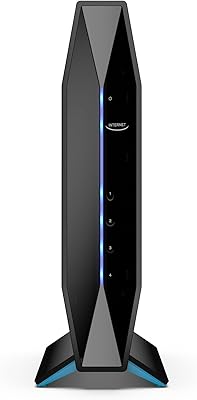
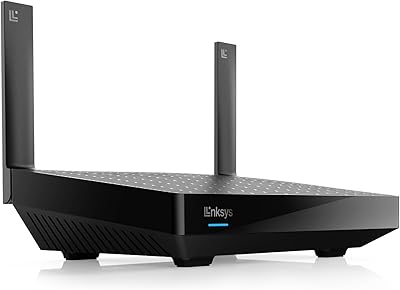
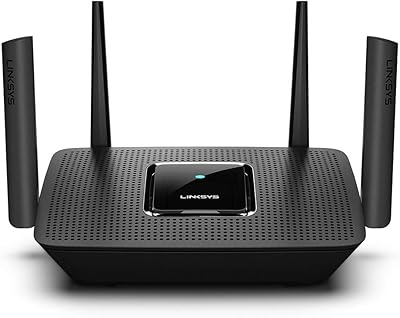
The Linksys AX2200 WiFi 6 Router is one of the more honest value propositions in the current router market — a 2024 release that brings genuine WiFi 6 technology to households that do not want to overspend upgrading from older standards. Powered by a Qualcomm chipset, it carries enough technical credibility to justify its place in the budget tier. The physical unit is compact and unobtrusive on a shelf or desk. Worth noting upfront: this is a single-unit device, mesh-ready but not a multi-node kit straight out of the box. With over 35 years of networking experience behind the brand, Linksys at least earns the benefit of the doubt here.

Features & Benefits

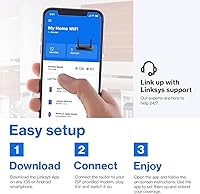
Where the Hydra 6 earns its place is in managing a realistically busy home network. WiFi 6's real advantage is not raw speed — it is how the 802.11ax standard handles multiple devices talking to the router simultaneously. Think a streaming TV, two phones, and a laptop all active at once; older routers start to stumble in that scenario, and this one holds up noticeably better. The Linksys app makes setup painless — no browser login, no manual configuration. Guest Mode is handy for isolating visitor devices or smart-home gadgets from your main network, and Intelligent Mesh support means you can add a Linksys node later if your coverage needs grow.

Best For

This Linksys mesh router makes the most sense for renters or small-home owners — a one- or two-bedroom space where the 1,500-square-foot coverage claim is realistic rather than theoretical. It handles a typical connected household well: a couple of smartphones, a smart TV, a tablet, maybe a gaming console. Push that toward 20-plus devices and slowdowns become more likely. Casual gamers and streamers will appreciate the low-latency focus; just do not expect it to keep up with higher-tier hardware on a multi-gigabit internet plan. It also suits anyone already in the Linksys ecosystem who wants affordable coverage expansion without platform-switching.

User Feedback

Sitting at 4.1 stars across just over 280 ratings, this WiFi 6 router earns broadly positive marks, though the reviews tell a nuanced story. Most buyers point to quick app-guided setup and a clear improvement over their previous router as the highlights. Streaming stability and reduced lag in casual gaming sessions come up frequently as genuine wins, particularly in smaller spaces. On the flip side, users in larger homes or multi-floor layouts consistently report that coverage falls short of the advertised ceiling — wall materials matter more than the spec sheet suggests. A few note occasional app connectivity hiccups. Those who reached Linksys phone support generally found the experience responsive, which is a quiet but practical reassurance.

Pros

  • Genuine WiFi 6 performance at a price point that makes upgrading from older standards a no-brainer.
  • The Qualcomm chipset adds hardware credibility that is uncommon for a router in this price range.
  • App-guided setup takes most users from box to browsing in under ten minutes.
  • Handles a typical multi-device living room — TV, phones, laptop — without noticeable congestion.
  • Intelligent Mesh support means the network can grow by adding nodes later rather than starting over.
  • Guest Mode makes it easy to isolate visitor devices or smart-home gadgets from your main network.
  • Low-latency performance is a genuine benefit for casual gaming and 4K streaming at moderate range.
  • Compact and lightweight build fits easily on a shelf or media unit without dominating the space.
  • US-based phone support is available, which provides reassurance for less tech-savvy buyers.
  • Backward compatibility with older WiFi standards means existing devices connect without issues.

Cons

  • Coverage drops noticeably in homes with thick walls or across multiple floors, well short of the marketed maximum.
  • The Hydra 6 is a single router — buyers expecting a multi-node mesh kit will need to purchase nodes separately.
  • AX2200 combined speeds can become a bottleneck for households on high-speed gigabit internet plans.
  • Some users report occasional app connectivity glitches, including brief drop-outs during remote management.
  • Only dual-band — no dedicated 6 GHz band, which limits headroom as more WiFi 6E devices enter the market.
  • Dense device environments above 20 connected gadgets can stress this router beyond its reliable performance range.
  • The mobile app, while convenient, offers less granular control than a traditional browser-based admin interface.
  • No USB port for network storage or printer sharing, which some buyers at this tier still expect.

Ratings

The scores below reflect an AI-driven analysis of verified global buyer reviews for the Linksys AX2200 WiFi 6 Router, with spam, bot activity, and incentivized feedback actively filtered out to ensure reliability. Ratings are drawn from real household experiences across a range of living situations and usage habits. Both the genuine strengths and the recurring frustrations are reflected here without bias.

Value for Money
88%
Most buyers feel this WiFi 6 router punches well above its price tag, particularly for households moving off older WiFi 5 or WiFi 4 hardware. Getting a Qualcomm-powered, app-managed WiFi 6 device at this price point is legitimately rare, and that resonates strongly in the reviews.
A handful of buyers who compared it closely to slightly pricier rivals noted that paying a bit more buys tri-band support or a bundled multi-node kit — making the value equation less clear-cut for anyone with a larger home or more demanding setup.
Setup & Ease of Use
92%
The app-guided setup process is the single most praised aspect across all reviews. Non-technical users consistently report going from unboxing to a working network in under ten minutes, with no need to touch a browser interface or understand IP address configuration.
A small number of users ran into app pairing issues on first launch, requiring a router reset and a second attempt. Those running older Android versions also occasionally reported sluggish app response during initial configuration.
WiFi Coverage
66%
34%
In open-plan apartments and small single-floor homes under 1,000 sq ft, the Hydra 6 covers the space reliably with a strong, consistent signal. Buyers in studio or one-bedroom layouts rarely report dead zones under these conditions.
The 1,500 sq ft coverage claim does not hold up well in practice for multi-floor homes or spaces with brick, concrete, or plaster walls. Several users in two-story houses describe noticeable signal loss on the upper floor, which is a recurring theme in critical reviews.
Multi-Device Performance
78%
22%
For a typical connected living room — a smart TV running a stream, two or three smartphones, and a laptop on a video call simultaneously — the Hydra 6 manages traffic without obvious slowdowns. WiFi 6's congestion-handling improvements over older standards are genuinely noticeable here.
Once the active device count climbs past 15 or so, particularly if several are bandwidth-intensive, performance starts to soften. Dense smart-home setups with cameras, voice assistants, and multiple streaming devices active at once tend to expose the limits of the AX2200 speed class.
Gaming & Streaming
76%
24%
Casual online gaming on a console or PC within moderate range of the router benefits clearly from the low-latency design — players report fewer rubber-banding moments and more consistent ping compared to their previous routers. 4K streaming on a single TV holds up reliably in typical apartments.
Competitive online gaming at high internet speeds can expose a ceiling with this WiFi 6 router, where latency remains acceptable but not best-in-class. Users with 500 Mbps or faster plans sometimes find throughput capped by the router before their ISP connection is the limiting factor.
App Experience
71%
29%
Day-to-day app management is straightforward for most users — checking which devices are connected, toggling Guest Mode, or prioritizing a specific device takes seconds from a phone. Remote access to the network from outside the home also works reliably for the majority.
A recurring complaint involves the app briefly losing connection to the router during management sessions, requiring a force-close and relaunch to reconnect. A minority of users also note the app lacks depth for anyone who wants granular control over DNS, QoS rules, or port forwarding.
Signal Stability
79%
21%
Under normal household conditions, the connection holds steady throughout the day without requiring router reboots. Buyers who replaced unstable older routers specifically call out the improved consistency during long video calls and overnight downloads as a clear win.
Some users report intermittent drops, particularly during peak evening hours when neighboring networks are congested on the 2.4 GHz band. A few noted that stability improved significantly after a firmware update, suggesting early software iterations had room to mature.
Build Quality
73%
27%
The compact, matte-black enclosure feels well-constructed for its price point and sits unobtrusively on a shelf or beside a TV stand. The lightweight build makes it easy to reposition without fuss during initial placement.
The plastic casing does not feel particularly premium, and some users note it attracts dust in open ventilation areas. There are no status indicator lights beyond basic LED feedback, which a few buyers found limiting when troubleshooting without access to a phone.
Speed Performance
68%
32%
For households on internet plans under 300 Mbps, the AX2200 combined speed class comfortably keeps up and rarely becomes the weakest link. Buyers upgrading from older 802.11n or basic 802.11ac routers report a noticeable real-world improvement in download and browsing responsiveness.
The AX2200 rating reflects combined dual-band throughput, and the real-world 5 GHz ceiling falls short of what faster internet plans can deliver. Users on gigabit connections find the router bottlenecks their available speed, leaving meaningful paid bandwidth unused.
Mesh Expandability
62%
38%
The Intelligent Mesh compatibility is a genuine future-proofing feature — if your coverage needs grow, adding a compatible Linksys node extends the network without starting over or buying into a completely different ecosystem.
This is a single-unit router, and additional nodes are a separate purchase. Buyers who assumed mesh coverage was included out of the box expressed clear disappointment, so the marketing language around this feature tends to set expectations that the product itself does not meet at this price.
Network Security
72%
28%
Guest Mode works as advertised, creating an isolated secondary network that keeps visiting devices and IoT gadgets well away from personal computers and storage. WPS pairing is convenient for quickly connecting smart-home devices without exposing network credentials.
Beyond Guest Mode and WPS, the security feature set is fairly basic for a 2024 router. There is no built-in parental control dashboard, no automatic threat detection, and no VPN passthrough configuration available directly in the app without workarounds.
Device Compatibility
86%
Backward compatibility with 802.11ac and 802.11n means older laptops, smart TVs, and IoT gadgets connect without any reconfiguration. Buyers who mix newer and older hardware in the same home appreciate not needing to phase anything out.
Without a 6 GHz band, the router has no pathway to support emerging WiFi 6E devices at their full capability. This is not a current-day problem for most households, but it does reduce the long-term relevance of the hardware as the device ecosystem evolves.
Customer Support
81%
19%
Buyers who contacted Linksys US phone support generally describe agents as knowledgeable and patient, particularly for setup and firmware troubleshooting. Having a real phone option — rather than chat-only or forum-based support — is something users at this price tier genuinely value.
Wait times during peak periods have drawn some criticism, and a few users noted that support interactions required multiple calls to fully resolve firmware-related stability issues. Email and online ticket support is considered slower and less effective than the phone channel.

Suitable for:

The Linksys AX2200 WiFi 6 Router is a practical pick for anyone living in a one- or two-bedroom apartment or small house who wants a real upgrade from an aging WiFi 5 or older router without spending a lot. If your household runs a smart TV, a couple of smartphones, a laptop, and maybe a tablet or gaming console all at once, this router handles that load confidently. Non-technical users will particularly appreciate the app-guided setup — there is no logging into a browser interface or wrestling with configuration menus. Casual online gamers and regular streamers benefit from the low-latency design, especially at close to medium range from the unit. It also fits naturally into the hands of anyone already using Linksys hardware who wants an affordable replacement node or a standalone upgrade that could expand into a mesh network later.

Not suitable for:

Buyers with larger homes, multi-floor layouts, or spaces with thick concrete or brick walls should temper their expectations, because the Linksys AX2200 WiFi 6 Router's 1,500-square-foot coverage claim is a best-case figure, not a reliable guarantee across challenging environments. Power users on gigabit or multi-gigabit internet plans will likely find the AX2200 speed class a bottleneck, leaving real bandwidth on the table. Dense smart-home setups with 20 or more simultaneous devices — security cameras, smart speakers, thermostats, plus phones and computers — can push this router past its comfort zone. Competitive gamers who depend on absolute minimum latency with a high-speed ISP plan should look at higher-tier hardware where that investment is better matched. Anyone who prefers managing a router through a full desktop browser interface may find the app-centric approach limiting over time.

Specifications

  • WiFi Standard: Operates on 802.11ax (WiFi 6) and is backward compatible with 802.11ac and 802.11n devices.
  • Speed Class: Rated AX2200, representing the combined dual-band throughput across the 2.4 GHz and 5 GHz bands.
  • Frequency Bands: Dual-band design broadcasts simultaneously on both 2.4 GHz for range and 5 GHz for higher-speed connections.
  • Coverage Area: Rated for up to 1,500 sq ft under optimal open-plan conditions; real-world range varies with wall materials and interference.
  • Device Support: Designed to handle 15 or more simultaneously connected devices without significant performance degradation under typical household load.
  • Chipset: Powered by a Qualcomm processor, which provides stable mesh performance and efficient multi-device management at this price tier.
  • Setup Method: Configured exclusively via the Linksys mobile app, available on both iOS and Android, with no browser-based interface required.
  • Special Features: Includes Guest Mode for network isolation, WPS for quick device pairing, and Intelligent Mesh support for node expansion.
  • Mesh Support: Functions as a single router out of the box, but supports expansion into a full mesh network by adding compatible Linksys nodes.
  • Dimensions: Measures 8.46″ x 6.08″ x 6.23″, making it compact enough to place on a shelf or media unit without occupying significant space.
  • Weight: Weighs approximately 1 pound, making it lightweight and easy to reposition during initial placement or setup.
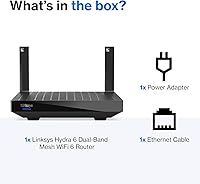
  • In the Box: Package includes the WiFi 6 mesh router unit and a power supply; no Ethernet cable is included.
  • Customer Support: Linksys provides US-based phone support staffed by dedicated networking troubleshooters, reachable at their published toll-free number.
  • Release Year: Released in 2024, making it a current-generation product with up-to-date firmware support at the time of purchase.
  • Brand Origin: Designed in California by Linksys, a networking brand with over 35 years of consumer and business hardware experience.

Related Reviews

Linksys MR20EC WiFi 6 Mesh Router
74%
78%
Wireless Performance
63%
Coverage & Range
91%
Setup & Installation
69%
App & Remote Management
82%
Device Handling & Congestion
More
Linksys MR7350 WiFi 6 Router
76%
91%
Setup & Onboarding
78%
WiFi Speed & Throughput
67%
Coverage & Range
83%
Device Handling & Congestion
72%
App & Remote Management
More
Linksys E8450 AX3200 WiFi 6 Router
73%
91%
Ease of Setup
83%
WiFi Speed & Throughput
77%
Coverage & Range
86%
Multi-Device Performance
88%
Value for Money
More
Linksys MX8000 Velop Mesh WiFi Router 2-Pack
75%
86%
Coverage & Range
74%
WiFi Speed Performance
83%
Multi-Device Handling
91%
Setup & Installation
78%
App Experience
More
Linksys LN3121 WiFi 6 Mesh Router
73%
91%
Ease of Setup
74%
WiFi Coverage
78%
Connection Speed
82%
Multi-Device Performance
83%
Network Stability
More
Linksys Atlas MX2000 2-Pack Mesh Router
82%
88%
WiFi Coverage & Range
91%
Setup & Ease of Use
83%
Network Speed & Throughput
86%
Device Load Handling
77%
Latency & Gaming Performance
More
Linksys MR8300 Tri-Band Mesh WiFi Router
79%
89%
Ease of Setup
72%
Wi-Fi Coverage
84%
Connection Stability
76%
Throughput & Speed
81%
Multi-Device Performance
More
Tenda RX2Pro AX1500 WiFi 6 Router
76%
91%
Value for Money
78%
Wireless Performance
72%
Coverage & Range
93%
Ease of Setup
74%
App Experience
More
Gryphon AX Mesh WiFi 6 Router
73%
91%
Parental Controls
88%
Network Security
76%
WiFi Speed & Performance
78%
Coverage & Range
84%
Setup & Installation
More
Reyee E6 AX6000 WiFi 6 Router
78%
93%
Value for Money
86%
Wireless Range & Coverage
82%
Gaming Performance
88%
Ease of Setup
61%
Mobile App & Software Experience
More

FAQ

It is a single router. It ships as one unit and works perfectly well on its own for smaller spaces. The mesh-ready label means you can add compatible Linksys nodes later to extend coverage, but those are sold separately — nothing extra comes in the box.

In most cases, no. You connect the Hydra 6 to your existing modem using an Ethernet cable, then follow the steps in the Linksys app. As long as your modem is already activated by your ISP, the router handles the rest without any additional calls.

It works with virtually any ISP-provided or third-party modem that has a standard Ethernet WAN port. You do not need to be in the Linksys ecosystem already — it is the modem side that needs to be compatible, and almost all modern modems are.

For casual online gaming — think multiplayer titles on a console or PC at moderate speeds — the low-latency design holds up well, particularly when you are within a reasonable distance from the router. If you are a competitive player relying on a 500 Mbps or faster internet plan, you may eventually want a higher-tier router to avoid any bottlenecking.

In most 900 sq ft apartments, this WiFi 6 router should cover the space comfortably, assuming a reasonably open layout. If you have a long narrow floor plan or rooms separated by thick walls, you might notice weaker signal in the far corners — but for a typical one-bedroom or studio, it should perform well.

Yes, the Linksys app lets you monitor connected devices and their activity remotely. You can see what is online and prioritize specific devices if you want to, all from your phone without logging into any router admin page.

Guest Mode creates a separate WiFi network for visitors or devices you want to keep isolated from your main network — handy for smart-home gadgets or friends visiting. You enable it directly in the app, give it its own password, and devices on that network cannot see or interact with your primary connected devices.

Honestly, probably not on its own. The 1,500 sq ft coverage rating is under ideal conditions, and a two-floor home adds attenuation from ceilings and floor materials. You would likely end up with dead zones on the far side of the second floor. Adding a second Linksys mesh node would address this, but factor that extra cost into your decision upfront.

Yes, the Hydra 6 is backward compatible with 802.11ac (WiFi 5) and 802.11n (WiFi 4) devices. Older phones, laptops, and smart-home gadgets will connect normally — they just will not benefit from the WiFi 6 improvements until they are replaced with newer hardware.

Start with the basics: restart the router and modem, then check the Linksys app for any firmware updates, since these often fix stability issues. If problems persist, Linksys offers US-based phone support that users generally report as responsive and knowledgeable — worth a call before assuming the hardware is faulty.

Where to Buy