Overview

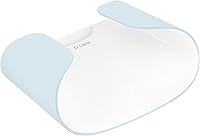
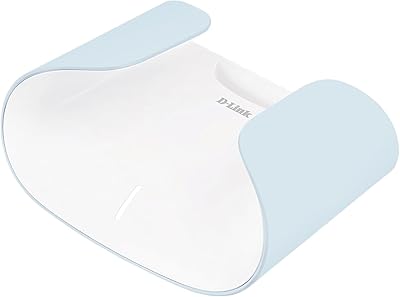
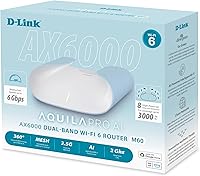
The D-Link M60 AX6000 Wi-Fi 6 Mesh Router is D-Link's most capable home mesh offering — and unlike most networking gear, it actually looks like something you'd want sitting on a shelf. No protruding antennas, no aggressive industrial styling. The Aquila Pro AI branding refers to onboard intelligence that monitors and adjusts your network in real time, which is more useful than it sounds. At its price point, buyers reasonably expect reliable multi-gig performance and hassle-free management — and the M60 largely delivers. It holds its own as a single unit for most homes, though the full ecosystem value clicks into place when you add M30 nodes for larger spaces.
Features & Benefits

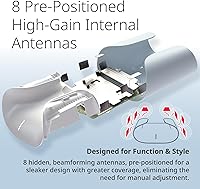
The M60 packs eight concealed antennas that project coverage in all directions — useful in homes where the router sits centrally but signal needs to reach upstairs or across thick walls. If your ISP just upgraded you to a 2-gig plan, this mesh router won't choke on it; the multi-gigabit WAN port handles those speeds without breaking a sweat. The AI-driven optimization is worth taking seriously: when a neighboring network starts crowding your channel, the router quietly shifts bands and steers devices to less congested airwaves — no manual intervention needed. Security is handled with WPA3 and auto-updating firmware, with no monthly fee attached.

Best For

D-Link's Aquila Pro flagship is a strong fit for anyone whose internet provider delivers gigabit-plus speeds and doesn't want that investment wasted at the router. It's equally well-suited for households that have quietly accumulated dozens of smart devices — lights, locks, cameras, thermostats — and need consistent low-latency coverage across all of them. Compared to competitors like Eero or TP-Link Deco, the M60 stands out for buyers who won't settle for a router that clashes with their living room decor. And if you'd rather not pay a recurring subscription just to keep your network secure, no-subscription WPA3 security is a genuine draw.

User Feedback

With a 4.0-star average across over 100 ratings, the M60 earns consistent praise for its quick, app-guided setup and speeds that hold up in practice — not just on paper. Non-technical household members frequently mention it's the first router they've genuinely liked the look of. The criticism worth noting: the 3,000 sq ft coverage estimate is generous, particularly in two-story homes or spaces with dense walls, and some buyers needed an M30 node sooner than expected. A few reviewers mention the AI optimization takes 24–48 hours to fully settle after installation, so don't judge it on day one. D-Link's customer support gets mixed marks, worth factoring in if you're less comfortable troubleshooting independently.

Pros

  • Handles multi-gig internet plans without bottlenecking — a rare and practical advantage at this price point.
  • Hidden internal antennas make this one of the few routers that actually looks good in a living space.
  • App-guided setup takes most buyers from unboxing to working network in under 15 minutes.
  • AI-driven channel optimization quietly resolves congestion without any manual intervention from the user.
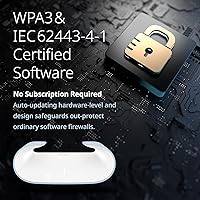
  • WPA3 security with auto-updating firmware comes standard — no subscription, no extra fees.
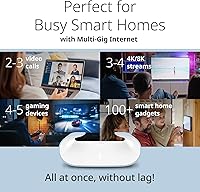
  • Performs reliably with 50-plus smart home devices active simultaneously without noticeable degradation.
  • QoS controls let you prioritize gaming or video call traffic when the household gets busy.
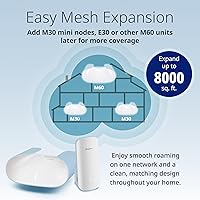
  • Mesh expansion with M30 nodes is straightforward and keeps the same clean aesthetic throughout the home.
  • Passive cooling means no fan noise — runs quietly even during extended heavy-traffic periods.
  • Four wired LAN ports serve consoles, NAS drives, and smart TVs without adding a separate switch for most homes.

Cons

  • The 3,000 sq ft coverage claim is optimistic in multi-story or older construction homes.
  • AI network optimization takes 24 to 48 hours to stabilize — first impressions can be misleading.
  • Only four LAN ports, which fills up quickly in home offices or media rooms with several wired devices.
  • Mesh expansion is locked to D-Link's own ecosystem, so existing nodes from other brands are incompatible.
  • The white finish shows dust and fingerprints easily, and no alternative colorways are currently available.
  • Advanced network settings are limited in the app — power users will miss web-interface depth.
  • Customer support quality is inconsistent, with some buyers reporting slow or scripted responses.
  • In tightly enclosed or warm spaces, sustained heavy loads can cause minor thermal throttling.
  • No dedicated gaming dashboard or real-time ping monitoring for competitive players who want granular latency tools.
  • Firmware update release notes are sparse, making it hard to track what changes with each update.

Ratings

The D-Link M60 AX6000 Wi-Fi 6 Mesh Router scores below were generated by AI after analyzing verified buyer reviews from across global markets, with spam, bot-submitted, and incentivized feedback actively filtered out. The result is an honest snapshot of where this mesh router genuinely excels and where real-world buyers have run into friction. Strengths and shortcomings are both reflected transparently so you can weigh them against your specific home setup.

Wi-Fi Speed & Throughput
88%
Buyers running 1-gig and 2-gig fiber plans consistently report that the M60 keeps up without throttling — a relief after years of routers that bottlenecked expensive ISP upgrades. Streaming 4K on multiple TVs while others are on video calls is a scenario many reviewers specifically call out as handled without drama.
Throughput at the edges of the coverage zone drops more than some competing AX6000 units, particularly on the 2.4 GHz band. A handful of power users note that real-world speeds don't always match the theoretical ceiling, especially through a floor or two of concrete.
Wi-Fi Coverage & Range
74%
26%
In open single-story homes and modern construction, the M60 pushes solid signal across 2,500 to 3,000 square feet without much fuss. The spherical antenna arrangement genuinely helps in centrally-located setups — side rooms and hallways tend to get better coverage than with a standard directional router.
The 3,000 sq ft claim is optimistic once thick walls, split levels, or older construction enter the picture. Reviewers in two-story brick or stucco homes frequently find themselves needing an M30 node sooner than the spec sheet implies, which adds to the overall cost.
Design & Aesthetics
93%
This is one of the few routers that non-tech family members have actively complimented, according to multiple buyers. The low-profile sculpted shell sits cleanly on a shelf or entertainment unit without looking like a piece of server rack equipment — a genuine rarity in this category.
The white finish, while clean, is a fingerprint and dust magnet if placed anywhere within reach. A few reviewers also wish it came in darker colorways to better match media consoles or darker furniture — right now white is the only option.
Setup & Initial Configuration
91%
The app-guided setup is one of the most consistently praised aspects across all reviews. Most buyers report going from box to working network in under 15 minutes, including those who describe themselves as non-technical. QR code pairing and clear step-by-step prompts remove the usual guesswork.
A small but vocal group encountered connectivity hiccups during the initial firmware update phase, where the router temporarily dropped offline. It resolved itself in most cases, but it's worth knowing this can happen and not assuming something is broken.
App Experience & Management
83%
Day-to-day management through the app — checking connected devices, setting up a guest network, adjusting parental controls — works reliably and without a steep learning curve. Voice assistant integration is a genuine bonus for households already running smart home ecosystems.
Some reviewers find the advanced settings panel limited compared to web-based interfaces on competing routers. Users who like granular control over DNS, VPN pass-through, or detailed traffic logs may feel the app trades depth for simplicity.
AI Network Optimization
77%
23%
The self-healing behavior is most noticeable in dense neighborhoods where channel congestion is a real problem — buyers in apartment buildings specifically mention that the router quietly shifts away from crowded channels without any manual intervention. Over a few days it learns usage patterns and pre-emptively steers heavy devices.
The optimization takes 24 to 48 hours to fully stabilize after initial setup, and the first day of performance is not representative of what the router will settle into. A subset of users who judged it too early left underwhelmed reviews that likely reflect this burn-in period.
Security & Firmware
89%
WPA3 support combined with IEC 62443-certified firmware design puts the M60 in a different security league than most consumer routers at this price. Automatic firmware updates mean most households stay protected without ever thinking about it — genuinely useful for buyers who set-and-forget their network.
While auto-updates are a strength, some technically inclined buyers want the ability to defer or schedule updates rather than having them apply automatically. A few reviewers also note that release notes for firmware updates are sparse, making it hard to know what changed.
Mesh Expandability
82%
18%
Adding M30 nodes to expand coverage is straightforward — same app, same SSID, and roaming between nodes is handled without dropping connections mid-stream. The design consistency between the M60 and M30 is a thoughtful touch that competing ecosystems don't always match.
Expansion only works within D-Link's own Aquila Pro ecosystem, so there is no cross-compatibility with third-party mesh nodes. If you already own nodes from another brand, you are starting fresh — something buyers coming from Eero or Deco setups should factor in.
Wired Port Performance
86%
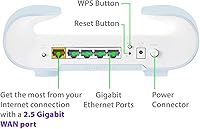
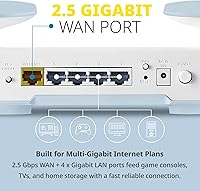
Having a multi-gigabit WAN port on a consumer router at this price is still less common than it should be, and buyers with 2-gig ISP plans are particularly grateful for it. The four Gigabit LAN ports handle NAS drives, game consoles, and smart TVs without any noticeable latency penalty.
Four LAN ports is workable but starts feeling tight in home offices or media rooms with several wired devices. A managed switch solves this, but it is an added cost and complication that competing units with more ports avoid.
Gaming Performance
81%
19%
QoS settings allow gaming traffic to be prioritized, and buyers who game competitively online report noticeably lower ping variance after enabling it. The OFDMA and MU-MIMO implementation handles multiple active gaming sessions without one device starving another.
The M60 lacks dedicated gaming dashboards or real-time ping monitoring that higher-end gaming routers offer. For serious esports users who want deep latency controls and per-device traffic shaping, this mesh router is capable but not purpose-built for their use case.
Smart Home Device Handling
84%
Households with large numbers of IoT devices — smart bulbs, sensors, cameras, thermostats — find the M60 reliably stable once all devices have settled. The BSS Coloring feature specifically helps reduce interference when many low-bandwidth devices are all active simultaneously.
Some users managing very large smart home setups, particularly those mixing Zigbee and Wi-Fi IoT devices heavily, report occasional dropped connections on the 2.4 GHz band during peak hours. It is not a persistent failure, but it happens often enough to be a pattern in reviews.
Value for Money
78%
22%
For a single-router purchase that delivers genuine Wi-Fi 6 performance, multi-gig WAN capability, and no recurring fees, the M60 compares favorably to similarly specced units from Netgear and Eero Pro. The no-subscription security model alone represents long-term savings for buyers keeping this router for three or more years.
Buyers who discover they need a node or two for full coverage in their home will find the total cost climbs quickly. At that point the investment competes with premium mesh systems that include multiple units in the box at a comparable combined price.
Customer Support
61%
39%
D-Link's online knowledge base and community forums cover most common setup and troubleshooting scenarios thoroughly. Buyers who are comfortable self-diagnosing issues using documentation generally find what they need without needing to contact support directly.
Live support experiences are inconsistent — a meaningful portion of reviewers describe slow response times and agents who default to scripted responses rather than solving the actual issue. This is a known pattern with D-Link and worth considering if you are not a confident self-troubleshooter.
Heat & Noise Management
87%
The M60 runs passively cooled — no fans — and stays at a comfortable temperature during normal household use. Buyers who have placed it in enclosed shelving units report it running warm but not dangerously hot, even during extended high-traffic periods.
In very warm rooms or tightly enclosed entertainment centers with poor airflow, a small number of reviewers noted performance throttling during sustained heavy loads. The compact form factor helps aesthetics but leaves less surface area for heat dissipation compared to larger chassis routers.
Physical Build Quality
85%
The housing feels solid and premium relative to the price bracket — no flexing or creaking, and the matte-finish shell resists minor scuffs. Buyers who have handled budget routers before specifically notice the step up in construction quality.
The rubber feet are modest and a couple of reviewers mention the unit slides more easily than expected on smooth shelf surfaces. It is a minor gripe, but something to note if you plan to place it somewhere vibrations from a subwoofer or appliance could nudge it.

Suitable for:

The D-Link M60 AX6000 Wi-Fi 6 Mesh Router is a strong match for households that have recently upgraded to a multi-gigabit internet plan and don't want their router to be the weak link in the chain. It's equally well-suited to families who run a lot of connected devices simultaneously — think multiple people streaming in different rooms, a few gaming sessions happening at once, and a pile of smart home gadgets all staying online in the background. Design-conscious buyers who have avoided upgrading their networking gear because every option looks like it belongs in a server room will find the M60's clean, antenna-free profile a refreshing change — it genuinely sits comfortably on a bookshelf or beside a TV without drawing attention. Security-minded users who are tired of paying monthly subscription fees just to keep firmware current will appreciate that WPA3 and automatic updates come included with no recurring cost. If you live in a single-story home or a modern open-plan space up to around 2,500 square feet, this mesh router handles that footprint confidently on its own.
Not suitable for:

The D-Link M60 AX6000 Wi-Fi 6 Mesh Router is not the right call for buyers with older homes featuring thick plaster, brick, or concrete walls, where the single-unit coverage estimate will fall short faster than the spec sheet suggests. If your living space spans multiple floors or stretches beyond 2,500 square feet with any real architectural complexity, budget for at least one M30 expansion node upfront rather than discovering the gap after purchase. Power users who want deep manual control — custom DNS, detailed per-device traffic logs, VPN server functionality, or granular firmware scheduling — will likely find the app-centric management interface too simplified for their taste. Buyers already invested in another mesh ecosystem, such as Eero or TP-Link Deco, should know there is no cross-compatibility here; switching means starting fresh. And if responsive, hands-on customer support is something you lean on when troubleshooting, D-Link's track record in that area is inconsistent enough to be a genuine consideration before committing.

Specifications

  • Wi-Fi Standard: Dual-band Wi-Fi 6 (802.11ax), backward compatible with 802.11a/b/g/n/ac devices.
  • Max Speed: Combined AX6000 throughput: up to 1,148 Mbps on 2.4 GHz and up to 4,804 Mbps on 5 GHz.
  • Coverage: Rated for up to 3,000 sq ft as a single unit under typical open-plan conditions.
  • WAN Port: One 2.5 Gigabit WAN port supports multi-gig internet service plans without speed bottlenecking.
  • LAN Ports: Four Gigabit Ethernet LAN ports for wired connections to consoles, TVs, NAS drives, or computers.
  • Antennas: Eight concealed internal antennas (four 2.4 GHz, four 5 GHz) designed for 360° spherical signal distribution.
  • Processor: 2.0 GHz quad-core CPU manages simultaneous multi-device traffic and AI optimization tasks.
  • Wi-Fi Streams: 8-stream architecture with 4×4 MU-MIMO and OFDMA for efficient parallel device communication.
  • Security: WPA3 encryption with IEC 62443-4-1 certified firmware design and automatic over-the-air security updates included at no cost.
  • Special Features: BSS Coloring, 160 MHz channel support, and beamforming are enabled for reduced interference and targeted signal delivery.
  • App Control: Managed via the D-Link Wi-Fi app with QoS, parental controls, guest network, voice assistant support, and remote access.
  • Mesh Support: Natively expandable with D-Link Aquila Pro M30 mini nodes using a single SSID and unified app management.
  • Frequency Bands: Operates simultaneously on 2.4 GHz and 5 GHz bands with automatic band steering for connected devices.
  • Dimensions: Physical footprint measures 8.93 × 6.45 × 3.13 inches, designed for shelf or surface placement.
  • Weight: Unit weighs 1.42 pounds, making it lightweight enough to mount or reposition without difficulty.
  • Color: Available in white with a matte sculpted finish designed to blend into home decor environments.
  • Subscription: No recurring subscription is required for security features, firmware updates, or core app functionality.
  • In the Box: Package includes the M60 router, power adapter, one Ethernet cable, and a quick install guide.

Related Reviews

D-Link AX1800 Mesh Wi-Fi 6 Range Extender
84%
90%
Wi-Fi Range and Coverage
85%
Setup and Installation
88%
Device Compatibility
80%
Wi-Fi Speed and Stability
93%
Security Features
More
D-Link AX3000 M30 WiFi 6 Mesh Router
78%
74%
WiFi Coverage & Range
78%
WiFi Speed & Throughput
88%
Setup & Installation
71%
App Experience
83%
Parental Controls
More
D-Link DIR-1950 AC1900 Wi-Fi Router
83%
88%
Value for Money
84%
Wi-Fi Performance
91%
Ease of Setup
82%
Coverage/Range
85%
Parental Controls
More
TP-Link Archer AX55
TP-Link Archer AX55
76%
83%
Wireless Performance
74%
Coverage & Range
86%
Device Handling & Congestion
91%
Setup & Ease of Use
78%
Build Quality & Design
More
TP-Link Deco X10 Wi-Fi 6 Mesh System
86%
92%
Value for Money
96%
Ease of Setup
89%
Wi-Fi Coverage
85%
Performance under Load
87%
Device Support
More
D-Link DIR-3040 AC3000 Tri-Band Wi-Fi Router
83%
88%
Performance
91%
Mesh Networking Coverage
85%
Ease of Setup
78%
Voice Control Integration
90%
Parental Controls
More
TP-Link TL-WR3002X Dual-Band Wi-Fi 6 Travel Router
85%
89%
Performance
91%
Ease of Setup
85%
Portability
87%
Security Features
88%
Wi-Fi Speed
More
ARRIS SURFboard mAX W30 Tri-Band Mesh Wi-Fi 6 Router
85%
88%
Wi-Fi Performance
81%
Setup & Installation
85%
Smart Home Integration
90%
Coverage & Range
89%
Speed (AX7800) & Throughput
More
TP-Link TL-WR1502X Travel Router
81%
91%
Ease of Setup
94%
Portability & Form Factor
88%
Captive Portal Handling
79%
Wi-Fi Performance
86%
Multi-Mode Versatility
More
Synology WRX560 Dual-Band Wi-Fi 6 Router
77%
91%
Network Security
88%
Software & Firmware
86%
VLAN & Network Segmentation
83%
Wired Connectivity
71%
Wireless Performance
More

FAQ

Setup is genuinely straightforward. You download the D-Link Wi-Fi app, plug in the router, and follow the step-by-step prompts — most people are up and running in under 15 minutes. The app walks you through naming your network and setting a password, and there's no need to log into a web browser or touch any advanced settings unless you want to.

The M60 includes a multi-gigabit WAN port specifically to handle plans beyond 1 Gbps, so it won't be the weak link for a 2-gig connection. That said, to hit those speeds on a device, you'll need to use one of the wired LAN ports or be very close to the router — Wi-Fi 6 is fast, but wireless speeds in real homes rarely reach the theoretical ceiling regardless of router brand.

It depends heavily on your home's layout and construction. In a modern, single-story open-plan space, the estimate is reasonable. In a two-story home, or one with thick plaster, brick, or concrete walls, you'll likely see the signal thin out before reaching that square footage. A number of real-world buyers in older or multi-level homes found they needed an M30 expansion node sooner than expected — worth factoring into your budget upfront.

It's more useful than it sounds, though it does take a day or two to kick in properly. The router continuously scans for channel congestion — so if a neighbor's network starts crowding the same frequency, it quietly shifts your devices to a less contested channel without you doing anything. It also learns which devices use the most bandwidth and steers them toward the best available band. It's not magic, but it does reduce the kind of random slowdowns that plague cheaper routers in dense neighborhoods.

No subscription is required. WPA3 security, automatic firmware updates, parental controls, and the core app features are all included without any recurring cost. This is a genuine differentiator compared to some competing mesh systems that lock advanced features behind a monthly plan.

Unfortunately, no. The D-Link M60 AX6000 Wi-Fi 6 Mesh Router only expands within D-Link's own Aquila Pro ecosystem using M30 mini nodes. There's no cross-compatibility with nodes from Eero, TP-Link, Netgear, or other brands. If you're already invested in another mesh system, you'd be starting fresh — something worth knowing before you buy.
The M60 holds its own on raw Wi-Fi 6 performance and port capability, and it edges out both competitors on the no-subscription security model. Where Eero has an advantage is ecosystem polish and Amazon integration; Deco tends to offer more node flexibility. The M60's clearest differentiator is the design — it's the only one in the group that genuinely looks at home on a living room shelf.

It runs completely silently — there are no fans inside. It uses passive cooling, so the only heat dissipation is through the housing itself. It does run warm under sustained heavy use, so avoid tucking it into a fully enclosed cabinet, but for a bedroom shelf or nightstand it's fine.

This is worth being honest about: D-Link's support reputation is mixed. Their online documentation and community forums are solid for standard setup and troubleshooting questions. Live support, however, gets inconsistent reviews — some buyers report helpful interactions, others describe slow response times and scripted replies that don't really address their issue. If you're comfortable self-troubleshooting with documentation, this is less of a concern; if you rely heavily on support, it's a factor worth weighing.

Yes, this mesh router handles large smart home device counts well. The combination of OFDMA, MU-MIMO, and BSS Coloring is specifically designed to manage many low-bandwidth devices communicating simultaneously without them stepping on each other. Buyers managing 50 or more IoT devices report stable connections once the network has settled. The 2.4 GHz band, where most IoT devices live, can occasionally get crowded during peak hours in very large smart home setups, but persistent failures are uncommon based on user feedback.

Where to Buy