Overview

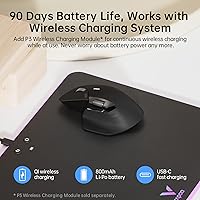
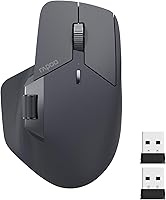
The Rapoo MT760 Multi-Device Wireless Mouse sits in a sweet spot for productivity-focused users who constantly juggle multiple screens or platforms. It offers tri-mode wireless connectivity — Bluetooth 5.0, Bluetooth 3.0, and a 2.4GHz USB dongle — letting you hop between up to four devices without re-pairing anything. The bow-back ergonomic shape is noticeably generous, built with larger hands in mind for those long desk sessions. Charging is handled via USB-C, backed by an 800mAh battery rated for up to 90 days. One thing worth knowing upfront: Qi wireless charging is technically supported, but the required P3 module is sold separately and does not come in the box.
Features & Benefits

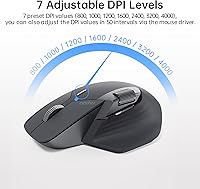
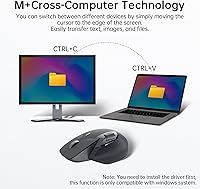
The MT760 packs a lot into a mid-range package. Four-device switching is handled by dedicated buttons on the top of the mouse — in practice, moving between a desktop, a laptop, and a tablet takes about a second and feels reliable for daily office use. Seven DPI settings ranging from 800 up to 4000 let you dial in precision for spreadsheets or pick up speed for general navigation with a single button press. The center scroll wheel is satisfyingly tactile, and the side scroll wheel uses a magnetic mechanism that feels noticeably smoother than standard click-wheel designs. The M+ cross-computer feature, which lets you drag files between connected PCs by moving your cursor to a screen edge, only works when both machines share the same Wi-Fi or Ethernet network — worth keeping in mind before you buy.

Best For

This multi-device mouse is a natural fit for remote workers or office professionals who regularly bounce between two or more computers. If your daily setup involves a Windows PC, a MacBook, and an iPad all on the same desk, Rapoo's wireless mouse handles that without the friction of re-pairing each time. It is also worth considering if you have larger hands — the generous bow-back shape provides full palm support that smaller productivity mice simply do not offer. People tired of swapping AA batteries will appreciate the USB-C charging convenience. And if you want to assign custom shortcuts or macros to your workflow, the 11 programmable buttons give you room to do that without spending flagship-tier money.

User Feedback

The MT760 carries a 3.8-star rating, which reflects a genuinely split experience rather than a flawed product. On the positive side, users consistently praise the scroll wheel feel, the sturdy build quality, and the reliability of device switching in daily use. Battery life also holds up well in real-world reports, with most users comfortably reaching several weeks per charge. Where things get more complicated: the driver software has a learning curve, and some users find the side buttons awkward depending on their grip style. A handful of buyers report occasional pairing lag when switching between devices. The M+ setup, in particular, trips people up when they do not realize a shared network connection is required. Solid mouse — just go in with realistic expectations.

Pros

  • Connects to up to four devices and switches between them quickly using dedicated top-panel buttons.
  • Tri-mode wireless support — Bluetooth 5.0, Bluetooth 3.0, and a 2.4GHz dongle — covers virtually any device combination.
  • USB-C charging is a welcome modern touch, eliminating the need to keep spare batteries on hand.
  • The 800mAh battery holds up well in real-world use, with many users reporting weeks of comfortable charge between top-ups.
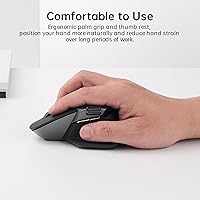
  • Bow-back ergonomic shape provides genuine palm support for users with larger hands during long work sessions.
  • Seven DPI levels let you shift between fine cursor control and fast navigation without diving into settings menus.
  • The side scroll wheel feels noticeably smoother and more controlled than the standard click-wheel designs found on competing mice.
  • Eleven programmable buttons offer meaningful customization headroom for macro-heavy workflows once the driver is set up.
  • Solid, well-built feel for the price tier — nothing about the construction feels cheap or loose.
  • Works across PC, Mac, tablet, and smartphone, making it genuinely cross-platform for mixed-OS households or offices.

Cons

  • Qi wireless charging requires a separately sold P3 module — it is not included and the listing can mislead buyers.
  • The M+ cross-computer feature only works when both machines are on the same local network, limiting its practical usefulness.
  • Driver software has a noticeable learning curve and the interface feels dated compared to rivals at this price point.
  • Some users report occasional pairing lag or brief disconnection moments when switching between Bluetooth devices.
  • Side button placement does not work well for all grip styles, particularly for users who rest their thumb lower on the mouse.
  • At 3.8 stars, the aggregate rating signals a meaningful number of buyers who encountered friction beyond the core features.
  • No onboard memory for button profiles — custom settings are tied to the driver software and do not travel with the mouse.
  • The 2.4GHz USB dongle adds a dependency on a free USB-A port, which is increasingly scarce on modern ultrabooks.
  • Setup for multi-device pairing requires reading through the manual; it is not immediately intuitive for first-time users.
  • The matte black finish, while clean-looking, tends to show oils and smudges from regular hand contact fairly quickly.

Ratings

The scores below reflect our AI-driven analysis of verified global buyer reviews for the Rapoo MT760 Multi-Device Wireless Mouse, with automated filtering applied to remove incentivized, bot-generated, and low-signal feedback. Each category is scored independently based on what real users consistently praised or flagged across thousands of purchase experiences. Both the standout strengths and the genuine frustrations are represented without softening either side.

Multi-Device Switching
83%
Users who regularly move between a desktop and a laptop report that the one-button device switching is fast and reliable enough to become a natural part of their daily rhythm. The ability to store four connections without re-pairing each time is genuinely appreciated by home-office workers running mixed-OS setups.
A consistent subset of reviewers describe a frustrating half-second-to-full-second lag during the switch, and some report needing to press the button twice before the new device registers. For users switching devices dozens of times a day, that friction adds up noticeably.
Wireless Connectivity Stability
74%
26%
In standard single-device Bluetooth use, most buyers find the connection solid and dropout-free during typical office tasks like document editing, video calls, and web browsing. The 2.4GHz dongle mode is consistently rated as the most stable option when users need zero-compromise reliability.
Bluetooth performance is noticeably less consistent in environments with heavy wireless interference, such as open-plan offices with many devices. A recurring complaint involves brief disconnections when the mouse is idle for a short period and then woken up, which some users find more disruptive than expected.
Ergonomics & Comfort
81%
19%
Users with larger hands specifically call out the bow-back arch as a meaningful comfort improvement over the flatter, more compact mice common at this price point. Several reviewers who previously dealt with wrist fatigue during long desk sessions report noticeably less discomfort after switching to this mouse.
Users with smaller or average-sized hands find the shape awkward and slightly too wide for a controlled grip, particularly for precise cursor work. The thumb rest and side button placement also drew criticism from people who use a claw grip rather than a full palm grip.
Battery Life
78%
22%
The rechargeable 800mAh battery genuinely impresses most buyers coming from disposable-battery mice — even moderate to heavy users report going three to five weeks between charges without anxiety. The USB-C charging port is a practical modern touch that fits into existing cable setups without hunting for a micro-USB.
The 90-day claim only holds for very light users, and heavier daily users should expect closer to four to six weeks realistically. A small number of reviewers also report the battery capacity degrading more quickly than expected after several months of regular use.
Scroll Wheel Feel
88%
The center scroll wheel is one of the most consistently praised aspects across buyer feedback — it has a tactile, well-damped feel that holds up well after extended use. The side scroll wheel, with its magnetic mechanism, feels smoother and more controlled than the notchy plastic wheels found on competing mice in this price range.
A minority of users find the scroll wheel resistance slightly too light for their preference, leading to accidental scrolling during fast navigation. There are also a handful of reports of the side wheel feeling less responsive after several months, though these appear to be isolated rather than systemic.
Build Quality
79%
21%
The overall construction feels solid and dense for a mid-range wireless mouse — buttons do not rattle, the chassis does not flex under normal grip pressure, and the click response feels consistent rather than mushy. Buyers frequently compare it favorably to pricier competitors when it comes to perceived material quality.
The matte black finish attracts visible oily smudges from regular hand contact faster than many users expect, requiring periodic cleaning to keep it looking presentable. A few reviewers also note that the side buttons feel slightly less premium than the main click buttons, with a softer and less defined actuation.
DPI & Tracking Performance
72%
28%
Seven DPI levels covering 800 to 4000 give everyday office users plenty of range to match their monitor setup and working style, and cycling through them with the dedicated button is quick during active use. Most buyers report the optical sensor performs accurately on standard desk surfaces and mouse pads.
This is not a high-precision sensor by any measure, and users who occasionally do photo editing or fine graphic work notice its limitations compared to dedicated productivity or creative mice. Tracking on glossy or reflective surfaces also receives some criticism for inconsistency.
Programmable Buttons
67%
33%
Having 11 buttons available for macro and shortcut assignment is a genuine differentiator at this price tier, and users who invest the time to configure them report meaningful productivity gains for repetitive workflows like copy-paste sequences or application switching.
The payoff requires patience: the driver software interface feels dated and takes some trial and error to navigate, particularly for users who have not used programmable peripheral software before. Button configurations are also not stored on the mouse itself, so the custom mappings only apply on devices where the driver is installed.
Driver Software Experience
54%
46%
Once the initial setup is complete, the driver runs quietly in the background without noticeable system impact, and it does unlock the full programmable button functionality that makes the mouse worthwhile for power users.
The software is one of the most common complaints across buyer reviews — the interface is unintuitive, lacks polish compared to Logitech or similar competitors, and the installation process trips up less technical users. On macOS in particular, permission prompts and occasional compatibility hiccups make initial setup more frustrating than it should be.
M+ Cross-Computer Feature
61%
39%
When it works correctly, the ability to drag files between two computers by sliding the cursor to the edge of one screen genuinely impresses users who manage dual-PC setups on the same desk, effectively replacing a more complex KVM workflow for basic file transfers.
The same-network requirement catches many buyers off guard, and users who expected this to work like Bluetooth-level pairing are frequently disappointed. Setup is not intuitive, and the feature receives disproportionately negative reviews relative to its actual capability, largely because of unclear in-box documentation.
Value for Money
76%
24%
For a mouse that combines four-device support, 11 programmable buttons, USB-C charging, and a comfortable large-hand ergonomic shape, buyers generally agree the feature-to-price ratio is competitive against alternatives that offer fewer capabilities at a similar or higher cost.
The value equation weakens for buyers who run into driver frustrations or connectivity inconsistencies, since the premium features that justify the price are also the ones most likely to disappoint. The additional cost of the P3 module for wireless charging also chips away at the perceived value for users who expected it to be included.
Out-of-Box Setup
69%
31%
Basic Bluetooth pairing and 2.4GHz dongle connection are both achievable within a few minutes for most users, and the mouse works immediately as a standard pointer device without any software installation required for core functionality.
Setting up all four device slots and getting M+ configured simultaneously is considerably more involved, and the included documentation does not walk users through the process clearly enough to avoid confusion. First-time multi-device mouse users in particular report a longer-than-expected onboarding experience.
Cross-Platform Compatibility
82%
18%
The mouse works reliably across Windows, macOS, iPadOS, and Android without requiring platform-specific profiles for standard use, which makes it genuinely practical for mixed-OS households or users who carry it between a work PC and a personal Mac.
Full programmable button functionality is effectively limited to Windows, as the driver software support on macOS is less complete and some button assignments do not carry over. iOS compatibility is limited to basic pointer use, and advanced features are inaccessible on mobile platforms entirely.
Portability
71%
29%
At just under 4 oz, the MT760 is light enough to toss in a laptop bag without adding meaningful weight, and the nano USB dongle is small enough to leave plugged into a laptop port during commutes without risk of damage.
The footprint is larger than ultra-portable travel mice, and users with smaller bags or minimalist carry setups may find it takes up more pouch space than they would prefer. There is no dedicated dongle storage slot in the mouse body, which means the dongle is easy to misplace during frequent travel.

Suitable for:

The Rapoo MT760 Multi-Device Wireless Mouse is built for productivity-driven users who spend their workday moving between multiple machines — think a remote worker with a home desktop, a work laptop, and a personal tablet all within arm's reach. The ability to store up to four device connections and switch between them with a dedicated button makes it genuinely practical for this kind of setup, rather than just a spec-sheet feature. People with larger hands will also find this a more comfortable daily driver than the compact mice that dominate this price range, thanks to the generous bow-back profile that supports a full palm grip over long sessions. If you prefer USB-C charging and want to stop buying batteries altogether, the rechargeable design fits naturally into a modern desk setup. Those who want to assign custom shortcuts or macros to streamline repetitive tasks will also find the 11 programmable buttons worth the mild software learning curve.

Not suitable for:

If you are a gamer or a creative professional who relies on ultra-precise tracking or a high-performance sensor, the Rapoo MT760 Multi-Device Wireless Mouse is not the right tool — it is built for office productivity, not precision-dependent tasks. Users who expect wireless charging out of the box will be disappointed, as the Qi charging support requires a separate P3 module that does not ship with the mouse. The M+ cross-computer drag-and-drop feature sounds compelling, but it only functions when all connected PCs are on the same Wi-Fi or Ethernet network, which rules out a lot of real-world mixed-device scenarios. If you have smaller hands or prefer a low-profile, lightweight mouse, the size and weight of this one may feel bulky rather than supportive. Finally, anyone who wants a truly plug-and-play experience with no software to install will likely find the driver requirement for programmable buttons an unnecessary friction point.
Specifications

  • Model Number: The mouse is identified by Rapoo's model number MT760.
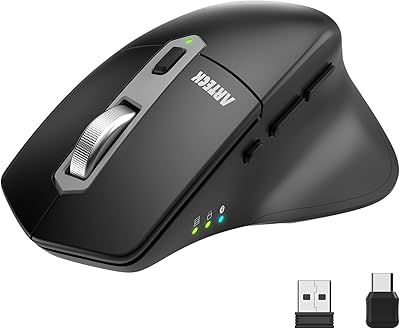
  • Connectivity: Supports three wireless modes: Bluetooth 5.0, Bluetooth 3.0, and a 2.4GHz USB dongle included in the box.
  • Multi-Device: Stores and switches between up to four paired devices using dedicated buttons on the mouse body.
  • DPI Range: Optical sensor offers seven adjustable DPI steps: 800, 1000, 1200, 1600, 2400, 3200, and 4000.
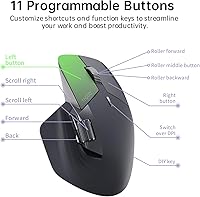
  • Buttons: Features 11 programmable buttons that can be customized via Rapoo's downloadable driver software.
  • Scroll Wheels: Includes a magnetic induction side scroll wheel and a tactile center scroll wheel rated for approximately 1,000,000 scroll cycles.
  • Battery: Powered by an 800mAh built-in lithium polymer battery with a manufacturer-rated life of up to 90 days per charge.
  • Charging: Charges via USB-C with fast-charge support; no disposable batteries are required.
  • Wireless Charging: Qi wireless charging is supported but requires the separately sold P3 Wireless Charging Module, which is not included.
  • Cross-Computer: M+ Cross-Computer Technology allows cursor-drag file transfer between PCs on the same Wi-Fi or Ethernet network.
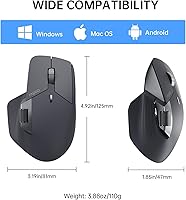
  • Dimensions: The mouse measures 4.92 × 3.12 inches in footprint, with a bow-back profile designed for larger hand sizes.
  • Weight: The mouse weighs 3.88 oz, sitting in a mid-weight range that balances control and comfort for extended use.
  • Sensor Type: Uses an optical movement detection sensor suitable for standard office surfaces and most mouse pads.
  • Compatibility: Compatible with Windows and macOS PCs, laptops, tablets, and smartphones across major operating systems.
  • Color: Available in Matte Black, which provides a fingerprint-resistant texture on the primary grip surfaces.
  • Dongle Storage: The 2.4GHz USB-A nano dongle connects directly to a host device's USB-A port for the non-Bluetooth wireless mode.
  • Manufacturer: Designed and produced by Shenzhen Rapoo Technology Co., Ltd., a China-based peripheral manufacturer.
  • Release Date: The MT760 was first made available for purchase in November 2023.

Related Reviews
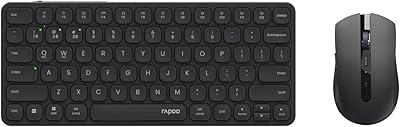
Rapoo 9050S Multi-Device Wireless Keyboard and Mouse Combo
87%
94%
Ease of Device Switching
89%
Typing Experience
91%
Battery Life
85%
Comfort and Ergonomics
90%
Multi-Device Compatibility
More
Rapoo E9050L Multi-Device Wireless Keyboard
88%
94%
Battery Life
88%
Typing Comfort
91%
Portability
89%
Build Quality
85%
Device Compatibility
More
Rapoo 9010M Wireless Keyboard and Mouse Combo
80%
88%
Multi-Device Switching
82%
Typing Experience
91%
Silent Operation
79%
Wireless Connectivity Reliability
93%
Value for Money
More
Arteck MD172 Multi-Device Wireless Bluetooth Mouse
87%
88%
Performance
91%
Ergonomics
93%
Battery Life
89%
Connectivity
85%
Clicking Noise
More
Logitech K780 Multi-Device Wireless Keyboard
83%
93%
Multi-Device Switching
82%
Typing Comfort
91%
Noise Level
88%
Device Cradle Utility
79%
Build Quality & Durability
More
Lenovo Multi-Device Wireless Keyboard ZG38C05810
83%
88%
Multi-Device Switching
83%
Typing Feel & Key Response
92%
Portability & Form Factor
76%
Battery Life
91%
USB-C Charging Convenience
More
Logitech K380 Pebble Wireless Multi-Device Keyboard
88%
96%
Multi-Device Compatibility
92%
Battery Life
84%
Typing Experience
93%
Portability & Weight
89%
Build Quality
More
Logitech K585 Multi-Device Slim Wireless Keyboard
88%
92%
Value for Money
88%
Performance
94%
Battery Life
90%
Device Switching
85%
Typing Experience
More
Bnnwa Multi-Device Wireless Bluetooth Keyboard with Touchpad
83%
91%
Value for Money
88%
Ease of Use
72%
Touchpad Responsiveness
94%
Device Switching
85%
Portability
More
Logitech K580 Slim Multi-Device Wireless Keyboard
82%
90%
Ease of Use with Multiple Devices
93%
Battery Life
80%
Typing Comfort
88%
Connectivity Options
84%
Build Quality
More

FAQ

Yes, the MT760 works with tablets and smartphones as well as desktop and laptop computers. It connects over Bluetooth, so as long as your tablet or phone supports Bluetooth 5.0 or 3.0, you can pair it and use it as a standard pointer device. Keep in mind that some advanced features, like the programmable buttons, may have limited functionality on mobile operating systems.

This is probably the most important thing to know before buying: Qi wireless charging is technically supported, but only if you also purchase Rapoo's P3 Wireless Charging Module separately. That module does not come in the box. Out of the box, you charge the mouse using the included USB-C cable.

No, re-pairing is not required each time. You pair each device once during initial setup and assign it to one of the numbered connection slots. After that, you just press the corresponding button on the mouse to jump to that device. In practice, the switch takes about one to two seconds, which is fast enough for regular use.

M+ Cross-Computer Technology lets you move your cursor from one PC screen to another and drag files between them, similar to how a KVM switch works but without extra hardware. The catch is that all the computers involved must be connected to the same Wi-Fi or Ethernet network, and you need to install Rapoo's driver software on each machine. If your computers are on different networks — like one on office Wi-Fi and another on a mobile hotspot — M+ will not function.

It is one of the few mice at this price point that is genuinely designed with larger hands in mind. The bow-back shape provides a higher arch than typical office mice, and the overall footprint is wide enough to support a full palm grip. Most large-handed users report it is comfortable during extended sessions, though grip style preference still varies from person to person.

Rapoo rates it at up to 90 days, but that figure assumes moderate usage. In real-world reports, heavy daily users tend to see closer to four to six weeks per charge, which is still very respectable. Recharging via USB-C is relatively quick thanks to fast-charge support, and you can continue using the mouse while it is plugged in, so downtime is minimal.

For basic use — moving the cursor, clicking, and scrolling — no driver installation is needed. It works as a standard HID device on Windows, macOS, and most operating systems right away. However, if you want to program the custom buttons or configure DPI settings beyond the hardware toggle, you will need to download and install Rapoo's driver software. The software setup has a learning curve, so budget a little time for that if customization matters to you.

You have full flexibility here. The 2.4GHz dongle mode is just one of three connection options — you can pair the mouse over Bluetooth 5.0 or 3.0 instead, which requires no dongle at all. If you are on a modern laptop with limited USB-A ports, using Bluetooth is a perfectly viable and stable alternative for most office tasks.

Occasional pairing lag when switching between devices is a recurring complaint across multi-device mice in this category, and the MT760 is not entirely immune to it. Most users do not experience frequent drops during normal single-device use, but the moment of switching between paired devices can sometimes take longer than expected or require a button press twice. It is not a defect so much as a known limitation of consumer Bluetooth multi-pairing technology at this price tier.

Yes, and this is one of its more practical strengths for mixed-OS users. You can assign your Windows PC to one connection slot and your Mac to another, then switch between them with a button press. No re-pairing or profile switching is needed once initial setup is done. Note that certain button functions may behave differently across operating systems, especially if you have custom macros configured through the driver software.

Where to Buy