Rapoo 9050S Wireless Keyboard and Mouse Combo

Overview
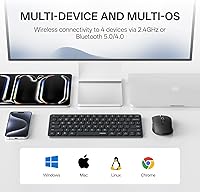
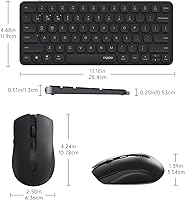
The Rapoo 9050S Wireless Keyboard and Mouse Combo is a 2025 refresh aimed squarely at productivity users who bounce between multiple devices throughout the day. At its core, the appeal is straightforward: four-device switching with both Bluetooth 5.0/4.0 and a 2.4GHz dongle, all without installing a single driver. It runs on Windows, Mac, Linux, and ChromeOS. This isn't a mechanical typing enthusiast's setup or a gaming rig — it's a slim, portable daily driver for people who want less clutter and more flexibility. The 2025 version builds on earlier criticism with tangible additions that make real day-to-day use noticeably easier.
Features & Benefits
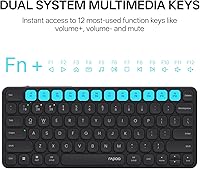
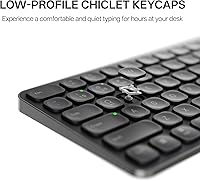
This multi-device set covers the connectivity bases well. The keyboard handles up to four paired devices, switching between them with a dedicated key, while the mouse manages two — a small but worth-noting asymmetry if you work across more than two machines. The 2.4GHz dongle gives you a more responsive connection when needed, while Bluetooth 5.0 and 4.0 handle phones and tablets without claiming a USB port. The scissor-switch keys are quiet — softer than a standard membrane board without losing too much tactile feedback. Both units recharge via USB, and the battery level indicator saves you from being caught off guard mid-meeting. The 12 function keys map shortcuts for both Windows and Mac out of the box.
Best For
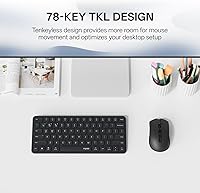
This wireless combo is a natural fit for anyone juggling multiple screens or operating systems daily — think a work laptop, a personal Mac, and a tablet all within arm's reach. It's especially well-suited for shared or quiet environments like offices, libraries, or coffee shops where every keystroke doesn't need to be a public announcement. The compact 78-key layout, minus the numpad, is a deliberate trade-off for portability rather than an oversight; if you rely heavily on number entry, keep that in mind. Where this multi-device set truly earns its place is on the desk of a budget-conscious multi-tasker who wants capable cross-device control without spending significantly more.
User Feedback
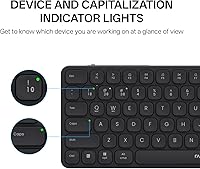
The Rapoo 9050S holds a 4.5-star rating, and the feedback largely reflects what you'd expect: buyers who prioritize quiet, flexible connectivity across devices at a reasonable price tend to come away satisfied. The Bluetooth pairing process draws consistent praise, as does the low-profile typing feel during long sessions. The device and Caps Lock indicator lights — added specifically in response to earlier complaints — get pointed appreciation, which speaks well of how the brand listens. On the flip side, some users flag the mouse's two-device ceiling as a frustrating gap against the keyboard's four, and dedicated spreadsheet workers miss having a numpad. This wireless combo is honest about what it is, and informed buyers rarely feel let down.
Pros
- Keyboard connects to up to four devices, making multi-machine workflows genuinely practical and quick to switch.
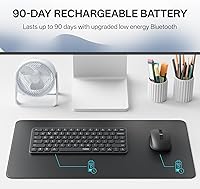
- Both keyboard and mouse use rechargeable lithium-ion batteries, cutting out disposable AA or AAA running costs entirely.
- Low-profile scissor-switch keys are noticeably quieter than standard membrane keyboards, a real advantage in shared spaces.
- Works out of the box on Windows, macOS, Linux, and ChromeOS with no driver installation required.
- Device selection, Caps Lock, and battery indicator lights were added directly in response to earlier user complaints — a sign the brand pays attention.
- Supports 2.4GHz, Bluetooth 5.0, and Bluetooth 4.0, giving genuine flexibility across laptops, tablets, and phones.
- Twelve function keys cover the most common shortcuts for both Windows and Mac without any reprogramming needed.
- At under 1.5 pounds total, the slim profile travels well and keeps desk setups clean and uncluttered.
- Mouse DPI steps from 800 up to 2400, covering most monitor sizes and everyday usage preferences comfortably.
- Holds a 4.5-star rating with repeated praise for easy pairing and a comfortable low-profile typing experience.
Cons
- Mouse only pairs to two devices, a frustrating mismatch against the keyboard's four-device capability.
- No numpad makes this a poor fit for data entry, heavy spreadsheet work, or number-intensive tasks.
- A 2400 DPI optical sensor is adequate for office use but underwhelming for precision creative tasks or any gaming.
- The 2.4GHz dongle occupies a USB-A port permanently whenever you want the most responsive wireless connection.
- Low-profile key travel may feel too shallow for typists used to mechanical switches or deeper membrane boards.
- No programmable mouse buttons, leaving power users with no way to customize shortcuts or macros on the mouse.
- Bluetooth connections can occasionally require re-pairing after extended idle periods, which interrupts fast-paced switching workflows.
- Available only in black, so buyers with specific desk aesthetics or color preferences have no alternatives.
Ratings
The scores below are generated by AI after analyzing thousands of verified global user reviews for the Rapoo 9050S Wireless Keyboard and Mouse Combo, with spam, incentivized, and bot-generated submissions actively filtered before any scoring was calculated. Each category honestly reflects both what buyers consistently praise and where real frustration surfaces — nothing has been softened or omitted to favor a positive overall impression.
Multi-Device Switching
Wireless Connectivity
Typing Experience
Value for Money
Noise Level
Mouse Performance
Battery & Charging
Build Quality
Portability & Design
Cross-Platform Support
Setup & Pairing
Mouse Ergonomics
Customization Options
Indicator Lights
Hotkey & Shortcut Support
Suitable for:
The Rapoo 9050S Wireless Keyboard and Mouse Combo is built for people who genuinely live across multiple devices — the kind of person who has a work laptop, a personal computer, a tablet, and a phone all active at the same desk and needs them to actually talk to one keyboard without a cable in sight. Remote workers and students will find the four-device keyboard switching useful in practice, especially when paired with the dual Windows and Mac hotkey layout that makes jumping between operating systems feel less disruptive. Because the keys are quiet enough to type in a library without turning heads, it is also a strong pick for shared office spaces or anyone working in close proximity to others who value silence. The rechargeable batteries and lightweight build make it easy to pack without hauling a pile of disposable cells, which suits people who split time between home and a workplace. Cross-platform support for Windows, macOS, Linux, and ChromeOS means you are unlikely to hit a compatibility wall no matter what sits on your desk.
Not suitable for:
Buyers who depend on a numpad as part of their daily routine — accountants, data entry professionals, or anyone entering numbers at volume — will feel that absence quickly, and no amount of keyboard shortcuts will fill that gap. Gamers should also look elsewhere; the optical sensor and scissor-switch keys are tuned for quiet office use, not the fast, precise demands of competitive play where response time and click feedback actually matter. The mouse only pairs to two devices, which creates a real mismatch for anyone expecting it to mirror the keyboard's four-device reach — if your workflow demands a mouse that follows you across three or four machines, the Rapoo 9050S Wireless Keyboard and Mouse Combo will fall short of that expectation. Heavy typists who prefer deep, satisfying key travel will find the low-profile chiclet keys underwhelming compared to a mechanical or quality full-travel membrane board. Finally, buyers who need a complete, full-size layout with a dedicated numpad and deeper customization options should budget up for a more feature-complete solution.
Specifications
- Keyboard Connectivity: The keyboard connects via Bluetooth 5.0, Bluetooth 4.0, or a 2.4GHz USB dongle, with support for up to four simultaneously paired devices.
- Mouse Connectivity: The mouse pairs over Bluetooth 5.0 or the included 2.4GHz USB dongle, with a maximum of two paired devices supported.
- Key Type: Low-profile chiclet scissor-switch keys provide a shorter travel distance and quieter keystroke than standard full-travel membrane designs.
- Key Count: The keyboard features 78 keys in a compact tenkeyless layout, with no dedicated numeric keypad included.
- Function Keys: Twelve multimedia function keys are mapped with dual shortcuts for both Windows and Mac OS, covering volume, media playback, and other common commands.
- Mouse Sensor: An optical sensor delivers smooth cursor tracking across five selectable DPI steps: 800, 1000, 1200, 1600, and 2400.
- Battery Type: Both units use built-in rechargeable lithium-ion batteries topped up via USB cable, with no disposable AA or AAA cells required.
- Indicator Lights: Dedicated LEDs on both units display the active device channel, Caps Lock status, and battery charge level.
- OS Compatibility: The combo operates driver-free on Windows, macOS, Linux, and ChromeOS, requiring no software installation on any supported platform.
- Bluetooth Version: Bluetooth 5.0 and 4.0 are both supported, improving device compatibility and extending battery efficiency compared to the prior generation's Bluetooth 3.0.
- Package Dimensions: The packaged combo measures 14.92 × 5.24 × 1.73 inches, keeping the overall footprint slim for storage or travel.
- Combined Weight: The total package weight is 1.34 pounds, light enough for daily commuting or moving between desk setups.
- Color: Available exclusively in black, with a uniform finish applied across both the keyboard body and mouse.
- Device Support: Compatible with personal computers, laptops, tablets, and smartphones that support Bluetooth 5.0, Bluetooth 4.0, or USB-A connectivity.
- Release Year: The 9050S launched in 2025 as an updated iteration of the prior generation, with Bluetooth 4.0 and new indicator lights among the key additions.
- Category Rank: Ranked #82 in the Computer Keyboard and Mouse Combos category on Amazon at the time of this review.
Related Reviews

Arteck HW192 Wireless Keyboard and Mouse Combo

QUASIO Wireless Keyboard and Mouse Combo

UBOTIE Wireless Keyboard and Mouse Combo

Vssoplor Wireless Keyboard and Mouse Combo

HP 18H24AA Wireless Keyboard and Mouse Combo

MPTOG S801AG Wireless Keyboard and Mouse Combo

SABLUTE Wireless Backlit Keyboard and Mouse Combo

TKVPJYYI Wireless Retro Typewriter Keyboard and Mouse Combo
VEILZOR UK418 Wireless Keyboard and Mouse Combo