Overview

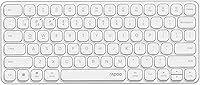
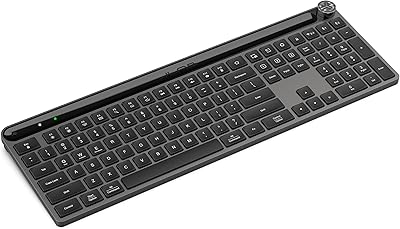
The Rapoo E9050L Wireless Keyboard arrived in late 2024 as one of the more thoughtfully built options in the budget-to-mid-range wireless space. Rapoo has been quietly refining its blade-series line for years, and the philosophy is consistent: thin, clean, and functional without unnecessary bulk. The kind of person drawn to this slim wireless keyboard usually has multiple screens on their desk — or at least a laptop plus a tablet — and is tired of swapping cables or re-pairing devices constantly. What sets expectations early is the aluminum alloy frame, which feels uncommon at this tier and signals that Rapoo isn't just chasing specs on paper.

Features & Benefits

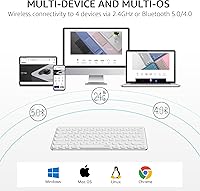
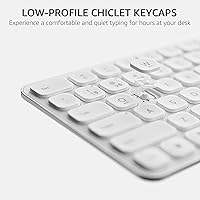
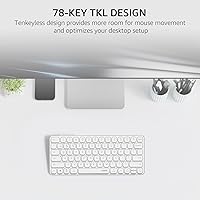
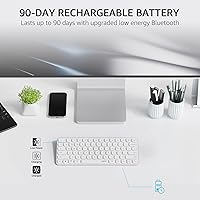
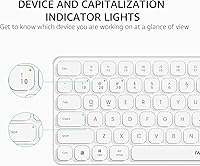
The four-device switching is the headline feature here, and in practice it works exactly as advertised — hold a dedicated key, tap a number, and the board jumps to your next device without hesitation. The scissor-key mechanism keeps the profile at just over half an inch tall, which translates to a noticeably flatter typing angle that genuinely reduces wrist fatigue over long sessions. Losing the numpad is the obvious trade-off with the 78-key layout, but the payoff is real portability. Battery life is rated at 90 days, though heavy Bluetooth users should expect less; still, a 10-minute fast charge covering a full workday is a practical safety net. Indicator lights for device, caps lock, and battery were added after user requests — a small but telling sign of attentiveness.

Best For

This compact multi-device keyboard fits a specific type of user really well — and it's worth being honest about who that is. If your workday bounces between a Mac laptop, a Windows desktop, and maybe an iPad, having one board handle all three without re-pairing is genuinely convenient. Travelers and commuters will appreciate the sub-11-ounce weight and flat profile that slips easily into most laptop bags. The quiet scissor switches make it a natural fit for shared offices, libraries, or anywhere noise is a real concern. People who work exclusively on spreadsheets or need a numpad regularly should look elsewhere. But for a clean desk aesthetic paired with cross-platform flexibility, this board hits the mark.

User Feedback

With a 4.0 out of 5 rating from around 150 buyers, the overall tone is genuinely satisfied but not without caveats. Most praise centers on how the build quality defies expectations for this price bracket — the matte aluminum frame in particular gets called out frequently. The lack of backlighting is the most common complaint, and notably, Rapoo never claims to offer it; the frustration tends to come from buyers who assumed it was included. A smaller group flags occasional Bluetooth pairing drops when switching between devices. Negative reviewers almost exclusively wanted a full-size board or backlit keys, which makes the fit-or-miss picture fairly easy to judge before buying.

Pros

  • Switches between up to four paired devices quickly, with no re-pairing or software required.
  • The aluminum alloy frame feels noticeably more solid than most plastic boards in this price range.
  • Scissor switches are genuinely quiet — comfortable in libraries, open offices, or late-night sessions.
  • At just over half an inch thick, it keeps the typing angle low and reduces wrist strain over time.
  • Rated up to 90 days per charge, with a 10-minute fast charge option as a practical backup.
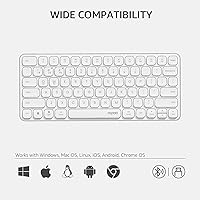
  • Works across Windows, Mac, Linux, and Chrome OS without needing separate keyboards or adapters.
  • Indicator lights for device slot, caps lock, and battery level were added directly in response to real user feedback.
  • Weighing just over 10 ounces, the Rapoo blade-series board is genuinely bag-friendly for daily commuters.
  • The USB-C charging port is a practical modern touch — no proprietary cables or AA batteries needed.
  • Dual keycap labeling covers both Mac and Windows shortcuts, so neither platform feels like an afterthought.

Cons

  • No backlight whatsoever — a significant omission for anyone who regularly types in low-light conditions.
  • Dropping the numpad is a real workflow disruption for accountants, analysts, or heavy spreadsheet users.
  • Some buyers report intermittent Bluetooth drops, particularly when switching between devices under heavier workloads.
  • The 90-day battery estimate assumes moderate use; intensive Bluetooth multitasking will likely reduce that window noticeably.
  • No companion software means zero key remapping or macro customization beyond the factory layout.
  • Currently available only in white, which may clash with darker or more neutral desk setups.
  • Adjusting from a full-size board takes time — the condensed layout requires relearning some habitual key positions.
  • Bluetooth stability can be affected by crowded wireless environments, such as dense office floors or apartment buildings.

Ratings

The Rapoo E9050L Wireless Keyboard earns a composite rating based on AI-driven analysis of verified global buyer reviews, with automated filters applied to remove incentivized, duplicate, and bot-generated submissions. Scores reflect the honest spread of real user experiences — not just the highs — so both the strengths that consistently delight buyers and the recurring pain points that frustrate them are factored in with equal weight. The result is a granular, category-by-category breakdown designed to help you quickly gauge where this compact multi-device keyboard excels and where it asks you to compromise.

Build Quality
83%
The aluminum alloy frame genuinely stands out for this segment — it doesn't flex under pressure and the matte antioxidant finish resists fingerprints better than glossy plastic shells. Most buyers report it feels more expensive than the price tag suggests, which consistently shows up as a positive surprise in reviews.
A small number of users note that while the frame is solid, the keycaps themselves feel slightly less premium — they're functional but not the textured, sculpted keys you'd find on higher-end boards. Long-term durability of the key legends under heavy daily use is also an open question given the product's relatively short market history.
Multi-Device Switching
81%
19%
For someone managing a Mac at work, a Windows desktop at home, and a tablet for notes, the four-slot switching is a practical time-saver — one shortcut and you're on the next device without touching a settings menu. Most users find the switching response fast enough that it doesn't interrupt a natural working rhythm.
A subset of buyers reports occasional hiccups — most commonly a brief delay or a failed switch requiring a second press, particularly in environments with dense Bluetooth traffic. While this doesn't happen consistently, it's noticeable enough to appear across multiple independent reviews and worth flagging for users who need flawless switching in professional settings.
Typing Experience
77%
23%
The scissor switches strike a balance between laptop-style travel and external keyboard stability — they're noticeably more consistent than many membrane boards in this range and give a satisfying, low-noise click on each keystroke. Writers and office users who type for hours at a stretch generally report fatigue doesn't set in as quickly as with taller, heavier keyboards.
Mechanical keyboard enthusiasts will find the tactile feedback shallow and somewhat unsatisfying — there's no audible click, no notable bump, and the key travel is limited by design. Users transitioning from a full-size desktop keyboard sometimes report an adjustment period before their accuracy on the compact layout returns to normal.
Battery Life
84%
A 90-day rated battery is a standout figure in this segment, and most users confirm they genuinely go weeks between charges during normal Bluetooth use. The addition of a visible battery indicator light means you won't be caught off guard mid-meeting — you get a clear warning before things hit critical.
The 90-day claim is measured under controlled, moderate-use conditions — users who rely on Bluetooth across multiple device slots throughout the day will see that figure come down noticeably in practice. Heavy RF dongle users may fare better on battery, but the real-world range for intensive users is likely closer to four to six weeks.
Portability
91%
At just over 10 ounces and 0.51 inches tall, this slim wireless keyboard disappears into a laptop bag without claiming much space or adding meaningful weight. Travelers and students who move between classrooms, coffee shops, and co-working spaces consistently rate it as one of the most practical daily-carry keyboards they've used at this tier.
The flat profile that makes it so portable also means there's no tilt-leg adjustment — you type at the same angle regardless of your desk height or personal preference. Buyers who rely on a tilted keyboard position for ergonomic reasons may find the fixed flat angle uncomfortable over extended sessions.
Value for Money
86%
An aluminum alloy frame, four-device multi-connectivity, USB-C fast charging, and cross-platform OS support in a single board at this price point is a combination that's hard to match in the current market. Most buyers feel they got noticeably more than they expected, particularly on the build quality side.
The absence of a backlight and no key remapping software are real feature gaps that some buyers discover only after purchase — and at a slightly higher spend, competing boards do offer one or both. For buyers who need those features, the overall value equation shifts depending on how much those omissions matter to their workflow.
Connectivity Reliability
72%
28%
Under typical office or home conditions, the Bluetooth connection is stable and the 2.4GHz RF dongle option offers an even more consistent link for users who keep one device close by. Most reviews report that day-to-day use — typing documents, switching between a laptop and a tablet — proceeds without interruption.
In Bluetooth-heavy environments such as open offices or co-working spaces with many paired devices nearby, some users report lag, dropped keystrokes, or a need to re-pair. The issue isn't universal, but it surfaces often enough across unrelated reviews to indicate the Bluetooth stack may be sensitive to wireless interference in crowded spaces.
Key Layout
67%
33%
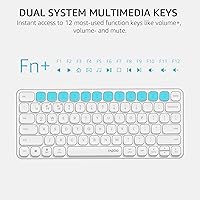
The 78-key TKL layout is genuinely well-organized for its size — the 12 multimedia hotkeys cover the most common shortcuts without cluttering the board, and the key spacing is wide enough that most users don't report frequent mis-strikes once they adjust. For writers, coders, and general office workers, the layout covers every daily need.
The missing numpad is a genuine dealbreaker for a meaningful portion of buyers — accountants, financial analysts, data entry workers, and anyone who uses number-heavy workflows daily will feel the absence immediately. Several negative reviews come specifically from users who underestimated how often they reached for the numpad before switching.
Noise Level
88%
Quiet typing is one of the most consistently praised aspects of the Rapoo blade-series board — users in libraries, shared bedrooms, and open offices specifically mention that colleagues and housemates don't react to the key sounds. The scissor mechanism keeps both the downstroke and the return stroke noticeably subdued compared to budget membrane alternatives.
While quiet by mainstream standards, a small number of users in very low-noise environments note that the key return produces a faint but perceptible click on each stroke. This rarely becomes a complaint, but users shopping specifically for silent-grade typing — the kind used in recording studios or very quiet medical settings — may want to verify before committing.
Cross-Platform Support
79%
21%
The dual-system keycap labeling means users who switch between macOS and Windows can actually read the correct shortcut references rather than guessing or relying on memory. Coverage across four operating systems — Windows, Mac, Linux, and Chrome OS — is broad enough for most real-world multi-OS setups, which is rarer than it should be at this price tier.
Some OS-specific shortcut keys don't translate perfectly across platforms — a function that works as expected on Windows may require a different key combination on macOS, and the included documentation isn't always clear on these differences. Linux and Chrome OS users in particular may need to spend some trial-and-error time finding the right key mappings.
Charging Convenience
82%
18%
USB-C charging is the right call here — no dongles to forget, no micro-USB frustration, and any modern cable works. The 10-minute fast charge that delivers a full day of use is a legitimately useful feature for commuters who forgot to charge overnight or anyone who needs a quick power top-up between meetings.
The board doesn't offer a wired operating mode, so if the battery is completely depleted you have a temporary productivity gap while waiting for it to recover enough charge. Users who prefer to occasionally run wired to eliminate any latency concern entirely will find no option to do so.
Aesthetic Design
85%
The matte antioxidant aluminum finish holds up to daily handling without accumulating the oily smudges that plague glossy plastic boards. For buyers building a clean desk setup, the slim white profile with the metallic frame sits neatly alongside modern monitors and accessories without adding visual clutter.
White is currently the only listed color option, which won't suit every desk aesthetic — buyers who prefer a dark, gray, or black keyboard will need to look elsewhere. There's also no RGB or backlight accent to add visual personality, which matters more to some desk setups than others.
Indicator Lights
74%
26%
The addition of device slot, caps lock, and battery indicator lights was a direct response to user criticism of earlier Rapoo keyboard versions, and buyers familiar with previous iterations consistently note the improvement. Knowing which device you're on without checking your screen saves a small but real amount of daily friction for multi-device users.
The indicators are functional but not particularly prominent — in brightly lit environments, the LEDs can be difficult to spot at a glance without deliberately looking for them. A few users also wish the battery indicator gave a more granular reading rather than a simple low-battery warning, especially for planning charging during longer travel days.
Ergonomics
76%
24%
The 0.51-inch height keeps the typing surface remarkably low, which helps maintain a natural wrist angle for most desk setups without needing a separate palm rest. Users who type primarily on laptops tend to transition to this compact multi-device keyboard easily, since the profile and hand position feel familiar from day one.
There are no built-in tilt legs or height adjustment of any kind, so users who prefer a raised back edge for wrist comfort are out of luck without an external keyboard stand. Those with larger hands may also find the narrower key spacing on a 78-key board slightly cramped compared to full-size layouts during fast typing.

Suitable for:

The Rapoo E9050L Wireless Keyboard is a strong fit for anyone who regularly works across multiple devices and wants one clean, lightweight board to handle all of them. Remote workers who bounce between a work laptop, a personal computer, and a tablet throughout the day will find the four-device switching genuinely useful rather than a marketing afterthought. Students who carry their gear to libraries or coffee shops will appreciate the sub-11-ounce weight and flat profile — it slides into a bag without drama and doesn't take up much desk real estate once it's out. The quiet scissor switches are a legitimate advantage in shared or noise-sensitive environments, from open-plan offices to study halls. Anyone building a minimalist desk setup who wants a keyboard that looks as good as it functions will also find the aluminum alloy frame a welcome detail at this price tier.

Not suitable for:

The Rapoo E9050L Wireless Keyboard is not the right call for anyone who relies heavily on a numeric keypad — accountants, data entry professionals, or anyone who lives in spreadsheets will likely find the missing numpad a genuine daily frustration rather than a minor inconvenience. The absence of a backlight is another real limitation: if you type in dim rooms, work late at night, or simply haven't fully memorized your keyboard layout, this board will slow you down. Users who expect rock-solid, zero-hiccup Bluetooth connectivity for mission-critical work should also take note — a subset of buyers has reported occasional pairing drops, and while the 2.4GHz RF dongle option helps, it's worth knowing going in. Power users who prefer a full-size layout or need highly programmable keys for gaming or complex macros will also want to look elsewhere. This is a capable daily-driver keyboard, but its strengths are specifically tied to portability and multi-device convenience — not raw functionality depth.

Specifications

  • Key Type: Scissor switch keys provide low-travel, quiet actuation well-suited to compact, flat keyboard designs.
  • Key Count: The layout includes 78 keys in a tenkeyless (TKL) configuration with no dedicated numeric pad.
  • Connectivity: Connects via Bluetooth 5.0, Bluetooth 4.0, and 2.4GHz RF wireless through a USB nano-dongle.
  • Multi-Device: Stores up to 4 device pairings simultaneously and switches between them using Fn key shortcuts.
  • Battery Life: The built-in lithium-ion battery is rated for up to 90 days on a full charge under typical use.
  • Fast Charge: A 10-minute USB-C charge delivers approximately one full day of use for on-the-go top-ups.
  • Charging Port: Uses a standard USB-C port for charging, compatible with most modern cables and wall adapters.
  • Frame Material: The frame is constructed from aluminum alloy with a matte antioxidant finish for added rigidity and texture.
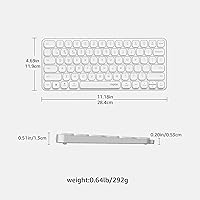
  • Dimensions: Measures 11.18″ long by 4.69″ wide by 0.51″ tall, keeping the footprint compact and the profile very flat.
  • Weight: Weighs 10.3 oz, light enough to carry daily without adding noticeable bulk to a laptop bag.
  • OS Support: Fully compatible with Windows, macOS, Linux, and Chrome OS, with dual-system keycap labeling included on the board.
  • Hotkeys: Includes 12 multimedia hotkeys covering common functions such as media playback, volume control, and email access.
  • Indicators: Features dedicated indicator lights for the active device slot, caps lock status, and remaining battery level.
  • Numeric Pad: No numeric pad is included; the TKL layout trades numpad access for a smaller footprint and better portability.
  • Color: Available in a white colorway with a matte aluminum frame finish as the primary listed option.

Related Reviews
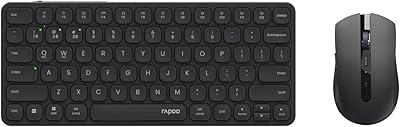
Rapoo 9050S Wireless Keyboard and Mouse Combo

77%
78%
Multi-Device Switching
84%
Wireless Connectivity
76%
Typing Experience
89%
Value for Money
85%
Noise Level
More
Arteck HW192 Wireless Keyboard and Mouse Combo
78%
78%
Build Quality
72%
Typing Experience
63%
Mouse Comfort & Ergonomics
81%
Battery Life
69%
Wireless Connectivity
More
Redragon BK7114 98-Key Wireless Low-Profile Keyboard
70%
83%
Wireless Reliability
71%
Typing Feel
88%
Noise Level
68%
Multi-Device Workflow
62%
Build Quality
More
Lenovo 300 Wireless Keyboard
75%
94%
Ease of Setup
88%
Typing Noise
91%
Value for Money
62%
Build Quality
86%
Battery Life
More
Links9+ Retro Typewriter Wireless Keyboard
74%
91%
Design & Aesthetics
62%
Typing Feel
76%
Wireless Connectivity
58%
Build Quality
83%
Value for Money
More
Cherry Stream Wireless Keyboard
88%
88%
Typing Comfort
92%
Wireless Performance
78%
Build Quality
85%
Ergonomics
95%
Setup and Installation
More
TECKNET TK-EKB01040BS01 Wireless Keyboard
76%
83%
Ergonomic Comfort
86%
Typing Noise Level
79%
Wireless Reliability
62%
Build Quality
88%
Value for Money
More
SHUNJINRUN KB426 Wireless Full-Size Keyboard
77%
83%
Typing Feel & Key Response
88%
Noise Level
67%
Build Quality & Materials
79%
Wireless Connectivity & Reliability
91%
Value for Money
More
Arteck HW305 Wireless Keyboard

79%
91%
Value for Money
94%
Ease of Setup
74%
Typing Experience
63%
Build Quality
69%
Battery Life
More
FENIFOX Wireless Keyboard and Mouse
86%
88%
Ergonomics
91%
Quiet Typing Experience
85%
Battery Life
89%
Wireless Connectivity
84%
Build Quality
More

FAQ

Each device slot is assigned to a dedicated key combination — typically Fn plus a numbered key from 1 through 4. Press the correct shortcut and the board switches over within a second or two. You never need to go back into your device's Bluetooth settings after the initial pairing is done.

Yes, and that's one of its more practical strengths. The keycaps are labeled for both operating systems, so you can have a Mac on one slot and a Windows PC on another and switch freely without mentally remapping anything. The multimedia shortcuts also adapt reasonably well across both platforms.

No — the Rapoo E9050L Wireless Keyboard does not include a backlight of any kind, and Rapoo does not advertise one. If you frequently type in dim environments or work late at night and rely on seeing your keys, this is a real limitation worth factoring in before you buy.

The official 90-day rating is based on moderate use and is likely measured under the more power-efficient 2.4GHz RF connection. If you primarily use Bluetooth and switch between multiple devices throughout the day, expect that number to come down — though most users still report several weeks between charges. The battery indicator light gives you a heads-up before things get critical.

The USB-C fast charge feature is a practical lifeline here — a 10-minute charge is enough to get you through roughly a full day of use. Just plug it into any USB-C cable, wait a few minutes, and you're back in action without a long interruption.

Yes, both iOS and Android devices connect over Bluetooth like any standard wireless keyboard. Keep in mind that some multimedia shortcuts are optimized for desktop operating systems, so a few function keys may behave differently or not respond at all depending on which app you're in.

It's in the same family — scissor switches give a firm, low-travel keystroke that most people find familiar if they're used to typing on a laptop. It's noticeably quieter than many external keyboards, and the shallow profile keeps your wrists at a fairly flat angle, which can reduce fatigue over longer sessions. It won't satisfy anyone chasing a mechanical keyboard feel, but for an office or travel board it's solid.

Yes, that's exactly how the system is designed. One of the four slots uses the 2.4GHz RF dongle — which tends to be the most stable and lowest-latency connection — while the other three slots run on Bluetooth. You can mix and match freely, so your primary desktop could use the dongle while your laptop and tablet connect over Bluetooth.

The frame does make a tangible difference. Most users who pick it up are surprised by how rigid it feels compared to all-plastic keyboards in a similar price bracket — there's no flex or creaking in normal use. It's not on the same level as a premium mechanical board, but it's noticeably more substantial than what you typically get at this tier.

Setup is straightforward — put the keyboard into pairing mode on whichever slot you want, find it in your device's Bluetooth settings, and connect. No drivers or companion apps are required for everyday use. The trade-off is that there's also no software available for remapping keys or creating macros, so you're working with the factory layout as-is.

Where to Buy