Overview

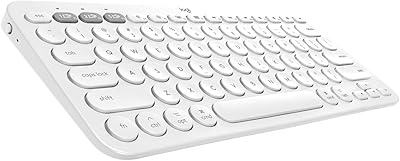
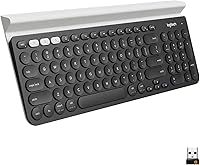
The Logitech K780 Multi-Device Wireless Keyboard has been sitting near the top of the mid-range keyboard market for years — and that staying power says something. Logitech has long been the default choice for reliable, no-fuss peripherals, and the K780 fits squarely into that tradition. What sets it apart at a glance is the speckled white finish and the rubberized cradle running along the top edge, which holds your phone or tablet upright while you type. It's a full-size board with a number pad, membrane switches, and dual wireless connectivity. Not flashy, not overbuilt — just a thoughtfully designed keyboard for people who actually need to manage more than one screen.
Features & Benefits

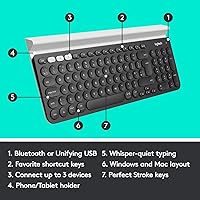
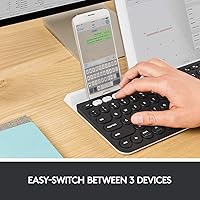
The most practical thing about this wireless keyboard is how it handles device switching. A dedicated Easy-Switch button lets you hop between up to three paired devices — your laptop, tablet, and phone — with no reconnection delays. The USB Unifying Receiver covers hardware that does not support Bluetooth, which adds useful flexibility. The built-in cradle is not a gimmick; prop your tablet up to follow a recipe or keep a video call visible while your hands stay on the keys. The full-size layout with a number pad is a genuine plus for spreadsheet work or data entry, and the low-profile keys stay impressively quiet in shared spaces. FLOW file-transfer between two computers is possible, but it does require a compatible Logitech mouse and the Logi Options+ software.

Best For

This multi-device keyboard is built for people whose workday genuinely spans multiple devices. If you're bouncing between a work laptop, a personal tablet, and your phone throughout the day, it reduces a real friction point. It works well in mixed-platform households — full compatibility with Windows, macOS, Chrome OS, iOS, and Android means everyone can use it without workarounds. The quiet keystrokes make it a natural fit for open-plan offices or shared living spaces where noise matters. That said, anyone who values a compact footprint or prefers a tenkeyless layout might want to look elsewhere. The K780 is unabashedly full-size — it takes up desk space, and there's no slimmed-down version of this particular model.

User Feedback

Long-term owners tend to appreciate how reliable this multi-device keyboard proves over time. Battery life is a consistent highlight — many users report going months without a swap, a nice contrast to rechargeable keyboards that need frequent cable time. The typing experience gets positive marks for comfort during extended sessions, though mechanical keyboard enthusiasts note the lack of tactile feedback as a real drawback. The speckled keycap legends can be harder to read under dim lighting, which a few reviewers flag as a minor but genuine annoyance. Desk footprint comes up too — the full-size layout earns praise from number-crunchers but frustrates anyone working on a smaller desk. Overall, the rating skews very positive, with most criticism reflecting personal preference rather than product flaws.

Pros

  • One-button switching between three paired devices works reliably and fast in daily use.
  • Battery life is exceptional — most users go months without needing to swap AAA batteries.
  • Genuinely quiet keystrokes make this wireless keyboard considerate in shared and open-plan spaces.
  • The built-in cradle holds phones and tablets at a useful angle for calls or document reference.
  • Works across Windows, macOS, Chrome OS, iOS, and Android without driver headaches.
  • The full-size layout with a number pad is a real productivity asset for data entry and spreadsheet work.
  • Dual connectivity via Bluetooth and USB Unifying Receiver covers virtually any device pairing scenario.
  • Long-term owners report solid durability with keycap legends staying legible after years of use.
  • Setup and initial pairing across all three device slots is quick and requires no software.
  • The understated speckled white design fits clean, professional desk setups without looking like a gaming accessory.

Cons

  • Membrane switches offer no tactile feedback — a real drawback for experienced or enthusiast typists.
  • No keyboard backlighting means legibility suffers in dim rooms or evening use.
  • The speckled keycap finish visually competes with legends under anything less than good lighting.
  • Full-size footprint is a problem for smaller desks — there is no tenkeyless or compact version available.
  • No battery level indicator, so the keyboard can die without any warning during a session.
  • FLOW cross-computer control requires a compatible Logitech mouse and Logi Options+ software — it is not built-in.
  • The plastic build feels functional rather than premium, especially noticeable on the wrist rest area.
  • White finish tends to show discoloration and yellowing over time in warmer or sunnier environments.
  • Bluetooth reconnection after a device wakes from sleep can occasionally lag on certain Android phones.
  • Only one color option limits buyers who prefer a darker or neutral keyboard to match their setup.

Ratings

The scores below were generated by AI after analyzing thousands of verified global user reviews for the Logitech K780 Multi-Device Wireless Keyboard, with spam, bot-submitted, and incentivized feedback actively filtered out. Every category reflects what real buyers consistently reported after extended daily use — strengths and frustrations included. Nothing has been softened to protect the rating.

Multi-Device Switching
93%
Users who juggle a laptop, tablet, and phone throughout the workday consistently call the Easy-Switch button one of the best quality-of-life features they have used in a keyboard. The transition between paired devices is fast enough that it does not interrupt workflow, and the three-slot setup covers most realistic multi-device scenarios without feeling like a compromise.
A small number of users report occasional reconnection hiccups when waking devices from sleep, particularly with certain Android phones. It is not a widespread complaint, but it surfaces often enough to be worth noting for anyone whose phone is always in the rotation.
Typing Comfort
82%
18%
The low-profile membrane keys strike a good balance between responsiveness and cushioning for long typing sessions. Office workers and writers who spend hours drafting documents tend to report noticeably less finger fatigue compared to stiffer keyboards, and the key spacing on the full-size layout feels natural even for larger hands.
Mechanical keyboard converts will find the typing feel underwhelming — the membrane switches lack the tactile snap that many enthusiasts consider non-negotiable. At this price point, that is a legitimate trade-off worth weighing, especially if typing satisfaction is a priority rather than just functional output.
Noise Level
91%
The keys are genuinely quiet — not just marketed as quiet. Users in open-plan offices and shared apartments consistently praise how inoffensive the K780 is during calls or late-night work sessions. It is one of the quieter full-size keyboards available without crossing into the mushy, unresponsive territory that plagues some silent switches.
A few users who upgraded from ultra-soft keyboards find the K780 slightly louder than expected, particularly when bottoming out keys forcefully. This is a minor point and unlikely to bother anyone in a normal office environment, but worth knowing if you are in a truly noise-sensitive situation.
Device Cradle Utility
88%
The rubberized cradle along the top edge holds phones and tablets at a comfortable upright angle, which turns out to be genuinely useful rather than a novelty feature. Users reference it constantly for video calls, following along with a recipe on a tablet, or keeping a reference document visible while typing on a connected computer.
The cradle width suits most phones and standard tablets well, but users with very large tablets in thick cases report some instability. It is not a dealbreaker, but it is clearly designed with mid-sized devices in mind rather than the largest slabs on the market.
Build Quality & Durability
79%
21%
The K780 has a solid, substantial feel thanks partly to its weight, and the keycaps show minimal wear even after extended daily use. Long-term owners — some reporting two or more years of continuous use — note that the device cradle and key legends hold up well without the usual signs of degradation.
The plastic construction, while sturdy, does not feel premium in hand. The speckled finish can show smudges and light scratches over time, and a handful of reviewers mention that the USB Unifying Receiver feels slightly loose in the port on some units, though this does not appear to affect performance.
Battery Life
94%
Battery performance is one of the K780's most consistently praised traits. Long-term owners routinely report going six months or more on a single pair of AAA batteries under regular daily use — a meaningful advantage over rechargeable keyboards that need periodic cable time to stay usable.
There is no battery level indicator or low-battery warning light, which means some users get caught off guard when the keyboard finally dies. It is a small oversight on a keyboard at this price, and a dedicated status LED would have been an easy fix.
Cross-Platform Compatibility
89%
Few keyboards handle the Windows-to-Mac-to-iOS triangle as reliably as the K780. Users in mixed-platform households appreciate that switching OS contexts requires nothing more than pressing a button — no re-pairing, no driver juggling, no compatibility surprises across macOS, Windows, Chrome OS, or mobile platforms.
Some function key behaviors need to be remapped depending on the OS, which requires installing the Logi Options+ software. Not a major hurdle, but users expecting fully plug-and-play behavior across every platform may need to invest a bit of setup time upfront.
Key Layout & Size
76%
24%
The full-size layout with a dedicated number pad is a genuine productivity asset for users doing spreadsheet work, accounting, or data entry — tasks where a compact tenkeyless layout would genuinely slow things down. The key spacing feels standard and familiar, which keeps the learning curve flat.
The keyboard takes up a meaningful amount of desk space, and users with smaller workstations or tight setups regularly flag this as a problem. There is no compact or tenkeyless version of this exact model, so buyers who want the multi-device features in a smaller footprint are out of options within this lineup.
Wireless Connectivity Reliability
84%
Both the Bluetooth and USB Unifying Receiver connections are stable in typical home and office environments. Users who sit within normal desktop range report essentially zero dropped inputs during regular use, and the dual-mode setup means you have a fallback if one connection method causes issues with a specific device.
Range drops off noticeably beyond around 8 to 10 meters, which is expected for this class of keyboard but worth knowing if you planned to use it from a distance. In environments with heavy wireless interference, a small number of users report occasional input lag via Bluetooth specifically.
FLOW Cross-Computer Control
67%
33%
For users who already own a compatible Logitech mouse and use Logi Options+, the FLOW feature adds a genuinely useful layer — being able to copy text on one machine and paste it on another without any cloud workaround is a practical time-saver for dual-computer setups.
FLOW requires both a compatible Logitech mouse and the Logi Options+ software to function, which means it is entirely inaccessible to users who do not already own qualifying hardware. It is a bonus feature for an existing Logitech ecosystem, not a standalone selling point, and some buyers feel misled by how prominently it is marketed.
Key Legibility
71%
29%
Under normal office lighting, the legends on the speckled white keycaps are clear and easy to read. The font size and contrast are adequate for touch typists and casual users alike, and the physical key size is generous enough that finding individual keys by feel is comfortable.
In dim or warm lighting conditions, the speckled pattern competes visually with the printed legends, making certain keys genuinely harder to read at a glance. There is no backlight option on this model, so evening or low-light users have no workaround beyond repositioning a lamp.
Setup & Pairing Experience
86%
Initial pairing across all three device slots is straightforward and takes only a few minutes. Most users report no issues getting Bluetooth connections established on the first attempt across all supported platforms, and the USB Unifying Receiver works out of the box without any software installation.
Re-pairing after a factory reset or when swapping in a new device requires cycling through the pairing mode correctly, which a few less tech-savvy users find mildly confusing without clearer instructions. The manual could do more to walk through edge cases like replacing one of three paired devices.
Value for Money
81%
19%
The K780 delivers a feature set — three-device switching, built-in cradle, broad OS compatibility, exceptional battery life — that is hard to match at the same price from competing brands. For productivity-focused users who genuinely need multi-device control, the cost works out to a reasonable investment over a multi-year lifespan.
For users who only type on a single computer and have no need for device switching or the cradle, the price feels harder to justify against simpler full-size wireless keyboards that cost considerably less. The value proposition is strong, but it is conditional on actually using what makes the K780 different.
Desk Aesthetics
74%
26%
The speckled white colorway reads as clean and neutral on most desks, avoiding the gamer-aesthetic that dominates many wireless keyboards in this price range. The understated design fits well in professional home office setups or minimalist workspaces without drawing attention to itself.
The single color option limits buyer choice, and the white finish tends to show discoloration and yellowing over extended periods in some environments. Users who prefer a dark or neutral gray keyboard will find no alternative colorway for this model in most markets.

Suitable for:

The Logitech K780 Multi-Device Wireless Keyboard was built for people whose workday genuinely involves more than one screen — and it shows in every design decision. If you regularly type on a work laptop, then need to fire off a message on your phone, then reference a document on your tablet, the one-button device switching removes a friction point that adds up over the course of a day. It fits especially well in home office setups where a single keyboard needs to pull double duty across a desktop and a secondary device without cable swapping or re-pairing rituals. The broad OS compatibility — spanning Windows, macOS, Chrome OS, iOS, and Android — makes it a natural choice for mixed-platform households where different family members or workflows demand different operating systems. The built-in device cradle is a practical bonus for anyone who takes video calls on a tablet or likes to keep a reference screen propped up while typing. Quiet typists working in shared spaces or open-plan offices will also find the low-profile membrane keys considerate enough to use without drawing complaints.
Not suitable for:

The Logitech K780 Multi-Device Wireless Keyboard is the wrong tool if your needs are straightforward. If you type on a single computer and have no real use for device switching or a built-in tablet stand, the price is hard to justify — there are simpler, cheaper full-size wireless keyboards that will serve you just as well. Mechanical keyboard enthusiasts will find the membrane switches unsatisfying; the keys are quiet and comfortable, but they lack the tactile feedback and crisp actuation that experienced typists often consider non-negotiable. Anyone working on a tight or cluttered desk should also think twice — the full-size layout with a number pad takes up real estate, and there is no compact variant of this model. Users who frequently work in dim or low-light environments will run into a genuine limitation, since there is no backlit option and the speckled keycap pattern can make legends harder to read without good lighting. If you are looking for a keyboard with a premium feel in the hand or a metal build, the all-plastic construction here will likely disappoint.

Specifications

  • Brand & Model: Manufactured by Logitech under the model designation K780, part of the company's multi-device wireless peripheral lineup.
  • Switch Type: Low-profile membrane switches designed for quiet, comfortable keystrokes during extended typing sessions.
  • Layout: Full-size layout with a dedicated number pad, standard function row, and navigation cluster.
  • Dimensions: The keyboard measures 14.9″ in length, 6.2″ in width, and 0.9″ in height.
  • Weight: The unit weighs 1.92 pounds, giving it a stable, substantial feel on the desk without being difficult to relocate.
  • Connectivity: Supports both Bluetooth Smart and Logitech's USB Unifying Receiver, allowing flexible wireless connection across a wide range of devices.
  • Paired Devices: Can store and switch between up to three devices simultaneously using the dedicated Easy-Switch button.
  • Device Cradle: An integrated rubberized cradle along the top edge holds smartphones and tablets upright at a comfortable viewing angle.
  • OS Compatibility: Fully compatible with Windows 10 and 11, macOS 10.15 or later, Chrome OS, iOS 11 or later, iPadOS 13.4 or later, and Android 7 or later.
  • Power Source: Powered by two AAA batteries, which are included in the box; no charging cable required.
  • Battery Life: Logitech rates battery life at up to 24 months under typical usage conditions with two AAA batteries.
  • Wireless Range: Effective wireless range is approximately 10 meters (33 feet) under standard operating conditions for both Bluetooth and Unifying Receiver connections.
  • Backlighting: The keyboard does not include per-key or zone backlighting; no illumination option is available on this model.
  • FLOW Support: Compatible with Logitech FLOW cross-computer control when paired with a supported Logitech mouse and the Logi Options+ software installed on both computers.
  • Color & Style: Available in a white speckled colorway, with a patterned finish across the keycap surfaces and keyboard body.
  • Item Model Number: The official Logitech part number for this keyboard is 920-008025.
  • Warranty: Logitech provides a standard one-year limited hardware warranty covering manufacturing defects from the date of purchase.
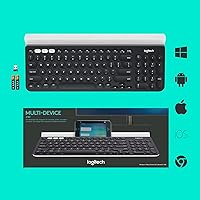
  • In the Box: Package includes the K780 keyboard, one USB Unifying Receiver, two AAA batteries, and a user documentation card.

Related Reviews
Logitech K585 Multi-Device Slim Wireless Keyboard
88%
92%
Value for Money
88%
Performance
94%
Battery Life
90%
Device Switching
85%
Typing Experience
More
Logitech K380 Pebble Wireless Multi-Device Keyboard
88%
96%
Multi-Device Compatibility
92%
Battery Life
84%
Typing Experience
93%
Portability & Weight
89%
Build Quality
More
Logitech K580 Slim Multi-Device Wireless Keyboard
82%
90%
Ease of Use with Multiple Devices
93%
Battery Life
80%
Typing Comfort
88%
Connectivity Options
84%
Build Quality
More
Logitech Bluetooth Multi-Device Keyboard K480
84%
93%
Ease of Device Switching
91%
Battery Life
85%
Build Quality
88%
Portability
78%
Typing Comfort
More
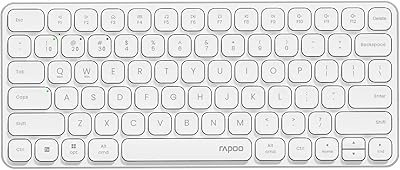
Rapoo E9050L Multi-Device Wireless Keyboard
88%
94%
Battery Life
88%
Typing Comfort
91%
Portability
89%
Build Quality
85%
Device Compatibility
More
Lenovo Multi-Device Wireless Keyboard ZG38C05810
83%
88%
Multi-Device Switching
83%
Typing Feel & Key Response
92%
Portability & Form Factor
76%
Battery Life
91%
USB-C Charging Convenience
More
Bnnwa Multi-Device Wireless Bluetooth Keyboard with Touchpad
83%
91%
Value for Money
88%
Ease of Use
72%
Touchpad Responsiveness
94%
Device Switching
85%
Portability
More
Logitech K380 Multi-Device Bluetooth Keyboard for Mac
88%
88%
Typing Comfort
85%
Bluetooth Connectivity
92%
Portability
94%
Battery Life
82%
Build Quality
More
Rapoo 9050S Multi-Device Wireless Keyboard and Mouse Combo
87%
94%
Ease of Device Switching
89%
Typing Experience
91%
Battery Life
85%
Comfort and Ergonomics
90%
Multi-Device Compatibility
More
VEILZOR Wireless Multi-Device Keyboard with Numeric Pad & Tablet Holder
84%
89%
Typing Comfort
94%
Ease of Setup
92%
Battery Life
87%
Build Quality
90%
Ergonomics
More

FAQ

Yes, that is one of the core strengths of the Logitech K780 Multi-Device Wireless Keyboard. You pair your iPhone via Bluetooth and your PC via either Bluetooth or the USB Unifying Receiver, assign each to a numbered slot, and then switch between them by pressing the corresponding Easy-Switch button. The transition is fast — typically under a second.

It works well with Macs. The K780 is fully compatible with macOS 10.15 and later, and the keys can be remapped using Logi Options+ to match Mac keyboard conventions. A small number of function key behaviors differ by default, but that software handles it cleanly.

Most long-term owners report getting anywhere from six months to over a year on a single pair of AAA batteries, depending on how heavily the keyboard is used. Logitech rates it at up to 24 months under typical conditions, which is optimistic but not wildly off for lighter users. The main frustration is there is no battery indicator, so you will not get a warning before it dies.

FLOW lets you move your cursor between two computers and even copy-paste content between them, as if you were using one machine. It sounds impressive, but it only works if you also own a compatible Logitech mouse and have Logi Options+ installed on both computers. If you do not have that setup, FLOW simply does not apply to you — it is a bonus for existing Logitech ecosystem users, not a feature everyone can use out of the box.

For most office typists, yes. The membrane keys are comfortable and quiet, with enough travel to feel responsive without bottoming out harshly. That said, if you are used to mechanical switches — particularly tactile ones — the K780 will feel softer and less satisfying. It is a fair trade-off for the noise reduction, but worth knowing before you buy.

Most standard-sized phones and tablets fit comfortably, including iPads and typical Android tablets in lightweight cases. Very large tablets in thick protective cases can be a bit wobbly, so if you are using something like a 13-inch iPad Pro in a rugged case, test it before relying on the cradle. For a standard 10-inch or 11-inch tablet, it works well.

No — the K780 has no backlighting whatsoever. In dim environments, the speckled keycap pattern can actually make it harder to read the legends, not easier. If you frequently work in low-light conditions, this is a genuine limitation and worth factoring into your decision.

The keyboard stays paired to all three devices simultaneously, but it only actively inputs to one at a time — whichever slot you have selected. Switching is instant and manual via the Easy-Switch button; there is no automatic context-switching based on what you are doing. You stay in control of which device receives your keystrokes.

Quite straightforward. Plug in the USB Unifying Receiver if needed, or put the keyboard into Bluetooth pairing mode by holding the Easy-Switch button for the desired slot. Each device pairs in a minute or two. You do not need to install any software just to get up and running — Logi Options+ is optional for customization and FLOW only.

Based on long-term user reports, yes. The keycaps hold up well under heavy daily use without significant legend fading, and the overall structure remains stable. The plastic body is not luxury-grade, and the white finish can show yellowing over time in warm or bright environments, but functionally the keyboard tends to keep performing reliably well past the two-year mark.