Overview

The Bnnwa Multi-Device Bluetooth Keyboard with Touchpad is a slim, affordable input device that combines a full keyboard and trackpad in one unit — so you're not reaching for a separate mouse. Bnnwa isn't a brand with wide recognition, and it's fair to set expectations accordingly: the build won't feel premium, but it holds up for everyday use. It connects to up to three devices at once via Bluetooth or 2.4GHz wireless, and despite its compact size, it sensibly retains dedicated arrow keys — a small but real advantage over similarly priced keyboards that strip those out entirely to save space.
Features & Benefits

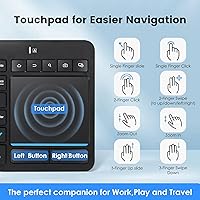
The standout feature of this all-in-one Bluetooth keyboard is single-key device switching — tap a dedicated button to jump between any of three paired connections without lag or re-pairing. The multi-touch trackpad is large for this form factor and handles scrolling, zooming, and basic pointing well enough for general use. Worth flagging for new owners: the Fn key locks the trackpad, which can cause confusion if triggered accidentally. A built-in auto-sleep function after 30 minutes of inactivity extends battery life noticeably. There are also 12 media shortcut combinations covering volume, brightness, and playback — practical extras that genuinely come in handy during daily use.

Best For

This wireless keyboard-trackpad combo is best suited for HTPC and media center setups, where having one compact device replace both keyboard and mouse on the couch genuinely simplifies things. It's equally useful for travelers or remote workers who rotate between a laptop, tablet, and a second PC — three-device switching covers that workflow without any extra hardware. However, if you type heavily or need precise cursor work, this isn't the right tool. The trackpad won't satisfy power users, and the relatively tight key spacing becomes noticeable during extended typing sessions, particularly for anyone with larger hands. Think convenience over performance.

User Feedback

Sitting at 4.0 stars from roughly 500 buyers, the Bnnwa keyboard has earned its rating honestly. Reviewers consistently praise quick Bluetooth pairing and a trackpad that's larger than expected — both meaningful wins for everyday use. The tactile feel of the keys also gets positive mentions, especially from users controlling media centers or secondary devices. On the downside, touchpad sensitivity comes up repeatedly as hit-or-miss, and intermittent connectivity drops are a real pattern in the critical reviews — not universal, but frequent enough to note. Some larger-handed users also find the layout tighter than the listed dimensions suggest. It over-delivers at its price point, but the limitations are real.

Pros

  • Connects to up to three devices and switches between them with a single keypress — no re-pairing needed.
  • The built-in trackpad is generously sized for this form factor, making it genuinely usable without a separate mouse.
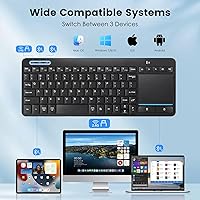
  • Broad OS compatibility covers Windows, Android, macOS, Chrome OS, and iOS out of the box.
  • At under a pound, this wireless keyboard-trackpad combo is easy to toss in a bag for travel or hot-desking.
  • Retains dedicated directional arrow keys despite the compact layout — a practical choice many rivals skip.
  • Auto-sleep after 30 minutes idle helps preserve battery life without any manual intervention.
  • Bluetooth pairing is consistently described by reviewers as fast and straightforward across different devices.
  • Twelve Fn-layer media shortcuts cover volume, brightness, and playback — useful for media center and HTPC use.
  • Ranked in the top 120 keyboards on Amazon with over 500 reviews, suggesting reliable real-world adoption.
  • Works well as a couch controller for smart TVs or living room PCs where a traditional setup is impractical.

Cons

  • Touchpad sensitivity is inconsistent — some users report needing to recalibrate or reconnect to restore normal tracking.
  • Intermittent Bluetooth drops appear in enough reviews to be a real concern for reliability-sensitive use cases.
  • Key spacing feels cramped for users with larger hands, leading to more typing errors during extended sessions.
  • The Fn-key touchpad lock is easy to trigger accidentally, and many buyers mistake it for a hardware fault.
  • ABS plastic construction feels noticeably budget-grade — the chassis flexes slightly under pressure.
  • No rechargeable battery option mentioned; battery replacement or management adds ongoing cost and inconvenience.
  • The Bnnwa brand carries no established warranty reputation or widely available customer support track record.
  • Trackpad gesture accuracy degrades noticeably for tasks requiring fine cursor control, such as editing or design work.
  • 2.4GHz dongle and Bluetooth share device slots, so users should verify their preferred connection method before buying.

Ratings

Our AI-generated scores for the Bnnwa Multi-Device Bluetooth Keyboard with Touchpad were produced by systematically analyzing verified global buyer reviews, with spam, bot activity, and incentivized feedback actively filtered out before scoring. Each category reflects the honest balance of praise and frustration real users reported — nothing is glossed over. Where the keyboard earns strong marks, you will see why; where it falls short, those trade-offs are called out just as clearly.
Value for Money
88%
For the price bracket it sits in, this all-in-one Bluetooth keyboard punches well above its weight by eliminating the need for a separate mouse entirely. Buyers managing a media center or traveling light consistently flag value as the single biggest reason they recommend it to others.
A handful of users felt the build quality did not quite justify even the modest asking price after extended use, particularly when plastic components showed wear or the trackpad became less responsive over time.
Multi-Device Switching
83%
The ability to hop between three paired devices with a single keypress is genuinely useful in real desk setups — users managing a laptop, tablet, and desktop side by side report that it cuts down on clutter and context-switching friction noticeably. Pairing itself is quick and does not require any software.
A subset of reviewers reported occasional lag or failure to reconnect cleanly when switching, particularly between a Bluetooth device and the 2.4GHz dongle connection, which disrupts an otherwise smooth workflow.
Touchpad Performance
61%
39%
The trackpad is larger than most competing units at this price point, which makes scrolling through web pages or navigating media menus from the couch reasonably comfortable. Basic two-finger scrolling and pinch-to-zoom work reliably enough for everyday browsing.
Precision tracking is where this wireless keyboard-trackpad combo stumbles — users attempting anything beyond casual navigation, such as clicking small interface elements or working in spreadsheets, frequently describe the cursor as jittery or inconsistent. Sensitivity drift after extended sessions comes up repeatedly in critical reviews.
Bluetooth Reliability
67%
33%
Initial pairing across supported operating systems is consistently described as fast and hassle-free, with no drivers needed. For users who stay within a reasonable distance and work in low-interference environments, the connection holds steadily through normal tasks.
Intermittent drops are the single most repeated complaint across critical reviews — not a universal problem, but frequent enough to be a real concern. Users in environments with dense wireless traffic, such as open-plan offices or apartments with many nearby networks, report the issue more often.
Typing Comfort
71%
29%
Key travel feels adequate for a slim keyboard at this tier, and users handling light typing tasks — search queries, short emails, media center input — generally find it comfortable enough for daily use. The retention of dedicated arrow keys is a practical touch that regular users appreciate.
The compact key spacing becomes a real problem during longer typing sessions, especially for users with broader hands who report elevated error rates. This is not a keyboard designed for sustained document writing or coding, and trying to use it that way leads to frustration quickly.
Build Quality
58%
42%
The ABS plastic construction keeps weight low — under a pound — which genuinely helps when carrying it between rooms or packing it for travel. The keycap legends are reported to remain legible after months of regular use, which is better than some budget competitors.
There is no mistaking this for a well-built peripheral: the chassis has noticeable flex when pressed, and the overall material feel is firmly in budget territory. A small number of users reported structural issues, such as keycap wobble or trackpad surface degradation, within the first few months of use.
Portability
86%
At just under 15 oz and slim enough to fit in most laptop sleeves, the Bnnwa keyboard is a genuinely practical travel companion for people who need input control on the go without carrying extra peripherals. Its all-in-one design means one item in the bag instead of two.
The unit does not include a protective carry sleeve or case, so the trackpad surface and keycaps are exposed to scratches in a bag. Users who travel frequently mention this as a minor but recurring annoyance.
OS Compatibility
82%
18%
Out-of-the-box support for Windows, macOS, Android, Chrome OS, and iOS is a genuine strength — most users had it working on their first device within minutes of unboxing, with no configuration required. It works particularly well as a single controller for mixed-OS households.
Some of the Fn-layer multimedia shortcuts behave inconsistently across operating systems, with certain key combinations not registering correctly on iOS or older versions of macOS. This is a minor issue for most users but can be annoying for those who rely heavily on media controls.
Media & Shortcut Keys
77%
23%
The 12 Fn-layer shortcut combinations covering volume, brightness, and playback are a practical addition for HTPC and smart TV users who want full media control from a single device. Most users find them intuitive enough to memorize quickly.
Because the shortcuts are layered behind the Fn key rather than dedicated keys, they require a two-handed action that feels slightly awkward in true couch use — particularly when adjusting volume mid-video with the keyboard balanced on your lap.
Setup & Pairing
84%
The out-of-box experience is straightforward: no software downloads, no complex pairing sequences. Most reviewers had the keyboard connected and operational within a few minutes across a wide range of devices, which matters a lot for less technical users.
Re-pairing after a factory reset or when connecting to a new device is occasionally described as finicky, with some users needing a second or third attempt before the keyboard was recognized correctly by the host device.
Battery Efficiency
74%
26%
The auto-sleep function, which activates after 30 minutes of inactivity, makes a real difference in day-to-day battery consumption. Casual users who pick the keyboard up for short sessions several times a day tend to report satisfying intervals between battery changes.
There is no built-in rechargeable battery, which means ongoing battery purchases or a stash of replacements for frequent users. Heavy users who keep the keyboard active for hours at a stretch find battery life less impressive without the sleep mode doing significant work.
Touchpad Lock Feature
63%
37%
The Fn-key touchpad lock is a useful safeguard for users who prefer to navigate solely via keyboard shortcuts, preventing accidental cursor jumps during focused typing. Once users learn it exists, it becomes a helpful tool for managing input modes.
A disproportionate number of support complaints about the touchpad stem directly from users accidentally activating this lock without realizing it exists. The feature is not communicated clearly in the documentation, leading many buyers to assume a hardware defect when the fix is a simple key combination.
Ergonomics & Layout
66%
34%
The slim, flat profile works well for lap use and couch-computing scenarios where a raised keyboard would be awkward. Keeping the arrow keys in a compact layout is a thoughtful decision that users who rely on them for document navigation and media scrubbing genuinely notice.
The flat ergonomic profile, while good for portability, offers no wrist elevation or tilt adjustment, which becomes uncomfortable during longer typing sessions. Combined with tight key spacing, users with larger hands or any repetitive strain concerns should factor this in carefully.
HTPC & Couch Use
89%
This is where the keyboard earns its strongest reviews — users controlling a living room PC, Android TV box, or Fire Stick consistently describe it as the ideal single-device solution. The combination of keyboard, trackpad, and media shortcuts on one slim unit solves a real problem elegantly at this price.
The 2.4GHz dongle or Bluetooth signal can occasionally struggle through the interference common in living room environments packed with smart devices, and resting the keyboard on a soft surface like a sofa cushion slightly degrades trackpad tracking accuracy.

Suitable for:

The Bnnwa Multi-Device Bluetooth Keyboard with Touchpad is a strong fit for anyone who wants a single, clutter-free input device for a home media setup or HTPC — if you control a living room PC from the couch, this combo replaces the awkward keyboard-plus-mouse juggle with one compact unit. It also makes real sense for people who regularly switch between two or three devices at the same desk, such as a laptop, a tablet, and a work PC, since the one-tap device switching keeps that workflow tidy without extra hardware. Travelers and light-duty remote workers will appreciate that it weighs under a pound and does not require a mouse alongside it. Budget-conscious users who need basic productivity, media control, and cross-platform compatibility — Windows, Android, macOS, Chrome OS — will find it covers all those bases without a significant financial commitment.
Not suitable for:

Anyone who types heavily for extended periods should look elsewhere — the key spacing on this all-in-one Bluetooth keyboard is tight enough that users with larger hands consistently report fatigue and errors during prolonged sessions. Designers, photo editors, or anyone who depends on accurate cursor placement will find the touchpad sensitivity too inconsistent for that kind of precision work. The ABS plastic build, while functional, does not hold up to the expectations of buyers accustomed to mid-range or premium peripherals, so if tactile quality and durability matter to you, this is not the right investment. If rock-solid wireless reliability is a strict requirement — say, for live presentations or professional environments where input drops are unacceptable — the occasional connectivity issues reported by a notable share of reviewers are a genuine risk worth weighing carefully.

Specifications

  • Brand: Manufactured by Bnnwa, a budget-tier peripheral brand available primarily through online marketplaces.
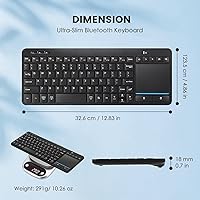
  • Dimensions: The unit measures 12.83″ long by 4.86″ wide by 0.70″ thick, making it slim enough to slide into most laptop bags.
  • Weight: At 14.8 oz, this keyboard is light enough for daily portability without feeling flimsy in the hand.
  • Material: The housing and keycaps are constructed from ABS plastic, which keeps weight low but results in a budget-grade tactile feel.
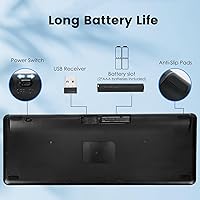
  • Connectivity: Supports both Bluetooth wireless and 2.4GHz wireless via USB dongle, giving users flexibility depending on their device.
  • Device Support: Pairs with up to 3 devices simultaneously, with one-key switching between active connections.
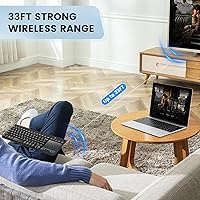
  • Wireless Range: Rated for a wireless operating range of up to 33 feet (10 meters) under typical open-space conditions.
  • OS Compatibility: Works across Windows, Android, Chrome OS, iOS, and macOS without requiring additional driver installation.
  • Trackpad: Features a large multi-touch trackpad supporting pointing, two-finger scrolling, and pinch-to-zoom gestures.
  • Touchpad Lock: The trackpad can be locked and unlocked using the Fn key combination, preventing accidental cursor movement during typing.
  • Shortcuts: Includes 12 multimedia shortcut combinations accessible via the Fn key layer, covering volume, brightness, and media playback controls.
  • Auto-Sleep: The keyboard automatically enters a low-power sleep state after 30 minutes of inactivity, waking instantly on any keypress.
  • Color: Available in black with a contemporary slim profile designed to complement modern desk and living room setups.
  • Key Layout: Compact full-layout keyboard that retains dedicated directional arrow keys despite its reduced footprint.
  • Market Rank: Holds a Best Sellers Rank of approximately #115 in the Computer Keyboards category on Amazon as of its listing data.
  • Customer Rating: Holds an average rating of 4.0 out of 5 stars based on over 500 verified customer reviews.
  • Availability: First made available for purchase in May 2024, making it a relatively recent entrant to the budget keyboard market.

Related Reviews

Lenovo Multi-Device Wireless Keyboard ZG38C05810
83%
88%
Multi-Device Switching
83%
Typing Feel & Key Response
92%
Portability & Form Factor
76%
Battery Life
91%
USB-C Charging Convenience
More
Logitech K480 Bluetooth Multi-Device Keyboard
77%
94%
Device Switching
58%
Typing Feel
91%
Battery Life
89%
Multi-Device Compatibility
71%
Device Cradle
More
Logitech K380 Bluetooth Keyboard for Mac
76%
93%
Multi-Device Switching
91%
Battery Life
89%
Mac Layout & Compatibility
88%
Portability
67%
Typing Experience
More
Arteck HB305-2 Bluetooth Keyboard
81%
88%
Multi-Device Switching
83%
Typing Experience
79%
Battery Life
61%
Build Quality
72%
Bluetooth Connectivity Stability
More
Arteck HB305-3 Bluetooth Keyboard and Mouse Combo
78%
86%
Multi-Device Switching
82%
Keyboard Typing Experience
63%
Mouse Comfort & Ergonomics
88%
Battery Life
61%
Build Quality & Materials
More
HUO JI Multi-Device Wireless Keyboard
77%
88%
Multi-Device Switching
84%
Value for Money
91%
Portability & Form Factor
61%
Typing Experience
63%
Build Quality & Durability
More
Kidopire Foldable Bluetooth Keyboard with Touchpad
86%
94%
Portability
89%
Multi-device Connectivity
90%
Battery Life
87%
Touchpad Performance
92%
Ease of Use
More
JPHTEK Foldable Bluetooth Keyboard with Touchpad
87%
92%
Portability & Design
87%
Typing Experience
90%
Battery Life
85%
Compatibility with Devices
88%
Ease of Setup
More
Logitech K780 Multi-Device Wireless Keyboard
83%
93%
Multi-Device Switching
82%
Typing Comfort
91%
Noise Level
88%
Device Cradle Utility
79%
Build Quality & Durability
More
CZUR TouchBoard Pro Bluetooth Keyboard with Touchpad
84%
93%
Portability & Size
88%
Battery Life
74%
Touchpad Performance
80%
Build Quality
85%
Connectivity & Compatibility
More

FAQ

Not at all. There are dedicated device keys on the keyboard, typically labeled or numbered for each paired slot. You press the corresponding key once, and the keyboard reconnects to that device in a second or two. No menus, no software — it just works.

Almost certainly not. The Bnnwa Multi-Device Bluetooth Keyboard with Touchpad has a built-in touchpad lock function activated by holding the Fn key along with the touchpad toggle key. It is easy to trigger by accident. Check your Fn key combination first before assuming there is a hardware fault — this resolves the issue for most users who report it.
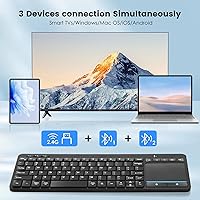
Yes, it pairs well with Android-based media devices including Fire TV Stick and Android TV boxes via Bluetooth. It is one of the stronger use cases for this keyboard, since it gives you typing, cursor control, and media shortcuts all in one unit from the couch.

No drivers are required. It connects as a standard HID Bluetooth keyboard and is recognized automatically by Windows, macOS, Android, Chrome OS, and iOS. Just pair it and start using it.

Yes, it is compatible with iOS and iPadOS via Bluetooth. Basic typing and cursor control work fine. Some of the Fn-layer media shortcuts may behave differently or not apply on Apple mobile devices, but core functionality is fully supported.

The rated range is 33 feet, which is about 10 meters. In practice, through walls or with interference from other wireless devices, real-world range tends to be shorter. For couch or desk use you are unlikely to ever push that limit.

For casual tasks — browsing, streaming, basic document navigation — yes. For anything requiring precision, like image editing or detailed spreadsheet work, the trackpad sensitivity can feel inconsistent. Some users also report it drifts slightly. It is fine for convenience use, but not a mouse substitute for professional work.

The keyboard runs on standard batteries rather than a built-in rechargeable pack. The auto-sleep feature after 30 minutes of inactivity helps extend battery life considerably during normal use. Exact battery life varies by usage, but the power-saving design means you should get reasonable longevity before needing a replacement.

It depends on your tolerance for compact layouts. The keyboard retains arrow keys and a full set of keys, but the overall width is under 13 inches, so key spacing is tighter than a standard desktop keyboard. Multiple reviewers with larger hands have noted increased typing errors during extended sessions, so it is worth factoring that in.

Intermittent disconnects are the most common complaint from users of this wireless keyboard-trackpad combo. A few things to try: move closer to the device, check for Bluetooth interference from nearby electronics, and make sure the keyboard has fresh batteries. If using the 2.4GHz dongle instead of Bluetooth, some users find that connection mode more stable for stationary desk setups.