Overview

The Qwiizlab ES40UR USB4 SSD Enclosure sits at the serious end of the external storage market, built for users who need genuine Thunderbolt-grade transfer speeds without a spinning fan on their desk. An SSD enclosure turns a bare M.2 NVMe drive into a portable external device, and in 2025, USB4 and Thunderbolt 4/5 are the fastest practical interfaces for that job. The all-aluminum chassis immediately separates it from cheap plastic shells flooding the budget tier. The ASM2464PD controller chip inside lends genuine technical credibility — it is the same class of silicon found in competing premium enclosures. That said, the interface ceiling is 40Gbps; how close you actually get depends entirely on the NVMe drive you choose to install.

Features & Benefits

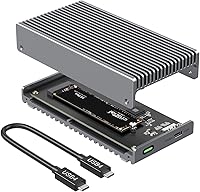
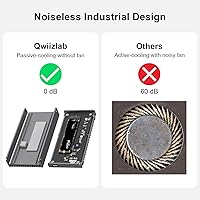
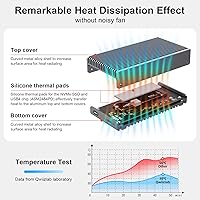
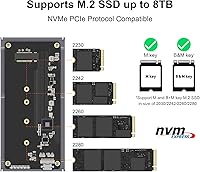
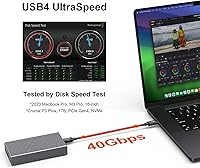
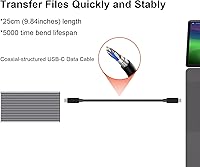
The 40Gbps USB4 interface translates to sequential read and write speeds approaching 3,840 MB/s under ideal conditions — numbers that matter when you are moving multi-gigabyte files regularly. The fanless aluminum body handles heat passively through a curved heat-sink surface, keeping things quiet and protecting both the SSD and controller during long transfer sessions. SSD compatibility is broad: M.2 NVMe PCIe drives with M Key or B-M Key connectors in 2230, 2242, 2260, and 2280 sizes are all supported, up to 8TB. The ES40UR also works with Thunderbolt 3 ports — a useful safety net for older machines — but Thunderbolt 2 and Thunderbolt 1 are not supported. The included 40Gbps coaxial cable, thermal pads, and screwdriver round out a thoughtful accessory kit.

Best For

This USB4 enclosure makes the most sense for creative professionals — video editors in particular — who routinely shuttle large RAW footage or ProRes files between a workstation and a laptop and cannot afford slow transfers. Apple Silicon Mac users with Thunderbolt 4 ports are the natural sweet spot, where peak performance is most reliably unlocked. It also suits anyone building a high-capacity portable backup solution, since 4TB and 8TB NVMe drives are now widely available. If you are currently running a USB 3.2 or USB-A enclosure and feeling the bottleneck, the jump in throughput here is substantial. One firm caveat: users on older Thunderbolt 2 or Thunderbolt 1 Macs will need a different solution entirely.

User Feedback

Buyers pairing the ES40UR with drives like the Samsung 990 Pro or WD Black SN850X report speeds that closely match the rated ceiling, which suggests the controller is not the limiting factor. Build quality feedback is consistently strong — the aluminum shell feels solid, and thermal performance holds up through extended transfers without throttling. Installation gets mentioned positively too; the included screwdriver and quick-start guide make the process accessible even for first-timers. On value, some buyers feel the price is fair relative to OWC or Sabrent alternatives, while others note those brands carry longer track records. The coaxial USB-C cable earns specific praise over generic cables. A handful of users report hiccups with non-Thunderbolt USB4 hosts, so confirming your port spec before buying is genuinely worth doing.

Pros

  • Real-world speeds approaching 3,840 MB/s are achievable when paired with a high-performance NVMe SSD.
  • The all-aluminum fanless chassis runs completely silent, which matters on a quiet desk or in a recording environment.
  • Broad M.2 NVMe compatibility covers 2230, 2242, 2260, and 2280 form factors, so most current drives will fit.
  • Thunderbolt 3 backward compatibility gives the ES40UR a longer useful life across older and newer machines.
  • The included 40Gbps coaxial USB-C cable is a meaningful inclusion — generic cables often cap out at lower speeds.
  • Thermal pads, a screwdriver, and screws are all in the box, making installation straightforward from the start.
  • Supports NVMe drives up to 8TB, making it practical for large media libraries or long-term archive builds.
  • Works on both macOS and Windows without driver headaches or platform-specific limitations.
  • The ASM2464PD controller is a credible, well-regarded chip used in competing premium enclosures at higher prices.
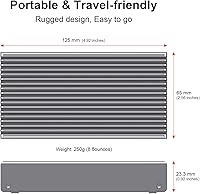
  • Compact dimensions of 4.92″ x 2.55″ x 0.92″ keep it portable without sacrificing a solid, premium feel.

Cons

  • No SSD is included, so the total investment is significantly higher than the enclosure price alone suggests.
  • Users with non-Thunderbolt USB4 hosts may see inconsistent speeds or compatibility issues in practice.
  • Thunderbolt 2 and Thunderbolt 1 ports are completely unsupported, cutting out a portion of older Mac users.
  • Actual transfer speeds vary widely depending on which NVMe drive is installed — the enclosure cannot compensate for a slow SSD.
  • Qwiizlab is a relatively new brand with less established long-term reliability data compared to OWC or Sabrent.
  • The premium price point requires buying a separate high-end NVMe drive to justify it, raising the barrier to entry considerably.
  • Passive cooling works well under normal use but has not been independently stress-tested across all high-TDP NVMe drives.
  • No USB-A adapter or cable is included, so users on mixed-port setups need to source an adapter separately.

Ratings

The scores below for the Qwiizlab ES40UR USB4 SSD Enclosure were generated by AI after analyzing verified buyer reviews from multiple global markets, with spam, bot activity, and incentivized feedback actively filtered out. Each category reflects the honest consensus of real-world users — both the strengths that make it stand out and the friction points that caused frustration. Nothing has been smoothed over to flatter the product.

Transfer Speed Performance
88%
Users pairing this enclosure with top-tier NVMe drives like the Samsung 990 Pro consistently report speeds that come impressively close to the 40Gbps ceiling, with real-world sequential reads landing well above 3,500 MB/s in benchmark tests. For video editors shuttling large ProRes files, the throughput difference versus USB 3.2 setups is immediately and practically felt.
Buyers who paired it with mid-range or budget NVMe drives were sometimes disappointed, not realizing the enclosure itself is only part of the speed equation. A handful of users on non-Thunderbolt USB4 hosts also reported inconsistent speeds, which dampened their overall experience.
Build Quality
91%
The solid aluminum chassis earns consistent praise for feeling genuinely premium in hand — nothing flexes, nothing rattles. Buyers frequently compare it favorably to OWC equivalents and note the curved heat-sink body looks and feels like a deliberate engineering choice, not just aesthetics.
A small number of buyers noted that the screw threads felt slightly less refined than expected at this price tier, and one or two reported minor surface scuffs on arrival. These are edge cases, but they suggest quality control is not yet perfectly consistent across every unit.
Thermal Management
84%
For typical workloads — sustained file transfers, backup jobs, editing directly off the drive — the fanless aluminum chassis keeps temperatures comfortably in check without any active cooling. Users working in quiet studio or office environments especially appreciate that there is zero fan noise at any point.
During very prolonged, back-to-back transfer sessions, the chassis does get noticeably warm to the touch, which concerns some users even if it is thermally within normal operating range. A few buyers running high-TDP NVMe drives reported slightly higher temperatures than they expected from a passive-only solution.
Compatibility
76%
24%
Cross-platform macOS and Windows support works reliably without driver installation, and Thunderbolt 3 backward compatibility gives the enclosure usable reach across several generations of MacBook Pro. Most popular NVMe drive families — Samsung, WD, Seagate — install and run without any configuration headaches.
The hard incompatibility with Thunderbolt 2 and Thunderbolt 1 catches some buyers off guard, particularly those with older Mac setups who assumed backward compatibility extended further. A handful of users on USB4 hosts without Thunderbolt certification also encountered speed inconsistencies or sporadic disconnects.
Value for Money
78%
22%
For buyers who fully exploit the USB4/Thunderbolt 4 interface with a fast NVMe drive, the performance-per-dollar stacks up well against alternatives from more established names like OWC. The included 40Gbps coaxial cable and thermal pads add genuine accessory value that competing enclosures often charge extra for.
The total cost of ownership is higher than the enclosure price implies, since a high-performance NVMe SSD must be purchased separately to justify spending this much on the shell. Buyers who later discover their port does not fully support USB4 speeds feel the sting of that mismatch acutely.
Ease of Installation
89%
The bundled screwdriver, pre-cut thermal pads, screws, and quick-start guide make the assembly process genuinely approachable for first-timers. Multiple reviewers with no prior hardware experience reported completing the installation cleanly in under ten minutes without consulting any external resources.
The quick-start guide is concise, which works for most users but leaves a gap for those who want more detailed guidance on thermal pad placement or torque on the retaining screw. A printed step-by-step with photos would eliminate the occasional forum post from confused first-time builders.
Cable Quality
86%
The included 40Gbps coaxial USB-C cable gets called out specifically by reviewers who have tested generic cables and noticed speed drops — this one holds its rated bandwidth reliably. Its build feels sturdy without being stiff or awkward to route on a desk.
The cable length may feel restrictive for users who need more reach between a desktop tower and a monitor-mounted port. A longer cable option or a second cable in the box would address occasional desk setup frustrations without much added cost.
Portability
82%
18%
At 4.92″ x 2.55″ x 0.92″, the ES40UR slips easily into a laptop bag pocket or camera bag without adding meaningful bulk. The solid aluminum shell offers enough protection for day-to-day transport between office and studio without needing a separate case.
It is not the lightest option in its class — the aluminum construction adds weight compared to plastic-shell alternatives — and it ships without a protective pouch or sleeve for the enclosure itself, which feels like a small oversight given it includes a velvet bag for the accessory kit.
Noise Level
97%
Completely silent operation is the single most universally praised aspect across all user feedback — no fan, no vibration, no coil whine. Buyers in recording studios, podcast setups, and open-plan offices specifically called out the silence as a practical daily benefit, not just a marketing claim.
There is genuinely little to criticize here; passive cooling is inherently silent. The only marginal note is that users who previously relied on fan noise as an informal thermal indicator lose that feedback signal entirely, which is a minor psychological adjustment rather than a real flaw.
SSD Compatibility Range
81%
19%
Support for 2230, 2242, 2260, and 2280 NVMe form factors means the enclosure works with compact drives from handheld PCs, standard laptop drives, and full-size desktop NVMe modules alike. The 8TB ceiling also future-proofs it against the next wave of high-density consumer NVMe releases.
SATA M.2 drives are not supported — only PCIe NVMe — which trips up a small but vocal group of buyers who assumed any M.2 drive would work. Clearer labeling during the purchase process would prevent this recurring source of one-star frustration.
Controller Chip
88%
The ASM2464PD is widely recognized in enthusiast communities as one of the better USB4 bridge chips available, and buyers who research before purchasing view its inclusion as a sign the enclosure was engineered for real-world performance rather than spec-sheet padding. It contributes to stable, consistent throughput across platforms.
While the chip is technically strong, it remains less battle-tested in long-term reliability comparisons than the controllers found in enclosures from brands with decade-long product histories. Some technically minded buyers want more independent third-party validation of its sustained-load endurance.
Packaging & Unboxing
79%
21%
The velvet drawstring bag adds an unexpectedly premium unboxing touch that buyers notice and mention positively, particularly those considering it as a gift. Accessories are neatly organized and nothing arrives loose or sliding around inside the box.
The outer retail packaging itself is relatively minimal, which matters to buyers who gift tech products and expect a presentation-ready box. A few users also noted the quick-start guide could be printed at a larger size for easier readability during installation.

Suitable for:

The Qwiizlab ES40UR USB4 SSD Enclosure is genuinely built for people whose work lives or dies by storage speed. Video editors and motion graphics professionals moving multi-gigabyte ProRes or RAW files between a desktop and a laptop will feel the difference immediately compared to slower USB 3.2 setups. Apple Silicon Mac users are arguably the ideal audience — Thunderbolt 4 ports on recent MacBook Pros and Mac Studios can fully exploit the 40Gbps interface, getting the most out of a fast NVMe drive installed inside. Power users building a high-capacity portable backup system will also appreciate the support for drives up to 8TB, paired with a chassis that handles heat quietly without adding fan noise to a workspace. If you are the type who researches controller chips before buying, the ASM2464PD inside is a reassuring sign this enclosure was engineered with performance in mind, not just marketing copy.

Not suitable for:

The Qwiizlab ES40UR USB4 SSD Enclosure is not the right call for every buyer, and it is worth being honest about where it falls short. If your laptop or desktop only has USB 3.2, USB-A, or older Thunderbolt 2 or Thunderbolt 1 ports, this enclosure will either be incompatible outright or will not deliver anything close to its rated speed potential — you would be paying a premium for a bottleneck. Casual users who just want a simple plug-and-play external drive for documents, photos, or light backups will find the price hard to justify, especially since the SSD itself must be purchased separately, adding meaningful cost on top. Budget-conscious shoppers can find USB 3.2 Gen 2 enclosures from Sabrent or UGREEN for a fraction of the price that will serve everyday tasks just fine. Anyone who expects consistent peak speeds regardless of which NVMe drive they pair it with may also be disappointed — the interface ceiling is 40Gbps, but the installed SSD is the real determinant of real-world results.

Specifications

  • Interface: Connects via USB4 at 40Gbps and is fully compatible with Thunderbolt 4 and Thunderbolt 5 ports.
  • Max Speed: Supports sequential read and write speeds up to 3,840 MB/s under ideal conditions with a compatible NVMe SSD installed.
  • Controller Chip: Uses the ASM2464PD USB4 bridge controller, a well-regarded chip found in premium-tier enclosures.
  • SSD Form Factor: Accepts M.2 NVMe PCIe drives with M Key and B-M Key connectors in 2230, 2242, 2260, and 2280 sizes.
  • Max SSD Capacity: Supports NVMe drives up to 8TB in capacity, accommodating both current and near-future large-format drives.
  • Cooling System: Fully fanless design uses a curved aluminum heat-sink chassis to passively dissipate heat from the SSD and controller.
  • Chassis Material: Machined from solid aluminum with a curved exterior surface engineered to maximize passive heat dissipation.
  • Dimensions: Measures 4.92″ in length, 2.55″ in width, and 0.92″ in height, keeping it compact enough for travel.
  • Color: Available in gray with a brushed aluminum finish.
  • OS Compatibility: Works natively with both macOS and Windows without requiring additional drivers.
  • Backward Compatibility: Compatible with Thunderbolt 3 ports but does not support Thunderbolt 2 or Thunderbolt 1 connections.
  • Included Cable: Ships with a 40Gbps-rated coaxial USB-C cable purpose-built to sustain the full interface bandwidth.
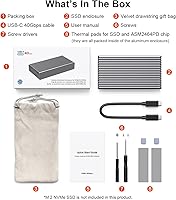
  • Accessories Included: Box contains the enclosure, 40Gbps USB-C cable, silicone thermal pads, a screwdriver, screws, and a quick-start guide.
  • Thermal Pads: Pre-cut silicone thermal pads are included for both the NVMe SSD and the ASM2464PD controller chip.
  • SSD Included: No SSD is included; a compatible M.2 NVMe PCIe drive must be purchased separately.
  • Model Name: Officially designated as the ES40UR by Qwiizlab.
  • Brand: Manufactured by Qwiizlab, a brand focused on high-speed storage accessories.
  • Packaging: Comes presented in a velvet drawstring gift bag, making it suitable for gifting.

Related Reviews

Cable Matters USB4 40Gbps M.2 NVMe Enclosure
80%
88%
Data Transfer Performance
83%
Build Quality & Materials
79%
Thermal Management & Cooling
91%
Portability & Form Factor
74%
Compatibility Range
More
Satechi ST-EU4NPM USB4 M.2 NVMe SSD Enclosure

81%
86%
Transfer Speed Performance
91%
Build Quality & Materials
93%
Installation & Setup Ease
74%
Thermal Management
54%
Included Accessories & Cable
More
SSK M.2 NVMe SSD Enclosure 40Gbps USB4, 8TB
88%
94%
Data Transfer Speed
89%
Ease of Setup
91%
Build Quality
75%
Heat Management
88%
Compatibility with Mac/Windows
More
WAVLINK Dual-Bay NVMe M.2 SSD Cloner
75%
83%
Offline Cloning Reliability
78%
Transfer Speed
71%
Compatibility Range
76%
Build Quality
86%
Ease of Setup
More
Plugable M.2 NVMe SSD Enclosure
87%
94%
Ease of Setup
92%
Data Transfer Speed
88%
Build Quality
90%
Port Compatibility
87%
Cooling & Thermal Management
More
Corsair EX400U 2TB Portable External SSD

80%
91%
Transfer Speed Performance
83%
Compatibility & Versatility
93%
Portability & Form Factor
67%
Sustained Transfer Reliability
74%
Build Quality & Durability
More
ANYOYO TB502Pro NVMe SSD Enclosure
78%
91%
Transfer Speed Performance
88%
Thermal Management
89%
Build Quality
86%
Thunderbolt 5 Compatibility
41%
TB3 Fallback Behavior
More
GEWOKLIY 2230 M.2 NVMe SSD Enclosure
86%
88%
Performance & Speed
90%
Build Quality & Durability
93%
Portability & Design
91%
Setup & Ease of Use
85%
Compatibility with Devices
More
elecacc M.2 NVMe SSD Enclosure Adapter
87%
92%
Ease of Use
89%
Cloning Functionality
90%
Transfer Speed
86%
Compatibility with SSD Sizes
88%
Portability
More
JEYI Quad NVMe Enclosure 32TB USB4 40Gbps
85%
94%
Data Transfer Speed
91%
RAID Functionality
77%
Cooling Performance
88%
Ease of Setup
85%
Build Quality
More

FAQ

Yes, Thunderbolt 4 is one of the ideal use cases for this enclosure. You can expect full 40Gbps interface speeds as long as the NVMe drive you install is fast enough to approach that ceiling. Apple Silicon MacBook Pro and Mac Studio owners are really the sweet spot audience here.

It depends. The ES40UR is designed for USB4 and Thunderbolt 4/5. If your USB-C port is USB 3.2 Gen 2 or lower, the enclosure will still connect and function, but your speeds will be capped at that port's limit — far below the 40Gbps this enclosure is rated for. You would essentially be paying a premium for headroom you cannot use.

Unfortunately, no. Thunderbolt 2 and Thunderbolt 1 are not supported by the Qwiizlab ES40UR USB4 SSD Enclosure. Backward compatibility stops at Thunderbolt 3. If your machine only has TB2 ports, you will need to look at a different enclosure entirely.

Drives like the Samsung 990 Pro, WD Black SN850X, and Seagate FireCuda 530 are popular pairings that tend to push speeds close to the interface ceiling. In general, any M.2 NVMe PCIe drive with an M Key or B-M Key connector in the 2230, 2242, 2260, or 2280 form factor will be compatible. The faster the SSD, the more of the 40Gbps bandwidth you can actually use.

Passive cooling through aluminum works well for typical workloads — file transfers, backups, and editing off the drive. The curved heat-sink design does a reasonable job pulling heat away from both the SSD and controller. During very long sustained transfers, some warmth is normal and expected; it is not a sign of a problem, just physics doing its job.

No prior experience is necessary. Qwiizlab includes a small screwdriver, screws, and thermal pads in the box, along with a quick-start guide. The installation process is straightforward — open the enclosure, seat the drive, apply the thermal pad, and secure the screw. Most people complete it in a few minutes.

It is a 40Gbps-rated coaxial USB-C cable, not a generic one. This is worth noting because many enclosures in this category ship with cables that cap out at 10Gbps or 20Gbps, quietly bottlenecking the entire setup. The coaxial construction is specifically designed to maintain signal integrity at 40Gbps.

In most cases, yes. Apple Silicon Macs support booting from external Thunderbolt drives, and this enclosure over a Thunderbolt 4 connection should work for that purpose. That said, boot drive compatibility can depend on macOS version and specific drive firmware, so it is worth verifying with your exact configuration before relying on it as your primary boot volume.

OWC is a well-established brand with a longer track record and robust warranty support, which gives some buyers more peace of mind. The ES40UR competes on specs and uses the same class of controller chip, and tends to come in at a lower price point. If brand heritage and customer support reputation are top priorities, OWC has an edge. If raw specs and value matter more, this aluminum SSD shell holds its own.

It works on both macOS and Windows without needing to install any drivers. The enclosure is plug-and-play on either platform, provided your Windows machine has a USB4 or Thunderbolt 4/5 port to connect it to.