ANYOYO TB502Pro NVMe SSD Enclosure




Overview
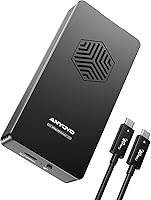
The ANYOYO TB502Pro NVMe SSD Enclosure enters a market where most external storage still can't keep pace with modern M-series Macs and Thunderbolt 5 laptops — and it's built specifically for that gap. Powered by Intel's JHL9480 controller, it pushes up to 80Gbps of bandwidth, which translates to moving massive video projects or disk images in seconds rather than minutes. The aluminum alloy chassis pairs with an active cooling fan, separating it from the passive enclosures that throttle under sustained load. Setup is genuinely tool-free and driver-free. One honest caveat worth knowing upfront: Thunderbolt 3 hosts will fall back to USB speeds, so the full performance is reserved for TB4, TB5, and USB4 connections.
Features & Benefits
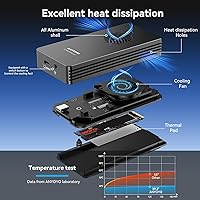
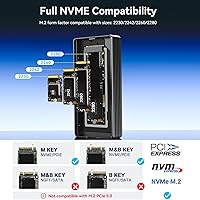
The JHL9480 chip is the real story here — it's what allows this Thunderbolt 5 enclosure to sustain high transfer rates without the speed drops that plague cheaper controllers under prolonged use. With support for SSD sizes from 2230 up to 2280, and both M and B+M key configurations, you're not locked into a narrow set of drives. The intelligent fan system is well-thought-out: it kicks in automatically when temperatures climb and stays quiet during lighter workloads. There's also a manual override if you want it running constantly during a heavy editing session. Add in broad port compatibility — covering USB 3.0 through Thunderbolt 5 — and this aluminum SSD enclosure works across virtually any modern workstation or laptop you're likely to own.
Best For
This Thunderbolt 5 enclosure is purpose-built for users who can actually use what it offers. M-series Mac users with Thunderbolt 4 or 5 ports will get the most out of it, particularly anyone editing 4K or 8K footage where read and write speeds directly affect how smoothly a project runs. Content creators who regularly swap drives between rigs will appreciate the tool-free design — no screwdrivers, no fuss, no dropped screws. It also suits PC and laptop users with USB4 ports who want an enclosure that won't become obsolete quickly. That said, if your machine only has Thunderbolt 3, skip this one. The speed fallback to 10Gbps USB effectively neutralizes the premium you're paying, and a purpose-built TB3 enclosure will serve you far better.
User Feedback
Buyers who pair the TB502Pro with compatible Thunderbolt 4 or 5 machines consistently report real-world speeds that align closely with advertised figures — a relatively rare outcome in this category. Build quality gets strong praise; the enclosure feels solid and the aluminum housing stays noticeably cooler than passive designs during long transfers. The fan does generate some noise at full tilt, which is worth knowing if you work in a quiet environment — it's not loud, but it's audible. The more pointed criticism targets Thunderbolt 3 fallback behavior, with some buyers frustrated by unexpectedly lower speeds on older systems. A handful of users also feel the price is steep unless you're running a TB4 or TB5 setup that fully exploits its ceiling.
Pros
- Real-world transfer speeds on Thunderbolt 4 and 5 hosts closely match advertised figures — rare in this product category.
- The JHL9480 controller maintains stable throughput during sustained transfers without the mid-session speed drops common in cheaper enclosures.
- Intelligent fan management keeps the enclosure cool under load while staying quiet during lighter tasks.
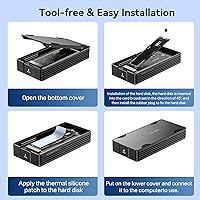
- Tool-free SSD installation takes under a minute and requires no drivers — genuinely plug-and-play.
- Broad SSD form factor support covers 2230 through 2280 sizes, accommodating most drives on the market.
- Aluminum alloy construction feels premium and dissipates heat far more effectively than plastic-bodied alternatives.
- Manual fan override gives users direct control during intensive workloads when you want maximum cooling regardless of temperature.
- USB Type-C connectivity and multi-protocol support mean the TB502Pro stays useful even as you upgrade host devices over time.
- Supports SSDs up to 8TB, which future-proofs the enclosure for high-capacity drives becoming more widely available.
Cons
- On Thunderbolt 3 hosts, speeds drop to USB levels — a costly mismatch if you haven't confirmed your port generation before buying.
- The fan is audible at full speed, which can be distracting in quiet studios or shared workspaces.
- At its price point, the value proposition collapses entirely if paired with a PCIe 3.0 SSD or a non-TB4/5 host.
- No included SSD means the total cost of a complete setup is substantially higher than it appears at first glance.
- Tablet compatibility is inconsistent — recognized SSD capacity limits vary by brand and are not always clearly communicated.
- The enclosure does not support M.2 PCIe 5.0 drives, which may frustrate early adopters building a next-gen storage setup.
- Slightly heavier and bulkier than passive enclosures, which matters for users prioritizing ultraportable carry setups.
- Limited brand recognition compared to OWC or CalDigit may create hesitation around long-term support and warranty reliability.
Ratings
The ANYOYO TB502Pro NVMe SSD Enclosure scores here reflect AI analysis of verified global buyer reviews, with spam, bot submissions, and incentivized feedback actively filtered out. The ratings cover everything from raw transfer performance to long-term build durability, and they don't shy away from the real friction points buyers have reported. If this Thunderbolt 5 enclosure excels in a category, you'll see it — and where it falls short, that's reflected just as honestly.
Transfer Speed Performance
Thermal Management
Build Quality
Thunderbolt 5 Compatibility
TB3 Fallback Behavior
Ease of Installation
SSD Compatibility Range
Fan Noise Level
Value for Money
Port & Device Compatibility
Heat Dissipation at Sustained Load
Cable & Accessory Inclusion
Driver-Free Operation
Suitable for:
The ANYOYO TB502Pro NVMe SSD Enclosure is genuinely built for a specific kind of buyer — one who already has, or is moving to, a Thunderbolt 4, Thunderbolt 5, or USB4 host device and needs external storage that can actually keep up. Mac users on M3 or M4 machines will find it a natural fit, particularly those editing multicam 4K or 8K footage where waiting on file transfers isn't an option. Video professionals and photographers who regularly shuttle large project folders between a workstation and a mobile rig will get real, tangible value from the sustained throughput this enclosure can deliver. Content creators who swap drives frequently will also appreciate the tool-free design — it takes seconds, not minutes, to change out an SSD. For anyone investing in a PCIe 4.0 NVMe drive and wanting an enclosure that won't bottleneck it, this aluminum SSD enclosure is one of the few options in its category that can handle the load without thermal throttling.
Not suitable for:
If your laptop or desktop only has Thunderbolt 3 ports, the TB502Pro is not the right buy — full stop. On a TB3 host, the connection falls back to USB 3.2 speeds, which means you'd be paying a significant premium for performance your system simply cannot access. Casual users who just need to back up documents or move the occasional file will also find the cost hard to justify against far simpler and cheaper alternatives. The active cooling fan, while effective, produces audible noise during intensive transfers, which may be a drawback for anyone working in a quiet recording or studio environment. Tablet users should verify their specific device carefully, as compatibility and maximum recognized SSD capacity varies widely by manufacturer. And if you're hoping to use M.2 PCIe 5.0 drives or NVMe-to-PCIe adapters, this enclosure won't support them — it's a firm hardware limitation, not a firmware issue.
Specifications
- Controller Chip: The enclosure uses the Intel JHL9480 controller, which is the current-generation chip enabling full Thunderbolt 5 bandwidth.
- Max Transfer Rate: Theoretical maximum bandwidth reaches 80Gbps, with sequential read/write speeds up to approximately 6000MB/s when paired with a compatible PCIe 4.0 NVMe drive.
- Interface: Supports Thunderbolt 5, Thunderbolt 4, Thunderbolt 3, USB4, USB 3.2, USB 3.1, and USB 3.0 via a single USB Type-C connector.
- SSD Form Factors: Compatible with 2230, 2242, 2260, and 2280 M.2 NVMe drives using M key or B+M key configurations.
- SSD Capacity: Supports M.2 NVMe SSDs up to 8TB in capacity, though some tablet hosts may recognize smaller maximums depending on manufacturer.
- Body Material: The chassis is constructed from aluminum alloy, which aids passive heat transfer and contributes to overall structural rigidity.
- Cooling System: An active cooling fan engages automatically when the chip reaches 55°C and shuts off below 40°C, with a manual override switch for forced on or off operation.
- Connector Type: Uses a USB Type-C port for host connection; a compatible Thunderbolt or USB4 cable is required to achieve maximum speeds.
- Installation: Tool-free SSD installation requires no screwdrivers, and the enclosure operates without any driver software on supported operating systems.
- Dimensions: Package dimensions measure 5.08 x 4.57 x 1.14 inches, making it compact enough for desk or bag use.
- Weight: The enclosure weighs 9.1 oz (approximately 0.26 kg), which is slightly heavier than passive plastic alternatives due to the aluminum construction.
- Compatible Devices: Works with desktops, laptops, MacBook, MacBook Pro, and select tablets that support a direct Thunderbolt cable connection; not compatible with mobile phones.
- Incompatible Drives: Does not support M.2 PCIe 5.0 SSDs or M.2 NVMe-to-PCIe adapter configurations.
- TB3 Limitation: On Thunderbolt 3 hosts, the connection defaults to USB 3.2 speeds (approximately 10Gbps) rather than full Thunderbolt bandwidth.
- SSD Not Included: The enclosure ships without an SSD; a compatible M.2 NVMe drive must be purchased separately.
- Model Number: The official model identifier is TB502Pro, as designated by the manufacturer ANYOYO.
Related Reviews
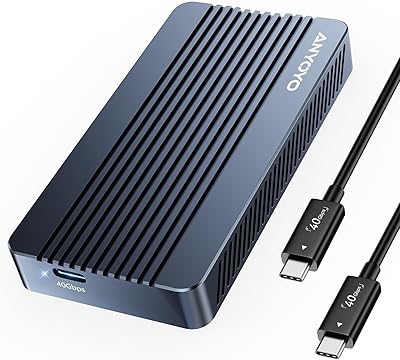
ANYOYO TBU405M1 40Gbps M.2 NVMe SSD Enclosure

ineo C2605-NVMe M.2 NVMe SSD Enclosure

WAVLINK Dual-Bay NVMe M.2 SSD Cloner

Cable Matters USB4 40Gbps M.2 NVMe Enclosure

Plugable M.2 NVMe SSD Enclosure
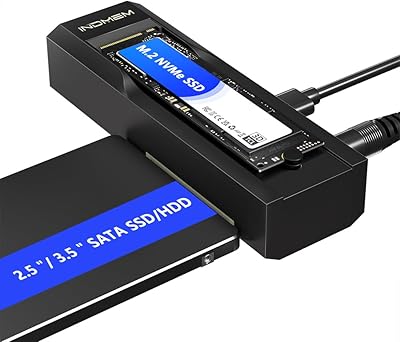
elecacc Dual Bay NVMe SATA SSD Enclosure
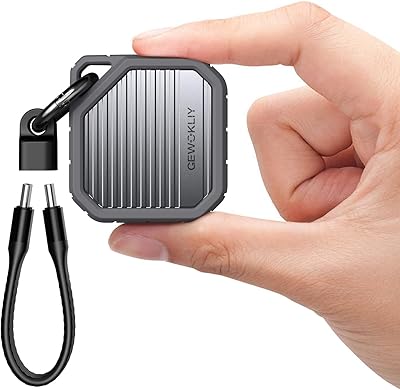
GEWOKLIY Ge-MC13 M.2 2230 NVMe SSD Enclosure

ORICO TCM2 M.2 NVMe SSD Enclosure
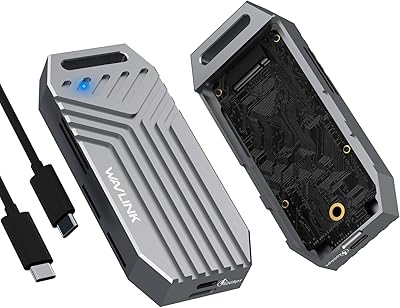
WAVLINK U41F USB4 NVMe SSD Enclosure
