



Overview

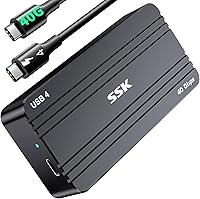
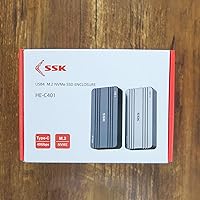
The SSK HE-C401 M.2 NVMe SSD Enclosure is a compact aluminum case that converts any compatible internal M.2 drive into a portable external storage device. It sits firmly in the mid-range USB4 segment, competing with other ASM2464-based enclosures that have flooded the market since 2023. One critical point upfront: this USB4 SSD case is designed for NVMe drives only — SATA M.2 drives are not supported, and that detail catches many buyers off guard. Since its April 2024 launch, it has reached #196 in the Enclosures category, which signals decent early adoption without relying on a long review history.

Features & Benefits

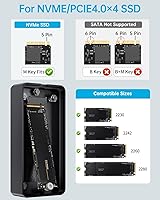
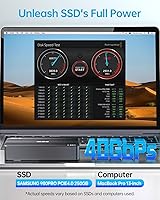
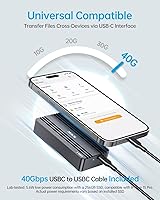
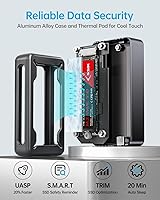
Powered by the ASM2464 chip, this NVMe enclosure targets USB4 40Gbps bandwidth and can push read speeds up to 3,800MB/s — but only when paired with a PCIe 4.0 NVMe drive and a host port that actually supports USB4 or Thunderbolt 3/4. On a standard USB 3.2 port, expect more modest results. It accommodates M.2 lengths from 2230 to 2280 and supports drives up to 8TB. The aluminum shell works with thermal silicone grease to manage heat during heavy transfers — temperatures around 141°F are normal and not a sign of malfunction. TRIM and S.M.A.R.T. support, an LED activity indicator, and a bundled 40Gbps cable round out a well-considered package.

Best For

This USB4 SSD case is a natural fit for content creators — videographers, photographers, and editors — who regularly move large RAW files or 4K/8K footage and cannot afford to wait around. It also works well for anyone repurposing a spare PCIe 4.0 NVMe drive rather than letting it sit idle. Mac and PC users can share one enclosure across both systems by formatting the drive as exFAT. iPhone 15 and compatible Android users get full USB4 speeds on mobile, a real advantage for on-the-go workflows. If you travel frequently and want something pocketable and durable instead of a clunky spinning-disk enclosure, this fits that need well.

User Feedback

Sitting at 3.8 stars, the SSK enclosure earns consistent praise for its solid build quality, easy installation, and real-world speeds that satisfy most users on Thunderbolt-equipped machines. The frustrations tend to cluster around a couple of recurring issues. New drives sometimes go undetected at first — this is not a defect, but rather a formatting requirement; exFAT is the recommended choice for cross-platform use. Some buyers also note that speeds on standard USB 3.x ports fall well short of the advertised ceiling, which is technically expected but rarely spelled out clearly. A handful of users flag compatibility quirks with certain hubs or older host systems, though most complaints trace back to setup confusion rather than hardware failure.

Pros

  • USB4 40Gbps interface delivers real-world speeds that genuinely compete with premium commercial external SSDs.
  • Backward compatibility with Thunderbolt 4/3 and USB 3.x makes this enclosure usable across a wide range of host devices.
  • Aluminum alloy construction feels solid and premium, not hollow or plasticky like cheaper alternatives.
  • Supports all four common M.2 NVMe lengths, so it works with most drives you are likely to have on hand.
  • A 40Gbps USB-C cable is included in the box, saving you from a frustrating compatibility hunt at extra cost.
  • TRIM and S.M.A.R.T. support actively protect long-term drive health, not just short-term transfer performance.
  • The LED activity indicator is a small but genuinely useful touch for confirming drive activity at a glance.
  • Compact dimensions and a sub-170g weight make this USB4 SSD case easy to carry daily without bulk.
  • Thermal silicone grease is pre-applied, so heat management is handled without any extra setup on your part.
  • Supports drives up to 8TB, offering real headroom for future storage upgrades without replacing the enclosure.

Cons

  • SATA M.2 drives are completely unsupported, a dealbreaker that is easy to miss before purchasing.
  • New drives require manual formatting before use, which frustrates buyers expecting immediate plug-and-play detection.
  • Peak speeds are only achievable on USB4 or Thunderbolt 3/4 hosts; USB 3.x ports cut performance significantly.
  • Operating temperatures can feel alarmingly hot to the touch during sustained transfers, even when functioning normally.
  • At 3.8 stars, the rating reflects a meaningful share of buyers who ran into setup or compatibility friction.
  • Some users report intermittent detection issues depending on the specific laptop, hub, or cable combination used.
  • The screw-secured installation, while secure, means swapping drives frequently is slower than tool-free designs.
  • Speed claims in marketing assume ideal conditions that many buyers real-world setups simply cannot meet.

Ratings

The scores below reflect our AI-driven analysis of verified global user reviews for the SSK HE-C401 M.2 NVMe SSD Enclosure, with spam, bot-generated, and incentivized submissions actively filtered out before scoring. Each category is assessed against real-world usage patterns reported by buyers across creative, professional, and everyday computing contexts. Both the genuine strengths and the recurring frustrations are weighted transparently, so the numbers tell the full story — not just the highlights.

Transfer Speed Performance
78%
22%
Users with Thunderbolt 3 or 4 equipped MacBooks and Windows laptops consistently report impressive real-world read speeds that hold up during large file transfers, particularly when offloading 4K footage or RAW photo libraries. The ASM2464 chip delivers on its promise when the host system can actually keep pace.
On USB 3.2 or USB 3.0 ports — which represent a significant portion of the user base — speeds fall far short of the advertised ceiling, leading to disappointment. The gap between marketing claims and everyday reality is wide enough that some buyers feel genuinely misled, even when the hardware itself is functioning correctly.
Build Quality
88%
The CNC-machined aluminum shell consistently earns praise for feeling solid, weighty, and well-finished — noticeably more premium than plastic-shelled rivals at a similar price point. Users frequently mention that the enclosure does not flex, rattle, or creak even after months of daily carry in bags and pockets.
A small number of users note that the screw threads feel slightly tight on first use, requiring care to avoid stripping. The overall assembly is sturdy, but the screwdriver included is quite basic and may not survive heavy repeated use if you swap drives often.
Compatibility
69%
31%
Broad protocol support — covering Thunderbolt 4/3 and the full USB 3.x family — means this USB4 SSD case works across an unusually wide range of laptops, desktops, and even modern smartphones. iPhone 15 users and Android owners with USB-C ports report smooth detection when using the bundled cable directly.
Compatibility through third-party hubs and docks is inconsistent, with several users reporting that the drive goes undetected unless plugged directly into the host machine. SATA M.2 drive owners who did not read the fine print carefully make up a disproportionate share of the negative reviews, which skews the overall rating downward unfairly.
Ease of Setup
74%
26%
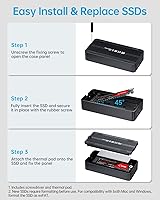
Installing an SSD takes only a few minutes even for first-timers — slide the drive in, tighten one screw, and you are done. Users who have assembled PCs before find the process almost trivially straightforward, and the included screwdriver means you are not hunting through a toolbox before you can get started.
New drives require a manual formatting step that the product documentation does not explain clearly enough for less experienced users. This single omission generates a disproportionate number of one-star reviews from buyers who assume the enclosure is broken simply because their unformatted drive does not appear on the desktop immediately.
Thermal Management
71%
29%
The combination of an aluminum alloy chassis and pre-applied thermal silicone grease does a reasonable job of pulling heat away from the SSD during sustained workloads, especially compared to plastic-bodied alternatives that trap heat entirely. Users running long video exports or backup jobs note that performance does not throttle noticeably during moderate sessions.
The enclosure surface can get uncomfortably warm to hold during prolonged heavy transfers, which alarms users unfamiliar with NVMe thermal behavior. While temperatures up to around 141°F are within normal operating range, the lack of any proactive cooling — such as fins or venting — means demanding workloads push the chassis to its thermal limits quickly.
Value for Money
76%
24%
For buyers who have a USB4 or Thunderbolt-capable host system and a PCIe 4.0 NVMe drive ready to install, the price-to-performance ratio is competitive within the mid-range USB4 enclosure segment. Getting a 40Gbps cable bundled in the box adds real value that is easy to overlook when comparing sticker prices across enclosures.
For users on older machines with only USB 3.0 or USB 3.1 ports, the USB4 premium built into the price is essentially wasted — a cheaper USB 3.2 enclosure would deliver the same real-world throughput at a lower cost. The value proposition is genuinely strong only for the subset of buyers whose hardware can actually take advantage of the interface.
Included Accessories
83%
The bundled 40Gbps-rated USB-C cable is a standout inclusion that most competing enclosures skip, forcing buyers to spend extra on a suitable cable separately. Users appreciate not having to research cable standards just to get started, and the provided cable tests reliably at full speed in most setups.
The included screwdriver is functional but feels cheap, and the overall packaging is minimal without much protective material for the enclosure itself. A short setup guide that explained the new-drive formatting requirement would have prevented a significant portion of the negative user feedback seen in reviews.
SSD Health Features
86%
TRIM and S.M.A.R.T. support are genuinely useful inclusions that help users monitor drive health and maintain consistent write speeds over time — features that cheaper enclosures often omit entirely. Power users and IT professionals in particular call these out as a deciding factor in choosing this enclosure over lower-spec alternatives.
Most casual users will never interact with these features directly or realize their benefit without third-party monitoring software. The enclosure does not ship with any companion app or dashboard, so taking advantage of S.M.A.R.T. data requires users to seek out tools like CrystalDiskInfo on Windows or third-party utilities on macOS independently.
Portability
91%
At 168g and smaller than a typical smartphone, this NVMe enclosure slips easily into a jacket pocket, camera bag, or laptop sleeve without adding meaningful weight or bulk. Frequent travelers and location-based videographers specifically highlight the form factor as a clear advantage over bulkier 2.5-inch external drive enclosures.
The screw-secured SSD installation, while secure for travel, makes swapping drives on the go impractical compared to tool-free designs. If you need to hot-swap between multiple SSDs regularly, the portability advantage is partially offset by the time and tools required each time you change drives.
LED Indicator
79%
21%
The activity LED provides clear, visible feedback about whether the drive is idle or actively reading and writing — a small but practically useful detail when managing large file transfers. Users who work in dim editing suites or at night find it helpful for confirming that a transfer is still in progress without constantly checking their screen.
The LED brightness is not adjustable and a handful of users find it slightly distracting in very dark environments. It is also worth noting that the indicator does not differentiate between read and write activity, which limits its diagnostic usefulness compared to more advanced status lighting found on premium enclosures.
Driver & Software Requirements
88%
The enclosure is entirely driverless — plug it in and the operating system handles recognition automatically on Windows 10/11 and macOS without any additional software installation. This makes setup cleaner and reduces the chance of driver conflicts on systems with complex software environments.
The absence of companion software means there is no dedicated tool for monitoring temperatures, drive health, or firmware updates from SSK directly. Users who want deeper insight into enclosure behavior need to rely on generic third-party utilities, which adds a layer of friction for less technically confident buyers.
Cross-Platform Usability
82%
18%
Formatting the installed drive as exFAT allows the same enclosure to read and write natively on both Windows and macOS without any additional drivers or workarounds, which genuinely simplifies shared workflows between platforms. Users who move between Mac and PC environments for editing or data management find this straightforward once initial formatting is complete.
The formatting step itself is not guided or prompted during setup, which creates friction specifically for users switching between platforms for the first time. Additionally, Linux support, while generally functional, is not officially documented and receives no support from SSK if issues arise.
Detection Reliability
63%
37%
In direct-to-port connections on Thunderbolt and USB4 hosts, detection is generally consistent and fast once the drive is properly formatted. Users with compatible and up-to-date host systems rarely report ongoing detection issues after the initial setup step is completed correctly.
Detection reliability drops noticeably through USB hubs, older docks, and certain laptop brands, with a recurring pattern of intermittent recognition failures that are difficult to diagnose or resolve. This is one of the clearest contributors to the overall 3.8-star rating and represents a real-world reliability concern for users who rely on hub-based desk setups.

Suitable for:

The SSK HE-C401 M.2 NVMe SSD Enclosure is a strong pick for anyone who needs genuinely fast portable storage and already has — or plans to buy — a PCIe 4.0 NVMe M.2 drive to pair with it. Content creators who regularly transfer large video or photo files will get the most tangible benefit, especially when working from a Thunderbolt 3 or 4 equipped Mac or PC where the USB4 bandwidth can actually be utilized. It also makes a lot of sense for professionals who want to repurpose a spare NVMe drive pulled from an upgraded laptop or desktop rather than leaving it unused. Travelers and mobile workers will appreciate the compact, all-metal build that slips into a bag pocket without adding meaningful weight. iPhone 15 users and modern Android owners with USB4-capable ports can also tap into the full speed potential on mobile, which is a genuinely useful advantage for on-the-go workflows.

Not suitable for:

If your M.2 drive is SATA-based, stop here — this USB4 SSD case does not support SATA and will not detect those drives under any circumstances, which is the single most important compatibility check before purchasing. Buyers who only have access to USB 3.0 or USB 3.1 ports on their laptop or desktop will see a fraction of the advertised transfer speeds, making the USB4 premium less justifiable compared to a cheaper USB 3.2 enclosure. This NVMe enclosure is also not the right fit for users who want plug-and-play simplicity with a brand-new, unformatted drive — new drives require manual formatting before the system will recognize them, a step that trips up less experienced users. Those expecting sustained low temperatures during heavy workloads should also calibrate expectations; the chassis can run quite warm under load, which is normal by design but may be unsettling if you are unfamiliar with NVMe thermal behavior. Finally, budget-focused buyers who only need occasional, light file transfers may find the mid-range price point harder to justify against simpler, slower alternatives.

Specifications

  • Interface: Connects via USB Type-C using the USB4 40Gbps standard, with backward compatibility for Thunderbolt 4, Thunderbolt 3, USB 3.2, USB 3.1, USB 3.0, and USB 2.0 ports.
  • Controller Chip: Uses the ASM2464 bridge chip, which is currently one of the most capable controllers available for USB4 NVMe enclosures.
  • Max Transfer Speed: Theoretical peak read speeds reach up to 3,800MB/s when paired with a PCIe 4.0 NVMe drive on a USB4 or Thunderbolt 3/4 host.
  • SSD Protocol: Supports NVMe M.2 drives exclusively; SATA M.2 drives are not compatible and will not be detected regardless of key type.
  • M.2 Sizes Supported: Accommodates M.2 NVMe drives in 2230, 2242, 2260, and 2280 form factors, covering the vast majority of consumer and prosumer drives on the market.
  • Max SSD Capacity: Supports installed NVMe drives with a storage capacity of up to 8TB.
  • M.2 Key Type: Compatible with M-Key and B+M Key NVMe drives; B-Key and A-Key drives are not supported.
  • Material: The outer shell is precision-machined aluminum alloy using CNC manufacturing, giving the enclosure a rigid, smooth finish.
  • Thermal Management: Thermal silicone grease is applied between the SSD and the aluminum shell to conduct heat away from the drive during sustained operation.
  • Normal Operating Temp: Chassis surface temperatures of up to approximately 141°F (60°C) are within the manufacturer's defined normal operating range during heavy transfers.
  • Dimensions: The enclosure measures 4.09″ long by 1.96″ wide by 0.81″ tall, making it genuinely pocketable for daily carry.
  • Weight: The unit weighs 168g (5.9 oz) complete, excluding any installed SSD.
  • Status Indicator: An LED activity light on the enclosure provides real-time visual feedback indicating whether the drive is idle, active, or transferring data.
  • SSD Optimization: Supports both TRIM and S.M.A.R.T. protocols to help maintain consistent write performance and monitor drive health over time.
  • Installation Method: The SSD is secured inside the enclosure with a screw, using the included mini screwdriver; no tool-free or latch mechanism is provided.
  • Included Accessories: The package includes one 40Gbps-rated USB-C cable and a small screwdriver for SSD installation.
  • Compatible Devices: Works with computers, laptops, Android smartphones, and iPhone 15 series devices that include a USB-C port with sufficient protocol support.
  • Model Number: The official SSK model number for this enclosure is HE-C401.

Related Reviews

dockteck DH0002 M.2 NVMe/SATA SSD Enclosure

84%
88%
Transfer Speed (NVMe)
76%
SATA Drive Performance
83%
Build Quality
93%
Ease of Setup
79%
Thermal Management
More
ineo C2605-NVMe M.2 NVMe SSD Enclosure

77%
88%
Write Protection Reliability
79%
Transfer Speed Performance
82%
Thermal Management
61%
Fan Noise Level
76%
Build Quality & Materials
More
WAVLINK Dual-Bay NVMe M.2 SSD Cloner

75%
83%
Offline Cloning Reliability
78%
Transfer Speed
71%
Compatibility Range
76%
Build Quality
86%
Ease of Setup
More
Cable Matters USB4 40Gbps M.2 NVMe Enclosure

80%
88%
Data Transfer Performance
83%
Build Quality & Materials
79%
Thermal Management & Cooling
91%
Portability & Form Factor
74%
Compatibility Range
More
Plugable M.2 NVMe SSD Enclosure

87%
94%
Ease of Setup
92%
Data Transfer Speed
88%
Build Quality
90%
Port Compatibility
87%
Cooling & Thermal Management
More
ORICO TCM2 M.2 NVMe SSD Enclosure
78%
83%
Transfer Speed
61%
Thermal Management
74%
Build Quality
91%
Ease of Installation
86%
Cable Bundle Quality
More
elecacc Dual Bay NVMe SATA SSD Enclosure
75%
93%
Ease of Setup
84%
Offline Cloning
71%
Transfer Speed
88%
Drive Compatibility
63%
Build Quality
More
GRAUGEAR G-M2U4-40G-F USB4 NVMe SSD Enclosure
71%
88%
Thermal Performance
83%
Transfer Speed
91%
Build Quality
54%
Setup & Ease of Use
72%
Compatibility
More
ANYOYO TB502Pro NVMe SSD Enclosure
78%
91%
Transfer Speed Performance
88%
Thermal Management
89%
Build Quality
86%
Thunderbolt 5 Compatibility
41%
TB3 Fallback Behavior
More
GEWOKLIY Ge-MC13 M.2 2230 NVMe SSD Enclosure
78%
83%
Transfer Speed
88%
Build Quality
79%
Compatibility
67%
Thermal Management
92%
Ease of Setup
More

FAQ

No, it will not. This NVMe enclosure is strictly designed for NVMe protocol drives only. If you plug in a SATA M.2 drive, the enclosure simply will not detect it — there is no error message, it just will not show up. Before buying, check your drive's product page or sticker to confirm it says NVMe.

Almost certainly not. A new, unformatted NVMe drive has no file system, so your operating system will not mount it automatically. Open Disk Management on Windows or Disk Utility on macOS, find the uninitialized drive, and format it — exFAT is the best choice if you plan to use it on both Mac and PC. After formatting, it will appear normally.

Only under specific conditions: you need a PCIe 4.0 NVMe drive installed and a host device with a genuine USB4 40Gbps or Thunderbolt 3/4 port. On a standard USB 3.2 or USB 3.0 port, speeds will be dramatically lower — think 500 to 1,000MB/s depending on the port generation. The hardware is capable of the claimed speeds, but your system has to be able to keep up.

Not necessarily. Surface temperatures up to around 141°F (60°C) are within the normal operating range for this type of enclosure during sustained high-speed transfers. The aluminum shell and thermal silicone grease are doing their job by pulling heat away from the drive. If it gets too hot to comfortably touch for more than a moment, give it a short break between large transfers, but occasional warmth is expected and not a sign of failure.

Yes, it does. Thunderbolt 4 is fully compatible, and that is actually where you will get the best performance out of this enclosure. Mac users with modern MacBook Pros or Mac minis will have no trouble reaching strong real-world speeds, especially with a PCIe 4.0 NVMe drive installed.

Yes, if your iPhone 15 has a USB-C port (all iPhone 15 models do), this USB4 SSD case can connect directly. For the fastest transfer speeds, use the included 40Gbps cable. Speeds will depend on what your specific iPhone model supports over USB-C, but it will function as external storage for files and media.

A 40Gbps-rated USB-C cable is included in the box, which is a meaningful inclusion. Many competing enclosures ship with a slower USB 3.2 cable and expect you to source your own USB4 cable separately. The bundled cable is the correct one to use to reach maximum speeds — do not swap it out for a generic USB-C cable if you care about performance.

The enclosure officially supports NVMe drives up to 8TB in capacity. In terms of physical size, it fits M.2 lengths of 2230, 2242, 2260, and 2280 — so the most common sizes including the longer 2280 drives used in most desktops and laptops are all supported.

It can work through hubs and docks, but your results will depend heavily on the quality and protocol support of the hub. Some users report intermittent detection issues through certain third-party hubs, particularly those that do not fully support USB4. For the most reliable performance and detection, a direct connection to your laptop or desktop port is always the safer choice.

It is straightforward for most people. You open the enclosure, slide the M.2 drive into the slot at the correct angle, press it flat, and secure it with the included screw. The screwdriver is in the box, so you do not need any other tools. The whole process takes about two minutes once you have done it once.