Overview

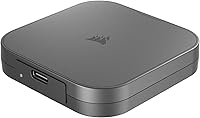
The Corsair EX400U 2TB Portable External SSD is built for creative professionals and power users who have finally outgrown the bottlenecks of older USB interfaces. While plenty of portable drives claim high speeds, this portable SSD is one of the few designed natively around USB4 — meaning the performance ceiling is genuinely different from anything USB 3.2 can offer. It's compact enough to slip into a pocket, works across Windows and macOS without any driver fuss, and handles both platforms with equal ease. That said, buyers need to go in clear-eyed: without a USB4 or Thunderbolt 4 port, those peak speeds simply are not accessible.
Features & Benefits

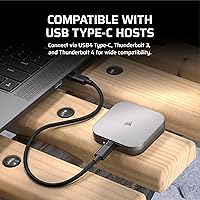
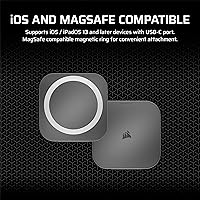
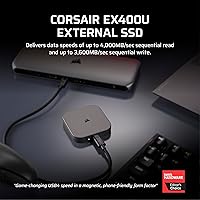
Plug the EX400U into a USB4 or Thunderbolt 4 host and the numbers speak clearly — sequential reads up to 4,000MB/s and writes reaching 3,600MB/s mean a 10GB video project transfers in just a few seconds. Corsair includes a 40Gbps-rated cable in the box, which matters more than it sounds — cheap cables regularly cap real-world performance. The drive also supports USB 3.2 Gen 2x2 for backward compatibility, though speeds drop substantially on those connections. One small but practical detail: it's MagSafe-compatible, letting it attach magnetically to certain Mac accessories for desk convenience — it won't charge anything, just snap on. At 3.25 ounces and barely half an inch thick, this portable SSD disappears in a bag pocket.

Best For

The EX400U makes the most sense for video editors and photographers who routinely shuffle large RAW files, 4K timelines, or multi-gigabyte project folders between machines. If you own a Thunderbolt 4 MacBook Pro or a recent Windows laptop with USB4, this drive will fully use that bandwidth — something most portable SSDs simply cannot do. Frequent travelers who refuse to carry bulky storage will appreciate the form factor. It's less compelling for users still on older USB-A or USB 3.0 setups; the hardware investment only pays off when your host machine can keep up. Cross-platform users who bounce between Mac and PC will find zero friction in day-to-day use.

User Feedback

With 122 ratings and a 4.1-star average, Corsair's USB4 drive has a modest but fairly positive early track record. Buyers who tested it on USB4 and Thunderbolt 4 hosts consistently report transfer speeds close to the advertised figures, which is genuinely rare in this category. The bundled cable earns specific praise — a welcome change from drives that ship with bandwidth-limiting accessories. On the critical side, a handful of users note that sustained large-file transfers can trigger thermal throttling, causing speeds to dip after extended sessions. A few also mention noticeable slowdowns on USB 3.2 ports, which tracks with how the hardware is designed. Given the limited sample size, these patterns are early signals rather than firm conclusions.

Pros

  • Real-world transfer speeds on USB4 hosts closely match the advertised figures, which is not always the case in this category.
  • A certified 40Gbps cable is included in the box, so you are not forced to hunt for a compatible accessory separately.
  • At 3.25 ounces and under half an inch thick, this portable SSD is genuinely pocketable without any compromise on capacity.
  • Plug-and-play compatibility means no driver installation or formatting headaches on either Windows or macOS.
  • 2TB of storage gives video editors and photographers enough room to carry full project libraries on the road.
  • Thunderbolt 4 compatibility means the drive works at full speed with a wide range of premium laptops, not just USB4-specific machines.
  • The compact square chassis feels solid and travel-ready without requiring a case or sleeve for basic protection.
  • MagSafe compatibility allows convenient magnetic docking to compatible Mac accessories on a desk, a small but practical touch.

Cons

  • Performance drops sharply when connected to USB 3.2 or older ports, which may catch less informed buyers off guard.
  • With only 122 ratings so far, there is not yet enough long-term feedback to fully assess durability and reliability over time.
  • Sustained large-file transfers have triggered thermal throttling in early user reports, causing speed dips during extended sessions.
  • There is no hardware encryption or bundled backup software, which may matter to users with security or data protection requirements.
  • The single fixed capacity option means buyers who need less storage have no lower-cost entry point in this product line.
  • No IP rating or ruggedized housing is mentioned, so it is not positioned for outdoor or physically demanding environments.
  • The premium price is only justified if your host device can actually deliver USB4 or Thunderbolt 4 bandwidth.
  • No carrying pouch or protective sleeve is included, a minor but noticeable omission given the price tier.

Ratings

Our AI rating system analyzed verified global user reviews for the Corsair EX400U 2TB Portable External SSD, actively filtering out incentivized, bot-generated, and low-quality submissions to surface what real buyers actually experienced. The scores below reflect a transparent composite of both the genuine strengths and the recurring frustrations reported across the 122-rating pool. Whether this drive earns its premium depends heavily on your hardware setup, and the scorecards make that tension clear.

Transfer Speed Performance
91%
On USB4 and Thunderbolt 4 hosts, users consistently reported real-world transfer speeds that came remarkably close to the advertised figures — a rarity in this category. Video editors moving 4K project folders described the experience as a step-change compared to their previous USB 3.2 drives, with multi-gigabyte transfers completing in seconds.
The story changes sharply on USB 3.2 connections, where several buyers expressed frustration that speeds dropped to a fraction of the advertised numbers. A small number of users discovered this only after purchase, suggesting the speed dependency on host hardware is not always fully understood upfront.
Compatibility & Versatility
83%
The EX400U works across USB4, Thunderbolt 4, and USB 3.2 Gen 2x2 connections, and switches between Windows and macOS without any formatting or driver intervention. Cross-platform professionals who bounce between a MacBook and a Windows editing rig particularly appreciated not having to think about compatibility.
While the backward compatibility is technically present, the practical performance on older ports disappoints users who expected more from the connection. Buyers using USB-A adapters or legacy laptops found the drive underperformed relative to its price, and some felt the product labeling did not make this trade-off prominent enough.
Portability & Form Factor
93%
At 3.25 ounces and barely half an inch thick, this portable SSD genuinely fits in a jacket pocket without creating bulk. Travel photographers and on-location videographers specifically called out the size as a practical advantage when packing light for shoots or client visits.
The compact chassis, while impressive, comes without any included sleeve or protective pouch — an omission that stings a bit at this price point. A few users also noted the flat square form factor, while pocketable, can slide around in a bag without a dedicated pocket to hold it in place.
Sustained Transfer Reliability
67%
33%
For typical short-burst transfers — moving a project folder, offloading a day's worth of photos, or duplicating a video file — the drive performs confidently and without interruption. Most users doing everyday creative tasks never encountered any speed inconsistency during normal use.
Extended, sustained transfers are where the drive shows strain, with early adopters reporting noticeable thermal throttling after prolonged continuous sessions. While this does not affect most use cases, users running large overnight backups or continuous high-volume data pipelines flagged speed dips as a genuine concern worth monitoring as the review pool grows.
Build Quality & Durability
74%
26%
The chassis feels solid for its size, with no flex or rattling in hand, and the matte finish resists minor scuffs and fingerprints during daily carry. Most buyers described the physical construction as feeling appropriately premium for a drive in this tier.
There is no ruggedized rating, IP dust or water resistance certification, or drop protection claim from Corsair. Users working in outdoor or field environments noted the drive feels better suited to studio and office environments than genuinely demanding physical conditions.
Included Accessories
88%
Corsair's decision to include a genuine 40Gbps-rated USB-C cable earned repeated specific praise in reviews — it is a meaningful inclusion that competing drives often skip, forcing buyers to spend extra to unlock full performance. Having the right cable in the box removes a frustrating hidden cost.
Beyond the cable, the accessory package is minimal — no carrying case, no sleeve, and no cable management solution. Given the drive's positioning as a premium travel companion, a simple protective pouch would have rounded out the package more convincingly.
Setup & Ease of Use
94%
Plug-and-play operation on both Windows and macOS means buyers at any technical level can start using the EX400U within seconds of opening the box. There are no drivers to install, no accounts to create, and no software prompts to dismiss — it simply mounts and works.
The simplicity does mean there is no companion app for health monitoring, drive diagnostics, or firmware updates, which more technically-minded users might miss. Checking for firmware updates requires navigating to Corsair's website independently rather than through any bundled utility.
Value for Money
71%
29%
For buyers with the right hardware, the EX400U delivers a level of portable performance that was essentially unavailable in this form factor until recently, and the included cable adds tangible value to the package. USB4-equipped users largely felt the price reflected a genuine capability premium.
Buyers who tested the drive on non-USB4 machines — and only discovered the speed limitation post-purchase — expressed clear dissatisfaction with the value proposition at this price. The fixed 2TB-only availability also means there is no lower-cost entry point for users who need less storage.
Thermal Management
62%
38%
Under normal workloads involving typical file transfers and short-burst operations, the drive handles heat without any user-visible impact on speed or behavior. Day-to-day creative workflows rarely push it into thermal territory.
Prolonged continuous transfers have surfaced throttling behavior in early reviews, with speeds visibly declining during extended high-load sessions. The compact chassis inherently limits thermal headroom, and it remains to be seen from longer-term usage data how frequently this affects real-world heavy users.
Cross-Platform Performance
89%
The drive behaves identically on macOS and Windows without any reformatting, which is a practical win for freelancers and agencies working across both ecosystems. Mac users with MagSafe-compatible accessories also appreciated the magnetic snap feature for desk use, even if its functionality is limited to physical attachment.
The MagSafe compatibility is purely magnetic and carries no charging or data function beyond physical convenience, which some Apple-focused buyers found slightly overstated in the marketing. Linux compatibility is not officially listed, which may matter to a niche subset of technical users.
Speed Consistency
69%
31%
Initial read and write speeds on compatible hosts were praised for being steady and predictable across a range of file sizes, from small RAW files to multi-gigabyte video exports. Most users found the drive reliable for professional daily use when the host hardware was up to the task.
The variance in performance based on connection type and thermal conditions means the experience is not uniform across all buyers and scenarios. Users expecting a plug-and-play premium experience on any machine were occasionally surprised by how much the host hardware influenced their results.
Brand Trust & Support
78%
22%
Corsair carries meaningful credibility in the PC hardware space, and buyers familiar with the brand expressed confidence in the product's legitimacy and long-term support. The model number is clearly documented, making warranty claims and firmware lookup straightforward.
With only 122 ratings at the time of this analysis, the drive's track record is still forming, and long-term reliability data is limited. A few users mentioned that Corsair's customer support response times for hardware queries were slower than expected for a premium-positioned product.

Suitable for:

The Corsair EX400U 2TB Portable External SSD is the right call for creative professionals who spend their days wrangling large files — think video editors exporting 4K or 8K timelines, photographers culling thousands of RAW images, or motion designers moving project folders that would choke a slower drive. If your laptop has a USB4 or Thunderbolt 4 port, this portable SSD will actually use that bandwidth, which puts it in a genuinely different league from the USB 3.2 drives that dominate most comparison lists. Frequent travelers who need serious storage capacity without adding weight to a bag will appreciate that the entire drive weighs under 3.5 ounces and disappears in a pocket. It also works cleanly across both Windows and macOS without any setup friction, making it a natural fit for professionals who switch between platforms or collaborate with colleagues on different systems. If you've been held back by slow transfer speeds on location shoots or tight editing deadlines, this drive addresses that problem directly.
Not suitable for:

Buyers who don't have a USB4 or Thunderbolt 4 port on their machine should think carefully before committing to the EX400U — the drive is backward compatible, but speeds drop significantly on USB 3.2 hosts, and at this price point, that represents a poor return on investment. If your primary machine is a few years old with standard USB-A ports, the performance advantage that justifies this drive's premium simply will not materialize. Casual users who mainly back up documents, store music libraries, or occasionally transfer a few photos will find the speed ceiling here is far beyond anything their workflow demands, and a more affordable drive would serve them just as well. The 2TB fixed capacity also means there is no option to start smaller and spend less — buyers who only need 500GB or 1TB of portable storage are paying for space they may not use. Anyone who regularly works on sustained, hours-long transfers should also be aware of early reports suggesting the drive can throttle under prolonged thermal load.

Specifications

  • Storage Capacity: The drive offers 2TB of usable solid-state storage, suitable for large video project libraries, RAW photo archives, and mixed media workflows.
  • Interface: It uses a USB4 (40Gbps) interface, which delivers the full bandwidth required to reach peak sequential transfer speeds.
  • Sequential Read: Sequential read speeds reach up to 4,000MB/s when connected to a compatible USB4 or Thunderbolt 4 host.
  • Sequential Write: Sequential write speeds reach up to 3,600MB/s under the same USB4 or Thunderbolt 4 connection conditions.
  • Connector Type: The drive uses a USB Type-C connector, compatible with USB4, Thunderbolt 4, and USB 3.2 Gen 2x2 ports.
  • Backward Compatibility: The EX400U is backward compatible with USB 3.2 Gen 2x2 and standard USB-C ports, though speeds are significantly lower on those connections.
  • Dimensions: The chassis measures 2.53 x 2.52 x 0.47 inches, making it one of the more compact portable SSDs in its performance tier.
  • Weight: The drive weighs 3.25 ounces, light enough to carry in a jacket pocket or small camera bag without noticeable bulk.
  • Platform Support: It works natively on both Windows PC and macOS without requiring any driver installation or third-party software.
  • Included Cable: Corsair includes a 40Gbps-rated USB-C cable in the box, which is required to achieve full USB4 transfer speeds.
  • MagSafe Support: The drive features MagSafe compatibility for magnetic attachment to compatible Apple accessories, though this does not enable any charging functionality.
  • Form Factor: The EX400U uses a 2.5-inch external SSD form factor with a flat, square profile designed for portability.
  • Setup: The drive is plug-and-play out of the box, requiring only a single USB-C connection for both power and data on supported systems.
  • Color: The drive ships in gray with a matte finish that resists visible fingerprints during everyday handling.
  • Model Number: The official Corsair model number for this drive is CSSD-EX400U2TB, useful when checking firmware updates or warranty claims.

Related Reviews

SanDisk Extreme 2TB Portable External SSD
81%
88%
Transfer Speed
91%
Build Quality
94%
Portability
87%
Durability & Reliability
83%
Compatibility
More
TEAMGROUP PD20 ECO 2TB Portable External SSD
86%
93%
Performance (Speed)
80%
Build Quality & Durability
88%
Portability & Design
85%
Waterproof & Dustproof Protection
89%
Compatibility (Cross-Device Use)
More
Buffalo SSD-SAO2.0U3B 2TB External SSD
79%
93%
PS5 & PS4 Compatibility
78%
Storage Capacity Value
67%
Transfer & Load Speed
91%
Form Factor & Design
82%
Build Quality & Durability
More
SanDisk Portable SSD 2TB External Drive
78%
83%
Transfer Speed
88%
Build Quality
93%
Portability
81%
Value for Money
61%
Thermal Management
More
Vansuny 500GB Portable External SSD
86%
88%
Performance
92%
Build Quality
94%
Portability & Size
87%
Data Transfer Speed
90%
Compatibility
More
fanxiang PS2100 2TB Portable SSD
88%
94%
Performance
92%
Durability
90%
Portability
75%
Compatibility
88%
Ease of Use
More
SSK SD600 2TB Portable SSD
78%
88%
Transfer Speed (Burst)
63%
Sustained Write Performance
84%
Build Quality & Design
93%
Portability
86%
Cross-Device Compatibility
More
Vansuny 512GB Portable External SSD USB 3.2 Gen 2
84%
93%
Cross-Device Compatibility
78%
Transfer Speed Performance
81%
Build Quality & Materials
94%
Portability & Form Factor
82%
Connector Protection
More
ADATA SE880 2TB Portable SSD
87%
95%
Performance (Speed)
91%
Portability (Size and Weight)
89%
Compatibility with Devices
88%
Build Quality
92%
Ease of Use (Setup and Setup Time)
More
ORICO B5PLUS 2TB Portable External SSD
74%
94%
Portability
78%
Transfer Speed
73%
Build Quality
81%
Value for Money
91%
Plug-and-Play Ease
More

FAQ

Yes, and this is the most important thing to understand before buying. The Corsair EX400U 2TB Portable External SSD is engineered around USB4, so peak speeds around 4,000MB/s are only achievable on a USB4 or Thunderbolt 4 port. On a USB 3.2 connection, speeds drop substantially — you are still getting a functional drive, but nowhere near what makes this model worth the investment.
If your MacBook Pro has Thunderbolt 4 ports — which most models from 2020 onward do — it will work at full speed. Thunderbolt 4 supports the USB4 protocol, so the EX400U will hit close to its advertised read and write figures on those machines. Just use the included 40Gbps cable rather than a generic USB-C cable.

Neither, actually. The MagSafe compatibility here means the drive can magnetically snap onto MagSafe-compatible surfaces or accessories for convenient desk placement. It has no bearing on charging — the drive itself is powered entirely through the USB-C data connection.

No dedicated software is bundled. The drive is formatted and ready to use out of the box, but it does not include any proprietary encryption, backup utility, or drive management app. If you need those features, you would need to set them up using third-party tools or your operating system's built-in options.

In theory, yes — as long as the tablet supports USB4 or USB 3.2 via its USB-C port, the drive will connect and be recognized. However, iPads handle external storage differently depending on the app and iOS version, so check that your specific workflow supports external SSD access before assuming full compatibility.

A handful of early users have noted that sustained transfers over extended periods can cause the drive to throttle speeds as it manages internal temperatures. For typical use cases like moving a project folder or backing up a shoot, this is unlikely to be noticeable. If you routinely run continuous multi-hour transfers, it is worth keeping in mind.

The chassis feels solid and compact, but Corsair has not given it a ruggedized rating or IP certification for dust or water resistance. It handles daily bag-tossing fine, but you would want to use a small sleeve or pouch if you are regularly working in dusty or wet environments.

Any USB-C cable will connect the drive, but only a 40Gbps-rated cable will unlock full USB4 performance. Corsair includes the right cable in the box, which is genuinely useful — many competing drives ship with slower cables that quietly cap your speeds without any warning.

The drive ships pre-formatted, and yes, you can reformat it to any file system your operating system supports. If you plan to use it across both Mac and Windows regularly, you may want to consider exFAT formatting for the broadest native read-write compatibility without additional software.

For everyday tasks like opening documents or streaming media off the drive, the difference is not dramatic. Where the EX400U pulls ahead is in bulk transfers — moving 50GB of footage or a large Lightroom catalog is meaningfully faster on USB4 versus USB 3.2, often finishing in a fraction of the time. The gap is most visible in creative and professional workflows.

Where to Buy